Cookieless Tracking: What It Means for Your Privacy

For years, “clear your cookies” was a suggested privacy solution. It felt like a digital fresh start. You could wipe your browser history, and those targeted ads would disappear. But today, that advice is outdated.
While major browsers now block third-party cookies by default, the advertising industry didn’t stop tracking you; it just got smarter.
Marketers quietly developed tracking methods that don’t rely on cookies at all. These new methods are mostly invisible, harder to control, and in some cases more persistent than cookies ever were.
So, how do you protect yourself against a tracker you can’t see?
In this guide, we’ll explain what cookieless tracking is, how the most common methods work, why they pose a bigger threat to your privacy, and the practical steps you can take to make yourself a harder target.
Cookie vs. Cookieless Tracking: Key Differences at a Glance
| Cookie-Based Tracking | Cookieless Tracking | |
| Where the data lives | Stored in your browser on your device | Stored on company, ad network, or analytics servers |
| Methods examples | First-party cookies, third-party cookies | First-party data, fingerprinting, probabilistic tracking, server-side tracking, IP tracking |
| Transparency | Visible through browser settings and consent banners | Less transparent; fingerprinting operates invisibly; users often unaware |
| Ability to delete | Easy. Users can clear cookies or browser data | No user-accessible delete options exist |
| Persistence | Temporary. Cookies expire or get removed | Long-lasting. Profiles can persist indefinitely |
| Blocked by browser privacy settings | Directly targeted | Often bypasses browser controls |
| Ad Blocker Impact | Easily blocked by browser extensions | Server-side methods bypass ad blockers |
What Is Cookieless Tracking?
Cookieless tracking is a way for websites and apps to gather user data without relying on traditional browser cookies. Instead, it uses methods like server-side tracking, first-party data, and, in some cases, browser fingerprinting. As you may expect, these methods raise concerns about online privacy and security.
What Happened to Cookies?
Cookies weren’t originally built for surveillance. They are simply small text files designed to give websites useful functionality (aka first-party cookies). For example, they can help sites remember your language preferences or keep items in your shopping cart.
However, advertisers realized they could use these files to track your movements across the web (aka third-party cookies). This helped them to build and share detailed profiles of your behavior.
Three major shifts forced the industry to move away from third-party cookies:
- New privacy laws: Regulations like the GDPR and CCPA now treat cookies as personal data. This forces websites to ask for your consent before tracking you.
- User awareness: People became tired of surveillance-style advertising. Many users started deleting cookies or installing blockers, making the old tracking methods less reliable.
- Browser restrictions: Major browsers like Safari and Firefox now block many third-party cookies by default.
The death of cookie-based tracking looks like a win for privacy, but in practice, it has triggered a scramble for new cookieless tracking methods. Advertisers are now developing tools that don’t rely on browser storage, making them much harder to detect and delete.
Cookieless Tracking Methods: How Cookieless Tracking Works
The advertising industry isn’t giving up on data collection just because cookies are phasing out. Instead, they are pivoting to stealthier technologies.
Most of these new methods operate in the background, making them invisible to standard browser tools and ad blockers. To protect your digital footprint, you first need to understand the mechanisms you are up against.
Here is a breakdown of the most common cookieless tracking methods in use right now:
Browser Fingerprinting
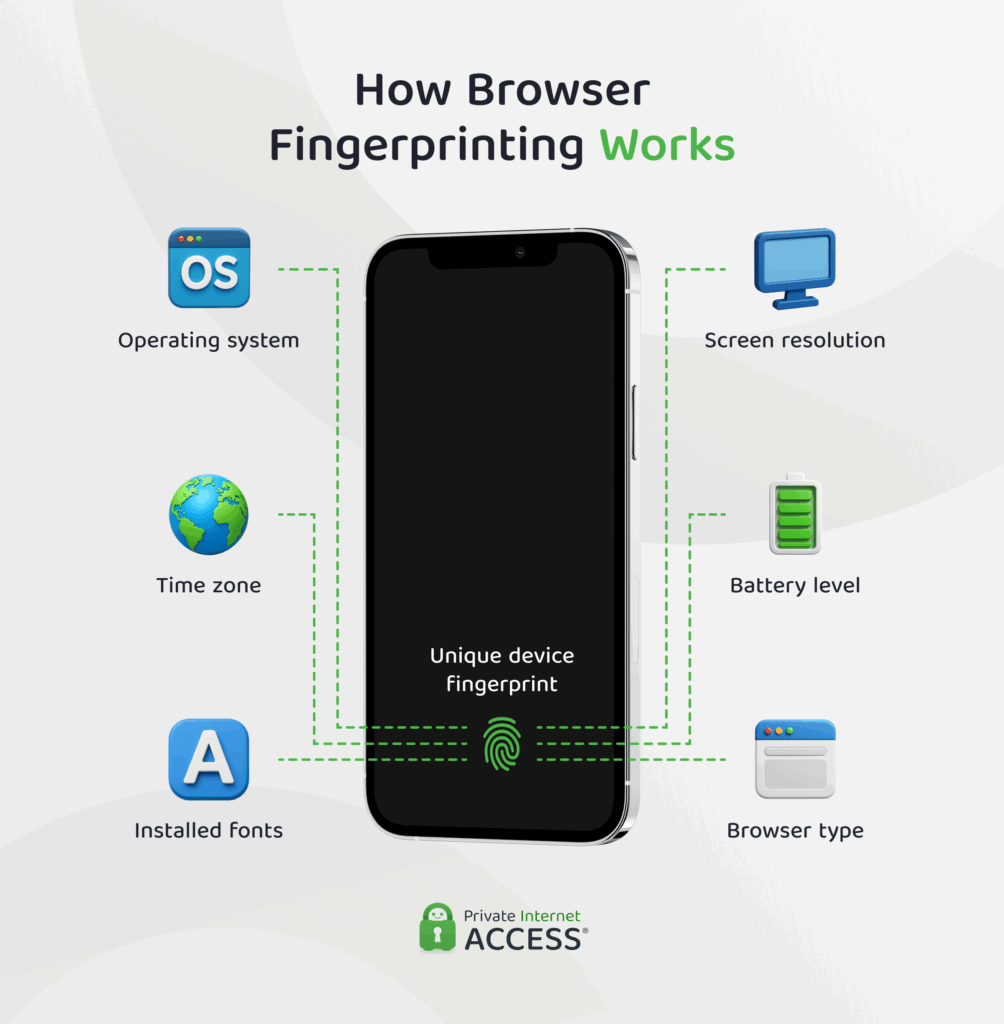
Browser fingerprinting is one of the most accurate and invasive ways to track you without using a single cookie. Think of it as a permanent digital barcode assigned to your specific device.
When you visit a website, your browser automatically shares technical details to ensure the page displays correctly. However, trackers silently record these details to build a unique profile of you.
They look at a specific combination of data points, including:
- Your hardware: screen resolution, battery level, and device model.
- Your software: Operating system version and browser type.
- Your settings: time zone, language preferences, and installed fonts.
Why it’s a privacy risk: You might think your laptop setup is standard, but the specific combination of your screen size, battery level, and installed fonts is likely unique to you.
Because this method relies on your device’s physical configuration rather than a file stored on your device, you can’t simply delete your fingerprint like you can a cookie. Even if you use Incognito mode, your device’s fingerprint remains largely the same, allowing trackers to recognize you the moment you reconnect.
First-Party & Zero-Party Data
As third-party tracking becomes harder to use, companies are shifting their strategy. Instead of relying on external trackers to spy on you, they are simply asking you for the data directly.
This method relies on the relationship between you and the specific website you are visiting. It breaks down into two categories:
- First-party data: Information a website collects automatically while you use it. This includes your purchase history, how long you spend on a page, and what items you leave in your shopping cart.
- Zero-party data: Information you intentionally share with a brand. This includes filling out a style preference quiz, setting up a profile, or answering a survey about your interests.
Why it’s a privacy risk: It seems fair to give information to a brand you trust, but the risk is in the fine print. Companies consider this information to be not only high-quality, but fully in line with privacy laws because people give it to them willingly.
The risk is that privacy policies frequently allow the sharing or selling of this owned data to partners and data brokers. You might want to give one company your preferences, but that info is often sent out to many other companies in a big marketing network.
Server-Side Tracking
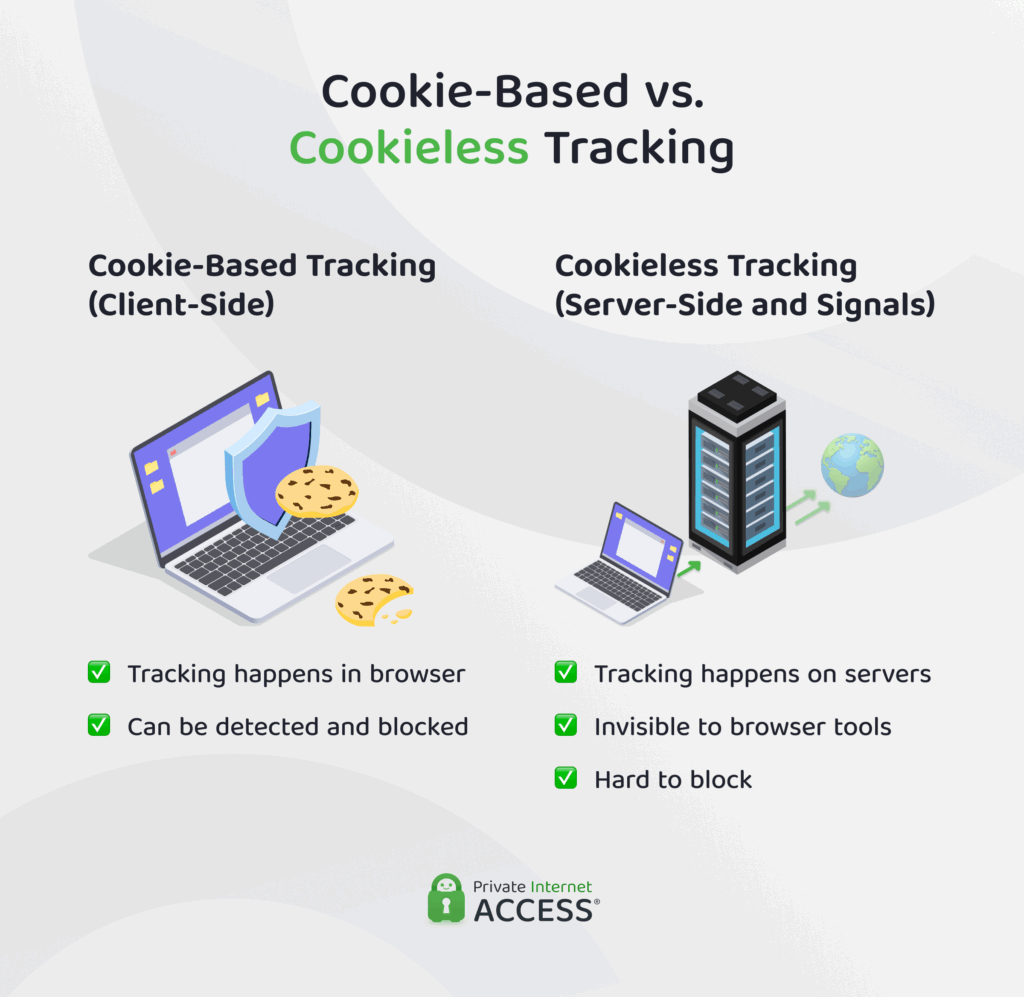
This is one of the stealthiest forms of tracking because it bypasses your browser entirely. In the past, tracking happened on your device (client-side). If your browser spotted a tracking script, it could block it. Server-side tracking moves this process to the website’s own server.
- You visit a website.
- The website’s server collects your data directly.
- The website sends that data to advertisers (like Facebook or Google) from their backend.
Why it’s a privacy risk: Because the data transfer happens server-to-server, your browser never sees it happen. This means standard ad blockers and privacy extensions usually can’t detect or stop it. You have no visibility into where your data goes once it reaches the website.
Pixel Tracking
If you have ever opened an email and wondered how the sender knew you read it, the answer is likely a tracking pixel.
A tracking pixel is a tiny, transparent image (usually 1×1 pixel in size) embedded in an email or webpage. When you open the email, your email client downloads the image. This download sends a signal back to the sender’s server.
What it reveals:
- Time: The exact moment you opened the message.
- Location: Your general location based on your IP address.
- Device: Whether you used a phone or desktop.
Why it’s a privacy risk: It turns your inbox into a surveillance tool. Marketers use this data to build a profile of your daily habits and location, often linking it to your other online activities.
IP Address Tracking
Your IP address is like your home address on the internet. It’s necessary for connectivity, but it’s also one of the easiest ways to track you.
Every time you connect to a website, your device broadcasts your IP address so the site knows where to send data. Advertisers use this number to determine your approximate physical location and tie your activity across the web back to your home network.
Why it’s a privacy risk: Your IP address is constant. Even if you clear your cookies and use a private browser, your IP remains visible to every site you visit unless you mask it by using a VPN, for example.
Probabilistic Tracking (AI Guessing)
Instead of looking for cookies on your device, probabilistic tracking uses machine learning to make an educated guess about who you are. Algorithms analyze billions of data points (such as your location, device type, browsing habits, and time of day) to link different devices to a single person, build a profile about you, and predict your actions and behavior.
For example, if a laptop and an iPhone connect to the same Wi-Fi network every evening, visit similar news sites, and have similar browsing habits, the AI can conclude with high confidence that they belong to the same person and link your activities together.
Why it’s a privacy risk: This tracking is incredibly difficult to fight because it doesn’t rely on storing files on your device. It is a calculation happening entirely on a company’s server. Major platforms like Google Analytics 4 and Meta already use this modeling to determine the behavior of users who have opted out of traditional tracking. Actually, even if you say no to cookies, AI may still be profiling you based on statistical patterns.
Is Cookieless Tracking Better for Privacy?
Not necessarily. Eliminating third-party cookies removes one specific tracking tool, but it doesn’t stop tracking itself. In fact, the methods replacing cookies are often more invasive and much harder for you to control.
Here is the truth about what’s getting better – and what’s getting worse.
What’s Actually Better
Yes, some aspects of the shift away from cookies are genuinely positive:
- Third-party cookies are declining: Cross-site tracking through third-party cookies is becoming less common. When Safari and Firefox started blocking them, a significant vector for tracking was reduced.
- First-party data gives you some control: If a company is relying on first-party data they collected directly from you, you at least theoretically have some control. You can delete your account, ask them to delete your data (under GDPR or CCPA), or stop using the service.
- Regulation is increasing: GDPR, CCPA, and similar laws are creating legal consequences for misuse of data.
Why Cookieless Tracking Is Actually Worse
But the downsides significantly outweigh the upsides:
- Fingerprinting is harder to block than cookies: Cookies were visible and deletable. Fingerprinting is invisible and permanent.
- Server-side tracking is undetectable: Traditional tracking happened in your browser, where you could theoretically block it. Server-side tracking happens behind the scenes, where you have no visibility or control.
- Machine learning is unpredictable: With cookies, you could see what was being tracked. With machine learning-based tracking, you can’t see or understand how you’re being identified.
- Users don’t know much about it: When cookies were prevalent, at least people knew tracking was happening and had conversations about it. Now, most people have no idea they’re being tracked through these new methods.
- No easy opt-out mechanism: Cookie consent banners (annoying as they are) give users visibility and some choice. Cookieless tracking often provides no mechanism for opting out.
- Standard privacy tools are less effective: Most ad blockers and privacy extensions work by spotting cookies and scripts in your browser. Because server-side tracking happens after your request leaves your device, many standard privacy tools simply can’t see it to block it.
How to protect yourself from cookieless tracking
While it’s impossible to completely prevent all online tracking, you can limit and reduce your digital footprint. Here’s how to protect yourself from cookieless tracking.
Use a VPN
Your IP Address reveals your approximate location and ties your activity across different sites to a single identity.
When you connect to a VPN, your real IP address is masked and replaced with one from the VPN server. This breaks the link between your physical location and your online activity. It also encrypts your internet traffic, which limits what your ISP can observe and, consequently, reduces the tracking of your browsing history.
PIA VPN adds extra protection: While a standard VPN conceals your IP, PIA offers built-in tools that go further:
- PIA MACE: This feature blocks known ads, trackers, and malicious domains at the DNS level before they even reach your device.
- Strict no-logs policy: PIA doesn’t record your browsing data, meaning whatever you do with your VPN connected remains private.
- Multi-Hop (Obfuscation): For extreme privacy, you can use our Multi-Hop feature to hide your VPN use from your ISP. This sends traffic through an extra server and disguises it as normal encrypted web traffic.
Use a Privacy‑Focused Browser
Your web browser is the gateway between you and the internet. It’s also one of the most important tools for blocking tracking. A privacy-focused browser can significantly reduce your tracking footprint. Some popular options are:
- Firefox: Blocks many trackers and third-party cookies by default, includes basic fingerprinting protection, and is actively maintained by a nonprofit organization focused on user rights.
- Brave: Takes a more aggressive approach. It blocks ads and trackers out of the box, offers stronger fingerprinting resistance, and often loads pages faster because tracking scripts usually don’t run.
- Tor Browser: Provides a high level of anonymity by routing traffic through the Tor network. It offers excellent fingerprinting resistance but is much slower and usually not practical for streaming or daily browsing.
Add Anti‑Fingerprinting Extensions
If you don’t want to switch browsers, you can strengthen your current one with extensions. These tools reduce trackers, making your fingerprint look generic or constantly changing.
- Privacy Badger: this extension learns which domains are tracking you across the web and blocks them automatically.
- CanvasBlocker: specifically targets canvas fingerprinting, a method where sites ask your browser to draw a hidden image to identify your graphics card. This extension blocks or fakes that data.
- uBlock Origin: a widely used all-around blocker. It stops many ads, scripts, and trackers from loading, which speeds up your browsing while protecting your privacy.
Tighten Your Browser Settings
You can significantly improve your privacy just by toggling a few settings in your current browser.
- Enable DNS-over-HTTPS (DoH): Normally, your ISP can see every website you request. DoH encrypts your DNS requests, ensuring only you and the DNS provider know which sites you connect to.
- Delete cookies on exit: Set your browser to wipe cookies every time you close the window. This ensures that even if a tracker places a cookie on your device, it won’t survive your current session. However, you will need to log back into your online accounts every time you close a window with a logged-in site loaded.
- Disable third-party cookies: Most modern browsers do this by default, but it’s worth double-checking your settings to ensure they’re disabled.
Use Private or Incognito Mode for Sensitive Tasks
There is a common misconception that Incognito or Private mode makes you invisible. It doesn’t.
What it actually does:
- It deletes your local history and cookies after you close the window.
- It prevents someone else who uses your computer from seeing where you went.
What it does not do:
- It doesn’t hide your IP address from websites.
- It doesn’t stop your ISP from seeing your activity.
- It doesn’t prevent browser fingerprinting.
Note: Use Private mode for keeping secrets from people in your house, not from people on the internet.
Practice Data Minimalism
The best way to stop companies from collecting your data is to never give it to them in the first place.
- Say no to unnecessary marketing consent boxes.
- Regularly unsubscribe from newsletters you don’t read.
- Check account privacy settings and turn off personalized ads where possible.
- Limit zero-party data. Be stingy with your information. If a form field (like “Phone Number” or “Income”) is optional, leave it blank.
- Avoid signing in with Google/Facebook. It’s convenient, but using these buttons links your activity on that website directly to your social media profile. Use a unique email address or an alias service instead.
Every bit of data you don’t hand over is one less piece that can be stitched into a detailed profile.
FAQ
What is cookieless tracking?
Cookieless tracking is a way for companies to monitor your online behavior without storing a file (cookie) on your browser. Instead of tagging you with a cookie, they use methods like browser fingerprinting, server-side tracking, and AI modeling to identify you. This allows them to continue collecting data even if you block third-party cookies.
How does cookieless tracking work?
Unlike cookies, which store data on your device, cookieless tracking relies on signals. When you visit a website, trackers collect distinct information about your connection (IP address), your device (screen size, battery level, fonts), and your behavior (clicks, time on page). This data is often processed on the company’s server (server-side) or analyzed by AI to create a unique profile that recognizes you whenever you return.
What are the benefits of cookieless analytics?
For advertisers, the benefit is that they can still continue tracking and collecting user data even when traditional cookies are blocked. Conversely, the benefit for users remains largely theoretical. While it reduces the tracking based on third-party cookies, it often replaces them with alternative tracking methods that are more difficult to detect and block.
What is cookieless advertising?
Cookieless advertising is a method of delivering ads without relying on third-party cookies to track users across websites. Instead, it uses first-party data, contextual targeting, aggregated signals, and anonymized identifiers to reach relevant audiences.
How does GA4 handle cookieless tracking?
Google Analytics 4 handles cookieless tracking by using first-party data, event-based tracking, and probabilistic modeling (AI guessing) to fill in gaps when cookies are absent. It relies on behavioral modeling and aggregated data to estimate interactions, conversions, and engagement without personally identifying individuals.
Can VPNs or privacy tools affect cookieless tracking accuracy?
Yes, VPNs and other privacy tools can affect cookieless tracking accuracy because they mask or change a user’s IP address, location, or device information, which are often used as identifiers. Privacy-focused browsers or extensions may also block scripts or limit data collection, reducing the accuracy of first-party data or server-side tracking.
Should I use Incognito mode to stop tracking?
Incognito mode is useful for local privacy (so your family doesn’t see your search history), but it doesn’t hide you from websites. Websites can still see your IP address and fingerprint your device even in private windows.
If I use a VPN, am I completely protected from tracking?
No single tool provides 100% protection, but a VPN makes you significantly safer. It hides your IP address and encrypts your traffic, which stops ISP snooping and IP-based tracking. However, a VPN can’t stop browser fingerprinting on its own because that relies on your browser’s settings.
