DNS over HTTPS: What It Is and Why You Should Use It

Every time you visit a website, your device sends a DNS request to find the website’s IP address. Normally, these requests are sent in plain text, which makes them easy to intercept or modify, potentially putting your privacy and security at risk. DNS over HTTPS (DoH) encrypts these requests, hiding them from most prying eyes on the network and giving you more protection.
In this guide, we’ll explain exactly how DoH works, its pros and cons, and how to enable it on your browsers and devices. You’ll also see how PIA VPN encrypts your DNS automatically.
What Is DNS over HTTPS?
DNS over HTTPS (DoH) is a protocol that protects the way your device looks up websites by encrypting those requests with HTTPS. If HTTPS sounds familiar, it should; it’s the secure version of the web’s standard protocol, which makes sure data sent between your browser and a site can’t be easily read or altered if it’s intercepted along the way.
But before your browser even reaches that site, it relies on the Domain Name System (DNS) to translate website names like privateinternetaccess.com into numerical IP addresses your network uses to connect to the right server.
The catch is that traditional DNS requests travel in plain text, making them easy for anyone with the right level of access to the network (such as your ISP, network admin, or a hacker) to monitor or even manipulate them.
DoH closes that gap by wrapping DNS queries inside encrypted HTTPS traffic, making it far harder for outsiders to monitor or interfere with what you’re doing online.
How Does DNS over HTTPS Work?
DNS over HTTPS works just like a normal DNS lookup, but with a couple of extra steps for encryption. Here’s the step-by-step process:
- Device sends request: Your browser sends the DNS query over HTTPS.
- Encrypted transit: The request travels through port 443 (the same port used by secure websites) making it indistinguishable from normal web browsing.
- DoH server receives it: A DoH-compatible server (like Cloudflare or Google DNS) decrypts the request.
- Server resolves domain: The server finds the IP address for the website you want to visit.
- Encrypted response sent back: The server returns the IP address over HTTPS, so it can’t be intercepted or tampered with.
- Browser connects securely: Your browser uses that IP address to connect to the website. If the site supports HTTPS, that connection will also be encrypted.
DNS over HTTPS: Pros and Cons
The shift from plain text to encrypted DNS has a few direct consequences worth noting. Here’s a look at some of the pros and cons of enabling DoH:
| Pros | Cons |
| Stronger privacy: Stops ISPs, public Wi-Fi operators, and other intermediaries from reading your DNS requests. | Potential for data breaches: Using one public DoH resolver can give a single provider control over large amounts of DNS data. |
| Improved integrity: Protects against tampering and DNS spoofing. | Reduced admin control: Network monitoring and parental controls may stop working. |
| Works on restrictive networks: Continues working on networks that tamper with DNS lookups. | Potential compatibility issues: Some apps or services may break when DNS filtering is bypassed. |
| Stealthy: Runs over port 443, making it harder to block. | Slight latency increase: May add milliseconds to lookups, especially if the resolver is far away. |
What DNS over HTTPS Doesn’t Do
DoH solves one specific problem: keeping DNS queries private and tamper-proof. It doesn’t try to address everything else. Here are a few things still outside its scope:
- Only DNS lookups are encrypted: Your IP address and the content of sites you visit remain visible.
- Web tracking continues: Cookies, ads, and browser fingerprinting remain a privacy concern.
- No fix for compatibility quirks: Services that rely on DNS filtering or internal routing may not function as expected.
- Doesn’t stop malware: If your device is already compromised, DoH won’t prevent data theft.
Expert tip: If DoH leaves too many gaps in your security, consider using a trusted VPN like Private Internet Access (PIA). It encrypts all your internet activity, including your DNS requests, protects against data leaks, works on any network, and includes a DNS-based malware blocker that prevents connections to domains known to contain malicious code.
When Do You Need to Use DNS over HTTPS?
Turning on DNS over HTTPS is a quick way to improve your online privacy and security when browsing. However, whether you need it depends on how you connect to the internet. DoH is most valuable when you’re on networks you don’t fully trust or when your DNS traffic might be monitored or filtered.

When to keep it on:
- Using public Wi-Fi networks in cafes, airports, or hotels
- Browsing without a VPN, especially if your ISP tracks activity
- Avoiding DNS-based censorship or content blocks
- Preventing DNS spoofing or tampering attempts
When it’s less important:
- You use a VPN that already encrypts DNS traffic inside the VPN tunnel
- You rely on local DNS filtering tools that need unencrypted DNS to work
- You’re on a private network you control and trust
How to Change DNS over HTTPS Settings
You really only have two decisions to make when setting up DoH:
- Where you want it enabled: browser-only or system-wide.
- Which resolver you trust: since that provider will see your DNS traffic.
1. Choose Where to Enable DoH
DoH can be enabled either at the browser level or the operating system level. If you turn it on in your browser, only the traffic from that browser will use encrypted DNS, while other apps on your device will continue using the default settings.
If you enable it at the system level, all network traffic from your device will be protected. Most browsers and operating systems place this option in their privacy or security menus, where you can toggle it on and select a resolver.
Expert tip: A high quality VPN like PIA encrypts your DNS system-wide without you needing to change any settings in your browser or operating system. It doesn’t just encrypt your DNS queries, either – it protects all the data leaving and returning to your device, giving you a much higher degree of privacy and security.
2. Choose a Resolver
Once DoH is enabled, your DNS traffic is sent to the resolver you select. In practice, this means you’re no longer relying on your ISP’s servers, but instead putting trust in whichever DoH provider you configure.
That’s why the choice matters: you’ll want a service with a clear privacy policy, a commitment not to log your activity, and a solid reputation for security.
Most browsers and operating systems include a few DoH providers by default, but you can also set up your own custom resolver if you want. Some examples of common public DoH resolvers are:
| Provider | DoH URL | Benefits |
| Cloudflare | https://cloudflare-dns.com/dns-query | Strong privacy policy, global network |
| Google Public DNS | https://dns.google/dns-query | Reliable and widely supported |
| Quad9 | https://dns.quad9.net/dns-query | Focus on blocking malicious domains |
| NextDNS | https://dns.nextdns.io | Highly customizable filtering options |
If you use a VPN, your VPN provider should run its own secure DNS servers, so the same trust considerations apply there as well. PIA has a strict no-logs policy, meaning it doesn’t see or log any of your browsing activity, including your DNS queries.
How to Enable DNS over HTTPS in Popular Browsers
Here’s where to find the DoH setting in the most widely used browsers:
Chrome
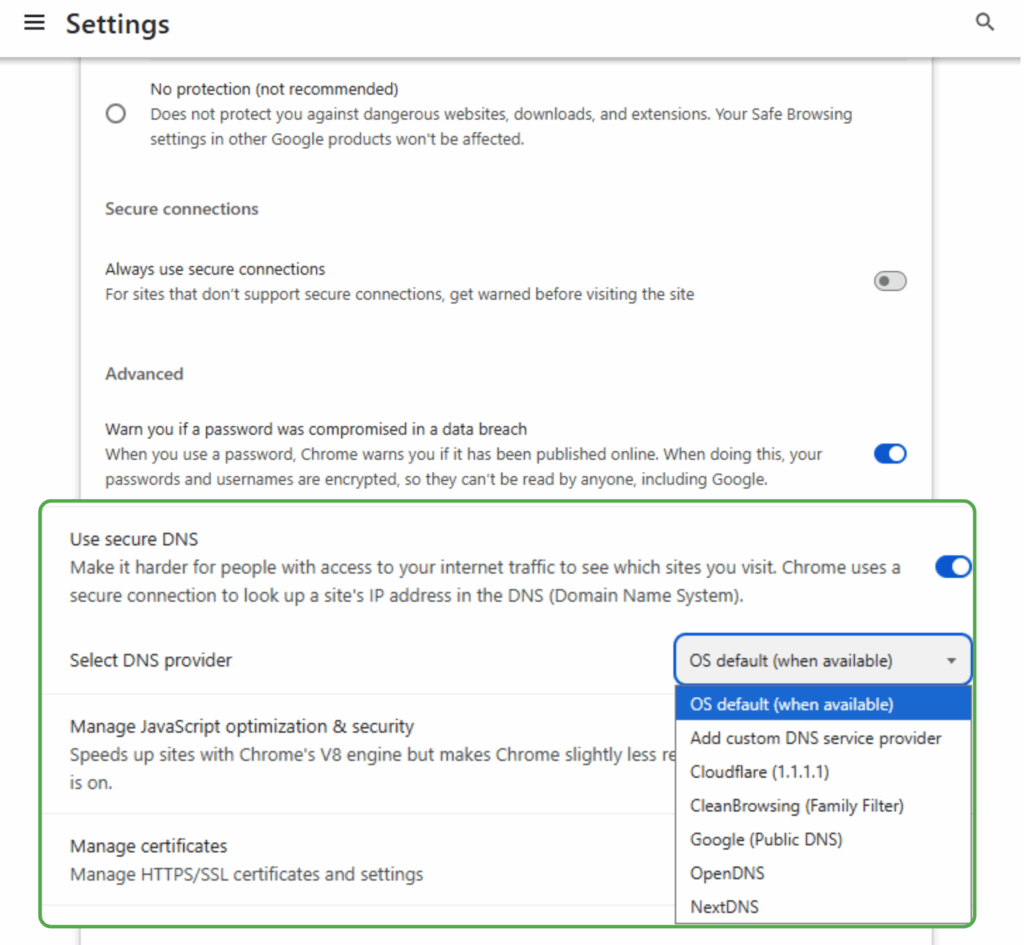
- Open Settings > Privacy and security > Security.
- Scroll to Use secure DNS and toggle it on. Right under it you’ll see Select DNS Provider. Open the dialogue box, and you can choose from several options.
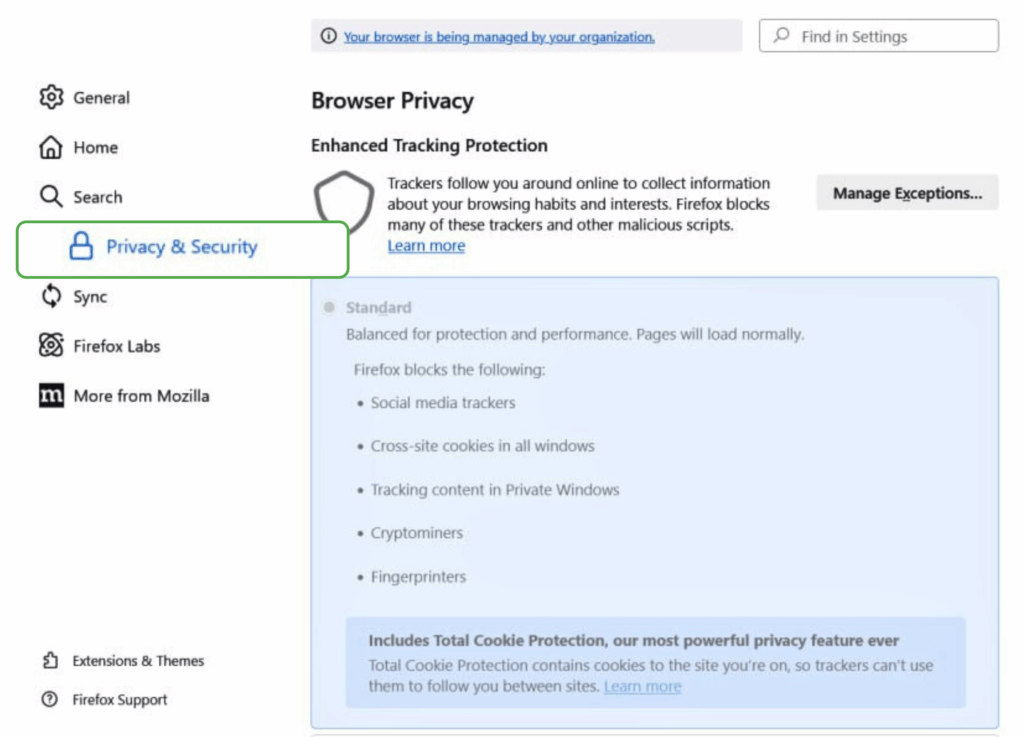
- Open Settings > Privacy & Security.
- Scroll to DNS over HTTPS and select your preferred protection level: Default, Increased, or Max.
- Go to Settings > Browser. Switch the toggle next to Use DNS-over-HTTPS instead of the system DNS.
- Pick Cloudflare, Google, or enter a custom resolver URL.
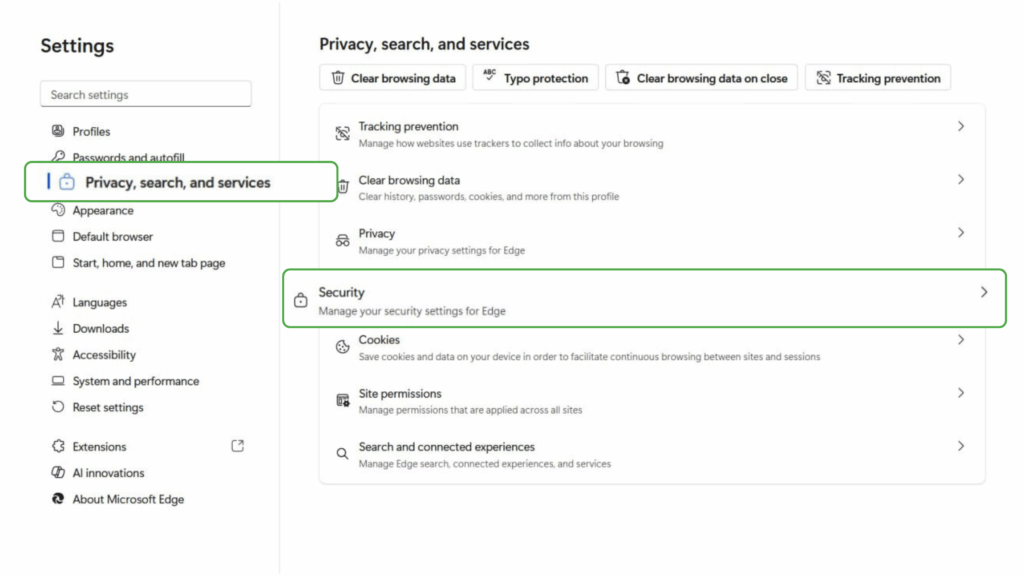
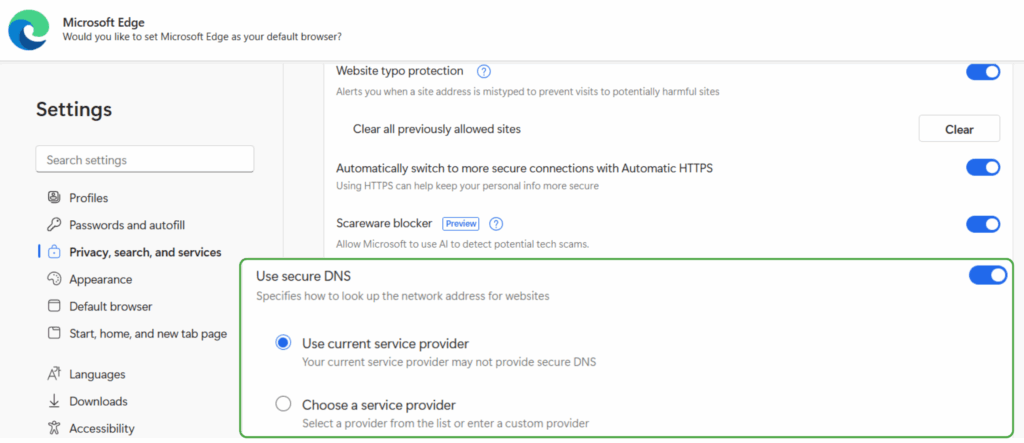
- Open Settings > Privacy, search, and services, and select Security.
- Toggle Use secure DNS to on and choose your current provider or enter a custom DoH address.
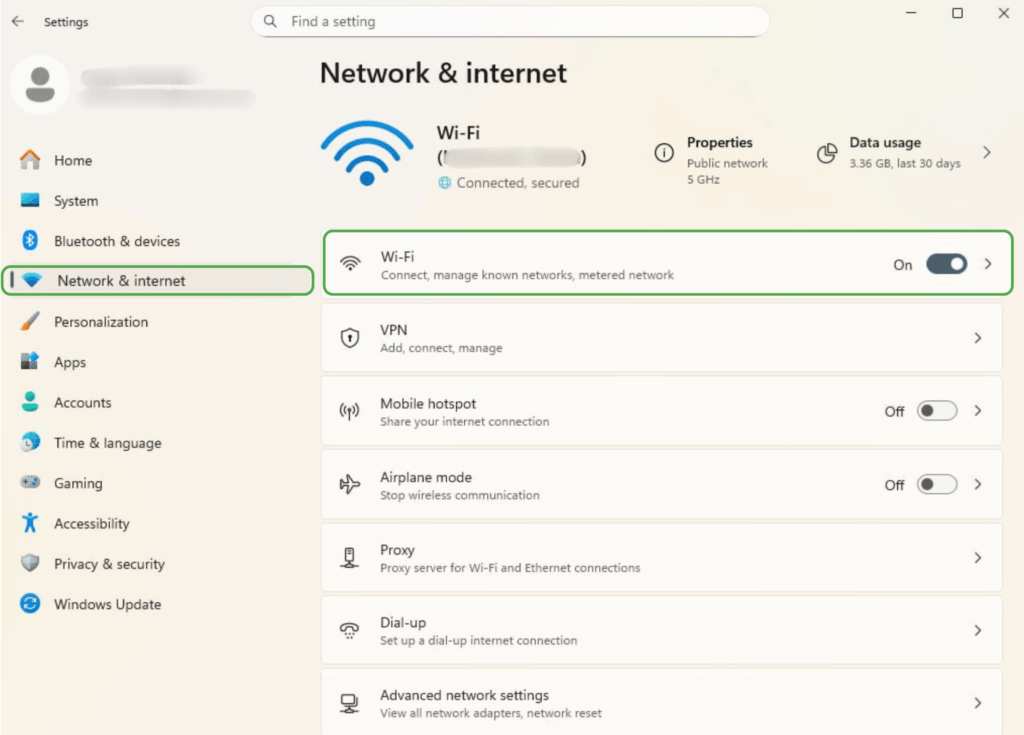
- Open Settings > Network & internet > Wi-Fi.
- Select your active network.
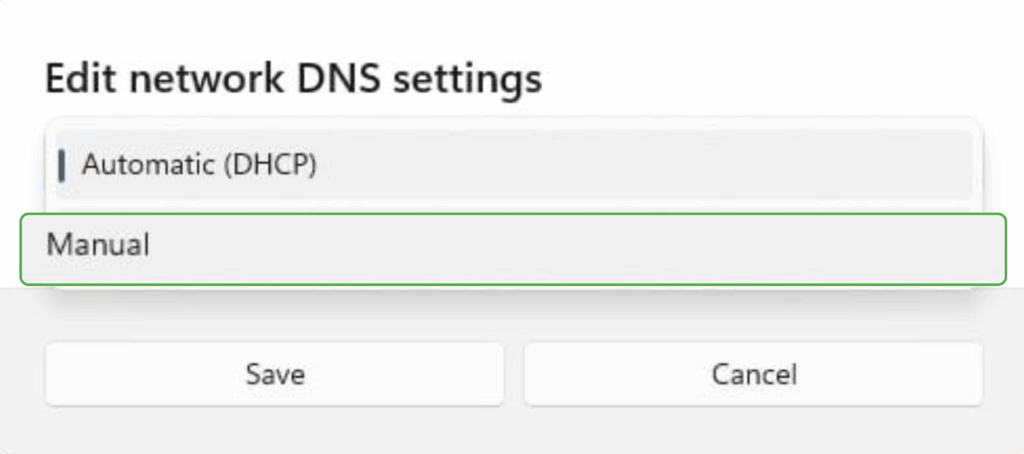
- Scroll down to DNS server assignment and click Edit.
- Switch to Manual.
- Enable IPv4 (and/or IPv6) and enter a DoH-compatible DNS address (for example, 1.1.1.1 and 1.0.0.1 for Cloudflare). For each DNS entry, set DNS over HTTPS to On.
- Download a configuration profile directly from a provider like Cloudflare, NextDNS, or AdGuard. Installing the profile tells the system to route all DNS traffic through their DoH servers.
- Use an app such as 1.1.1.1, NextDNS, AdGuard, or a VPN client like PIA that automatically encrypts DNS traffic for you.
- Check in your browser’s settings: In Chrome, Edge, or Firefox, go back to the DNS over HTTPS settings page. Most browsers will clearly show whether DoH is enabled and display the name of the resolver in use.
- Run an online DoH test: Visit a DNS leak test site and confirm the resolver matches your chosen DoH provider:
- Cloudflare’s Browsing Experience Security Check: Shows if DoH is enabled.
- DNSLeakTest.com: Reveals which DNS servers are resolving your queries.
- Corporate or school environments where DNS filtering is required
- Managed or restricted networks where encrypted DNS is disabled
- Networks using firewalls that block port 443 traffic to known DoH servers

Firefox

Opera


Microsoft Edge
Safari
Safari doesn’t currently support DNS over HTTPS (DoH). So, if you’re on a Mac and want that extra layer of privacy, your best options are to use another browser that supports DoH or manually configure encrypted DNS in your macOS network settings.
💡 If you want to keep using Safari and don’t want to configure anything yourself, you can just get Private Internet Access and it’ll handle all encrypted DNS for you.
How to Enable DNS over HTTPS on Different Platforms
DNS over HTTPS can also be enabled at the operating system level, so all apps and browsers on your device use it. The exact steps vary depending on your platform.
Windows 11



Android (9 and newer)
Android’s Private DNS setting supports DNS-over-TLS (DoT), not DoH. If you specifically want DNS-over-HTTPS (DoH), you’ll need to enable it inside your browser app or use a DNS app like Cloudflare 1.1.1.1, NextDNS, or AdGuard DNS that give you system-wide encrypted DNS.
macOS and iOS
Apple doesn’t provide a built-in switch for DNS-over-HTTPS in the macOS or iOS settings. You can switch to a custom DNS resolver, but that won’t enable encryption. To actually use DoH, you have two main options:
How to Test if DNS over HTTPS Is Working
Enabling DNS over HTTPS (DoH) is only half the job: testing ensures your DNS requests are encrypted and routed to the right resolver.
If you see your ISP’s name instead of your DoH provider, it means DoH isn’t active.
For PIA VPN users: Open the PIA app and use the built-in DNS leak test. If every query resolves to PIA’s secure DNS servers, your traffic is encrypted and protected.
When DNS over HTTPS May Be Restricted
In some networks or regions, DoH may be intentionally blocked or disabled. This can happen in:
In these cases, you may need to turn off DoH or use the DNS settings required by the network. In some situations, alternatives like DNS over TLS (DoT) or a VPN may also be appropriate, as long as using one complies with local laws and policies.
DNS over HTTPS (DoH) vs. DNS over TLS (DoT)
DoH isn’t the only way to secure a DNS request. DNS over TLS (DoT) is another protocol that encrypts DNS traffic. Instead of using HTTPS, it relies on Transport Layer Security (TLS) to secure DNS queries and responses. The downside is that DoT typically runs over port 853, which makes it easy to identify and block on restrictive networks.
Both DoH and DoT provide similar levels of encryption and help prevent third parties from monitoring or altering DNS requests. The key difference is how they transmit data and how easily they can blend into other network traffic.
| DNS over HTTPS (DoH) | DNS over TLS (DoT) | |
| Port | 443 | 853 |
| Encryption | HTTPS (TLS 1.3 or similar) | TLS |
| Stealth | Blends with regular HTTPS traffic | Easy to identify and block |
| Network Compatibility | Works on most networks, even restrictive ones | May be blocked on firewalled or filtered networks |
DoH is the better choice when stealth is important, such as on public Wi-Fi. A controlled network setting where simple management and easy filtering are top priorities is a better use case for DoT.
Does DNS over HTTPS Affect Speed?
In most cases, the difference in speed is negligible. The encryption process adds only a tiny delay, usually just a few milliseconds, that most users will never notice.
However, DNS over HTTPS can sometimes improve performance if your current DNS provider is slow or throttled. Switching to a high-performance DoH resolver can return results more quickly, especially if it’s optimized for low latency. The actual impact depends on factors like your internet connection, the distance to the DoH server, and current network congestion.
Should You Combine a VPN with DNS over HTTPS?
A VPN already encrypts all internet traffic between your device and the VPN server, including DNS requests, and routes those requests through the VPN’s own secure DNS servers. This means that additional DoH isn’t usually necessary.
When both are used, DNS requests are technically encrypted twice: first by the DoH itself, and then by the VPN. In this setup, the encrypted DoH request is sent to a public DoH resolver, such as Cloudflare or Google, through the VPN connection. This means the VPN provider sees the encrypted DoH request, while the DoH provider sees the actual query.
This layered approach can make it even harder for outside parties to intercept or manipulate DNS traffic, and it adds redundancy if one layer is blocked or fails. However, it also introduces an extra layer of dependency on the DoH resolver, which may not be necessary if you trust your VPN’s own private DNS servers.
FAQ
What is DNS over HTTPS and why is it used?
DNS over HTTPS (DoH) is a protocol that encrypts DNS queries and sends them over HTTPS. The encryption prevents third parties, such as ISPs, network admins, or cybercriminals, from viewing or altering your DNS requests. It improves privacy and helps protect against DNS-based attacks like spoofing or interception.
How does DNS over HTTPS improve online privacy?
By encrypting DNS lookups, DNS over HTTPS hides the websites you want to visit from anyone monitoring the network. This means ISPs, public Wi-Fi operators, and other intermediaries can’t log or tamper with your DNS queries. Note that while it improves privacy, it works best as part of a broader security setup.
What’s the difference between DNS over HTTPS and DNS over TLS?
Both DoH and DNS over TLS (DoT) encrypt DNS traffic. DoH uses HTTPS over port 443, making it harder to block and blending it with regular web traffic. DoT uses TLS over port 853, which is easier to detect and may be blocked on restrictive networks.
Can DNS over HTTPS make browsing faster?
DoH usually has little impact on speed. In some cases, it can improve performance if your existing DNS service is slow, but it can also add milliseconds of latency due to encryption. The difference is generally small enough that most users won’t notice.
Are there any drawbacks to using DNS over HTTPS?
There are a few drawbacks to using DoH. It only encrypts DNS lookups, not your full internet traffic. It can interfere with certain network services, such as parental controls or custom filtering. It also doesn’t hide your IP address or prevent tracking by websites.
