Phishing Scams: How to Spot and Avoid Them
One click. That’s often all it takes.
For an individual, it can mean a complete loss of savings or a stolen identity. For a business, it can mean regulatory fines, long-term reputational damage, and even millions in losses. Phishing isn’t a rare crime. With around 3.8 million phishing attacks recorded in 2025, it remains the most common entry point for cybercriminals worldwide1.
The danger is growing in both scale and finesse. AI can now generate grammatically perfect messages; deepfake audio and video may trick people, while fake login pages tend to look identical to real sites. Attackers now have sophisticated and convincing phishing weapons at their disposal, and they can target anyone.
This guide is meant to help you understand what phishing is and how it works. In it, you’ll find real-world cases that show the damage a single click can do, as well as preventive steps that can help you recognize and stop phishing attacks before damage is done.
What Phishing Really Is and Why It Works
Phishing is a type of cyberattack where criminals impersonate trusted people or brands (such as a bank, a coworker, or even a family member) to trick you into giving up sensitive information (like passwords, bank details, or company data).
Instead of exploiting software flaws, they use psychological tactics like urgency, fear, reward, or authority to pressure you into clicking a link, downloading an attachment, sending money, or entering credentials.
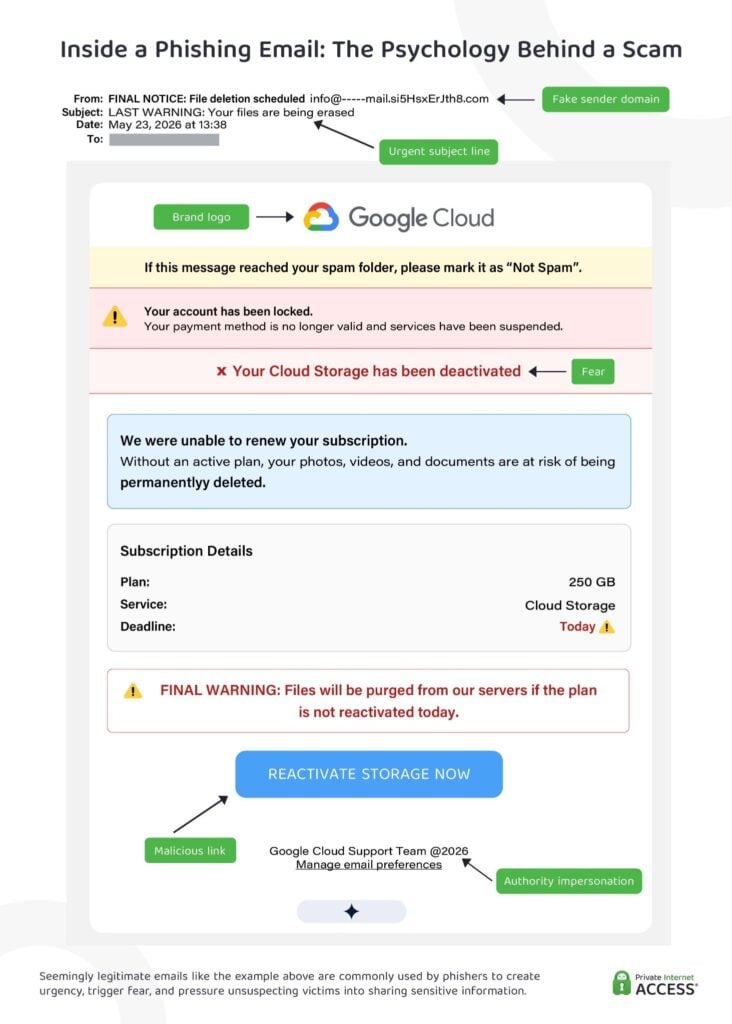
Phishing messages can reach their targets through emails, messaging apps, phone calls, fake websites, and social media. Attackers usually copy real logos, replicate writing styles, and mimic email addresses to make their messages appear authentic. Sometimes, they even send the messages from real accounts they compromised, which can make distinguishing real from fake particularly difficult.
Neither individuals nor organizations are immune. When targeting individuals, the attacker’s goal is usually account takeover, payment fraud, or identity theft. When it comes to companies, on the other hand, a single compromised user can open the door to data breaches, ransomware attacks, wire fraud, and long-term reputational damage.
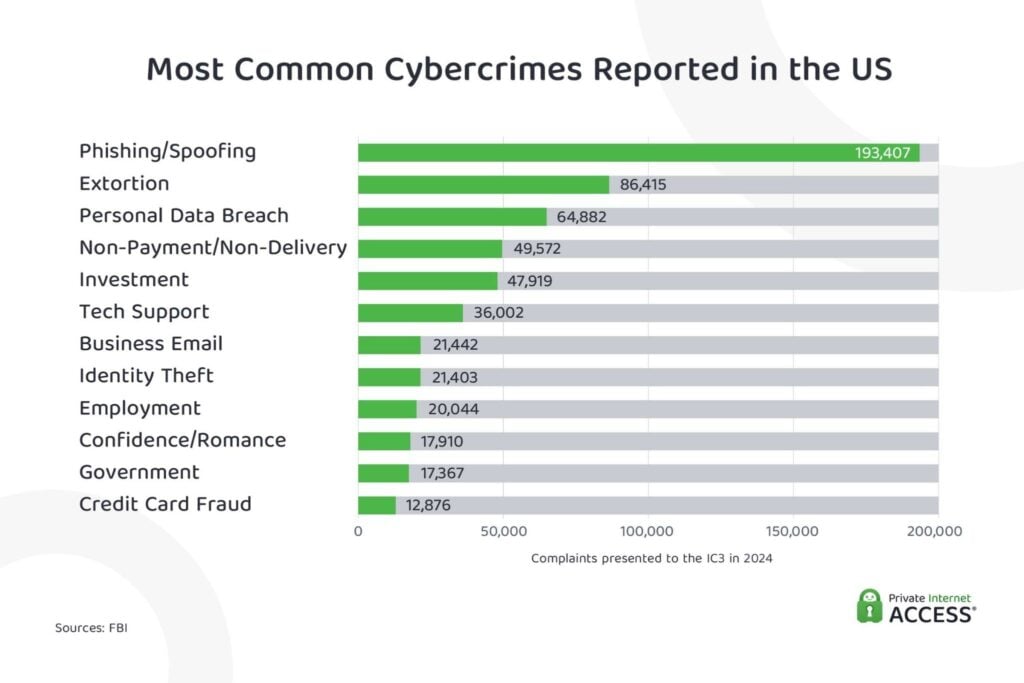
Phishing is the most widespread form of cyberattack. According to the FBI, phishing was the most frequently reported cybercrime in 2024, with 193,407 complaints recorded2. Extortion ranked a distant second with 86,415 complaints. These figures only represent reported cases; the number of phishing incidents that actually occurred is certainly greater.
The problem is pervasive across the world. According to the Anti-Phishing Working Group, 3.8 million phishing attacks were recorded globally in 2025, up slightly from 3.76 million in 20241.
How Phishing Campaigns Operate
Whether the target is a global organization or an individual, phishing follows the same pattern: impersonation, urgency, or exploitation of trust at an unguarded moment.
Understanding the channels and types of attacks can make it easier to recognize the red flags before any real damage occurs.
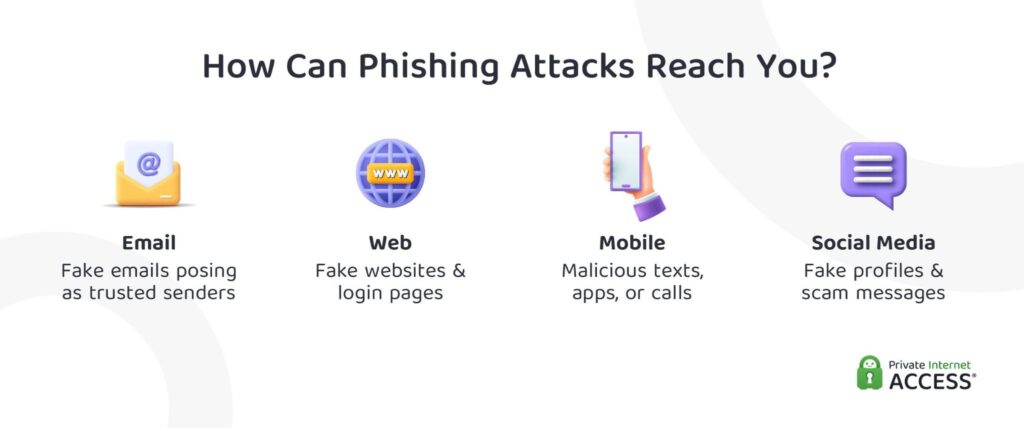
The following section provides a brief overview of phishing channels and their commonly used tactics. For more detailed information and examples, please refer to the appendix at the end of this article.
Email-Based Attacks
First deployed in the mid-1990s, an email-based attack happens when bad actors mimic legitimate senders to steal credentials, money, or data. They often use lookalike domains (e.g., substituting “m” for “rn” in the email address), branding, urgent language, and malicious links or attachments to trick recipients.
According to Astra Security, in 2022, 1.2% of emails sent were estimated to have been phishing attempts3. Over the years, attackers have honed various tactics, including:
- Email phishing: Mass emails impersonating trusted brands, urging victims to log in or perform another action via malicious links.
- Spear phishing: Highly targeted emails tailored to a specific person or team using personal credentials.
- Whaling: Phishing schemes that target high-level executives or individuals.
- Clone phishing: Legitimate emails copied and re-sent with a malicious link (or attachment) and a note like “resending for visibility.”
- Business email compromise (BEC): Impersonation or account takeover to redirect payments or exfiltrate sensitive data.
Fake Website and Browser Tricks
Some phishing tactics focus on replicating legitimate websites to harvest credentials, hijack sessions, or install malware. These attacks are designed to exploit the trust you have in the impersonated brand.
For example, you may land on a fake login page and enter your credentials without a second thought, assuming it’s a normal identity-validation request from that service.
Other common tactics for website-based phishing schemes include URL spoofing (when lookalike domains use small typos to mimic a brand’s legitimate website address) and scareware (pop-up alerts that simulate security warnings and urge you to make purchases or downloads under the guise of protecting your device).
Text Messages and Mobile Scams
Scams targeting smartphone users have become increasingly common. According to Zimperium’s 2024 Mobile Threat Report, 82% of phishing sites are now specifically optimized for mobile devices4. Here are five common tactics phishers use:
- SMS phishing (Smishing): Sending fraudulent texts from seemingly legitimate entities. They usually urge users to click on malicious links.
- Deepfake video and voice phishing (Vishing): Using AI-generated audio or video calls to impersonate authorities, companies, or trusted individuals. They usually request payment authorization or data disclosure.
- Malicious apps: Launching fake or trojanized apps that mimic popular software. They often harvest credentials via fake login screens or spyware installation.
- Push notifications: Impersonating brands via fraudulent browser or app notifications. They tend to redirect users to malicious sites or flood them with scam messages.
- QR code phishing (Quishing): Creating QR codes that install malware or redirect users to credential harvesting websites when scanned. They can be placed in emails or physical locations.
Social Media Impersonation
Social media-based attacks exploit popular platforms like Facebook, Instagram, or LinkedIn through fake profiles, scammy direct messages, or pretend support accounts.
For example, criminals could impersonate someone you know and request urgent financial assistance. They could also share data-harvesting quizzes or surveys on Facebook, tricking respondents into giving them the answers to common security questions (like their pet’s name or mother’s maiden name).
What Happens When Phishing Works
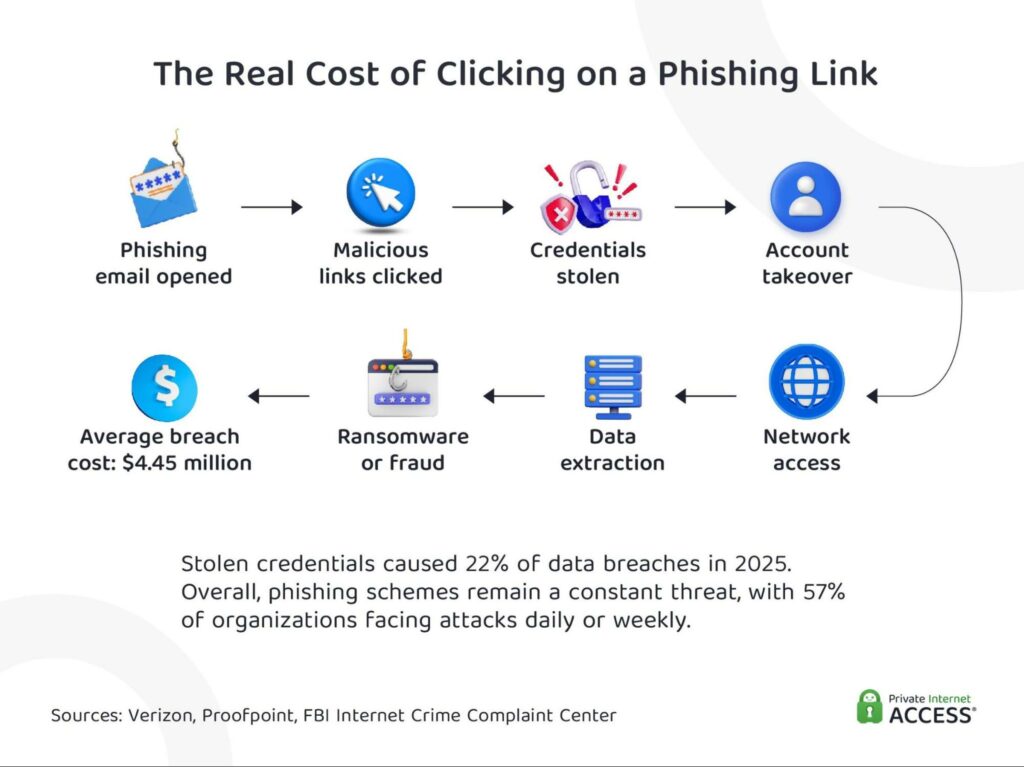
Successful phishing attacks aren’t petty crimes. They often result in financial losses, emotional distress, data breaches, and long-term reputational damage.
Data Leaks
According to IBM’s Cost of a Data Breach Report, phishing accounted for 16% of the 600 breaches studied across the globe in 2025, with the average incident costing $4.44 million5. The report found that phishing continued to be the #1 attack vector employed by attackers to gain access to organizations.
Perhaps one of the most infamous examples is the 2023 breach of MGM Resorts International.
How did the attackers manage it? By simply calling the company’s IT helpdesk.
After learning the personal details of a member of staff via LinkedIn, the perpetrators impersonated the employee and convinced the IT team to reset account credentials. This single social engineering tactic triggered a widespread system outage across MGM’s hotels and casinos. It exposed the data of roughly 37 million customers, disrupted operations for days, and cost the company over $100 million6.
Phishing and impersonation attacks don’t just steal passwords; they may open the door to entire enterprises and destroy consumer trust along the way. Data leaks can cause long-term reputational damage for the affected companies.
A notable example occurred in 2015 when TalkTalk, a UK telecom provider, suffered a breach that compromised customer information. In the aftermath, the company lost around 95,000 subscribers and suffered £60 million in financial losses7.
Exposure to Malware or Ransomware
Phishing is also the primary delivery mechanism for ransomware and malware infections.
The 2014 Dyre banking trojan campaign, for example, showed how badly phishing-delivered malware can hit organizations. It infected 133,000 computers worldwide and created 1,100 phishing websites mimicking well-known banks8.
The attackers pretended to be tax consultants in phishing emails, convincing employees to download malicious executable files disguised as financial documents.
The phishing element of the campaign was two-pronged. When victims didn’t engage with emails or fake web pages, the attackers called them directly via Skype, impersonating bank employees or even law enforcement agents to pressure victims into giving up their login details.
Regulatory Fines
When phishing leads to large-scale exposure of personal information, regulators can step in.
British Airways, for instance, was fined $26 million by the UK Information Commissioner’s Office following the 2018 data breach9. The attack in question resulted in the exposure of the personal data and payment information of more than 400,000 customers. Attackers used compromised credentials to redirect users to a fraudulent payment page where they harvested login and card details.
The penalty was not among the largest ever issued, but the breach illustrates how credential compromise and web-based impersonation tactics can be leveraged to compromise large-scale systems and steal user information.
Direct Financial Theft
Business email compromise (BEC) scams have drained billions from organizations worldwide. According to the FBI’s 2024 Internet Crime Report, BEC scams have caused over $50 billion in global losses since 20132.
A notable example is the 2024 deepfake-enabled BEC case. A finance employee at UK engineering firm Arup transferred approximately $25 million after attending a video call with deepfake versions of senior executives10.
The consequences of these attacks are not limited to corporate losses; sometimes, on an individual level, the consequences can be just as severe.
According to research by email security company Tessian, 1 in 4 employees who made a security mistake that led to a breach lost their jobs11. Moreover, even when they keep their jobs, victims may face penalties at work and suffer from damaged reputation.
Identity Theft
Phishing often begins with what looks like a routine workplace request, which is what can make it so tricky to identify.
In 2020, employees at US-based Magellan Health received what appeared to be a legitimate internal email requesting employee W-2 tax forms. The request was fraudulent. As a result, sensitive tax data belonging to roughly 364,000 individuals was exposed12.
That information (e.g., Social Security number, income details, home address) is often all that an identity thief needs to begin their scam. Victims can spend years dealing with fraudulent tax filings, unauthorized loans, and damaged credit histories.
How Companies Are Preventing Phishing
According to IBM, the cost of the average breach fell by 9% in 2025 compared to the previous year5. This drop doesn’t necessarily indicate fewer breach attempts. Instead, it reflects faster identification and containment, which helped organizations limit the financial repercussions.
However, the operational impact remains severe. The report found that 86% of breached organizations experienced “significant or very significant” business disruption (an 85% year-on-year increase). In other words, even when breaches are contained, they still disrupt operations, systems, and customer service.
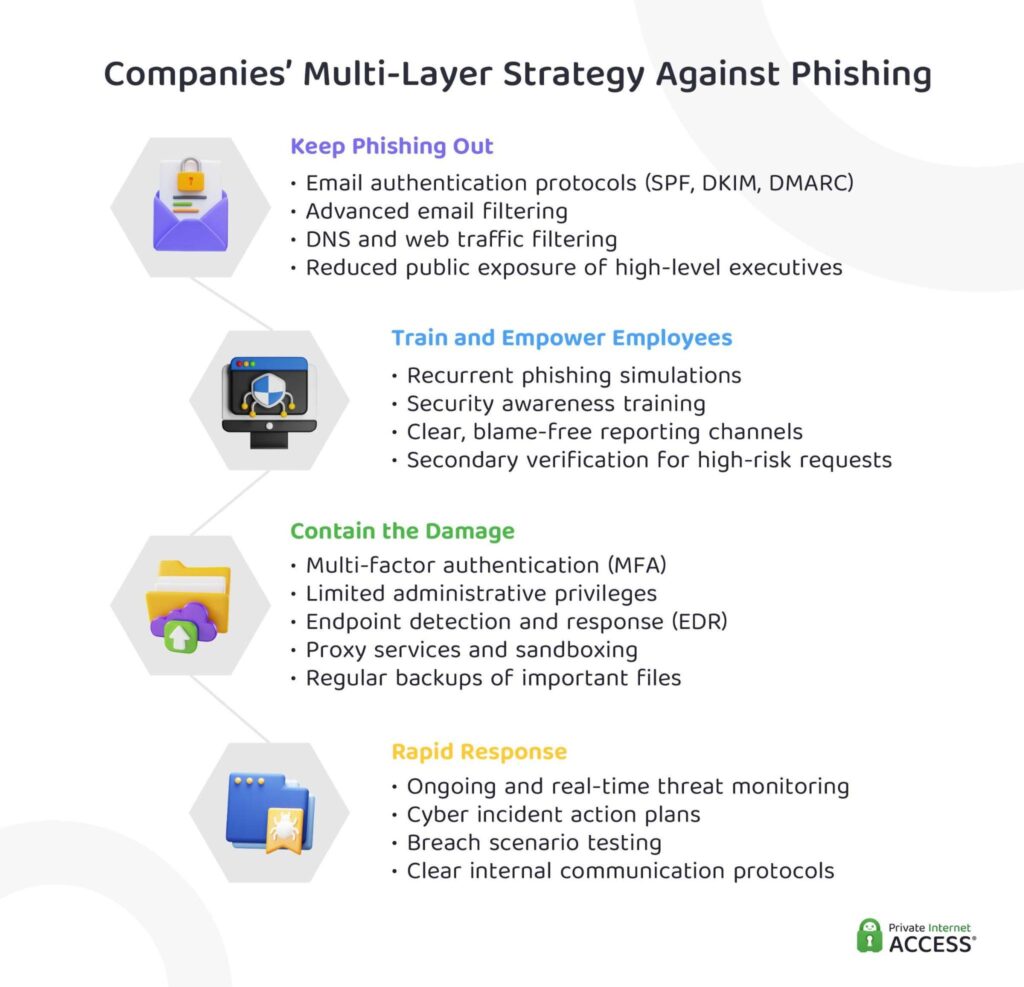
After recognizing the importance of phishing prevention, many companies have been investing in awareness training. Research shows that trained employees are 30% less likely to fall for phishing attempts; however, the effectiveness of this training can decline over time, as knowledge retention tends to fade within four months13.
As a result, organizations are shifting toward multi-layered defense models (which consider people, process, and technology) to minimize the risk and impact of phishing attacks.
How to Protect Yourself From Phishing
The strongest defence is usually a combination of personal caution with technical safeguards. While no one measure provides complete protection, implementing multiple defensive layers can significantly reduce the risk of falling prey to phishing scams.
How to Prevent Phishing From Reaching You
- Use strong, unique passwords for every account: Complex passwords (with a mix of uppercase and lowercase letters, numbers, and special characters) can reduce the likelihood of attackers guessing them. Using a password manager to generate and store credentials can make it easier to handle all the complex passwords you need.
- Enable two-factor authentication (2FA): This way, even if your credentials are stolen, attackers can’t access your account without the second verification step. It could be a code from a mobile app, a physical security key, or biometric authentication.
- Block pop-ups: Pop-up blockers can prevent the launch of unwanted windows on your browser. This, in turn, can prevent malware installation and malicious redirects. You could try enabling the built-in blocker by going to your browser’s settings.
- Keep software updated: Updates patch known security vulnerabilities, which can keep attackers from exploiting them to access your device or data. Try to install the updates for your operating systems, apps, browsers, and other software regularly.
- Be cautious about sharing personal information online: Phishers love to gather information from social media for targeted attacks. So, be cautious with what you post. Try to avoid sharing work-related details or photos that show personal information on social media.
- Strengthen defenses: Device, network, and web protection services can help keep phishing and other cyberthreats away. Enabling firewalls, using legitimate security software, and deploying secure web gateways add an extra layer of defense.
- Check for HTTPS, but don’t completely rely on it: HTTPS and padlock icons in address bars indicate encryption, not legitimacy. Keep in mind that phishing sites can also use HTTPS.
- Stay informed and educate others: Trusted cybersecurity sources can help you keep up with new tactics and threats. Share phishing awareness tips with family and colleagues to reduce attackers’ overall chances of success.
Unfortunately, even if you follow all these suggestions to the letter, it’s likely some phishing attempts will still slip through your emails and personal messages. So, it’s important that you keep your eyes open.
How to Identify Phishing Attempts
Phishing attempts don’t always look suspicious. It can be a routine delivery notification, a periodic password reset request, a message from a trusted individual, or an email from “the CEO” of a company you engage with. These attacks tend to work because they seamlessly blend into everyday communication.
Estimates suggest that over 90% of all data breaches are caused by human mistakes14. It’s not because people are careless, but because attackers continuously develop new tactics to look urgent, familiar, and legitimate. That’s why awareness is often your best defense.
Over the next section, we’ll give you some tips on how to identify phishing attempts. Although it’s no exact science, below you can find 7 warning signs you can watch out for.
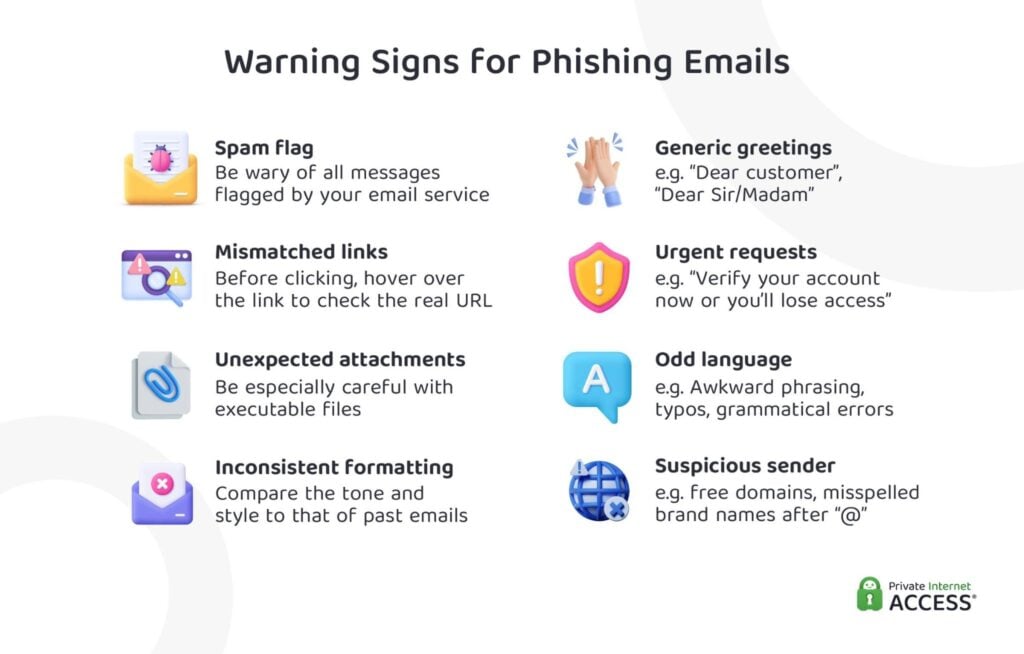
- It’s in your spam folder. While spam filters aren’t perfect, they often help catch what you might miss. Modern email providers analyze sender reputation, content quality, and recipient engagement history. They also run SPF, DKIM, and DMARC authentication. Emails failing these checks often land in spam folders, which is an instant red flag.
- The email comes from an unusual, mismatched, external, or public sender address. Legitimate organizations never send emails from public domains like @gmail.com (not even Google itself). According to APWG’s Q4 2025 Phishing report, 8 out of 10 phishing emails originate from free webmail providers15.
Also, watch out for domain misspellings, like @micros0ft.com (zero replacing “o”) or @paypa1.com (one replacing “l”). They are designed to trick people who only give the sender email a quick glance. If what comes after the “@” symbol doesn’t match the organization’s name exactly, it’s almost certainly a scam.
- It starts with a generic greeting and lacks personalization. Modern email software is easily capable of inserting names from the company’s own database. So, generic greetings like “Dear Customer/User” or “Dear Sir/Madam” are a red flag.
Please note that not all emails with a generic greeting are scams, but it’s a common phishing signal, especially from services where you’ve already registered.
- The text looks too perfect. There was a time when obvious spelling or grammatical errors were reliable red flags. Not anymore. With AI tools like ChatGPT widely available, cybercriminals can now easily create grammatically flawless phishing messages. On top of typos and grammatical errors, also look for:
- Slightly unusual tone
- Overly formal or robotic phrasing
- Subtle context mistakes
- Awkward wording
- The message is urgent or distressing. Be wary of emails claiming suspicious activity, demanding personal or financial information, offering unexpected refunds, or threatening account closure. These will often encourage immediate clicks, calls, or downloads, which is a classic phishing tactic designed to force speedy, careless action.
If you’re skeptical about a message, contact the organization directly through confirmed official channels and verify the information you received.
- It comes with an unexpected attachment. Be especially cautious of files ending in: .exe, .msi, .jar, .bat, .cmd, .js, .vb/.vbs, .scr, and .ps1. These can execute malicious code. Keep in mind that even PDFs and Office files can contain harmful macros. So, if you weren’t expecting the file, it’s probably best not to open it or verify with the sender first.
- The message includes suspicious links. Before clicking, hover over links to reveal their true destination. For example, if the visible text says “http://www.paypal.com”, but the underlying URL shows “http://creash.ie/paypal-login.doc”, that’s a big red flag. If the displayed text doesn’t match the actual URL, don’t click. Always watch out for:
- Misspellings
- Extra characters
- Strange subdomains
- Random strings of letters
Exercise caution with URLs, as bad actors can use similar-looking characters to trick you, like an uppercase “i” in place of a lowercase “L” (“I” and “l”). When in doubt, either visit the company’s website manually or use a URL checker to verify if the link is malicious before you open it.
What to Do If You Get a Suspicious Message
Recognizing a phishing attempt is important, but what you do next matters even more. A single click can cause plenty of damage. Taking timely action can protect not just you, but also your colleagues, family, and organization.
Immediate Actions to Take
- Stop! Don’t engage: Don’t click. Don’t download. Don’t reply. Opening an email rarely infects your device, but it can alert attackers that your address is active, especially if you reply. Moreover, clicking links can send you to credential-harvesting websites, and attachments may install malware. So, when in doubt, don’t interact.
Hang up suspicious calls. If someone on the phone claims to be from your bank, a government agency, or tech support and pressures you to share personal or financial information, hang up. If you need to contact the organization, don’t use the callback number provided. Always use the number listed on the official website.
- Document and report: Take a screenshot of the message, include the sender address and any suspicious links for evidence. If work related, report it to your IT department immediately. For personal accounts, forward phishing emails to the Anti-Phishing Working Group at [email protected].
- Use built-in reporting: Most organizations provide platform-specific reporting tools, so be sure to use them. The faster you report phishing, the faster platforms can shut down malicious accounts.
- Email:
- Gmail: Select an email > Report phishing.
- Outlook: Select an email > Report or Report phishing (often in the toolbar or three-dot menu, depending on platform).
iCloud Mail does not have a dedicated option for reporting phishing, but you can move phishing emails to the Junk folder. This will help Apple improve their spam filtering service. To do this on your iPhone: Swipe left on an email > Tap “More” > Move to Junk.
- Social media:
- Facebook:
- Send the message to [email protected]
- Use in-app reporting tools via the three-dot menu or “options” button.
- Instagram: Three-dot menu > Report.
- Snapchat:
- Profile settings > Report.
- Three-dot menu > Report.
- TikTok: Three-dot menu > Report > Frauds and Scams.
- WhatsApp:
- Long-press a message > Report.
- iOS: Open a chat > Tap the person’s profile at the top > Report.
- Android: Three-dot menu > More > Report.
- YouTube: Three-dot menu > Report.
- Facebook:
- SMS/Text:
- Forward suspicious texts to 7726 (SPAM).
- iOS: Open the message > Tap the phone number at the top > Block contact.
- Android: Open the message > Tap the three-dot menu > Block & report spam.
- File sharing:
- Dropbox: Notify to [email protected].
- Google Drive: Right-click file > Report abuse.
- OneDrive:
- Right-click file > Report abuse
- Use Microsoft’s online reporting form.
Steps to Mitigate Damage
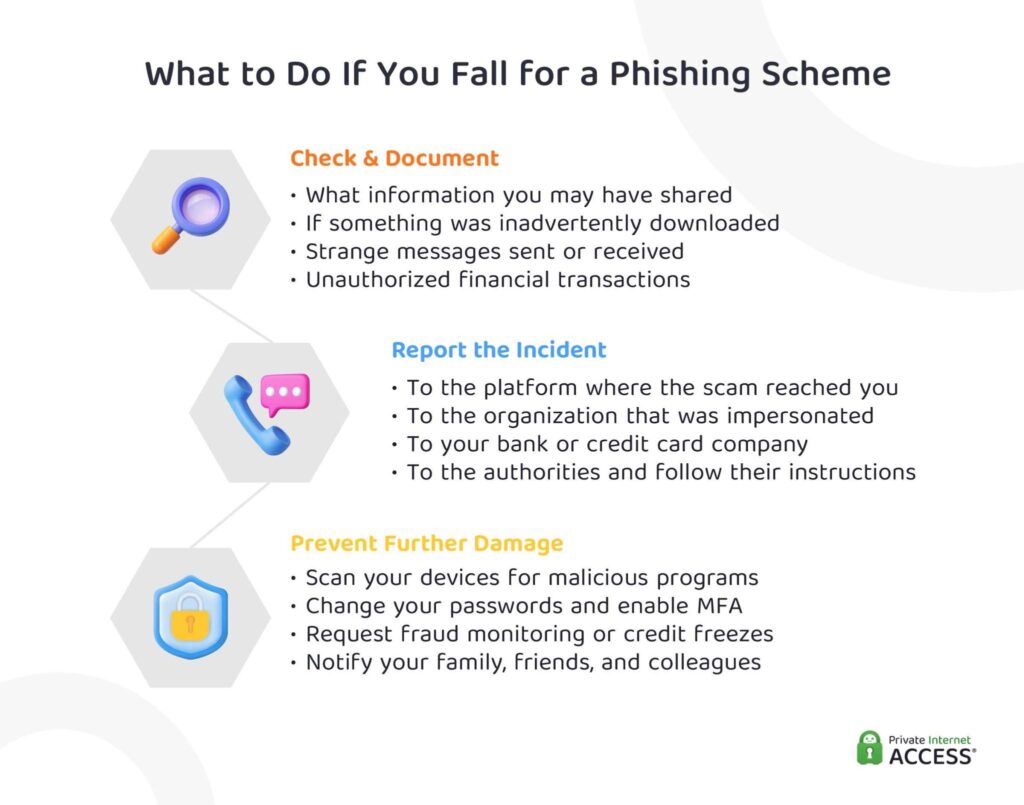
Even the most cautious person can make a mistake. It just takes one rushed click or one unguarded moment, and you may have unknowingly shared your credentials or other sensitive information. In such instances, the priority shifts from prevention to damage control.
The faster you respond, the more damage you can prevent. Don’t panic, but act quickly.
- Investigate and document:
- Confirm if you entered credentials, downloaded files, shared financial data, or sent verification codes.
- Check both your browser history and sent emails.
- Document suspicious logins, password resets, unusual emails, account changes, and strange messages sent to contacts.
Why this matters: It can help identify and keep records of the scope of the compromise. This is important in case you decide to report it to the authorities.
- Secure accounts and devices:
- Use a clean device.
- Change passwords for affected accounts.
- Use strong, unique passwords.
- Enable app-based 2-factor authentication.
- Log out of all active sessions.
- Change reused passwords on other accounts.
Why this matters: It can keep attackers from having long-term access to your accounts and data.
- Check for malware:
- Disconnect the device from the internet.
- Run full antivirus and anti-malware scans.
- Remove suspicious programs.
- Update OS and security software.
Why this matters: Removing malicious software can protect devices and networks from persistent attacks.
- Contact authorities immediately:
- US: Federal Trade Commission (FTA) via IdentityTheft.gov
- UK: Action Fraud
- EU: European Anti-Fraud Office
- Canada: Canadian Anti-Fraud Centre
- Australia: Australian Cyber Security Centre (Scamwatch)
Why this matters: It can help limit potential financial and reputational damage. It can also prevent cyberattackers from further data misuse, like identity theft.
- Protect your financial identity:
- Notify your bank or credit card provider.
- Request fraud monitoring or account freezes.
- In the US, apply a credit freeze with Equifax, Experian, or TransUnion.
Why this matters: It can prevent criminals from opening new accounts or taking loans in your name.
- Warn others:
- Inform colleagues, friends, and family.
- Notify the organization the attacker impersonated.
Why this matters: It can keep cyber attackers from successfully committing phishing attacks in your name. This can help protect others.
How Phishing Is Changing (and Getting Harder to Spot)
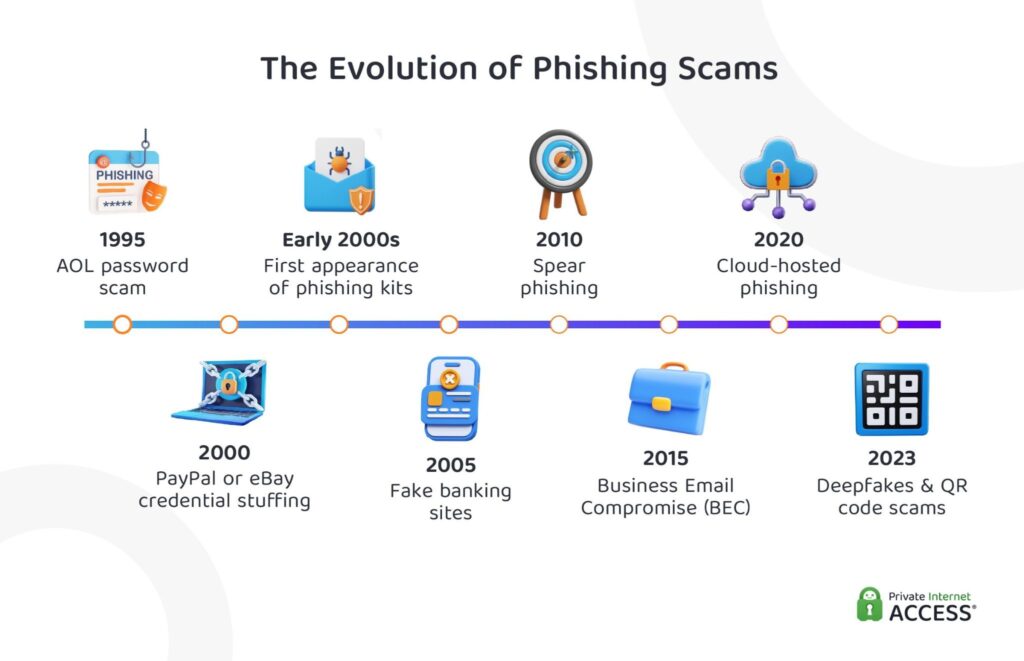
Phishing attacks are evolving rapidly as cybercriminals make use of new technologies to devise increasingly sophisticated attacks. The infographic below illustrates this shift: how we went from scams focused on stealing passwords to sophisticated attacks that impersonate trusted authorities, companies, or even loved ones.
Let’s take a closer look at how phishing tactics are evolving and what emerging trends you should watch out for.
The Role of Generative AI in Phishing
Generative AI tools (like OpenAI’s ChatGPT or Anthropic’s Claude) allow attackers to produce polished, convincing content in seconds. While reports state that fully AI-generated phishing still represents a small percentage (0.7%–4.7%) of attacks16, these tools boost attackers capabilities by allowing them to:
- Write fluent, professional emails in seconds
- Personalize messages using social media data
- Imitate brand tone and formatting
- Create realistic login pages
- Translate scams into multiple languages
What once required skill and expertise can now be mass produced with a prompt. So, it’s not just that AI can be misused to improve the effectiveness of a phishing message; with AI tools, the speed and scale at which attackers operate can escalate too.
Research firms like Gartner predict that 17% of total cyberattacks will involve generative AI by 202717, while other experts forecast AI-enhanced phishing will become the dominant social engineering method starting as early as 202618.
Deepfake Video and Audio
Deepfake technology enables criminals to create hyper-realistic audio and video of (generally unconsenting) people.
Voice cloning systems like Microsoft’s VALL-E can now replicate voices from three seconds of audio, down from the 30 minutes required years ago. According to The Battle Against AI-Driven Identity Fraud report, deepfake fraud attempts increased by 2,137% in just 3 years19.
As this technology continues to improve, distinguishing real from fake may become more challenging.
Exploited Cloud-Based Architecture
Popular cloud computing platforms (like Microsoft OneDrive, Google Drive, or GitHub) can be particularly beneficial to phishers. They provide something difficult to find: automatic legitimacy.
By hosting fake login pages on these platforms, phishers take advantage of trusted domain names and valid SSL certificates. As organizations rely significantly on these services, security teams are reluctant to block them outright, creating blind spots for attackers to exploit.
According to Netskope’s Cloud and Threat Report, malicious content distribution via popular cloud apps remains an ongoing risk for organizations. Nearly 90% of the firms studied experience monthly malicious downloads20.
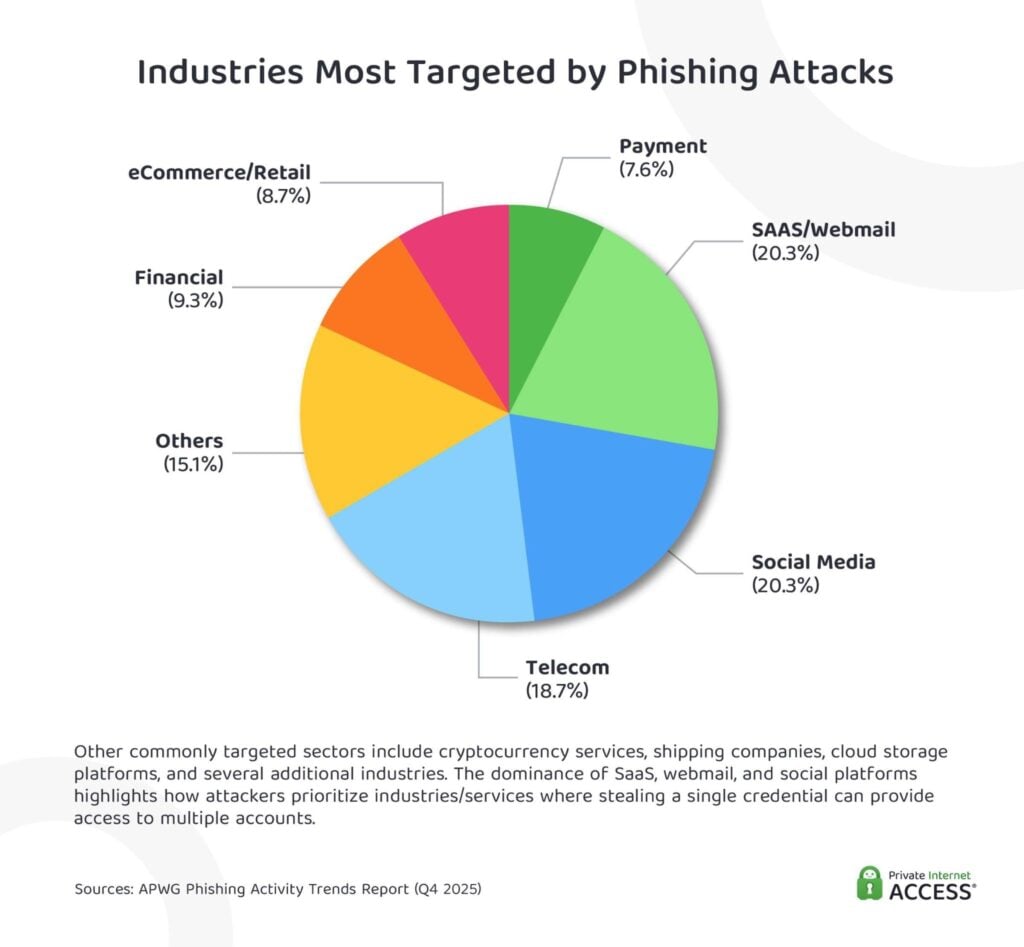
The targeting patterns seen in global phishing attacks reinforce this trend. Data from the Anti-Phishing Working Group shows that SaaS and webmail platforms account for more than 20% of phishing attacks15, making them one of the most frequently impersonated service categories.
Resources for Staying Informed
While antiviruses, firewalls, and anti-phishing tools may help, it’s likely technology alone won’t keep all phishing attempts from reaching you. Complementing tech tools with cybersecurity knowledge gives you a better chance to successfully reduce the risks associated with phishing.
Trusted cybersecurity websites, government agencies, and industry organizations provide free, up-to-date threat updates and best practices to keep you ahead of emerging scams. You can see a few reputable examples below.
Websites and Blogs
- StaySafeOnline (National Cyber Security Alliance) offers comprehensive guides on phishing prevention and password management.
- KnowBe4 publishes research and best practices for building stronger security cultures.
Government and Cybersecurity Organizations
- The Cyber Threat Alliance facilitates threat intelligence collaboration.
- Cloud Security Alliance (CSA) provides cloud security best practices and guidance.
- National Cybersecurity Alliance advocates for safe technology use through education and partnerships.
Training Programs and Courses
- Free options:
- Indiana University’s Email Security Fundamentals: A self-paced course covering five key modules on business email compromise, malicious links, malware, ransomware, and spear phishing. Completing all modules earns you a certificate of completion.
- PhishingBox’s Phishing Test Simulator: A free 10-question quiz presenting visual email examples to test phishing identification skills. It provides immediate assessment of awareness levels.
- Paid courses:
- Udemy’s Cyber Security: A beginner-level 34-minute video course covering what phishing is, how it works, its impact, and prevention strategies. It includes lifetime access and a certificate of completion.
- The Cpl Institute’s Online Phishing Awareness Course: A 40-minute interactive e-learning module using case studies to teach recognition and defense against phishing across email, social media, phone, and web platforms. It features practical prevention steps, including password security, software updates, and security tool usage.
We included the examples above simply to illustrate a few of the training programs and courses that are offered by reputable organizations. However, many more are available beyond the ones mentioned here. If you’re interested in taking one, we kindly encourage you to research more options and select the one that best aligns with your individual needs and goals.
Reducing Risk: What You Need to Remember
Phishing attacks aren’t going away; if anything, they’re getting more sophisticated. AI-generated content, deepfake impersonation, and abuse of trusted platforms have made these attacks more convincing, efficient, and difficult to detect.
The good news is that you can avoid the vast majority of phishing attempts you encounter. Email filters, two-factor authentication, and browser safeguards all help, especially when combined with user awareness and clear response action plan.
So, take that extra second to check sender addresses; pause before clicking links or downloading attachments; question any email creating urgency or demanding sensitive information. A small pause can make all the difference.
Appendix: Phishing Tactics and Real-World Examples
The table below provides a comprehensive breakdown of various phishing tactics, each with an example to illustrate how these strategies can be applied in real life.
References:
- Year in Review 2025 — APWG
- 2024 Internet Crime Report — FBI
- 81 Phishing Attack Statistics 2026 — Astra Security
- 2024 Global Mobile Threat Report — Zimperium
- Cost of a Data Breach Report 2025 — IBM
- MGM Resorts ransomware attack led to $100 million loss, data theft — Bleeping Computer
- TalkTalk hack toll: 100k customers and £60m — Wired
- Behind The Mystery Of Russia’s Hackers Who Stole Millions From US Business — Forbes
- British Airways fined £20m over data breach — BBC News
- Arup lost $25mn in Hong Kong deepfake video conference scam — Financial Times
- 1 in 4 employees who fell victim to cyberattacks lost their jobs — Security Magazine
- Magellan Health Ransomware Affects Over 364,000 People — HIPPA
- Security Awareness Training Statistics 2026 — Keepnet
- The State of Human Risk 2026 — Mimecast
- Phishing Activity Trends Report, Q4 2024 — APWG
- AI Phishing Attacks: How Big is the Threat? — Hoxhunt
- Gartner Forecasts Global Information Security Spending to Grow 15% in 2025 — Gartner
- The AI Phishing Revolution: Implications for Cybersecurity in 2025 — Sasa Software
- The Battle Against AI-driven Identity Fraud — Signicat
- Cloud and Threat Report: 2025 — Netskope
Feel free to use the data and images from this article. We’re all about open access. Just link back to this article so credit goes where it’s due.
