What Is QUIC Protocol and How Does It Differ From TCP?
The internet loads far more than simple web pages. A single website may pull text, images, videos, fonts, scripts, analytics, ads, and background application data from multiple sources at the same time. Every one of those elements depends on a transport protocol to move data between your device and the relevant server.
For decades, Transmission Control Protocol (TCP) was the primary method for sending web traffic. TCP is reliable, but it was designed long before mobile browsing, cloud applications, streaming platforms, and real-time web apps became everyday internet activities.
QUIC addresses many of those limitations. It helps websites and applications start connections faster, recover from network interruptions more efficiently, and maintain better performance on mobile and wireless networks. In this guide, you’ll learn what the QUIC protocol is, how it works and compares to TCP, and where it’s used, as well as the advantages and tradeoffs that come with it.
Table of Contents
The QUIC Protocol DefinedQUIC’s Development and Standardization
How Does QUIC Work?
What Makes QUIC Different?
QUIC vs. TCP: What’s the Difference?
Upsides of the QUIC protocol
Downsides and Risks of the QUIC Protocol
FAQs
The QUIC Protocol Defined
QUIC (Quick UDP Internet Connections) is a modern transport protocol that controls how devices establish secure connections and exchange data across the internet. At its core, QUIC reduces delays while maintaining reliability and security.
Traditionally, websites used two separate technologies:
- TCP to establish and manage connections
- TLS (Transport Layer Security) to encrypt traffic
With older HTTPS connections, browsers and servers had to complete multiple setup stages before meaningful data could start flowing.
QUIC simplifies that process by combining transport and encryption into a single protocol. Instead of performing connection setup and security negotiations separately, QUIC integrates TLS 1.3 into the connection process, allowing secure communication to begin sooner.
Today, QUIC serves as the transport layer for HTTP/3, the latest version of the Hypertext Transfer Protocol.
QUIC’s Development and Standardization
QUIC started as an internal Google project in the early 2010s1. Google engineers noticed that modern websites were becoming increasingly complex, while TCP-based connections still followed connection models developed decades earlier. To reduce delays, Google created an experimental protocol known as gQUIC.
As interest grew, Google submitted QUIC to the Internet Engineering Task Force (IETF), the organization responsible for many internet standards.
After years of development and testing, the IETF standardized QUIC in 2021 through RFC 90002, and HTTP running over QUIC became HTTP/3.
QUIC is now widely used across the internet through HTTP/3 deployments and powers a significant share of modern web traffic. Major technology companies, platforms, and browsers that support QUIC and HTTP/3 include Google, Meta, Cloudflare, Chrome, Edge, and Safari.
The performance benefits it offers drives its widespread adoption. Content delivery networks (CDNs), cloud providers, and website operators use QUIC and HTTP/3 to reduce latency, improve reliability, and deliver a smoother experience for users, particularly on mobile networks and connections prone to packet loss.
How Does QUIC Work?
A typical QUIC connection follows these steps:
- The browser starts the connection: The process begins when your browser sends an initial request to the server. This first exchange contains information needed to establish the connection and negotiate security settings.
- Security is established: The browser and server agree on encryption settings and confirm the connection.
- Encrypted data starts flowing: Once the connection is ready, the browser and server begin exchanging data.
- Content divides into multiple streams: QUIC separates traffic into multiple independent streams within the same connection. This allows different parts of a webpage to load at the same time.
- Lost packets affect only one stream: Network interruptions happen all the time. If a packet is lost while an image is loading, QUIC only retransmits the missing data for that particular stream. The remaining streams continue delivering content as usual.
- The transfer completes: Throughout the session, QUIC continuously monitors network conditions, retransmits lost packets when necessary, and adjusts data flow to match available bandwidth. Once all requested data arrives, the transfer is complete and the webpage finishes loading.
What Makes QUIC Different?
The performance improvements offered by QUIC come from several technologies working together behind the scenes.
Built on UDP Instead of TCP
QUIC operates over User Datagram Protocol (UDP), a lightweight transport layer protocol. UDP itself doesn’t provide reliability, packet recovery, congestion control, or encryption. QUIC adds those capabilities on top of UDP while avoiding some of TCP’s limitations.
Built-In TLS 1.3 Encryption
QUIC incorporates encryption by default and requires TLS 1.3 for every connection. After the initial handshake, it encrypts most transport metadata, leaving only the information necessary to route traffic. By concealing more connection details than traditional TCP-based communications, QUIC helps improve privacy and reduces opportunities for network inspection or interference.
Multiplexed Data Streams
One of QUIC’s most important features is multiplexing. Websites have many moving parts, including dynamic content, lazy-loaded images, scripts, and background API requests. With traditional TCP connections, packet loss in one resource can delay the delivery of others, creating a bottleneck that slows down page loading.
QUIC places these resources into independent streams that travel over a single connection. If one stream experiences packet loss, the others can continue loading instead of waiting for recovery. This helps reduce delays that commonly affect TCP-based connections.
Connection Migration
QUIC uses connection IDs rather than relying solely on IP addresses and ports. This allows sessions to remain active when network conditions change. For example, if a smartphone switches from home Wi-Fi to mobile data while streaming a video, QUIC can often maintain the session without requiring a full reconnect.
Congestion and Packet Loss Management
QUIC monitors network conditions and adjusts transmission rates in real time. When it detects congestion, it can slow traffic to help prevent overload. As conditions improve, it can increase throughput to make better use of available bandwidth. Because congestion control is built into QUIC, updates and improvements can be deployed more easily than with traditional transport protocols that are tightly integrated into operating systems.
Faster Repeat Connections With 0-RTT
QUIC supports Zero Round Trip Time (0-RTT) session resumption, allowing browsers to reconnect to recently visited websites faster. By reusing information from an earlier session, QUIC can start transferring data without repeating the full connection setup process. This can help websites, cloud services, email platforms, and productivity tools load faster and feel more responsive.
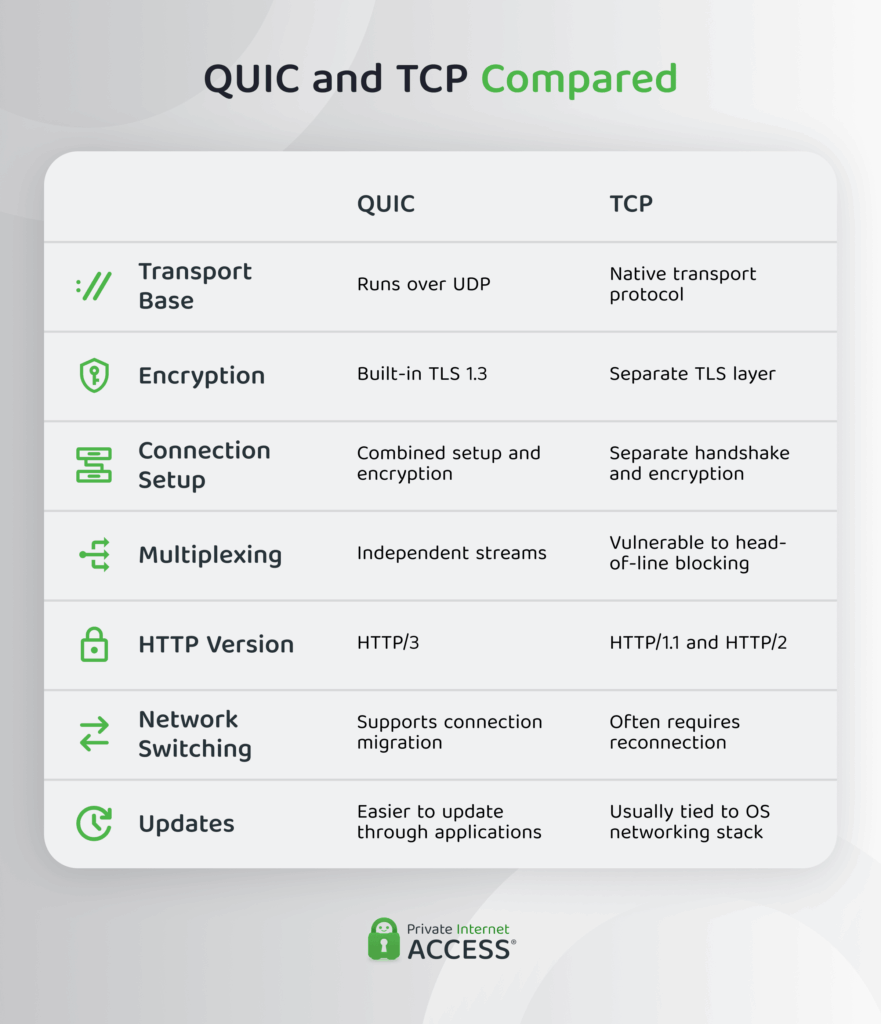
QUIC vs. TCP: What’s the Difference?
While both protocols move data across networks, they handle connections very differently.
Upsides of the QUIC protocol
- Faster connection setup: QUIC reduces startup delays by combining transport and encryption negotiations into a single process. This allows secure communication to begin sooner than with many traditional TCP-based connections, which require multiple sequential steps before the browser and server can start exchanging page data.
- Quicker repeat visits with 0-RTT: 0-RTT lets QUIC reuse information from a recent session to load a recently visited site faster. Your browser and server may not need to repeat the full startup process every time. This can improve responsiveness for services that you open often, such as email, cloud tools, and dashboards.
- Continuity during network changes: You can keep the same session when you jump between Wi-Fi hotspots and mobile internet on the go. Unlike TCP, QUIC uses the connection ID. Port and IP address changes won’t start the setup again.
- Reduced head-of-line blocking: TCP delivers data in strict order. If one packet is delayed, later packets may have to wait even if they’ve already arrived. QUIC avoids much of this problem through independent streams that can continue operating separately.
- Better fit for IoT traffic: QUIC is better suited for Internet of Things (IoT) devices, such as sensors, controllers, cameras, and autonomous drones3. These devices send small bursts of data over weak, lossy, or changing networks. If the device changes networks, the QUIC protocol exchanges information faster than older TCP standards while keeping sessions alive.
- Stronger built-in data security: QUIC encrypts and authenticates traffic from the moment there’s an established connection. It protects more connection metadata than many older protocols and helps reduce visibility into traffic details, making certain forms of monitoring or traffic analysis more difficult.
- Reduced page loading: QUIC carries many page elements in a single connection instead of queuing them like older TCP-based protocols. This means that if there’s an element delay, the protocol can recover that stream without forcing others to wait.
- Better performance on mobile networks: Mobile networks are prone to signal fluctuations, packet loss, and frequent transitions between Wi-Fi and cellular data. QUIC helps maintain smoother performance when these changes occur, reducing disruptions and delays.
- Flexible congestion management: You can adjust how QUIC reacts when the network becomes crowded. Congestion control is part of the protocol that slows traffic before overload gets worse. QUIC is easier to update than older transport protocols that embed behavior deep within operating systems.
Downsides and Risks of the QUIC Protocol
- Performance gains depend on network conditions: The benefits of QUIC are often most noticeable on mobile networks, high-latency connections, congested Wi-Fi networks, and environments where packet loss is common. On fast, stable wired networks, the performance differences compared to traditional TCP-based connections may be less pronounced.
- Slower adoption on the web: According to W3Techs, roughly 8.8% of all websites use QUIC as of April 20264. Adoption has been gradual because QUIC can be more challenging to integrate into environments built around older network tools, policies, and infrastructure. Organizations may enable QUIC for user-facing services while continuing to rely on legacy systems behind the scenes.
- Less visible to security tools: Some security tools are less effective at recognizing QUIC traffic because the protocol encrypts most connection details (payload data, control information, etc.). Unless you use modern cybersecurity tools, this can make it harder to identify, classify, and filter traffic.
- Operational pressure on IT teams: Many enterprise networks use TCP-based inspection, firewall, and monitoring systems. Supporting QUIC may require organizations to update existing infrastructure, adjust traffic policies, modernize monitoring tools, and adopt new troubleshooting processes to accommodate the protocol’s architecture and encrypted design.
- 0-RTT replay risks: The same technology that accelerates repeat visits can create replay attack concerns. An attacker could potentially capture and resend certain early-session requests. For this reason, you should restrict QUIC to actions that are safe to repeat, like loading public pages.
- Exposure to QUIC-based flood attacks: Attackers can abuse QUIC traffic in distributed denial-of-service (DDoS) attacks that overwhelm your server or network with excessive traffic. Because QUIC encrypts both application data and some connection-management information, it can be harder for monitoring tools to distinguish malicious traffic from legitimate traffic.
- Risk of reflection and amplification attacks: QUIC runs over UDP and can inherit some of its vulnerabilities. In a reflection attack, the attacker spoofs the victim’s IP address so the server sends replies to the victim. In an amplification attack, the reply is larger than the original request, which increases the traffic sent to the target. Poorly configured environments may not enforce QUIC’s default security measures.
A secure VPN can reduce most of these risks. PIA VPN routes your traffic through an encrypted tunnel via a third-party server. This masks your IP address by replacing it with the VPN server’s IP address, helping protect you from location-based DDoS and reflection attacks. It also makes your online activities nearly impossible to read, improving your network security.
FAQs
What is QUIC?
QUIC (Quick UDP Internet Connections) is a modern internet transport protocol that helps you connect to websites faster and more securely. It combines connection setup and security, unlike older protocols that handled them as separate, consecutive steps. As a result, sites start loading sooner in your browser, revisits are even faster, and more of your data stays protected.
What is the QUIC protocol, and how does it work?
QUIC is a protocol that some websites use to move data. When you open a site, the browser and server agree on the connection rules and security settings in a single step. The protocol then encrypts your traffic and splits the data into independent streams (for example, different streams for site text, interactive buttons, and media). It has congestion control that adjusts transfer speed based on network load and uses a connection ID to maintain connectivity when you change networks.
What is the experimental QUIC protocol?
The QUIC protocol was experimental when Google created it in 2012. Unlike older web TCP protocols, which handled connection setup and encryption as separate steps, QUIC combined these steps to reduce setup delays. Google submitted the protocol to the Internet Engineering Task Force (IETF) in 2015, and it’s now used by a substantial number of websites.
QUIC vs. TCP: What are the main differences?
QUIC reduces delays and bottlenecks in older TCP-based traffic. TCP needs a separate connection setup before encrypting your traffic and moves data sequentially in one stream, meaning one lost packet can stall site loading. QUIC runs over UDP, builds encryption into the connection process, and splits traffic into streams that load independently.
Does QUIC use UDP and why?
Yes, QUIC runs over UDP because it doesn’t follow the older TCP-based connection model. UDP provides a lightweight transport layer, while QUIC adds security and network management features, such as encryption, multiplexed streams, congestion control, and data packet recovery.
Can a VPN affect QUIC traffic or performance?
VPNs add an extra layer of protection to your QUIC traffic, which can introduce some delay. A VPN wraps your traffic in its own encrypted tunnel and sends it through a secure third-party server. Since QUIC runs over UDP, a VPN that handles UDP poorly can cause a fallback to an older transport protocol. However, a top-grade VPN may actually improve your speeds by preventing activity-based speed throttling.
References
