Safe Sexting: Technical Tips to Keep Your Photos Secure
Sexting has become a common form of communication in modern dating. It’s the exchange of sexually explicit (or suggestive) messages online, which can often include pictures or recordings. Like any other form of sensitive information sharing, sexting comes with certain risks that are worth understanding before engaging in it.
We at PIA firmly believe that your body is your own. Sharing depictions of it is and should always be your choice; one you should be able to make freely but also well informed. That’s why we put together this detailed guide on safe sexting practices. In it, we go over potential privacy concerns and walk you through simple, actionable steps you can take as precautionary measures.
Important: Adults only
This article is intended for adults only. It assumes that any intimate content discussed is created and shared only between consenting adults. Minors should never create, request, send, receive, store, or share sexually explicit or intimate images of themselves or anyone else. Any sexual or intimate image involving a minor may be illegal, even if it was self-generated or shared voluntarily. If you receive, discover, or are sent an intimate image that appears to involve a minor, do not save it, forward it, screenshot it, or share it. Report it immediately to the platform and to the relevant child-protection or law-enforcement authority, such as the Internet Watch Foundation in the UK or the National Center for Missing & Exploited Children in the U.S. This guide is provided for privacy and harm-reduction awareness only. It does not encourage sexting, does not provide legal advice, and cannot remove the risks of creating or sharing intimate content online.
Table of Contents
Why Safety Matters When SextingBefore Sending Your Pictures
When Sending Your Pictures
After Sending Your Pictures
What to Do If Your Pictures Are Exposed
Be Mindful While Sexting
Appendix: Feature Definitions
Why Safety Matters When Sexting
Once intimate content is shared online, there’s a possibility that it could be distributed or accessed in ways you didn’t intend. This can happen through non-consensual sharing, account compromises, or accidental exposure. Understanding these risks can help you better protect your privacy.
What Is Non-Consensual Intimate Image (NCII) Abuse?
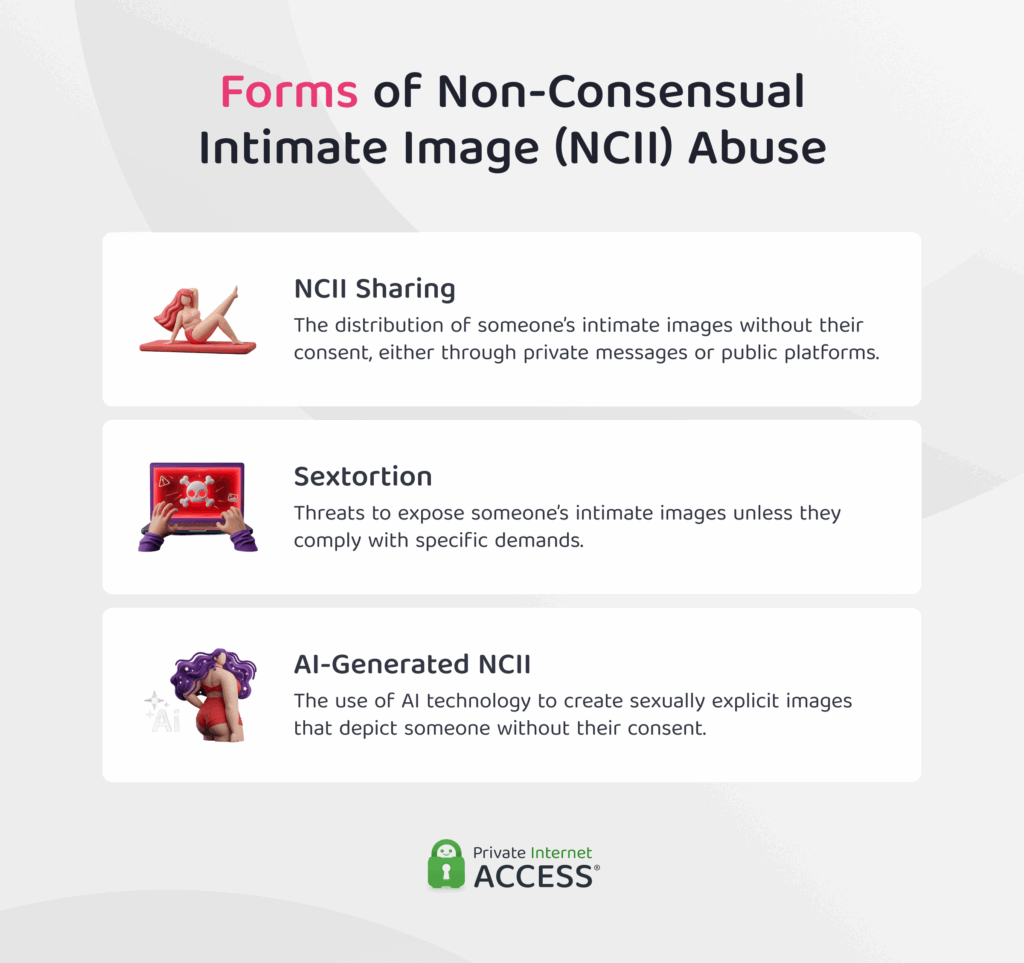
It’s an umbrella term that covers a range of abusive behaviors involving intimate content. For instance, exposing intimate images without consent, threatening to share them unless demands are met, or even generating sexual depictions of someone without their permission.
Understanding how different forms of NCII abuse work can help you recognize the risks associated with sharing intimate content online. Below, we’ll explore each one of them in more detail.
NCII Sharing
The distribution of someone’s intimate images without their consent, often by a former or current partner, is widely referred to as revenge porn. However, that term can be revictimizing and downplay the seriousness of the issue it describes. So we’ll use NCII sharing throughout the rest of this article instead.
With the rapid growth of digital technology and social media platforms, NCII sharing has grown as well. In the UK alone, more than 25,000 cases of NCII sharing were reported in 2025, the highest number recorded to date.1
Sextortion
Sextortion is a form of blackmail in which someone threatens to expose a person’s intimate images unless their demands are met. These demands often include money or additional sexual content.
The images used for sextortion can be obtained through:
- Coercion or manipulation: Victims are pressured or deceived into sharing images.
- Catfishing: Perpetrators use fake identities to trick victims into sending images.
- Non-consensual capture: Images are obtained through screenshots or recordings without the victim’s knowledge.
- Hacking: Someone accesses accounts or devices to steal existing images.
- Fake or AI-generated content: Fabricated images are used to threaten victims.
A study that considered 16,000+ adults across 10 countries found that 1 in 7 (14.5%) have had someone threaten them with sharing their intimate images.2 According to the study, sextortion is most often committed by intimate partners, both current and former.
AI-Generated NCII
This form of image-based abuse involves using someone’s likeness to create explicit images with AI tools. These images are produced without the person’s consent and can be used to harass, humiliate, or sextort them.
Although being in possession of an explicit picture of someone is not a prerequisite for generating or editing an image with AI, it’s still important to be aware of the risk. Someone could still use AI tools to alter the images you share while sexting. They could make it seem like you’re revealing more of your body or otherwise portray your likeness in ways you never intended.
Note: While anyone can be affected by NCII abuse, research suggests that women are disproportionately targeted. Statistics from the UK suggest that in over 80% of the reported cases, it was a man who committed NCII sharing.3 Moreover, a 2025 analysis of the now-defunct MrDeepFakes website found that approximately 95% of the individuals depicted in its sexual deepfake videos were women.4
How Can Your Intimate Photos Accidentally End Up Exposed?
While statistics suggest that intimate images are often exposed by someone the victim knows personally, this may not always be the case. Intimate content can also be intercepted, accessed, or exploited by malicious actors when proper cybersecurity measures are not in place.
Here are some of the most common ways this can happen, along with steps that can help reduce the risk.
Automatic Cloud Backup
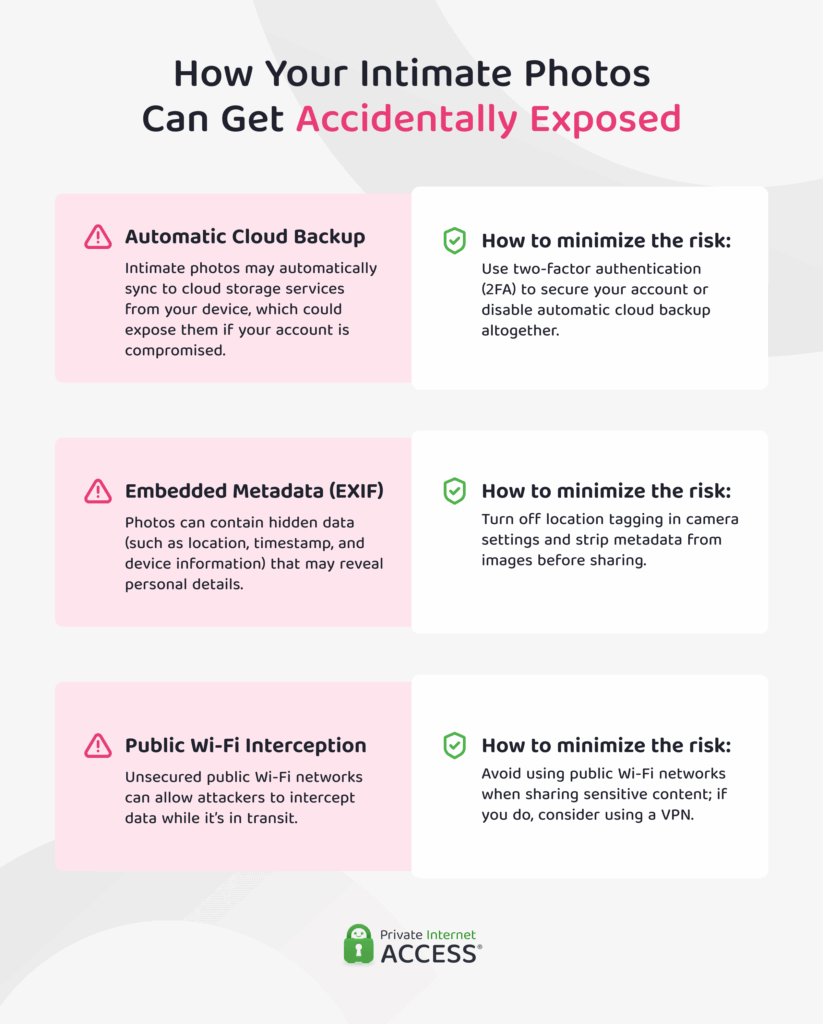
Many people use cloud services (like Google Photos and iCloud) to keep their photos and videos backed up. When you create a Google or Apple account, you’re prompted to enable cloud sync for convenience and easy access to your files.
Once enabled, any images saved to your device are automatically uploaded to the cloud. As a result, if the cloud account is ever compromised, any intimate photos could be exposed. This risk is doubled, as either the sender’s or the recipient’s device (or both) might be configured to automatically backup images.
There are several ways cloud accounts can be compromised, including:
- Phishing attacks: Attackers can trick you into entering your login credentials on fake websites or forms that look legitimate.
- Infostealer malware: Malicious software can extract saved passwords from your device, which attackers can use to log into accounts like Apple ID or Google and get access to cloud-stored photos.
- Credential stuffing with weak or reused passwords: Attackers often use stolen login information from one breach to try logging into other accounts.
An effective way to protect your account is to enable two-factor authentication (2FA). This adds an extra layer of security by requiring two forms of verification to log in. This way, even if someone obtains your password, they cannot access your account without entering a one-time code.
To further minimize the risk of intimate content being exposed through an account compromise, you can disable automatic cloud backup on your device. This prevents images from being uploaded to the cloud, meaning that even if your account is accessed without permission, the intimate photos stored on your device would not be exposed.
(The risk associated with the recipient’s device settings and cloud account would, however, remain.)
Image Metadata
All photos contain additional information called Exchangeable Image File Format (EXIF) data. This information is not shown directly when you open an image, but you can see it when you go to the image’s properties. EXIF data can include:
- GPS coordinates of where the image was captured
- Device model and software version
- Precise timestamp of when the photo was taken
When you share a photo via direct message or email, this metadata travels with the file. Some platforms (like Instagram or X) may automatically strip EXIF data on upload, but most messaging apps preserve it. This metadata can potentially be used to link the image directly to you, even if the image itself doesn’t show your identity.
You can reduce this risk by turning off camera location tagging in your phone’s settings. This ensures that new photos don’t include GPS data. We’ll tell you how you can do that in more detail below.
Public Wi-Fi Interception
When you connect to public Wi-Fi, the network is usually unsecured and shared among many users. This means that an attacker on the same network can potentially intercept data being transmitted, a technique called “packet sniffing.”
Many messaging apps use end-to-end encryption (E2EE), either by default or as an optional feature you can activate. E2EE means that only you and the person you’re communicating with can see the content of the message; no one else in between can access it.
That said, attackers can still see message metadata, like who you’re sending it to, the time it was sent, and the location of the device that sent or received it.
Using a Virtual Private Network (VPN) can help prevent this data from being exposed. A VPN encrypts the internet traffic between your device and the VPN server, which makes it difficult for people on the same Wi-Fi network to see your activity.
However, as a general rule, try to avoid using public Wi-Fi networks, especially when handling sensitive content.
Before Sending Your Pictures
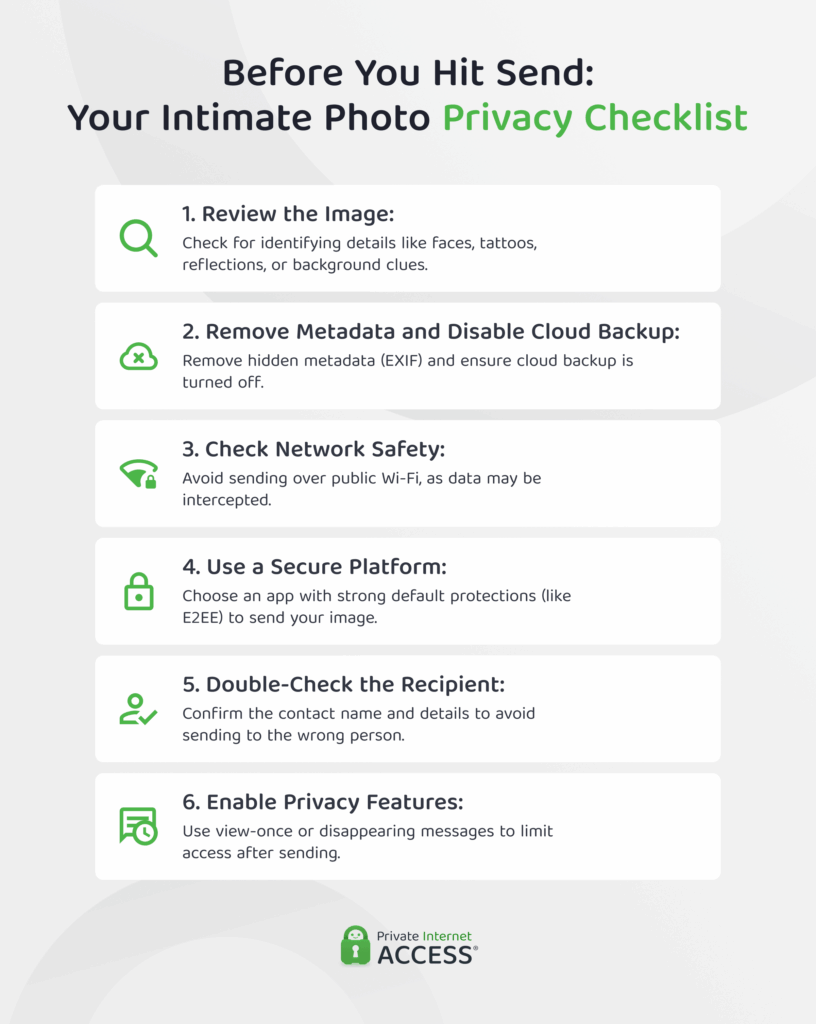
If you choose to send intimate content, taking the following precautions may lower the risk of it being exposed or traced back to you. It’s important that you prepare both your phone and your picture so that no information is accidentally shared or stored without your knowledge.
Below you’ll find an easy step-by-step guide on how to do this.
Prepare Your Phone Before Taking a Picture
Before taking an intimate photo, it’s important to configure your phone so that you’re in full control of how it’s stored. Here is what you can do.
Disable Automatic Cloud Backup
To prevent intimate images from being stored online, it’s best to turn automatic cloud backup off before taking the photo.
To turn off photo backup on Google Photos:
- Open the Google Photos app on your device
- Tap your profile picture at the top-right corner
- Select Photos settings.
- Go to Backup & sync.
- Toggle off Backup & sync.
To turn off photo backup on iCloud:
- Open the Settings app on your iPhone or iPad.
- Select iCloud.
- Under Saved to iCloud, select Photos.
- Toggle off Sync this iPhone.
On both Android and iOS, disabling cloud backup prevents new photos from being uploaded, but any existing images already in the cloud remain and must be deleted manually.
Remember to also disable automatic cloud backup for images received or sent in chats. Most messaging apps allow you to do this easily in their settings.
For example, here’s how you can disable automatic backups of photos sent or received through WhatsApp:
- Open WhatsApp.
- Tap Settings.
- Go to Chats.
- Tap Chat Backup.
- Tap Auto Backup.
- Select Off.
Store Images in a Hidden or Encrypted Folder
To reduce the risk of your intimate photos being accidentally exposed, it’s advisable to keep them off your main photo gallery. Both Android and iOS offer features like hidden or locked folders that can only be accessed using a PIN or biometric authentication.
To move a photo to the Hidden Folder on iPhone:
- Open the Photos app on your iPhone.
- Navigate to the photo or video you want to hide.
- Tap the Share button.
- Scroll down and select Hide.
- Confirm by tapping Hide Photo.
You can access the Hidden Folder via Albums > Utilities > Hidden. For added privacy, iOS 16 and later models allow you to tuck away the album so that it’s hidden from view and can only be accessed by typing “hidden” within the Photos app.
Keep in mind that photos in the Hidden album are still included in iCloud Photos if syncing is enabled, since Apple doesn’t allow excluding specific albums from cloud sync. If you want to ensure that photos in your Photos library are not stored in iCloud, you would need to turn off iCloud entirely.
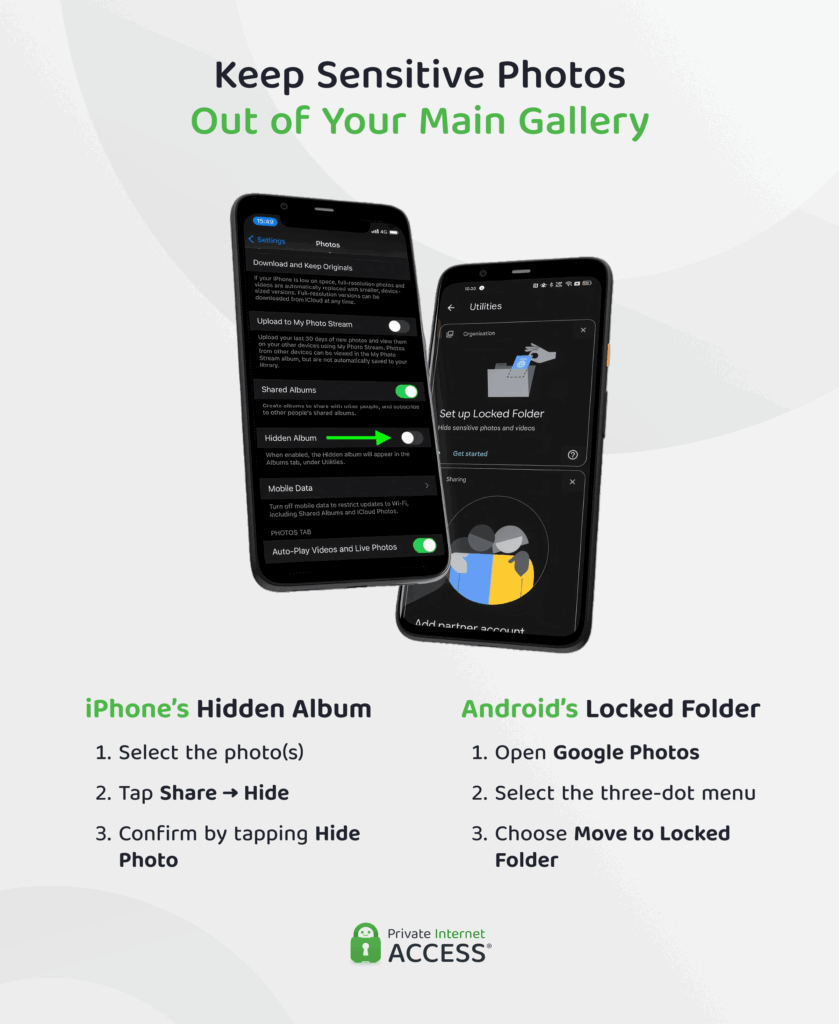
Android has a similar feature called Locked Folder. To move photos there:
- Open Google Photos.
- Select the photo(s) you want to secure.
- Tap the three-dot menu located on the top right.
- Choose Move to Locked Folder.
You can find the Locked Folder in the Google Photos app under Library (or Collections) > Utilities > Locked Folder.
By default, photos and videos in the Locked Folder are stored locally on your device and are not backed up to the cloud.
However, keep in mind that a standard hidden folder may only remove photos from the main view and not provide full encryption. For an extra layer of security, you can also use dedicated encryption apps. These often offer additional safety features like independent passwords, encrypted backups, and self-destructing files.
Make Your Picture Privacy-Friendly
If someone shares your intimate photo without your consent, there’s little to nothing you can do to stop them. With that said, identifiable details in the frame or metadata could make it easy for others (i.e., unintended recipients) to link it back to you.
Here’s what you can do to mitigate this.
Remove Identifiable Features From the Shot
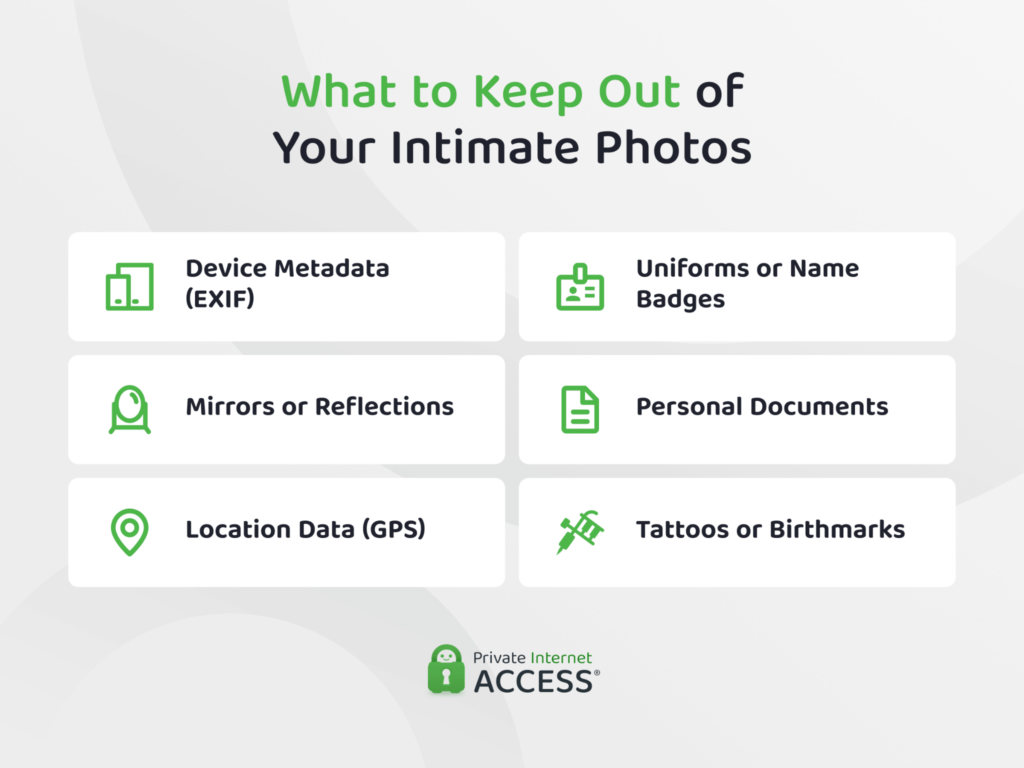
Identifiable features can include your face, any tattoos or birthmarks you may have, and even a uniform that can be associated with you. Leaving recognizable backgrounds and reflective surfaces (like mirrors or glasses) out of the picture is for the best, too.
If you’ve already taken a photo and you notice an identifiable feature in it, consider deleting it and taking a new one. If you’re reluctant to do this, you can try cropping or blurring the identifiable part.
However, keep in mind that specialized tools may sometimes restore blurred details, so cropping is generally the safer choice. This is especially true if the information displayed on the picture is highly sensitive, such as a full name or street address.
Alternatively, you can try using an inpainting tool to remove the identifiable detail from the picture and replace it with a matching background. There are several apps you can use, but choosing one that processes images locally on your device and doesn’t require an account can help protect your privacy.
Delete Metadata
Every photo you take contains EXIF data, including details such as your location, device type, and the time the photo was captured. This is information that can potentially be traced back to you.
To ensure your photo doesn’t contain location information, you could turn off location in your camera app.
On Android:
- Open your Camera app.
- Go to Settings.
- Look for Location tags, Save location, or Geo-tagging.
- Toggle it off.
On iOS:
- Open Settings.
- Go to Privacy & Security.
- Select Location Services.
- Tap Camera.
- Choose Never.
If you’ve already taken an intimate photo with location enabled, you can strip that data before sending. To remove location data from a photo on mobile devices, follow the steps below.
On Android:
- Open the image in Google Photos.
- Swipe up or tap the three-dot menu to view photo details.
- Tap the location information.
- Select Remove location or Edit location and remove it.
On iOS:
- Open the photo in the Gallery app.
- Swipe up on the image or tap the information icon.
- Tap Adjust next to the location section.
- Select No Location
You can also remove location data from a photo on desktop devices.
On Windows:
- Right-click the file.
- Select Properties.
- Open the Details tab.
- Click on Remove Properties and Personal Information.
On macOS:
- Open the image in Preview.
- Select Tools.
- Choose Show Inspector.
- Go to the GPS tab.
- Click on Remove Location Info.
Keep in mind that these steps only remove the location data from your device. To remove all EXIF data (including information such as the device model and the date and time the photo was taken), you may need to use a dedicated metadata-removal app before sharing the image.
When Sending Your Pictures
Once your pictures are ready, it’s important to consider which platform you should use to send them.
Important: The guidance in this section, and in this article more generally, assumes the exchange involves consenting adults and that there’s a reasonable level of trust between sender and recipient. These tips focus only on the technical aspects of sharing intimate content and cannot protect against someone who deliberately misuses images after receiving them.
Choose a Secure Channel to Send Your Picture
Options for sending pictures range from messaging and dating apps to social media and even wireless transfer methods. Each of these platforms have their own features that make it more or less suitable for sexting.
You can find a description of each of the features mentioned in this section (such as disappearing messages and end-to-end encryption) in the appendix at the end of this article.
Messaging Apps
These can offer a relatively high level of privacy for sexting. Most popular messaging apps today use end-to-end encryption, which theoretically ensures that only the sender and recipient can access the content shared. (Unless, of course, somebody grabs a hold of your device and goes through your conversations.)
In some apps (like Signal and WhatsApp), end-to-end encryption is enabled by default. This is the safest option as it requires no action on the user’s part. Other apps (like Telegram) may require users to enable it manually or restrict it to specific chat modes, such as one-to-one conversations.
Aside from end-to-end encryption (E2EE), there are also other features aimed toward protecting your privacy. Disappearing messages and view-once media, for instance, are designed to reduce how long content remains accessible to the recipient.
Most apps also have a “delete for everyone” function that allows users to remove messages after sending them, though some limit it to a certain time window. After that time window closes, deleting the message only removes it from your own chat, while the other person can still see it.
However, most messaging apps do not prevent screenshots or notify users when one is taken. This means that whoever you send your picture to could still capture it and keep it without your knowledge.
Dating Apps
Considering their primary function, dating apps may seem like the most suitable platform for sexting. However, from a cybersecurity perspective, they’re not necessarily the safest option for it.
None of the major dating apps offer end-to-end encryption for messages or media, meaning the platform itself can access all content shared.
Additionally, most major dating apps don’t provide fully private media storage, meaning that any photos you send are typically saved on the platform’s servers. As a result, the app may have access to this content, and, in many cases, you have limited ability to control or revoke access once it has been sent.
Research largely confirms that most dating apps are not the safest for sharing intimate content. For example, Mozilla’s Privacy Not Included report, which reviewed 25 popular dating apps, found that up to 88% failed to meet Mozilla’s minimum security requirements.5
The same research further found that over half of the analyzed dating apps had experienced a data breach in recent years, while 80% may share or sell user data for advertising purposes.
While most affected apps have since fixed the issue, this finding shows that dating apps can still have serious privacy vulnerabilities that are important to consider before using one for sexting.
Important: If you’ve only recently matched with someone on a dating app, think carefully before moving the conversation to another platform. Dating apps often provide reporting, blocking, and moderation features that can be useful when interacting with someone you don’t know well. Regardless of which app you choose to use for sexting, be extra careful about not including identifying details in intimate images you send to people you don’t know well.
Social Media Platforms
Social media platforms are generally not safe for sexting. Most do not provide end-to-end encryption by default, which means the provider can access messages and media.
Features like disappearing messages or view-once media offer some control, but recipients can still take screenshots. Some apps may notify you when a screenshot is taken, but this doesn’t always apply to all messages.
Even then, these notifications can often be bypassed using third-party apps or taking a photo of the screen with a second device.
Additionally, social media platforms typically collect extensive metadata and store content in the cloud, meaning sensitive images could still be exposed even if messages are deleted.
Device-To-Device Sharing
Device-to-device transfer methods such as AirDrop, Bluetooth, and Android Quick Share are generally more privacy-friendly than apps. This is because they send files directly between devices without passing through any cloud server or platform storage.
This significantly reduces many of the systemic risks associated with messaging, dating, or social media platforms. Transfers are also encrypted in transit, adding an additional layer of security while the file is being sent.
However, device-to-device sharing comes with a critical trade-off: once the transfer is complete, you lose all control over the file. There’s no option to delete, unsend, or revoke access. Images are saved directly to the recipient’s device, often automatically, and cannot be retrieved.
Note: If you ever use AirDrop for sexting, set it to “Contacts Only”. In “Everyone” mode, any nearby Apple device can send a file request. To configure this, go to Settings → General → AirDrop → Contacts Only.
Secure Accompanying NSFW Content
Sexting isn’t just about sharing intimate photos. It can also involve texts, voice notes, and videos intended to remain private. Like photos, these other formats can contain identifying details that could reveal your identity if they end up in the wrong hands.
For example, you could sext using words only, sending your partner suggestive or explicit messages with no accompanying visual. The lack of images may seem like a less risky alternative (and, in some ways, it is), but these messages can still be saved and shared without your consent.
In this case, you could implement some of the recommendations above to minimize the risks: choose a secure app for sexting and activate the “disappearing messages” feature (or “delete for all”) so that texts aren’t permanently stored in the chat.
If you use voice notes, keep in mind that background noises could give hints as to your location and identity, should the recording somehow end up exposed.
So, be mindful about the information you share and the noises that could be heard while you’re recording. Videos combine both visual and audio elements, which increases the chances of unintentionally revealing identifying information. To keep that risk to a minimum:
- Turn off automatic cloud backups to avoid unintended storage of sensitive videos.
- Review everything visible in the frame, including your face, body marks, surroundings, and reflections.
- Pay attention to audio as well as background conversations or sounds can reveal more than intended.
- Enable view-once or disappearing options before sending, if the app supports them.
After Sending Your Pictures
Once you’ve shared intimate content, you have very little control over it. However, there are still steps you can take, both right after sending and over time, to help manage what happens to it.
Important: This guidance assumes that you and the recipient have already agreed on key conditions, such as whether the content should be deleted after a certain time, who is allowed to view it, and whether any copies may be kept. If you haven’t done so yet, consider starting a conversation about it with the person you intend to sext with.
What If You Receive One in Return?
If you receive an intimate photo from someone else, it’s important to handle it with the same care and responsibility you would expect for your own intimate content. The same risks that could expose your own images also apply to content shared with you.
If you have permission to keep the image, here’s what you can do to prevent its accidental exposure:
- Avoid keeping the image in your main photo gallery; store it in a secure, encrypted folder or a trusted vault app instead.
- Make sure cloud backup is turned off for the location where the file is stored.
- Protect any accounts that could access the image with a strong, unique password and app-based two-factor authentication, if possible.
If you need to delete someone’s intimate image, simply pressing “delete” may not be enough. Here’s what to do to fully remove it from your device:
- Check your Recently Deleted or Trash folder and permanently remove the image.
- Make sure the media hasn’t been automatically saved by an app (such as WhatsApp or Messenger) to your camera roll, and delete any copies from the app’s media or downloads folders if available.
- Review your cloud backup to ensure the image has not been uploaded.
- Examine any third-party backup services you may be using and remove the image if it’s stored there.
Important: If someone sends you an intimate image of another person, it’s highly likely that the person depicted did not agree to it being shared. Do not forward or redistribute the image under any circumstances, as this can further violate the person’s privacy. Instead, delete the image promptly and report the sender using the platform’s abuse reporting tools.
If the image appears to involve a minor, take immediate action by reporting it to the platform and to the appropriate national authority, such as the CyberTipline operated by the National Center for Missing & Exploited Children (U.S.) or the Internet Watch Foundation (U.K.).
What If You Want to Revoke Access to Your Pictures?
If you no longer want someone to have access to the pictures you shared with them, there are things you can try to revoke their access.
- Ask Directly: Asking the recipient to delete the images is the first step in any consensual exchange.
- Delete the Message: Make sure you choose the delete for everyone option, as this removes the photo from both your device and the recipient’s device.
- Revoke Access to Shared Cloud Content: Removing permissions or disabling shared links (such as Google Drive or iCloud albums) prevents further access to the images.
However, keep in mind that none of these measures accounts for copies or screenshots the recipient may have already created. This only prevents future access. If the recipient has already downloaded, copied, or taken screenshots of the content, those versions will not be affected.
What to Do If Your Pictures Are Exposed
If you discover that intimate images of yourself are circulating online, there are steps you can take to have them removed and to pursue action against the person who shared them. Acting quickly is essential to limit further exposure and prevent the content from spreading.
Document the Exposure
Before taking any other action, it’s essential to document all evidence showing that the content was shared without your consent. This documentation forms the foundation for any next steps, including reporting to platforms and pursuing legal action.
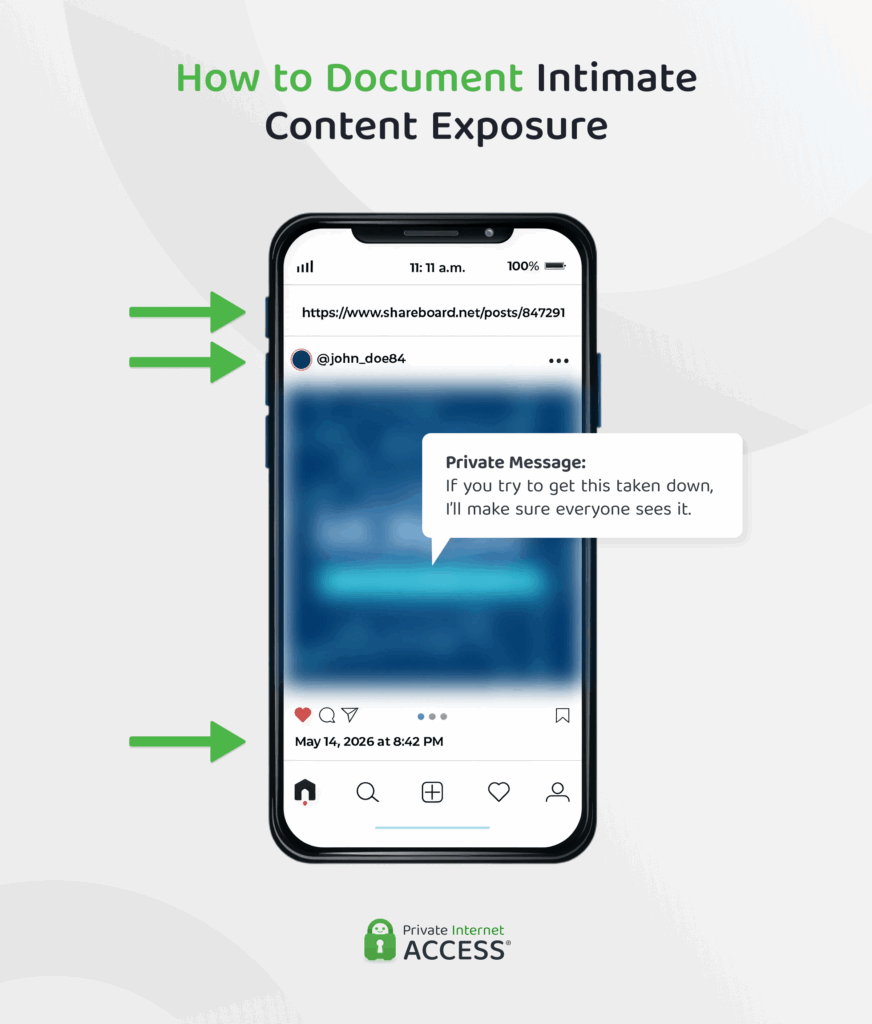
Document evidence by taking screenshots of the intimate content that has been shared online. The screenshots should contain:
- The URL of the website or the platform where the image appears
- The date and time it was posted
- The username, profile, or account information of the person who posted it
- Copies of relevant private or public messages, like texts, emails, or call logs, with the date and time each message was sent.
Request the Content to be Removed
Depending on the platform the content was shared on, there are different ways to request its removal.
Social Media Platforms
- Locate the content: Identify where the images or messages are posted online. Note the URL, profile, or account responsible.
- Use the platform’s reporting tools: Most platforms provide a way to report content that violates privacy or safety policies. Select the option most relevant to non-consensual or intimate content and follow any prompts.
- Provide supporting evidence: Include screenshots or copies of messages, showing the date, time, and source of the content. Clear documentation improves the chances that the report will be taken seriously.
- Submit the report and follow instructions: Some platforms may request additional information or verification before processing. Follow any instructions carefully.
When a report is submitted, the time it takes to be reviewed varies by platform, but typically ranges from 24 to 72 hours. Content that clearly violates rules is often removed, but removal isn’t guaranteed and may require additional evidence.
If the report is upheld, the content can be taken down, and the uploader may face warnings, account restrictions, or permanent bans depending on the platform’s policies.
Search Engines
If you find intimate photos of you appearing in search engine results, here is how you can remove both the content and its visibility in search.
- Identify where the image is hosted: Search engines like Google or Bing don’t usually host the content themselves, but index it. Click the result to find the website where the image is actually published.
- Request removal from the website: If possible, contact the website owner or use their reporting tools to request removal.
- Submit a removal request to the search engine: Even if the website doesn’t respond, you can ask search engines to remove the result. For example, Google allows you to request removal of explicit images through its “Remove explicit personal images” process.
Since September 2025, Google has also partnered with StopNCII.org to help detect and remove NCII from search results.6 Using StopNCII’s hashing technology, images that users have registered through the service can be identified and blocked from appearing in search results, even if they are re-uploaded elsewhere.
StopNCII.org can help you detect and remove content across multiple platforms at once. This service can be used both after content has been shared and as a precautionary preventative step to stop further distribution. It works by generating a unique digital fingerprint (called a hash) of your image directly on your device, meaning the image itself is never uploaded or shared.The hash is submitted to participating platforms, which use it to detect and block the image if someone tries to upload it, or to flag it for removal if it is already online. A single submission applies across all partner platforms simultaneously.
Dark Web
Content hosted on the dark web is significantly harder to address, as there’s often no central platform or operator you can contact to request removal.
If you believe your intimate images are being shared in these spaces, it’s important not to try to handle it on your own, as this may expose you to safety risks and compromise important evidence.
Instead, consider engaging a specialist in digital forensics or a lawyer experienced in NCII abuse cases. They may be able to trace distribution, preserve evidence, and advise on possible legal actions.
Consider Your Legal Options
NCII abuse is criminalized in many countries. While the laws differ in scope and enforcement, they offer victims legal protection that may help get the content removed and hold perpetrators accountable. Peruse the table below to see an overview of laws against NCII in selected jurisdictions.
Be Mindful While Sexting
These technical precautions can help lower the risk of your intimate content being exposed, but no method guarantees complete protection. If you choose to sext, it’s helpful to stay mindful of the main risks associated with it and carefully consider what you share, who you share it with, and which platforms you use.
Appendix: Feature Definitions
- Cloud Server Use: Indicates whether a file is transmitted through or routed via internet-based servers rather than sent directly between devices.
- Cross-Platform Compatibility: Indicates whether a feature works across different operating systems and device ecosystems (for example, Android and iOS).
- Delete for Everyone: A feature that allows the sender to remove a message or media from both their own chat and the recipient’s chat after it has been sent.
- Direct Saving to Device: Indicates whether a file is saved directly onto the recipient’s device storage upon receipt, rather than remaining only within the app.
- Disappearing Messages: Messages that automatically delete after a set period of time.
- Encryption in Transit: Indicates whether a file is protected using encryption while it is being transferred between devices.
- End-to-End Encryption (Default): A security feature where only the sender and recipient can access the content. The data is encrypted on the sender’s device and decrypted only on the recipient’s device. “Default” indicates it is enabled automatically.
- Metadata Collection: Indicates whether the service collects technical information about a transfer (such as time, device type, or connection details), rather than the content itself.
- Post-Transfer Retrieval: Indicates whether a sent file can be accessed, recovered, or withdrawn after it has already been sent.
- Private Media Album: A feature that allows users to store or share photos and videos in a restricted or locked space with controlled access.
- Proximity Requirement: Indicates whether devices must be physically near each other to complete a transfer.
- Screenshot Blocking: A feature that prevents users from taking screenshots or screen recordings of content within an app
- Screenshot Notification: A feature that notifies the sender when a recipient takes a screenshot or screen recording of content.
- Server-Side Storage: Indicates whether the file is stored on the service provider’s servers after being sent, even temporarily or as part of delivery.
- Unsolicited Nude Detection: A safety feature that detects and warns users about potentially explicit images they did not request, often blurring content before viewing.
- View-Once Media: Photos or videos that can only be viewed once before they disappear from the chat.
References:
- Revenge Porn Helpline Report 2025 – swgfl.org.uk
- Sextortion: Prevalence and correlates in 10 countries – sciencedirect.com
- Revenge Porn Helpline: Annual Report 2024 – swgfl.org.uk
- Characterizing the MrDeepFakes Sexual Deepfake Marketplace – arxiv.org
- Data-Hungry Dating Apps Are Worse Than Ever for Your Privacy – www.mozillafoundation.org
- Developing a new partnership to combat non-consensual intimate imagery on Search – blog.google
Feel free to use the data and images from this article. We’re all about open access. Just link back to this article so credit goes where it’s due.
