WAN Miniport: What It Is and How to Fix Driver Issues
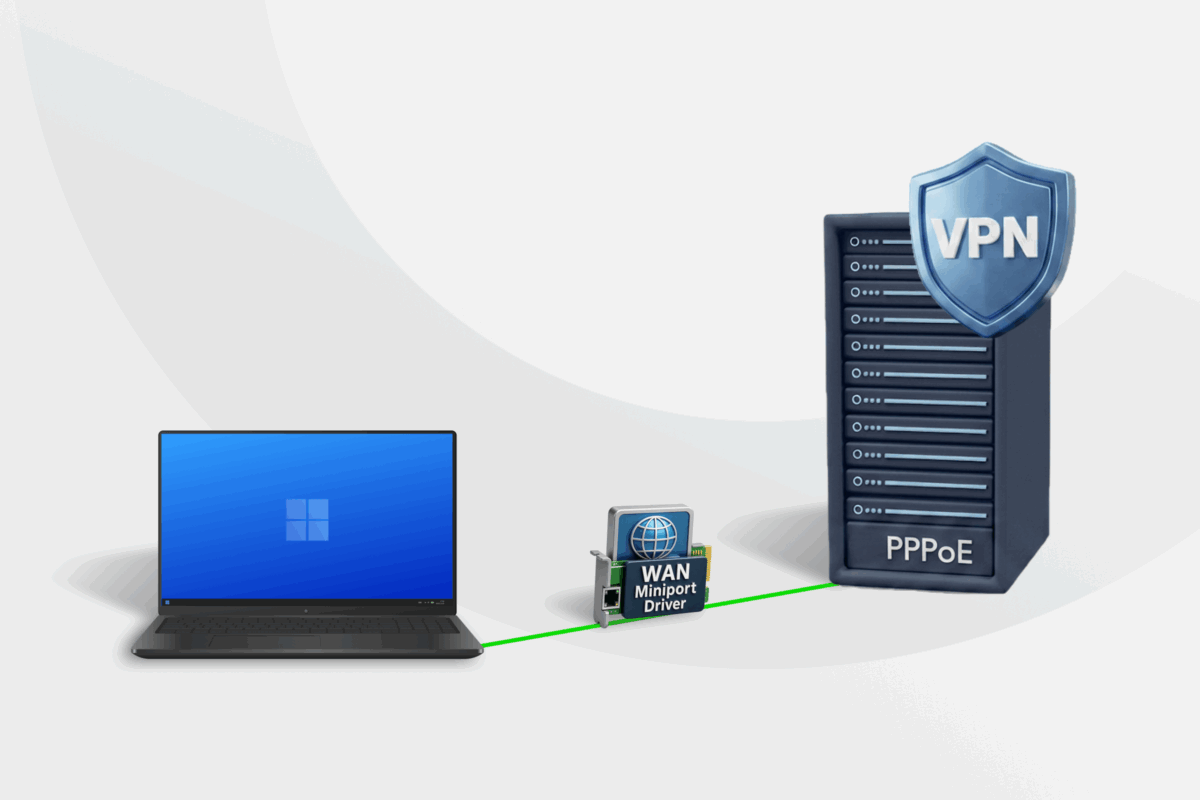
You might’ve noticed that multiple WAN Miniports suddenly appeared in your Device Manager settings. These built-in drivers usually don’t require manual configuration, but sometimes they can cause connection issues with VPNs or internet access.
This article explains what a WAN Miniport is and why Windows creates them. It also contains clear, step-by-step fixes for common miniport driver errors that can impact your network or VPN connectivity.
Table of Contents
What Is a WAN Miniport?How a WAN Miniport Works
WAN Miniport Protocol Types
WAN Miniports Uses
Fixing WAN Miniport Connection Issues
FAQs
What Is a WAN Miniport?
A Wide Area Network (WAN) Miniport (sometimes referred to as “mini WAN port”) is a virtual network driver, which is a piece of software built into Windows. It helps manage different types of connections.
A WAN is any network that connects computers over long distances. The internet is one example of a WAN connection.
Primarily, WAN Miniports provide pathways for Windows to run two specific connection types:
- Virtual Private Network (VPN) protocols: Rulebooks that tell your computer how to connect to a VPN server.
- Point-to-Point Protocol over Ethernet (PPPoE): An older Internet broadband standard that requires a username and password to connect.
Windows uses WAN Miniport drivers automatically when you set up a new VPN profile. These miniports exist so you don’t have to install drivers each time you set up a VPN or PPPoE connection.
You can find WAN Miniport entries in your Device Manager under Network Adapters. Usually, you don’t need to configure miniports unless the Device Manager shows missing or duplicated miniports (usually accompanied by a yellow warning symbol), which can disrupt your internet or VPN connection.
Here’s a summary:
| A WAN Miniport Is… | A WAN Miniport Is Not… |
| A Windows virtual driver (a small piece of software) | A physical network card (chip inside your computer) |
| The bridge Windows uses for VPN and PPPoE protocols | A standalone app you can open or run |
| Reused across multiple connections | Duplicated each time you add a VPN |
| Something you should reinstall only if corrupted or missing | Something to casually delete from the Device Manager |
How a WAN Miniport Works
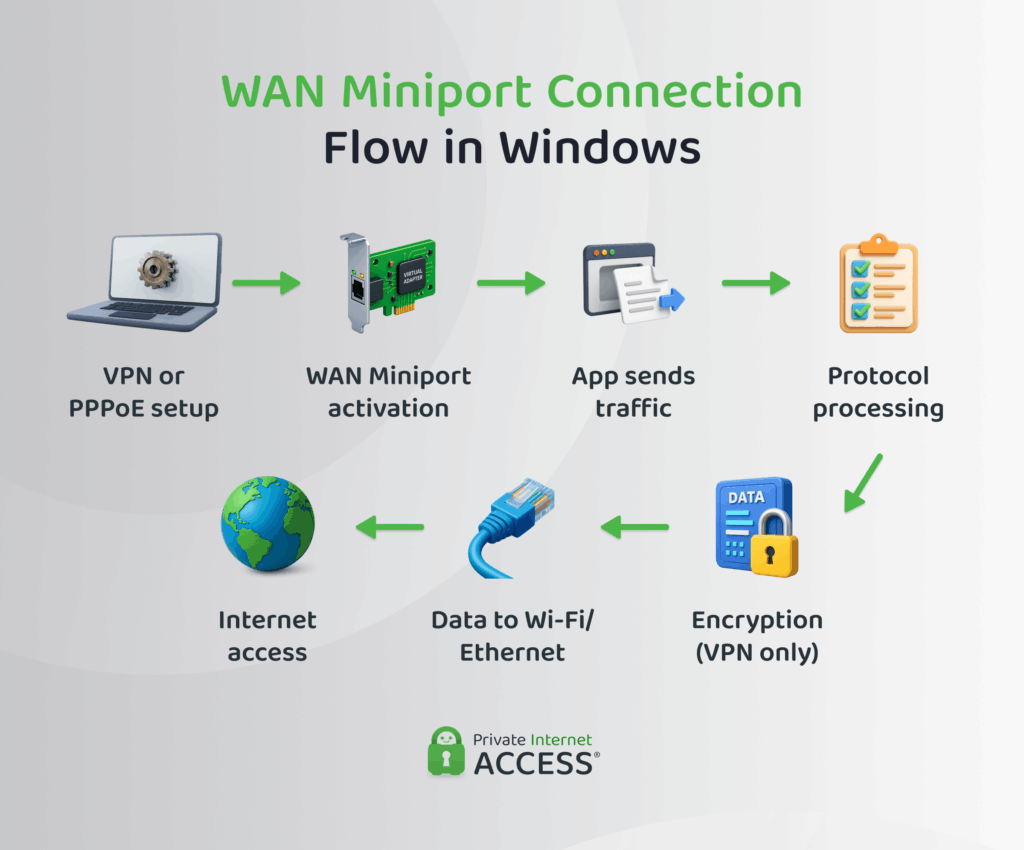
The following process happens in the background when you set up a VPN or a PPPoE connection on Windows:
- Connection setup: Windows creates a connection profile and stores the settings needed to establish the VPN or PPPoE connection.
- WAN Miniport activation: Windows assigns the correct WAN Miniport driver for the VPN protocol or a PPPoE connection.
- Connection established: The miniport works with the Windows networking stack to create a virtual network connection.
- Data transmission: Applications send data through the virtual connection rather than directly through the physical network adapter.
- Protocol processing: Windows applies the rules and encapsulation required by the selected VPN protocol or PPPoE connection.
- Security processing (VPN only): If you’re using a VPN, the VPN protocol encrypts your traffic before it leaves your device. PPPoE connections do not provide encryption on their own.
- Internet transmission: Windows sends the processed traffic through your computer’s Wi-Fi or Ethernet adapter, where it’s transmitted across the network.
WAN Miniport Driver Types
Windows uses two internal WAN Miniport driver models to run connections: NDISWAN and CoNDIS WAN. They control how different pieces of networking software and hardware talk to each other.
- Network Driver Interface Specification WAN (NDISWAN): This is the earlier model where VPN and PPPoE data move without security considerations. Modern Windows keeps this driver type for compatibility with older software, but it’s mostly deprecated due to safety risks1.
- Connection-Oriented NDIS WAN (CoNDIS WAN): This is a modern driver type that not only manages data packets but also tracks the connection state (when and how a session begins and who initiates it) and applies more consistent security rules.
You don’t interact with these driver types. Instead, you can see protocol entries in the Device Manager.
WAN Miniport Protocol Types
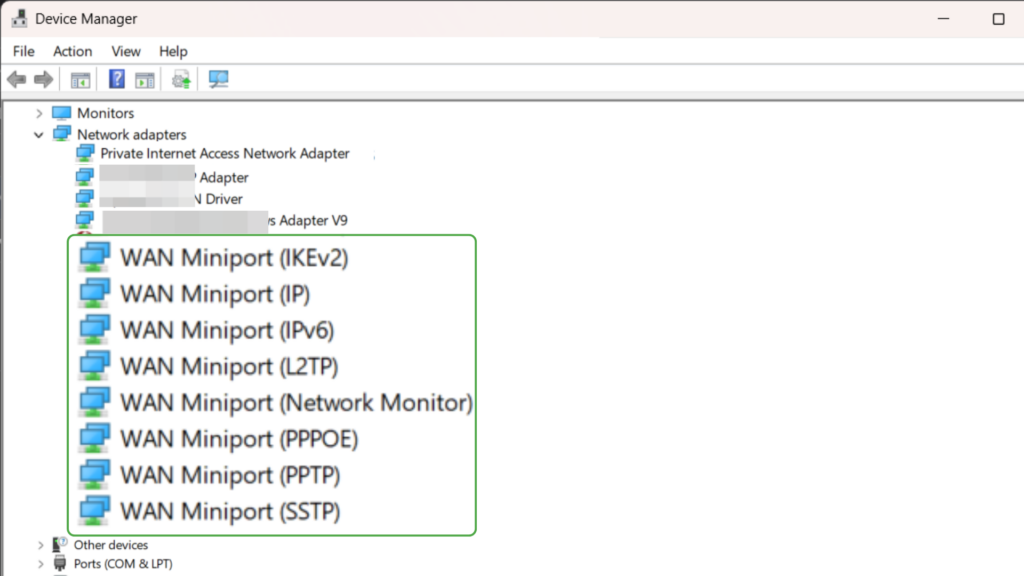
Common WAN Miniport protocols include:
- WAN Miniport IP: Provides support for IPv4, an addressing system with shorter numeric addresses (like 192.168.1.1) used to identify devices on a network or the internet.
- WAN Miniport IPv6: Provides support for IPv6, which uses longer addresses (like 2001:db8::1) to fix the shortage of IPv4 addresses.
- WAN Miniport PPPoE: Connects to ISPs that ask for a username and password before giving you internet access. Common on DSL lines, though less used today.
- WAN Miniport L2TP: Powers Layer 2 Tunneling Protocol VPNs. L2TP on its own does not encrypt data2, so it is almost always paired with IPsec for security.
- WAN Miniport IKEv2: Handles a secure protocol often used for mobile devices. It works with IPsec VPN connections.
- WAN Miniport PPTP: Supports an older Point-to-Point Tunneling VPN Protocol that’s fast but insecure by today’s standards.
- WAN Miniport SSTP: Sends VPN traffic using the TLS protocol on port 443 to run Secure Socket Tunneling VPN Protocol, often used on strict networks that restrict other VPN types.
WAN Miniports Uses
In Windows, WAN Miniports act as middlemen between WAN connections (VPN and PPPoE) and the internet. While you usually won’t notice them, they’re essential because they:
- Make VPN connections work: WAN Miniport creates the tunnel for a given VPN protocol. Without it, Windows cannot form the encrypted tunnel that masks your IP address and secures traffic via a VPN app.
- Sign in on PPPoE lines: PPPoE miniports set up the login session for older DSL internet that requires a username and password. They make sure to add your credentials to the Ethernet link so the connection can start.
- Separate multiple network connections: Miniports separate different types of connections to avoid conflicts between sessions. This allows you to run a PPPoE login and a VPN profile side by side on the same PC without one breaking the other.
- Help you troubleshoot: If a miniport driver is missing or corrupted, Windows shows a warning in the Device Manager. This signals that the specific protocol method (such as IKEv2 VPN) is broken at the system level and needs repair.
Fixing WAN Miniport Connection Issues
Problems with the WAN Miniport can happen due to driver issues, broken system files, incorrect setup, or malware. Luckily, these issues are usually easy to fix and don’t take much effort.
1. Manually Update the WAN Miniport Driver
Problem: Old or corrupted miniport drivers can stop a VPN from starting a session or a PPPoE login from working.
Solution: Try updating the drivers.
- Open Device Manager (or press Windows + R and enter
devmgmt.msc). - On the menu bar, click View and select Show hidden devices.
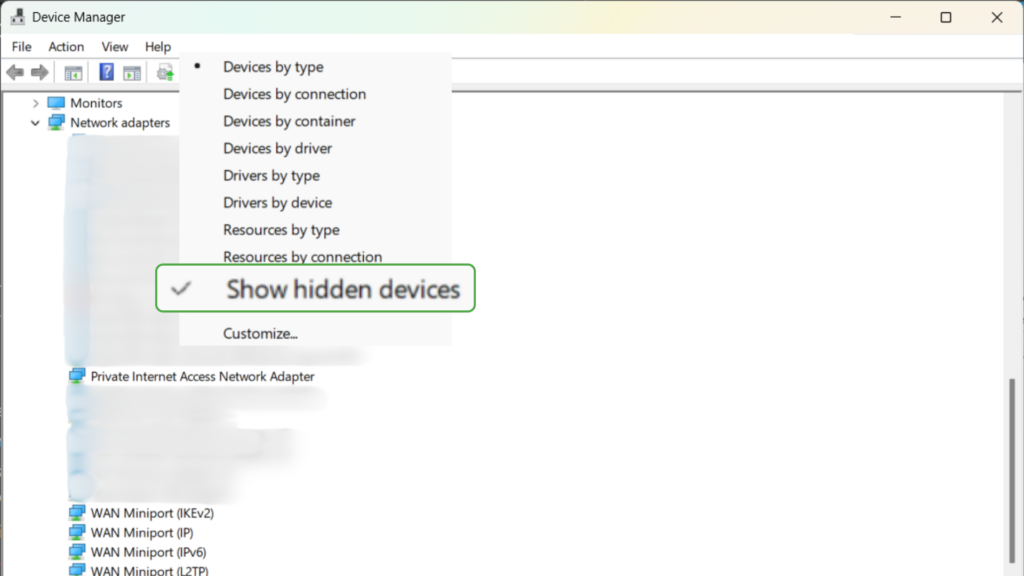
- Expand Network adapters, find the correct WAN Miniport (usually the entry with the issue), and select Update driver.
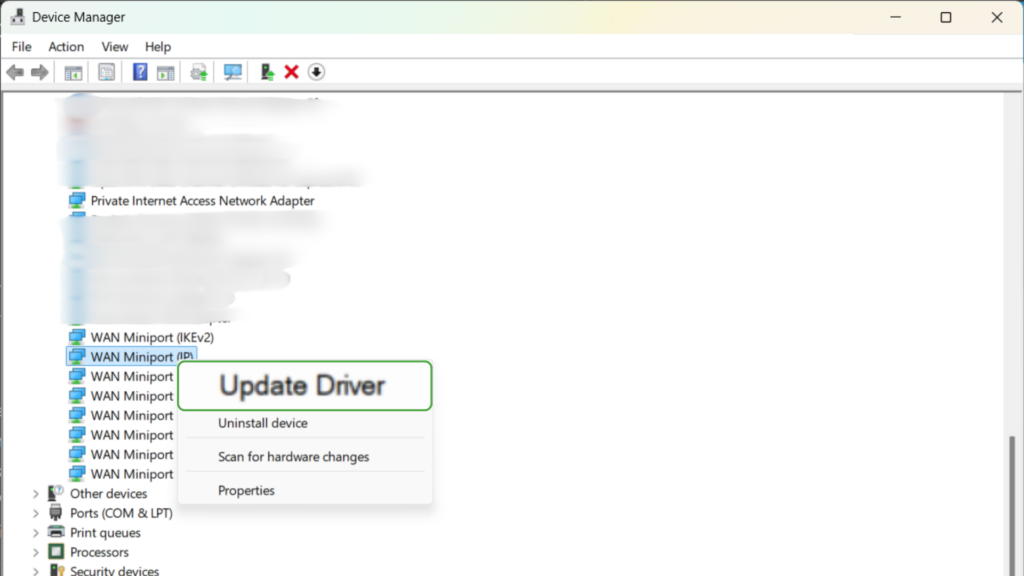
- Select Search automatically for drivers to let the system check locally and online.
- Restart your PC to test the VPN connection.
Alternatively, you can update the WAN Miniport driver via trusted driver updating software.
2. Repair System Files
Problem: Damaged core Windows files may be the reason you don’t see WAN Miniports or have too many duplicate drivers in the Device Manager. This often happens after system changes, including Windows crashes, a failed VPN install, or other network misconfigurations3.
Solution: Use Windows’ built-in repair tools (SFC and DISM) that verify and replace damaged files with “healthy” versions.
- Open the Start menu, type
cmd, right-click on Command Prompt, and select Run as administrator.
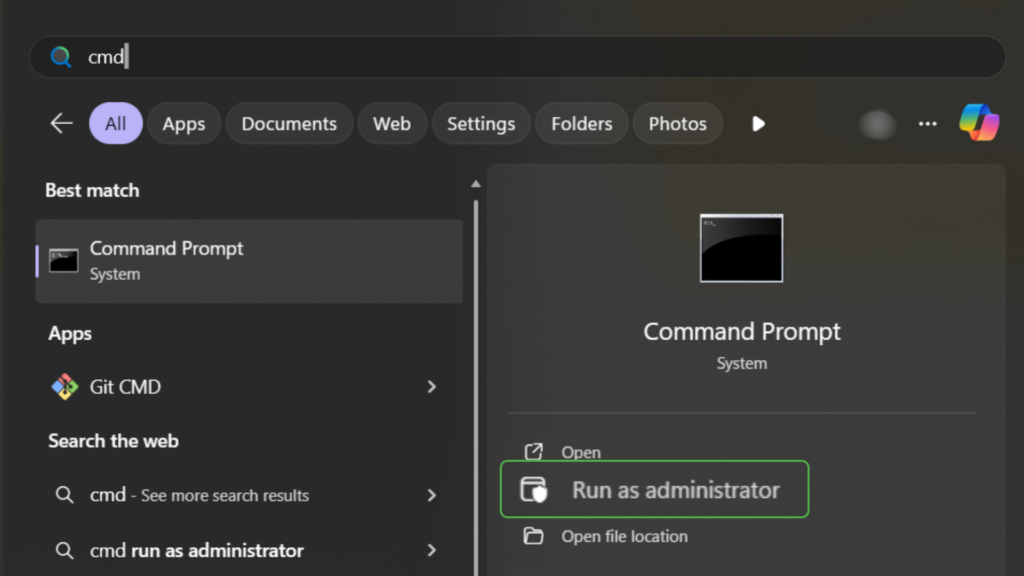
- Run the command
sfc/scannowand press Enter to scan protected Windows files and replace corrupted or missing components with clean versions.
- Enter these commands one at a time to reset networking:
- Run
netsh winsock resetto reset the Winsock catalog, which manages some network communication in Windows. This fixes issues caused by broken or malicious network configurations. - Run netsh int ip reset to rewrite the TCP/IP stack (rules that tell Windows how to send and receive internet data) to default settings, possibly fixing internet problems with WAN Miniports. Reboot your device to ensure the changes take effect.
- Enter these DISM commands in the same elevated window, one at a time:
- Run
DISM /Online /Cleanup-Image /CheckHealthto check if Windows has already flagged the system image as damaged. - Run
DISM /Online /Cleanup-Image /ScanHealthfor a deeper check of image files. - Run
DISM /Online /Cleanup-Image /RestoreHealthto replace corrupted files with healthy ones.
- Restart the PC to confirm if the WAN Miniports load and work in the Device Manager.
3. Reinstall WAN Miniports Manually
Problem: A WAN Miniport may vanish completely or show a Code 28 or Code 31 error, meaning Windows can’t find the correct driver.
Solution: Add the miniport from Windows’ list of Microsoft adapters.
- In Device Manager, select Network Adapters, open the Action menu, and select Add legacy hardware.
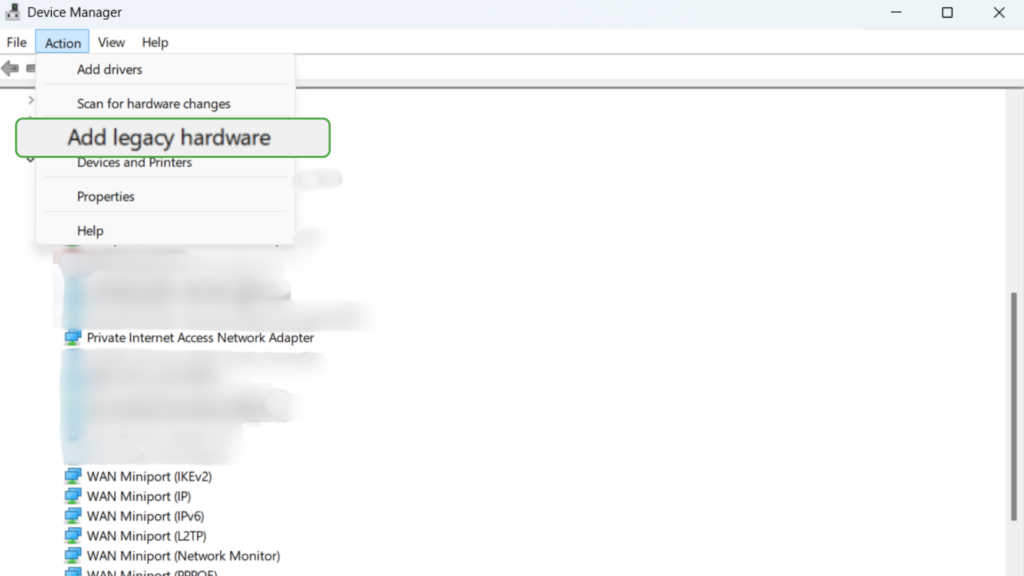
- In the Add Hardware window that appears, select Install the hardware that I manually select from a list.
- Under Common hardware types, click Network adapters.
- Choose Microsoft as the manufacturer and select Microsoft KM-TEST Loopback Adapter.
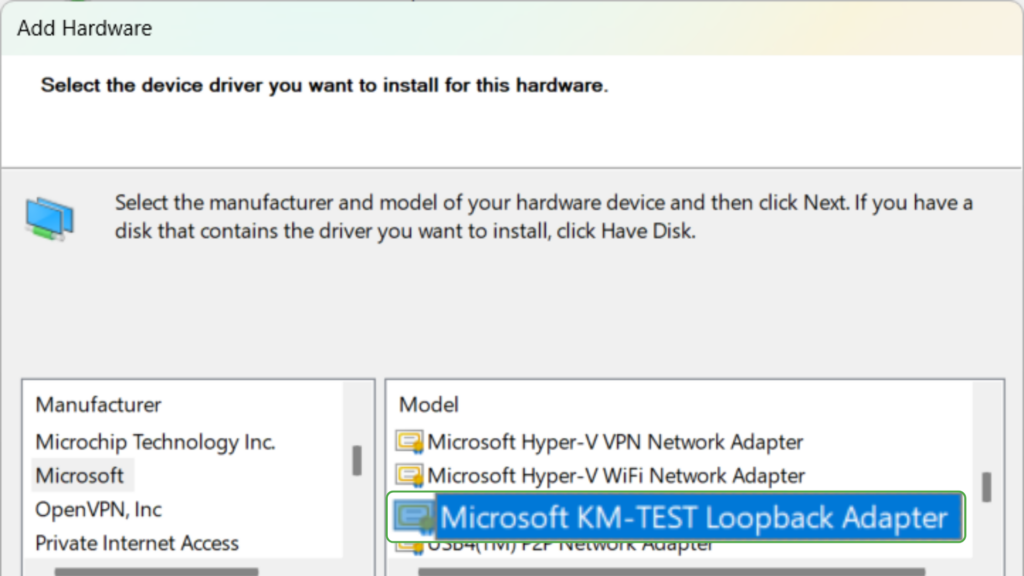
- Restart the PC.
4. Check for Malware
Problem: Malicious software can damage system files responsible for the correct working of the WAN Miniports. This causes them to create duplicates, fail to load, or create connection failures.
Solution: Run a full scan with Windows Security or a trusted antivirus product. For example, PIA’s Antivirus can find and delete malware and isolate and block suspicious file downloads. It also notifies you about dangerous links and websites, so you can avoid potential dangers.
FAQs
What is “WAN Miniport”?
A WAN Miniport is a virtual network driver. It’s basically a small bit of software that allows Windows to use certain networking and VPN protocols. Windows generates these software drivers when you create a new encrypted connection.
What is the purpose of a WAN Miniport on Windows?
WAN Miniports have several functions, but they mainly provide a pathway for VPN protocols. Additionally, they support PPPoE logins (for ISPs that require a login and password on Ethernet connections) and use separate protocols to avoid networking conflicts.
What is a WAN Miniport driver?
A WAN Miniport driver is the built-in Windows software that powers a miniport entry for a VPN or PPPoE protocol. These drivers appear in the Device Manager for each VPN protocol under names similar to “WAN Miniport IP” or “WAN Miniport PPPoE.”
How does a WAN Miniport work in networking?
A WAN Miniport works as a middleman between your actual network card and a VPN app or a PPPoE connection. When you connect to a VPN, Windows routes the traffic through the correct miniport driver, which then applies encryption to the traffic. For PPPoE, it packages your login details so your ISP can authenticate your internet session.
What is the difference between a WAN Miniport and a regular network adapter?
A WAN Miniport is a software-based adapter used to run protocols, while a network adapter is physical hardware inside your computer. The miniports only enable VPN and PPPoE connections, but they don’t replace your Ethernet or Wi-Fi cards.
Do VPN connections use WAN Miniports?
Yes, every VPN protocol built into Windows relies on a WAN Miniport. Protocols like IKEv2, L2TP over IPsec, and SSTP cannot work without them. Your VPN app interacts with these drivers in the background to connect to a secure server via the internet.
How can I fix VPN issues related to WAN Miniport drivers?
To troubleshoot WAN Miniport issues, update (or reinstall) miniport drivers, install Windows updates, run SFC and DISM to restore damaged files, and reset networking with netsh commands. You can also add drivers using the Add legacy hardware option. Finally, run a full malware scan of your Windows PC to clear up any issues.
Why do WAN Miniports appear in the Device Manager?
If you’re seeing WAN Miniports in Windows Device Manager, it’s because your computer uses them to help manage VPN and PPPoE connections. When you first set up a connection, Windows automatically adds a corresponding WAN Miniport to your system.
References:
