What Is Bluejacking? How It Works and How to Spot It
Did you see an odd message pop up on your phone over Bluetooth and wondered if you’ve been hacked? You’re not alone. Bluejacking has confused and startled phone users since the early 2000s, and it’s often mixed up with far more serious Bluetooth attacks.
This article explains what bluejacking actually is, how it differs from other Bluetooth threats, whether it still matters on modern phones, and what to do if it happens to you.
Bluejacking Explained
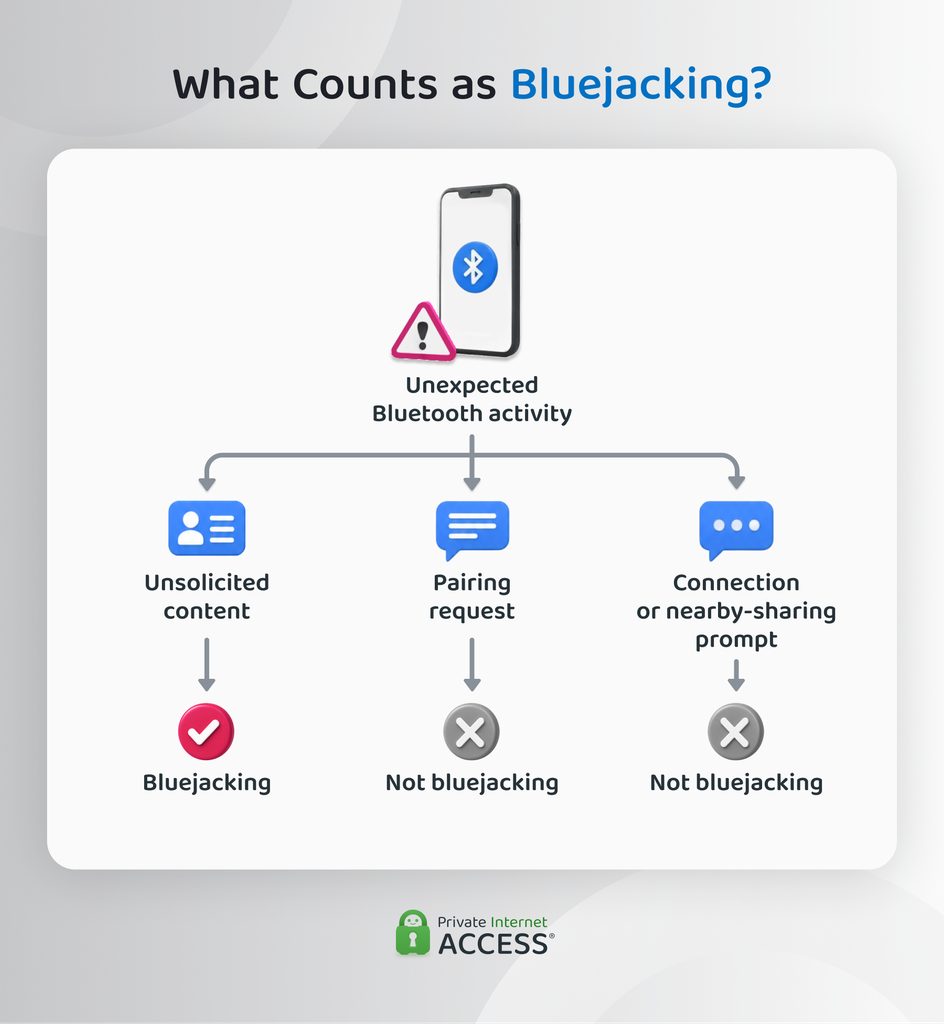
Bluejacking happens when someone sends unsolicited content to your device over Bluetooth. It’s not common anymore, but a classic technique in the past often involved sending a digital contact card, called a vCard, with a message added to one of its text fields.1
Bluejacking is a low-level prank rather than a hack. Attackers often use it for harmless mischief, anonymous advertising in public spaces, or social proof of concept to demonstrate Bluetooth proximity vulnerabilities. The primary goal is to startle the recipient or force them to look at an unexpected screen notification.
Because the attack relies entirely on forcing an incoming connection prompt to display custom text, it can’t steal data, install malware, or grant remote control over the target phone. Think of it as unwanted Bluetooth communication rather than a device takeover, and don’t treat the term as a catch-all for every type of unexpected Bluetooth activity.
Bluejacking vs. Bluesnarfing vs. Bluebugging: What’s the Difference?
The difference between bluejacking and bluesnarfing is what happens to your data. With bluejacking, someone sends unsolicited content to your Bluetooth device. When someone accesses information already stored on your device without your permission, it’s called bluesnarfing. Bluebugging is different from both. It involves gaining unauthorized control over certain device functions.
The three terms aren’t interchangeable because they describe separate capabilities. Here’s a quick comparison table:
| Risk | Bluejacking | Bluesnarfing | Bluebugging |
| Can someone send content to you | ✅ | ❌ | ❌ |
| Can someone retrieve data stored on your device | ❌ | ✅ | Potentially, if the level of control allows it |
| Can someone control device functions | ❌ | ❌ | ✅ |
| Information flow | It moves toward your device | It’s taken from your device | It may move in either direction, depending on the action |
How Does a Bluejacking Attack Work?
Bluejacking typically involves the following stages:
- The sender comes within Bluetooth range of your device: Bluejacking relies on a local Bluetooth connection, meaning the content doesn’t travel over the internet.
- Your device becomes reachable: Depending on its Bluetooth settings and capabilities, another nearby device may detect it as a potential recipient.
- The sender pushes an object toward your device: Classic bluejacking commonly used Bluetooth object-transfer features to send something such as a digital contact card containing a message.
- Your device presents the incoming content or transfer request: At this point, you may see the unsolicited object or a transfer prompt.
How Does a Bluejacking Message Reach Another Device?
Once the sender can reach a compatible device, classic bluejacking relies on Bluetooth’s Object Push Profile (OPP) for the transfer. A Bluetooth profile is a set of rules that tells compatible devices how to perform a particular task. OPP defines how one device can push a supported object to another.
Underneath OPP is OBEX (Object Exchange), which handles the exchange of that object. Here, an “object” means structured data the receiving device knows how to interpret, rather than a message sent through a normal chat or texting service.
The vCard Payload Structure
Early Bluetooth phones already knew how to receive and display vCards, which is why they became associated with classic bluejacking. Instead of using a vCard only for contact details, a sender could place a short message inside one of the card’s text fields. The receiving phone would then treat it as a contact object carrying a message.
A common misconception is that bluejacking only works within 10 meters, a figure based on typical Class 2 Bluetooth radios, the most common type in phones. But Bluetooth range also depends on a combination of hardware, physical obstacles such as walls, and interference from other signals. Class 1 devices can reach up to 100 meters.2
Does Bluejacking Require Pairing?
Classic OPP-based bluejacking doesn’t require the sender to pair with your device.
Bluetooth pairing is a separate security process. It creates shared keys that the devices can use to establish a secure relationship. Bonding means saving those keys so the devices can reuse them for later connections. The Bluetooth Special Interest Group (SIG) – the global standards organization that oversees Bluetooth technology and specifications – treats pairing and bonding as distinct concepts.3
Here are the most common Bluetooth terms that people often treat as interchangeable:
| Bluetooth Term | What It Means |
| Paired | The devices have created shared security keys. |
| Discoverable | Another compatible device can find yours through Bluetooth discovery. |
| Connected | The devices currently have a Bluetooth connection for a particular service or task. |
| Bonded | The pairing process stores the keys so they can be used for later connections. |
Discovering or reaching another Bluetooth device doesn’t mean the two devices have formed a trusted relationship. This is why by itself, an unexpected pairing request isn’t evidence of bluejacking.
Is Bluejacking Dangerous?
Classic bluejacking usually has a limited direct impact because the immediate effect is the unwanted content itself, which could be offensive material or, if repeated, a form of harassment.
There’s also a separate social-engineering risk. A bluejacked message could contain a deceptive link designed to get you to visit a malicious site. But receiving the message alone doesn’t steal your credentials, expose files, or compromise your phone.
Further harm would require someone to exploit a separate security flaw. The same goes for malware: a bluejacked object doesn’t automatically install it because the object reaches your device.
How Can You Tell If You’ve Been Bluejacked?
Bluejacking usually leaves a visible sign because its purpose is to deliver something to your device. What appears on your screen can also tell you how far the transfer got.
- You see an unexpected transfer request: Someone tried to send you something, but this doesn’t mean you accepted or received the object.
- Unsolicited content appears on your device: If the object itself arrives or your phone displays it, the transfer has moved beyond the initial request.
If data is missing or your device is behaving unexpectedly, that points to a different Bluetooth security issue.
Does Bluejacking Still Work on Modern Phones?
Classic bluejacking doesn’t map neatly onto every modern smartphone. To understand why, it helps to look at how Bluetooth technology evolved and how current nearby-sharing systems handle incoming content.
Why Is Classic Bluejacking Less Common Today?
Classic bluejacking grew out of an earlier generation of Bluetooth phones that supported OPP-based object transfers. Sending a contact card over Bluetooth was a normal way for devices to exchange information, which also gave bluejacking a convenient way to deliver an unwanted message.
Current smartphones handle nearby sharing in different ways. Rather than relying only on a generic Bluetooth object-push workflow, iOS and Android base nearby file sharing around platform-specific services with clearer controls over when your phone is available to other people.
That changes an important part of the bluejacking model. A nearby device being within Bluetooth range no longer tells you much on its own about whether it can send content to a current phone. The receiving system also has to allow that type of interaction.
This doesn’t mean modern smartphones are immune to unwanted nearby communication. It means the original technique no longer applies the same way to every current phone.
How Do Modern Phones Handle Nearby Sharing?
On Apple devices, AirDrop gives the recipient control over who can reach them. Current iPhones can restrict AirDrop to contacts or temporarily allow all connections for 10 minutes.4 When someone sends content through the normal AirDrop flow, the system asks the recipient to accept or decline.
AirDrop also differs technically from classic Bluetooth object pushing. For instance, AirDrop uses Bluetooth Low Energy to discover nearby devices, then uses its peer-to-peer Wi-Fi technology for the connection that carries the data.
Android uses Quick Share, which makes a phone in Receive mode visible to nearby devices. When someone tries to send content, the recipient can see the sender’s identity and what they want to send, with an option to accept or decline.5 Google also provides visibility options that limit who can share with the device.6
The difference is easier to see side by side:
| Classic OPP-based Bluejacking | Modern Nearby Sharing |
| The receiving device must support the relevant Bluetooth object-push behavior | Both devices must support the relevant platform sharing system |
| Being within Bluetooth range can make the target reachable for the relevant transfer | Physical proximity alone doesn’t mean the recipient is available to receive content |
| Bluejacking describes this older unsolicited object-push technique | AirDrop and Quick Share are separate nearby-sharing systems, not types of bluejacking |
How to Prevent Bluejacking
You don’t have to stop using Bluetooth to reduce unwanted transfers. A few basic settings and security habits can make your device much harder for an unknown nearby sender to reach.
- Turn off nearby receiving when you don’t need it: If your phone lets you disable incoming nearby sharing separately, leave it off until you’re ready to receive something. If you temporarily enable receiving to everyone nearby, turn it off once you complete the transfer.
- Limit who can send content to you: When you enable nearby sharing, use a restricted option such as known contacts or your own devices instead of leaving your phone available to everyone nearby.
- Only accept transfers you expect: Check that you recognize the sender and were expecting the content before approving it. If either is unclear, decline the request.
- Don’t interact with unsolicited content: If unwanted content reaches your device, close it rather than opening unknown files or following links inside the message to prevent malware.
Can a VPN Protect You From Bluejacking?
No, a VPN can’t prevent bluejacking because bluejacking happens between nearby devices over Bluetooth. A VPN protects supported internet traffic by sending it through an encrypted VPN tunnel. Local Bluetooth transfers never pass through that tunnel.
That means a VPN can’t change whether your device is discoverable over Bluetooth, control permissions for nearby sharing, or stop another nearby device from trying to send you content. However, a VPN can help in other ways. It adds a layer of protection to your internet traffic and limits the risks of interception, tracking, and other online privacy concerns.
FAQ
How can you prevent bluejacking?
You can reduce bluejacking by limiting when your device is available to receive content from unknown nearby devices. Current sharing systems such as AirDrop for iPhone and Quick Share for Android let you restrict visibility or require you to approve incoming transfers, though the exact controls vary by platform.
Is bluejacking illegal to do?
Bluejacking isn’t inherently illegal, but authorities in some jurisdictions may treat it as unauthorized communication or harassment depending on intent, content, and frequency. Even where sending an unsolicited Bluetooth message isn’t a specific offense, threatening messages or repeated unwanted contact may violate communications or harassment laws.
Does turning off Bluetooth stop bluejacking?
Yes. Turning Bluetooth off stops classic bluejacking because the phone can no longer receive the Bluetooth object transfer the technique relies on. This is different from leaving Bluetooth enabled while restricting who can send nearby content.
What is the purpose of bluejacking?
Bluejacking has no single purpose. It’s a way of sending unsolicited Bluetooth messages rather than a motive. Historically, senders used it for jokes or casual messages, but it has also served as a channel for promotional content.
What phones are vulnerable to bluejacking?
Classic bluejacking can affect Bluetooth devices that support the relevant incoming object-transfer behavior, so there isn’t a reliable list of vulnerable phone brands or models. Older Bluetooth phones are most susceptible to the technique, while current iPhones and Android phones use different nearby-sharing controls and approval flows.
References:
