How to Spot and Avoid Coinbase Email Scams
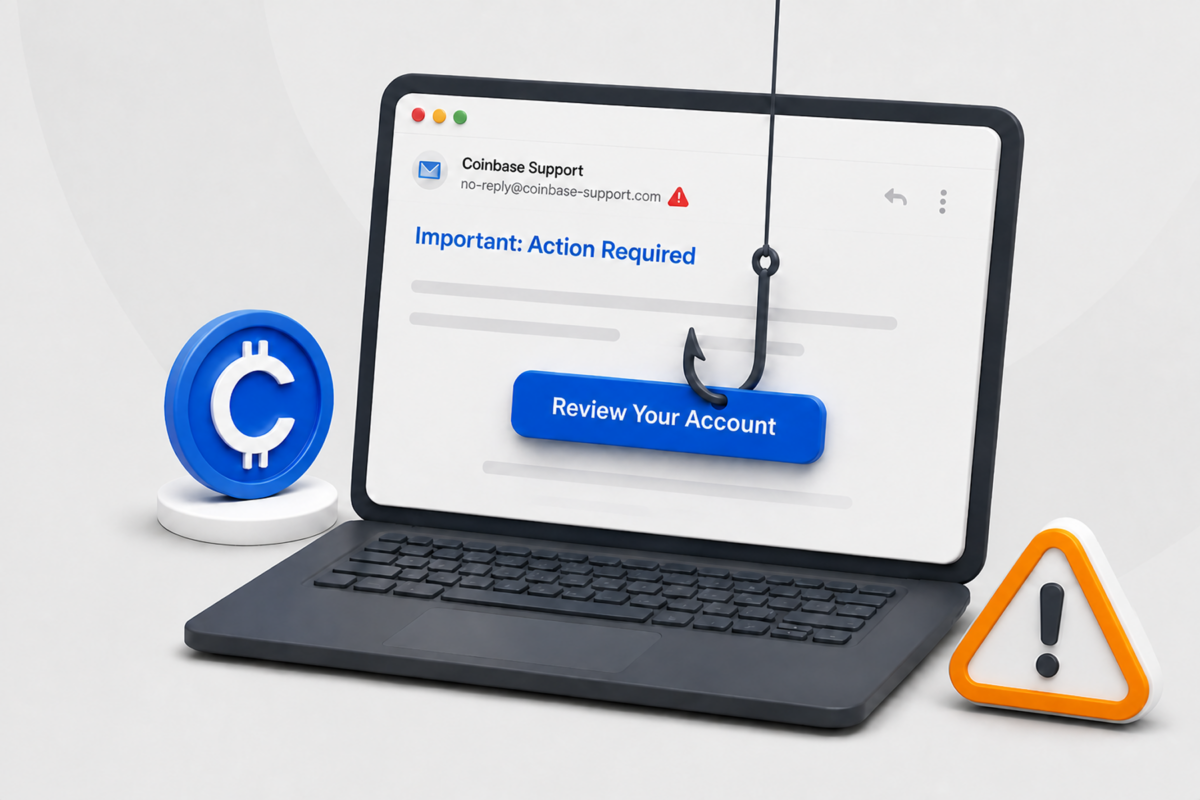
Got an email from “Coinbase” about a login, withdrawal, or security change you don’t remember making? Not sure if it’s real, or worried a scammer’s already inside your account?
This guide explains how to identify Coinbase scam emails, verify suspicious messages safely, and protect your account if you clicked a link or shared information.
What Is a Coinbase Email Scam?
A Coinbase email scam is a phishing attempt that pushes you into an action that benefits the scammer.
Scammers copy legitimate Coinbase emails about account activity, device confirmations, security updates, and transactions to appear trustworthy. But, unlike the real emails, scam emails may direct you to a fake login page, ask you to share a verification code, provide a fraudulent support number, or tell you to transfer crypto to another wallet.
The email is usually only the first stage of the scam. Once you click a link or call the supplied number, the attacker uses urgency, authority, and fear to discourage you from checking the claim independently.
Official branding, polished design, or a Coinbase display name doesn’t prove an email is genuine. Attackers can copy templates and spoof sender information, and even a message containing your name, phone number, or account balance could be fraudulent.
How to Tell If a Coinbase Email Is Real
Rely on more than one clue. A correct-looking sender address is useful, but attackers can spoof the From field, so it shouldn’t be your only test.
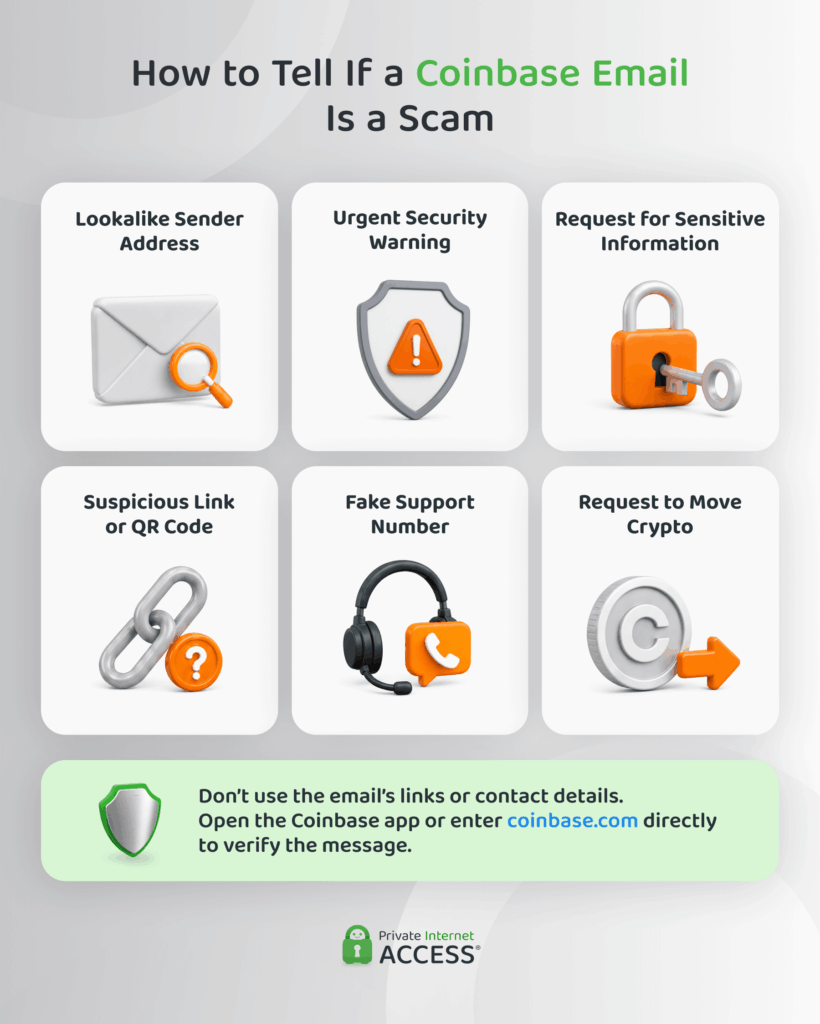
Check the Complete Sender Address
Expand the sender details instead of trusting a display name such as “Coinbase Support.” According to Coinbase, legitimate messages only come from coinbase.com or one of its verified subdomains,1 including:
- coinbase.com
- mail.coinbase.com
- updates.coinbase.com
- info.coinbase.com
- cb.mail.coinbase.com
Check the end of the address carefully. Domains such as coinbase-security.com, coinbase.support-example.com, or co1nbase.com don’t belong to Coinbase. In the second example, “coinbase” is only a subdomain of support-example.com. In the third, the letter “i” has been replaced with the number “1.”
Check What the Message Asks You to Do
Scam emails usually ask you for information that Coinbase would never request. Scammers may also invent case numbers, claim there’s suspicious activity, or send links to fake “secure portals.”
Treat a message as a scam if it asks you to:
- Reveal a password, passkey, verification code, private key, or wallet recovery phrase
- Move crypto to a “safe,” “secure,” or “investigation” wallet
- Call a number in the email to stop a transaction
- Install software, a browser extension, or a remote-access tool
- Scan a QR code to verify or protect your account
- Continue the conversation on Telegram, WhatsApp, or another unofficial channel
Verify the Claim
Don’t click the email’s button, even if the destination appears legitimate when you hover over it. Open the official Coinbase app or enter coinbase.com yourself, then check your notifications, recent activity, active sessions, and confirmed devices.
If the account shows no matching alert or transaction, the email was likely a scare tactic. If you do see unexpected activity, lock the account and contact Coinbase through its Help Center.
Don’t Rely on Spelling Mistakes Alone
Typos, awkward grammar, and blurry logos are common phishing signs, but their absence proves nothing. Modern scam emails can copy legitimate templates and use polished language. Focus on the sender’s real domain, the requested action, the link destination, and what appears inside your account.
Common Coinbase Scam Emails
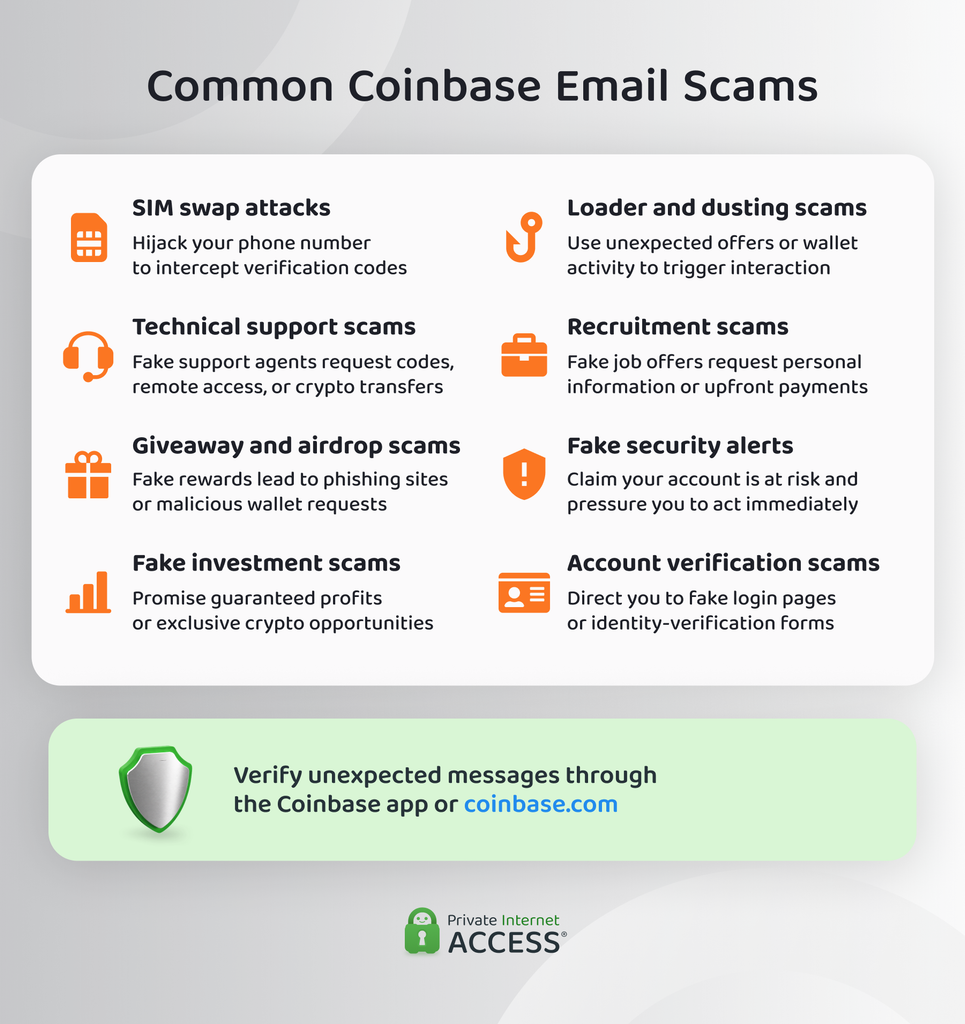
Recognizing the following schemes can help you spot a suspicious interaction before handing over information or funds.
SIM Swap Attacks
A SIM swap attack targets the phone number connected to your Coinbase account. The attacker uses stolen personal information and social engineering to convince your mobile provider to transfer your number to a SIM card or device they control.
This may allow the attacker to receive text messages and account recovery codes intended for you. Phishing can support the attack by helping the scammer collect the personal information needed to impersonate you. Using a passkey or security key instead of SMS authentication can help reduce this risk.
Technical Support Scams
Technical support scams begin with someone pretending to represent Coinbase. You may receive an email about suspicious account activity, followed by instructions to call a supplied phone number or contact a supposed support agent.
The scammer may ask for your verification code, tell you to install remote-access software, or claim that you must transfer your crypto to a secure wallet. Coinbase support won’t ask you to do any of these things.
Giveaway and Airdrop Scams
These scams advertise free cryptocurrency, promotional rewards, or limited-time airdrops using Coinbase branding. They often appear in emails and social media posts, sometimes with fake comments designed to make the offer look genuine.
To claim the reward, the scammer may send you to a fake website that requests your Coinbase login information or asks you to connect a wallet. Connecting a wallet or approving a malicious request could give the scammer access to your assets.
Fake Investment Opportunity Scams
Investment scams promise guaranteed profits, unusually high returns, or early access to an exclusive cryptocurrency opportunity. The attacker may claim the offer is available only to selected Coinbase customers and pressure you to act before it expires.
They use excitement and fear of missing out instead of warnings about account security. Be cautious of unsolicited investment offers, especially if someone pressures you to transfer crypto to an unfamiliar wallet.
Loader and Dusting Scams
A loader scam offers to use your Coinbase account to process transactions in exchange for a share of the proceeds. The attacker may request your login details or access to an account with high transaction limits. These schemes often involve stolen payment information, leaving the account owner responsible for unauthorized activity.
In a dusting scam, someone sends a very small amount of cryptocurrency or an unfamiliar token to your wallet. Some malicious tokens include names or transaction details designed to lead you to scam websites. Don’t visit links associated with unexpected wallet activity or interact with unfamiliar tokens without verifying them independently.
Employment and Recruitment Scams
Recruitment scams impersonate Coinbase hiring teams or partner companies. The emails may advertise remote positions, quick interviews, or urgent onboarding opportunities.
The scammer may request identity documents, account information, payments for equipment, or communication through an unofficial messaging service. Verify the position on Coinbase’s official careers website and confirm that the recruiter is using an authentic @coinbase.com address.
Fake Security Alert Emails
Fake security alerts claim that someone accessed your account, made a withdrawal, added a new device, or changed your password. The message then provides a link or phone number for “securing” the account.
These emails often copy Coinbase’s branding closely and use convincing security language. Check your account through the app or coinbase.com directly rather than following the email’s instructions.
Account Verification Scams
Verification scams claim that your Coinbase account requires additional identity confirmation because of a policy update, compliance review, or security concern. The email usually links to a fake login page or form that collects account credentials and personal information.
Any real verification requirement will show up inside your Coinbase account itself, not through a form linked from an unexpected email. Don’t submit information through a page reached from an unexpected email.
What to Do With a Suspicious Coinbase Email
If you haven’t interacted with the message:
- Don’t click links, scan QR codes, download attachments, reply, or call the listed number.
- Open Coinbase from your bookmark or official app and verify the message there.
- If anything looks wrong, lock the account and contact Coinbase through its official Help Center.
- Report the phishing attempt before deleting it.
- Mark the message as phishing or spam in your email service.
Blocking the sender may reduce messages from that address, but scammers frequently rotate addresses. Reporting the message gives your email provider more information to identify similar campaigns.
How to Report a Coinbase Phishing Email or Text
Email the report to [email protected]. Include the phishing site’s complete URL and the full email headers, not only a screenshot. Headers show the route the message took to reach you and can help investigators identify the sending infrastructure.
You can usually find headers using these options:
- Gmail: Open the message, select the three-dot menu, then choose Show original.
- Outlook: Open the message, select the three-dot menu, then look for View message source or View message details, depending on the version.
- Yahoo Mail: Open the message, select More, then choose View raw message.
Coinbase also recommends forwarding or copying the text to 7726 (SPAM) if your carrier supports the service.
What to Do If You Clicked a Coinbase Scam Link
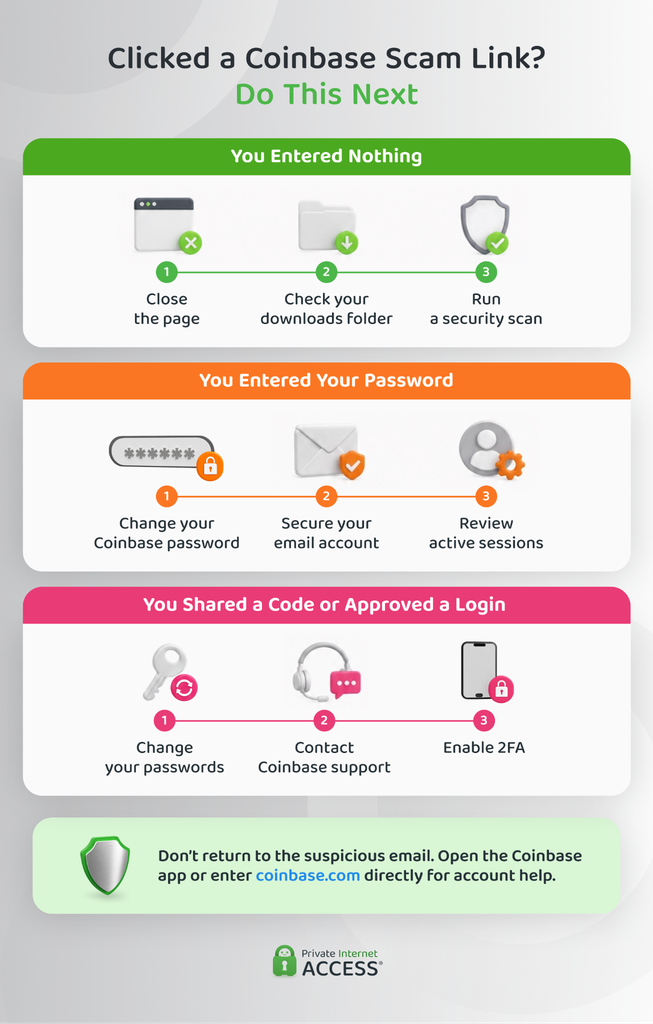
Clicking a link doesn’t automatically mean the scammer has your account. What happened next determines the risk.
You Only Opened the page
Close it without downloading anything or accepting browser notifications. Update your browser and operating system, then run a reputable security scan if the page downloaded a file, prompted an installation, or behaved unexpectedly. Check your downloads folder and remove any file you didn’t intend to save.
You Entered Your Password
Go directly to Coinbase and change the password immediately. Change the password on any other account where you reused it, beginning with your email account. Review Coinbase’s active sessions and confirmed devices, and revoke anything you don’t recognize.
You Shared a Verification Code or Approved a Login
Lock your Coinbase account, change the Coinbase and email passwords, and contact official support. Review your two-step verification settings and replace SMS authentication with a passkey or security key if available.
You Installed Software or Granted Remote Access
Disconnect the device from the internet and end the remote session. Uninstall the remote-access tool if you can do so safely, run an antivirus scan, and use a different trusted device to change important passwords. Check your email for new forwarding rules, recovery addresses, or authorized devices that you didn’t add.
You Revealed a Wallet Recovery Phrase or Sent Crypto
Assume the recovery phrase and wallet are compromised. Contact Coinbase through official channels and follow its guidance. Don’t send additional funds to anyone promising to recover the crypto, since recovery services are frequently another scam. Preserve transaction IDs, wallet addresses, emails, phone numbers, and screenshots for your reports.
How to Reduce the Risk of Coinbase Phishing
- Use a unique password: A password manager can create and store a different password for Coinbase and every other account.
- Secure your email account: Email is often used for password resets, so protect it with a unique password and strong multi-factor authentication.
- Use phishing-resistant authentication: Passkeys or security keys are harder to phish than SMS codes.
- Bookmark Coinbase: Use the bookmark or official app instead of links in emails, texts, ads, or search results.
- Review sessions and devices: Remove any entry you don’t recognize and investigate unexpected confirmation messages.
- Add carrier protection: A carrier PIN or port-out lock can make SIM-swap attempts harder.
- Keep software updated: Install security updates for your operating system, browser, email app, and Coinbase app.
- Slow down urgent decisions: Independently verify requests to share data, install software, approve a wallet connection, or move funds.
FAQ
How do I know if a Coinbase email is real?
Check the complete sender address against Coinbase’s verified domains and look at what the message asks you to do. Coinbase won’t ask for your password, two-step code, recovery phrase, or remote access. Verify any claim by opening the official app or typing coinbase.com into your browser rather than using the email’s links or phone number.
Why do I keep getting spam emails from Coinbase?
Your address may have appeared on a marketing list, in publicly available information, or in data from an unrelated breach. Receiving these emails doesn’t necessarily mean you have a Coinbase account or that someone compromised an existing one. Mark the messages as phishing, avoid using suspicious unsubscribe links, and check your email account for unfamiliar logins or forwarding rules.
I received a text message from Coinbase, is this a scam?
A text claiming to be from Coinbase may be a scam, particularly if you didn’t request a code or the message contains a link, phone number, security warning, or request for information. Never share a Coinbase verification code, even with someone claiming to represent support. Check your account through the official app and send a screenshot of any suspected phishing text to [email protected].
Where do I report Coinbase phishing email?
Forward the phishing email to [email protected]. Include the complete email headers and any phishing URL so Coinbase has the information needed to investigate it. For a phishing text, send Coinbase a screenshot and forward the message to 7726 (SPAM) if your carrier supports it.
Resources:
