Encrypted DNS Traffic: What It Is and How It Works

The Domain Name System (DNS) is how your device finds websites online, but by default, your internet service provider (ISP), network admins, and even others on the same network may be able to see those requests. Encrypted DNS addresses this exposure by adding a layer of privacy to everyday browsing.
In this article, we’ll clearly explain what encrypted DNS is, how it works, and its pros and cons. We’ll also help you understand and troubleshoot common issues.
What Is Encrypted DNS Traffic?
Encrypted DNS traffic is when DNS queries and responses are protected by encryption. Essentially, the data is scrambled so it’s far harder for anyone else on the network to read or interfere with.
To fully understand what this is, let’s quickly go over how DNS works.
DNS is responsible for converting human-friendly website names (like privateinternetaccess.com) into machine-readable IP addresses (like 203.0.113.40) that computers use to route traffic. Normally, your device sends DNS queries and gets responses in plain text.
This means anyone monitoring the network, like your ISP, network administrator, or public Wi-Fi operator, can see which websites you’re trying to visit. In a worst-case scenario, like if a malicious actor gains access to the network, they may be able to intercept and manipulate your DNS requests, sending you to fake websites designed to capture your passwords or payment details.
How Does DNS Encryption Work?
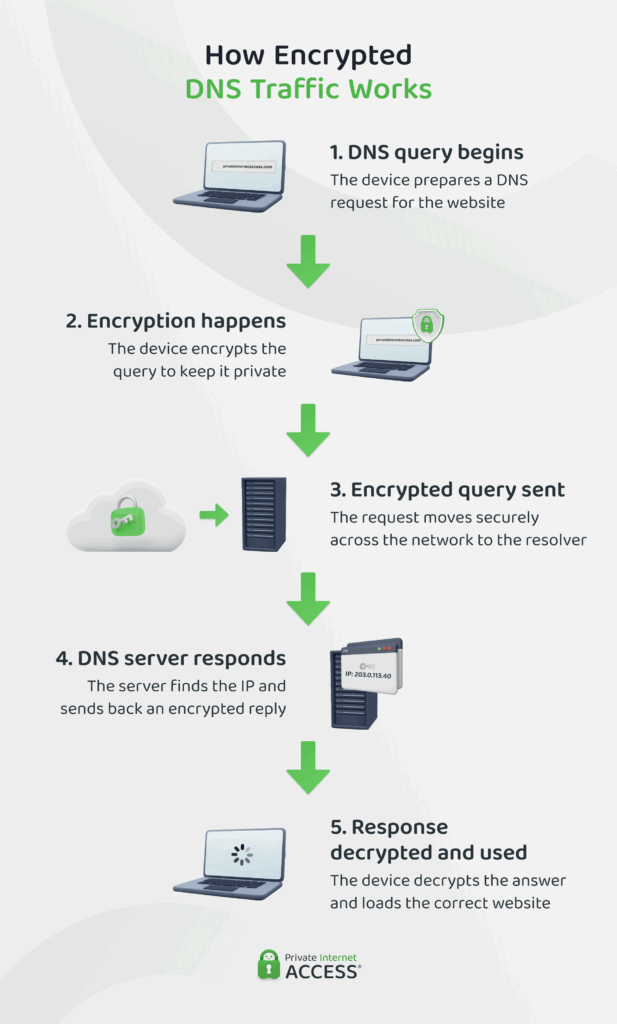
When your device is set up to use encrypted DNS, it handles the encryption locally, before any DNS requests leave your device. Only the trusted DNS resolver can decrypt it.
Here’s what happens at the network level:
- Your device generates a DNS query (for example, asking for the IP address of privateinternetaccess.com).
- Your device encrypts it using a pre-selected protocol typically handled by the operating system, browser, or a DNS client.
- The encrypted request is then sent over the internet to a DNS server (also called a resolver) that supports encrypted queries.
- The resolver decrypts the request, looks up the IP address, and sends the response back – also encrypted.
- Your device receives and decrypts the answer, then uses the IP address to connect to the website or service.
Types of Encrypted DNS Protocols
To protect DNS traffic, your device has to use an encryption protocol: a set of rules that defines how that data is transmitted over the internet in a secure manner. These protocols sit between your device and the DNS server.
The two most common DNS encryption protocols are DNS over HTTPS (DoH) and DNS over TLS (DoT).
DNS over HTTPS (DoH)
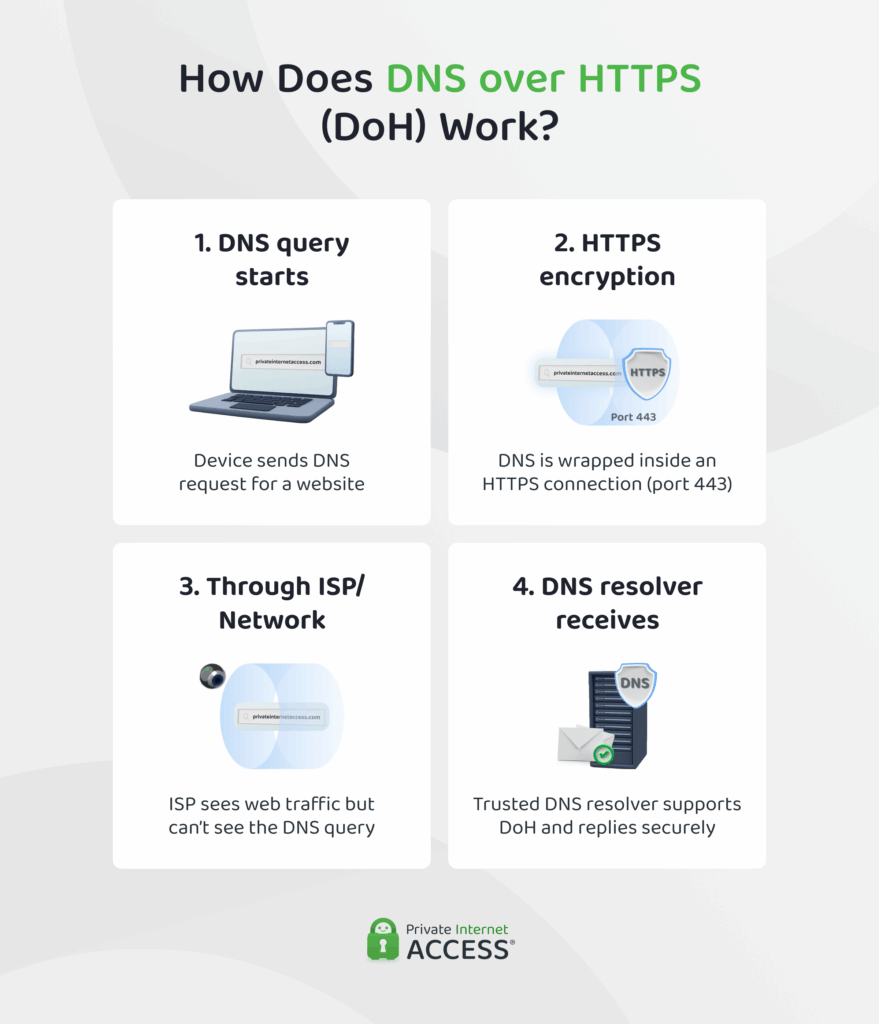
DNS over HTTPS encrypts your DNS queries by sending them inside an HTTPS request.
HTTPS relies on TLS (Transport Layer Security), a cryptographic protocol that secures data as it travels over the internet. TLS encrypts the entire communication between your device and the DNS server, including your DNS query and the response. It also authenticates the DNS server, ensuring that you’re communicating with a trusted resolver and not an imposter.
Since HTTPS uses port 443, the same port used for secure website traffic, your DNS lookups are hidden within regular browsing activity, making it much harder for ISPs, network admins, or censors to detect, track, or block them separately.
Most modern browsers, like Firefox, Chrome, and Edge, support DoH directly. This makes setup easy – you can usually turn it on directly from your browser settings without extra technical steps. If you’re looking to improve privacy on highly regulated networks like schools or workplaces, DoH is often the best choice.
DNS over TLS (DoT)
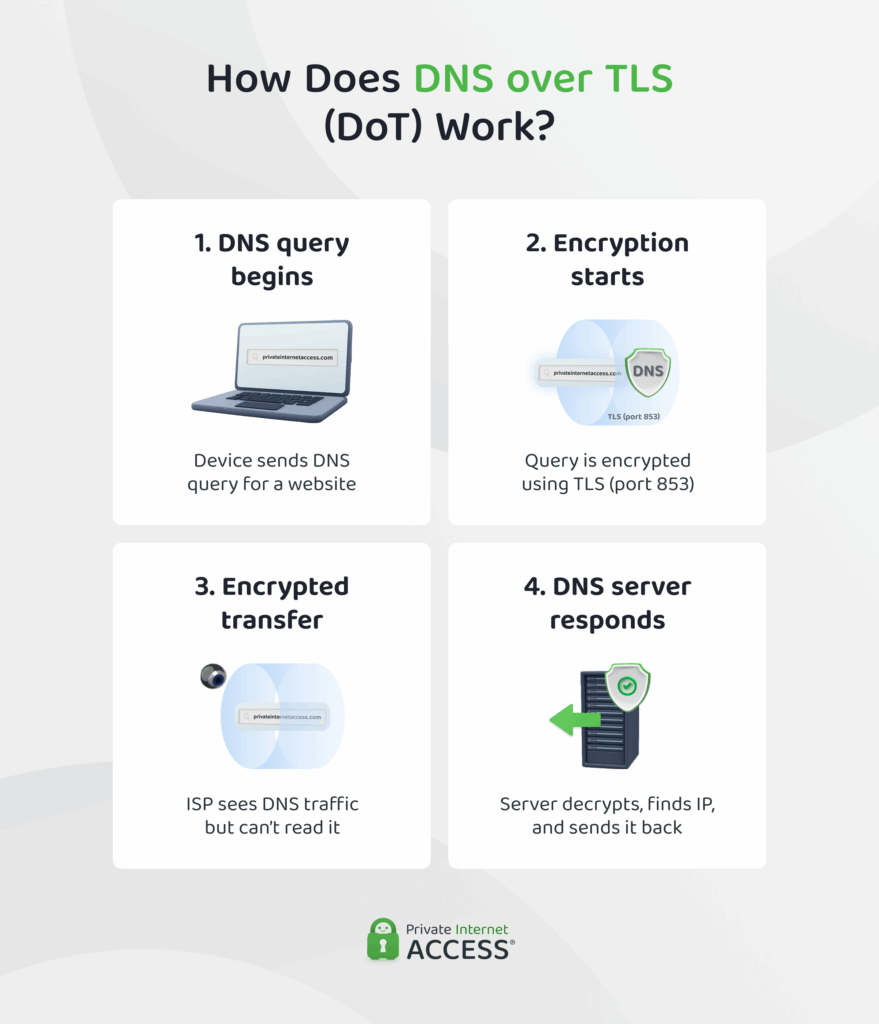
DNS over TLS (DoT) also encrypts your DNS requests using the TLS protocol, but does so over a dedicated channel specifically reserved for DNS communication (port 853).
Just like with DoH, TLS protects your DNS traffic from eavesdropping or tampering and verifies that you’re talking to a legitimate server.
However, unlike DoH, which disguises DNS traffic inside regular HTTPS web traffic, DoT uses its own dedicated port. This makes it easier for network tools to recognize and manage, but also means networks can easily recognize and block it. On the plus side, DoT sometimes provides slightly faster DNS responses because it doesn’t include the extra web-based layers involved in DoH.
However, DoT often requires manual setup, either through your operating system settings or router, which can be more complex compared to DoH’s browser-based approach. It’s typically implemented at the system or network level, making it ideal for securing DNS across all apps and devices on a network.
If you want device-wide or network-wide DNS encryption and you’re not worried about DNS filtering, DoT is a clean, efficient solution.
DNS over HTTPS vs. DNS over TLS
| Feature | DNS over HTTPS | DNS over TLS |
| What it does | Encrypts DNS queries by sending them as standard HTTPS web traffic | Encrypts DNS queries using a secure TLS connection dedicated to DNS |
| How it encrypts | Wraps DNS queries in HTTPS, the same protocol used to secure websites (TLS over HTTP) | Uses pure TLS encryption directly between your device and the DNS server |
| Port used | Port 443 (same as regular web traffic) | Port 853 (used only for encrypted DNS) |
| Privacy strength | High (hides DNS traffic inside normal web traffic) | High (encrypts all DNS traffic) |
| Blocking resistance | Strong (hard to block because it looks like website traffic) | Moderate (firewalls can block or flag DNS-specific port) |
| Ease of setup | Very easy (built into browsers like Chrome and Firefox) | Requires some setup (typically configured at the system or network level) |
| Device compatibility | Works well in browsers and apps that support DoH | Ideal for routers, operating systems, and full-device protection |
| Performance | Slightly slower due to extra layers of HTTPS | Slightly faster as it’s optimized specifically for DNS |
| Best for | Everyday users who want quick, browser-based privacy without configuration | Advanced users setting up encrypted DNS for entire devices or networks |
Pro tip: If you’re looking for system-wide DNS encryption, but lack the skills to set up DNS over TLS, you can use a VPN with a private DNS, like Private Internet Access. It encrypts all the data leaving and entering your device, including your DNS queries. With intuitive apps for major systems, it’s simple to set up, with no tech knowledge required.
Benefits and Drawbacks of Encrypted DNS
Encrypting DNS traffic offers significant privacy improvements but does have a few trade-offs. Let’s break down the key benefits and limitations:
Main Benefits of Encrypted DNS
✅Protect your browsing privacy: It makes your browsing activity less visible to ISPs, advertisers, and network operators.
✅Prevent DNS spoofing and tampering: Helps you reach the real website you’re looking for rather than fake, manipulated, or harmful alternatives.
✅Maintain privacy on public Wi-Fi: Shields your online activity from bad actors on unsecured shared networks like those at airports or cafés.
Possible Drawbacks of Encrypted DNS
⚠️Slightly slower DNS resolution. Encryption can introduce minor delays, especially noticeable on slow networks or older devices. For most users, this impact is minimal, but it may occasionally cause slower loading times.
⚠️Network compatibility issues. Certain networks actively block encrypted DNS protocols (particularly DNS over TLS, which uses its own port). You might experience connectivity problems or see warnings about blocked DNS traffic.
⚠️More complex setup in some cases. While browsers usually support encrypted DNS easily, enabling it system-wide or on routers might involve technical configuration that’s challenging for some users.
⚠️Limited protection. Encrypted DNS protects only your DNS requests, not all the traffic or connections, which leaves some privacy gaps.
Pro tip: The PIA VPN app encrypts all the traffic leaving and entering your device, giving you a high degree of reliable protection with no manual configuration required. It also comes with an advanced kill switch, DNS leak protection, automation, split tunneling, and other effective advanced privacy features.
Why Is My Network Blocking Encrypted DNS Traffic?
If you see a message that “This network is blocking encrypted DNS traffic,” it means your current network isn’t allowing encrypted DNS traffic to function properly. Here’s why that might be happening:
- Your home network or ISP might intentionally block encrypted DNS to:
- Enforce parental controls or content filters
- Direct you to its own DNS servers for logging or targeted advertising
- Comply with legal or regulatory requirements
- Public, work, or school networks typically block encrypted DNS to:
- Monitor and control user internet activity
- Enforce acceptable usage policies or content restrictions
- Prevent users from bypassing network security measures
- Device or router issues can also unintentionally block encrypted DNS because of:
- Misconfigured DNS settings or software conflicts
- Outdated firmware or operating system issues
- Security software overrides encrypted DNS settings
How to Fix the “Network Blocking Encrypted DNS Traffic” Error
Here are several steps that can help restore encrypted DNS functionality:
- Restart your router and device (home networks): If you’re at home, power-cycle your router by unplugging it for 30 seconds, then plugging it back in. Restart your device afterward. This refreshes network settings and can resolve temporary DNS blocks.
- Reconnect to your Wi-Fi network: On your device, select Forget this network, then reconnect and re-enter your Wi-Fi password.
- Update router and device firmware (home networks): Ensure your router firmware and device software are up to date, as older versions may lack support for encrypted DNS.
- Change your DNS resolver: Change your DNS settings on your device (or router if you control the network) to use reliable encrypted DNS providers such as Cloudflare (1.1.1.1), Google DNS (8.8.8.8), or Quad9 (9.9.9.9).
- Switch to DNS over HTTPS (DoH): If your ISP blocks DoT (port 853), switching to DoH (port 443, same as HTTPS) may allow encrypted DNS traffic to work normally.
- Switch to mobile data or hotspot: If your current network restricts DNS encryption, temporarily switch to a mobile hotspot or cellular data.
- Use a good VPN: Private Internet Access encrypts your DNS queries by routing them through its own secure tunnel and server network. A VPN that offers stealth or obfuscation mode can help maintain a more stable and secure connection across a wide range of networks.
FAQ
Should I block DNS traffic?
No, DNS is essential for accessing websites and online services. Blocking it prevents your devices from translating domain names into IP addresses. This effectively disconnects you from the internet. Instead of blocking, you can encrypt your DNS traffic to improve your privacy and reduce the risk of tampering.
How do I secure my DNS traffic?
You can secure your DNS traffic using encrypted DNS protocols like DNS over HTTPS (DoH) or DNS over TLS (DoT). Which one you want to use depends on what kind of protection you need: for situations where DNS requests may be filtered, DoH is the better option. For system-wide protection, DoT is more appropriate. If you’re looking for an easy solution you can implement in a few clicks, a VPN with encrypted DNS offers an even higher level of privacy.
Why is encrypted DNS traffic important for online privacy?
Traditional DNS queries transmit in plain text, meaning anyone monitoring your network can see the websites you visit. Encryption makes these queries harder to read. This limits how easily ISPs or network administrators monitor your online activity and can reduce the risk of DNS manipulation.
How does encrypted DNS protect my data?
Encrypted DNS protects your data by scrambling your DNS queries and responses. This encryption limits visibility into the requests you’re making and websites you’re visiting, reducing exposure to prying eyes. It also lowers the chances of DNS spoofing attempts that redirect traffic to fake sites.
What are the different types of encrypted DNS protocols?
The primary types of encrypted DNS protocols are DNS over HTTPS (DoH) and DNS over TLS (DoT). DoH encrypts DNS queries over the HTTPS protocol, blending them with regular web traffic. DoT encrypts DNS queries over a dedicated port. Both offer strong encryption, but they differ in how they integrate with network traffic and their susceptibility to blocking.
How can I set up encrypted DNS on my device?
That depends on the type of encrypted DNS you want and where you want it. As an individual user, you can enable built-in DoH settings in your web browser: most web browsers today, like Chrome, Firefox, and Edge, offer this. You can also configure DNS over TLS in your operating system settings or on your router for network-wide protection.
For a simpler and more comprehensive solution, you can use a good VPN like PIA. It automatically handles encrypted DNS within its secure tunnel.
Is encrypted DNS traffic slower than regular DNS?
Encrypted DNS traffic can introduce a slight delay compared to regular, unencrypted DNS. This is due to additional encryption and decryption processes. However, this performance impact is often minimal and unnoticeable for most users. This is especially true on modern, high-speed internet connections. The security and privacy benefits typically outweigh this minor potential speed difference.
How do I know if my DNS traffic is encrypted?
The simplest way is to use an online DNS leak test tool. These tools typically show what kind of DNS encryption your device is using (if any). Alternatively, you can check with network monitoring tools like Wireshark.
