What Is Federated Identity and How Does It Work?

A federated identity is a way of linking one verified digital identity across multiple independent systems, so authentication happens once and access follows automatically.
For individuals, that means less friction. For organizations, it means tighter access control, fewer credentials to manage, and a smaller attack surface.
In this article, we’ll break down how federated identity works, explore the protocols and components behind it, and weigh the benefits and challenges of adopting it so you can understand what it means for your online security.
Table of Contents
Federated Identity DefinedWhat Is Federated Identity Management?
How Federated Identity Works
Standard Protocols for Federated Identity
Key Benefits of Federated Identity Management
Challenges of Implementing Federated Identity
Federated Identity: Frequently Asked Questions
Federated Identity Defined
A federated identity is a digital identity that’s recognized across multiple independent systems or organizations. Your credentials live in one place, but they’re trusted everywhere within that network.
Every time you click “Sign in with Google” to access a third-party app, you’re using a federated identity. Instead of creating a new account, you’re letting a trusted source (like Google) vouch for who you are. The app accepts that confirmation and lets you in – no new password required.
Federated Identity vs. Single Sign-On
Single sign-on (SSO) is an authentication process that lets you log in once and access multiple applications without repeated prompts to log in again. It allows you to sign in to one account and then move across others without re-entering your credentials.
This is essentially the same experience that federated identity delivers, but there’s one key difference: SSO operates within a single organization or domain.
While SSO unifies access across systems that sit under the same trust umbrella (i.e., internal systems), federated identity extends that idea across organizational boundaries.
What Is Federated Identity Management?
A federated identity is a single digital identity that works across multiple independent systems or organizations, and federated identity management (FIM) is the framework that makes this possible.
FIM establishes trust agreements between different systems, allowing them to share and accept identity information without requiring each system to store your credentials separately. In practice, this means you can log into one account and access third-party tools, partner platforms, or cloud services without re-entering your details.
At its core, FIM separates the job of verifying who you are from the job of providing you with access. One system handles authentication, while others simply trust the result.
This division of responsibility is what makes federated identity both scalable and secure. It enables organizations to expand their access ecosystems without multiplying the identity management overhead that comes with it.
Importance of FIM in Online Security
The average user has hundreds of passwords to remember across personal and work accounts. Considering that, it’s easy to understand why many people take shortcuts in an attempt to make access easier.
According to a 2024 Forbes Advisor survey, 78% of individuals reuse the same password across multiple accounts1. While that might help you cut down on the number of keys to remember, it means that one compromised account potentially jeopardizes other accounts sharing that password, too – a technique attackers exploit at scale through credential stuffing.
Federated identity management addresses this problem at its root. Because a single trusted identity provider handles authentication rather than dozens of separate platforms, users don’t need to create or reuse multiple passwords. Fewer credentials in circulation means fewer opportunities for attackers to exploit them.
It also means sensitive systems are protected by centralized and enforced security policies, including multi-factor authentication (MFA), rather than relying on individual users to make sound password choices.
How Federated Identity Works
Federated identity relies on a concept called the trust relationship. Before any authentication can happen across systems, those systems must agree to recognize and accept each other’s identity decisions. Once that agreement is in place, users can move between them without re-authenticating.
Three components make this work:
- Identity Provider (IdP): The system that verifies who you are. It stores your credentials, authenticates you, and issues a signed token confirming your identity.
- Service Provider (SP): The application or platform you’re trying to access. It doesn’t verify your identity itself, but trusts the IdP’s confirmation.
- User or Principal: The person requesting access (you).
The Step-by-Step Federated Login Process
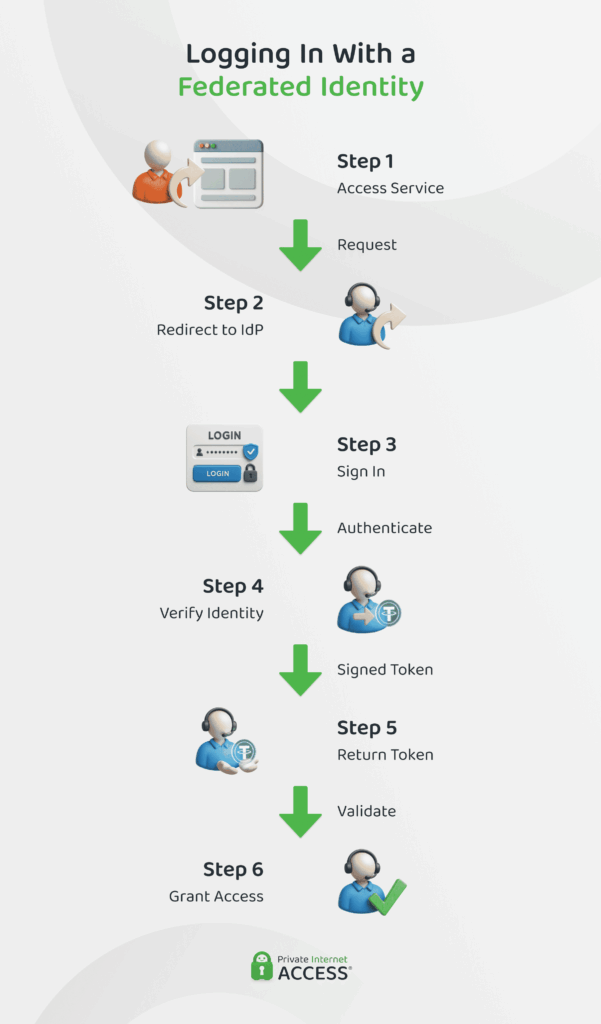
There are six stages that a typical federated login process goes through in order to provide you access to a particular platform:
- You attempt to access an online service.
- The SP detects you aren’t authenticated and redirects you to the IdP.
- You log in at the IdP using your credentials (often using multi-factor authentication).
- The IdP authenticates you and issues a signed security token containing your identity information.
- That token is passed back to the SP.
- The SP validates the token and grants you access.
This entire exchange happens in seconds and the service provider never sees your credentials directly.
Standard Protocols for Federated Identity
Different federated identity protocols have emerged to solve different problems, and many organizations use more than one.
Security Assertion Markup Language or SAML 2.0 is the long-standing enterprise standard, widely used for corporate single sign-on and built for environments where security and interoperability between organizations matter most.
OAuth 2.0 is the protocol behind the “Allow this app to access your account” prompts, letting applications act on your behalf without ever seeing your password. It only handles authorization, unless paired with OpenID Connect (OIDC).
The WS-Federation protocol, developed by Microsoft and IBM, remains present in legacy enterprise environments2. However, most new implementations now use SAML and OIDC3.
| Protocol | Type | Primary use | Format |
| Security Assertion Markup Language | Authentication & authorization | Enterprise SSO internal systems and applications | XML |
| OAuth 2.0 | Authorization only | Third-party apps (access to user data without sharing passwords) | Token format varies (typically JSON-based APIs) |
| OpenID Connect | Authentication & authorization | Consumer-facing apps, mobile apps, modern web SSO | JSON |
| WS-Federation | Authentication & authorization | Legacy enterprise environments, Microsoft ecosystems | XML |
Key Benefits of Federated Identity Management
The case for federated identity management goes beyond convenience. When authentication is centralized and trust relationships replace scattered credentials, the benefits affect how users work, how IT teams operate, and how organizations manage risk.
For Users
The most immediate benefit for users is simplicity. Instead of maintaining separate credentials for every platform you use, you authenticate once and move between connected services.
That reduction in friction carries a real security benefit, too. With federated identity, a dedicated identity provider stores and manages your credentials in one place rather than scattering your credentials across dozens of platforms with varying security standards. And fewer passwords mean less temptation to reuse them.
There’s also the question of what happens when something goes wrong. If a service provider you use suffers a breach, your core credentials aren’t exposed because you never handed them over in the first place. The SP only ever received a token confirming your identity, not the credentials themselves.
Finally, federated identity supports stronger authentication without adding friction. Because the IdP manages login centrally, every connected service can enforce MFA consistently. You go through one secure login process and get access to everything, rather than going through MFA on each platform.
For IT and Admins
For IT teams, the primary advantage of FIM is control. Rather than managing user accounts and access permissions across dozens of separate systems, administrators work from a single identity provider.
This centralization pays dividends at the edges of the user lifecycle (i.e., onboarding and offboarding). Provisioning a new user means creating one account and, when someone leaves an organization, disabling their IdP account prevents new authentication should they try to log in.
Without FIM, deprovisioning often relies on manual processes across multiple platforms. This can create a lag that can leave former employees with active access to sensitive systems long after they should have lost it.
There’s also a meaningful reduction in day-to-day administrative overhead. Password resets and account recovery requests are among the most common IT helpdesk tickets. With fewer credentials in circulation and authentication centralized, this frees up IT resources for higher-priority work.
What’s more, centralized authentication generates centralized logs. Every access event flows through the IdP, giving administrators a clear record of who accessed what and when. This makes it much easier to track than fragmented authentication across independent systems.
For Security & Compliance
Security is where FIM’s centralized architecture shines. As all authentication flows through a single identity provider, administrators can enforce security policies consistently across every connected system.
That consistent enforcement also plays a part in regulatory compliance. The General Data Protection Regulation (GDPR), Health Insurance Portability and Accountability Act (HIPAA), and SOC 2 all require organizations to demonstrate control over who can access sensitive data, under what conditions, and with a verifiable audit trail. And FIM supports these and more.
Access logs are consolidated at the IdP rather than scattered across individual platforms, making it easier to produce unified access records that auditors look for. Additionally, when revoking user access, it prevents them from obtaining new authentication tokens.
There’s also a data minimization argument. With FIM, personal identity data sits in one authoritative place rather than copied across every service a user touches. That reduces the number of potential breach surfaces and supports the data protection principles that regulations like GDPR require organizations to uphold.
Challenges of Implementing Federated Identity
Unfortunately, federated identity management isn’t perfect. The same centralization that makes it powerful also introduces risks, and the initial lift required to get a system running is significant.
For one, establishing trust relationships between systems isn’t a plug-and-play exercise. Different platforms may use different protocols, schemas, or attribute formats, requiring careful configuration to ensure they communicate correctly.
With multiple organizations or external partners involved, negotiating and technically implementing those trust agreements adds another layer of complexity. Getting this right upfront takes time and specialist knowledge.
User attributes (think roles, permissions, and department details) also need to stay consistent across all connected systems.
When something changes at the IdP, those changes don’t always propagate instantly or cleanly to every service provider. Stale or mismatched attributes can result in users having incorrect access levels, creating both security and operational problems.
Centralizing authentication also means that if the IdP goes down, access to every connected service goes down with it. A compromised IdP is like a compromised front door, making it a high-value target that requires robust availability planning and strong security controls in its own right.
Federated Identity: Frequently Asked Questions
What is a federated identity?
A federated identity is a single digital identity that’s recognized across multiple independent systems or organizations. Rather than creating separate accounts for every platform, a trusted source verifies your credentials and then they’re accepted by any compatible platform.
What is federated identity management?
Federated identity management (FIM) is the framework that governs how federated identities work in practice. It establishes the trust agreements, protocols, and processes that allow different systems to share and accept identity information securely, enabling users to authenticate once and access multiple platforms without re-entering their credentials.
How does federated identity authentication work?
When you attempt to access a service with a federated identity, you’re redirected to an identity provider (IdP), where you log in and verify your identity. The IdP issues a signed security token confirming who you are and passes it to the service you’re trying to reach. That service validates the token and grants access.
What is a federated identity manager and what does it do?
A federated identity manager is the system or platform that administers federated identity across an organization. It manages the trust relationships between identity providers and service providers, handles authentication policies, and ensures that all connected systems provision, maintain, and revoke user access consistently across all systems.
What are the benefits and risks of federated identity for organizations?
The primary benefits include simplified access management, reduced credential sprawl, stronger security policy enforcement, and easier regulatory compliance. The main risks are the complexity of initial setup, the potential for identity sync issues across connected systems, and the fact that the identity provider represents a single point of failure if it goes down or gets compromised.
Can a VPN add security when accessing federated identity logins remotely?
Yes. While federated identity manages authentication, it doesn’t protect your network connection. A VPN encrypts your traffic and masks your IP address, reducing the risk of interception.
References:
