Is Tinder Private? What You Need to Know When You Sign Up
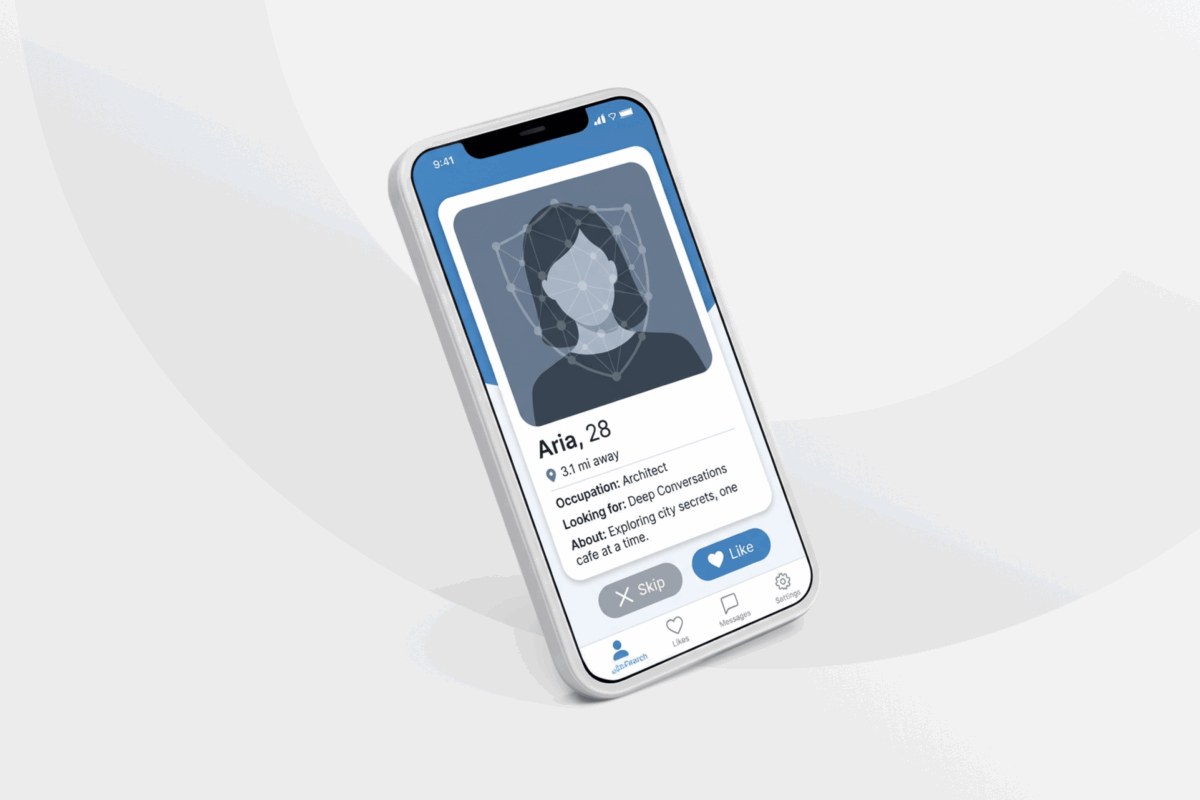
The nature of a dating app like Tinder means you have to provide a fair amount of personal information. Whether you’re looking for a long-term relationship or something more casual, your profile may include real photos, your age, location, interests, and other details about your life.
The question is how much of that information other users can see and whether it could make you easier to identify outside the app. There’s also the broader issue of how Tinder collects, stores, and shares your data, including whether advertisers or other third parties can use it to learn about your activity and preferences.
We took a close look at Tinder’s privacy policy, visibility controls, verification tools, and past security issues to see how private it the app really is.
Table of Contents
You’re Not Anonymous on TinderWhat Can Other Tinder Users See About You?
How Does Tinder Incognito Mode Work?
Prevent Contacts From Seeing You On Tinder
What Data Does Tinder Collect?
How Does Tinder Use and Share Your Data?
How to Improve Your Privacy on Tinder
How to Delete Your Tinder Account and Data
Tinder’s Past Privacy and Security Incidents
FAQ
You’re Not Anonymous on Tinder
While you can limit what other members see, Tinder still needs enough information to create, operate, and moderate your account. So there’s no way to use the app without it knowing who you are.
Tinder may connect your account to your phone number, email address, device, location, profile photos, and app activity. It may also require a video selfie through Face Check in certain locations or situations.
Privacy on the app broadly falls into two categories:
- Privacy from other Tinder users: You can control some profile details and limit who receives your profile as a recommendation.
- Privacy from Tinder: Tinder still processes information connected to your account, device, location, and activity.
While you can browse Tinder more privately and make your profile less identifiable, you can’t create a Tinder account that hides your identity through its standard settings. Tinder can always associate your activity with an account and device.
| Privacy question | Answer |
| Can you control who sees your profile? | To an extent |
| Can other users see all the data Tinder collects? | ❌ |
| Does Tinder collect device and activity data? | ✅ |
| Can you use Tinder without revealing your identity? | ❌ |
| Does Incognito Mode hide you from Tinder? | ❌ |
| Can a VPN make your profile invisible? | ❌ |
What Can Other Tinder Users See About You?
When another Tinder user sees your profile, they can view the information you’ve chosen to make public. This typically includes your first name, age, photos, bio, and any optional details you add, such as interests, work, or education. Available profile fields can vary by location and account, but note that any combination of photos, work details, education, interests, or recognizable locations can make it easier for someone to identify you outside the app.
Other users may also see your approximate distance rather than your exact location. You can hide your age and distance through the app’s privacy settings. Tinder may also display activity indicators that show whether someone has used the app recently.
How Does Tinder Incognito Mode Work?
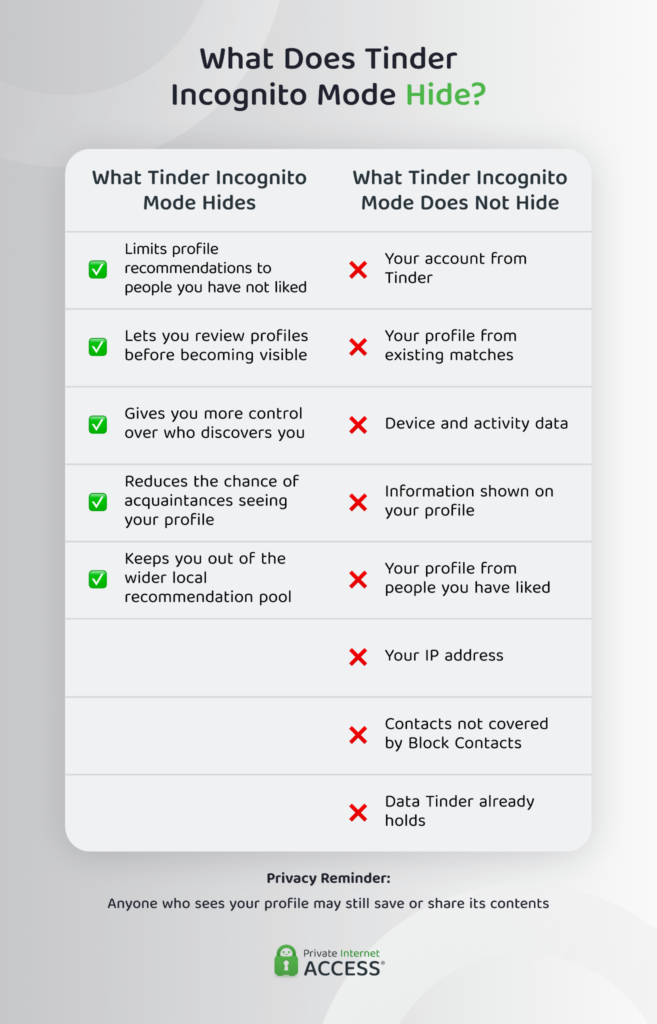
Incognito Mode is a privacy feature available with Tinder Plus, Gold, and Platinum subscriptions. It lets you continue browsing profiles and choosing Like or Nope, but only people you’ve liked will see your profile in their recommendations.
This gives you more control over who discovers you. You can review someone’s profile before becoming visible to them, rather than appearing throughout the wider recommendation pool. It may also reduce the chance of acquaintances coming across your profile, provided you haven’t already liked them.
Incognito Mode is different from fully hiding your profile. Instead of pausing Discovery altogether, you can keep browsing while limiting your visibility to selected people. However, it doesn’t hide your identity from Tinder or stop it from collecting information about your account, device, and activity.
Tinder Incognito Mode vs. Disabling Discovery
Incognito Mode and Disable Discovery both reduce profile visibility, but they work differently.
Incognito Mode lets you continue browsing and liking profiles, but your profile should only appear to people you’ve already liked.
Disabling Discovery stops Tinder from recommending your profile to new people. You also can’t view or like new profiles, but you can continue chatting with existing matches. People you liked before disabling Discovery may still see your profile and match with you.
| Feature | Incognito Mode | Disable Discovery |
| View new profiles | ✅ | ❌ |
| Like new profiles | ✅ | ❌ |
| Appear to people you haven’t liked | ❌ | Usually no |
| Appear to someone you previously liked | ✅ | Possible |
| Chat with existing matches | ✅ | ✅ |
| Hide activity from Tinder | ❌ | ❌ |
| Requires a subscription | ✅ | ❌ |
Incognito Mode is more useful when you want to keep browsing but choose who sees you. Disable Discovery works better for pausing new recommendations while keeping your current matches and messages.
Prevent Contacts from Seeing You On Tinder
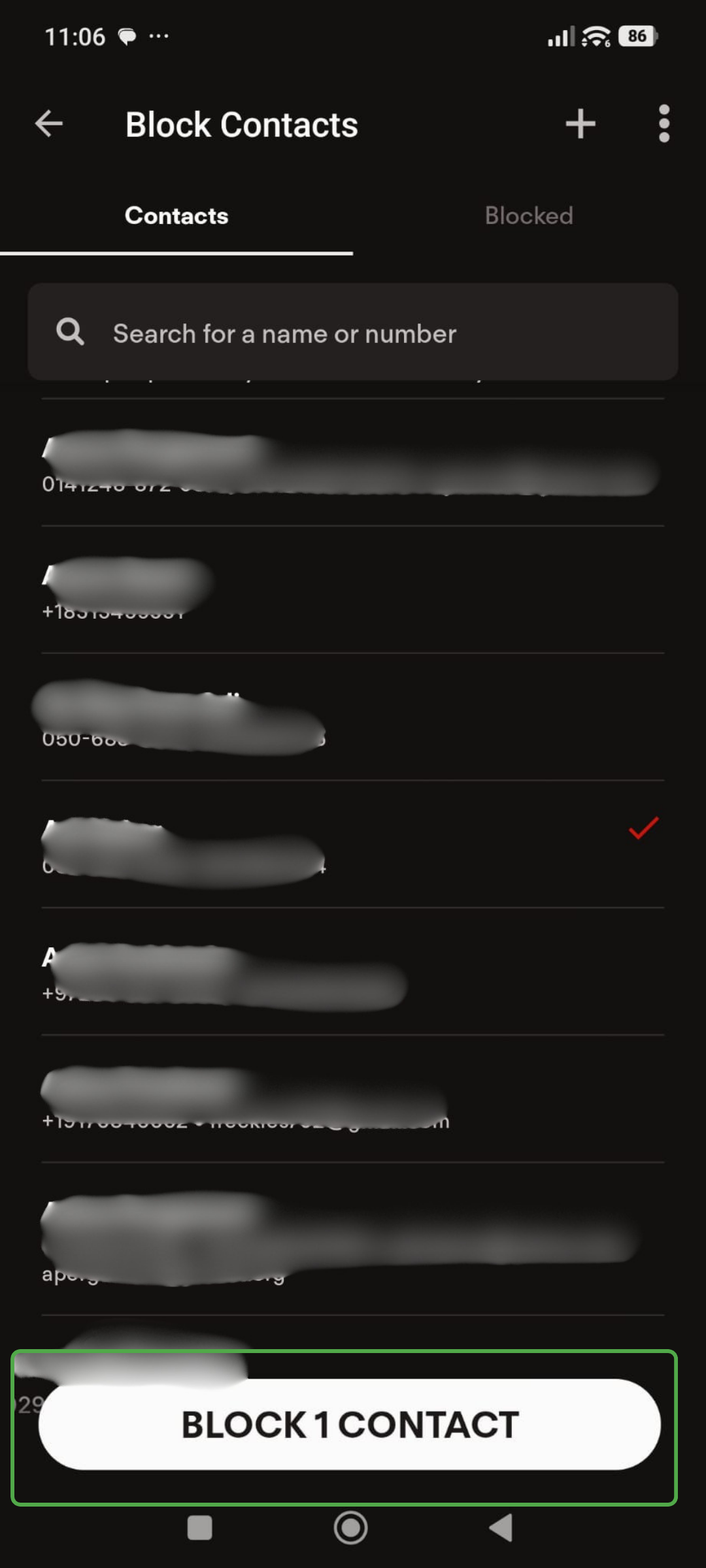
Tinder’s Block Contacts feature can help prevent selected people from viewing your profile.
You can let Tinder access your phone’s contact list and choose which contacts to block. You can also enter a person’s phone number or email address manually without sharing your full contact list.
The feature can’t identify every account. It works when the information you provide matches the phone number or email address that person used for Tinder. It also doesn’t remove an existing match or conversation.
To block a contact:
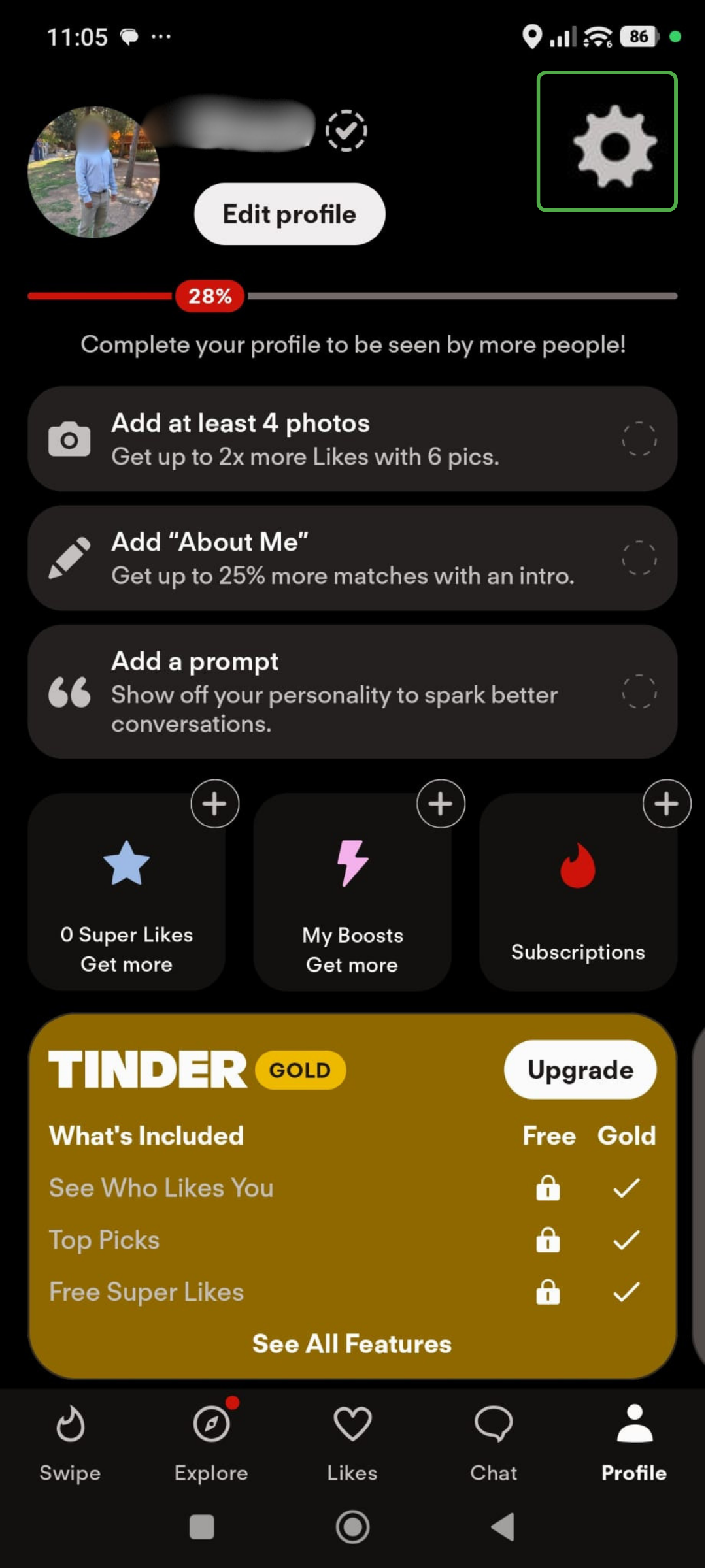
- Open Tinder and tap the gear icon.
- Scroll down to Block Contacts.
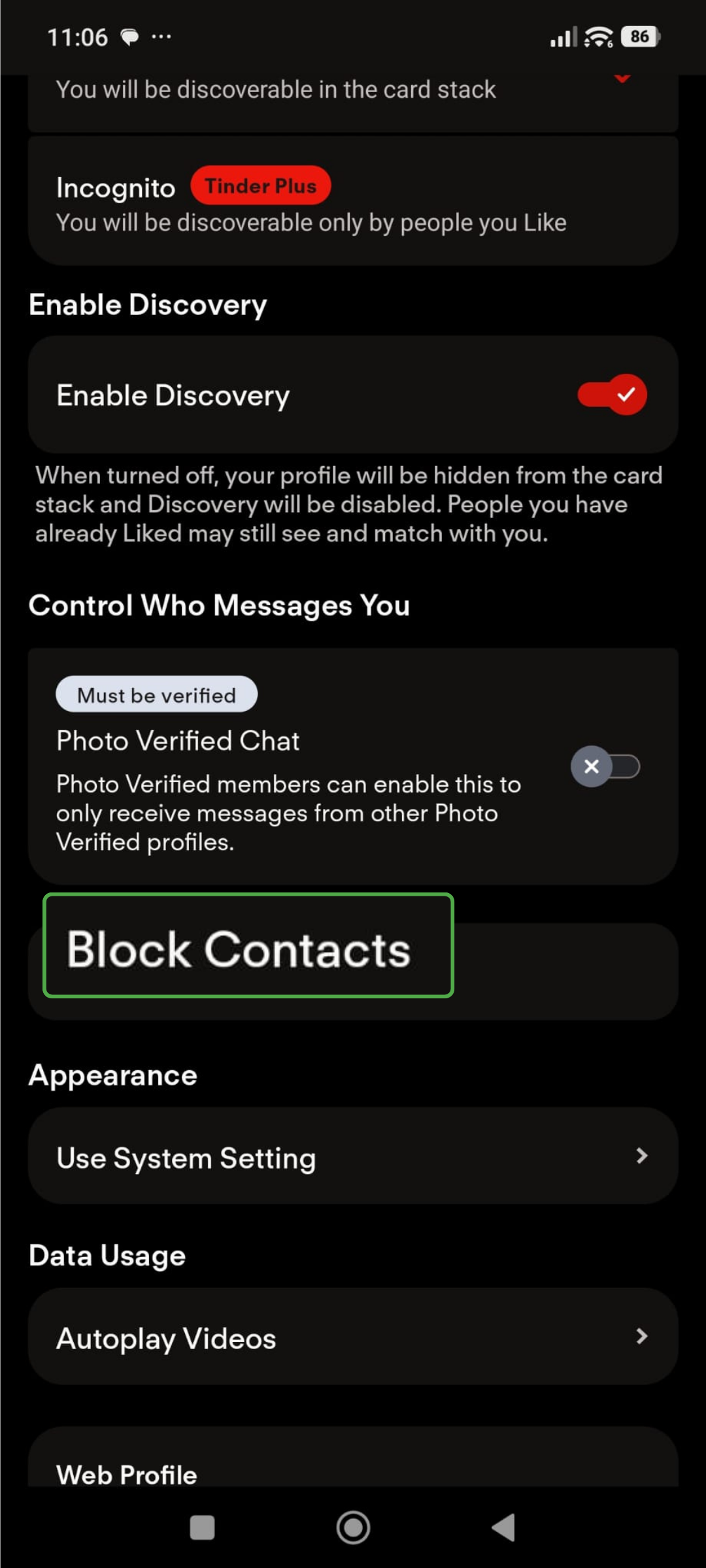
- Tap the contacts you don’t want to find you on Tinder, and tap Block Contacts.
What Data Does Tinder Collect?
Tinder collects the information you submit and the data it generates when you use the service. The exact amount depends on your settings, permissions, device, location, and the features you use.
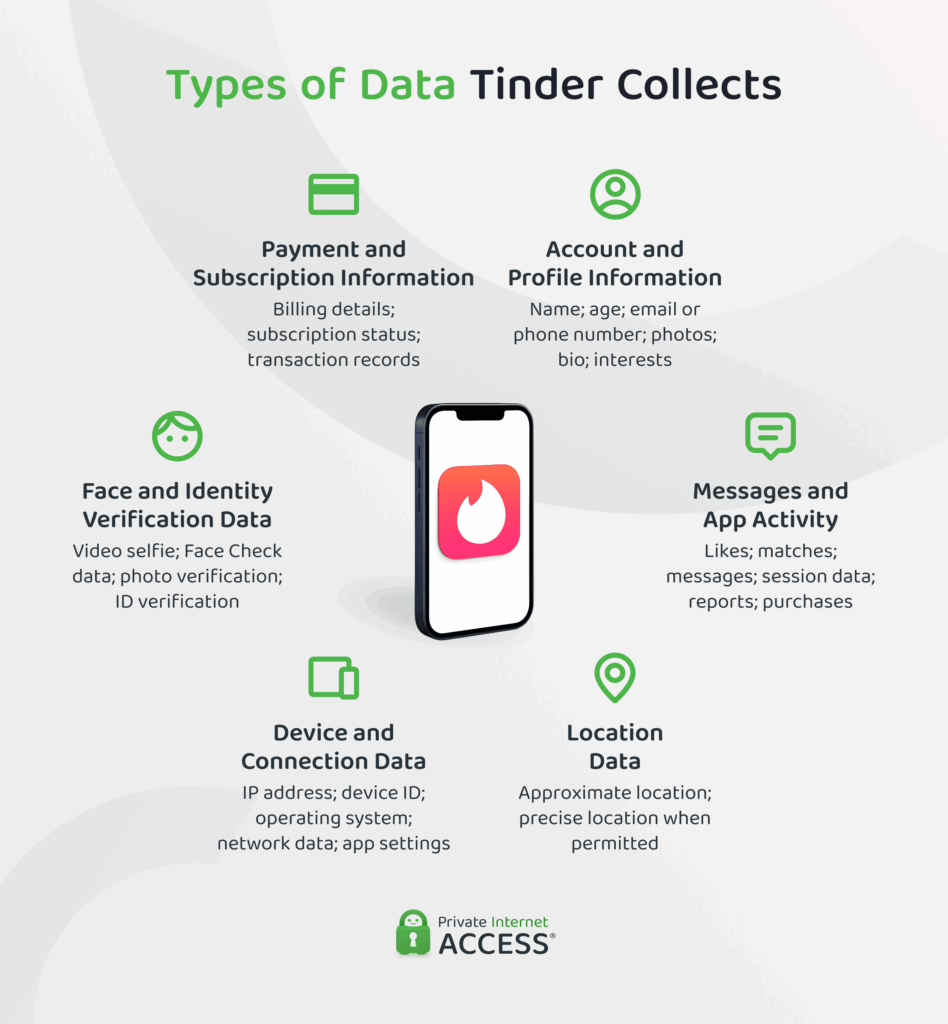
Account and Profile Information
This includes the information Tinder needs to create and operate your account, such as;
- Phone number or email address
- Name and age
- Profile photos
- Bio and interests
- Account preferences
- Customer-support messages
- Subscription and transaction details
Some profile fields can reveal sensitive information when you choose to complete them. Tinder requires certain basic details to run the account, while many profile additions are optional.
Messages and App Activity
Tinder can process information about how you interact with the service, including:
- Likes and rejections
- Matches
- Messages
- Features used
- Session information
- Reports and blocks
- Purchases
- Interactions with recommendations
Tinder says it uses this data to operate and personalize the service, improve its systems, support safety features, and comply with legal obligations.
Location Data
Tinder uses location to provide nearby recommendations. When you allow it, Tinder can collect location information from your device.
It may also estimate your general area through your IP address and other technical data. Restricting precise location can make Tinder’s location estimate less accurate, but it may also affect how some features work.
Related: If you’re looking to appear in a different location while traveling or before moving, see our guides on how to change your region on Tinder and how to use Tinder while traveling.
Device and Connection Data
Tinder’s privacy policy says it collects technical information from the devices you use to access the service. This can include:
- IP address
- Device ID and type
- Operating system
- Network information
- App settings
- Advertising identifiers
- Browser and cookie identifiers
- Crash and performance data
- Device movement and sensor data
An IP address identifies the internet connection your device uses and can indicate an approximate geographic area. A device identifier helps a platform distinguish one device, browser, or app installation from another.
Face and Identity Verification Data
Tinder may require a video selfie through Face Check. It also offers separate photo and identity-verification processes.
Face Check analyzes a short video to confirm that a real person is present. Tinder also generates mathematical representations called a FaceMap and face vector. These aren’t normal profile photos. They’re data that Tinder derives from facial characteristics and uses for comparison.
Tinder says it may use the FaceMap to estimate age and check whether the video selfie matches the account’s profile photos. Tinder can compare the face vector with other accounts to help identify profiles using the same likeness. Tinder says it generally keeps this data while the account is open and deletes it within 30 days of account closure, unless it must keep the data longer for legal or safety reasons.
Face Check is separate from ID and Photo Verification, which may ask you to submit an identity document. Tinder keeps a redacted copy to support the verification badge.
Verification can make impersonation more difficult, but it doesn’t make you less identifiable because it connects the account to additional identifying information.
How Does Tinder Use and Share Your Data?
Tinder uses personal data to:
- Operate accounts and provide recommendations
- Personalize features
- Process payments
- Provide customer support
- Detect fraud and rule violations
- Support safety systems
- Develop and test features
- Deliver or measure advertising
- Meet legal obligations
Tinder may share information with service providers that help operate the platform. It may also disclose data to Match Group affiliates, advertising or business partners, authorities when legally required, and parties involved in a corporate transaction.1
What Tinder shares depends on the service, purpose, location, and applicable law. Tinder’s privacy controls may let eligible users access, correct, delete, or object to certain uses of their data.
Hiding your profile from other members doesn’t stop this processing. It changes who can discover you within Tinder, not how Tinder operates your account.
How Long Does Tinder Store Your Data?
Tinder’s privacy policy describes a safety-retention period before it deletes most data. It also says limited information may remain longer for purposes such as payment records, customer support, fraud prevention, legal claims, consent records, and preventing banned users from returning.
These periods can vary by data category and applicable law. Check the current privacy policy before deleting your account if a specific retention period matters to you.
Tinder keeps your data for 90 days after you delete your account, so if you rejoin within that period, your previous data will still be there.1
How to Improve Your Privacy on Tinder
You can’t stop Tinder from collecting all account data while you use the service. You can, however, choose what information to share and limit your exposure and who sees your profile.
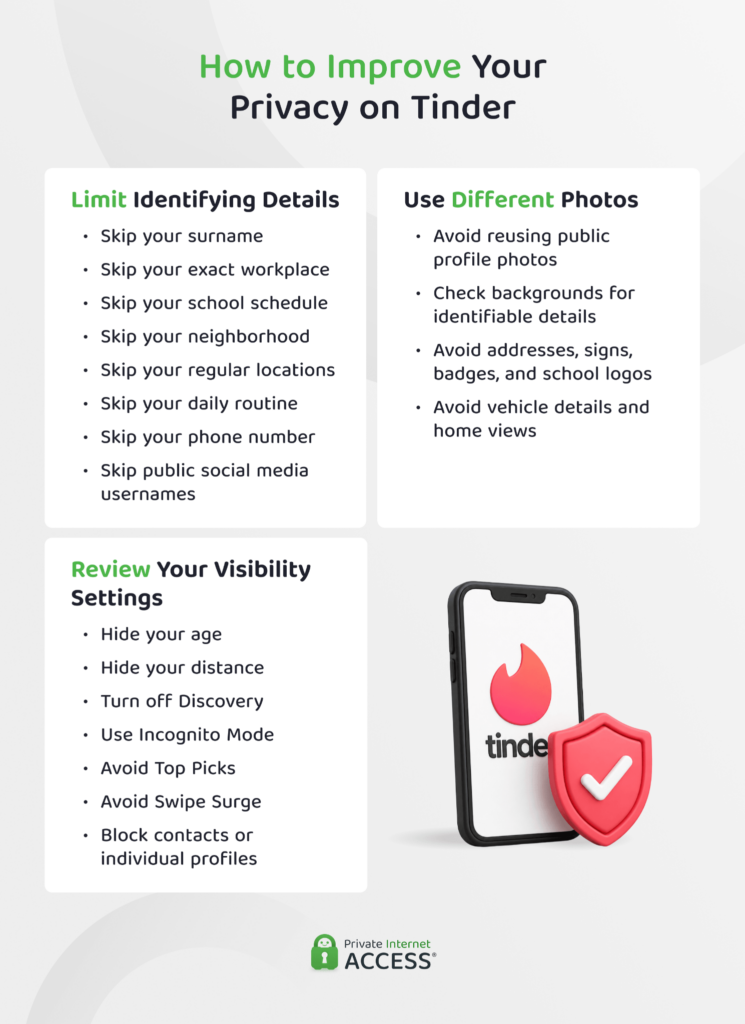
Limit Identifying Profile Details
Don’t include more personal information than your profile needs.
Consider leaving out:
- Your surname
- Exact workplace
- School schedule
- Neighborhood
- Regular locations
- Daily routine
- Phone number
- Public social media usernames
Check photos for addresses, signs, name badges, school logos, vehicle details, or recognizable views from your home.
Skip Reusing Public Profile Photos
A photo that appears across several public accounts can connect those profiles.
Using different Tinder photos may reduce basic image matching. It doesn’t hide your identity, and anyone who sees an image can still copy it.
Review Your Visibility Settings
Depending on your account and subscription, Tinder provides settings that may let you:
- Hide your age
- Hide your distance
- Disable Discovery
- Use Incognito Mode
- Avoid appearing in Top Picks
- Steer clear of Swipe Surge
- Block contacts or individual profiles
Review these settings after app updates, as features and defaults may change. Tinder’s current privacy controls include options for hiding age or distance and showing your profile only to people you’ve liked.
How to Delete Your Tinder Data and Account
Deleting the Tinder app from your phone doesn’t close your account. You need to delete the account through Tinder’s settings or account-management tools.
To delete your Tinder account:
- Open the Tinder app.
- Tap the gear icon.
- Scroll all the way to the bottom, and tap Delete Account.
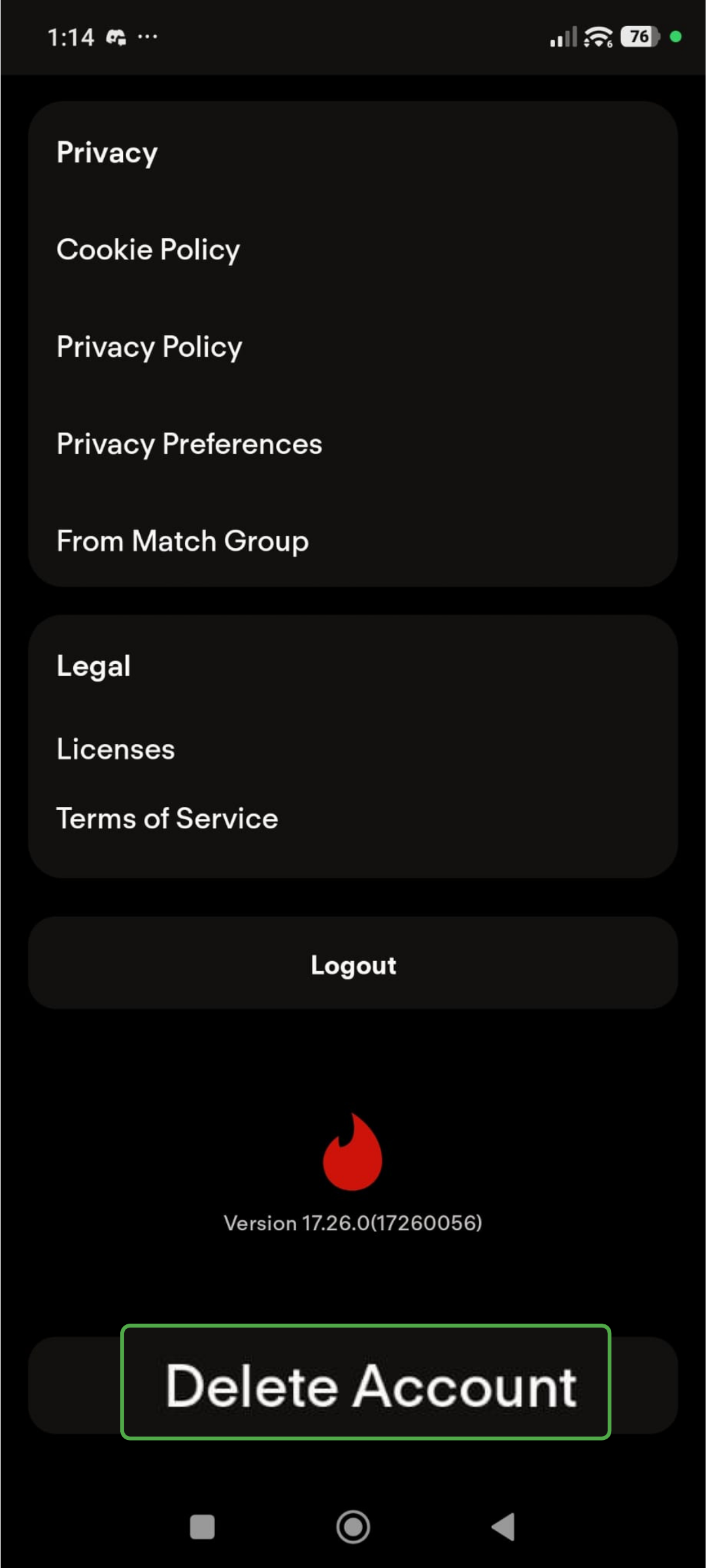
- Tap Continue with deletion.
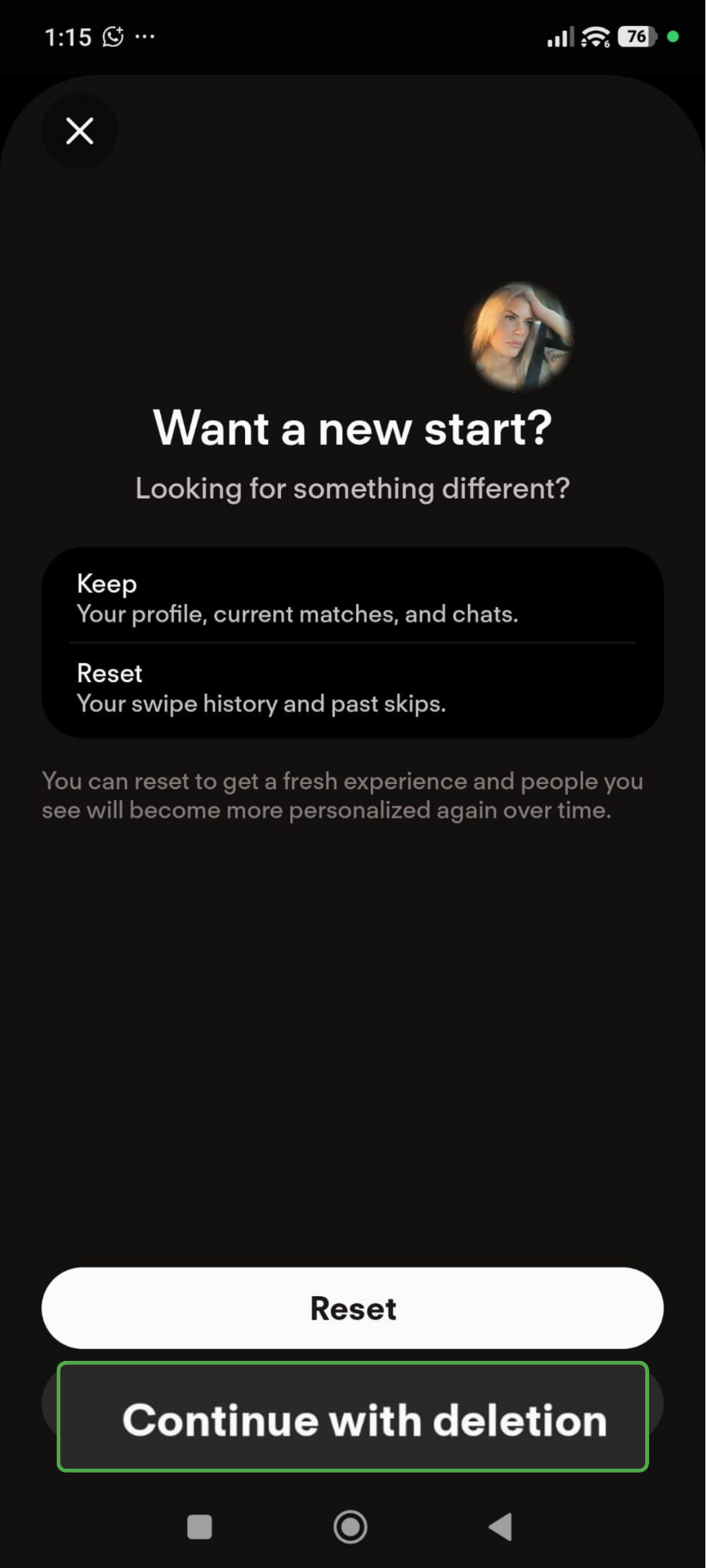
- Tap Delete my account.
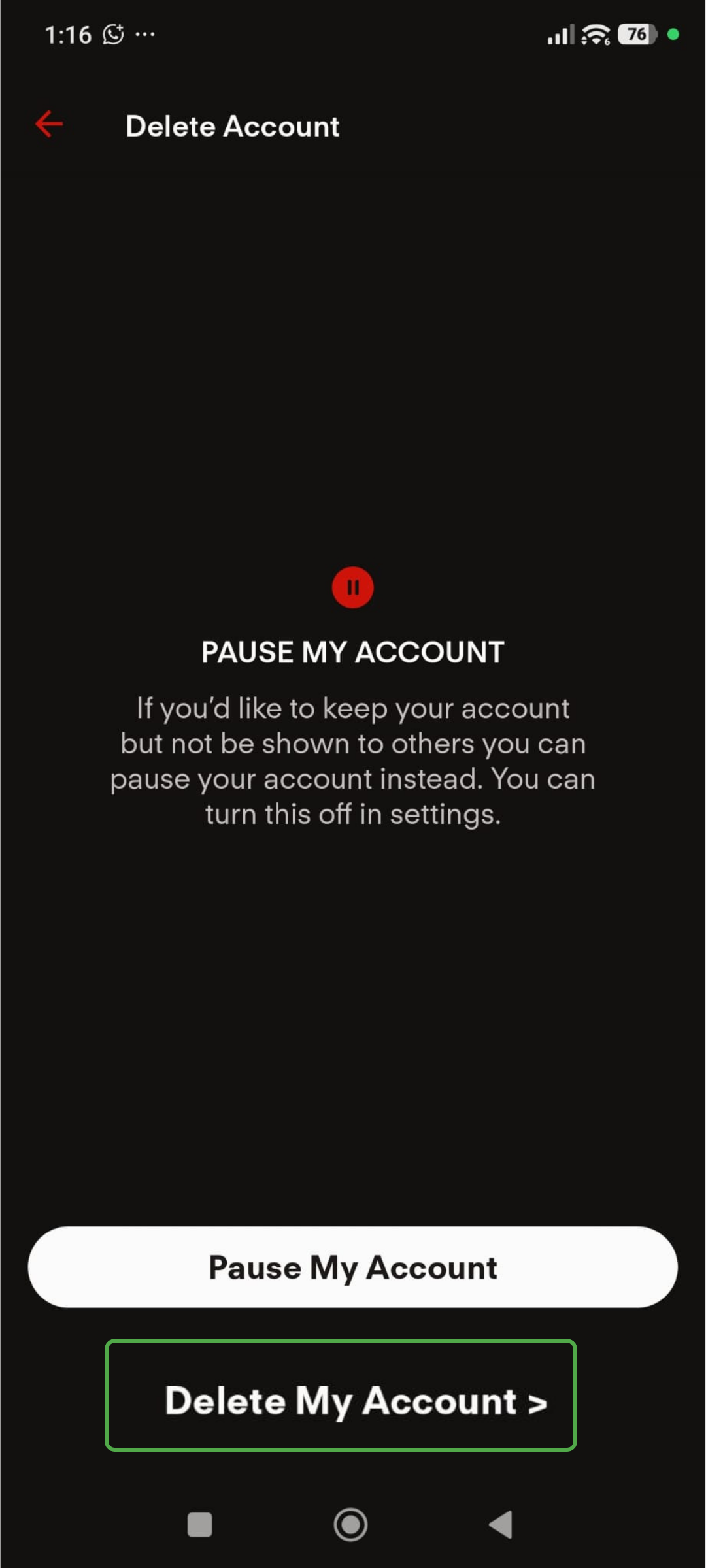
- Add a reason for deleting your account, or tap Skip.
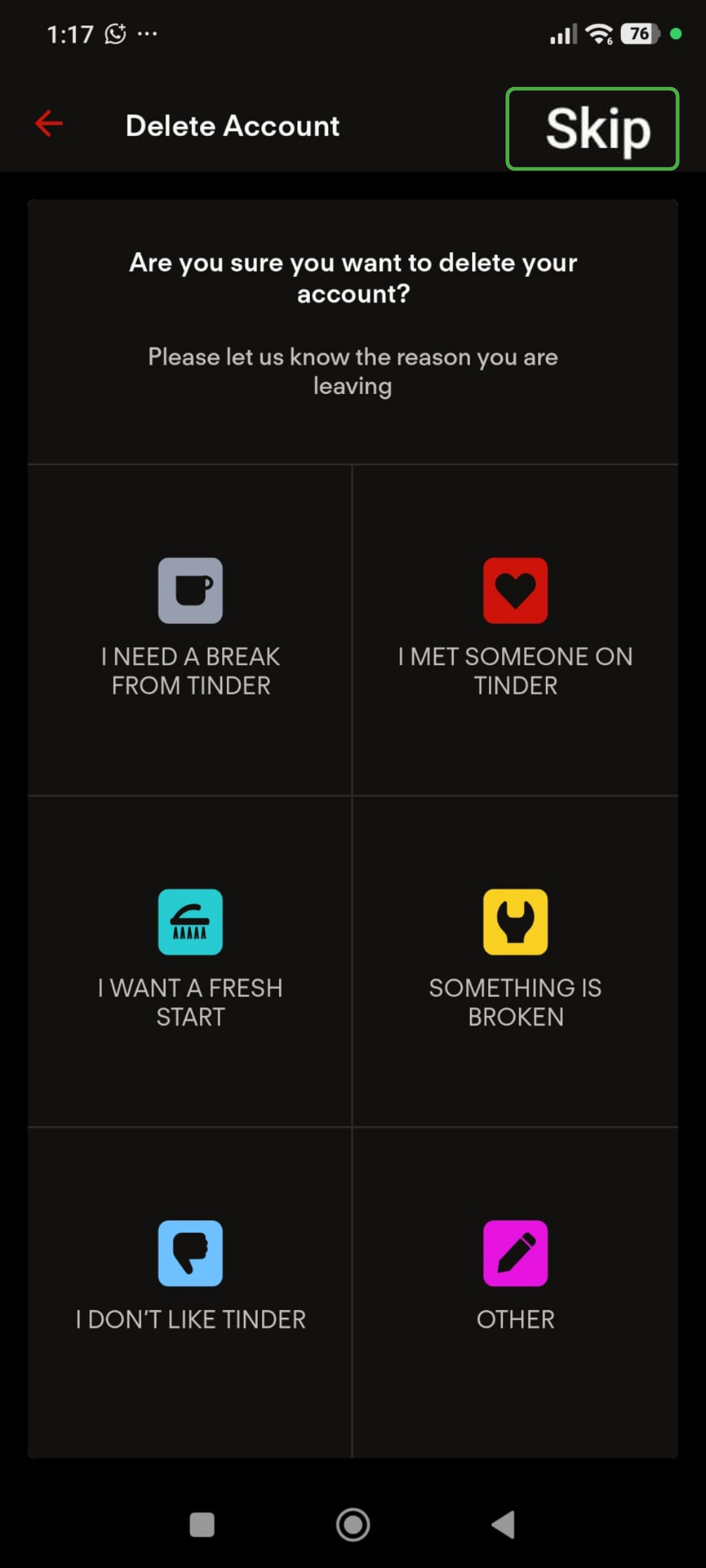
- Tap Delete my account.
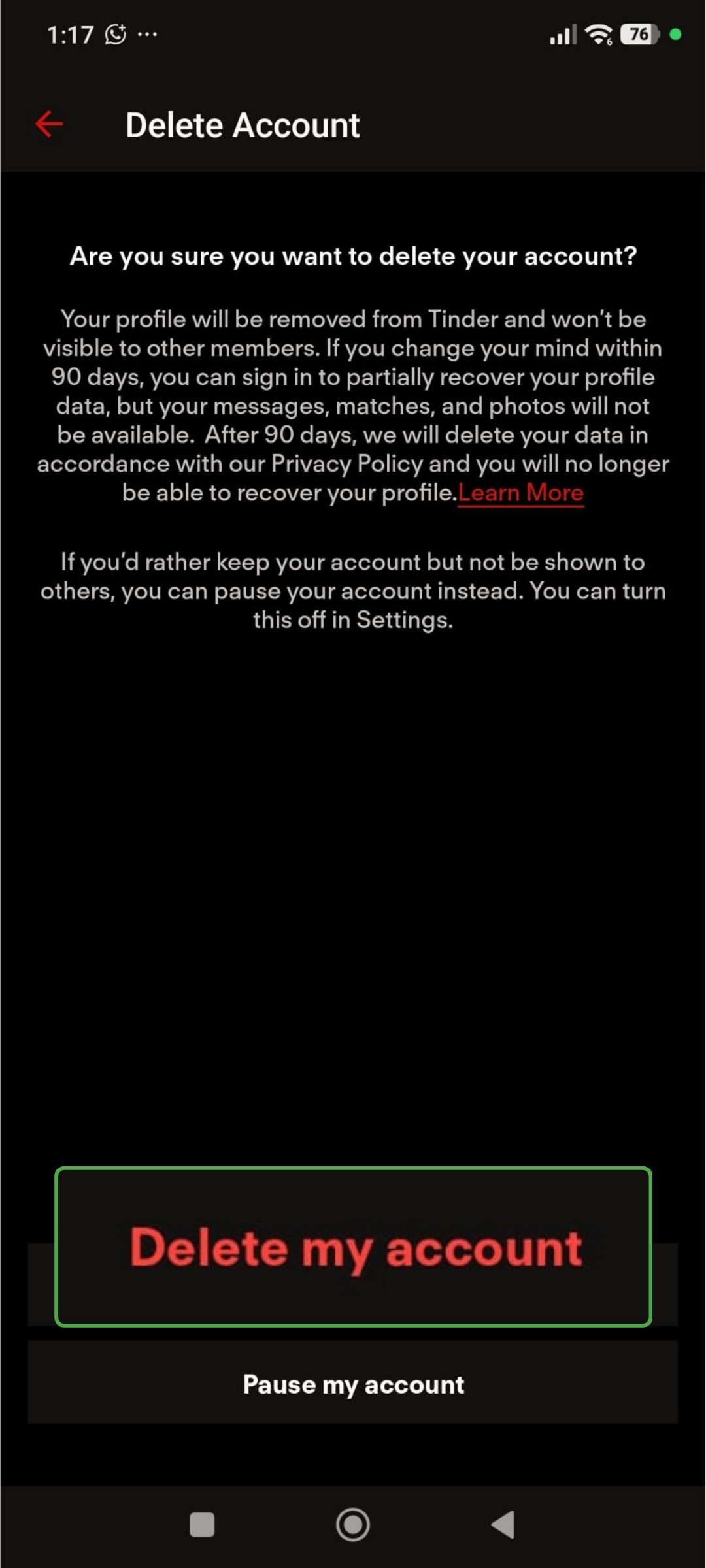
Your profile will be removed, and other users won’t be able to find you.
Tinder’s Past Privacy and Security Incidents
Tinder has faced two major security incidents, one in 2018 and one in 2020. These incidents don’t mean your data is currently at risk on the app, but they show that vulnerabilities and leaks can happen, and it’s worth understanding the potential fallout.
Tinder’s 2018 Security Vulnerabilities
In 2018, researchers from Checkmarx found weaknesses in Tinder’s Android and iOS apps.2
At the time, the apps loaded profile photos without HTTPS encryption. Someone on the same Wi-Fi network could potentially see the photos a user loaded, or replace them within the app’s traffic.
The apps encrypted other data, but the researchers found that differences in network-request sizes could reveal whether someone swiped left, swiped right, or matched. Tinder later fixed the reported issue.2
This was a technical vulnerability, not evidence that Tinder’s entire internal database had been breached.
The 2020 Tinder Photo Collection
In 2020, researchers found more than 70,000 Tinder profile photos of women linked with approximately 16,000 user identifiers circulating online.3
According to reporting, the images came from visible profiles rather than a direct compromise of Tinder’s internal systems. The incident showed that anyone who can see profile information can copy it and redistribute it outside the platform.
Using profile photos that don’t appear on public accounts can make it more difficult to connect a Tinder profile with someone’s broader online identity. It can’t stop another user from saving an image they can see.
FAQ
Can my contacts see me on Tinder?
Tinder lets you grant or block access to your phone contacts. You can also block specific people so they can’t find you on Tinder. The feature doesn’t affect existing matches and may not identify accounts created with different contact details.
Is Bumble better than Tinder?
Neither service is automatically better for everyone. Compare their current privacy policies, profile-visibility controls, verification systems, reporting tools, and deletion rules. From a privacy perspective, the better option is the one that provides the controls you need while avoiding sharing unnecessary information.
Can I hide Tinder from my contacts?
Tinder lets you block selected contacts by sharing your contact list or entering their details manually. Tinder will try to stop you from seeing each other when the submitted phone number or email address matches the other person’s account. It isn’t a guarantee, and it doesn’t remove an existing match.
Can someone tell if I’m active on Tinder?
Activity indicators may show that you’ve used Tinder recently, depending on the feature and your settings. Other users may also infer that you’re active when you update your profile. Privacy settings such as Incognito Mode and Disable Discovery limit what others can see about you, including whether you’re online or active.
Can people on Tinder see when you screenshot?
Tinder doesn’t block screenshots or tell you when someone takes a screenshot of your profile or photos. Be careful about putting anything on your profile you wouldn’t want shared.
Does Tinder track IP addresses?
Yes. Tinder’s privacy policy explicitly states that it collects users’ IP addresses along with other necessary technical data.
How long until Tinder deletes your data?
For active accounts, Tinder stores data for as long as necessary to provide users with its services. Once an account is deleted, the data stays on Tinder’s servers for 90 days in case you want to reactivate it. After that, everything is deleted.
References:
