How Your Phone Betrays You in a Crowd: The Four Signal Layers Leaking Your Location Every Day
Mobile phones give us unprecedented levels of convenience, but it often comes with a caveat: privacy and security risks. The rate of connectivity enabled by widespread digitization has also paved the way for our personal and potentially sensitive information to be acquired and traded that much more easily.
For example, the Real-Time Bidding (RTB) industry was revealed to have contributed to one of the biggest data breaches involving mobile phone data. In Europe, it led to the average person’s online data getting exposed nearly 380 times a day. In the U.S., the daily exposure rate reached nearly 750 times1.
Similar cases were recorded in 2025. In November, journalists uncovered that the location data of European Union (EU) officials was being offered for sale by brokers2. And earlier in the year, a breach against Gravy Analytics (a broker specializing in location data) affected around 30 million users globally3, allegedly resulting in a database with 10 TB of information up for sale.
Such large-scale breaches are not typically the result of consumers’ direct security lapses4. Tech providers, data brokers, and consumer companies are often targeted by bad actors because of the sheer amount of information concentrated within their servers. So, when security measures fail for any reason, regular users may end up with their data exposed.
But individuals aren’t completely powerless when it comes to protecting their data. In this guide, we’ll talk about practical ways privacy-conscious users can reduce unnecessary exposure.
- Data Brokers: Why Being in a Crowd Can Pose a Privacy Problem
- Overview: The Four Layers of Phone Exposure in Public
- Layer 1: Cellular (What Your SIM Could Be Leaking)
- Layer 2: Wi-Fi (What Your Device Is Openly Broadcasting)
- Layer 3: Bluetooth (What Your Phone Is Quietly Sharing)
- Layer 4: App and Ad ID (What Your Apps Are Disclosing)
- Regional Spotlight: What to Do if You Live in the U.S. or Europe
- Recap: Things to Know Before Heading Into a Crowded Space
- FAQ
Data Brokers: Why Being in a Crowd Can Pose a Privacy Problem
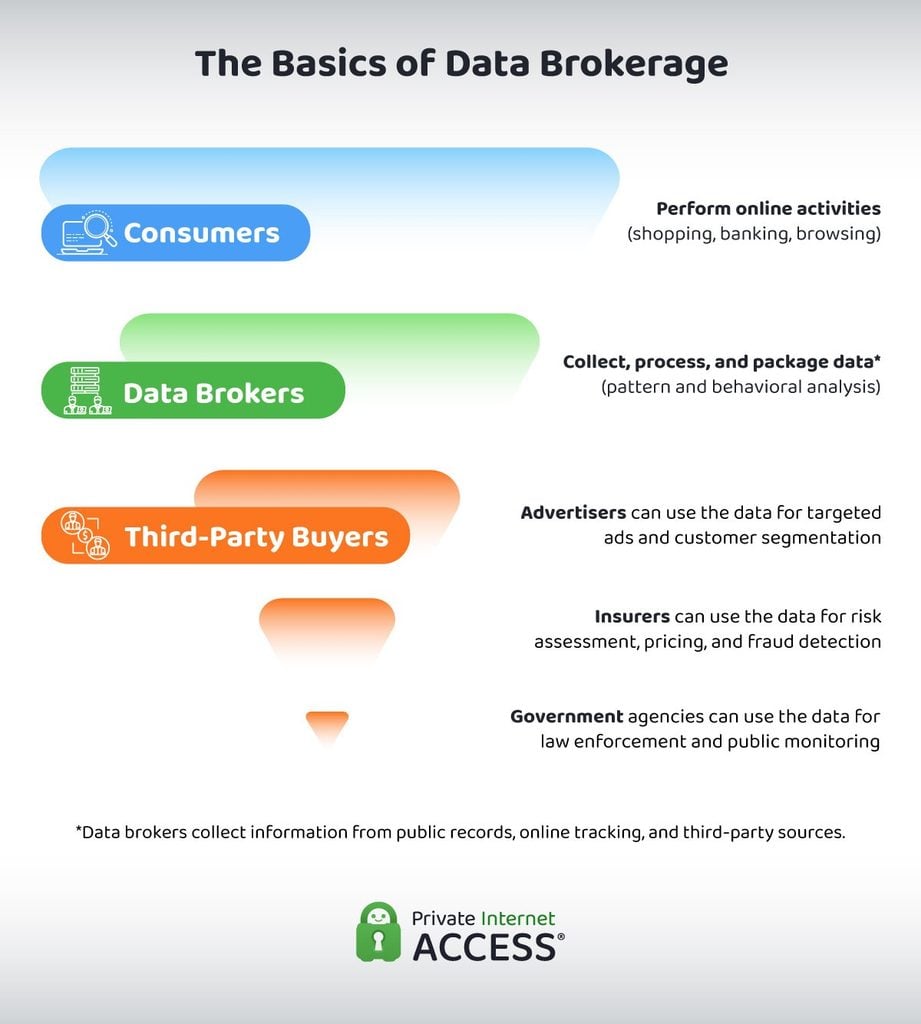
Data brokers use public records, traceable online activity, and other openly accessible channels to collect user information. They often do this without explicit consent from individuals.
All phones that run on cellular connections or carry apps transmit some kind of signal and data. When you’re at home, the data shared is more limited since you’re in a private, more controlled environment. In a crowd, every phone is on active broadcast mode at the same time, and they may be exposed to unfamiliar and potentially untrustworthy actors.
Your phone constantly sends Wi-Fi probe requests out to unknown and unverified networks. Commercially owned Bluetooth beacons recognize your device. On top of that, cellular and ID-tagged ad activity within your apps continue to transmit data. Data gatherers take advantage of this overlap.
This means that any device’s security is greatly affected by where it physically is. A “secure” phone at home is not the same as a “secure” phone in a crowded shopping mall.
We created this guide to provide everyday users with practical, easy-to-follow tips to protect their smartphones in everyday (crowded) spaces.
Overview: The Four Layers of Phone Exposure in Public
Given how much our physical and digital habits may vary, it’s difficult to account for every venue type that you might find yourself in. That’s why this guide is organized by signal layer: cellular, Wi-Fi, Bluetooth, and app or ad ID.
We also included a region-specific section (for the EU and the U.S.) to cover situations where policies may affect how a user should protect their data.
Crowded public spaces concentrate every signal layer at once. Taken together, these four broadcast signals can give data brokers and advertising tech companies a lot of crucial and potentially sensitive information about you.
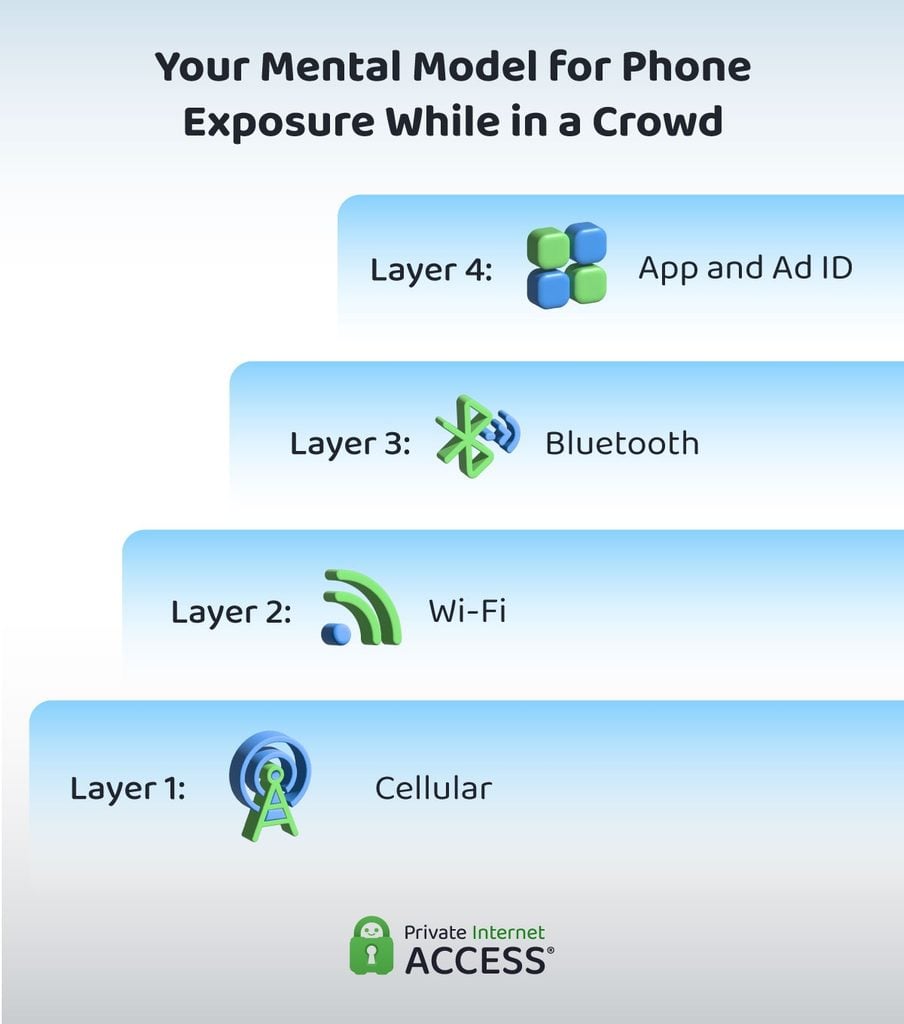
- Cellular: Your phone can be identified using the International Mobile Equipment Identity (IMEI) and the International Mobile Subscriber Identity (IMSI), which allow your phone to “speak to” nearby cell towers and base stations to establish a connection.
- Wi-Fi: Even when you’re not connected to public or unknown networks, your mobile phone sends out probe requests that expose the network names of previous connections.
- Bluetooth: As long as your Bluetooth is on, advertising channels and beacons can identify your device and link it to adtech infrastructure.
- App and ad ID: Your mobile ad ID ties almost every app you open (as well as your device identity and history as a whole) to a global data resale market.
In the sections below, we’ll dive deeper into each layer. We’ll discuss the specific risks they pose and how to protect yourself against them.
Four questions to ask yourself when you’re in a crowded public space:
- What cell tower is my phone talking to right now?
- What Wi-Fi networks could be tracking my phone’s connection history?
- What Bluetooth devices is my phone visible to?
- Which apps on my phone are awake and sharing location?
Layer 1: Cellular (What Your SIM Could Be Leaking)
Your phone’s IMEI and IMSI are key elements for your device’s cellular functions. The IMEI gives your smartphone a unique identifier, while the IMSI makes your account (SIM number) unique on the network.
Put simply, changing your phone (but keeping the same SIM or eSIM) will change your IMEI but keep your IMSI the same. Conversely, changing your number (while keeping your device) will change your IMSI but not the IMEI.
Despite being indispensable, these identifiers can be exploited using stingrays or IMSI catchers. These are cell site simulators that try to capture and harvest IMEI and IMSI data from nearby phones. By pretending to be real cell towers, they trick phones into attaching before handing them back to the true network.
Some of the older 2G cellular connections use weak or no encryption. Some stingrays can force devices to fall back into 2G. When this happens, activities carried out through the cellular connection can be vulnerable to interception or surveillance. This can include your calls, texts, and even online banking.
Stingrays aren’t easy to spot, especially for everyday users, but they’re still out there. In 2025, the Electronic Frontier Foundation’s (EFF) open-source Rayhunter tool, which detects cell site simulators, found that stingrays are likely present and active in populous U.S. cities like Chicago and New York5. The global market for stingrays is forecast to reach 690.7 million USD by 20336.
Even without stingrays, there’s still a possibility that your location data may be leaked. In 2024, the Federal Communications Commission (FCC) fined the four major U.S. carriers for sharing their customers’ location information without consent7.
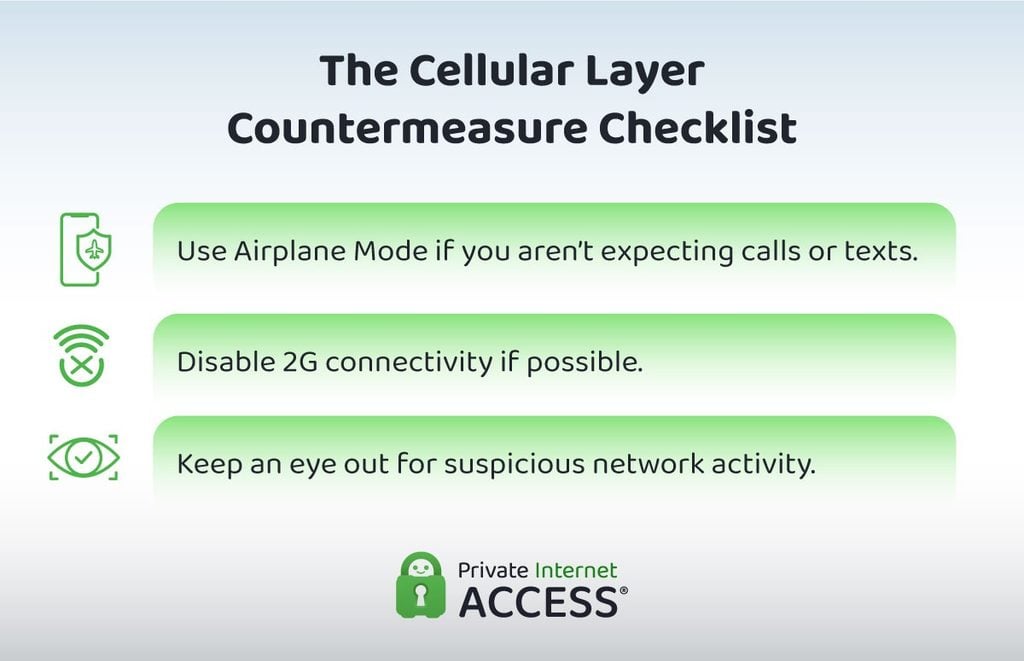
People might believe that turning off their Wi-Fi and Bluetooth connections is enough to prevent unwanted data exposure, but the cellular connection is always on by default. Airplane Mode is the easiest way to protect against the risks of cellular exposure since it disrupts all outbound network connections.
When traveling or passing through a space that you know to be a chokepoint for professionals or commuters, consider activating Airplane Mode. You can do this, too, when you anticipate being in a crowded public space for a long time.
While Airplane Mode is technically the best option to protect your device against cellular-level intrusions, we understand that it’s not feasible for many users to disable all connectivity, especially when traveling. Many of us rely on our phones for navigation or to get help in emergencies.
If using Airplane Mode constantly when in public isn’t an option for you, pay attention to suspicious or unexpected network activities instead. A forced 2G fallback is the most concerning indicator to watch for, since modern devices should default to stronger networks when available. Turn on Airplane Mode immediately if you notice this pattern.
Some devices also allow you to disable 2G connectivity. For Samsung users, you may follow these steps:
- Go to Settings.
- Tap Connections.
- Select Mobile networks.
- Scroll down and toggle off the setting that says Allow 2G service for each active SIM on your device.
Here’s how you can do the same on a non-Samsung Android device:
- Go to Settings.
- Tap Network & Internet.
- Select SIMs.
- Scroll down and toggle off the setting that says Allow 2G.
For iOS users, Lockdown Mode disables 2G and 3G cellular connectivity8. To activate it:
- Go to Settings.
- Tap Privacy & Security.
- Scroll to the bottom and select Lockdown Mode.
- Tap Turn On Lockdown Mode.
Can a VPN help protect you at the cellular layer?
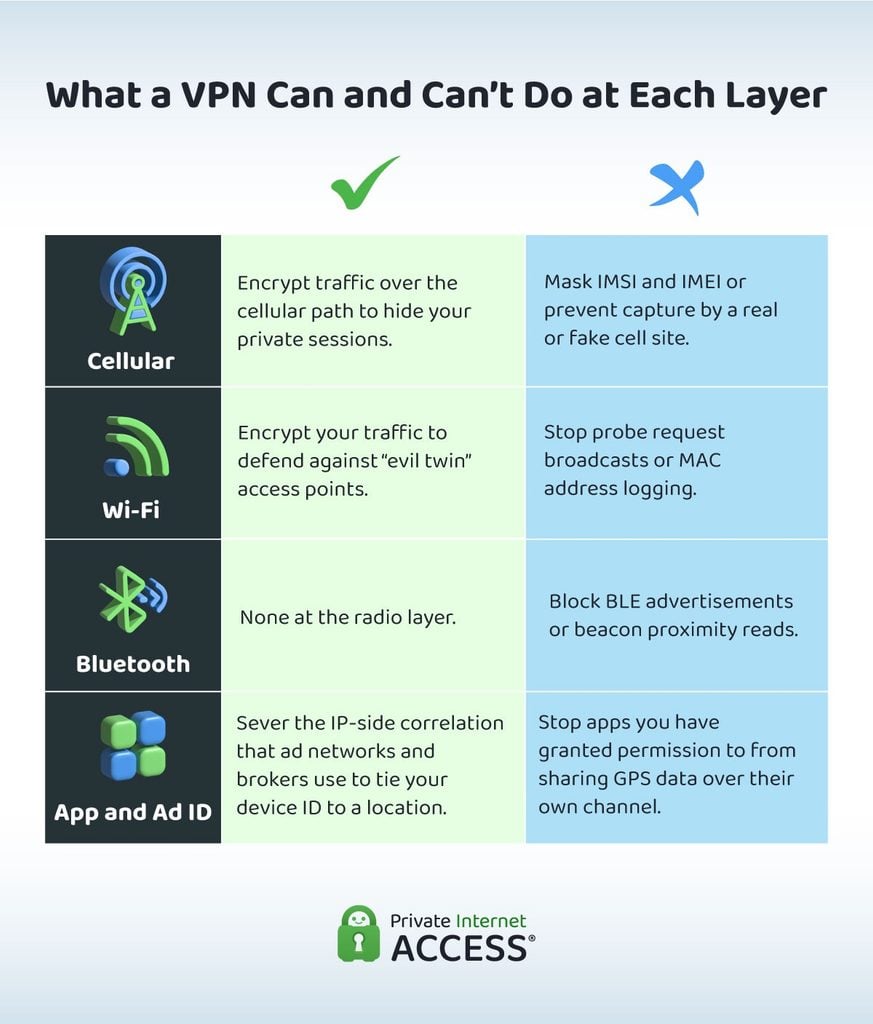
A VPN doesn’t stop your device from announcing itself to a real or fake cell tower. It also doesn’t change or mask your IMSI and IMEI.
However, a VPN encrypts your data and activity online. So, it can hide your information from prying eyes even if a cell site simulator manages to force your phone into an unencrypted network (2G connection). While bad actors might still be able to harvest your IMSI and IMEI, they can’t view your private sessions.
Layer 2: Wi-Fi (What Your Device Is Openly Broadcasting)
Over the years, the dangers of connecting to public and unknown Wi-Fi networks have been discussed numerous times by cybersecurity experts9. But several misconceptions continue to circulate, and they’re preventing users from taking more proactive steps to prevent exposure.
For instance, most don’t realize that your smartphone continuously sends out probe requests to available connections, even when it isn’t currently connected to a Wi-Fi network. These requests broadcast known Service Set Identifiers (SSIDs), which are the names of your previous Wi-Fi connections.
If you have connected to “trusted” public Wi-Fi networks in the past, your list of known SSIDs can serve as a map of places you’ve visited, worked at, or traveled through.
All phones also have a unique Media Access Control (MAC) address that ensures data delivered through routers is delivered to the correct devices. This address is shared with the network administrator as soon as you connect to their Wi-Fi.
Modern devices typically randomize your MAC address by default to help reduce exposure. However, a 2025 peer-reviewed study in Nature Scientific Reports found that data involving Wi-Fi signal strength patterns may be enough to approximate user locations through device fingerprinting10. Additionally, a 2024 study published at arXiv showed that MAC address de-randomization is possible11.
This means that default MAC address randomization isn’t enough to prevent device fingerprinting and tracking. Not only are there inherent limitations and weaknesses in the randomization process, but other methods of location tracking through Wi-Fi probe requests also exist.
Bad actors may also use social engineering techniques to harvest information. “Evil twin” SSIDs are rogue access points (unauthorized and often malicious routers or devices connected to trusted networks) that aim to trick users into connecting to a fake version of the “legitimate” public network.
If you find two near-identical Wi-Fi network names in a crowded public space, it’s possible that one of those networks is an “evil twin” that baits people into connecting. The goal is typically to capture login credentials, personal information, and traffic data.
“Legitimate” public networks can still pose a threat to users’ privacy, especially when they require an email address or phone number before allowing you to connect. These captive portals are commonly used in malls or other commercial spaces, as they allow the network administrator to capture data for advertising purposes.
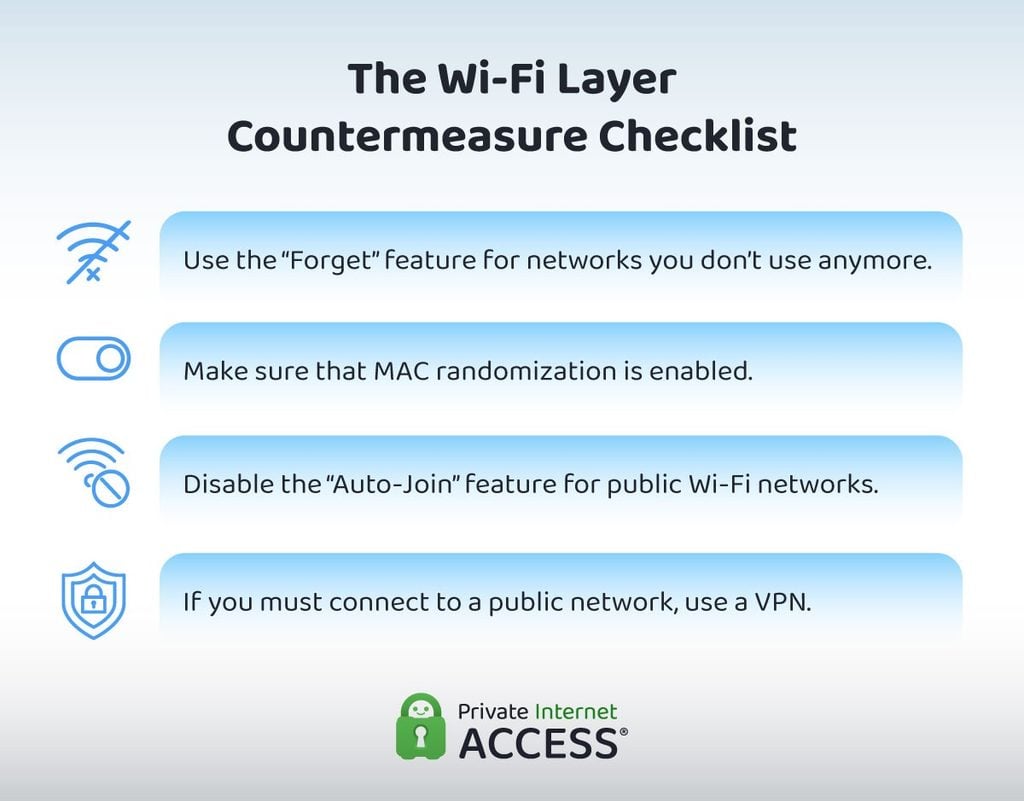
Since probe requests are generally impossible to fully stop, it helps to always “forget” Wi-Fi networks that you’re currently not using. Doing so removes known SSIDs from the broadcast list and shortens your phone’s internal connection “map.”
As a general rule, avoid connecting to public Wi-Fi networks. If it’s absolutely necessary, make sure to confirm that MAC randomization is on and “Auto-Join” is disabled before connecting. Even if you believe that a specific network is trustworthy, removing the “Auto-Join” feature helps reduce the chances of future compromise.
Here’s how you can check if the MAC randomization is enabled on a Samsung phone:
- Go to Settings.
- Tap Connections.
- Select Wi-Fi.
- Tap the settings (gear) icon next to the network you’re connected to.
- Scroll down and tap MAC address type.
- If MAC randomization is on, it will be set to Randomized MAC. If it’s set to Device MAC or Phone MAC, change it immediately.
The following steps are for non-Samsung Android users:
- Go to Settings.
- Tap Network & Internet.
- Select Internet.
- Tap the settings (gear) icon next to the network you’re connected to.
- Scroll down and tap Privacy.
- If MAC randomization is on, it will be set to Use randomized MAC. If it’s set to Use device MAC, change it immediately.
For iPhone users, follow these instructions:
- Go to Settings.
- Select Wi-Fi.
- Tap the blue information (“i”) icon next to the network you’re connected to.
- Look for the Private Wi-Fi Address setting.
- If MAC randomization is on, the Private Wi-Fi Address will be set to Rotating or Fixed. If it’s set to Off, change it immediately.
Remember that you have more control over your cellular data network (personal hotspot) than over a public or unknown network. So, if you must perform urgent online activities in crowded public spaces, opt for cellular connectivity if possible.
If that’s not an option, use a VPN before connecting to any network. Moreover, avoid providing your real name or contact information to any captive portal redirect to help limit the possibility of data exposure.
Can a VPN help protect you at the Wi-Fi layer?
A VPN can’t stop your phone from broadcasting probe requests. It also can’t prevent a venue or public network from logging your MAC identifier if it isn’t already randomized.
What it can do is encrypt everything between your phone and the internet so that any public or unknown network (as well as anyone potentially monitoring them) sees only an encrypted tunnel. Even if you connect to a rogue AP or “evil twin” by accident, bad actors on the other side won’t be able to monitor your activity and data.
Layer 3: Bluetooth (What Your Phone Is Quietly Sharing)
The Bluetooth connectivity layer is possibly the least understood, even though it’s the most commercially deployed method. Specifically, businesses and adtech companies often use Bluetooth Low Energy (BLE), a less power-intensive version of the classic Bluetooth, to gather consumer data (such as location and browsing history).
Smartphones send out BLE “advertisements” that beacons listen for. These beacons allow mobile phones to connect to smart devices like fitness wearables and home sensors. However, these beacons are also often found in malls, transportation hubs, stadiums, conferences, and other event venues. They detect and track the presence of Bluetooth-activated devices to provide location-based services.
Like with Wi-Fi probe requests, beacons don’t need to establish a direct connection with your device to collect information. All it needs to do is detect the presence of the phone to create a broadcast layer.
Given how common smart devices are becoming, Bluetooth device shipments are projected to reach 8.11 billion units yearly by 203012, and the Bluetooth beacon industry is expected to grow to 1,106.87 billion USD by 203413. This means that there’s an increasing number of active devices that are participating in a wireless broadcast ecosystem by default.
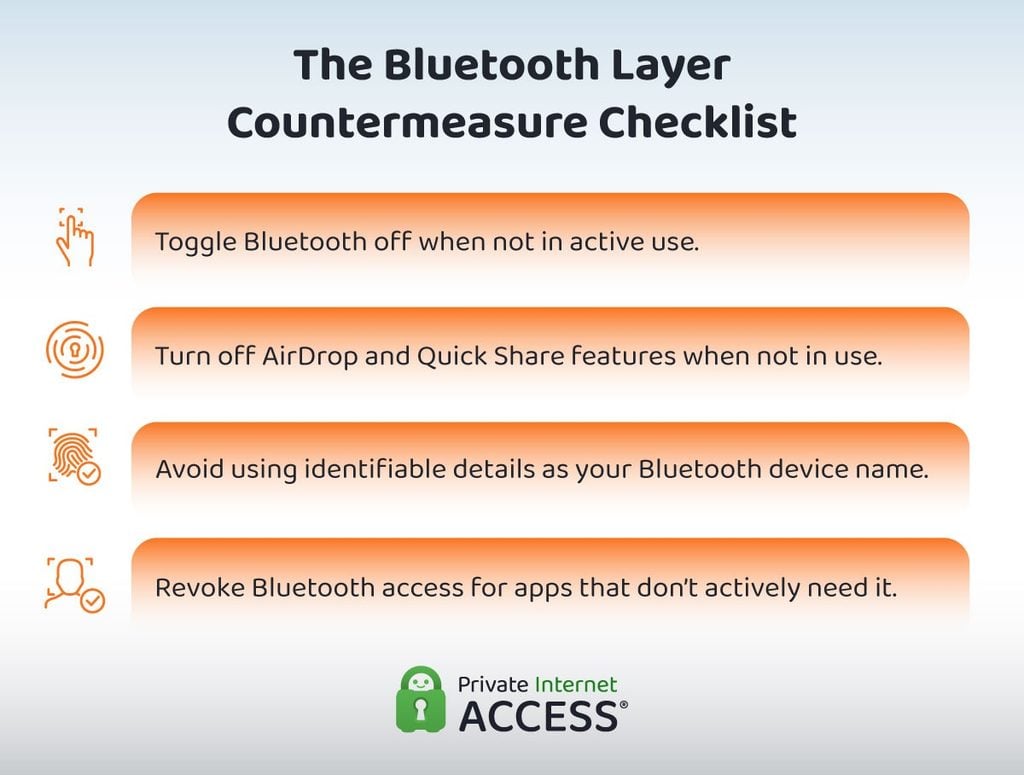
Using your real name (or any personal detail that can easily be traced back to you) as your smartphone’s device name creates unnecessary exposure. It also makes it easier for data brokers or adtech companies to build a consumer profile of you.
A generic device name is safer, especially when you don’t often use your phone to facilitate data transfers with other people. If you need a more identifiable name for file sharing, opt for a random phrase or a unique configuration of letters and numbers. “iPhone xG16uL” is better than your name, the name of your first pet, or your hometown.
If you use features like AirDrop or Quick Share, never allow “Everyone” to find you. Set it to “Contacts Only” at most, and try to turn it back off the moment you’re done sharing.
If you own an iPhone, keep in mind that turning Bluetooth “off” through the Control Center doesn’t fully deactivate the internal radio. It only deactivates it temporarily by disconnecting your device from the accessories it’s linked to at that moment. Instead, follow these steps:
- Go to Settings.
- Tap Bluetooth.
- Toggle it off.
Lastly, make sure to audit Bluetooth permissions per app. Both iOS and Android phones list which apps have Bluetooth and “Nearby device” access. Revoke access for any app that doesn’t need it, and reassess whether you truly need to keep the ones that do.
Can a VPN help protect you at the Bluetooth layer?
A VPN doesn’t affect, interact with, or hinder Bluetooth connectivity. Beacons can “hear” your phone, whether or not a VPN is activated.
Layer 4: App and Ad ID (What Your Apps Are Disclosing)
RTB (or real-time bidding) uses data from apps and websites visited through mobile phones to track individuals’ activity. It has the capacity to broadcast your location at scale. Across the U.S. and Europe, there are around 178 trillion RTB events reported per year1.
The mobile advertising ID is the key attribute for this form of data collection. For instance, the Federal Trade Commission (FTC) filed a complaint against data broker company Mobilewalla for allegedly linking over 500 million ad IDs to precise location data over the span of more than 2 years14.
In 2025, the Electronic Privacy Information Center (EPIC) and Irish Council for Civil Liberties (ICCL) claimed that Google’s RTB violates data protection laws by publishing “sensitive data without any security.” Said RTB was reportedly operating on nearly 34 million websites, over 90% of Android apps, and around 80% of iOS apps15.
Assertions that advertising data collected from RTB is “anonymous” also fall short. Documented instances of ad data getting reconstructed to track individuals tell us that any information leaked through app and ad IDs can be used to identify certain users2.
The biggest threat is the scale by which RTB exposes personal information. Since virtually all individuals with mobile phones use a wide variety of apps, breaches affecting or targeting RTB data are bound to affect a large part of the population.
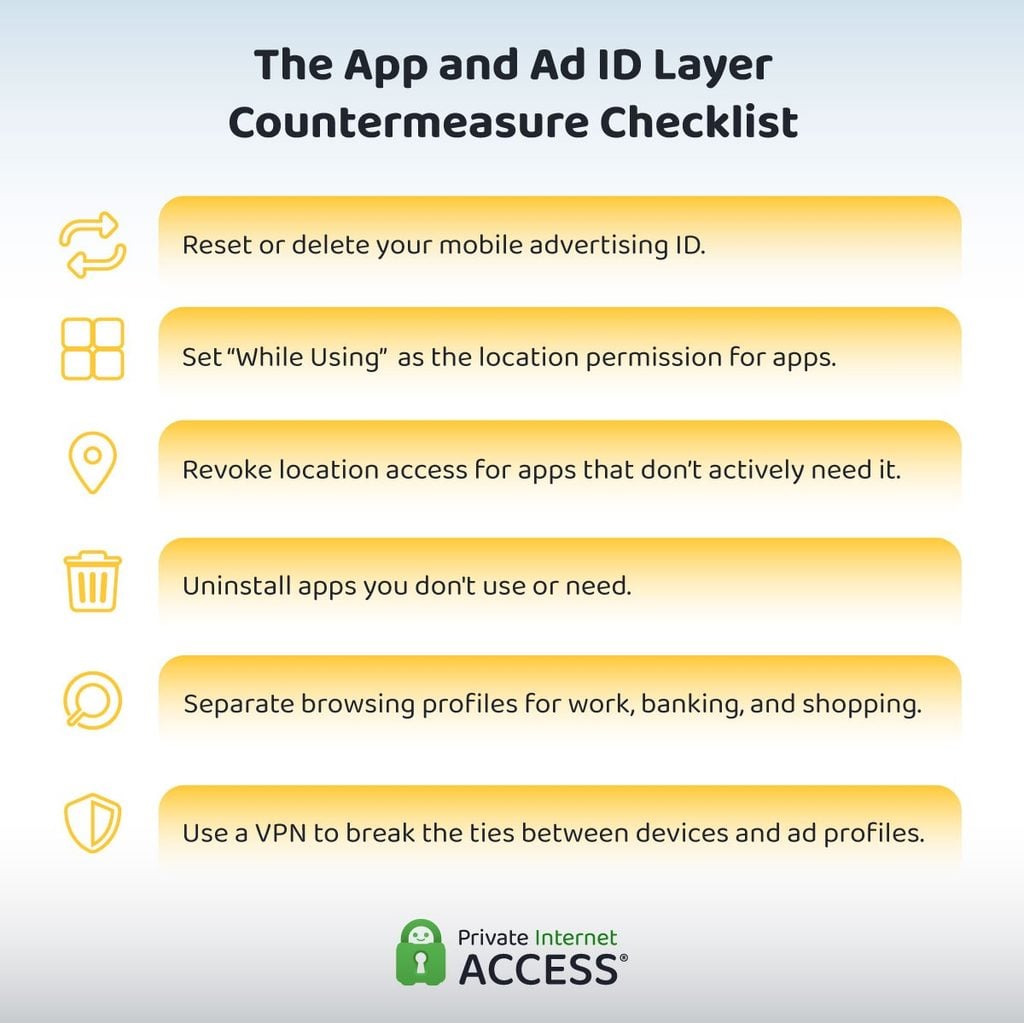
Given how RTB relies on app-sourced data, it’s unlikely that anyone can completely shield themselves from exposure through this layer. However, you can take certain steps to limit your vulnerability.
Resetting (or deleting, if possible) your mobile advertising ID is the most important adjustment. On Samsung phones, you can follow these steps:
- Go to Settings.
- Tap Security and privacy.
- Choose More privacy settings.
- Tap Ads.
- Select Delete advertising ID if it’s available. Otherwise, select Reset advertising ID.
Non-Samsung Android users can use these instructions:
- Go to Settings.
- Tap Privacy.
- Choose Ads.
- Select Delete advertising ID if it’s available. Otherwise, select Reset advertising ID.
You may do this two to four times a year to ensure your ad ID is refreshed regularly.
For iPhones, you may use the App Tracking Transparency feature16:
- Go to Settings.
- Tap Privacy & Security.
- Select Tracking.
- Toggle off the Allow Apps to Request to Track option.
- Turn it back on to reset your ad ID.
If you decide to keep the toggle on, you’ll receive a prompt asking for permission to track your activity whenever you install a new app. Select “Ask App Not to Track.” Conversely, you may simply reset your ad ID and then keep the toggle off to prevent tracking.
You should also regularly audit which apps can access your location. It’s seldom necessary to grant 24/7 permission to apps. Most times, a “While Using” permission is more than enough for optimal function.
Other apps might require your location only at signup. In those cases, you may revoke access completely after you’ve completed app registration.
To further simplify the process, consider removing unnecessary apps from your device entirely. An app purge every 6 months can help reduce your susceptibility to different types of trackers and RTB exposure.
Can a VPN help protect you at the app and ad ID layer?
Once you grant an app permission to access your location information, a VPN can’t stop your device from sending GPS coordinates. It also can’t stop the apps from sharing said GPS data over their own channels.
A VPN can, however, sever the IP-side correlation that ad networks, internet providers, and data brokers use to tie your device ID to a specific location. It can also encrypt your traffic so that a network administrator or public Wi-Fi observer can’t link ad ID-tagged activities with private sessions.
Regional Spotlight: What to Do if You Live in the U.S. or Europe
In the U.S., regulatory handling of cases of location breach is generally trending toward placing more accountability on corporations and adtech companies. This means that users in the country may find increasingly more consumer-friendly policies in the coming years.
Certain states already have stricter laws. The California Consumer Privacy Act (CCPA), for instance, enabled a sweep of the location data industry in 2025. Data brokers and adtech companies received letters notifying them of potential violations and requesting further information about their practices for investigative purposes17.
Similarly, the General Data Protection Regulation (GDPR) in the EU continues to help everyday users opt out of certain intrusive data collection practices. Location data is considered personal data per the policy, which means that individuals may be able to request that their geo-based information be removed from brokers’ databases18.
The EU Artificial Intelligence Act, passed in 2025, is also helping reduce exposure by banning real-time remote facial recognition19.
Recap: Things to Know Before Heading Into a Crowded Space
Review this quick summary of the countermeasures you can take to protect yourself at every signal layer, as well as how a VPN can help.
Overall, we hope this guide helps everyday users, professionals, and privacy enthusiasts safeguard their information whenever out in crowded public spaces.
While completely eliminating exposure is not feasible while using virtually connected devices, understanding vulnerabilities and limiting weak points can help protect sensitive information, contacts, and activities.
FAQ
Is “anonymous” location data really anonymous?
No. A case in November 2025 found that the location data of EU officials that was being sold among brokers allowed for the identification of the individuals involved2. The mobile app and ad ID can be used to reconstruct “anonymous” data, so protecting these identifiers in the first place is crucial.
Is turning off Wi-Fi and Bluetooth enough to limit exposure?
No. Cellular connectivity is often active by default and continues to function even when Wi-Fi and Bluetooth connections are turned off. Similarly, app and ad IDs can identify users and track their activities if the IDs aren’t either regularly reset or disabled.
Is using a VPN enough to protect your phone from exposure in a crowded space?
No. A VPN can only encrypt your data and traffic as it travels from your device to the internet. It can’t hinder Bluetooth functionality, and it doesn’t automatically delete or reset the mobile advertising ID. To review what a VPN can and can’t do, jump back to our full recap for all signal layers.
Are the tools used for data brokerage illegal?
Most tools used by bad actors, data brokers, or adtech companies are not illegal by default. That said, evolving regulations and laws in certain regions may require more oversight on the use of said tools or ban certain activities, such as live facial recognition.
Am I protected enough from exposure if I am in the EU?
The GDPR and EU AI Act can give users in the region stronger statutory rights, but the underlying tech is the same. Individuals must still safeguard their devices for maximum security.
Feel free to use the data and images from this article. We’re all about open access. Just link back to this article so credit goes where it’s due.
References:
- The Biggest Data Breach—ICCL
- Phone location data of top EU officials for sale, report finds—TechCrunch
- A breach of Gravy Analytics’ huge trove of location data threatens the privacy of millions—TechCrunch
- Why Companies Aren’t Held Accountable For Data Breaches—TIME
- Rayhunter: What We Have Found So Far—EFF
- Stingray Device Market Analysis & Forecast: 2026–2033—Coherent Market Insights
- FCC Fines Largest Wireless Carriers for Sharing Location Data—FCC
- About Lockdown Mode—Apple
- Dangers of public Wi-Fi: how to use open networks safely—Surfshark
- Compromising location privacy through Wi-Fi RSSI tracking—Nature
- MAC Address De-Randomization using Multi-Channel Sniffers and Two-Stage Clustering—arXiv
- Bluetooth® market dashboard—Bluetooth®
- Beacon Market Report—Market Data Forecast
- FTC Takes Action Against Mobilewalla for Collecting and Selling Sensitive Location Data—FTC
- EPIC, ICCL Enforce Complaint In re Google’s RTB—EPIC
- If an app asks to track your activity—Apple
- Attorney General Bonta Announces Investigative Sweep of Location Data Industry, Compliance with California Consumer Privacy Act—State of California Department of Justice Office of the Attorney General
- Your right to get your data deleted—Information Commissioner’s Office
- Article 5: Prohibited AI Practices—EU Artificial Intelligence Act
