Is DuckDuckGo Safe? A Complete Privacy and Security Breakdown
If you’ve never used one before, choosing a privacy-focused search engine or browser can be a little daunting. How do you know your data will be any better protected than it is with the big players?
Learn what DuckDuckGo does with your search and personal data, how its browser and AI chat protections actually work, and where independent researchers have found gaps. We also compare DuckDuckGo against Google to see how both companies handle user data and source search results.
Quick Guide to DuckDuckGo Safety
Why DuckDuckGo is generally safe:
- Its search engine doesn’t build a profile of you and its browser and extension block trackers by default.
- Its ads are only based on the contents of the search results page, thus removing any financial incentive for the company to build a profile on you.
- No major breach has occurred since its launch, partly because the company stores so little user data.
However, independent audits only focus on its VPN service, and it relies on Bing for search results.
How Does DuckDuckGo Protect Your Privacy?
DuckDuckGo’s privacy protections extend well past the search engine, as it employs the same principles across its product portfolio.
Tracker Blocking and Anti-Fingerprinting
Hidden Google trackers reportedly sit on 85% of websites,1 which is why DuckDuckGo ships tracker-blocking and anti-fingerprinting tools with both its browser extension and standalone web browser. These protections make it harder for websites to build a unique profile on you by collecting details like your screen size, operating system, and other information.
On Android, App Tracking Protection blocks third-party trackers inside other apps on your phone, even when those apps aren’t open. The feature works by detecting when another app is about to send data to a known tracking company and blocking that request.
Smarter Encryption and Link Tracking Protection
Mainstream browsers only upgrade a connection to an encrypted Hypertext Transfer Protocol Secure (HTTPS) version of a site in certain situations, such as when you type an address into the address bar without specifying “http://”.2 If you follow a link that points to the unencrypted HTTP version, the browser may load that version as is.
DuckDuckGo’s Smarter Encryption tries to upgrade every link you open to HTTPS, regardless of whether you reached it through search, social media, or another website.
DuckDuckGo also removes tracking parameters that let trackers follow clicks from one site to another, while identifying and avoiding parameters that serve important functions.3
Email Protection
DuckDuckGo’s Email Protection feature targets trackers embedded in emails. Turning the feature on hides your real address behind a forwarding @duck.com address and strips known trackers from forwarded messages.
Since it works through address forwarding rather than a specific browser, it functions no matter which browser or email client you use.
Duck.ai Chat Privacy
DuckDuckGo’s AI chat, Duck.ai, gives you access to models from providers including Anthropic, OpenAI, and Mistral. The service anonymizes every chat and strips metadata such as IP address before the request ever reaches the underlying model provider.
DuckDuckGo also has agreements with AI model providers to ensure they don’t use your conversations for training and delete your prompts after generating a reply.4
What Data Does DuckDuckGo Collect?
DuckDuckGo says it doesn’t collect or share personal data such as your search history to build profiles that can be used for targeted advertising. That doesn’t mean that it doesn’t collect any personal information at all, though. Here’s a breakdown of its products and which data they collect and retain.
| Product | Data Collected or Processed | Data Retention |
| Search engine | Search queries and temporary technical data, such as IP addresses. | DuckDuckGo doesn’t save search history with IP addresses or other personal identifiers. |
| Browser and extensions | Technical data and locally stored settings. | DuckDuckGo doesn’t save browsing history on its servers, but some history may persist on the user’s device. |
| Email Protection | Email addresses and forwarding information. | DuckDuckGo uses addresses to provide the forwarding service and they may also be used for fraud prevention. |
| Duck.ai | Chat prompts, uploaded files, and usage statistics. | DuckDuckGo doesn’t store chats by default, but optional sync can save them in encrypted form. |
| Subscriptions and VPN | Subscription details and anonymous VPN performance metrics. | DuckDuckGo doesn’t save performance data with account information and doesn’t keep VPN activity logs. |
| Support and feedback | Contact details and information submitted in requests. | DuckDuckGo retains as needed to handle requests and this may be processed by third-party partners. |
How Safe Is DuckDuckGo?
Whether DuckDuckGo is a secure, privacy-first solution comes down to two questions:
- Has it ever suffered a breach?
- Does its design have gaps that researchers or attackers can exploit?
On the first question, independent reviewers have not yet identified a major disclosed breach of DuckDuckGo’s infrastructure or user data.
Part of the reason is that DuckDuckGo is much less data-heavy than competitors. Because the company’s products don’t store as much personal, search, or browsing history, there’s less sensitive information sitting on its servers to attract attackers.
Of course, no solution is foolproof. In 2022, privacy researcher Zach Edwards found that DuckDuckGo’s browser extensions and mobile browsers couldn’t block certain Microsoft tracking scripts on third-party websites. The restriction came from DuckDuckGo’s agreement with Microsoft,5 which provides Bing search results and advertising services.
The company later announced that it had changed its agreement with Microsoft and would begin blocking those Microsoft tracking scripts. However, some Microsoft scripts used for advertising conversion tracking remained exempt in certain circumstances, highlighting the limits of DuckDuckGo’s privacy protections.
Beyond this, no independent third-party audit of DuckDuckGo’s wider privacy stack exists, other than the audit of its VPN’s no-logs policy.6 Most of what’s known still comes from the company’s own disclosures and individual researcher findings.
DuckDuckGo vs. Google: Key Differences
The core differences between DuckDuckGo and Google come down to where the search results originate, how much of your activity each company retains, and what happens to that data afterward.
Data Collection and Tracking
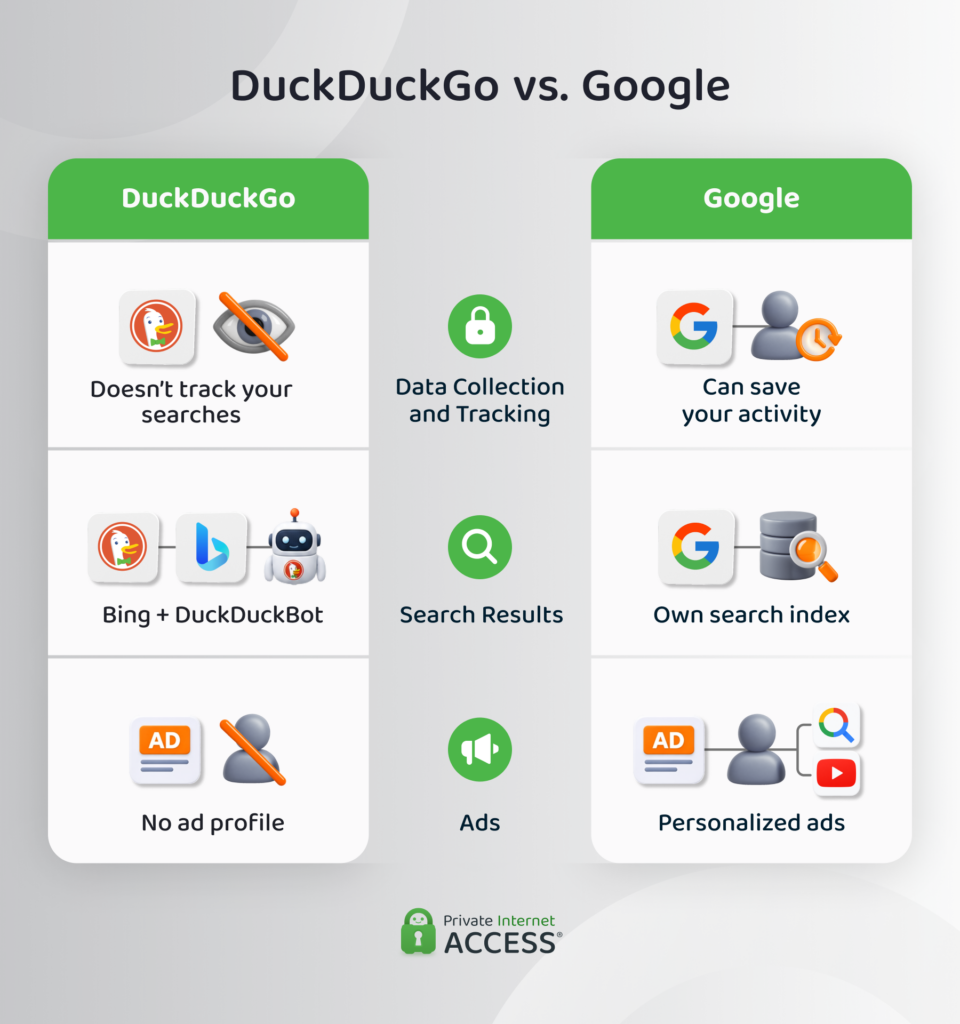
Google’s privacy policy states that when you’re signed in with certain history settings on, Google can track your activity across its services and use it to personalize recommendations, ads, and even train generative AI models.7
Google lets you review and turn this history off at any time through your account’s activity controls, but doing so can limit how effectively you can use some of Google’s services.
By contrast, DuckDuckGo’s privacy policy states that it avoids collecting this kind of data in the first place, removing the need for an opt-out.
Where Search Results Actually Come From
DuckDuckGo doesn’t run a comprehensive web index the way Google does. Instead, it draws its traditional search results from Bing while layering its own crawler, DuckDuckBot. On the other hand, Google builds its results in-house, through its own crawling and indexing systems.
Ads and Monetization
Both companies earn money from search advertising, but their targeting methods differ. DuckDuckGo doesn’t deploy targeted advertising on a per-user basis. Ads run through Microsoft’s ad network and target results pages rather than user profiles.
Google’s ad system can draw on a much wider set of signals when you turn on personalization, including saved search history, YouTube activity, and other information tied to your Google Account. Turning personalization off narrows the scope, although Google may still serve ads based on the general topic of the page or your approximate location.
Why Pair DuckDuckGo With a Dedicated VPN?
DuckDuckGo’s protection stops at the edge of your connection, so your internet service provider (ISP) can still see what sites you visit. However, a VPN can close this gap, and DuckDuckGo offers one with an independently audited no-logs policy as part of its paid subscription. Note that while it may be suitable for everyday privacy tasks like keeping your ISP from tracking you, a dedicated VPN can be a worthwhile alternative for various reasons, including:
- Thorough device coverage: DuckDuckGo’s VPN works on Windows, macOS, iOS, and Android, but a dedicated VPN service like PIA extends that coverage to other devices like smart TVs and compatible routers.
- Server variety: Dedicated VPN providers offer a much broader server network, with PIA covering {countries_no} countries across the globe.
- Reliability: A VPN service like PIA offers a fast 10-Gbps network to limit lag and server congestion, which can help to keep live streaming and video calls from dropping.
- Dedicated IP address: Using DuckDuckGo’s VPN means you’ll have to rely on a shared IP address pool and your IP address will rotate constantly. If you’re looking for more stability, PIA offers a Dedicated IP address add-on, which is helpful if you use apps and services that are sensitive to IP address changes.
If you simply want to encrypt your browsing on your PC or smartphone, DuckDuckGo’s VPN should do the job. However, if you want protection on every device, access to more servers, or additional features like a dedicated IP address, a standalone VPN service might be the better fit.
FAQ
What is DuckDuckGo?
Founded in 2008, DuckDuckGo is an independent company that started with a privacy-focused search engine and expanded to an ecosystem offering browser, email, VPN, and AI chat tools. It earns money from ads based on search page content and not personal profiles. Some features, such as Email Protection or subscription support, may collect limited personal information. Each product’s privacy policy explains how it’s used and how to opt out.
What is the downside to DuckDuckGo?
One downside of DuckDuckGo is that there aren’t any third-party verifications of its privacy features, outside of an independent audit focusing on DuckDuckGo’s no-logs policy. The company also relies on Bing to deliver its search results. A security researcher discovered that DuckDuckGo allowed Microsoft tracking scripts to keep running.
Which is safer, Google or DuckDuckGo?
Between Google and DuckDuckGo, DuckDuckGo is safer by design because its product suite collects and retains far less personal information than Google’s products. Although Google offers various ways to opt out of data collection, DuckDuckGo skips that step by not storing the information in the first place.
How does DuckDuckGo make money?
DuckDuckGo earns revenue through ads matched to the content of a search results page rather than to a personal profile, with ad clicks handled through Microsoft’s ad network.
Can anyone see what I search on DuckDuckGo?
No, DuckDuckGo says it doesn’t log identifiers alongside your searches, so it can’t connect a query back to you. However, your ISP or someone else snooping on your network may be able to see the sites you visit, even if you’re searching with DuckDuckGo. You can help prevent this with a reputable VPN.
Does DuckDuckGo use AI?
Yes, DuckDuckGo uses AI to generate summarized answers on its search results pages. It also has a privacy-focused AI service called Duck.ai. Duck.ai gives you anonymized access to third-party AI models, but doesn’t retain prompts or conversation history for training.
Is DuckDuckGo free?
Yes, DuckDuckGo’s search engine, browser, and Duck.ai are free to use with no account required. The company also offers a paid subscription that adds a VPN, identity theft restoration, and personal information removal from data broker websites.
Is DuckDuckGo safe from hackers?
DuckDuckGo hasn’t had a reported breach of its infrastructure or user data and it stores little personal information, so there’s not much for hackers to target. However, that doesn’t guarantee its safety. There haven’t been any independent audits of its privacy stack outside of its VPN no-logs policy, so its security record mostly rests on the company’s own disclosures.
References:
- DuckDuckGo Tracker Radar Exposes Hidden Tracking – DuckDuckGo
- Firefox connection upgrades – HTTP to HTTPS – Mozilla Support
- Web Tracking Protections – DuckDuckGo
- How does Duck.ai protect my privacy? – DuckDuckGo
- DuckDuckGo removes carve-out for Microsoft tracking scripts – TechCrunch
- DuckDuckGo VPN No-Log Policy Audit – Securitum
- Gemini Apps Privacy Hub – Google Support
