Network File System (NFS): Setup and Security Guide
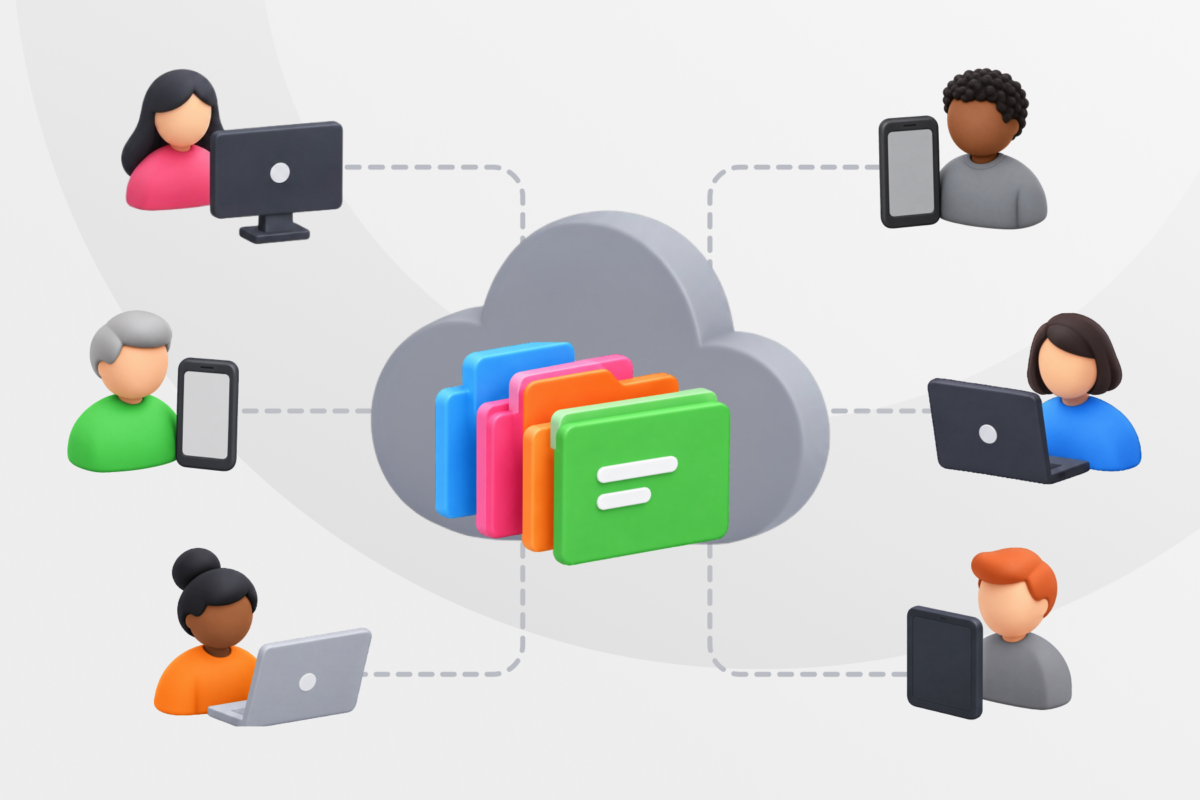
Think of a Network File System (NFS) like a shared library for computers. Instead of each machine keeping its own copy of a file, NFS lets multiple devices access files stored on one central server as if each device stored those files locally. You can open, edit, and save them the same way you always do, without copying files or guessing which version is current.
While there are certain benefits to using NFS, there are also considerations about network security and file handling that can make NFS unreliable.
How Does NFS Work?
NFS links a computer that stores files (the NFS server, or host) to any number of computers that need access to those files (the NFS clients). The server shares a folder and the client mounts it, which means the shared folder appears as part of the client’s own file system. Once mounted, users and apps can work with those files.
Now, let’s see what happens behind the scenes. An NFS daemon runs on the server and listens for requests from clients. When a client tries to open or save a file, an NFS daemon sends a request using remote procedure calls (RPC). The server now processes the request, applies the configured access rules, and sends the data back over the network, ready for you to pick it up.
Because NFS runs over IP, it works on any IP-based network. It can be a small local setup or a large enterprise network.
Key NFS Services That Make It Work
Behind every NFS setup is a group of background services (daemons) that oversee communication. They work in the background and without them, an NFS file system wouldn’t function. Here are some of them:
- nfsd: The core NFS daemon that handles client requests to access and manage files on the server.
- rpc.mountd: Deals with mount requests from clients and checks if they’re allowed access to specific shared directories.
- rpcbind/portmap: Acts like a directory for RPC services, telling clients which network ports NFS-related services are using.
- nfs lock: Responsible for file locking, ensuring multiple clients don’t overwrite each other’s changes.
- rpc.rexd: When a client sends a request from a remote machine, this daemon executes commands on the server using RPC. It’s not required in modern NFS setups.
Operating Systems That Support NFS
NFS works on most major operating systems:
- Linux and Unix-based systems: Linux and Unix have NFS built in, so you can share files across servers and workstations without installing extra software.
- macOS: It includes NFS, though it usually defaults to Server Message Block (SMB), another network file-sharing protocol. NFS is often used alongside Linux or Unix machines in mixed environments.
- BSD systems: There’s full NFS support out of the box. BSD machines can act as servers or clients.
- Windows: Can use NFS, but it’s not enabled by default. You can set it up to function as a client and sometimes even as a server, but it requires some technical know-how.
Because NFS runs over IP, these systems can all share files on the same network.
Network File System Versions: Complete Comparison
| Characteristics | NFSv2 | NFSv3 | NFSv4 |
| Release year | 1984 | 1995 | 2003 |
| Protocol | UDP | TCP/UDP | TCP only |
| File size support | 32-bit | 64-bit | 64-bit+ |
| Security | Unix authentication | Unix authentication | ACLs, Kerberos authentication |
| Performance | Basic | Improved (async writes) | Optimized, stateful, secure |
| Firewall-friendly | ❌ | ✅ (Limited) | ✅ |
| Current use | Legacy | Common | Recommended for modern deployments |
NFSv2: Legacy Protocol
NFSv2 was the original version released in 1984. It has a simple, stateless design (the server doesn’t keep previous client requests), uses UDP to communicate, and only supports 32-bit file sizes.1 But the biggest drawback is its limited security. There’s no built-in authentication or encryption, so it’s not safe for sensitive data.
Many consider NFSv2 outdated today, but some legacy systems still rely on it for compatibility with older NFS models.
NFSv3: Improved Performance
Released in 1995, this protocol came with TCP support, larger file sizes (64-bit), and asynchronous writes. It’s still mostly stateless, which keeps it fast and simple. There’s limited security as it relies on client-side controls and doesn’t offer strong authentication or encryption.2
Linux and Unix systems may still use NFSv3 because it focuses on speed and performance rather than tight security.
NFSv4: Modern Standard With Security
NFSv4, released in 2003, is the current standard. It’s a stateful protocol with built-in support for authentication, access control lists (ACLs), and firewall-friendly operation. NFSv4 only uses TCP, supports Kerberos for secure authentication, and allows Linux, Unix, macOS, and Windows systems to access the same files.
It’s the most secure NFS version, designed to protect data in transit and enforce access controls. NFSv4 is the recommended version for new deployments.3
NFSv4 also has two updated versions, NFSv4.1 and NFSv4.2.4, 5
- NFSv4.1 added support for global WAN operations, parallel NFS for better performance, and a new session model with directory delegation.
- NFSv4.2 introduced modern features like server-side copy, space reservations, sparse file support, and better ways to handle data so large storage setups run more smoothly.
Benefits of the Network File System
Those who need to share files across multiple systems on the same network often rely on NFS because it’s simple and efficient. Here’s why:
- Provides a mature and stable protocol: NFS has been in use for over 30 years. That means it’s well documented, widely used, and backed by decades of documentation and tooling.
- Enables remote file sharing: Since NFS lets multiple clients access the same files from a central server, everyone works with the same data. Changes show up in real time and files stay consistent.
- Reduces storage needs: Files stay on the NFS server, so client machines don’t need large local storage. They can access the files remotely.
- Lowers admin overhead: Centralized storage simplifies backups, updates, and access management.
- Lowers reliance on removable media: There’s less need for USB drives or disks, which lowers malware risk.
- Scales with the network: NFS can grow to support more users, systems, and data as needs change.
- Supports mixed environments: Works across Linux, Unix, macOS, and Windows systems on the same network.
Disadvantages of the Network File System
Even though it’s efficient, NFS has some limitations that can affect performance, compatibility, and security.
- Network dependency: NFS depends on the network. If the connection is slow or unstable, file access suffers. Busy environments, long distances, heavy traffic, or network congestion can cause slowdowns and affect performance.
- Security limitations: Security is another drawback, especially in older NFS versions. If you’re not careful when you’re configuring it, NFS can expose shared files to prying eyes and unauthorized access.6 Moreover, older NFS versions lack strong security, such as encryption. While more secure, newer versions can still benefit from external security support, such as a firewall or reliable VPN.
- Transfer size limits: With NFS, you can only send small chunks of data. NFSv2, the oldest and most outdated protocol, has a 4 GB file size limit (due to 32-bit offsets), whereas NFSv3 and later versions allow for much larger files, thanks to 64-bit offsets. However, all of this can affect large file operations.
- Complex configuration: Permissions, user ID mapping, and firewall rules can be difficult to manage, especially in mixed environments. If you’re using Linux-only hosts, setup and management are usually much simpler.
NFS Security Concerns and Troubleshooting
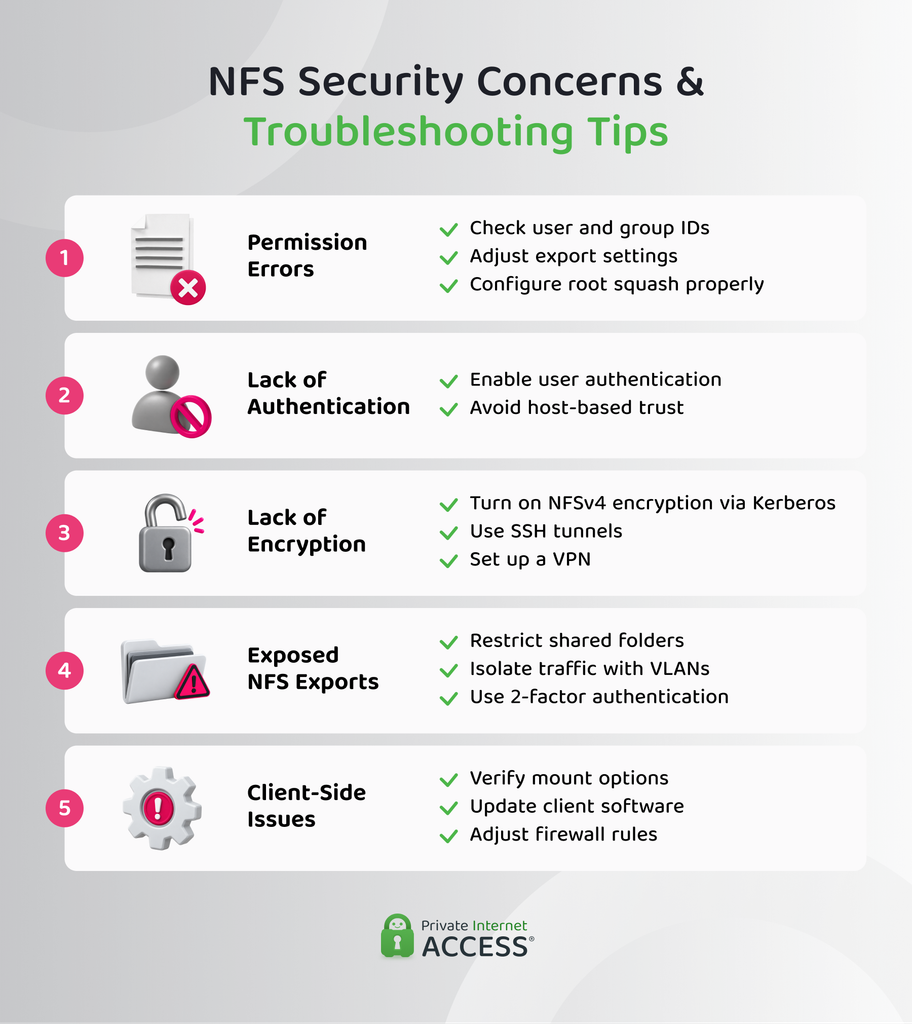
While NFS is efficient and reliable within trusted networks, modern networks can no longer guarantee the level of security it needs. For example, the University of Utah suffered a ransomware attack in September 2020 linked to improperly secured servers,7 highlighting how exposed network services can be leveraged as entry points.
Here are the most common security concerns:
- Permission errors: Mismatched user and group IDs between the NFS server and clients or incorrect export settings usually cause these errors. Wrong use of options like root squash (which limits root privileges) can also block access unexpectedly.
- Lack of authentication: Older NFS versions rely on host-based trust rather than user authentication. That’s why it’s easier for attackers on the same network to pretend to be clients and access shared data.6
- Lack of encryption: Since NFS lacks built-in encryption (NFSv4 allows encryption, but only if the administrator enables it through Kerberos), attackers can intercept, steal, or modify data, especially in untrusted or shared environments. This can happen through a Man‑in‑the‑Middle attack.
- Exposed NFS exports: If not properly restricted, NFS exports can become accessible. Unauthorized systems can mount those shared directories and read or change sensitive files. Moreover, firewalls or VLANs that don’t isolate NFS traffic can leave it exposed as well.
- Client-side security issues: Sometimes, the server isn’t the problem. Issues can arise from misconfigurations on the client’s side, such as incorrect mount options, firewall rules, or outdated client software.
Troubleshooting Network File System Issues
Even with proper security measures, NFS can run into problems. Here’s how to identify and fix the most common ones.
- Start with the basics: Restart the server, client machines, and networking equipment if something seems off. If file access is slow, test the connection speed to see if network performance is causing the problem.
- Verify network and service settings and checking IP addresses: Make sure your client has a valid IP. If the address starts with 169.x.x.x, it usually means there’s a problem. Run these commands in the command prompt/terminal:
- Windows:
ipconfig - Mac/Linux:
ifconfig - Linux:
ip addr
- Windows:
- Test connectivity: On Windows, Linux, and macOS, see if the client can reach the NFS server by typing
ping <enter the server IP address here>. - Check packet path: Find where traffic might be blocked:
- Windows:
tracert <server-IP> - Mac/Linux:
traceroute <server-IP>
- Windows:
- Confirm NFS services: Make sure the server is running the required NFS programs:
- Linux/Unix:
rpcinfo -p <server-IP>
- Linux/Unix:
- Review permissions and access controls: Make sure each client has only the access it needs. Limit write permissions to essential users and enforce strong authentication where possible. Also, enable
root_squashon the NFS server so root users on client machines can’t have administrative access to server files. - Enable encryption: Older NFS versions don’t encrypt data by default. If files need to travel over untrusted networks, consider using Kerberos (a protocol used to authenticate users), SSH tunnels, or a trusted VPN for extra protection.
- Check for software updates: Keep the server and clients updated. Installing patches fixes known vulnerabilities and improves stability.
- Secure configuration reminders: Restrict NFS exports to only the systems that need access. Double-check firewall rules and VLAN configurations to prevent accidental exposure and make sure multi-factor authentication is in place for any system that can access the network.
- Identify deeper network issues: Use advanced diagnostic tools such as Wireshark to check for network irregularities and analyze your traffic.
Network File System in Cloud Computing
Cloud vendors also implement the NFS protocol for cloud storage, including AWS EFS, NFS file shares in Microsoft Azure Files, and Google Cloud Filestore. These services let you mount shared file storage in the cloud like you would with an NFS server in your own office. For teams already using NFS, this makes moving workloads to the cloud much easier, since apps don’t need to be rewritten to manage a new storage system.
The main difference is that the cloud provider oversees the infrastructure, including scaling, availability, backups, and hardware maintenance. You still control access and permissions, but you don’t have to manage the servers. This makes cloud NFS useful for shared workloads like web servers, analytics, or development projects.
Why You Need a VPN for NFS
One of the security measures you should implement when using NFS is a secure VPN. PIA VPN adds a layer of security whenever you connect to the internet, especially over unsecured networks. PIA VPN encrypts your connection, which can prevent third parties from intercepting your file transfers. We also hide your IP address, making it harder for attackers to target your NFS server.
If an organization has many computers (clients) connecting to the same NFS server, a VPN can act like a secure tunnel between them. Instead of reconfiguring NFS itself (which can be complex), the VPN encrypts all network traffic.
Private Internet Access (PIA) is a strong choice for protecting NFS traffic because we support unlimited device connections, which is perfect if multiple clients need simultaneous access. PIA uses the industry-standard AES-256 encryption to protect NFS data in transit and includes an ad/tracker blocker that cuts off malicious sites at the DNS level.
IT teams can also customize settings to match their security policies, giving precise control over who can access NFS resources and how.
FAQ
What is a Network File System (NFS)?
NFS is a protocol that lets computers share files and directories over a network. It allows multiple clients to access and work with files stored on a central server as if they were local, making file sharing and collaboration easier. NFS has three main versions: NFSv2, NFSv3, and NFSv4. The first version is now obsolete, while modern deployments use NFSv4.
How does the Network File System work?
NFS uses a client-server model. The server stores the files, and clients mount the server’s directories over the network. When a client opens or saves a file, it sends a request to the server using remote procedure calls (RPC). The server checks the request, applies the access rules, and sends the data back over the network.
What is NFS used for in networking and cloud computing?
NFS provides shared access to files across Linux, Unix, and other systems. Network File System in cloud computing lets services like AWS EFS, Azure Files, and Google Cloud Filestore provide cloud storage that works like an on-premises NFS server. It’s easier for teams to access and manage files remotely.
What are the benefits of using NFS for file sharing?
NFS has several benefits. It makes it easy for multiple systems on the same network to share files. It’s mature and stable, with decades of documentation and real-world use. Files stay on a central server, so clients don’t need large local storage, and changes appear in real time for everyone. NFS can scale as networks grow and works with Linux, Unix, macOS, and Windows, making it ideal for mixed environments.
Can PIA VPN secure remote access to a Network File System?
Yes, PIA VPN protects your data from interception and unauthorized access with encryption and hides your IP address, so it’s more difficult to target your NFS network with IP-based attacks like DDoS. We provide an added security layer without any major changes to the existing NFS setup.
Resources:
- NFS: Network File System Protocol specification – RFC Editor
- NFS Version 3 Protocol Specification – RFC Editor
- 4.3. Securing Services – Red Hat Enterprise
- Network File System (NFS) Version 4 Minor Version 1 Protocol – RFC Editor
- Network File System (NFS) Version 4 Minor Version 2 Protocol – RFC Editor
- 8.7. Securing NFS – Red Hat Enterprise
- NFS: Network Protocol Explained – WireX
