What Are the Types of DNS Servers and How Do They Work?

Every time your device connects to a website, an app, or a service, it relies on the Domain Name System (DNS) to translate the human-readable name (e.g. www.privateinternetaccess.com) into an IP address so it can reach the correct server.
But the DNS doesn’t rely on a single server to resolve a domain name; it uses a network of different server types, each responsible for a specific step in the lookup process.
In this guide, we’ll break down the main DNS server types, how they work together to resolve a domain, and how all of it can impact speed, reliability, and privacy.
Types of DNS Servers
In a typical DNS lookup, your request passes through four types of DNS servers:
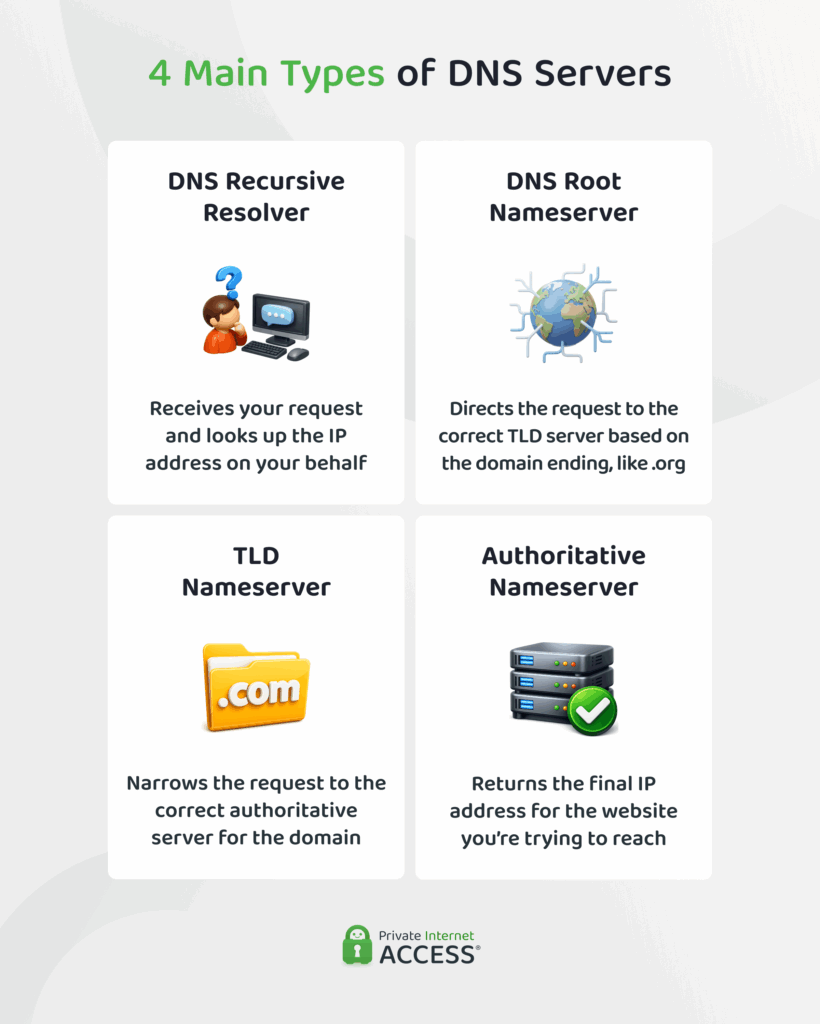
Recursive Resolver
The recursive resolver is the server your device interacts with. Its job is to contact other DNS servers to find the correct IP address of the server your device is trying to connect to. The recursive DNS server exists so your device doesn’t have to take all of the load.
Once a recursive DNS server receives the answer, it sends it back to your device. It also maintains a cache of recent lookups — more on that below.
Internet Service Providers (ISPs) manage most recursive resolvers, but you can manually switch to a public DNS server like Google DNS, which may offer better performance.
Root Server
Root name servers direct the resolver to the next step in the lookup process. The root server looks at the domain extension of the DNS request, like the .com in privateinternetaccess.com, and points it to the correct Top-Level Domain (TLD) server.
There are 13 logical root server names (A-root through M-root). Each root server is operated by a separate organization, with the L-root server being managed by ICANN1.
TLD Server (Top-Level Domain Server)
A TLD DNS server stores a list of authoritative nameservers for all domains under its specific TLD. For example, a .com TLD server manages information for all .com domains, like google.com or privateinternetaccess.com. It stores the locations of authoritative nameservers that hold the IP addresses.
Domain registries manage TLD servers under ICANN’s oversight (Internet Corporation for Assigned Names and Numbers), maintaining consistency and governance across the global DNS infrastructure.
Authoritative Nameserver
Authoritative nameservers provide the definitive answers in the DNS resolution process. These servers store essential DNS records that direct browsers to the correct resources, including IP addresses linked to domain names.
The records include A records (which map domains to IPv4 addresses) and AAAA records (which map domains to IPv6 addresses). When a resolver contacts an authoritative nameserver, it returns the official IP address for the requested domain.
Domain administrators typically configure two authoritative servers: a primary (master) and a secondary (slave) to ensure high availability. The primary server maintains the original zone file with read/write access, while the secondary server holds a read-only copy obtained through zone transfers. This redundancy keeps domains accessible even when one server experiences downtime.
How DNS Servers Work Together: Resolving a Domain
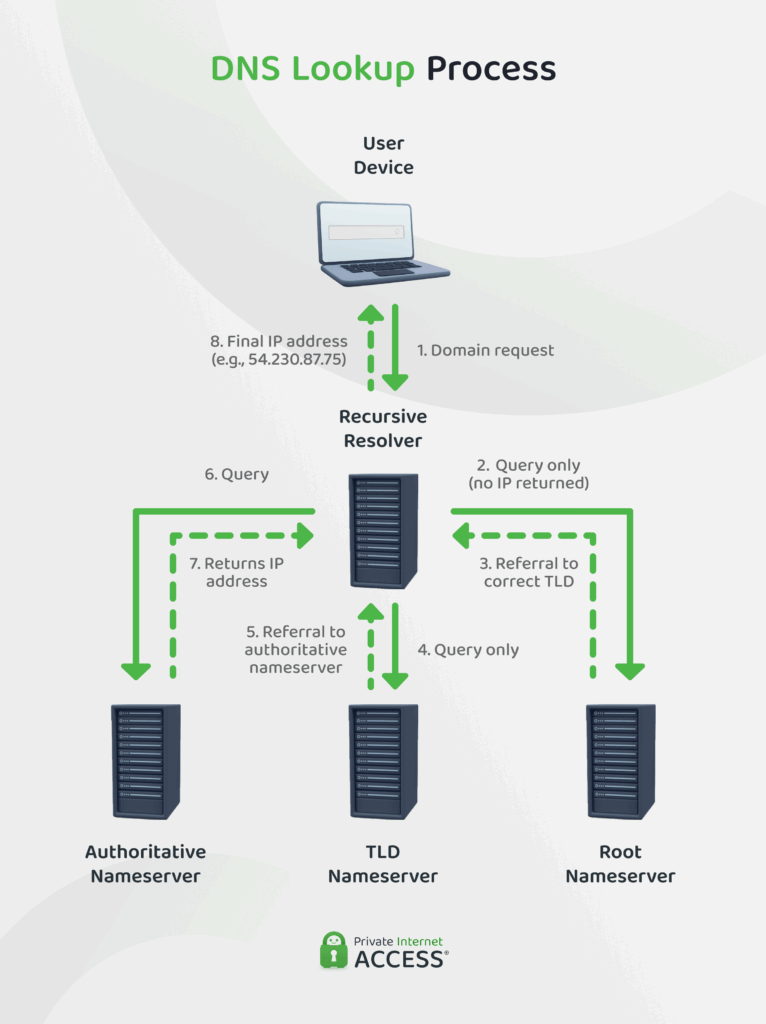
Here’s a step-by-step breakdown of how the main DNS server types work together when you access any online service. For this example, let’s trace what occurs when you visit www.privateinternetaccess.com:
- You enter www.privateinternetaccess.com in your browser and press Enter: The browser now needs to find the IP address linked to that domain to start a connection.
- Your device checks its local cache: The operating system first looks in its DNS cache to see if it already knows the IP address for www.privateinternetaccess.com.
- ✅ If it does, it returns the IP address to the browser, and your browser connects.
- ❌ If not, your device forwards the query to a recursive resolver.
- The request goes to a recursive resolver: This resolver also first checks its own cache for the IP address.
- ✅ If it finds the information cached from a recent query, it returns the IP address directly to your device.
- ❌ If not cached, it begins a multi-step lookup process to find the answer.
- The resolver queries a root DNS server: If the recursive resolver doesn’t have the IP address cached, it contacts one of the 13 root DNS servers worldwide. The root server examines the “.com” portion of www.privateinternetaccess.com and responds with the IP addresses of the .com Top-Level Domain (TLD) servers.
- The recursive resolver then queries a .com TLD server for information about privateinternetaccess.com: The TLD server responds with the IP addresses of PIA’s authoritative DNS servers (nameservers like ns1.privateinternetaccess.com and ns2.privateinternetaccess.com).
- Next, the recursive resolver contacts the authoritative DNS server: This server maintains the official DNS records for privateinternetaccess.com. This server responds with the actual IP address for www.privateinternetaccess.com (such as 203.0.113.1).
- With this information, the resolver sends the IP address back to your device: Your browser can now establish a direct connection to PIA’s web server using this IP address.
- Your device and the recursive resolver cache it: This data persists in the cache for a period of time (called the TTL, or time-to-live) to speed up future access.
This entire process usually happens in milliseconds.
Why DNS Caching Is Important
DNS caching is a key part of how the system works, and it plays a major role in speeding things up.
DNS caching helps load websites and services faster by storing the results of previous domain lookups, so your device doesn’t have to repeat the process every time you revisit a website.
This caching happens in three main places: your browser, your operating system, and the recursive DNS server.
When you enter a domain, your device’s stub resolver, a simple DNS component that handles the first step of a domain lookup, checks the operating system’s DNS cache to see if the IP address is already there. If it is, your device uses it instantly. If not, the stub resolver forwards the request to a recursive DNS server, which checks its own cache of recently resolved domains. If the server also lacks the answer, only then does it perform a full DNS lookup across the internet.
Your browser can also cache DNS results during a session, which makes repeated visits to the same site even faster. In this layered system, each cache reduces the time and effort needed to resolve domains, cutting down page load times, conserving bandwidth, and reducing the strain on global DNS infrastructure.
Types of DNS Queries and Responses
There are two common types of DNS queries:
- Recursive query: When your device needs to resolve a domain name, it sends a recursive query to a DNS resolver. The resolver takes on the responsibility to return the final answer, even if it needs to contact multiple other DNS servers to get the information.
- Iterative query: DNS servers use iterative queries to communicate with each other. In this process, a server responds with the best information it has – often a referral to another DNS server that might know more. For example, a root server might point to a top-level domain (TLD) server, and the TLD server might direct the query to the authoritative server for the domain.
Once a DNS query is made, the response can come from different sources. There are two main types:
- Authoritative answer: An authoritative answer comes straight from the nameserver that actually manages the domain’s DNS records. When you receive this type of response, you’re getting the current, official IP address directly from the source.
- Non-authoritative answer: Your DNS resolver stores recent lookup results in its cache to speed up future requests. When it gives you a non-authoritative answer, it’s pulling that information from its cache rather than checking with the original source. As long as the cached data hasn’t expired (based on its TTL), this answer remains valid and gets you connected much faster.
| Query/response type | Which server is involved? | What it does |
| Recursive Query | Your device or app (e.g., browser) asking a DNS resolver | Resolver returns the final IP address, even if it has to query multiple servers. |
| Iterative Query | DNS resolver contacting other DNS servers (like root or TLD servers) | The server replies with the best info it has, often a referral to another DNS server. |
| Authoritative Answer | Authoritative DNS server for the domain | Response comes directly from the server managing the domain’s DNS records. |
| Non-authoritative Answer | Your DNS resolver returning a cached result | Provides a cached response without rechecking the authoritative source. |
Types of DNS in Computer Networks: Beyond the Basics
Some large or complex networks, such as large enterprise systems, ISPs, and data centers, use additional specialized DNS servers for better performance, security, and control.
Caching-Only DNS Server
A caching-only DNS server’s only role is to store and reuse DNS responses to speed up future lookups.
Companies often set up caching-only servers inside their networks to improve DNS performance and reduce external traffic. When a device makes a DNS request, the caching server forwards it to a public recursive resolver, stores the response, and reuses it for other users on the same network. If someone else requests the same domain, the server returns the saved result instantly.
DNS Forwarder Server
A DNS forwarder sends DNS queries to another server instead of resolving them directly. It acts as a relay, passing requests to an upstream DNS server, often one with added features like filtering, logging, or faster response times.
Forwarders are common in enterprise networks, home firewalls, and security-first setups. Companies typically configure them to fall back on resolving queries themselves if the upstream server fails.
Reverse DNS Server (rDNS)
A reverse DNS server does the opposite of a standard DNS lookup; it maps an IP address back to a domain name.
This information is held in PTR (Pointer Records) controlled by the organization that owns the IP range – usually an ISP or hosting provider.
Mail servers rely on reverse DNS to verify senders. Services like Gmail and Outlook check whether the sender’s IP address maps back to the claimed domain. If it doesn’t, the message is often blocked or flagged as spam. Network teams also use rDNS for logging, audits, and identifying traffic in enterprise environments.
Common Security Threats to DNS Servers: How to Protect Your Privacy
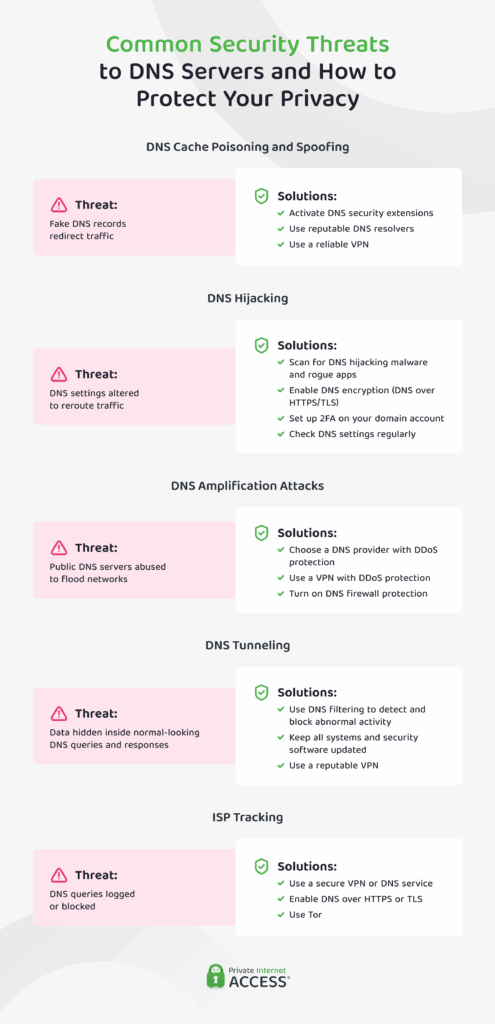
DNS servers are common targets because they play a central role in directing internet traffic. If compromised, they can expose your data, hijack your traffic, or restrict access to information. Below are the most common DNS-related threats and how to defend against them.
DNS Cache Poisoning and Spoofing
In a DNS cache poisoning attack, hackers insert false information into a DNS server’s memory. This redirects you to fake websites designed to capture sensitive information, spread malware, or run phishing scams. For example, when you try to visit your bank’s website, the poisoned server might send you a fraudulent copy instead.
How to protect yourself:
- Use secure DNS services like PIA VPN (automatically enabled in our app), Cloudflare (1.1.1.1), or Google DNS (8.8.8.8) that defend against cache poisoning.
- Activate DNSSEC (DNS Security Extensions) to verify the integrity of DNS responses.
- Use a good VPN when using public Wi-Fi for sensitive activities, as unsecured networks can be more vulnerable to attacks such as DNS poisoning.
DNS Hijacking
Hackers change your DNS settings to send your traffic through servers they control. This lets them monitor your activity or redirect you to fake websites, even if the address looks normal in your browser.
How to protect yourself:
- Check your DNS settings regularly to ensure they haven’t been changed.
- Run antivirus software that can detect DNS-hijacking malware or rogue apps.
- Enable DoH or DoT to encrypt your DNS traffic and block third-party tampering.
- Use two-factor authentication on your domain registrar account if you own websites.
DNS Amplification Attacks
In DNS amplification attacks, attackers abuse public DNS servers by sending small requests that trigger massive responses, which are then used to overwhelm a target with traffic. While these attacks primarily target DNS providers and large websites, individual users can experience the collateral damage.
How to protect yourself:
- Choose DNS providers with DDoS protection, like Cloudflare or Quad9.
- Use a reliable VPN service that offers DDoS protection to shield your IP address from being targeted or misused.
- Enable DNS firewall features that automatically block abnormal traffic patterns.
DNS Tunneling
DNS tunneling is a technique that attackers use to exfiltrate data or control malware by disguising it inside what appear to be regular DNS queries. The malicious software encodes stolen information into DNS requests and sends it to a server controlled by the attacker.
Since most networks allow DNS traffic by default, this method can bypass firewalls and monitoring tools without raising alarms.
How to protect yourself:
- Use a VPN to encrypt all your internet traffic to reduce the effectiveness of DNS tunneling attacks.
- Deploy DNS filtering tools to detect and block suspicious queries.
- Watch for unusual DNS behavior, like frequent requests, large packet sizes, or strange domain names.
- Update your systems and security software regularly to block the malware before it can tunnel data.
ISP Tracking and Data Sales
Your ISP can monitor and log every website you visit by intercepting your DNS requests. This allows them to build a detailed profile of your online activity. In some regions, ISPs are legally allowed (or not prohibited) to sell this data to advertisers or third-party data brokers.
How to protect yourself:
- Use DNS services that don’t log activity, like PIA VPN, Cloudflare, or Quad9.
- Use a VPN with DNS leak protection to route all DNS requests through an encrypted tunnel.
- Turn on DNS-over-HTTPS in your browser to encrypt DNS traffic.
- Test for DNS leaks if you’re using a VPN or encrypted DNS to confirm that your DNS requests aren’t accidentally being sent to your ISP.
Key takeaway: Switching from your ISP’s default DNS to privacy-focused alternatives like PIA’s own DNS, Cloudflare (1.1.1.1), or Quad9 (9.9.9.9) can improve your privacy and security. For more comprehensive protection, PIA combines private DNS with strong VPN encryption and built-in DNS leak protection, with no manual configuration required.
FAQs
What are the main types of DNS servers?
The four main types of DNS servers are recursive resolvers, root servers, top-level domain (TLD) servers, and authoritative nameservers. Together, they handle the process of translating a website’s domain name into its IP address.
What’s the difference between recursive and authoritative DNS servers?
A recursive DNS server receives your DNS query and takes responsibility for resolving it. It checks its cache or contacts other servers to find the answer. An authoritative DNS server, on the other hand, stores the actual DNS records for a domain and returns the correct IP address.
What is the role of a DNS forwarder in a network?
A DNS forwarder is a server that passes DNS queries to another DNS server instead of resolving them itself. It’s often used in internal networks to reduce bandwidth usage, improve DNS response times, and centralize DNS traffic management. Organizations use forwarders to route queries through preferred servers for better control.
How does DNS caching improve browsing speed and performance?
DNS caching stores the results of previous DNS lookups on your device or DNS server. When you revisit a website, your system can retrieve the IP address from cache instead of repeating the full DNS resolution process. This reduces loading time, decreases network traffic, and improves overall browsing performance, especially for frequently visited sites.
References
