World Cup Wi-Fi Safety: How to Stay Safer on Open Networks
For the first time in nearly three decades, the World Cup is returning to North America, with an expected 6.5 million fans heading to the US, Mexico, and Canada. 1
But following the tournament doesn’t just mean moving between cities, stadiums, and fan zones – it also means constantly switching between networks. One moment, you’re streaming highlights at home. Next, you’re checking scores at a café, browsing updates at the airport, or using sports apps on hotel Wi-Fi.
That switching can increase your exposure to cybersecurity risks, especially on crowded or unsecured connections. In this article, we’ll explore some of the most common Wi-Fi-related risks you may encounter during the World Cup and share practical tips to help you stay safer online throughout the tournament.
Quick takeaway: Public Wi-Fi networks are often less secure than home connections, and major events like the World Cup naturally lead to more online activity as you log into apps, share updates, book travel, and stay connected throughout the day.
Together, these factors can create more opportunities for malicious actors to intercept data, launch phishing attacks, or target unsuspecting users on shared networks.
Where Most World Cup Wi-Fi Security Risks Come From
Understanding where these risks come from can help you make safer choices online throughout the World Cup.
Unsecured or Poorly Protected Public Wi-Fi
According to a 2024 Forbes Advisor survey, 40% of respondents said their information had been compromised while using public Wi-Fi.2 During the World Cup, the temptation to connect to free airport, stadium, hotel, or café Wi-Fi will naturally be high.
The problem is that many public hotspots rely on weak security settings or outdated encryption standards. On these networks, cybercriminals have a higher chance of monitoring your traffic, intercepting sensitive info, launching phishing attacks, or targeting devices connected to the same network.
Temporary and Rapidly Deployed Wi-Fi Infrastructure
Sometimes major international events rely on temporary or rapidly deployed network infrastructure to support massive crowds, digital ticketing, surveillance systems, public Wi-Fi, and event operations.
Research into mega-event cybersecurity highlights that infrastructure built under time pressure can sometimes introduce security weaknesses or leave systems more exposed to cyber threats.3
In busy venues like fan zones, hotels, and stadiums, this can create more opportunities for cybercriminals to exploit weak network protections, fake captive portals, or poorly secured public connections.
Fake or Look-Alike Wi-Fi Networks
Busy locations like airports, transport hubs, and stadiums are common places for fake Wi-Fi hotspots. Attackers may set up look-alike networks with names that closely match official ones. If you connect to the wrong network, you can unknowingly expose your online activity.
Outdated Hardware and Software
Hotels and short-term rentals may continue using older routers or systems that aren’t updated regularly. These systems can have known weaknesses that make them easier to target.
Since many guests use the same network, busy periods can create more opportunities for malicious activity. If you’re planning to use the hotel Wi-Fi during World Cup travel, using a reliable VPN is a smart precaution.
Constant Switching Between Networks
The convenience of connecting to public Wi-Fi can sometimes outweigh caution. You might connect to airport Wi-Fi in the morning, hotel internet in the afternoon, café hotspots between matches, and stadium Wi-Fi later that evening.
The more unfamiliar networks you use, the greater the chance of accidentally joining an unsafe or fake hotspot. Frequent switching can also make it easier to overlook warning signs such as suspicious login pages, unsecured connections, or unusual network names.
When Are You Most at Risk During the World Cup?
Stadium Wi-Fi: Fake Hotspots Around Major Venues
Inside packed venues like MetLife Stadium, Estadio Azteca, or BC Place, cybercriminals can exploit the massive demand for connectivity as thousands of fans attempt to share videos, scan tickets, and stay connected throughout the matches.
Through “evil twin” attacks, they can create fake Wi-Fi hotspots that closely imitate legitimate networks, hoping rushed or distracted fans will connect without noticing the difference.
If you accidentally join a fake network, cybercriminals might attempt to intercept unsecured traffic or display fake sign-in pages to trick you into revealing account credentials, payment information, or ticket details.
Hotel Wi-Fi: Shared Guest Networks With Weak Security
Recent incidents linked to the 2026 Winter Olympics highlight that hospitality infrastructure remains a target during major international events.4
In crowded host cities like Los Angeles, Toronto, and Mexico City, overloaded hotel guest networks and outdated networking systems can increase your exposure to threats. Combined with heavy network traffic, inadequately secured networks can create more opportunities for attackers to exploit weak security settings or redirect users to scam websites.
Automatic reconnections can also become a problem during travel. If your phone or laptop reconnects to a previously used hotel network without you noticing, you may be less likely to spot suspicious login pages or unusual network behavior.
Airport Wi-Fi: Credential Harvesting and Phishing
Airports are often the first place traveling fans connect to public Wi-Fi during the World Cup. Between flight changes, long queues, delayed departures, and navigating unfamiliar terminals, travelers are more likely to make quick decisions without closely checking network details.
Attackers may exploit that urgency through fake Wi-Fi portals, fraudulent booking offers, or phishing pages disguised as airline alerts, travel updates, or free airport internet access. These scams often try to pressure users into signing in with email, airline, or social media accounts.
Because travelers frequently access booking platforms, banking apps, and digital tickets while in transit, airports can become attractive environments for credential theft and financial scams during large international events. A report by The Knoble projects that more than 28,500 potentially suspicious financial transactions could occur during the 2026 World Cup.5
How to Stay Safer on Public Wi-Fi During World Cup Season
Tip: Mobile data is often one of the safer ways to stay connected during the 2026 World Cup while on the move, since it relies on your carrier’s network instead of a shared public hotspot. If you’re traveling to the US, Canada, or Mexico for the World Cup, an eSIM can also help reduce reliance on hotel, airport, or stadium Wi-Fi.
If you do end up using public Wi-Fi, it’s worth taking a few extra steps to reduce risk.
Use a VPN on Public and Unfamiliar Wi-Fi
(Helps reduce exposure from interception risks, including MITM-style attacks)
Turn on your VPN before connecting to public Wi-Fi. It encrypts your internet traffic, making the data you send and receive harder to read or intercept on shared networks. This includes situations where attackers may try to interfere with or redirect traffic on unsecured networks.
Using a secure VPN is especially useful when you are logged into apps, checking accounts, or using services that involve personal data. Even on networks that look legitimate, VPN encryption helps reduce what others on the same connection can see.
When it comes to the 2026 World Cup VPN, Private Internet Access (PIA) is one of the strongest options. Aside from powerful AES-256 encryption, PIA includes a kill switch that blocks your internet if the VPN connection drops, helping prevent accidental data exposure on public Wi-Fi.
PIA also includes MACE, which blocks ads, trackers, and known malicious domains before they load, so you’ll be less exposed to unsafe links. In addition, you can enable auto-connect on Wi-Fi, so the VPN activates automatically whenever you join new or untrusted networks.
Double-Check Wi-Fi Names Before Connecting
(Helps protect against evil twin attacks)
While there’s no foolproof way to verify whether a public hotspot is genuine, several warning signs can help reveal suspicious networks before they put your data at risk:
- Duplicate or slightly altered network names: Cybercriminals frequently create hotspots with names that closely imitate the official network. For example, instead of the official FunZone_WiFi, hackers may set up FunZone_Free_WiFi.
- No password protection: Open networks that don’t require a password can leave internet traffic exposed and easier for attackers to intercept, especially on crowded public networks.
- Suspicious login portals: Be cautious of unexpected login pages that appear immediately after connecting and request sensitive information such as email addresses, payment details, or passwords. Legitimate public Wi-Fi providers rarely ask for this level of personal information just to get online.
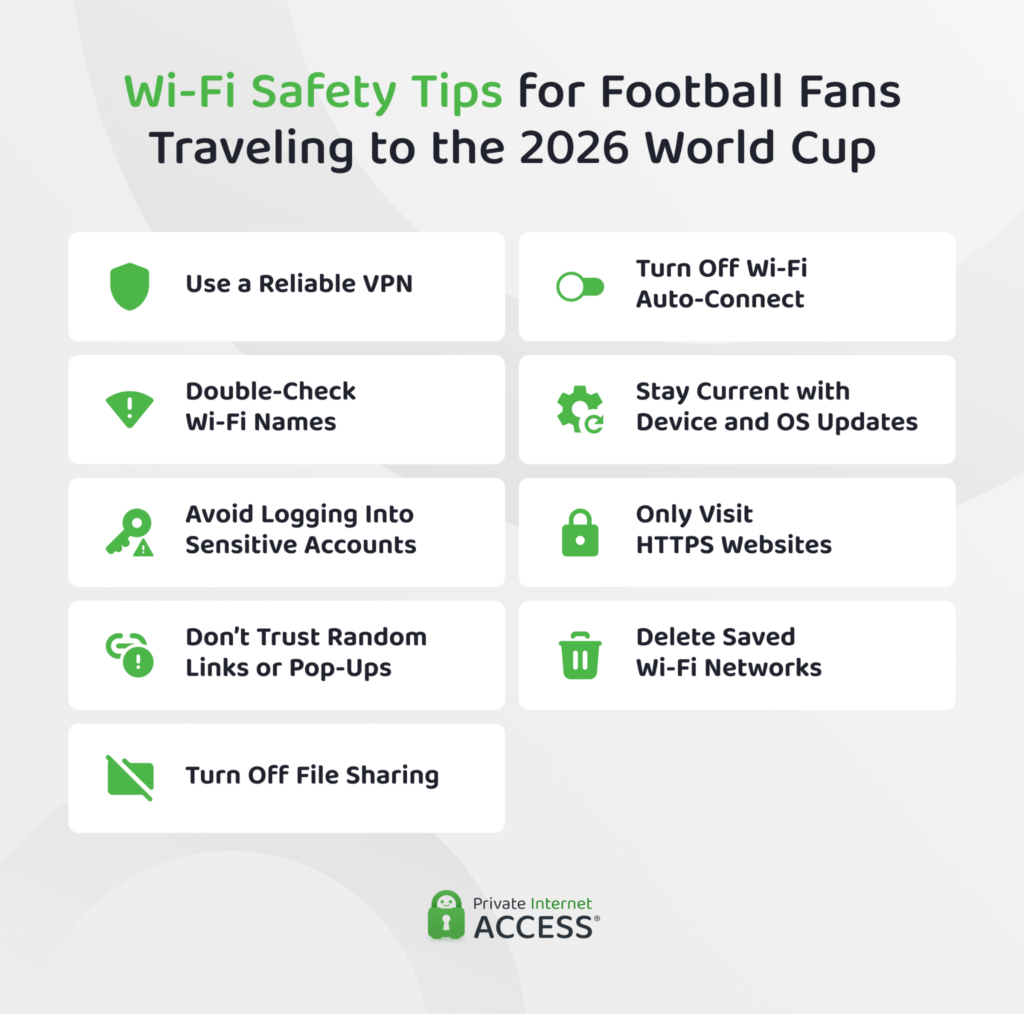
Avoid Logging Into Sensitive Accounts
(Reduces the impact of phishing and interception risks)
Public Wi-Fi networks route traffic through infrastructure you do not control. This is one of the key free Wi-Fi risks at sporting events, where large crowds rely on open or lightly secured networks.
For this reason, it’s best to avoid these networks for logging into accounts like email, banking, or other services that store personal data. If you do need to access them, use a high-quality VPN for an extra layer of protection.
Turn Off File Sharing
(Reduces device visibility and exposure to other users on the same network)
File sharing and network discovery features can expose your devices to unnecessary risk on shared public networks. If enabled, nearby users on the same Wi-Fi network may potentially detect your device and attempt unauthorized access.
Before connecting to public Wi-Fi:
- Disable file sharing
- Turn off AirDrop or nearby sharing features when not needed
- Disable network discovery on laptops
- Avoid sharing folders across public networks
Be Careful With Links, Messages, and Pop-Ups
(Helps reduce phishing and fake login page risks)
Excitement around major sporting events can make it easier for phishing scams to blend in with legitimate messages and promotions. Attackers may send fake World Cup ticket offers, streaming links, travel confirmations, giveaway promotions, or urgent account alerts through email, messaging apps, SMS, or social media.
These scams often redirect you to convincing fake websites that imitate trusted ticket vendors, streaming services, or hotel platforms. If a page appears unexpectedly, redirects without context, or pressures immediate action, it’s safer to close it rather than continue browsing.
Turn Off Auto-Connect For Wi-Fi
(Reduces accidental connection to unsafe or look-alike networks)
Many smartphones, tablets, and laptops automatically reconnect to previously used networks whenever they are nearby. In crowded fan zones or soccer stadiums, this can increase the chance of connecting to unsafe or fake hotspots without realizing it.
Disabling auto-connect gives more control over which networks your device joins and helps reduce accidental exposure to unsafe public Wi-Fi.
Keep Your Device and Apps Updated
(Helps reduce exposure to known vulnerabilities and malware risks)
Software updates regularly patch known vulnerabilities in browsers, apps, and operating systems. Keeping your device updated helps reduce exposure to security flaws that attackers may attempt to exploit on public networks.
Remove Networks You No Longer Use
(Reduces future reconnection and exposure risk)
After leaving a hotel, stadium, café, or airport, remove the Wi-Fi network from your saved connections list whenever possible. This helps reduce the risk of your device automatically reconnecting later to a fake hotspot using the same network name.
Only Visit HTTPS Websites
(Adds protection at the website level through encryption)
Once a website loads and before entering any sensitive information, check that it uses HTTPS rather than standard HTTP.
Secure websites display a padlock icon in the browser’s address bar and use URLs that begin with “https://”. HTTPS encrypts traffic between your device and the website, making sensitive information significantly harder to intercept on public networks.
Modern browsers may also display warnings when a website uses an invalid security certificate, lacks encryption, or appears unsafe. If a browser warns that a website is insecure, it’s generally safer to avoid entering personal information or continuing to browse the site.
FAQ
Is stadium Wi-Fi safe to use during the World Cup?
Stadium Wi-Fi can be convenient during the World Cup, but it’s not always the safest way to get online. These networks are usually shared by thousands of fans at the same time, which can increase exposure to cybersecurity risks like fake hotspots. The safest way to use stadium Wi-Fi is with a VPN, which protects your personal information with strong encryption.
Is public Wi-Fi safe at sports events?
Public Wi-Fi at sports events may attract a large number of people, which can make it an attractive target for cybercriminals. These networks are often unsecured, making it easier for attackers to attempt to intercept traffic, launch phishing scams, or set up fake hotspots.
If public Wi-Fi is unavoidable, it’s safer to avoid logging into sensitive accounts, entering payment information, or downloading confidential files. A secure VPN can also help make your browsing activity harder for others on the same network to monitor.
Can hackers see what I’m doing on hotel Wi-Fi during World Cup travel?
Hotel Wi-Fi can expose your activity more than a private network because it’s shared and may not always be strongly secured. For this reason, you should avoid sensitive activities like logging into accounts or entering personal data.
Should I use mobile data instead of public Wi-Fi when watching the World Cup?
In most cases, mobile data is one of the safer ways to stay connected during the World Cup because it relies on your carrier’s network instead of a shared public hotspot. This reduces exposure to common public Wi-Fi risks like fake networks and phishing attacks. Mobile data can be expensive, though, so if you decide to use public Wi-Fi, it’s a good idea to use a reliable VPN like PIA for more protection.
What’s an evil twin Wi-Fi network, and how do I avoid it during the tournament?
An evil twin is a fake Wi-Fi network that mimics a legitimate one to trick users into connecting. It’s one of the more common stadium Wi-Fi security risks, where network names can look very similar. Although it’s not always easy to tell whether a hotspot is genuine, a few warning signs can help you avoid suspicious networks.
Can a VPN affect HTTP/3 performance or connectivity?
A VPN does not specifically target or improve HTTP/3, but it can affect how your connection is established. In some cases, HTTP/3 traffic may not work as expected over certain VPN setups or networks, and your connection may automatically fall back to HTTP/2 depending on compatibility.
References:
- FIFA-WTO study estimates USD 47 billion economic output from FIFA Club World Cup™ and FIFA World Cup™ in the US – Inside FIFA
- Should You Use Wi-Fi While Traveling? 41% Have Had Their Information Compromised – Forbes
- Cyber security of Mega Events: A Case Study of Securing the Digital Infrastructure for MahaKumbh 2025 — A 45-day Mega Event of 600 Million Footfalls – arXiv
- Italy foiled Russia-linked cyberattacks on embassies, Olympic sites, minister says – Reuters
- Watchdog warns high FIFA World Cup ticket prices increase risk of scams – Reuters
