DNS vs. VPN vs. Smart DNS: Definitions, Pros, Cons, and Use-Cases

If you’re after faster browsing or better online privacy, you might come across terms like DNS and VPN. They may get mentioned together, but they work in different ways and serve distinct purposes.
In this guide, we’ll break down the terms DNS, smart DNS, and VPN. We’ll cover what they do, their strengths and weaknesses, and how to use them.
Quick answer: If you just want faster, more reliable browsing, switch to a custom DNS. If you want to stream on a device that doesn’t support VPNs, use smart DNS. If greater privacy and security are your priority, use a VPN. You can also combine all three.
DNS vs. Smart DNS vs. VPN: At a Glance
When you’re frustrated with slow browsing, streaming troubles, or worries about privacy, it’s not obvious which tool to pick. Here’s what each does:
- DNS: The system that translates website names into IP addresses computers use to connect to each other.
- Smart DNS: A DNS service that redirects certain DNS requests through servers in other regions to mask your real location for more privacy.
- VPN: A cybersecurity tool that encrypts your internet traffic and hides your IP address for stronger privacy.
| Feature | Custom DNS | Smart DNS | VPN |
| 🛡️ Privacy | ⚠️ Minimal | ⚠️ Minimal | ✅ Strong (IP masking + encryption) |
| 🔒 Security | ❌ None | ❌ None | ✅ Encrypted traffic |
| ⚙️ Ease of use | ✅ Very easy | ✅ Easy | 🛠️ Easy with apps |
| ⚡ Speed | ⚡ Fast lookups | ⚡ Fast for browsing/streaming | ⚡ Generally fast, varies by server |
What Is DNS?
The Domain Name System (DNS) is the system that translates human-friendly website names (like google.com) into computer-friendly IP addresses (like 198.51.100.16). Any time you enter a domain name into your browser, the browser sends a request to a DNS server and is provided with an IP address it can use to connect to the website.
The process looks something like this:
You enter the domain name > The browser sends a request > The DNS server provides the IP address > The browser connects with the web server
What Is Custom DNS?
The DNS that you use by default comes from your Internet Service Provider (ISP), but many people choose to switch to alternatives like Google DNS or Cloudflare DNS. These custom DNS options are often faster and more reliable, helping reduce downtime and improve loading speeds.
Otherwise, custom DNS works exactly like regular DNS, but it may include extra features like parental controls or filters that block potentially malicious sites. Some custom DNS providers also support encrypted protocols (like DNS over HTTPS or DNS over TLS), which prevent third parties, such as your ISP or someone on public Wi-Fi, from snooping on your DNS lookups.
| Custom DNS Pros | Custom DNS Cons |
| ⚡ Faster browsing (quicker lookups than some ISP servers) | 🔒 No encryption by default, so traffic isn’t protected without additional configuration |
| 🧹 Optional content filtering or parental controls | 🕵️ DNS provider can still see requests |
| ⚙️ Easy setup on most devices | 🤝 Dependent on the reliability and trustworthiness of the DNS provider |
What Is Smart DNS?
Smart DNS is a DNS service that routes only certain parts of your internet traffic, usually the DNS queries that reveal your geographic location, through proxy servers in different regions.
As a result, the services you visit see the location of those servers instead of your real location. Much like a regular DNS, smart DNS doesn’t add any special extra privacy protections.
Note that smart DNS works on devices that don’t support VPN apps natively, like smart TVs, games consoles, and some routers. This makes it a practical choice when a VPN simply isn’t an option on the device you’re using.
| Smart DNS Pros | Smart DNS Cons |
| 📍Changes your virtual location for more privacy | 🔒 No encryption – traffic is not protected |
| ⚡ No speed reduction since traffic isn’t encrypted | 🕵️ No IP masking, so your true location can be exposed |
| 📺 Works natively on smart TVs, consoles, and routers | 🔐 Limited privacy and security benefits |
| ⚙️ Simple setup, usually just a small settings change | 🎯 Main use is streaming – not a full security tool |
What Is a VPN?
A Virtual Private Network (VPN) is a tool that creates a secure, encrypted connection between your device and the internet. The VPN encrypts your data before it leaves your device, sends it through an encrypted tunnel to a VPN server, which then forwards it to its final destination (like the site you wanted to visit).
Many providers, like PIA VPN, run their own DNS servers and route your DNS requests through them, instead of letting your ISP handle lookups. This means your DNS lookups are encrypted inside the VPN tunnel, making it much more difficult for your ISP or anyone monitoring your network to see which sites you visit.
VPNs typically include DNS leak protection which helps to make sure your device doesn’t accidentally fall back to your ISP’s DNS and expose your activity. PIA also includes a kill switch, which cuts your internet connection entirely if the VPN drops unexpectedly, helping prevent your real IP from being exposed, even for a second.
| VPN Pros | VPN Cons |
| 🔒 Strong privacy by hiding your IP | ⚡ Speeds can vary depending on server and provider |
| 🛡️ Protects data with encryption | ⚙️ Requires an app or account setup to use |
| 🚫 Can help prevent activity-based ISP throttling | 🌍 Some services may block or limit VPN connections |
DNS vs. VPN vs. Smart DNS: Key Differences
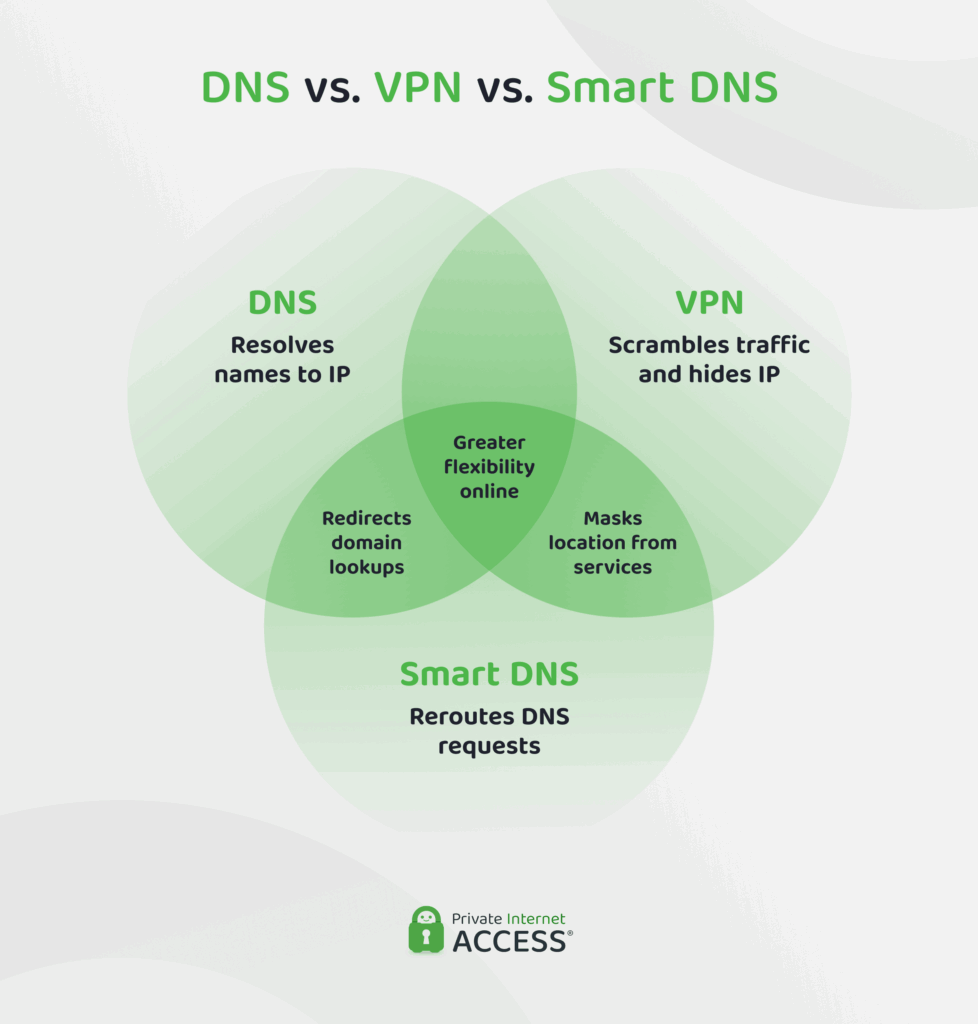
The main difference between these three is that DNS or custom DNS is a core internet service you need to function online, while VPN and smart DNS are optional tools built on top of it.
1. Privacy and Security
Here’s how they compare:
- DNS: Some custom DNS options support encrypted protocols (like DoH or DoT) that hide your DNS lookups from your ISP or coffee-shop Wi-Fi snoopers. But that’s all; the rest of your traffic is still exposed.
- Smart DNS: It reroutes your DNS requests for privacy and convenience. It doesn’t encrypt anything or hide your IP, though. Your browsing data, IP, and activity are still visible to your ISP or anyone monitoring your network.
- VPN: It encrypts all your internet traffic, including DNS requests, to help prevent your ISP, employer, or hotspot provider from monitoring what you do online.
Bottom line: Only a VPN encrypts your traffic and hides your IP. Custom DNS with encryption protects your DNS lookups specifically, but leaves everything else exposed. Smart DNS offers neither. If privacy is your main concern, a VPN is the only tool here that meaningfully delivers it.
2. Speed and Performance
Speed and security are two of the biggest tradeoffs between custom DNS, smart DNS, and VPNs. Here’s how they compare:
- DNS: The fastest because it just resolves domain names. Even if it’s custom DNS with encryption, it only adds a tiny bit of latency. For most users, the difference is negligible compared to unencrypted DNS.
- Smart DNS: Almost as fast as unencrypted DNS. It only reroutes specific DNS requests, so the effect on performance is minimal.
- VPN: Encrypting and rerouting your connection via a remote server can introduce some slowdown, but the actual impact depends on server distance, load, and provider quality.
Bottom line: DNS and Smart DNS are fastest because they don’t encrypt or mask anything. VPNs add some overhead because they encrypt all your traffic and hide your IP. If you want speed and security, you need a high-quality VPN with fast servers, like PIA VPN, which uses 10-Gbps VPN servers throughout its 90-country network.
3. IP and Location Masking
Masking your IP and location adds a much-needed layer of privacy if you don’t want your online activity tied back to your real-world identity. Here’s what you get with each:
- DNS: Doesn’t mask your IP or location, even if it’s a custom DNS with extra features. Your real IP is visible to websites, apps, and hackers.
- Smart DNS: It routes certain DNS requests through proxy servers, which can hide your location from some websites you visit. Still, your real IP address remains visible to most services.
- VPN: Fully masks your IP and location from websites and hackers since all your internet traffic appears to come from the VPN server.
Bottom line: Only a VPN will truly mask your IP address and physical location from websites, apps, and hackers. Good VPNs like PIA also include IP leak protection and a kill switch to help prevent accidental IP leaks if you lose connection to the VPN server.
4. Ease of Use
All three options are “user-friendly” once they’re running, but the setup and daily experience can look very different.
- Custom DNS: It’s the easiest to configure: you just swap out the DNS server address in your device or router settings. After that, it works in the background with no maintenance. The downside is that if you’ve never touched your OS settings, even this small change can feel quite technical.
- Smart DNS: It usually requires subscribing to a paid service and manually configuring DNS settings they provide. Some services offer setup guides, but it’s less of a one-click solution than a VPN. Once configured, it doesn’t need much attention.
- VPN: VPNs are simple: download an app, log in, and click “connect.” Depending on your needs, they can require more day-to-day interaction – for example, switching servers if you want to change your digital location or managing settings like split tunneling which lets you decide which apps use the VPN.
Bottom line: Custom DNS is the true “set and forget” option. A VPN requires a download and account setup, but the app handles everything from there – most users just hit connect and leave it running. Smart DNS takes more initial configuration, especially if you’re setting it up on a router or console, but needs little attention once it’s done.
Is It Legal To Change Your DNS?
Changing your DNS is perfectly legal. When switching to a different DNS server, you’re simply telling your device to use a different “address book” to look up websites.
Using smart DNS or a VPN is also legal in most countries, but the way you use them matters. Violating terms of service or engaging in illegal actions while using these tools is still breaking rules and can result in consequences. You should always use VPNs within legal limits.
When to Use a Custom DNS vs. a VPN vs. a Smart DNS
The choice between custom DNS, smart DNS, and a VPN will ultimately depend on how you spend time online and what your biggest concerns are.
The table below breaks down the best daily use cases for each option:
| Custom DNS | Smart DNS | VPN |
| ✅ Faster browsing ✅ More reliable connections ✅ Using email, messaging, or banking apps ✅ Implementing parental controls | ✅ Improving streaming or gaming speeds ✅ Streaming on VPN-incompatible devices ✅ Location privacy | ✅ Securing connections on public Wi-Fi ✅ Safer shopping and banking online ✅ Hiding your IP and location from ISPs or trackers ✅ Changing your virtual location for work or while traveling abroad |
Privacy Tip: You don’t have to pick just one. A VPN handles encryption and IP masking, while a custom DNS adds speed, reliability, and optional content filtering on top. PIA VPN bundles its own DNS servers, leak protection, and a kill switch into a single subscription — so you get all three layers without juggling separate services.
FAQs
What is the difference between DNS and VPN?
DNS translates website names into IP addresses, helping your device find and connect to websites, but it doesn’t hide your activity or encrypt your traffic. A VPN routes all your internet traffic through a secure, encrypted tunnel, masking your IP address and location while protecting your data. Essentially, DNS improves access and reliability, while a VPN adds privacy and security.
Does DNS hide my IP address like a VPN?
No, DNS doesn’t hide your IP address. It simply translates domain names into IP addresses so your device can reach websites, without encrypting or masking your connection. A VPN, on the other hand, routes your traffic through a secure server, hiding your IP and location from websites and third parties with access to your network.
Can I use DNS and VPN together?
Yes, you can use DNS and a VPN together. A VPN often uses its own DNS servers to prevent leaks, so your requests are resolved securely while your IP remains hidden. Combining them can improve both privacy and access, helping to ensure websites load correctly without exposing your identity or activity.
Is a VPN more secure than using DNS alone?
Yes, a VPN is far more secure than using DNS alone. DNS only translates website names into IP addresses and doesn’t encrypt your traffic, leaving your data and IP exposed. A VPN encrypts all your internet traffic, hides your IP address, and helps protect your data from hackers, ISPs, and other potential eavesdroppers.
What is a DNS leak and how does it affect VPN use?
A DNS leak happens when your device sends DNS requests outside the VPN tunnel, often to your ISP’s DNS servers, instead of through the VPN’s secure DNS. This can reveal the websites you visit, even while your VPN is active, undermining your privacy. Essentially, it defeats one of the main purposes of a VPN, which is hiding your online activity and location. This is why DNS leak protection and a kill switch are important features to look for in a VPN.
