Intrusion Detection System (IDS) Meaning and Guide
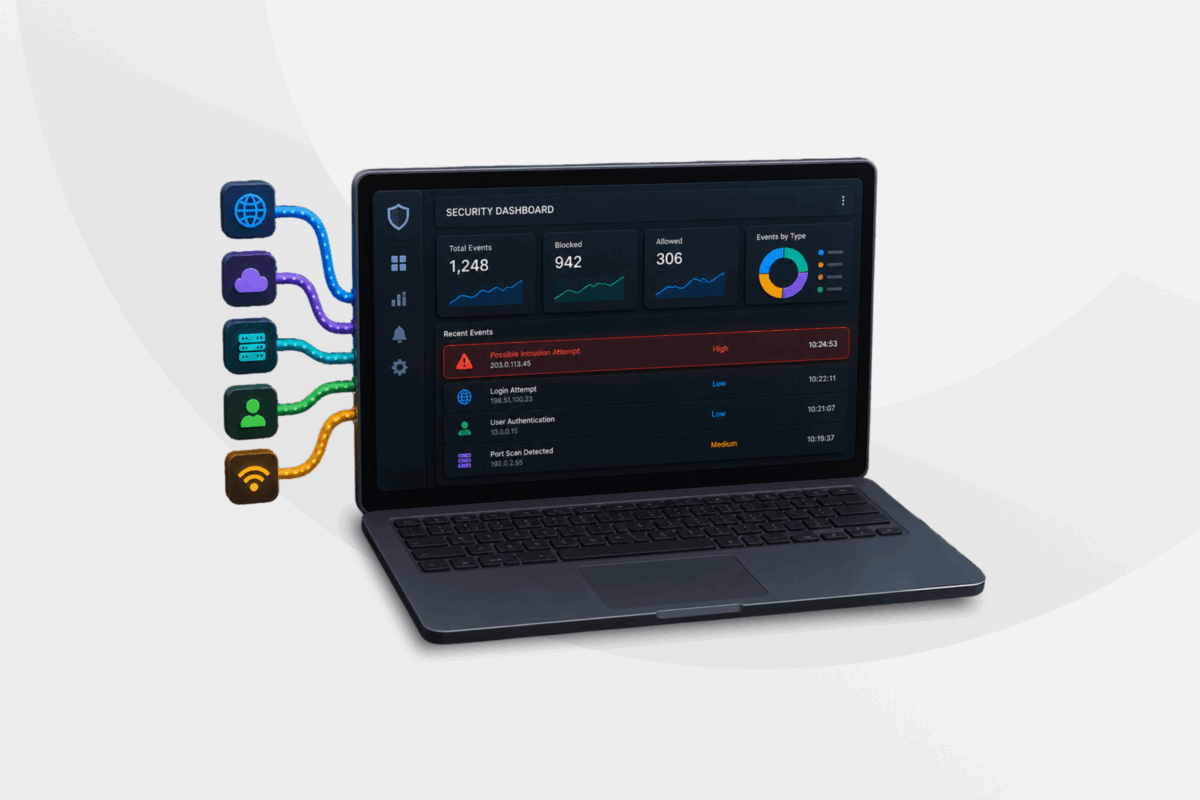
Cybercriminals prefer to operate undetected when they’re carrying out their attacks. They use digital tricks and treachery to get around security measures without alerting you to the fact that something’s wrong.
Fortunately, there are tools you can use to pick up on this obfuscation. An intrusion detection system, or IDS, is one. It watches network or system activity to flag unauthorized access or policy violations as they happen, helping you to defend your network before any damage can be done.
In this blog, we’ll cover what IDS means, how these systems detect threats, the main types you’re likely to encounter, IDS vs. IPS (that’s intrusion prevention system) and other security solutions, as well as the benefits of and best practices for IDS deployment.
What Does IDS Stand For?
An intrusion detection system, usually abbreviated to IDS, is a device or software application that monitors network traffic or system activity for signs of malicious behavior or policy violations, and reports the incident to a person, team, or system.
Put simply, an IDS watches your network or devices and tells you when something suspicious is happening, so you or your security team can decide how to respond. It doesn’t block anything on its own, though. That’s the job of a related tool: the IPS.
What Is an Intrusion in Cybersecurity?
An intrusion is any unauthorized attempt to access, manipulate, or disable a computer system or network.
Intrusions can be external (e.g., an attacker exploiting a software vulnerability from outside your network) or internal, like an employee accessing files they aren’t authorized to view. Some are disruptive by design while others are built to stay hidden for as long as possible so the attacker can gather data undetected for a sustained period.
Common examples of intrusions include credential stuffing attacks, malware infections, denial-of-service (DoS) attacks, and zero-day exploits.
Why Use an IDS? Intrusion Detection System Capabilities
Security teams responsible for defending large networks face an ongoing problem: the sheer volume of operating system logs, firewall records, and server activity is often too large to review manually.
An IDS minimizes the burden on IT teams by continuously monitoring this activity across firewalls, files, routers, and servers, and organizing it into a format that’s easily accessible and understandable.
When something suspicious turns up, a well-configured IDS will report it fast, passing the alert up to whoever needs to act on it so they can get a head start on investigating and containing an incident, rather than discovering it only after it’s already caused damage.
An IDS also lowers the skill floor needed to help manage day-to-day security. Its interface is generally built so that staff without deep security expertise can still monitor for and respond to routine alerts, freeing up specialists for more complex investigations.
IDS and Other Security Solutions: IDS vs. IPS vs. Firewall
| IDS | IPS | Firewall | |
| System type | Monitoring and alerting system | Monitoring and blocking system | Access control system |
| Placement in network infrastructure | Out-of-band, receiving a copy of traffic via a tap or SPAN port | Inline, sitting directly in the path of network traffic | Inline, at the network perimeter or between segments |
| Detection or prevention | Detects and alerts only | Detects and actively blocks | Prevents access based on predefined rules, not threat analysis |
| Mechanism | Signature and anomaly-based traffic analysis | Signature, anomaly, and behavior-based analysis with automated response | Rule-based filtering by IP address, port, and protocol |
An intrusion prevention system, or IPS, extends what an IDS does. The role of an IPS is to identify known and emerging attack patterns in real time and stop them automatically without waiting for a person to review an alert first.
This makes an IPS well suited to fast-moving threats such as denial-of-service attacks or attempts to exploit a newly disclosed vulnerability, where the delay of manual review could be costly.
Where an IDS only watches traffic and raises an alert, an IPS sits directly in the path of network traffic and can act on what it finds, dropping malicious packets, resetting a connection, or blocking IP addresses. This is why many security teams deploy both technologies together as an integrated intrusion detection and prevention system (IDPS).
A firewall serves a different function again. Rather than analyzing traffic for attack patterns, it filters traffic based on a fixed set of rules, typically the source and destination IP address, port, and protocol. A firewall decides what’s allowed onto the network in the first place, while the IDS and IPS analyze and block malicious traffic that’s gotten past the firewall.
Detection Methods Used in IDS/IPS
An IDS might rely on one detection method or combine several, and the method it uses directly affects what it catches and misses. Here are the main approaches in use today:
- Signature-based detection: Compares traffic or activity against a database of known attack patterns, called signatures. This catches known threats reliably, but can miss new or modified attacks that don’t yet have a signature on file.
- Anomaly-based detection: Builds a baseline of what normal network or system behavior looks like, then flags any significant deviation from it. This can catch previously unseen attacks, including zero-day exploits, though it tends to generate more false positives than signature-based detection.
- Policy-based detection: Flags any activity that breaks a security policy set by the organization, regardless of whether that activity matches a known attack pattern.
- Reputation-based detection: Blocks or flags traffic from IP addresses and domains already known to be associated with malicious activity.
- Stateful protocol analysis: Compares observed protocol behavior against vendor-defined standards for how that protocol should behave, flagging deviations that might indicate an attack.
- Behavioral analysis: Looks at patterns of activity over time, such as login timing or data transfer volume, to flag behavior that’s unusual for a specific user or system, even when no single action looks obviously malicious on its own.
Types of IDS
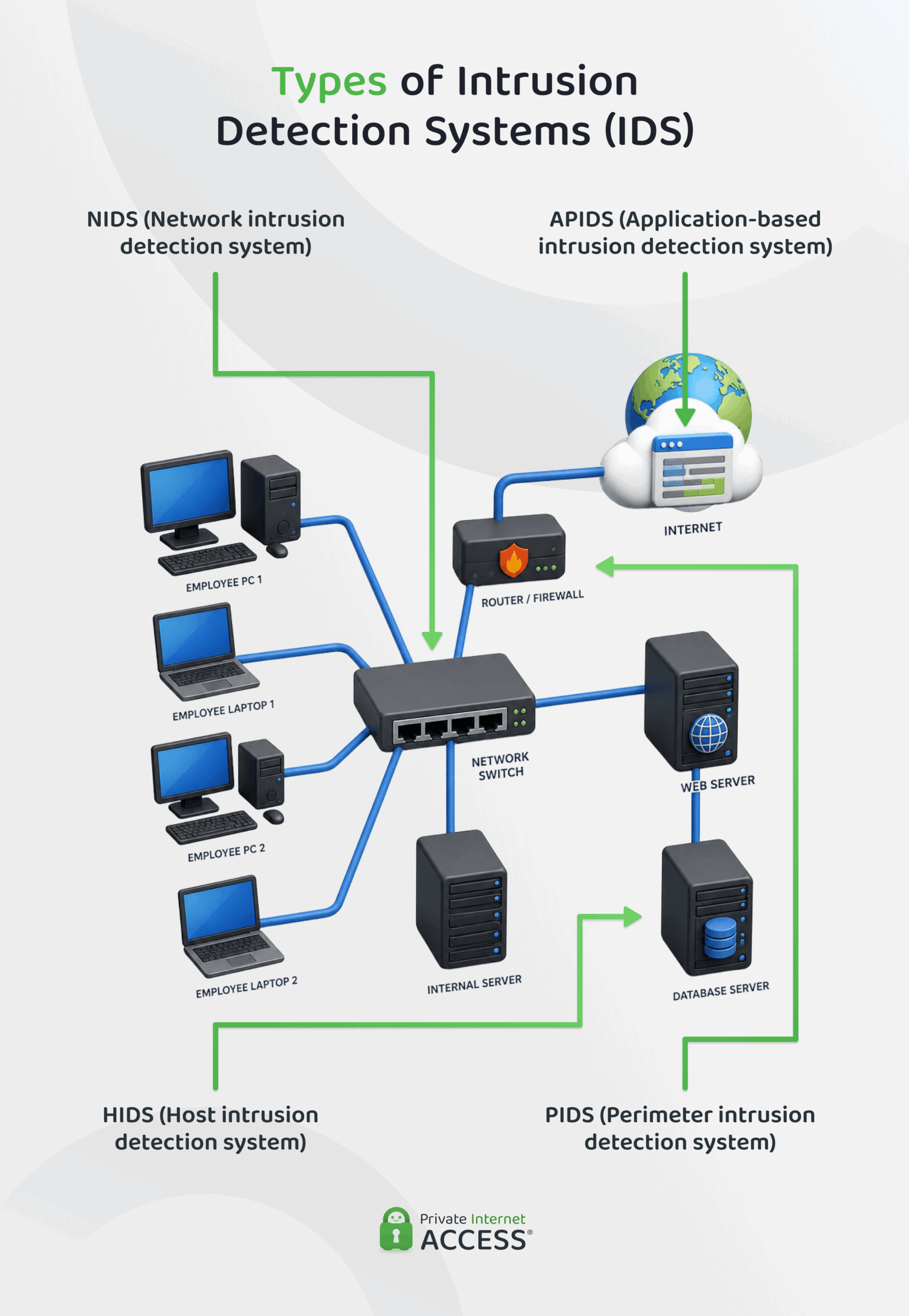
Besides the detection methods they use, IDS platforms can also be grouped by where they sit within a system and what they monitor. The type an organization chooses depends on whether it’s protecting an entire network, a single device, or a specific application.
Network Intrusion Detection System
A network intrusion detection system, or NIDS, monitors traffic across an entire network segment, typically by receiving a copy of that traffic through a tap or SPAN port on a switch.
It has visibility into every device on the segment, so it can catch threats moving between devices, not just those aimed at a single machine. Its main limitation is that it can’t see into traffic encrypted before it reaches the sensor, or activity confined to a single host that never touches the monitored segment.
Host Intrusion Detection System
A host intrusion detection system, or HIDS, runs directly on an individual device, such as a server or workstation, to monitor system calls, file changes, and application logs on that machine.
This gives a HIDS visibility into activity a NIDS can’t see, including changes to files or configurations made locally, but it only protects the device it’s installed on and needs to be deployed and maintained separately on every system an organization wants to cover.
Perimeter Intrusion Detection System
A perimeter intrusion detection system, or PIDS, is deployed at the boundary between an organization’s network and outside connections to catch intrusion attempts as they cross that boundary.
This makes it well suited to protecting critical infrastructure at the edge of the network, though it typically won’t catch threats that originate from inside the network itself (e.g. a compromised internal account).
Application-Based Intrusion Detection System
An application-based intrusion detection system, sometimes called an application protocol-based IDS or APIDS, monitors the communication of a specific application protocol rather than general network traffic.
It usually sits between a web server and its database, watching the traffic passing between them to catch attack attempts like SQL injections. Because it’s built around one protocol, an APIDS can apply much more specific rules than a general-purpose IDS, but it also only protects the application it’s monitoring.
Other Types of Intrusion Detection Systems
There are a few other IDS variants worth knowing:
- Stack-based IDS integrates directly with an operating system’s Transmission Control Protocol/Internet Protocol (TCP/IP) stack, inspecting packets as they’re processed rather than as a separate monitoring layer.
- Hybrid IDS combines two or more of the above approaches, typically network and host-based monitoring, to give broader coverage than either provides alone.
- Cloud-based IDS options let organizations monitor cloud workloads without deploying physical hardware.
How an Intrusion Detection System Works
An IDS takes raw network or system data and turns it into an actionable alert. Implementations vary depending on system setup, size, and other factors, but most follow a similar sequence from initial data collection to reporting an identified threat.
1. Data Collection and Packet Inspection
The first stage is gathering the data the IDS will analyze to determine whether there’s a potential threat that needs to be blocked.
For a network-based IDS, this typically means capturing a copy of network traffic through a tap or Switched Port Analyzer (SPAN port or mirror port) on a switch, then inspecting individual packets for their headers and payload contents. For a host-based IDS, data is drawn from system logs, file integrity records, and application activity on the device itself.
Either way, the goal of this is to assemble a complete enough picture of activity that can be used in the next stage. Missing or incomplete data collection at this point limits what any later analysis can catch, regardless of how sophisticated that analysis is.
2. Pattern Matching and Anomaly Analysis
In the second stage, the IDS analyzes data using one or more detection methods (most commonly signature matching, anomaly detection, or both). Here, individual packets, log entries, or system calls are compared against reference data built up over time.
An IDS platform will usually flag repeated access attempts or unusual activity that happens within a short window. Many also assign a confidence score to what they find rather than a flat Yes/No verdict, which helps reduce how often borderline activity gets escalated as a full alert.
3. Alerting and Reporting Mechanisms
The final stage turns a detected event into something a person or another system can act on to prevent unauthorized access to a system.
Once the IDS flags an activity as suspicious, it typically generates an alert containing details like the source and destination of the traffic, the type of activity detected, and its severity. It then routes that alert to an IPS, security information and event management (SIEM) system, a dashboard, or directly to on-call staff.
Well-configured alerting also assigns a severity level to each event, so a minor policy violation and an active exploitation attempt don’t compete equally for an analyst’s attention. Many organizations connect these alerts directly to a ticketing system or a security orchestration platform, which can open a case automatically, notify the right team based on the type of event, or trigger a predefined response playbook for common scenarios.
IDS Evasion Techniques
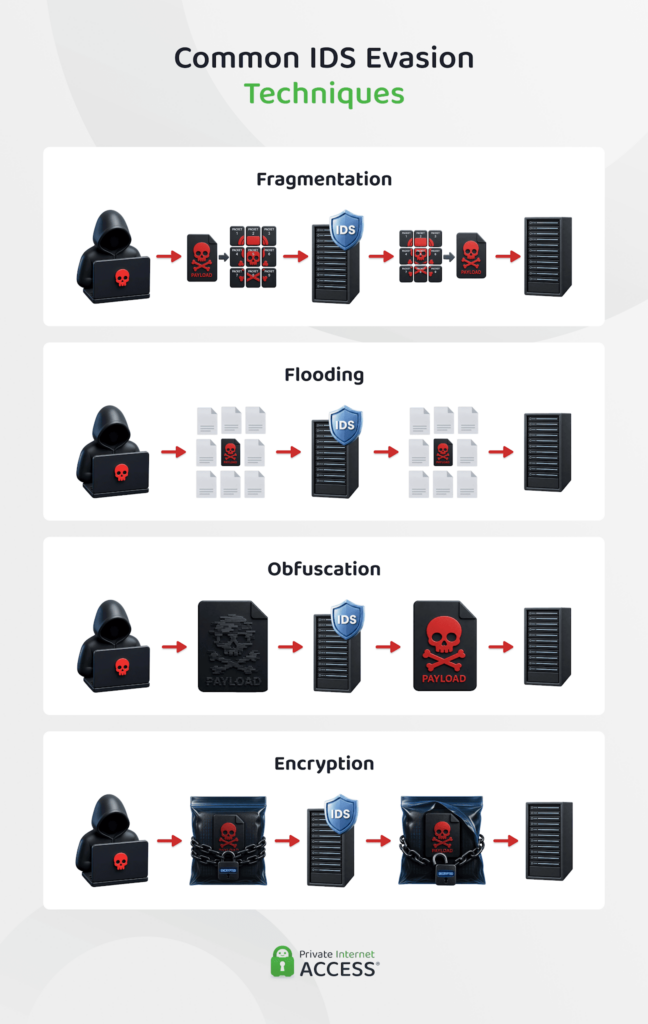
An IDS is a valuable layer of defense, but it isn’t foolproof. Attackers have developed several techniques specifically designed to slip past detection. Understanding them helps explain why IDS deployments need regular tuning and updates rather than a one-time setup.
- Fragmentation: Splitting a malicious payload across multiple smaller packets so an IDS inspecting individual packets doesn’t recognize the reassembled threat.
- Flooding: Overwhelming a network or an IDS with a high volume of traffic, making it harder for the system to process and flag genuinely malicious activity within the noise.
- Obfuscation: Disguising an attack by altering its structure, such as encoding a payload or renaming files, so it no longer matches a known signature.
- Encryption: Sending malicious traffic through an encrypted tunnel so an IDS can’t use TLS or SSL inspection – or other methods – to see what’s actually being transmitted.
Benefits and Challenges of Deploying an IDS
Deploying an IDS comes with real advantages for network visibility and threat awareness, but it also introduces practical trade-offs worth weighing before rolling one out.
Key IDS Benefits
The clearest benefit of an IDS is visibility. It gives security teams insight into what’s actually happening across a network or device that would otherwise go unnoticed, including reconnaissance activity and early-stage attacks that haven’t yet caused visible damage.
This visibility also supports compliance. Many regulatory frameworks and industry standards call for continuous monitoring and logging of network activity, and an IDS is often central to meeting that requirement.
Beyond passive monitoring, the same logs and alerts an IDS produces can support proactive threat hunting, where security analysts search through historical data for signs of an intrusion that evaded initial detection, rather than waiting for an alert to surface it.
Common IDS Challenges
The most common challenge with an IDS is false positives. In other words, these are alerts that flag legitimate activity as malicious. A high false-positive rate wastes analyst time and can lead to real alerts getting ignored amid the noise.
Encrypted traffic presents a related problem. Since an IDS that inspects packet contents usually can’t see inside traffic protected by TLS or similar encryption without additional decryption infrastructure, this can create a blind spot many organizations struggle to close.
An IDS also needs ongoing maintenance to stay effective, including regular updates to its signature database and periodic retuning of anomaly baselines. Without some level of maintenance, detection accuracy tends to degrade.
Best Practices for Implementing IDS
Getting real value from an IDS depends as much on how it’s deployed as which product is chosen. A few practices consistently make the difference between an IDS that catches real threats and one that generates noise nobody reviews.
- Benchmarking: Establish a clear baseline of normal network and system behavior so the IDS has an accurate reference point for what counts as unusual.
- Placement: Position sensors at key network chokepoints (e.g. at the network perimeter or between critical internal segments) rather than relying on a single sensor to cover an entire organization.
- System updates and optimizations: Keep signature databases current and periodically review detection rules. Outdated signatures can miss new threats and stale rules might generate false positives.
- Access permissions: Restrict who can view, modify, or disable IDS configurations and alerts to avoid unauthorized changes that create blind spots an attacker could exploit.
- Security implementations: Pair the IDS with complementary controls, such as a firewall or an IPS, rather than treating it as a standalone solution capable of covering every layer of network security on its own.
- System integrations and configurations: Connect IDS alerts to a SIEM or centralized logging system so alerts can be correlated with other security data instead of reviewed in isolation.
FAQ
What does IDS mean?
An intrusion detection system, or IDS, is a tool that monitors network or device activity for unauthorized access attempts and alerts security staff when something suspicious turns up. It doesn’t block traffic itself, that needs to be done by a person or another cybersecurity system.
What is the difference between IDS and IPS?
Both an IDS and an IPS are network protection tools. An IDS monitors traffic and alerts staff when it detects something suspicious. An IPS sits inline with traffic and can automatically block or drop malicious packets in real time. Many organizations run both together as a combined intrusion detection and prevention system, or IDPS.
How does an Intrusion Detection System (IDS) work?
An IDS works by collecting network or system data, then analyzing it to flag activity that looks malicious. Once something suspicious is identified, the IDS generates an alert containing key details and routes it to security staff or a monitoring system for review.
What is the role of an Intrusion Prevention System (IPS)?
An IPS is a complementary tool to an IDS. It identifies malicious or policy-violating traffic in real time and takes automatic action to stop it – e.g. dropping a packet, resetting a connection, or blocking a source IP address. Unlike an IDS, which only detects and alerts, an IPS is positioned inline so it can intervene directly.
How do IDS, IPS, and firewalls work together?
A firewall filters what traffic is allowed onto the network in the first place. An IDS monitors what gets through for suspicious activity, while an IPS blocks that activity automatically. Together, these tools cover different layers of a network’s defense.
When should an organization use IDS instead of IPS?
An IDS suits environments where uptime and reliability matter more than automatic blocking, while an IPS is the better fit for internet-facing systems where stopping traffic fast matters more than the small risk of blocking legitimate traffic.
