What Are IP Classes in Networking and Do They Still Matter?
When engineers created the first networks to help humans and computers interact online, they designed a system based on IP (Internet Protocol) addresses. Later, they introduced categories to organize them, known as IP address classes.
Today, we have newer systems and more practical solutions. Still, in certain situations, we continue to reference the same IP address class structure defined many years ago.
So, what exactly are IP address classes? How many are there, and why are they being replaced by a new system? Here’s what you should know about IP address classes today.
The Core Principles of IP Addresses
IP addresses are unique numerical identifiers assigned to interfaces, which, in practical terms, means every website, computer, smartphone, tablet, router, and basically anything else that needs to send and receive data over the Internet.
The first widely used IP addresses were established under IPv4 (Internet Protocol version 4). This system uses a 32-bit binary format, allowing for around 4.3 billion unique addresses.1
Back in the 1980s, before social media, streaming platforms, and always-connected devices became part of daily life, the available pool of IPv4 addresses seemed more than sufficient. 2 The Internet was still relatively small, so the possibility of billions of connected devices seemed far off.
However, as internet adoption accelerated and more devices came online, concerns about long-term IPv4 exhaustion began to grow by the late 1980s and early 1990s. This eventually led to changes like Classless Inter-Domain Routing (CIDR) in the 1990s, which improved how IP addresses were allocated and reduced waste.3
Even with these conservation measures, IPv4’s scalability limits became more apparent over time. This accelerated the adoption of IPv6, a newer protocol built on a 128-bit addressing system capable of supporting a vastly larger number of unique IP addresses.
Although IPv6 adoption continues to grow, much of today’s internet traffic still relies on IPv4. That makes understanding IPv4 address classes, subnet masks, private IP addresses, subnetting, and routing concepts still highly relevant.
The Anatomy of IPv4 and IPv6 Addresses
Every IPv4 address has a 32-bit number divided into four segments called octets. They’re easy to recognize because they’re separated by periods. Each octet has 8 bits and has a value ranging from 0 to 255.
The IPv4 addresses you usually see are simplified, human-friendly versions of the “real” binary address, such as 192.0.2.10. Behind the scenes, computers interpret this address in binary form: 11000000.00000000.00000010.00001010.
Each octet provides valuable information that helps identify the network and the host (the device connected to the internet).
IPv6 expands IP addresses to 128 bits and writes them in hexadecimal format separated by colons, such as 2001:db8:85a3::8a2e:370:7334. This expanded format creates an enormous number of possible addresses (nearly 340 undecillion)4, giving the internet far more room to support modern devices, smart technology, and future growth.
Although IPv4 and IPv6 use different address formats, both serve the same core purpose: helping devices identify one another and exchange data across networks efficiently.
The 5 Classes of IP Addresses
As the number of assigned IPv4 addresses kept growing, managing them became increasingly difficult. To make routing more efficient, network designers introduced a structured classification system for IP addresses known as classful addressing.
The system divided IPv4 addresses into five classes: A, B, and C were designed for standard network assignments, while Classes D and E were reserved for specific purposes. This structure made it easier to organize devices, allocate address space, and direct internet traffic more efficiently.
Each IPv4 address class is identified by several characteristics, including its address range, default subnet mask, network-to-host allocation, and intended network size. A subnet mask is a number that looks like an IP address and helps identify which portion refers to the network and which part refers to the host.
The first octet, or group of octets, plays a major role in determining the address class, network size, and default subnet mask, while the remaining octets identify the host device. Here’s a simplified overview of IPv4 address classes and their ranges:
| Class | Octet Range | Default Subnet Mask | Number of Hosts | Typical Use |
| A | 1 to 127 | 255.0.0.0 (8 bits) | Up to 16,777,214 | Large networks (historic) |
| B | 128 to 191 | 255.255.0.0 (16 bits) | Up to 65,534 | Medium networks (historic) |
| C | 192 to 223 | 255.255.255.0 (24 bits) | Up to 254 | Small networks (historic) |
| D | 224 to 239 | N/A | N/A | Multicast |
| E | 240 to 255 | N/A | N/A | Research and experimental |
IP Address Class A
Class A IP addresses were typically used by very large organizations and enterprise-level networks. Only the first octet, which ranges from 1 to 127, identifies the network. The remaining bits identify host devices, allowing large networks to support over 16.7 million connected devices.5
Because of this enormous capacity, large enterprises, governments, internet backbone providers, and major institutions historically relied on Class A IP addresses. The default subnet mask for Class A addresses is 255.0.0.0. A common example of a Class A IP address looks like this: 23.45.67.89.
IP Address Class B
Class B IP addresses were usually used by medium- and large-sized organizations. In this class, the first two octets – or the first 16 bits – are assigned to the network, and the remaining bits identify the host. The first octet ranges from 128 to 191.
This structure allowed Class B networks to support more than 65,000 hosts per network,6 making them suitable for universities, healthcare systems, regional internet service providers (ISPs), and large businesses with growing infrastructure needs.
The default subnet mask for Class B addresses is 255.255.0.0. An example of a Class B IP address is:
172.16.25.10
IP Address Class C
Class C IP addresses were designed for smaller networks that didn’t require the massive host capacity provided by Classes A or B.
In Class C, the first three octets – or 24 bits – are assigned to the network, and the last portion is assigned to the host. The first octet ranges from 192 to 223. The default subnet mask for Class C addresses is 255.255.255.0. A typical example of a Class C IP address is 192.168.1.20.
IP Address Class D
Class D IP addresses are reserved for multicasting, a communication method that allows one sender to distribute data to multiple devices simultaneously instead of creating separate connections for every recipient.
Multicasting remains useful for activities such as video conferencing, streaming, online gaming, and live broadcasts where the same data needs to reach many devices at once. Unlike Classes A, B, and C, Class D addresses are not assigned to individual organizations or devices. They are reserved exclusively for multicast traffic.
Class D addresses are identified by a first octet ranging from 224 to 239. One example of a Class D IP address is 224.0.0.1.
IP Address Class E
Class E IP addresses are reserved primarily for research, experimental networking, and development purposes.
These addresses are not used on public internet networks or assigned to standard devices. Instead, they are typically reserved for controlled testing environments, networking experiments, and research labs.
The first octet for Class E addresses ranges from 240 to 255. An example of a Class E IP address is 240.0.0.10. Although most internet users never interact directly with Class E addresses, they still remain part of the broader IPv4 addressing structure.
Special IP Address Ranges and Exceptions
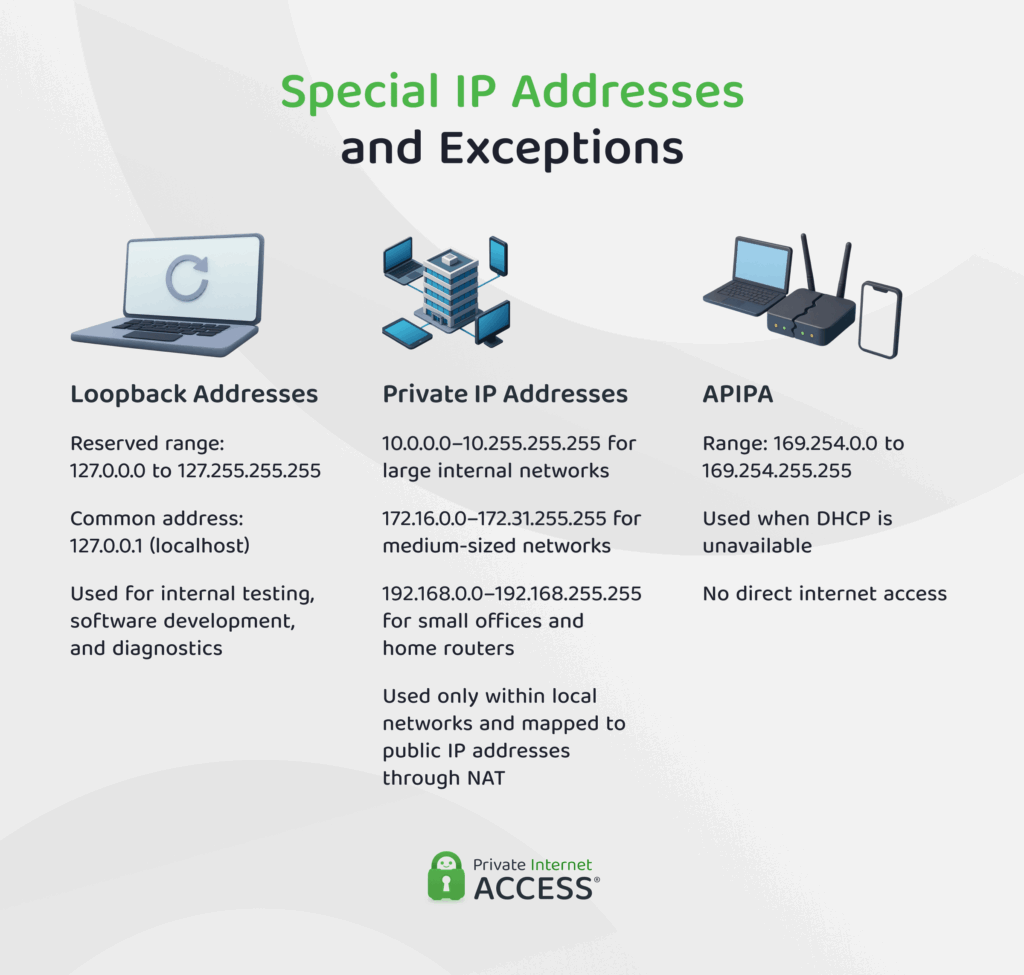
Beyond Classes A through E, several IPv4 address ranges serve special networking and communication purposes.
Loopback Addresses
Although 127 falls within the original Class A range, the entire 127.0.0.0/8 block is reserved for loopback and localhost testing, so it’s typically excluded from usable Class A address ranges. The most commonly used loopback address is 127.0.0.1, widely known as localhost. However, the full loopback range goes from 127.0.0.0 to 127.255.255.255.
Addresses in this range allow a device to communicate with itself for testing, diagnostics, and software development.
Private IP Addresses
Private IP addresses are reserved for internal network communication. They’re not routed publicly across the internet. The Internet Assigned Numbers Authority (IANA) reserved the following private ranges, one each for Class A, Class B, and Class C:
- 10.0.0.0/8 (Class A)
- 172.16.0.0/12 (Class B)
- 192.168.0.0/16 (Class C)
These private IP ranges are widely used in home Wi-Fi networks, offices, enterprise environments, cloud infrastructure, routers, and other internal systems that need devices to communicate securely within the same network.
For example, many home routers assign local device addresses such as 192.168.1.1 or 192.168.0.1, allowing smartphones, laptops, printers, and smart home devices to communicate internally without interacting directly with the public internet.
Devices using private IP addresses communicate externally through Network Address Translation (NAT), which converts private IP addresses into a public IP address for internet access. You can also learn more about Double NAT.
Automatic Private IP Addressing (APIPA)
APIPA allows devices to self-assign temporary IP addresses if a DHCP server becomes unavailable. These addresses fall within the following range: 169.254.0.0/16 and are assigned randomly and temporarily.
With an APIPA address, a device can communicate with other devices on the same local network, but it won’t be able to access the internet. In many cases, this can also trigger a “no network connection” or “limited connectivity” warning until a valid IP address is assigned by a DHCP server.
How Subnetting Works Within IP Classes
To fully understand how IP classes work and how computers communicate within the IPv4 system, it’s also important to understand subnetting. This common practice divides a large network into smaller, more manageable internal networks called subnets.
Instead of placing every device on one massive network, subnetting allows administrators to separate systems into smaller sections based on departments, office locations, device types, or operational needs. This helps reduce unnecessary broadcast traffic, improve overall network performance, strengthen segmentation, and make internal networks easier to manage and secure.
Subnetting works by modifying the subnet mask associated with an IPv4 address. By borrowing bits from the host portion of the address, administrators can create multiple smaller subnetworks from a single larger network. The more subnets created, the fewer hosts each subnet can accommodate, giving organizations greater control over traffic flow, device organization, and IP address allocation.
Although subnetting significantly improved the original classful addressing system, it didn’t completely solve IPv4 allocation problems. Because IP address classes relied on fixed network sizes, many organizations still ended up with far more addresses than they actually needed, leading to considerable waste across the IPv4 address space.
Plus, as Internet usage expanded globally, the limitations of classful addressing became increasingly apparent. Engineers eventually introduced Classless Inter-Domain Routing (CIDR), a more flexible and scalable system that replaced rigid class-based allocation and greatly improved routing efficiency across modern networks.
CIDR: The Modern Alternative to IP Address Classes
Classless Inter-Domain Routing (CIDR) replaced traditional classful addressing with a far more flexible and efficient routing system. Instead of relying on rigid IP address classes, CIDR uses variable-length subnet masks (VLSMs) and CIDR notation.
CIDR adds a suffix to the end of an IP address, such as 192.168.1.0/22. The number after the slash indicates how many bits belong to the network portion of the address, making it easier to define network sizes with much greater precision.
This approach helped reduce wasted IPv4 address space, improved route aggregation, and allowed networks to scale more efficiently without being restricted by fixed class boundaries. CIDR also played a major role in slowing IPv4 exhaustion by making better use of the remaining address pool.
Today, CIDR remains the standard routing and IP allocation method across both IPv4 and IPv6 networks, forming a core part of how modern internet infrastructure operates.
FAQ
What is an IP address?
An IP address is a unique string of numbers that identifies an interface, such as your smartphone, tablet, or home router. This address allows computers and devices to communicate online and exchange data.
What are the different classes of IP addresses?
IPv4 addresses are divided into five classes: A, B, C, D, and E. These classes differ by purpose, with Classes A, B, and C used for standard network and device addressing, while Classes D and E are reserved for specialized functions.
How do IP address classes and ranges work?
IP address classes organize IPv4 addresses into groups based on network size and purpose. Class A supports very large networks, Class B is designed for medium-sized networks, and Class C is commonly used in homes and small businesses. Class D handles multicast traffic, while Class E is reserved for experimental use. Each class uses a specific IP address range to help devices identify networks and communicate online.
What are private IP address classes?
Private IP address classes are blocks of IP addresses reserved for private networks within Classes A, B, and C. These addresses are used by local networks and cloud services for internal communication being routed across the public internet.
How are IP address classes used in networking?
IP address classes were designed to simplify communication and routing. By creating different categories, engineers made it easier to recognize network sizes and intended uses based on the first octet of an IP address. This helped improve routing efficiency and allowed networks to scale based on organizational needs.
Can a VPN change or hide my IP address class?
A VPN masks your real IP address with one assigned by the VPN server you connect to, making your connection appear to come from the server’s public IP address instead. Depending on the VPN service and the server you choose, the visible IP address may belong to a different IP address class.
References
- The Difference Between IPv4 and IPv6 – IPv4.Global
- RFC 791: STD 5: Internet Protocol – RFC Editor
- Classless Inter-Domain Routing (CIDR): an Address Assignment and Aggregation Strategy – RFC Editor
- What Is IPv6? – Cisco
- Class A addresses – IBM
- Configure IP Addresses and Unique Subnets for New Users – Cisco
