Is Telegram Safe to Use and Should You Trust It?
You may use Telegram to follow channels, participate in groups, share files, or chat privately with friends. But how much of that activity is actually private? Can other people access your messages, and does Telegram protect you from hackers, scams, and data leaks?
Telegram has security and privacy features, but it doesn’t protect every type of communication in the same way. Some conversations receive stronger encryption than others, while public groups, third-party bots, and interactions with strangers introduce more risks.
We examined Telegram’s official documentation, privacy policy, and history of reported vulnerabilities. While Telegram is safe, here’s what you should know before using it to share your sensitive information.
- How Safe Is Telegram?
- How Does Telegram Protect Your Messages?
- How Can Bad Actors Access Your Telegram Data?
- Has Telegram Ever Had a Data Breach?
- What Information Does Telegram Collect?
- Is Telegram Safe for Sending Private Photos?
- Is Telegram Safe to Use With Strangers?
- Are Telegram Bots and Mini Apps Safe?
- How to Make Telegram Safer
- Does a VPN Make Telegram Safer?
- FAQ
How Safe Is Telegram?
How safe Telegram is depends partly on the type of chat you use. Telegram offers cloud chats, Secret Chats, groups, and channels, but they don’t all provide the same level of privacy.
| Chat Type | How It Works | Main Privacy Consideration |
| Cloud chats | One-to-one conversations that sync across your devices | Stored on Telegram’s servers and not end-to-end encrypted |
| Secret Chats | Device-specific conversations between two people | End-to-end encrypted, but unavailable for groups |
| Group chats | Conversations involving a number of members | Stored in Telegram’s cloud, and members may copy or forward messages |
| Public channels | Broadcasts that anyone can find and follow | A wide audience may see posts and interactions |
| Private channels | Invitation-only broadcasts | Only invited members can access it, but content still lives in Telegram’s cloud |
| Bot chats | Conversations with automated third-party services | Bot developers can receive information you send to their bots |
Secret Chats offer Telegram’s strongest message protection, while standard conversations prioritize convenient cloud storage and access from several devices. Groups, channels, bots, and interactions with strangers can introduce additional risks that encryption alone doesn’t address.
Telegram can be safe for everyday use, but it isn’t equally private in every situation. Its protections also can’t prevent someone from accessing an unlocked device, stealing a login code, or sharing information they received.
How Does Telegram Protect Your Messages?
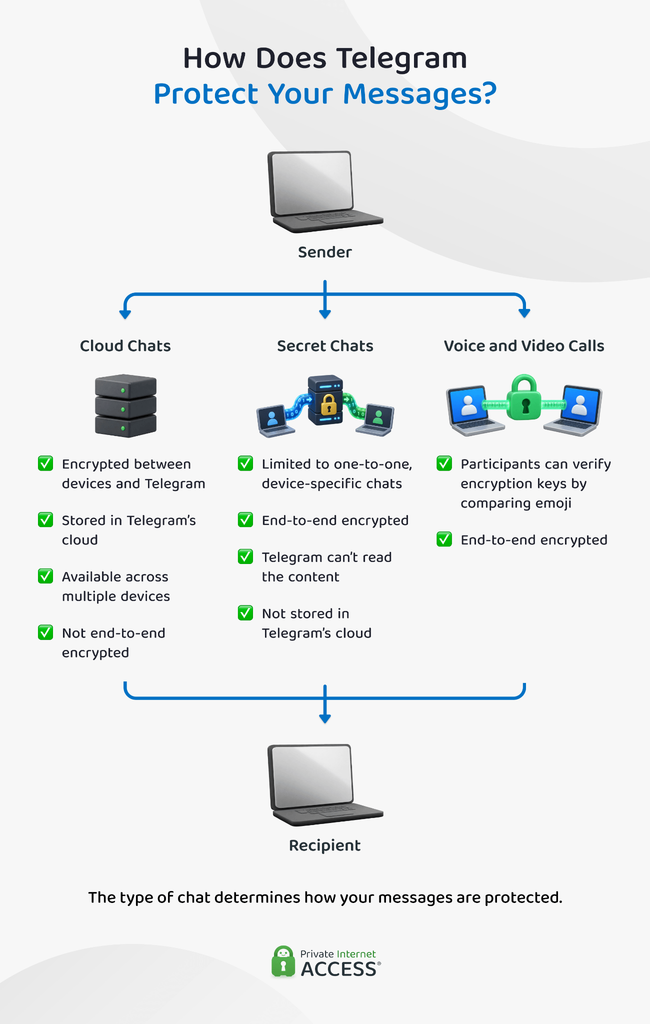
Telegram uses two different forms of encryption, depending on the type of conversation. Understanding this distinction is essential when deciding whether Telegram is safe for a particular message.
Cloud Chats
Telegram’s Cloud Chats use client-server encryption. This includes standard private conversations, groups, channels, and messages sent to Saved Messages.
Telegram encrypts cloud chat data as it travels between your device and its servers. It also stores messages, photos, videos, and documents there so you can access them from many devices.
This protects your messages against someone intercepting your internet connection. However, cloud chats aren’t end-to-end encrypted because Telegram’s infrastructure processes and stores them.
Secret Chats
Telegram Secret Chats use end-to-end encryption, which means only the participants’ devices hold the decryption keys. Telegram says it can’t read the content of these conversations and doesn’t store Secret Chat messages on its servers.
This feature also:
- Works only between two people
- Remains on the device where the conversation started
- Blocks message forwarding within the app
- Supports self-destruct timers
- Lets participants compare encryption keys
The lack of cloud storage provides stronger privacy, but it also means Secret Chats don’t synchronize across your devices. Logging out of Telegram also removes your Secret Chats from that device.
Voice and video calls use end-to-end encryption as well. Telegram displays a matching emoji that participants can compare to help verify that no one intercepted the call.
How Can Bad Actors Access Your Telegram Data?
Telegram’s encryption doesn’t prevent every form of unauthorized access. Instead of trying to break the encryption itself, scammers are more likely to steal your login credentials, access an existing session, or compromise one of your devices.
Stolen Login Codes
Telegram accounts are connected to phone numbers. An attacker could potentially try to steal a login code through various means, including phishing, SIM swapping, malware, or by persuading you to send them a code that appears in your Telegram account.
Telegram login scams sometimes use fake support accounts or websites that imitate the Telegram login page. Others ask you to scan a QR code to join a group, vote in a contest, or verify your identity. The QR code may actually authorize the attacker’s device to access your account.
Once inside, the attacker can potentially read your Telegram Cloud Chats and impersonate you. Secret Chats won’t appear on the attacker’s device, since they stay tied to the device where you started them.
Unsecured Active Sessions
Telegram lets you stay logged on phones, tablets, and computers. This is convenient, but an old or unauthorized session may continue providing access to your cloud chats until you terminate it.
You can review these connections under Settings > Devices. Remove any device, location, or session you don’t recognize.
Compromised Devices
Telegram can’t keep messages private if something compromises the device displaying them. Spyware, malicious accessibility services, screen-recording malware, or physical access to an unlocked phone could expose both cloud chats and Secret Chats.
Telegram also warns that rooted or jailbroken devices create additional risk because malicious software may gain access to protected storage or process memory.
Has Telegram Ever Had a Data Breach?
There is no well-documented public incident showing that attackers breached Telegram’s central servers and downloaded every user’s private messages. However, Telegram has experienced security vulnerabilities, and some incidents described as “Telegram breaches” have exposed user information through other means.
2016 Iran Account Attacks
In 2016, researchers reported that attackers identified approximately 15 million Iranian phone numbers connected to Telegram accounts and managed to compromise more than a dozen accounts.1
Telegram responded that the mass lookup only revealed whether people registered phone numbers with the service and didn’t provide access to the accounts. It also said the account compromises resulted from intercepted SMS codes rather than a vulnerability in Telegram’s encryption.2
2020 Third-Party App Exposure
In 2020, researchers discovered an unsecured database containing the user IDs and phone numbers of approximately 42 million Iranian users. The information reportedly came from unofficial Telegram apps used in Iran, where it restricted access to the official app.3
This was a significant exposure of Telegram-related data, but it wasn’t a breach of Telegram’s official infrastructure. It illustrates the risk of signing in through unofficial clients, even when they connect to a legitimate messaging service.
EvilVideo Vulnerability
In 2024, ESET researchers discovered an Android vulnerability known as EvilVideo. It allowed attackers to disguise malicious Android installation files as videos inside Telegram chats, groups, and channels.4
The victim still had to open the video and approve the installation of an external app. The vulnerability affected Telegram for Android version 10.14.4 and older, and Telegram provided a patch for version 10.14.5. This incident shows why you should keep the app updated.
What Information Does Telegram Collect?
Telegram collects the phone number and basic account details you provide when creating an account. This may include your profile name, photo, and bio.5
Depending on how you use the app and which permissions you grant, Telegram may also process:
- Messages and media stored in cloud chats
- Synced contact names and phone numbers
- Your IP address
- Devices and Telegram apps you use
- Your history of username changes
- Location data you choose to share
- Information you submit to bots and Mini Apps
Telegram may retain security-related metadata for up to 12 months to prevent spam, abuse, and other violations.5
You can stop contact synchronization and delete previously synced contacts through Telegram’s privacy settings. Deleting contacts from your phone alone may not remove the copies already uploaded to Telegram.
Can Telegram Share Your Data With Authorities?
Telegram may disclose your IP address and phone number after receiving a valid order from the relevant judicial authorities. The order must confirm that authorities suspect you of criminal activity that violates Telegram’s Terms of Service.5
Telegram records these disclosures in quarterly transparency reports. However, authorities don’t automatically receive Secret Chat content, since Telegram doesn’t hold the decryption keys required to access them.
Is Telegram Safe for Sending Private Photos?
Telegram encrypts photos while sending them, but that doesn’t guarantee they will remain private after reaching the recipient.
A Secret Chat provides stronger technical protection than a regular cloud chat because its media is end-to-end encrypted and you can apply a self-destruct timer. However, no messaging feature can prevent the recipient from photographing the screen with another device or otherwise reproducing what they see.
Before sending a private photo:
- Confirm that you have the correct recipient
- Use a Secret Chat for sensitive content
- Remove unnecessary location or identifying information
- Set a self-destruct timer if appropriate
- Assume that the recipient could preserve a copy
Disappearing media can reduce how long content remains accessible through Telegram, but it shouldn’t be treated as proof that the photo no longer exists.
Is Telegram Safe to Use With Strangers?
Telegram’s shared groups, public usernames, and public channels make it useful for building communities, but they also give scammers a few ways to approach potential victims.
Common Telegram scams include:
- Fake cryptocurrency investments
- Impersonation of friends, businesses, or public figures
- Fake technical support accounts
- Job and task scams
- Giveaway and prize scams
- Phishing links
- Malicious downloads
- Bots requesting payments or personal information
Be suspicious if someone promises guaranteed returns, asks you to pay a fee before receiving money, demands cryptocurrency, or creates urgency around an unexpected account problem. Verify businesses and people through a separate official channel before trusting their identity.
Are Telegram Bots and Mini Apps Safe?
Bots and Mini Apps can be useful, but independent developers create and operate these rather than Telegram.
According to Telegram’s privacy policy, bot developers may receive your public name, username, profile pictures, and messages you send to the bot. A bot added to a group may also be able to read group messages, depending on its permissions.
Opening an external link controlled by a bot developer may reveal your IP address and other standard browser information to that website. Mini Apps may also collect information under their own privacy policies.
Don’t give a bot or Mini App your:
- Telegram login code
- Account password
- Recovery phrase
- Private encryption key
- Identity documents
- Financial information unless you’ve verified the service
A bot appearing inside your Telegram app doesn’t mean Telegram has reviewed or endorsed it.
How to Make Telegram Safer
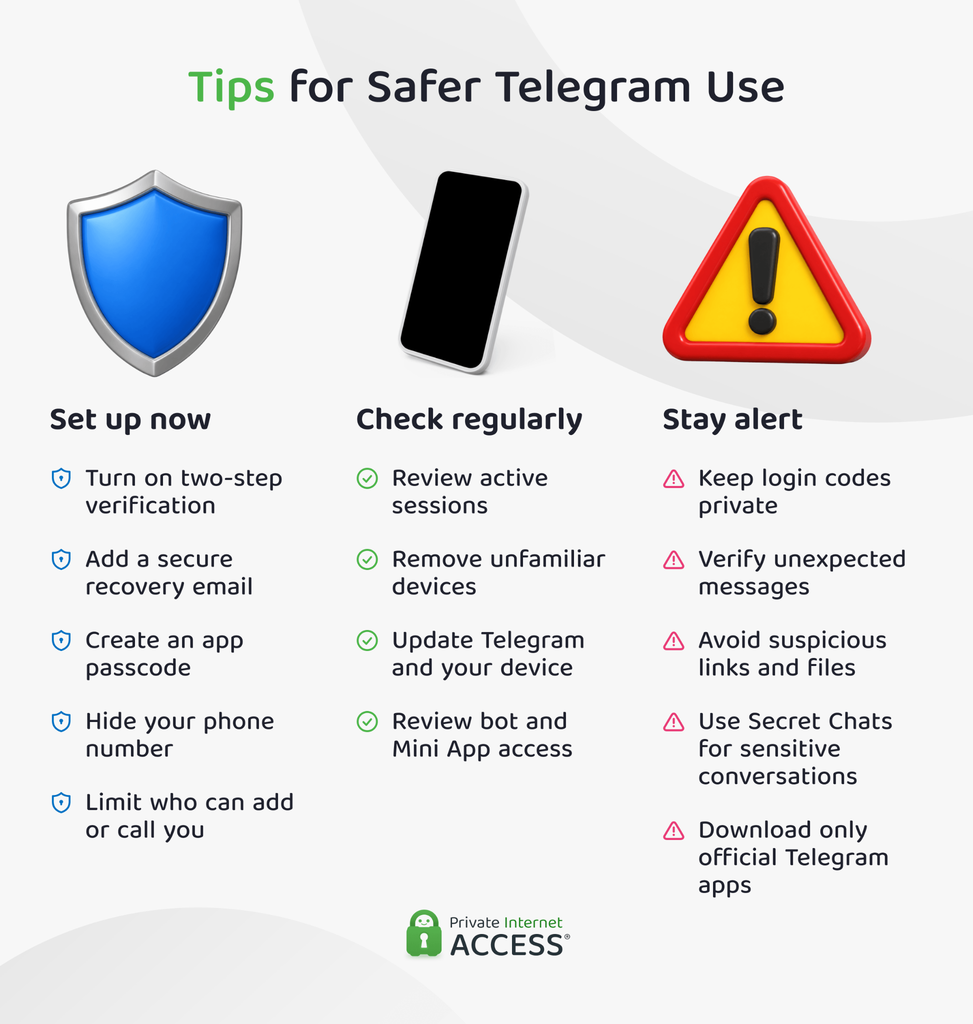
Telegram’s default configuration may not match your privacy needs. These steps can help protect your account and limit the information other users can see:
1. Enable Two-Step Verification (2FA)
Go to Settings > Privacy and Security > Two-Step Verification and create an additional password. This helps prevent someone from accessing your account with a stolen or intercepted login code alone.
Protect your recovery email with its own unique password and 2FA. Otherwise, the recovery account could become another way to compromise Telegram.
Telegram also supports passkeys, which let you sign in using your device’s PIN or biometric authentication without relying on an SMS code.
2. Check Your Active Sessions
Open Settings > Devices and review every session connected to your account. Terminate unfamiliar connections and remove sessions from devices you no longer use.
3. Adjust Your Privacy Settings
Review who can see your phone number, profile photo, last-seen status, and online activity. You can also limit who can call you or add you to groups and channels.
Restricting these settings won’t make you invisible online, but it can reduce unsolicited contact and the amount of information visible to strangers.
4. Use Secret Chats
Start a Secret Chat before sharing sensitive information with another person. An ordinary private chat remains a cloud chat even if you enable disappearing messages.
For further verification, compare the Secret Chat’s encryption key visualization with the other participant through a separate trusted method.
5. Install Updates
Download updates for Telegram and your operating system when they become available. Security patches help protect you against known vulnerabilities that may remain exploitable in older app versions.
Only install Telegram through its official website or a trusted app store. Avoid modified or unofficial clients whose developers you don’t know.
6. Protect Your Login Codes
Never give a Telegram login code to another person, including someone claiming to work for Telegram. Inspect QR-code login requests before approving them, and don’t scan codes to vote, verify your age, or join an unfamiliar group.
7. Be Careful With Links and Files
Treat unexpected links, applications, archives, and documents as potentially dangerous, even if they come from a known account. That person’s account may have been compromised.
Verify unusual requests through another communication method before opening the content.
Does a VPN Make Telegram Safer?
PIA VPN encrypts your internet connection between your device and the VPN server. This helps protect your traffic from exposure on unsecured Wi-Fi and replaces your public IP address with the VPN server’s address when connecting to online services.
However, a VPN doesn’t change how Telegram encrypts its messages. It can’t add end-to-end encryption to cloud chats, protect an unlocked or infected device, or prevent a recipient from sharing your messages.
A VPN helps protect the network connection. Telegram’s account controls, Secret Chats, and your own decisions help protect different what actually happens on the platform.
FAQ
Can people on Telegram track you?
Other Telegram users generally can’t see your precise location unless you share it. However, they may identify you through your username, profile details, shared groups, or a phone number they already have. Opening an external link can also reveal your IP address and browser information to the website operator.
How can I tell if someone is a scammer on Telegram?
Common warning signs include guaranteed investment returns, unsolicited payment requests, fake support accounts, urgent warnings, and requests for passwords or login codes. Check usernames and verify the person or organization independently before trusting them. Avoid unexpected links and files until you confirm who sent them.
What are the downsides of using Telegram?
Telegram’s biggest limitation is how it secures some of your chats. For example, ordinary private messages and group chats aren’t end-to-end encrypted. The service also stores cloud chats on its servers and may collect IP addresses, device information, and other metadata. Public groups, third-party bots, and contact from strangers can also expose users to scams and malicious content.
References:
- Hackers accessed Telegram messaging accounts in Iran – Reuters
- Keep Calm and Send Telegrams! — Telegram
- Elasticsearch Database with 42 Million Records of Iranian Citizen Found Exposed Online – securityboulevard.com
- Exploiting the EvilVideo Vulnerability on Telegram for Android – welivesecurity.com
- Privacy Policy – Telegram
