What Is an L2TP VPN and Is It Still Safe to Use?
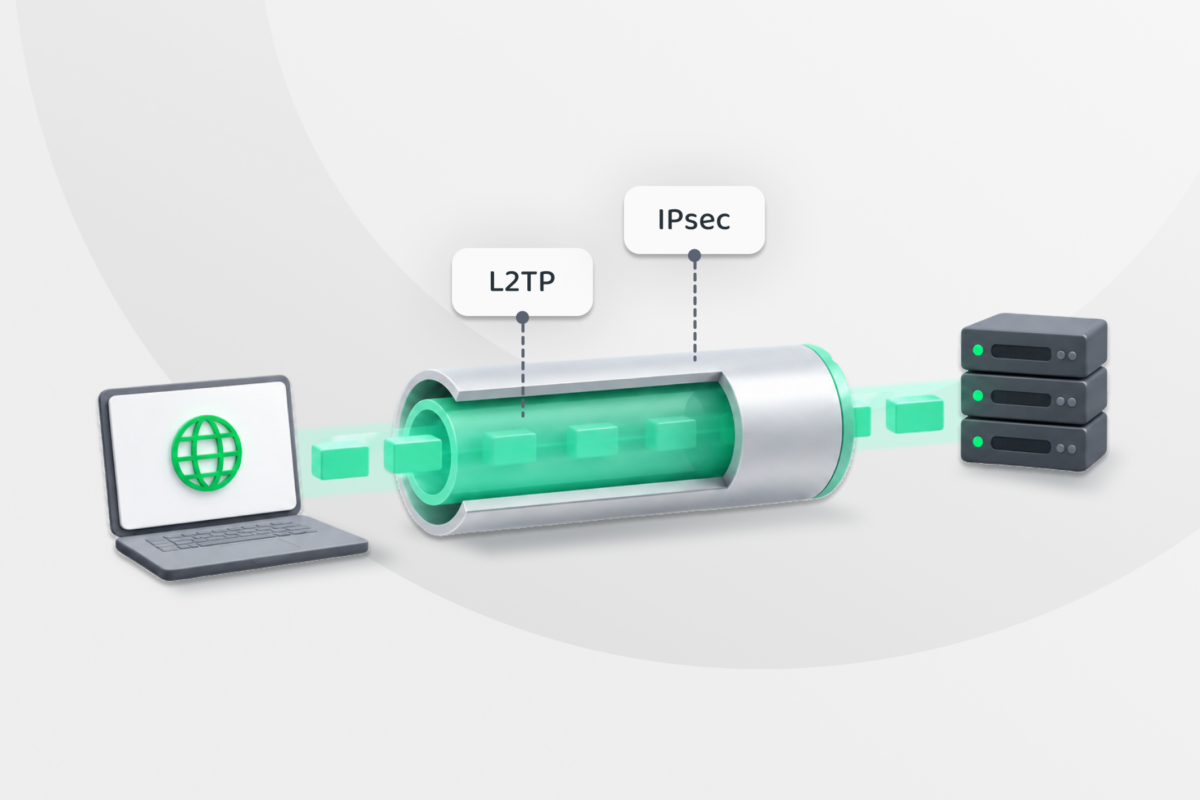
Layer 2 Tunneling Protocol (L2TP) has been around for decades, so you may still see it in older devices or network settings. It’s a tunneling protocol that moves your data between your device and a VPN server, but it doesn’t encrypt that data on its own.
So, how does L2TP work, and is it still safe to use today?
What Is an L2TP VPN?
L2TP creates a VPN tunnel that carries data between your device and another point on a network, such as a VPN server. L2TP handles the tunneling part, but it doesn’t encrypt the data on its own.
That’s why L2TP usually pairs with Internet Protocol Security (IPsec), which encrypts and protects it as it travels through the tunnel.
When you see L2TP VPN, it usually means L2TP/IPsec rather than L2TP by itself. The two technologies work together to create the VPN connection.
How Does L2TP/IPsec Work?
Here’s how an L2TP/IPsec connection works:
- IPsec sets up the secure tunnel: Your device contacts the VPN server. Internet Key Exchange (IKE) helps both sides agree on how to protect the connection and creates the encryption keys they’ll use.
- L2TP establishes the tunnel: This step sets up a tunnel between your device and the VPN server, carrying your network data using Point-to-Point Protocol (PPP), an older standard that helps transport data and can also handle things like your VPN login.
- IPsec protects the L2TP traffic: L2TP wraps the data with the information needed to move it through the tunnel, and IPsec then encrypts that traffic while it travels across the network.
- The VPN server processes and routes the traffic: When the data reaches the VPN server, IPsec removes its protection and L2TP removes the tunnel information. The server then sends the data to its destination.
Is L2TP Secure?
L2TP on its own isn’t secure enough for a VPN because it doesn’t encrypt the data traveling through the tunnel.
IPsec can encrypt the traffic so other people can’t read it in transit. It can also check that no one’s changed the data along the way and protect against replay attacks, where an attacker tries to resend captured network traffic.
How secure an L2TP/IPsec connection is also depends on how it’s configured. The encryption settings, authentication method, and key exchange all matter. For example, a weak pre-shared key can make the connection easier to attack. Some setups use certificates instead.
Another concern is IKEv1, an older version of Internet Key Exchange used to set up IPsec connections. Some older L2TP/IPsec deployments may still rely on it, but the Internet Engineering Task Force (IETF) deprecated IKEv1 in 2023 and recommends moving to IKEv2.¹ For a new VPN setup, an up-to-date protocol is generally the better choice when your devices and network support one.
How to Set Up an L2TP VPN
You can set up L2TP/IPsec manually if your device supports it and you already have access to an L2TP/IPsec VPN server. Here’s how to do it:
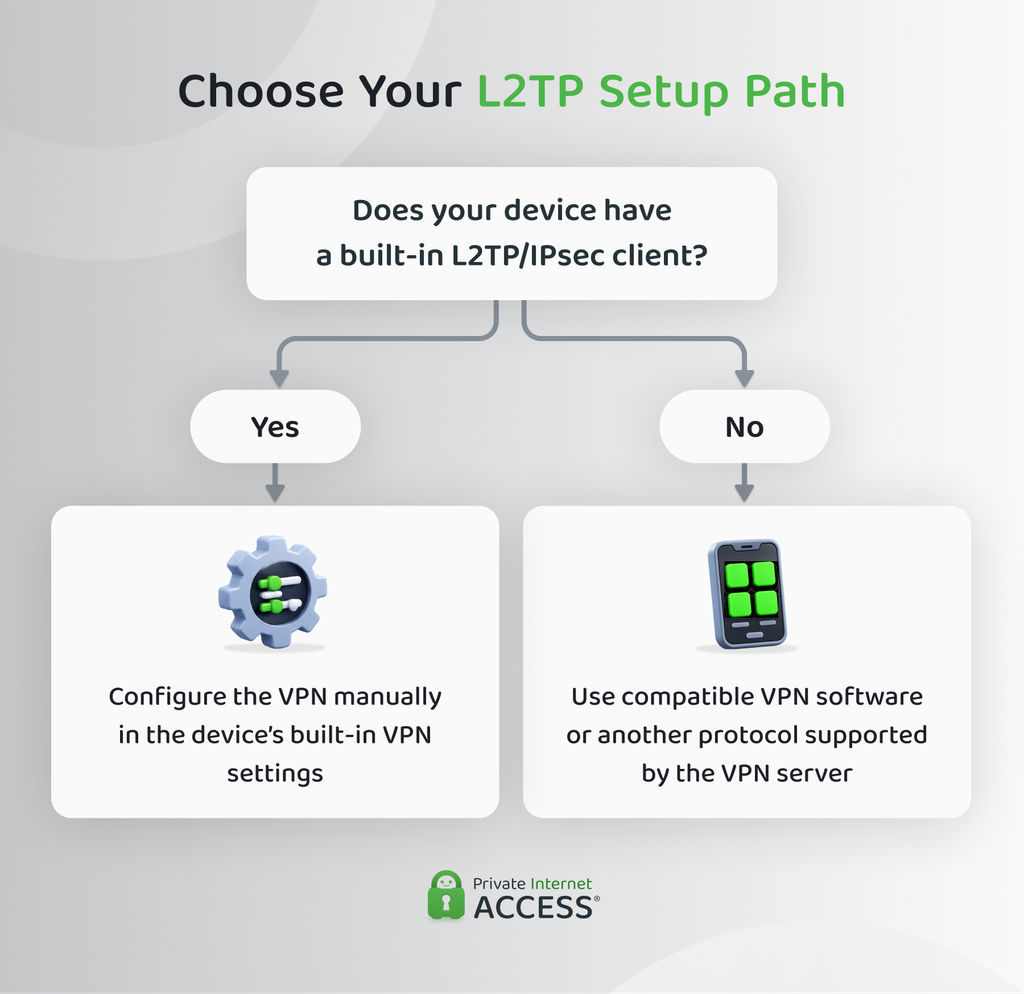
Before You Start: Server Details and Device Support
Before you begin, get the connection details from your VPN provider, workplace IT team, or whoever manages the VPN server. For the setups below, you’ll usually need:
- Server address: The hostname or IP address of the L2TP VPN server.
- Username and password: The login details for your VPN account.
- Pre-shared key (PSK): A shared secret used by your device and the VPN server to authenticate the IPsec connection.
These instructions assume the server uses a pre-shared key. Some L2TP/IPsec setups use certificates instead, so follow the settings provided by whoever manages your server. Your device also needs a compatible L2TP/IPsec client:
| Device | Built-in L2TP/IPsec support |
| Windows 10 and 11 | ✅ |
| macOS | ✅ |
| iPhone and iPad | ✅ |
| Android 11 or earlier | ✅ |
| Android 12 or later | ❌ |
| Linux | Depends on the distribution and installed VPN software |
| Routers | Depends on the router model and firmware |
How to Set Up L2TP on Windows 10/11
- Go to Settings > Network & Internet > VPN.
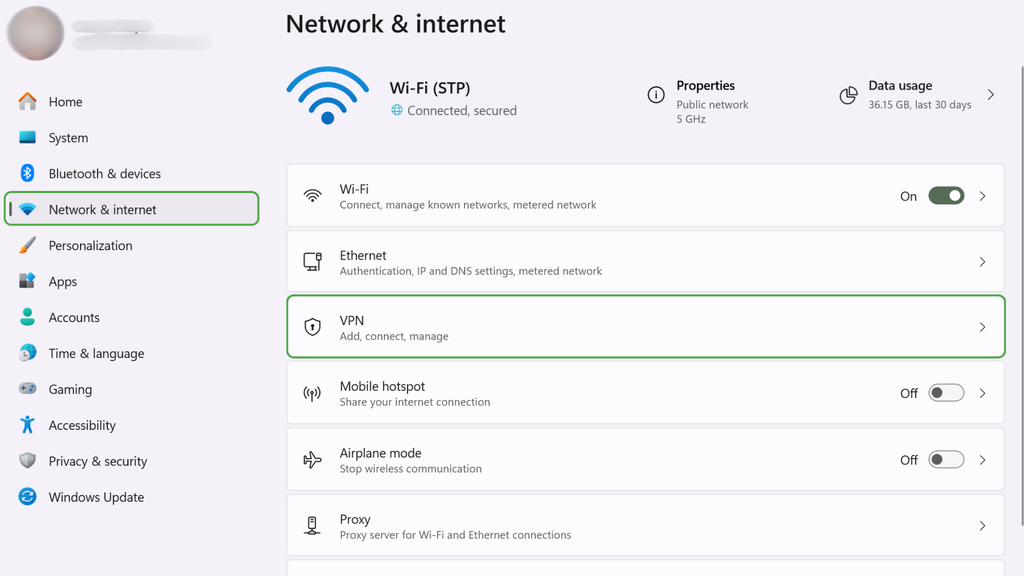
- Select Add VPN.
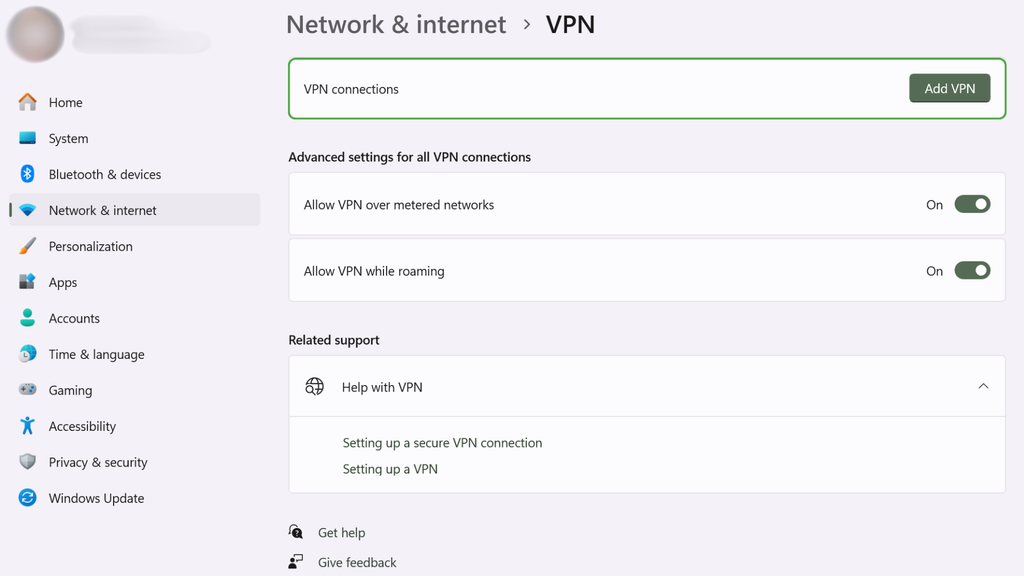
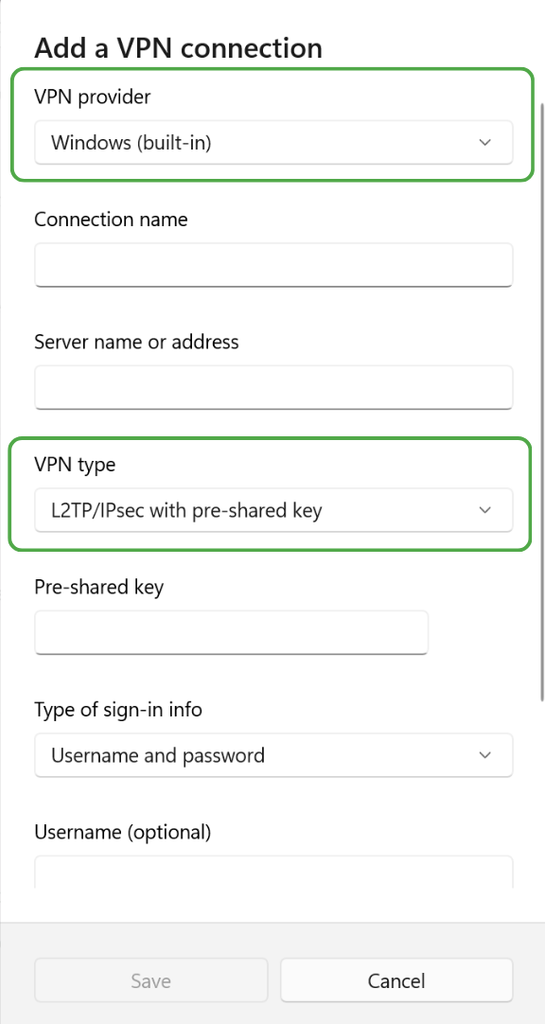
- Enter the connection details:
- VPN provider: Windows (built-in)
- VPN type: L2TP/IPsec with pre-shared key
- Server name/address, username, password, and shared key: All details you get from your VPN provider.
- Click Save, then select the new profile and click Connect.
How to Set Up L2TP on macOS
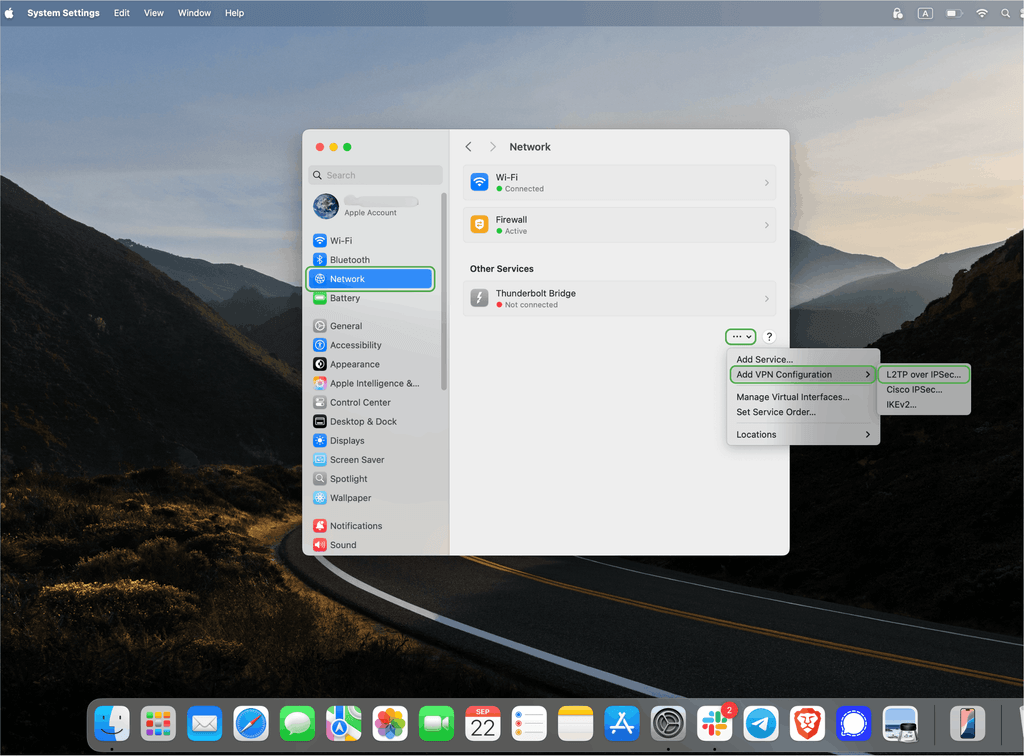
- Open System Settings > Network.

- Click the Action menu at the bottom of the sidebar, then choose Add VPN Configuration > L2TP over IPsec.
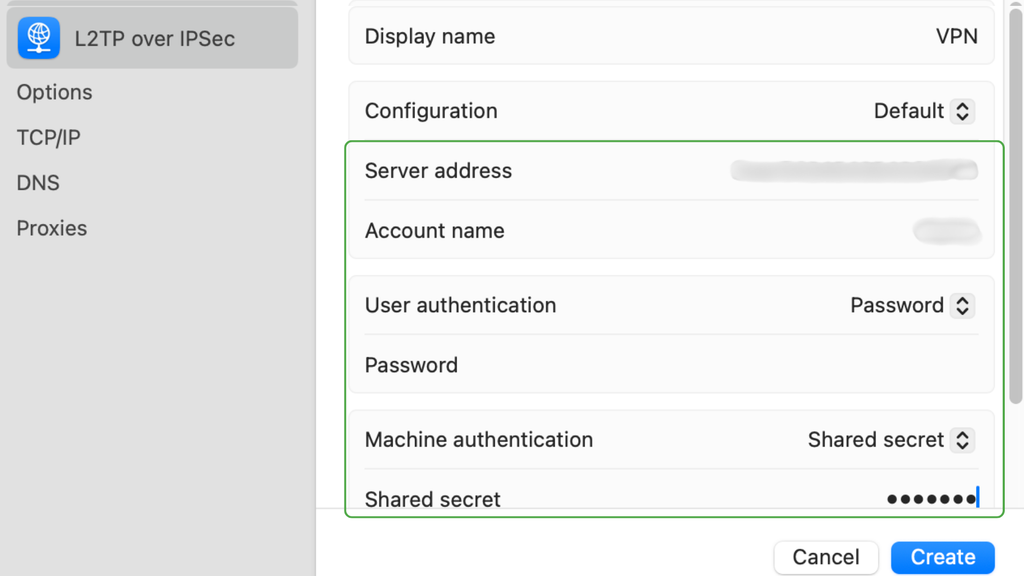
- Enter your connection details, including:
- Display Name: Choose a name for the VPN connection.
- Server Address: Enter the VPN server hostname or IP address.
- Account Name: Enter your VPN username.
- User Authentication: Choose Password and enter your password.
- Machine Authentication: Choose Shared Secret and enter the pre-shared key.
- Click Create.
- Open System Settings > VPN, then turn on the VPN connection you just created.
How to Set Up L2TP on iPhone or iPad
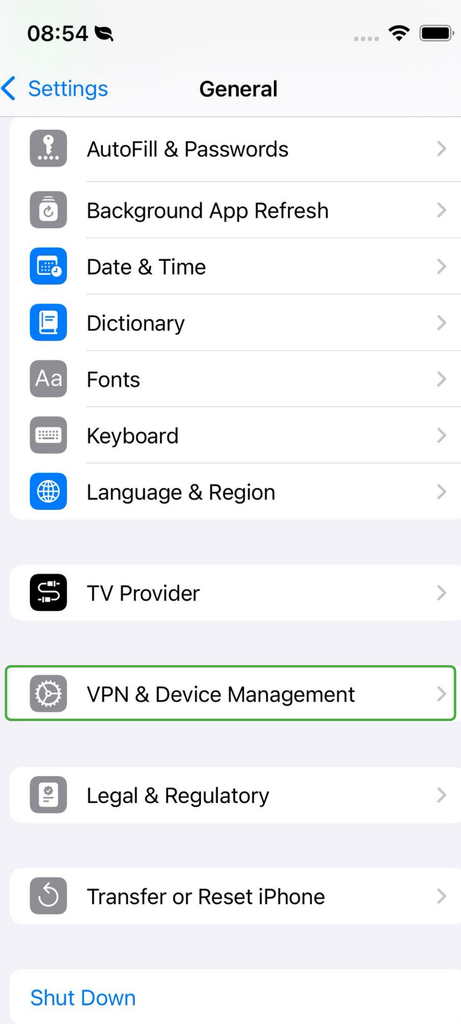
- Open Settings > General > VPN & Device Management.
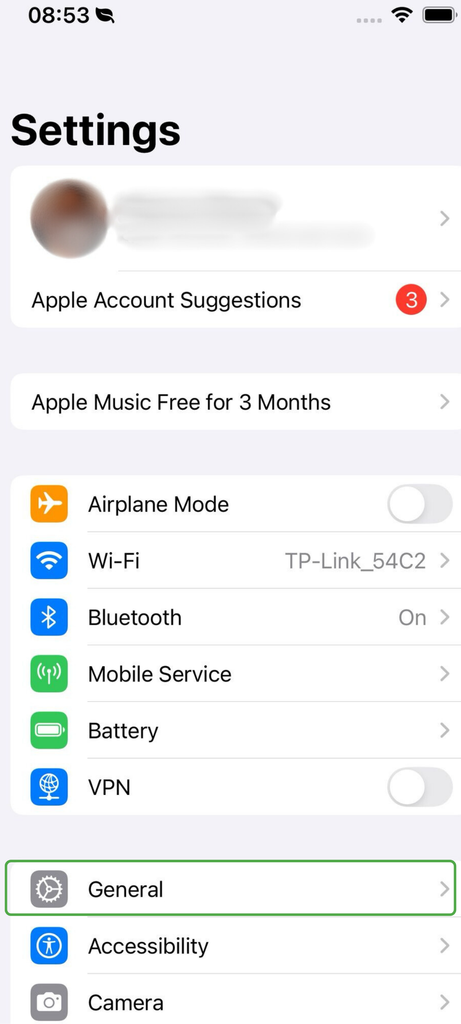
- Navigate to VPN > Add VPN Configuration, then tap Type and select L2TP.
- Enter the connection details:
- Description, server, account, and password: Get these details from your VPN provider.
- Shared secret (PSK): Enter it in the Secret field.
- Click on Done. Select the new VPN profile, then turn the VPN on to connect.
Set Up L2TP on Android 11 or Earlier
Android 11 and earlier can include a built-in L2TP/IPsec client, though menu names vary between phone manufacturers.
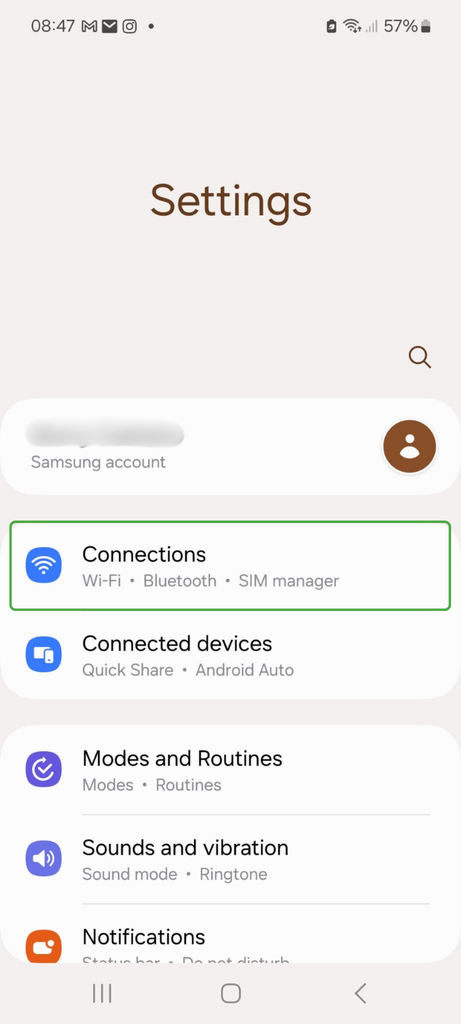
- Go to Settings > Connections.
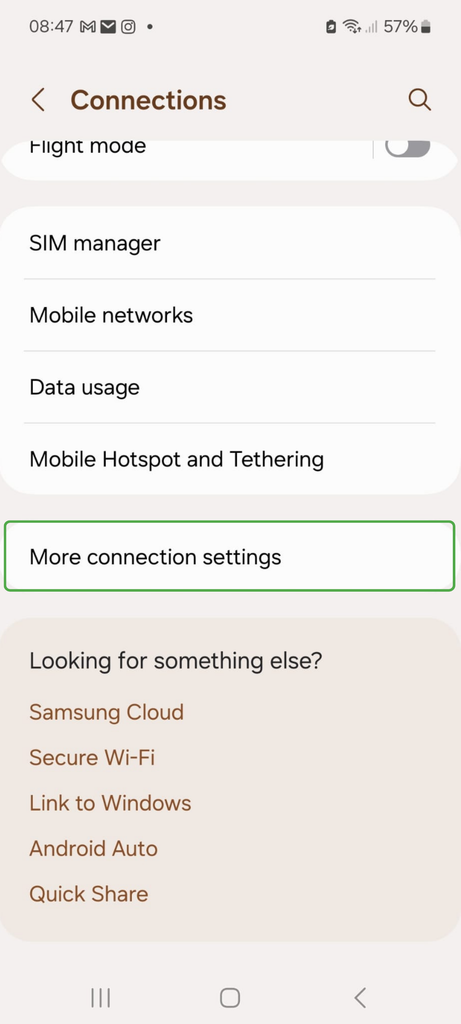
- Select More connection settings.
- Navigate to the VPN option.
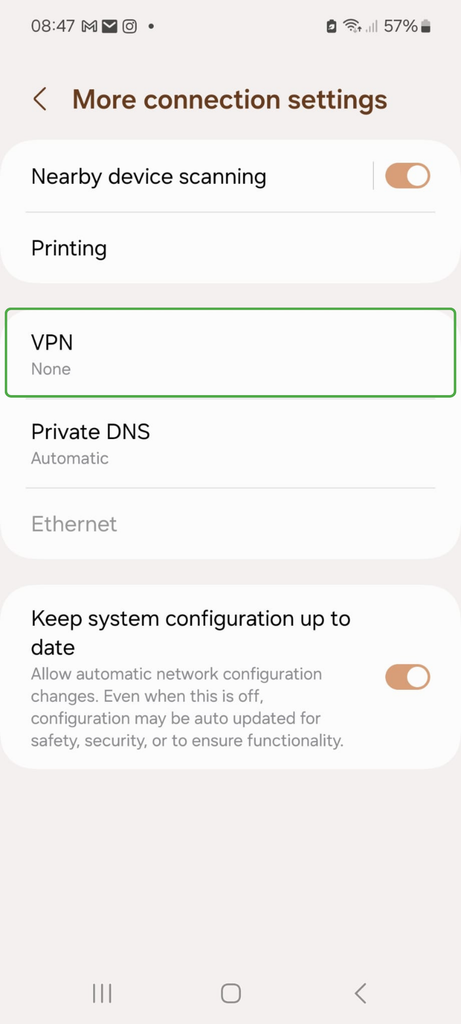
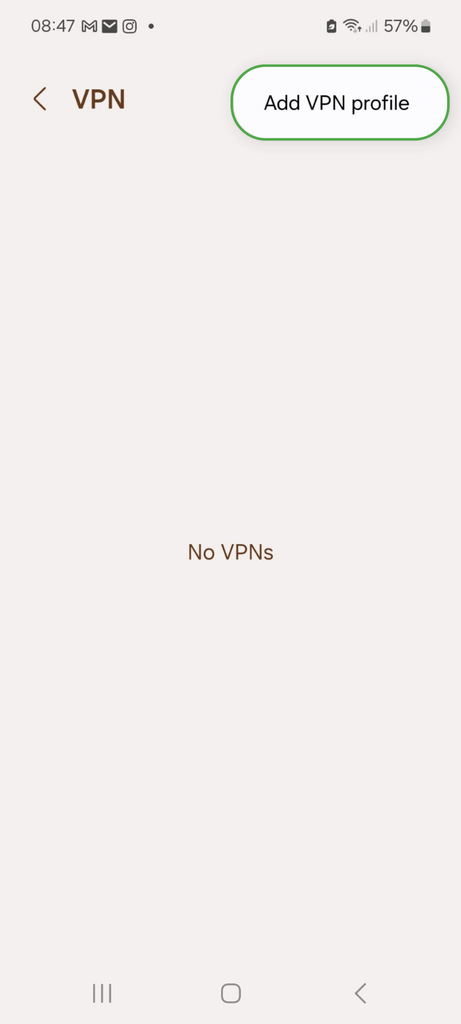
- Tap Add VPN profile.
- Under Type, select L2TP/IPsec PSK.
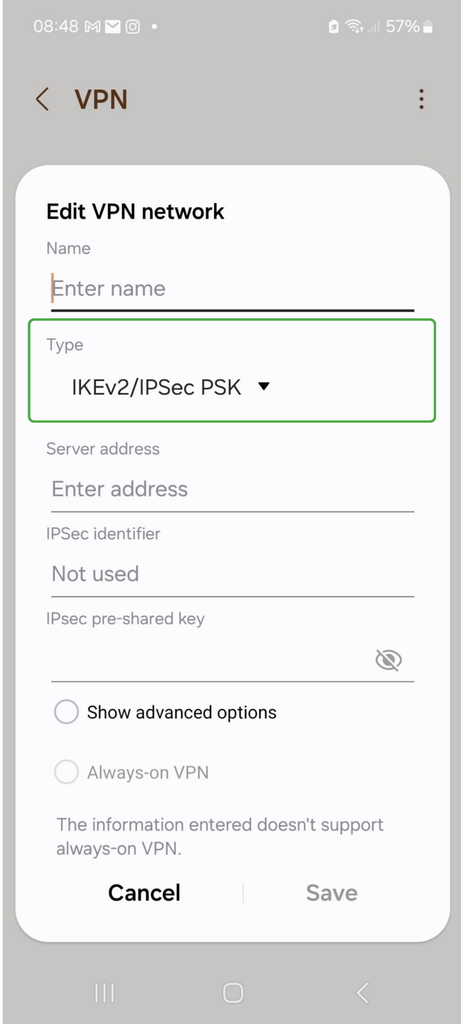
- Enter the following details from your VPN provider:
- Server address
- IPsec pre-shared key
- Username and password
- Save the profile, then select it from the VPN list and tap Connect.
Fixing Common L2TP VPN Connection Problems
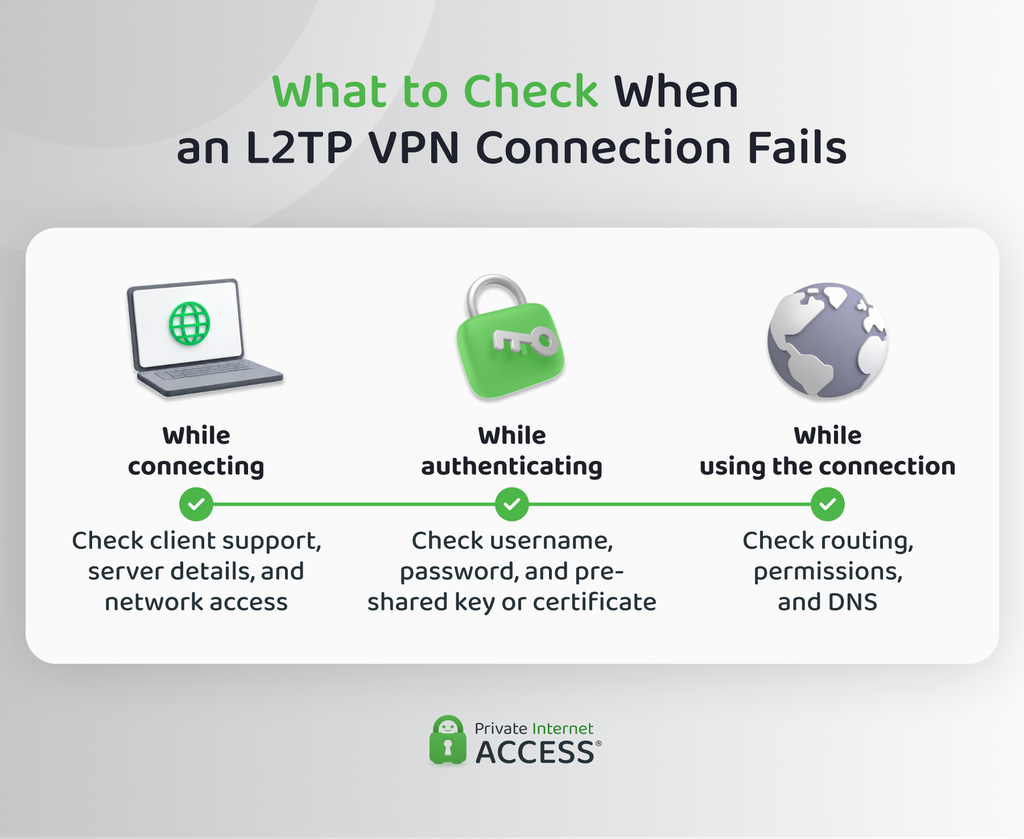
If your L2TP VPN doesn’t work after setup, the symptom can help narrow down the cause. Try these checks:
- L2TP isn’t available as a VPN option: Check whether your device still includes an L2TP client. If it doesn’t, you’ll need compatible VPN software or another protocol supported by the server.
- The VPN won’t connect: Make sure you’re connected to the internet, then check the server address, VPN type, and pre-shared key or certificate. If any of these don’t match the server settings, the connection can fail before L2TP starts.
- Your login doesn’t work: Double-check your username and password, then confirm your account can use the VPN. Some workplace setups may also require a domain or other login details from the network administrator.
- The VPN works on one network but not another: The second network may be blocking L2TP/IPsec traffic because of a firewall. If you don’t manage that network, ask the administrator whether they’re restricting VPN traffic.
- The VPN connects, but you can’t reach an internal service: The tunnel may be working, but routing or access permissions can still block that resource. A conflicting private IP address range can also stop traffic from reaching the right network.
- A service works by IP address but not by name: This usually points to a DNS problem. Your device may be using the wrong DNS server or be missing the settings needed to resolve internal hostnames.
- The VPN connects, but internet access stops: Check whether the VPN should route all traffic through the server or only specific private networks. The server and client need the correct routes for whichever setup you use.
Benefits of L2TP/IPsec
Although L2TP/IPsec is an older setup, it still has some advantages when you’re working with systems that already support it:
- Fits existing network infrastructure: Organizations that already use L2TP/IPsec gateways can keep those connections running while they move devices and services to newer VPN protocols over time. This can avoid replacing compatible hardware or server infrastructure all at once.
- Works without extra software on some platforms: Windows, macOS, iOS, and older Android versions include a built-in L2TP/IPsec client, so compatible devices can connect without installing separate VPN software.
- Uses established networking standards: L2TP and IPsec follow standardized technologies, so compatible equipment from other vendors can work together when both sides use matching settings.
Limitations of L2TP/IPsec
L2TP/IPsec comes with a few practical trade-offs, especially compared with newer VPN technologies:
- Extra processing: Because L2TP puts your data in a tunnel and then IPsec encrypts the whole thing, every packet ends up wrapped twice. That extra processing and larger packet size creates more overhead, which can slow down your speeds, especially compared to newer protocols.
- Trouble on restricted networks: Some firewalls and routers may block or mishandle the network traffic L2TP/IPsec needs. This can stop the VPN from connecting, especially on controlled workplace or public networks.
- More setup friction: L2TP/IPsec often relies on manual VPN profiles and some current platforms don’t offer this natively. That can make one setup harder to maintain across a mix of newer and older devices.
Which Ports Does an L2TP VPN Use?
An L2TP/IPsec connection uses other ports and network protocols for different parts of the connection.2 User Datagram Protocol (UDP) is a common way for devices to send data across a network.
| Port or protocol | What it does |
| UDP 1701 | Carries L2TP data between your device and the VPN server. In an L2TP/IPsec connection, IPsec protects this traffic while it travels across the network |
| UDP 500 | Starts the IPsec connection. Your device and the VPN server use it for IKE, which helps them agree on the security settings and encryption keys they’ll use |
| UDP 4500 | Used for Network Address Translation (NAT) traversal, which lets protected IPsec traffic pass through routers that share one public IP address across several devices. |
| ESP – IP protocol 50 | Carries IPsec-protected traffic when it isn’t using NAT traversal. ESP stands for Encapsulating Security Payload. “50” is an IP protocol number, not a TCP or UDP port. |
What Does L2TP Passthrough Do?
L2TP passthrough is a router feature that helps L2TP traffic pass through NAT. Without it, some routers may have trouble handling an L2TP connection correctly.
Some routers include a separate IPsec passthrough setting because L2TP/IPsec uses both technologies. Routers often enable these features by default, so you may not need to change anything unless your router is blocking the connection.
L2TP vs. Other VPN Protocols: How Does It Compare?
Here’s how L2TP/IPsec fares against the most common VPN protocols nowadays:
| Protocol | Traffic Protection | Firewall/NAT Flexibility | Network Switching | Platform Support | Use Cases |
| L2TP/IPsec | IPsec protects L2TP traffic | Limited | Usually reconnects | Some built-in support | Legacy/existing setups |
| PPTP | Older/weaker protection methods | Limited | Usually reconnects | Mostly legacy systems | Legacy only |
| IKEv2/IPsec | IPsec + IKEv2 | Good | MOBIKE keeps VPN connected across networks. | Broad current support | Mobile/remote VPNs |
| OpenVPN | TLS-based setup + encrypted tunnel | High | Usually reconnects | Usually needs a client | Widely used |
| WireGuard | Fixed modern cryptography | Good | Supports IP roaming | Broad current support | Modern VPNs |
L2TP/IPsec vs. PPTP
L2TP/IPsec and Point-to-Point Tunneling Protocol (PPTP) are both older VPN technologies, but they protect your traffic in different ways. PPTP uses older encryption and login methods. L2TP/IPsec uses L2TP to create the tunnel, while IPsec handles encryption and authentication.
They also use varying types of network traffic. PPTP relies on Generic Routing Encapsulation (GRE) to carry data and some firewalls block it. L2TP/IPsec doesn’t use GRE, but it can still have trouble on networks that block the traffic IPsec needs.
L2TP/IPsec vs. IKEv2/IPsec
Both use IPsec to protect your traffic, but they build and manage the VPN connection in distinctive ways. L2TP/IPsec adds an L2TP tunnel on top of IPsec, creating a two-layered system. IKEv2/IPsec uses IKEv2 to set up and manage the IPsec connection without an extra layer.
IKEv2/IPsec is also better at handling network changes. It can use Mobility and Multihoming Protocol (MOBIKE), a feature that helps keep the VPN connected when your device gets a new IP address, such as when you switch from Wi-Fi to mobile data. L2TP/IPsec will usually need to reconnect after that change.
L2TP/IPsec vs. OpenVPN
OpenVPN gives you more flexibility in how VPN traffic travels across a network. It can use either UDP or TCP and can work over alternate ports, which gives it more options and better compatibility with restricted networks.
L2TP/IPsec has a more fixed setup. However, some operating systems already include an L2TP/IPsec client, so you can configure it through the device’s VPN settings. OpenVPN usually requires a separate VPN app or client.
L2TP/IPsec vs. WireGuard
Unlike L2TP/IPsec, WireGuard handles the VPN tunnel and encryption together. WireGuard uses a fixed set of modern encryption tools instead of supporting many other choices.
WireGuard can also handle changes to your device’s IP address through IP roaming. For example, if you move from Wi-Fi to mobile data, it can update the connection without building a new tunnel. L2TP/IPsec typically has to rebuild the connection from scratch when your network changes.
Tech tip: Opt for a newer protocol when you have the choice. L2TP/IPsec can still be useful when an older device or network requires it, but for everyday VPN use, the PIA VPN app gives you access to the superior WireGuard and OpenVPN protocols without any manual configuration.
FAQ
Can I use L2TP without IPsec?
Yes, technically, but bare L2TP isn’t suitable for a secure VPN connection over the internet. L2TP creates the tunnel but doesn’t provide the encryption and traffic protection IPsec adds, so they’re used together.
Where do I find my L2TP VPN server address?
You get the server address from whoever provides or manages the VPN, such as your VPN provider or workplace IT team. It will usually be a hostname or an IP address that you enter in your device’s VPN settings.
What is an L2TP/IPsec pre-shared key?
A pre-shared key (PSK) is a secret that’s configured on both your device and the VPN server to help authenticate the IPsec connection. It’s separate from your VPN username and password, and it’s usually provided by whoever manages the server.
Why is L2TP missing from my Android VPN settings?
You can set up L2TP on Android 11 or earlier. If you’re using Android 12 or later, L2TP is missing because Google removed built-in support for it and PPTP starting with Android 12. A third-party VPN app may still support a compatible connection, but the native Android L2TP option is no longer available.
Can L2TP/IPsec work behind NAT?
Yes. IPsec can use NAT traversal to work through routers that use Network Address Translation (NAT). When IPsec detects NAT, protected traffic can move to UDP port 4500 so it can pass through the router.
Resources:
