WireGuard vs. OpenVPN: Which VPN Protocol Is Better?

VPN performance, security, battery drain, and compatibility can all vary depending on which VPN protocol you choose. While most VPN apps give you a choice of protocol, they don’t tell you how to choose the right one.
In this blog post, we’ll explore how WireGuard and OpenVPN (the two most popular commercial VPN protocols) stack up against each other in terms of speed, security, ease of setup, and other factors.
The Difference Between OpenVPN and WireGuard at a Glance
| Factor | WireGuard vs. OpenVPN | Why The Protocol Wins |
| Speed | WireGuard | Lighter, more efficient code processes data faster, with noticeably lower latency |
| Encryption | WireGuard | Fixed modern cipher suite – no customization options, but no weak settings to misconfigure |
| Compatibility | OpenVPN | Works on more legacy devices, older routers, and niche hardware setups |
| Battery use | WireGuard | Uses less CPU power to encrypt traffic, so it drains your battery more slowly |
| Setup | WireGuard | Requires a key pair to generate, with no certificate files to manage |
Is WireGuard Better Than OpenVPN?
WireGuard is typically the better VPN protocol for everyday activities like streaming, gaming, and general browsing. It offers faster connection speeds and uses less data and battery than OpenVPN.
However, OpenVPN may still be the optimal choice if you’re using legacy routers or devices that only support older protocols, or in enterprise setups that need certificate-based authentication or fine-grained cipher control.
How VPN Protocols Work
Every VPN connection depends on a VPN protocol, the set of technical rules that determines how your device and the VPN server build the encrypted tunnel between them, how they verify one another, and what cipher scrambles your traffic.
You can think of the VPN itself as a private road your data travels on and the protocol as the engineering behind that road: how it’s laid out, how quickly traffic can move along it, and how well it’s protected from anyone trying to monitor movements across it.
While there are several to choose from, including IKEv2, SSTP, L2TP, and PPTP, WireGuard and OpenVPN are the two most used commercial VPN protocols available today.
What Is OpenVPN?
OpenVPN is one of the most trusted open-source VPN protocols in the world. James Yonan created it in 2001 while looking for a reliable way to keep his connection private while traveling through Central Asia.1 Since then, developers, system administrators, and IT professionals have been using it across consumer VPN apps, corporate networks, and everything in between.
A big part of OpenVPN’s popularity comes from its robust security foundation. It builds its encrypted tunnel using the TLS protocol (the same tech that secures HTTPS websites) and uses the OpenSSL library for its cryptographic operations.
This combination allows it to support numerous cryptographic algorithms for encryption, authentication, and key exchange, giving you a wide range of configuration options depending on what your network needs.
OpenVPN can also run over two different transport protocols, Transmission Control Protocol (TCP) and User Datagram Protocol (UDP), to send data between your device and the VPN server.
That flexibility, combined with support for almost every operating system and router on the market, is why OpenVPN became the default protocol for commercial VPN providers for the better part of two decades.
What Is WireGuard?
WireGuard is a newer VPN protocol built for speed, simplicity, and security. Like OpenVPN, WireGuard is open source and is compatible with most major desktop and mobile operating systems.
Security researcher Jason Donenfeld developed the protocol in 2015. He found existing VPN protocols slow to audit and needlessly complex to configure and aimed to create one lean enough that its entire codebase could be read and understood in an afternoon.2,3
It gained popularity in March 2020, when Linux creator Linus Torvalds merged it into the Linux kernel and called the code a work of art due to its streamlined simplicity.4
The entire WireGuard codebase runs to roughly 4,000 lines – a fraction of the size of older VPN protocols. It offers a small, fixed set of modern cryptographic tools, connects over UDP only, and authenticates devices with public keys instead of certificate files. All this makes it faster, more efficient, and easier to configure.
By simplifying and minimizing the handshake process required to secure connections, it handles network changes far more gracefully than older protocols, a feature that makes it especially appealing to modern users who are often on the move.
WireGuard vs. OpenVPN Performance Comparison
From speed and security to compatibility and resource use, WireGuard and OpenVPN offer a range of benefits and drawbacks depending on what device and network you’re working on and what you’re doing online. Let’s take a look at how they stack up against each other.
OpenVPN vs. WireGuard: Speed
Turning on a VPN will always affect your internet speed to some degree because it adds extra processing and distance for your data to travel before reaching its destination. But how noticeable the change is will depend on which protocol you’re using.
WireGuard is generally the faster option. Its lightweight design (4,000 lines of code compared to OpenVPN’s 70,000+ lines) means it processes data with less overhead.
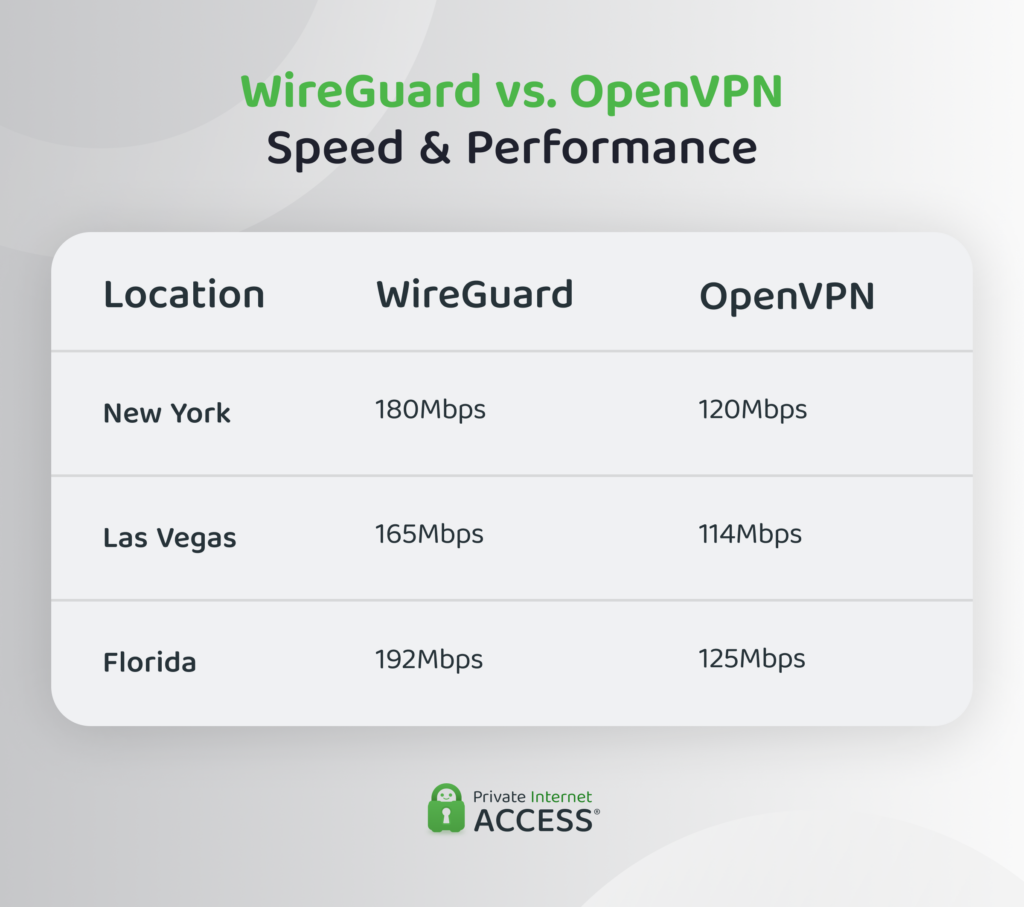
In one benchmark test performed using PIA, WireGuard was around 1.5 times faster than OpenVPN. It reached around 180 Mbps on a New York server, compared with roughly 120 Mbps on OpenVPN over the same connection from the same location.
The gap closes when you factor in the infrastructure you’re running them on. On hardware with AES-NI – a set of hardware-level CPU instructions that accelerates AES encryption and decryption – OpenVPN running over UDP can reportedly perform competitively with WireGuard.
The Data Channel Offload (DCO) feature also has an impact here. It moves OpenVPN’s data processing into the kernel, or the core component of the operating system that manages the bridge between physical hardware like the CPU or memory and software applications. This closes much of the architectural distance between it and WireGuard, though it’s still far from a standard offering.
Where WireGuard still tends to pull ahead is latency. Its streamlined handshake and processing mean less delay between sending a request and getting a response, which translates to less lag in video calls and online games.
Tech tip: Your VPN protocol isn’t the biggest factor in your overall connection speed. Your internet plan, your distance from the server, and your ISP’s network all matter more, and no VPN protocol can make a slow connection fast.
WireGuard vs. OpenVPN: Security and Encryption
Both protocols use strong, modern encryption standards, but they take different approaches to securing your data.
OpenVPN uses the OpenSSL library. It usually relies on the Advanced Encryption Standard (AES) at 128-bit or 256-bit strength for data encryption, RSA encryption (often 2048-bit or 4096-bit) for key exchange, and SHA-256 or SHA-512 (Secure Hash Algorithm) for authentication.5,6
By supporting many different combinations of these algorithms, OpenVPN enables administrators to fine-tune the protocol to meet their specific security needs. That flexibility allows for misconfiguration, though, which can create unforeseen weaknesses.
WireGuard is quite different. It uses a single, fixed set of modern cryptographic primitives (or mathematical algorithms these protocols rely on). It encrypts data with ChaCha20, authenticates it with Poly1305, handles key exchange with Curve25519, and hashes with BLAKE2s.2
There is, however, one major privacy trade-off between the two protocols that comes from the way authentication happens.
WireGuard assigns each device a static public key and a fixed internal IP address, so a server could link a specific IP to a specific user session unless your VPN provider uses additional safeguards to keep it from becoming an identifiable trail.
OpenVPN, on the other hand, assigns IP addresses dynamically, keeping identity and connection details more separate.
Commercial VPN providers often offset WireGuard’s static-IP behavior with double-NAT systems, letting multiple users share the same internal address so no single IP maps back to one person. Providers also wipe session data shortly after a connection ends to erase any links that may have been established.
The smaller codebase also means that it’s much easier to audit WireGuard for potential vulnerabilities (and therefore patch them). Plus, it presents a much smaller attack surface.
OpenVPN vs. WireGuard: Compatibility
OpenVPN runs on Windows, macOS, Linux, iOS, and Android. It’s also supported by the vast majority of routers, including older models and niche hardware that newer protocols haven’t reached yet.
WireGuard has been part of the mainline Linux kernel since version 5.6,7 and native or near-native implementations now exist for Windows, macOS, iOS, and Android.
One area where it still trails is router support: many budget and older router models support OpenVPN out of the box but have only recently added WireGuard or require custom firmware to get it.
Part of the compatibility difference comes down to how each protocol identifies devices. OpenVPN relies on the well-documented certificate-based model for install that’s more complex but widely supported across platforms, while older operating systems, kernels or VPN software may lack a supported WireGuard implementation.
WireGuard vs. OpenVPN: Resource Use
Every VPN connection uses some CPU power to encrypt and decrypt your traffic, but how much depends on the protocol handling the job.
WireGuard uses less CPU and battery than OpenVPN because of how it’s built. It runs inside the kernel, avoiding the repeated copying of data between kernel space and user space that eats into processing power.
WireGuard also stays silent until it’s needed, using essentially no resources between connections. That efficiency is especially noticeable on phones and laptops, where WireGuard draws less battery than OpenVPN during an active connection, since the processor spends less time working to keep the tunnel encrypted.
OpenVPN tends to require more CPU cycles than WireGuard for the same amount of data. On modern laptops and desktops, this difference is rarely noticeable. But on older devices, those with smaller batteries, or less processing power, it’s more likely to speed up battery drain or result in a hot device.
The newer DCO feature can limit these effects as it moves the protocol’s data processing into the kernel, but it isn’t yet available in every OpenVPN client.
Neither protocol will drastically drain a modern device’s battery, but WireGuard’s lighter footprint becomes noticeable when you’re connected for long periods or working on smaller or older devices.
OpenVPN vs. WireGuard: Data Usage
OpenVPN uses more data than WireGuard to move the same amount of traffic across a connection.
This difference comes down to protocol overhead. OpenVPN can add overhead through its TLS-based control channel, data-channel encapsulation, and, when configured, keep-alive traffic. WireGuard uses a leaner protocol design with less protocol overhead, so it can generally carry the same amount of underlying traffic with less additional data.
The difference in data consumption generally won’t make a difference if you’re using Wi-Fi at home or have an unlimited mobile data plan, but it will have more of an impact if you’re on a capped mobile data plan or paying for data by the gigabyte. In these instances, WireGuard’s leaner packet structure can help you to stretch a limited data allowance further.
WireGuard vs. OpenVPN for Remote Access
For anyone who switches between Wi-Fi and mobile networks multiple times across the course of a day, WireGuard will likely be the more reliable of the two VPN protocols.
WireGuard can quickly reestablish a connection when the network changes or a signal drops. OpenVPN can also reconnect automatically after a network interruption, although how quickly and smoothly it recovers can depend on the VPN app and its configuration.
WireGuard’s fixed cryptographic suite also leaves little room for misconfiguration (a blessing for network administrators managing remote environments), since it uses a fixed set of ciphers to handle authentication, encryption, and decryption. OpenVPN, by contrast, requires deliberate hardening to avoid a configuration that works but isn’t actually secure.
Where OpenVPN pulls ahead is enterprise authentication. It integrates with existing identity infrastructure such as Active Directory and Lightweight Directory Access Protocol (LDAP), along with username-and-password logins, and multi-factor authentication (MFA).
WireGuard authenticates devices through static public keys and has no native support for directory logins or MFA. Organizations that want those features need to add a third-party management layer on top of the VPN protocol.
OpenVPN vs. WireGuard: Setup and Customization
Setting up WireGuard usually involves generating a public/private key pair and dropping it into a simple, INI-style configuration file along with the server address. There’s little else to configure, which is part of why WireGuard has become popular with people who want security without a technical project attached.
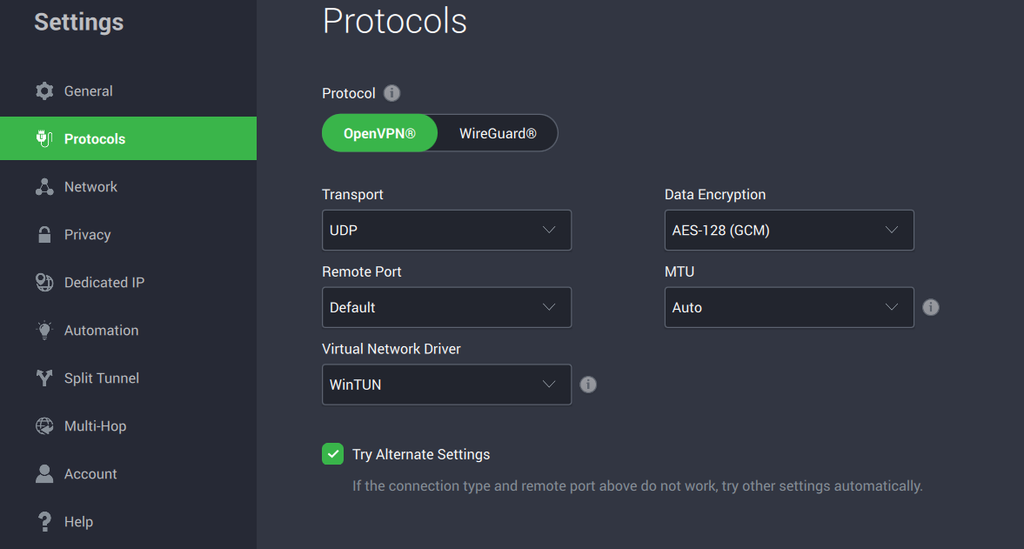
OpenVPN’s setup is more technical. It often requires a provider-supplied .ovpn configuration file along with certificates issued by a certificate authority. This greater complexity allows for more flexibility (e.g., administrators can customize details like the transport protocol, port, and cipher strength), but it can also backfire for anyone who changes a setting without understanding what it does.
Rather than weighing WireGuard against OpenVPN in this case, the best option is a VPN that offers both protocols, handles their setup internally, and lets you switch between them without touching any configuration files.
WireGuard or OpenVPN? How to Choose the Right Protocol For Your Needs
The longstanding general guidance about these two protocols still stands: Use OpenVPN for compatibility and flexibility and WireGuard for speed and simplicity.
WireGuard is a better fit for streaming, gaming, and mobile use, where its small speed and battery efficiency advantages make an outsized impact. OpenVPN still makes sense for those using legacy routers without WireGuard support and enterprise setups where cryptographic flexibility is a necessity.
For most people, the better answer isn’t picking one protocol forever. It’s choosing a VPN that supports both and lets you switch.
| Factor | WireGuard | OpenVPN |
| Speed | Faster, lower latency | Solid, slightly slower |
| Encryption | Fixed modern suite (ChaCha20, Curve25519) | Configurable (AES, RSA, SHA) |
| Codebase | ~4,000 lines, easy to audit | ~70,000 lines, harder to audit fully |
| Compatibility | Major operating systems, growing router support | Nearly universal, including legacy hardware |
| Resource use | Lower CPU and battery drain | Higher CPU use, more battery drain |
| Data usage | Smaller packet headers, less overhead | Larger headers, more data used |
| Remote access and authentication | Static public keys only | Native support for passwords, directories, MFA |
| Setup | Key pair, minimal configuration | Config files and certificates, more setup steps |
FAQ
Can WireGuard replace OpenVPN?
Yes, for most users WireGuard can replace OpenVPN. WireGuard handles everyday tasks like streaming, gaming, and browsing more efficiently than OpenVPN, although it’s less ideal if you’re using an older router, your network blocks UDP traffic, or you need strong built-in authentication measures.
Is WireGuard more secure than OpenVPN?
Both protocols are secure. WireGuard’s smaller codebase and modern, fixed cryptography make it easier to audit and less prone to configuration errors, while OpenVPN offers more configurable encryption and has a longer real-world track record. For most users, WireGuard’s simpler setup and smaller attack surface make it the better choice.
Is WireGuard easier to configure than OpenVPN?
Yes. WireGuard needs a key pair and a server address, while OpenVPN involves certificate files and more configuration steps. That said, most reliable VPN apps will handle this setup so you don’t need to configure anything.
Does WireGuard use less battery than OpenVPN?
Generally, yes. WireGuard’s lightweight code and efficient processing mean less CPU work, which translates to less battery drain. The difference usually is most noticeable during long connections on mobile devices and cellular data rather than short browsing sessions on a desktop.
Can I switch between WireGuard and OpenVPN on the same VPN app?
Yes, with the right VPN app. PIA VPN lets you freely switch between WireGuard and OpenVPN from the settings menu. You can pick WireGuard for everyday tasks and switch to OpenVPN when your network calls for it.
Is WireGuard supported by all VPN providers?
Not quite all, but most leading VPN providers now support WireGuard. Some legacy and free VPN services still haven’t added support for WireGuard, but PIA includes the protocol across all its apps alongside OpenVPN, so you can choose the protocol that fits your situation.
Can OpenVPN still help me get around firewalls?
Not anymore. Running OpenVPN over port 443 used to be a way to disguise VPN traffic, but modern firewalls now inspect packet structure rather than looking only at the port, so that trick no longer works.
References:
- The History of OpenVPN – OpenVPN
- WireGuard: Next Generation Kernel Network Tunnel – NDSS Symposium
- WireGuard: a new VPN tunnel – LWN.net
- WireGuarding the mainline – LWN.net
- OpenVPN 2.6 Manual – OpenVPN
- OpenVPN protocol – GitHub
- Linux 5.6 Kernel Released With WireGuard, USB4, New AMD + Intel Hardware Support – Phoronix
