What Is Rate Limiting? How It Works and Why It Happens
If you see an “HTTP 429: Too Many Requests” error, or a message asking you to try again later, the service you’re using may have applied a rate limit.
The limit may apply to your account or an API key. It could also be your session or public IP address. The exact setup depends on what the provider wants to protect and how it tracks usage.
This guide explains what rate limiting is and how it works. It also covers the main methods behind it, why services use them, and what to do when you hit a limit.
Rate Limiting Explained
Rate limiting is a control that restricts how often a client can perform an action or use a resource. A client can be a web browser, a mobile app, an automated script, or another server that calls an application programming interface (API). The activity a system measures depends on what it’s protecting.
At the application level, a website or API may count requests, failed login attempts, or messages. Some APIs also assign weighted resource units, so a complex operation uses more of the available allowance than a basic one. At the network level, routers and firewalls may instead measure packets, connection attempts, or data throughput.
What Does It Mean to Be Rate Limited?
Being rate limited means a service has restricted a certain type of action because it recorded more activity than its rule allows. The restriction may be narrow. For example, you might still use the app but can’t send another message. An API may keep working overall while one function, such as search, stops accepting requests.
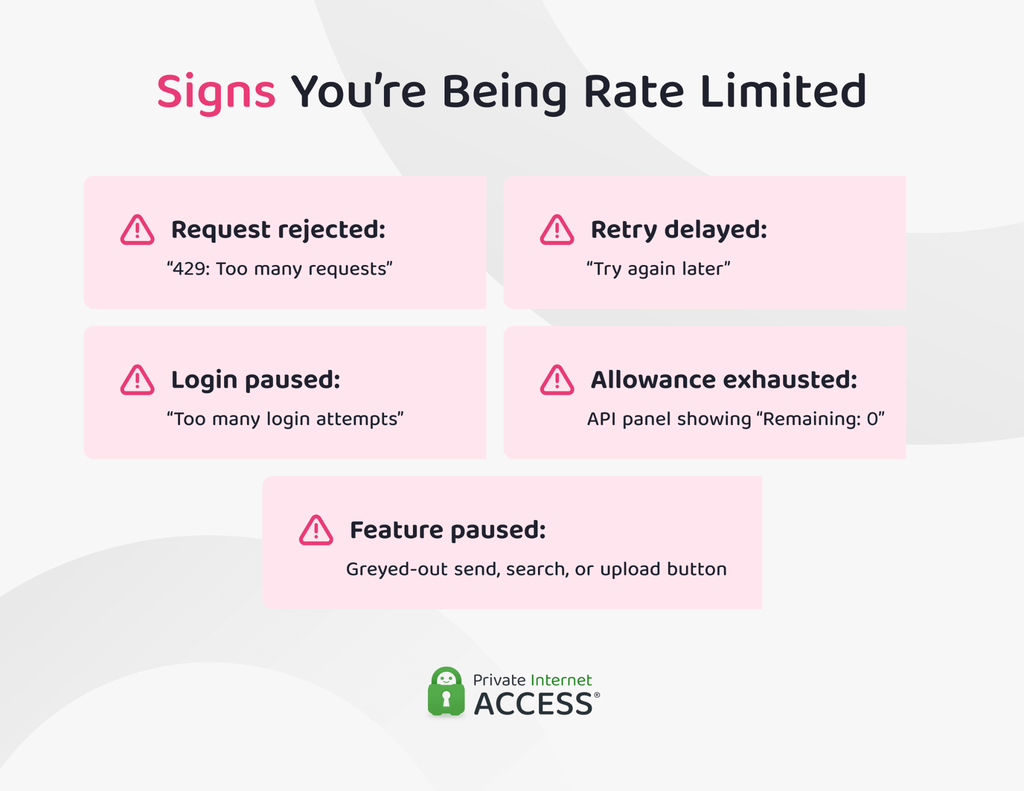
Being rate limited doesn’t always mean you misused the service, and it doesn’t mean the service banned your account. Here are some signs you’re being rate limited:
- “Too Many Requests” error: The server rejected the request under its current request-rate policy.
- “Try again later” error: The service expects a pause before it accepts the action again.
- “Too many login attempts” error: The restriction applies to an authentication step.
- A feature stops working for a time: The service may pause posting, messaging, searching, or uploading.
- Rate-limit details appear in an API response: The response may show the remaining allowance or when it becomes available again.
Rate limits don’t all last the same amount of time. Some end when a fixed window resets. Others ease off as older requests stop counting or as the system restores your allowance. A service may keep the restriction in place for longer if it applies a separate cooldown or account-level block.
Why Do Websites and APIs Use Rate Limiting?
Rate limiting helps online services manage heavy use without letting one source take up too much capacity. Providers can set different rules for actions that carry more risk or require more processing power. These controls serve several practical purposes:
- Keeping the service responsive: Servers can process a limited amount of work at once. If requests arrive too fast, pages may load slower and API calls may take longer to complete.
- Reducing repeated abuse: A service can restrict rapid login attempts used in credential-stuffing attacks, password-reset requests, form spam, or automated scraping. This slows large-scale abuse, though attackers may still get around simple limits by spreading their activity.
- Sharing capacity more fairly: Providers can give each account, organization, API key, or plan its own allowance. This stops one client from taking up resources that other users also need.
- Accounting for costly requests: A cached lookup may use little processing power, while a complex search may query several systems. Some APIs charge more units for demanding tasks, such as creating cloud resources.
How Does Rate Limiting Work?
The System Matches a Request to a Policy
The rate limiter first tests the request against the conditions in each rule. A rule can combine details such as the HTTP method, request path, sign-in state, previous response codes, or customer plan.
For example, one rule might apply only when someone submits a password reset request while not signed in. Another might count only failed sign-in attempts while ignoring successful ones. A rule counts a request only when it meets every required condition.
It Builds a Counter Key
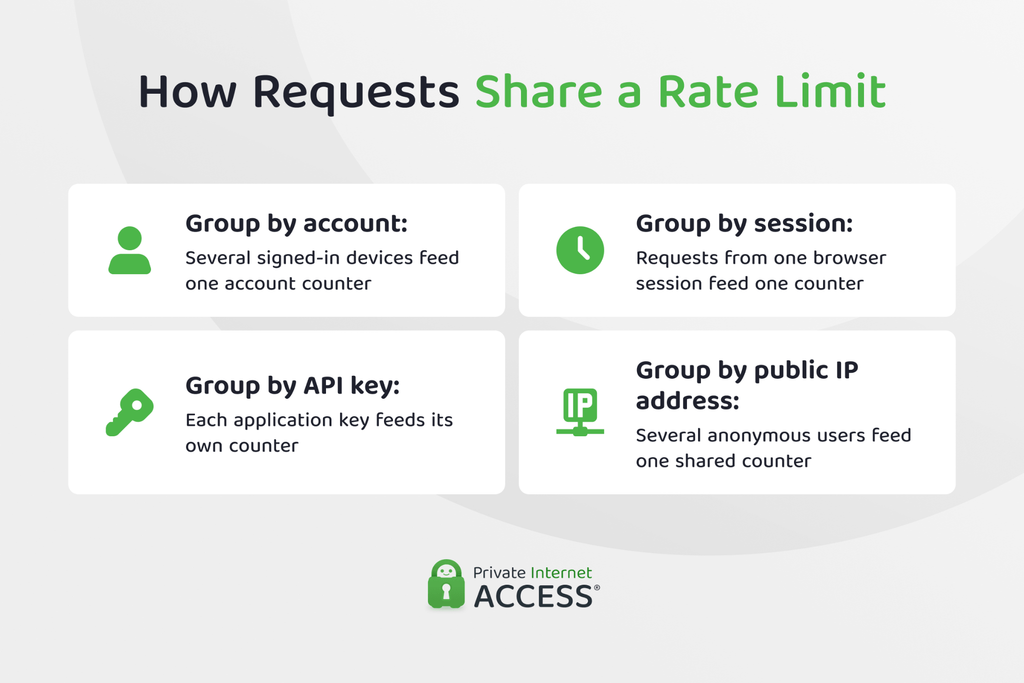
After a request matches a rule, the service decides which activity should count toward the same limit. It does this with a counter key, a label that groups related requests into the same allowance. The service uses a specific identifier to determine which requests count against the same allowance.
A signed-in user’s requests may count under their account ID, an app may use its API key, and signed-out traffic may group by session or public IP address. A business account may share one limit across its whole organization.
A service can combine more than one detail. It might pair an account ID with a group of API routes, so the same customer receives separate allowances for search requests and file exports. If the preferred identifier is missing, the service may fall back to another one, such as the public IP address.
How the service builds the key determines who shares the allowance. Requests from one account may count toward the limit, even when they come from different devices. Two separate API keys may receive their own limits, even when the same company owns both.
It Measures Activity Against a Threshold
The rate limiter adds the request’s cost to the activity already recorded for that key. A basic request may cost one unit, while a task that needs more processing can cost several.
For example, an API might charge one unit for reading a profile and ten units for exporting a report. With an allowance of 60 units per minute, either 60 profile reads or 6 report exports would use the full amount.
The system may evaluate more than one policy for the same request. A call may remain within its route allowance but exceed a broader account limit. Crossing any active threshold can trigger the next step.
It Applies the Configured Action
The rate limiter can act before the request reaches the main application. It may reject the request at once, hold it in a queue, or place the counter key under a temporary restriction.
Rejecting traffic early saves processing power because the application doesn’t need to run the request. Queuing can smooth a brief surge by releasing work at a controlled pace instead.
The action may affect only the current request or continue for a set period. The system can also record which rule fired, how much activity it measured, and which action it took. Administrators use that data to review how the policy behaves under real traffic.
Common Examples of Rate Limiting
Rate limiting can apply to many everyday online actions, such as:
- Login pages: A site may limit failed password attempts from one account or public IP address. This slows rapid password guessing without restricting successful sign-ins.
- Password-reset systems: A service may cap how often someone can request a reset email or submit a verification code. This helps prevent automated tools from flooding the account-recovery process.
- Social platforms: Limits may apply to posts, follows, messages, or file uploads. These rules curb bulk spam and stop automated accounts from performing actions too quickly.
- Public APIs: A provider may limit calls by API key or account. It can also set a separate allowance for each endpoint or customer plan.
- E-commerce sites: Stores may restrict rapid product searches, stock checks, or checkout attempts. This can slow scraping tools and automated purchasing bots.
- Cloud platforms: A provider may cap operations for each customer project or resource type. This stops one workload from using too much shared capacity.
- Network gateways: Routers and firewalls can limit packet rates, new connections, or data throughput. This keeps incoming traffic within the network’s handling capacity.
Common Rate Limiting Algorithms
While a rate-limit policy sets the allowance, an algorithm decides how the service tracks that allowance over time and how it handles bursts:
| Algorithm | Burst Handling | Stored Data | Main Strength | Main Trade-off |
| Fixed window | Can allow bursts at reset points | Low | Runs fast and scales easily | Two bursts can occur around a reset |
| Sliding log | Applies a strict rolling limit | High | Tracks requests precisely | Storage use grows with request volume |
| Sliding counter | Smooths activity by segment | Moderate | Balances accuracy with lower storage use | Segment-based counts are not exact |
| Token bucket | Allows controlled bursts | Low | Supports short spikes while holding the long-term rate | Poor settings can admit too much work at once |
| Leaky bucket | Smooths processing output | Depends on queue size | Keeps work flowing at a steady pace | May delay or drop requests |
Fixed Window Counter
A fixed window divides time into set blocks. The service stores one count for the current block and resets it when the next block begins. For example, a client may send 100 requests between 10:00:00 and 10:00:59. At 10:01:00, the count returns to zero.
A client could exploit the reset by sending 100 requests before 10:01 and another 100 right after, pushing almost 200 through within seconds while staying inside separate windows.
Fixed windows require little storage and processing. They suit basic limits where brief spikes near each reset won’t cause problems.
Sliding Window Log
A sliding window log stores the exact time of every request. Before accepting another one, the service removes timestamps outside the rolling period and counts those that remain.
With a 60-second limit, the service always checks the previous 60 seconds from the current moment. It doesn’t wait for a clock minute to end.
This method gives an exact count, but busy services must store and process many timestamps. It works best on lower-volume endpoints where precise enforcement matters more than storage and processing.
Sliding Window Counter
A sliding window counter divides a rolling period into smaller segments. It stores one count for each segment instead of saving every request time. A one-minute window might contain six ten-second segments. As time moves forward, the service adds the active segment counts and removes the oldest one.
Smaller segments improve precision but require more stored data. Larger segments use less storage but give a rougher result. This method handles window boundaries more smoothly than a fixed counter. It also uses less storage than a full sliding log, which makes it practical for many APIs.
Token Bucket
A token bucket represents the available allowance with tokens, and three settings control it:
- Capacity: The most tokens the bucket can hold
- Refill rate: How quickly tokens return
- Request cost: How many tokens one operation uses
A request can proceed only when enough tokens are available. The service may reject or delay it when the bucket lacks the required amount.
Suppose the bucket holds 20 tokens and refills at five per second. A client can send an initial burst of 20 one-token requests. After that, it can sustain about five requests per second as new tokens arrive.
Costly operations may use several tokens. This lets one policy account for how much load each request puts on the system.
Token buckets handle short bursts well, but an oversized bucket can let too much work reach the backend at once.
Leaky Bucket
A leaky bucket controls how quickly work leaves a queue. Requests may arrive in bursts, but the service releases them at a fixed rate. For example, the queue may process ten requests per second. New requests wait behind earlier ones. Once the queue fills, the service may reject or discard any extra traffic.
This differs from a token bucket. A token bucket controls whether a request can enter. A leaky bucket controls the pace queued work moves through the system.
The steady output protects systems that need a predictable workload. The trade-off is that bursts add delays, with possible request loss when the queue reaches capacity.
How to Fix or Avoid Being Rate Limited
Most limits clear once request volume drops. The next step depends on whether you’re using the service yourself or running software that sends requests for you.
What Everyday Users Can Do
Here are some things you can try to give the service time to restore access and help you rule out a wider account issue:
- Pause the restricted action: Stop refreshing the page or repeating the same login. More attempts can use any allowance that becomes available.
- Follow the service’s instructions: Use the wait time shown in the error. Check the status page if the same issue affects several features.
- Look for hidden retries: A browser extension or desktop app may keep sending requests after the visible action fails. Close the source of those requests before trying again.
- Sign in when the service supports it: Some platforms give signed-in users a separate allowance from signed-out visitors. Only do this when the provider recommends it.
- Contact support if access doesn’t return: The issue may involve an account lock or a faulty rule rather than a normal rate limit.
💡 PIA Pro Tip: Don’t clear cookies unless the provider recommends it. This may end your session without changing the rule that caused the restriction.
How Developers Should Handle Rate Limits
Developers can reduce rate-limit errors by controlling how their apps send requests and how those apps respond after they hit a limit. Here are some measures that help keep request volume within the provider’s rules:
- Set a client-side pace: Limit how fast the app sends requests and apply separate controls to endpoints with different rules.
- Retry with backoff and jitter: Increase the delay after each failed retry, then add a small random offset. This prevents many clients from retrying at the same moment.
- Cap retries: Stop after a set number of attempts. Don’t retry errors that waiting can’t fix, such as invalid credentials or malformed requests.
- Cut avoidable calls: Cache reusable responses and use conditional requests when the API supports them.
- Replace polling with event updates: Webhooks let the provider send new data when something changes. This removes repeated checks that return the same result.
- Limit concurrent work: Queue tasks that don’t need an instant response. This prevents too many long-running requests from competing for the same allowance.
- Track usage before the user reaches the limit: Monitor request volume by endpoint or credential. Alert the team when the remaining allowance drops below a safe level.
Does a VPN Affect Rate Limiting?
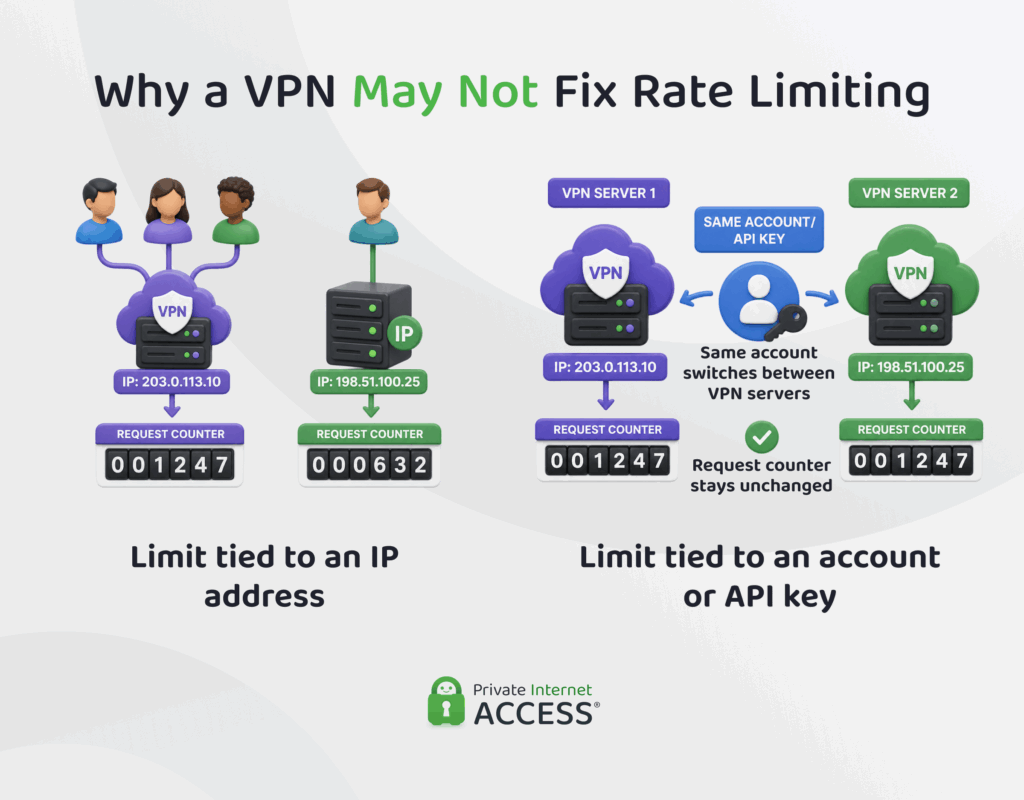
A VPN can affect rate limiting only when a service groups traffic by public IP address. It replaces your usual IP address with the VPN server’s address, which VPN users share. A service that counts by IP address alone will pool all their activity into one allowance. It doesn’t change the account or access credentials you use, but you could hit a limit even when your own request rate is moderate.
A dedicated IP address mitigates this because no other VPN customer uses it. However, it won’t reset a limit tied to your account or API key. It also won’t remove a session-based restriction or a quota assigned to an organization or subscription.
Switching VPN servers isn’t a reliable fix because the limit may follow your identity rather than your IP address. Repeated IP address changes can also trigger separate security checks or breach the service’s rules. Follow the provider’s wait time and retry guidance instead.
Where Rate Limiting Falls Short
Rate limiting depends on rules that providers must scope, tune, and enforce. Even a sound algorithm can cause problems when the policy doesn’t match real traffic.
- Broad rules can restrict unrelated activity: A single limit across an entire service may treat a page view like a demanding API call. Narrow rules reduce this risk, but they can leave gaps if the same action remains available through another route.
- Static thresholds may not match real demand: A limit based on normal traffic can become too strict during a product launch or seasonal surge. A threshold set too high may fail to protect the service when traffic rises sharply.
- Distributed systems may count requests differently: Large services often enforce one policy across several servers or regions. Delays between those systems can let some requests exceed the intended limit or cause another server to reject them early.
- Counter failures create a difficult choice: If the system that stores request totals goes offline, the service must either let traffic through or reject it. The first option weakens protection, while the second can block legitimate users.
- Request volume doesn’t reveal intent: A high request rate may come from abuse, a faulty app, or genuine demand. A rate limiter can measure the traffic, but it needs other signals to judge why it happened.
Rate Limiting vs. Throttling, Quotas, and Concurrency Limits
Rate limiting often works alongside other controls that manage traffic or access. Their names can overlap in product documentation, so the label alone doesn’t always show how the control behaves.
Some platforms use throttling as another name for rate limiting, even when they reject excess requests with a “Too Many Requests” error. Others use the term for slowing traffic or delaying requests instead of blocking them at once.
A usage quota tracks total consumption over a longer period. A client may stay below a per-minute limit but still use up its daily allowance or billing-period total. A concurrency limit looks at how many operations are still running. It can reject a new request when earlier work hasn’t finished, even if requests trickle in.
An account lockout protects the sign-in process after repeated failed attempts. Bot management uses wider signals to assess whether traffic comes from automation. Traffic shaping controls how network traffic moves, often by pacing packets or changing their priority.
Here’s how they compare:
| Control | What It Measures | How It Works |
| Rate limiting | Requests or actions within a set window | Rejects or delays activity after the client reaches the allowed rate |
| Throttling | Traffic above a configured level | Slows requests or rejects them until demand falls |
| Usage quota | Total consumption across a longer period | Stops or restricts use after the daily, monthly, or plan allowance runs out |
| Concurrency limit | Requests or jobs still running | Blocks new work when too many operations are already active |
| Account lockout | Failed authentication attempts for one account | Blocks sign-in after repeated failures, often for a set period |
| Traffic shaping | Packet flow or transfer rate | Paces or prioritizes network traffic to control how data moves |
| Bot management | Behavior, device signals, and request patterns | Challenges, blocks, or limits traffic that appears automated |
FAQ
What is rate limiting?
Rate limiting controls how often you can access a resource or perform an action. A service sets an allowance for a period, then delays or rejects activity that exceeds it.
What does it mean to be rate limited?
Being rate limited means your activity exceeded the rule that applies to a feature, account, or resource. The restriction may be temporary, but its scope and duration depend on the service’s policy.
What does “rate limited” mean in networking?
In networking, rate limited means a device controls how fast traffic enters or moves through the network. The device may delay, drop, or mark traffic above the set rate for different handling.
Why do websites or APIs use rate limiting?
Websites and APIs use rate limiting to protect system capacity and restrict unusually fast activity. It also helps providers control client usage across shared services or plan-based allowances.
How can I fix or avoid being rate limited?
Stop or reduce the activity that triggered the limit, then wait for the time shown in the error message. Developers should follow the provider’s reset guidance and gradually retry instead of sending another burst of requests.
Does using a VPN help bypass rate limiting?
No, a VPN isn’t a reliable way to bypass rate limiting. A VPN changes your IP address, which is visible to the service, so limits tied to an account, API key, session, or tenant remain in place.
