Roblox Ban Guide: Account Bans, IP Bans, and Appeals
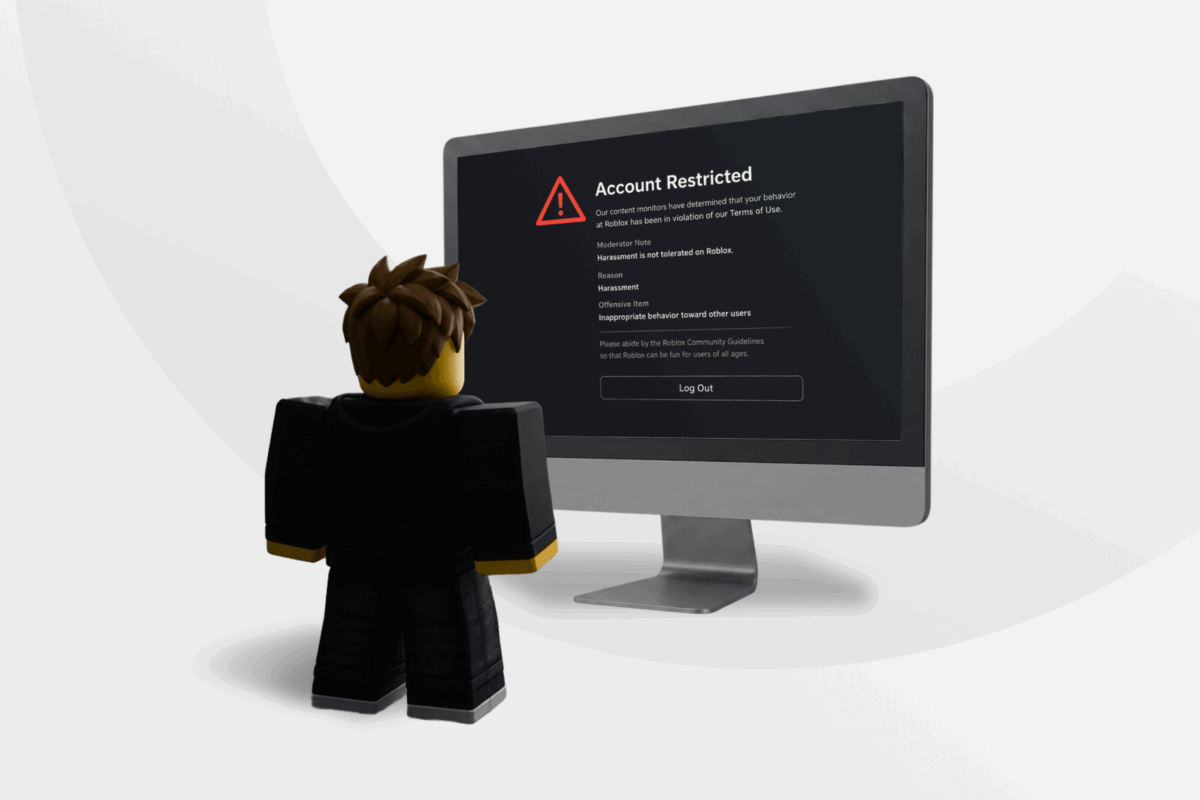
Since a Roblox ban can refer to several types of restrictions, it can be hard to know whether you’re dealing with a temporary account suspension, a ban from a single Roblox experience, or a technical issue.
This guide explains the main types of Roblox restrictions, what causes them, how long they can last, how to identify the action affecting your account, and how the appeals process works.
Types of Roblox Bans and Restrictions
A Roblox ban generally refers to an enforcement action that can restrict access to an account or an individual experience. But not every moderation action results in a ban. Roblox can remove or restrict content without suspending or terminating an account.
This table shows how the main Roblox restrictions differ:
| Restriction | Scope | Typical Indicator | Temporary | Appeals Reviewer |
| Warning | Account or content | Moderation notice | N/A | Roblox |
| Timeout | Account activity | Moderation notice | ✔️ | Roblox |
| Account suspension | Entire account | Suspension notice | ✔️ | Roblox |
| Account termination | Entire account | Termination notice | ❌ (unless overturned) | Roblox |
| Experience ban | Single experience | Error code 267 or 600 | Depends on the creator | Experience creator |
Suspected IP bans are another discussed restriction, but Roblox doesn’t publicly document them in the same way as the moderation actions above.
However, Roblox does reserve the right to take action against alternate accounts belonging to the same user when that user violates its rules. Users sometimes refer to this as an enforcement ban. Although this differs from a suspected IP ban, either situation may affect multiple accounts.
Understanding Roblox Account Actions
The information Roblox provides can help you understand what happened and what to do next. Review any moderation notification or error message shown when you sign in or try to join an experience, and check the following details:
- Violation category: The rule or policy linked to the decision.
- Moderated activity: The message, item, experience, or account behavior that Roblox moderated.
- Restriction type: Whether you received a warning, timeout, suspension, or account termination.
- Duration: Any expiry date or time shown in the notice.
- Scope: Whether the restriction affects your full account or a single experience.
- Appeal option: Any instructions on how to request a review of the decision.
Why Does Roblox Ban Accounts?
Roblox can take action against your account when your content or behavior breaks its platform rules. The outcome depends on the severity and impact of the violation, as well as any previous violations on your account.
How Roblox Terms of Use Relate to Bans
Roblox’s Terms of Use set the conditions you agree to follow when you use the platform. This document includes Community Standards, which explain the content and behavior Roblox prohibits.
Common Reasons for a Roblox Ban
Roblox’s rules apply to how users behave, interact with others, and create or share content on the platform. Violations can range from harmful behavior toward other users to misuse of Roblox’s systems, economy, or creator features. Some frequent violations include:
- Harassment or discrimination: Targeted abuse, bullying, threats, or discriminatory conduct.
- Violent or sexual content: Graphic violence, sexual activity, or other prohibited sexual content.
- Cheating or scams: Exploits, account theft, deceptive trades, or fraudulently obtaining Robux.
- Spam or deception: Repetitive messages, deceptive claims, or manipulative content.
- Intellectual property violations: Uploading music, images, or other material without permission.
- Economy misuse: Buying, selling, or transferring Robux through unauthorized services.
- Privacy or safety violations: Sharing personal information or directing users to unsafe external sites.
- System misuse: Interfering with platform features or using Roblox in ways it does not permit.
- Creator violations: Publishing experiences or content that breaks Roblox’s rules, or failing to address widespread violations within an experience or community you manage.
How Long Do Roblox Bans Last?
The length of a Roblox ban depends on the type of restriction and the circumstances. Here’s what you can generally expect from each action:
- Warning: Usually ends once you acknowledge the notice.
- Timeout: A short, temporary restriction.
- Account suspension: Lasts until the expiry date or time shown in your moderation notice.
- Account termination: Remains in place unless Roblox overturns the decision.
- Experience ban: Depends on the experience creator’s enforcement decision.
Roblox IP Bans: What We Know
An IP address ban generally refers to a restriction associated with a public IP address rather than a single account. Because devices connected to the same router typically share a public IP address, a network-level restriction could affect multiple devices or accounts using the same connection.
Roblox does document the use of IP addresses to help determine an account’s regional location. Even so, it doesn’t say that this relates to any IP-based enforcement. Roblox also doesn’t publicly document IP bans as a specific type of moderation action, so there’s no official way to confirm one.
Community discussions commonly associate suspected IP bans with serious or repeated violations, including exploiting, large-scale automation, ban evasion, and severe Community Standards violations.
Related: IP Tracking: What It Is and How It Works
Account Ban vs. Suspected IP Ban
An account ban continues to apply when you sign in to the affected account, regardless of the device or network you use. If Roblox works on your usual account when you connect through another network, your usual connection may be the problem. This doesn’t confirm an IP-based restriction, as other network issues can cause similar issues.
If you’re unsure what’s causing the problem, try these checks before contacting Roblox support:
- Check for a platform outage.
- Try Roblox on another device using your usual network to rule out a device-specific issue.
- Test another network to see whether the problem only occurs on your usual connection.
Roblox Ban Appeal: Rules and Process
If you believe Roblox moderated your account or content incorrectly because it misidentified the activity or lacked important context, you may be able to appeal the decision and request another review. Before submitting an appeal, here are some of the key requirements:
- Appeal deadline: Submit your appeal within 30 days of the moderation action. Users located in the EU have six months to appeal an initial moderation decision.
- One review per decision: Once it’s reviewed an appeal, Roblox won’t review the same moderation action again.
- Associated email address: Contact Roblox Appeals from a valid email address linked to the account.
How To Appeal a Roblox Ban
Your moderation notification determines which appeal route to use. If the action appears in Violations & Appeals, open it, select Appeal, and provide the requested information.
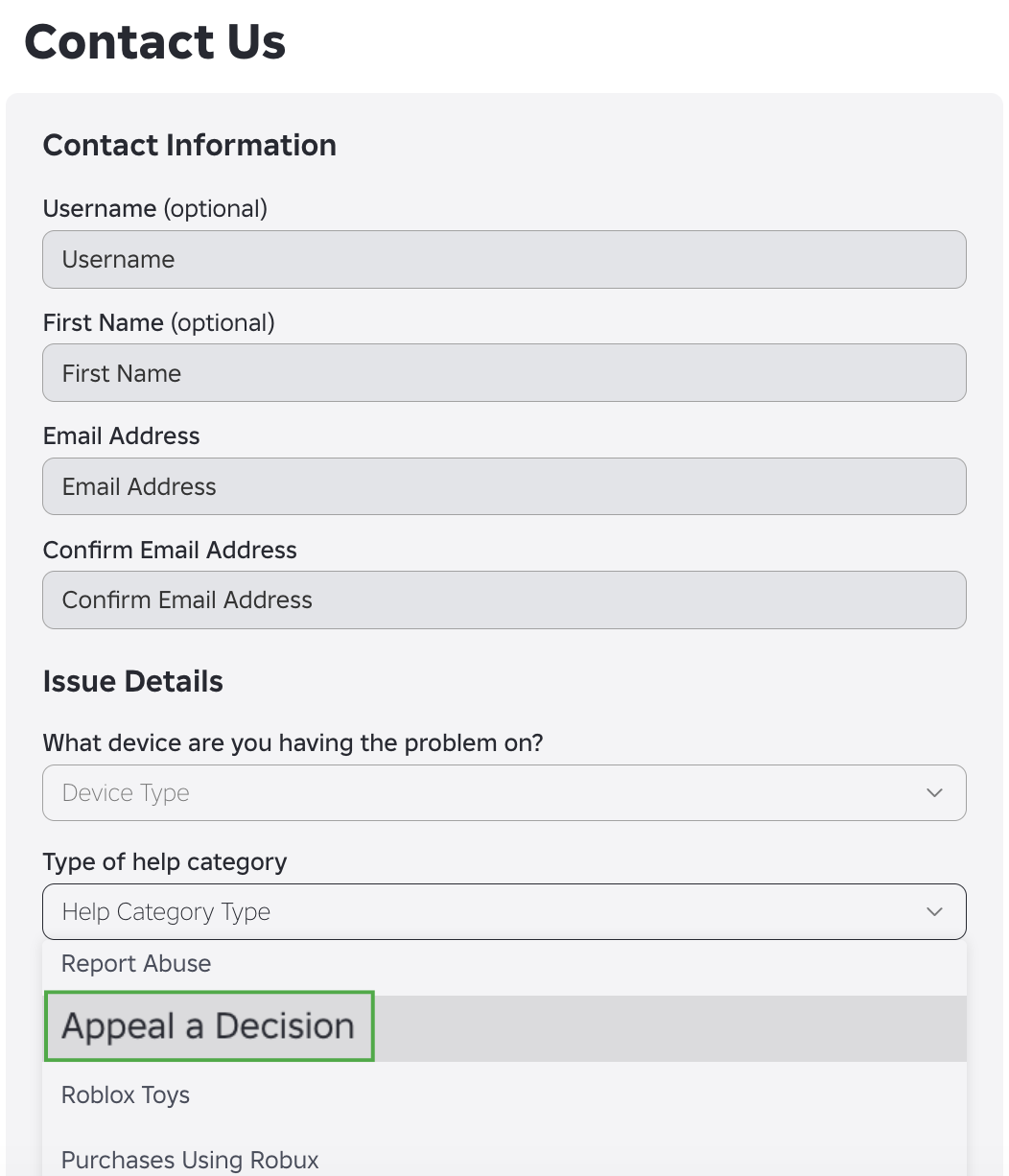
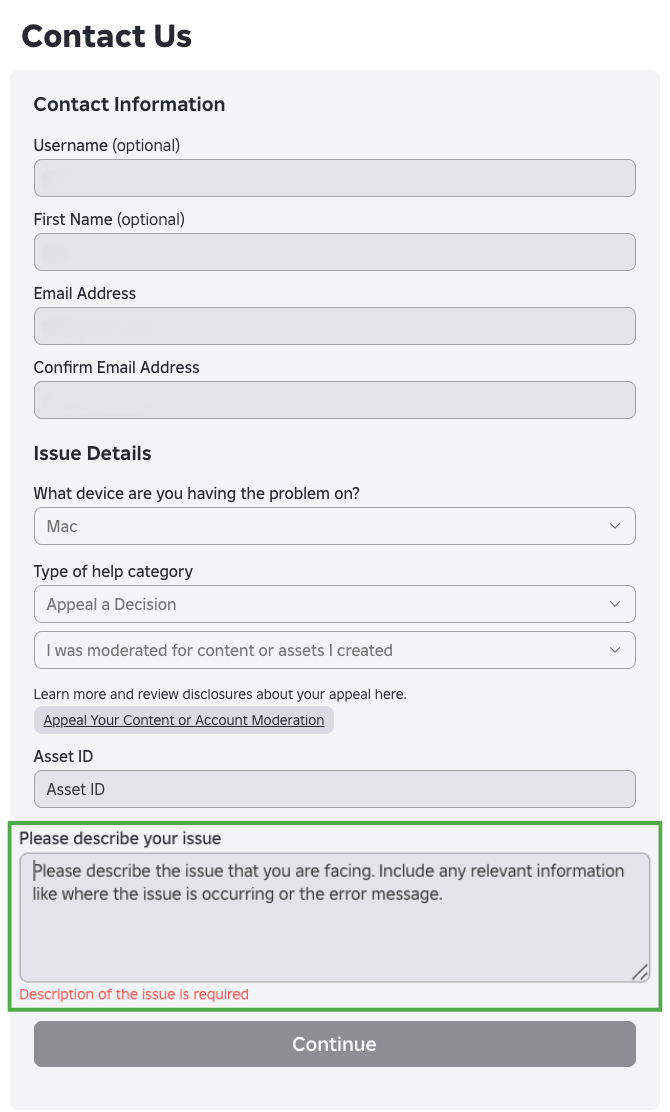
If the moderation action doesn’t appear there, submit your appeal through the Roblox Support Form. To complete the form:
- Log in to your Roblox account.
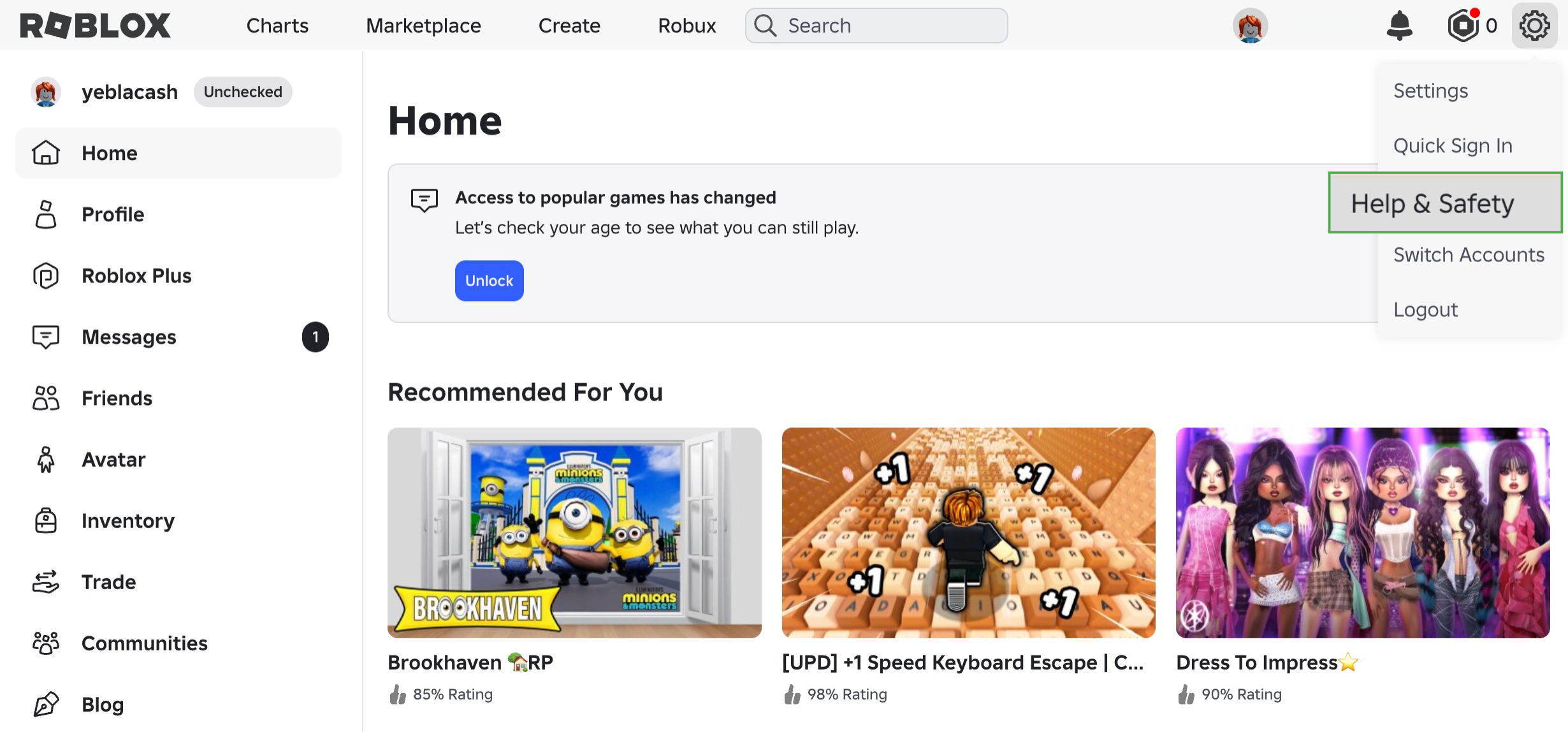
- Click the Settings cogwheel icon in the top-right corner, then select Help & Safety.
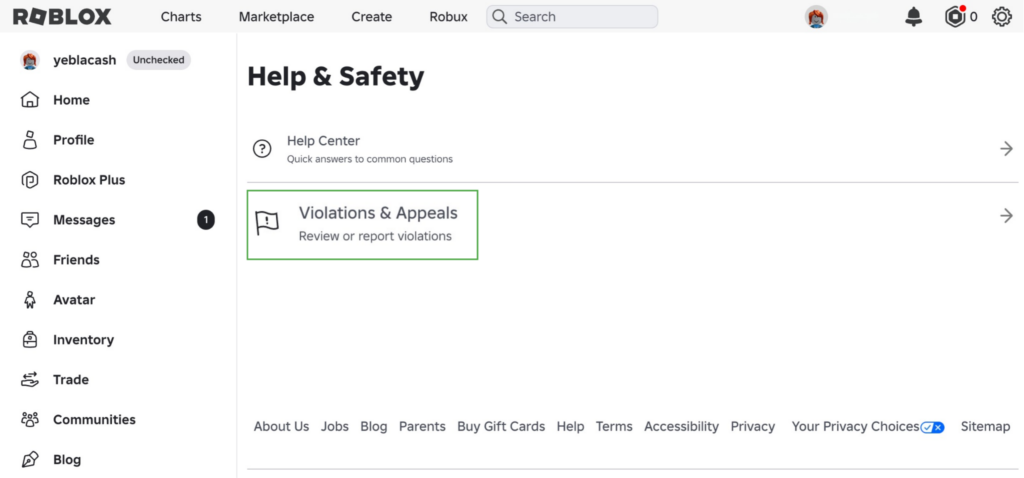
- Choose Violations & Appeals.
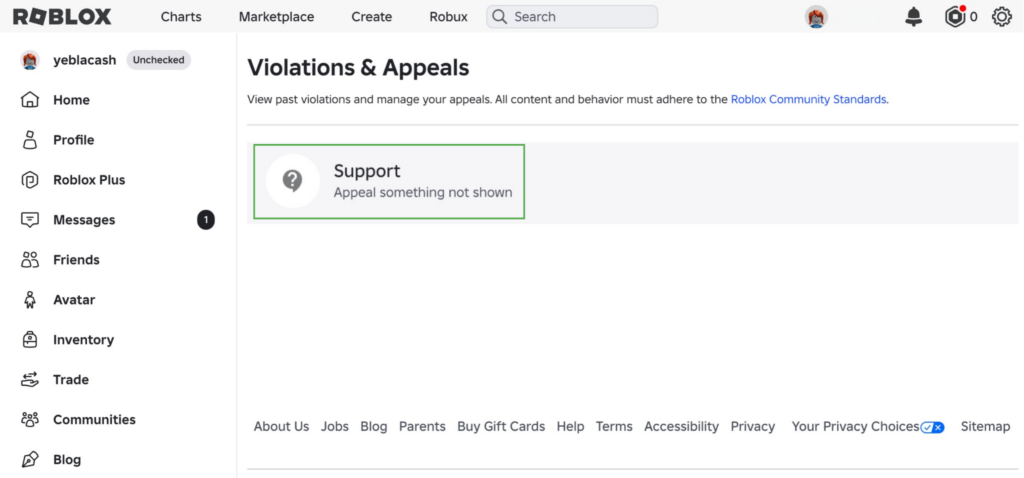
- Click Support.
- Fill out the contact form. Under “Type of help category,” select Appeal a Decision.
- Explain why you believe the moderation decision was incorrect and include all the relevant details.
What to Include in a Roblox Ban Appeal
The information in your appeal should help Roblox identify the moderation action and understand why you’re requesting another review. Relevant details may include:
- Your Roblox username
- The date and reason shown in the moderation action
- Relevant context that may help explain the situation
- Any supporting evidence you can provide
What If Someone Else Used Your Account?
If someone accessed your account without permission and their activity resulted in moderation, explain the circumstances when you submit your appeal and provide any relevant supporting information. You should also secure your account to prevent further unauthorized access.
Start by checking your device for suspicious downloads or browser extensions, then run a malware scan. Next, change your Roblox password and secure the email account linked to it.
You may also want to enable two-step verification in your Security settings to set up an additional step for certain sign-in and account actions. Roblox supports several methods, including authenticator apps.
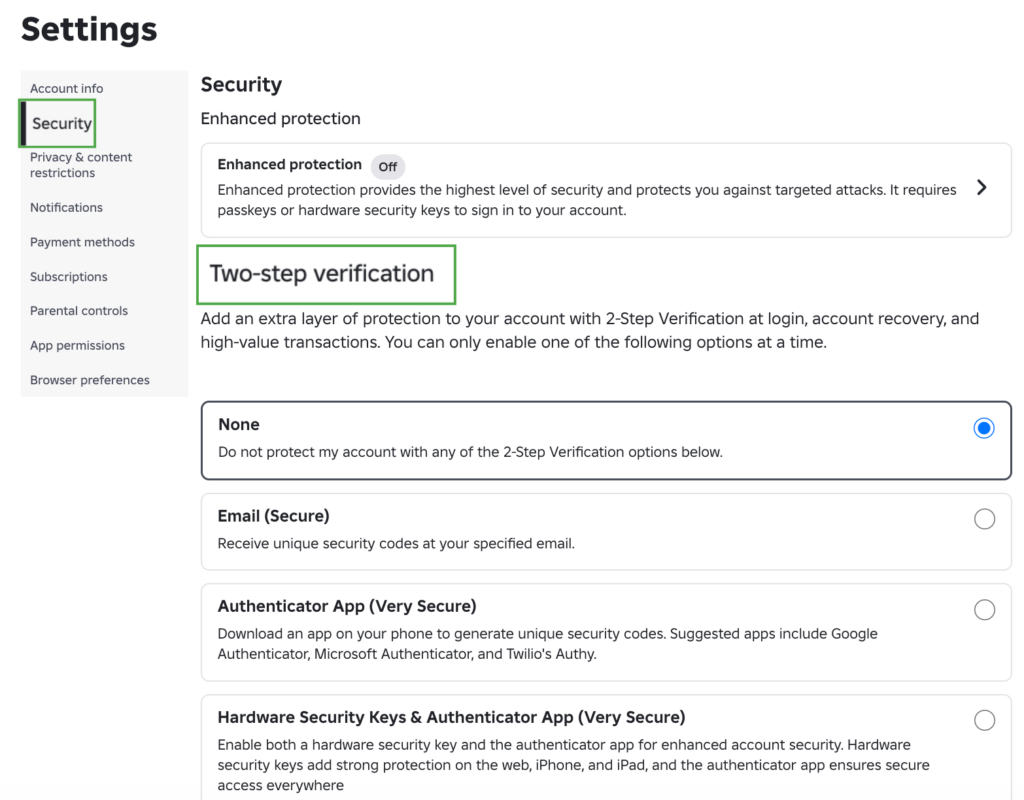
You can also review the Devices where you’re logged in section and log out any unfamiliar ones. Alternatively, choose Log Out of All Other Sessions to sign out of all devices except for your current one.
Can You Appeal a Roblox Experience Ban?
If you receive Error Code 267 or 600, you’ll need to contact the experience creator to appeal the ban. Roblox Support can’t remove a creator-issued ban or contact the creator on your behalf.
You can reach the creator through the contact options available on their Roblox account, community, or experience page. In the appeal, explain why you’re requesting a review and provide any relevant information the creator asks for.
What Happens After You Appeal a Roblox Ban?
The outcome depends on who issued the ban. For Roblox moderation, the Appeals team reviews the decision and may adjust the moderation status if it deems a change necessary. Submitting an appeal doesn’t guarantee Roblox will remove the consequence, and the time to receive a decision can vary.
Experience creators handle appeals for bans they issue themselves. Roblox doesn’t provide a standard review process or outcome for these appeals, so the response and timing depend on the creator.
Can a VPN Affect Roblox Bans or Connections?
Roblox acknowledges VPN use, but using one can affect certain aspects of how Roblox works.
Roblox notes that VPN connections may reduce the accuracy of your account’s regional location. Its Subscription Terms also prohibit the use of a VPN or similar technology to conceal your actual location during a purchase. Additionally, changing your connection or IP address isn’t a way to get around a ban.
For Error Code 403, which occurs when the Roblox Player launched from the website fails to initialize properly, Roblox recommends disabling active extensions, plugins, and VPNs as part of its troubleshooting guidance.
A VPN can’t help you remove an account suspension or reverse a termination. Its primary purpose is to encrypt your internet traffic, which can provide more privacy when you use Roblox on public or unfamiliar networks.
Users should not use a VPN to evade an enforcement action, and Roblox may also suspend or terminate alternate accounts associated with a user who violates its terms.
Roblox Ban: FAQ
What is a Roblox ban and why do bans happen?
A Roblox ban is an enforcement action that can restrict access to an account, content, or part of the platform. Roblox can take action when users or creators violate its Terms or Community Standards, while experience creators can ban users from individual experiences.
How long do Roblox bans last?
The length of a Roblox ban depends on the type of restriction and the circumstances. Check your moderation notice for any expiry date or time that applies to your account. Some actions, such as account terminations, have no end date.
How is a Roblox IP ban different from an account ban?
A suspected Roblox IP ban would affect connections linked to an IP address, while an account ban remains tied to a specific account. Roblox doesn’t publicly document IP address bans as a moderation action, so there’s no official method for confirming one.
How can I check why my Roblox account was banned?
Sign in to your Roblox account and check the moderation notification for the violation category and any content or activity linked to the decision. The notice may also show how long the restriction lasts and whether you can appeal.
How do the Roblox Terms of Service relate to bans and enforcement?
Roblox’s Terms of Use set the rules for using the platform, while the Community Standards explain what content and behavior Roblox allows or prohibits. Violating these rules can lead to warnings, content removal, account restrictions, or other enforcement actions.
Can using a VPN affect Roblox bans or account access?
Using a VPN can’t remove or reverse a Roblox ban, but it can affect the accuracy of your account’s regional location and Roblox may delay your account access when activity comes from a new device or location. Roblox may also recommend disabling your VPN and other extensions when troubleshooting launching issues.
