VDI vs. VPN: Which One Works Best for Remote Access?

VDIs and VPNs both serve a distinct purpose in secure access to remote work resources, but the ways they help prevent data leaks and increase user security are entirely different.
In this guide, we provide you with all the information you need to know about VDIs vs. VPNs, including how they work exactly, their pros and cons, and when you need each.
VDI vs. VPN at a Glance: What’s the Difference?
A VDI (Virtual Desktop Infrastructure) is a system that lets you access a full desktop environment hosted on a central server. To use it, you just connect to it remotely.
A VPN (Virtual Private Network) is software that creates a secure, encrypted tunnel between your device and a private network. It protects data in transit and lets you safely access company systems from outside the office.
Here’s a quick side-by-side comparison. You can find a more detailed look at their differences here.
| VDI | VPN | |
| When to use | You need full remote desktop access to a machine hosted in a company’s data center | You need secure remote access to a company’s internal network or apps |
| How it works | You log in to a virtual desktop hosted on a central server in the data center | Your device connects through an encrypted tunnel into the company’s internal network |
| Apps run | On the company’s remote servers: your device is just showing the screen | Directly on your device |
| Works on | Only needs a device that can run a remote desktop client and handle a steady internet connection; the server does all the actual computing. | Your device runs the software itself, so it needs enough power to handle whatever apps you’re using. |
| Offline access | No, requires an internet connection | Some apps work offline |
What Is a VDI?
A VDI is a technology that lets you run a virtual desktop on a remote server and access it over the internet from almost any device. These virtual desktop setups are popular with companies that want to standardize desktop environments for all users, while still allowing them to use personal devices for access.
VDI works by running a software layer called a hypervisor that splits the server into multiple virtual desktops, each with its own operating system.

To access the network remotely, a user must log in to the VDI via a browser, at which point a connection broker authenticates the user, typically via a username and a password, and connects you to the right personal virtual desktop. Once you’re in, everything you do, from clicking and typing to changing settings, happens inside that virtual desktop running on the server.
VDI Pros
✅ Centralized management: Admins manage all virtual desktops from one console, which generally means quick updates, efficient troubleshooting, and consistent system oversight.
✅ Data protection: Sensitive data never leaves the controlled environment, which reduces the risk of leaks or loss.
✅ Consistent user experience: Each employee’s virtual desktop is configured to match their workload, ensuring stable performance and easy scalability while maintaining reliability across different network and system conditions.
VDI Cons
⚠️ Expensive: VDIs can be costly because you need an administrator to handle the large number of updates and other maintenance. Implementing them is expensive because they require multiple components and machines.
⚠️ Hard to implement: Setting up VDI requires careful planning and coordination across hardware, software, and network infrastructure to meet performance and security needs.
⚠️ Third-party interference: Companies often rely on a third party, because the VDI company maintains the infrastructure, which may compromise user privacy.
What Is a VPN?
A VPN is a tool that establishes a secure connection between a device and your company’s network. You install or set up a VPN on the devices you use to access the network.
When you connect to a VPN, it first encrypts your traffic, making it unreadable to anyone with network access like your ISP or a bad actor that’s trying to intercept the connection. It then sends the data to a VPN server, which forwards it to its destination; for example, a company server.
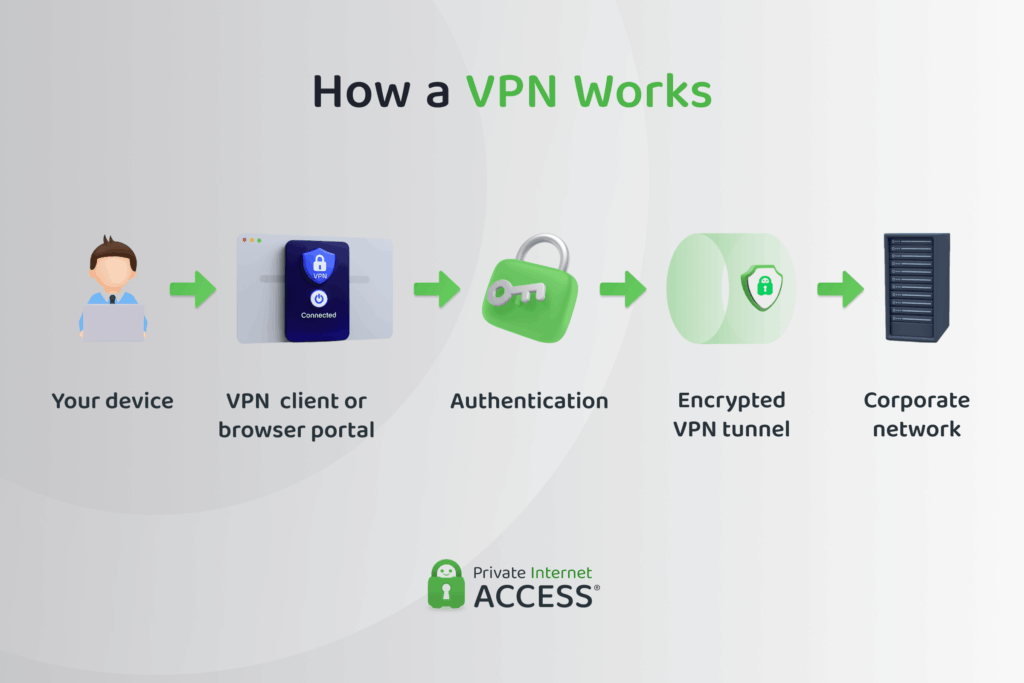
To access remote work resources, you typically need a remote access VPN or a site-to-site VPN:
- A site-to-site (S2S) VPN allows two separate networks to communicate as if they were one private network by creating a secure, encrypted connection between them.
- A remote access VPN is designed to create a secure connection to a specific private network (e.g., your company’s network) from outside the network’s standard area of operation.
When you connect to a VPN server in your company’s region during a business trip in another state or country, you can still access your remote work resources and virtual desktop securely as if you were sitting in a physical office. Plus, you have the added benefit of not having to worry about privacy breaches while using the hotel or other shared Wi-Fi connection.
Privacy Tip: For small teams of freelancers or independent contractors, a consumer VPN like Private Internet Access can protect your sensitive business information. It encrypts their connections, protecting files, passwords, and messages from prying eyes on unknown networks.
VPN Pros
✅ Simple setup and easy to use: Companies can install server software or subscribe to a hosted service without building extra infrastructure. Once installed, employees or freelancers just sign in and toggle the VPN on or off. Software can be used on company or personal laptops and phones without complex configurations or IT support.
✅ High performance: Premium VPNs operate large, well-optimized server networks that keep connections stable and fast for video calls, file sharing, and other everyday work.
✅ Built-in security: Strong encryption and multi-factor authentication keep company data secure in transit.
VPN Cons
⚠️ Decentralized management: The user installs the software, which means the company relies on employees to know how to operate the service and remember to use it when accessing the work network remotely.
⚠️ Security risk from poor configuration: A VPN that’s poorly configured or uses weak encryption can expose company data and create network vulnerabilities.
⚠️ Performance impact: VPN traffic adds encryption overhead and can slow down connections, especially when many users connect to the same gateway or the server is overloaded.
VDI vs. VPN: Key Differences
A VDI and a VPN are very different tools, with plenty of differences between them.

VDI vs. VPN: Objectives
A VDI provides each remote user with a full virtual desktop hosted on company servers or in the cloud. This standardizes the experience across devices: everyone logs into the same desktop environment, no matter what hardware they use.
A VPN, on the other hand, creates a secure tunnel that connects a user’s device to the company’s internal network. Once connected, they access company systems and data directly from their local machine. This is especially useful for employees who frequently travel for work or use public Wi-Fi to access remote resources.
VDI vs. VPN: Security
A VDI keeps all data and applications within the company’s controlled infrastructure, reducing the risk of data leaks from personal devices. The user only streams a visual interface, meaning files never leave the data center.
The data is protected within the data center or cloud environment as well, through access controls, network segmentation, encryption at rest, and continuous monitoring by IT.
A VPN secures the connection rather than the environment. It encrypts all traffic between the device and the company network, protecting data in transit but not on the user’s endpoint.
VDI vs. VPN: Management and Control
VDI environments are centrally managed by IT teams. Administrators control every aspect, from user permissions and software updates to data access and security settings. This means companies can restrict file sharing, downloads, and even which sites you visit on the virtual desktop. This ensures consistent policy enforcement and easier oversight across all remote users.
Remote access VPNs are also managed by IT, but the control extends only to network access, including what you can access in that network. It doesn’t include what happens once you connect to it. Admins manage who connects, which network segments they reach, and monitor traffic for security issues. However, they can’t control what happens on your local device.
VDI vs. VPN: Complexity
VDI takes more work to get off the ground. It needs servers, licenses, and enough infrastructure to run dozens or hundreds of virtual desktops. The payoff is control: once it’s set up, IT can update, patch, and manage everything in one place. But adding more users or storage means adding more resources, so scaling isn’t exactly effortless.
A VPN is far simpler to deploy. IT sets the access rules, hands out credentials, and you connect through a lightweight VPN app or built-in tool. It’s quick and inexpensive to roll out, but the user usually needs to get involved in setting it up on their device and making sure they’re connected. Plus, every device, network, and configuration adds another variable IT has to keep an eye on.
VDI vs. VPN: Performance and Reliability
VDI performance depends on how powerful the company’s servers are and the quality of the connection between you and the data center. When those systems are solid, you get a smooth, consistent experience because everything runs from centralized resources. But if bandwidth drops or servers struggle, the virtual desktop slows down for everyone.
VPN performance, meanwhile, comes down to your internet connection and the VPN server’s load. It’s usually fast on stable private networks but can drag on crowded public Wi-Fi or when connecting to distant servers.
Which Is Better: a VDI or a VPN?
It depends on what you need it for.
Trying to provide a uniform desktop environment for 400 people regardless of which device they use to access the platform? That’s a job for a VDI.
Need a secure connection to personal or work applications and resources from a motel or coffee shop? A VPN is your best bet.
Can You Use a VDI and a VPN?
Yes, you can use a VDI together with a VPN. In this setup, the VPN first creates a secure connection between your personal device and the company’s network. Then, through that secure tunnel, you connect to your VDI.
The downside is that using both can slow things down. Each layer adds extra network traffic and processing, which can cause lag or reduced performance, especially on slow internet. It also means more configuration and troubleshooting for IT. So yes, it’s possible and even common in high-security environments, but it’s not always necessary, especially if all users are on company-managed devices with secure configurations and the VDI is already hosted in the cloud and accessed through secure web gateways.
You may need both a VPN and a VDI if:
- You handle highly sensitive data like in banking, healthcare, or government work.
- Compliance rules require strict data control (consider HIPAA, PCI-DSS, GDPR).
- You connect from untrusted or personal devices, not company laptops.
- Remote workers are in high-risk regions where network security can’t be guaranteed.
- Internal apps aren’t exposed to the internet, meaning a VPN is needed to reach the VDI servers.
FAQ
What is the difference between VDI and VPN?
The primary difference between a VDI and a VPN is their purpose. A VDI creates a secure desktop environment for remote work and other applications, while a VPN creates a secure connection to the internet.
Which is better for remote work: VPN or VDI?
Each tool has its place in remote work. A VDI provides a standardized virtual desktop for employees that’s accessible anywhere and from any compatible device. On the other hand, a VPN provides secure access to virtual desktops by creating a private connection, even over public networks.
How do VPN, VDI, and RDS compare in terms of security?
VDIs create virtual desktops that isolate sensitive data within a centralized system of servers, reducing the risk of data breaches. Remote desktop services (RDS) don’t create separate virtual desktops, but allow users to access apps or desktops hosted on a server. A VPN, on the other hand, provides secure access to a network, not desktop management. It does this by encrypting all your internet traffic.
When should you choose a VDI over a VPN?
If you need to create multiple virtual desktop environments, choose a VDI. A VPN can’t create virtual desktops for remote workers, but it can help secure network connections used to access virtual desktops.
Does VDI offer better performance than VPN for remote access?
A VDI provides better performance for activities that require high levels of processing power. It isn’t as impacted by external network issues like slow internet speeds, and it doesn’t encrypt all traffic. Instead, it protects the apps, files, and other important information within the desktop environment. VPNs provide better performance for everyday tasks, like securely accessing banking, email, and shopping services.
What are the main use cases for VPN, VDI, and RDS?
A VPN gives remote users a secure connection to a company’s internal network. A VDI provides employees with a complete virtual desktop environment, while an RDS gives users remote access only to specific Windows applications or desktops without deploying a full virtual desktop infrastructure.
