VPN for Dummies: A Beginner’s Guide to Online Privacy

Over the past few years, VPN ads have exploded. They’re on TV, in podcasts, all over social media, and even on buses. But those ads are often packed with buzzwords and techy phrases that might sound complicated.
The truth is, VPNs are easier than you think. You don’t need to be a tech wizard to use one: as long as you can download an app on your phone or software on your computer, you’re good to go. Read on to find out what a VPN does, how it does it, and why you should use one.
What Is a VPN? An Explanation “For Dummies”
A VPN (virtual private network) is software that protects your internet connection and keeps your online activity private. Think of it as a protective bubble around your internet connection, making it harder for snoops, hackers, or even your internet provider to see what you’re doing.
A VPN also hides your IP address, which is like your device’s home address on the internet. Normally, websites, apps, and online trackers can see this address and figure out your approximate location (like which city you’re in) and can potentially tie your activity back to you. When you use a VPN, they only see the VPN’s IP instead.
How a VPN Works: In Simple Terms
A VPN works by creating a secure, encrypted tunnel between your device and a VPN server (owned or rented by your VPN provider). It sends all of your internet traffic through this tunnel to the VPN server, which then forwards it to the app, site, or service you’re trying to reach.

Here’s what happens in the background, step by step:
- Encryption starts on your device: As soon as you connect, the VPN client on your device encrypts all of your outgoing internet data. Anyone trying to spy on your traffic, such as hackers on public Wi-Fi or even your ISP, will only see scrambled code.
- Encrypted traffic travels to the VPN server: Your ISP carries your traffic across its network to the VPN server, but because it’s encrypted, the ISP can’t read the contents: it only sees that you’re using a VPN.
- The VPN server assigns you a new IP address: Once your traffic arrives, the VPN server hides your real IP and assigns one of its own. To websites and services, you now appear to be connecting from the VPN server’s location rather than your actual one.
- Your traffic heads to its destination: The VPN server forwards your request to the website or service you want. At this stage, the VPN’s main role is to mask your IP address. Whether your data remains encrypted depends on the site itself; if the site uses HTTPS (as most do today), your traffic continues to be protected end-to-end.
The VPN server also handles the return traffic. When the website or service sends data back, it first goes to the VPN server. The server encrypts that data again and sends it back through the tunnel to your device. Just like on the way out, the connection between your device and the VPN server stays encrypted.
Think of it like using a P.O. box for all your mail. Instead of giving out your home address, you use the P.O. box (the VPN server). Anyone looking only sees that box, not your real location. And since your letters are sealed (encrypted), nobody can read what’s inside along the way.
VPN Glossary for Dummies
| VPN Term | Definition |
| Encryption | The process of scrambling your data so no one can read it without the right key. |
| IP address | A unique number that identifies your device online, like a home address for your internet connection. |
| VPN server | The secure, remote computer your VPN sends your internet traffic through. |
| Logs | Records of online activity. A no-logs VPN doesn’t store these, which helps protect your privacy. |
| VPN protocol | The set of rules a VPN uses to connect and encrypt data. Common examples include OpenVPN, WireGuard, and IKEv2. |
| Split tunneling | A VPN feature that lets you choose which apps or websites use the VPN connection and which use your regular internet. |
| Kill switch | A safety feature that automatically blocks your internet if the VPN disconnects, so your data isn’t exposed. |
| Bandwidth | The amount of data you can send and receive over your internet connection. Some free VPNs limit bandwidth, which can slow or stop browsing once you hit the cap. |
| Connection speed | How fast your VPN can send and receive data. It’s important for browsing, streaming, gaming, and downloading. |
Beginner Tip: You don’t need to memorize these terms. Just keep this list handy, and you’ll know exactly what they mean when you see them in VPN ads or apps.
Why Use a VPN?
The main reason you should use a VPN is to keep your online activities private, whether you’re shopping online, streaming, working remotely, or just checking email at a coffee shop. Let’s take a closer look at the practical benefits.
Protecting Your Privacy Online
Without a VPN, websites and third parties can link your activity to your real IP address. With a VPN, your traffic looks like it comes from the VPN server instead, masking your location and making tracking much harder. The VPN’s encryption also prevents your ISP from monitoring your online activities: most of what your internet provider can see is scrambled data and that you’ve connected to a VPN.
Changing Your Virtual Location
News sites, social media, and search engines often tailor the content they show you to your current location. If you’re traveling to another region or researching another part of the world, this can come between you and the information you need. A VPN allows you to change your virtual location, so you can digitally travel back home to get search results, local news, and social media updates most relevant to you.
Comparing Online Shopping Deals
Some websites show different prices based on your location. A VPN keeps your browsing on these sites private and lets you get a clearer view of how they set their offers, so you can make choices with a clearer picture and less tracking in the background.
Working Remotely With Secure Access
Remote workers, contract workers, and freelancers often send sensitive documents and client information over the internet. This can be risky when working outside the company’s secure firewall, especially on unsecured public Wi-Fi at a coffee shop, airport, or hotel. A VPN encrypts your connection, making it much harder for cybercriminals to intercept files, emails, or login credentials.
Staying Safe on Public Wi-Fi
Public networks in places like coffee shops, hotels, and airports are convenient but often insecure. A VPN adds a layer of encryption, protecting your passwords, payment details, and other private information from anyone who might be snooping on the same network.
Streaming Securely Anywhere
When you stream shows, movies, or live events, you’re sending account credentials and personal data across the internet. A VPN encrypts that data, protecting it from anyone who might try to steal your login details. This is especially important when you’re streaming over public Wi-Fi. A VPN can also stop your ISP from slowing down your connection. Some ISPs throttle speeds for bandwidth-heavy content like streaming, but VPN encryption hides your activity from your provider, meaning it can’t target you in this way.
Securing Connections to Restricted or Shared Networks
Shared networks can pose more risks to your privacy because you never know who’s connected to them. A VPN gives you the security and privacy you need to browse confidently on large, open networks. Encryption allows you to securely connect to the sites you need for remote work, research, or anything else – even on restricted networks. Just keep in mind that you should always respect an organization’s network policies wherever you’re connecting.
VPN Myths vs. Reality
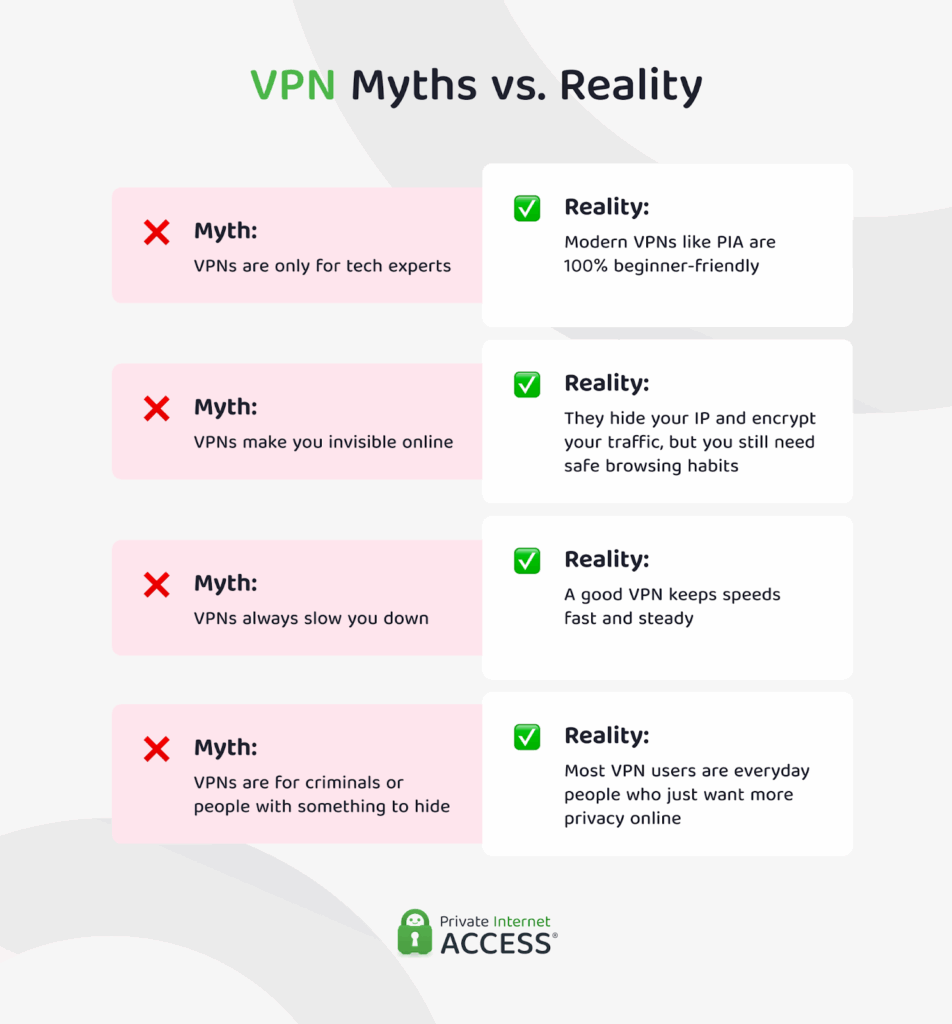
There are plenty of misconceptions about VPNs. Let’s clear a few of them up:
Myth: VPNs Are Only for Tech Experts ❌
✅ Reality: That might have been true years ago, but today’s VPN apps are built to be simple. You can usually turn them on with one click, and they run quietly in the background without needing any complicated setup.
Myth: VPNs Make You Invisible Online ❌
✅ Reality: A VPN hides your IP address, protects your online activities from snoopers, and makes you harder to track which improves privacy, but it doesn’t make you untouchable. Websites can still follow you with cookies, logins, and browser fingerprints. Safe browsing habits still matter.
Myth: VPNs Always Slow You Down ❌
✅ Reality: Any VPN adds a bit of overhead, but with a quality VPN provider, the difference is typically barely noticeable. Performance depends on factors like server location: if you connect to a nearby server, speeds usually stay fast enough for streaming, gaming, and video calls, even on public Wi-Fi.
Myth: VPNs Are for Criminals or People with Something to Hide ❌
✅ Reality: Wanting privacy in the digital world doesn’t mean you’re doing anything wrong, and using a VPN is simply a way to protect your data online. It can be useful for everyday situations like shopping, streaming, working remotely, or checking email on public Wi-Fi.
What a VPN Can and Can’t Do
As you can see, a VPN is an important part of your online security stack. However, don’t get the wrong impression that it’s some type of super program that will keep you safe online. Like anything else, there are things it can and can’t do.

What a VPN Can Do
✅ Protect your data in transit: A VPN encrypts your internet traffic, making it unreadable to anyone who tries to intercept it. This shields sensitive information like passwords, payment details, and messages.
✅ Make you harder to track online: A VPN replaces your real IP address with the VPN server’s address, so websites, advertisers, and other third parties can’t easily tie your activity to your identity or location.
✅ Help prevent ISP throttling: Some internet providers slow down certain types of online activity, like streaming or gaming, during peak hours. A VPN can help you avoid these slowdowns by masking the type of traffic you’re sending, keeping your connection more consistent.
✅ Keep your activity private on public Wi-Fi: Free Wi-Fi in coffee shops, hotels, or airports is convenient but often insecure. A VPN adds a layer of protection so cybercriminals on the same network can’t see what you’re doing.
✅ Secure remote connections: Many workplaces and schools use VPNs to protect access to internal files, tools, and resources. If you connect from outside their network, the VPN keeps that connection private and safe.
What a VPN Can’t Do
⚠️ Protect you from malware or viruses: A VPN doesn’t scan for or remove malicious software. You’ll still need antivirus or anti-malware software to block infected downloads or harmful programs.
⚠️ Stop phishing scams: A VPN won’t prevent you from clicking a fake link or giving away personal information to a fraudulent site. It doesn’t detect and warn you that a site may be unsafe or malicious. Safe browsing habits and awareness are still key to avoiding these traps.
⚠️ Make you completely anonymous online: While a VPN hides your IP address and encrypts your traffic, it can’t erase all traces of your activity. Sites you log into, cookies, and other identifiers can still connect activity back to you.
⚠️ Replace safe browsing habits: A VPN is one layer of your security. To stay truly protected, you’ll need to combine it with other tools and good practices, such as using strong passwords, keeping software updated, and being careful about what you share online.
What to Look for in a VPN for Beginners
If you’ve never used a VPN before, the options can feel overwhelming. Many providers advertise advanced features, but for beginners, the most important thing is finding one that’s easy to use, reliable, and built around privacy. Here’s a simple checklist to guide you:
Beginner-Friendly VPN Checklist
- Ease of use: A simple app with one-click connect and clear menus.
- Speed: Fast, stable servers for smooth browsing, streaming, and video calls.
- Servers: A wide range of server locations so you can connect from different regions when you need to.
- Unlimited bandwidth: You don’t want a VPN that limits how much data you can use per day or month.
- No-logs policy: A proven commitment to not storing your browsing activity, preferably backed by a third-party audit.
- Wide device support: Works on phones, laptops, tablets, and even routers.
- Reliable customer support: 24/7 help if you run into problems.
How to Use a VPN: Step-by-Step
Using a VPN is easier than it sounds. With Private Internet Access (PIA), you can go from sign-up to secure browsing in just a few minutes.
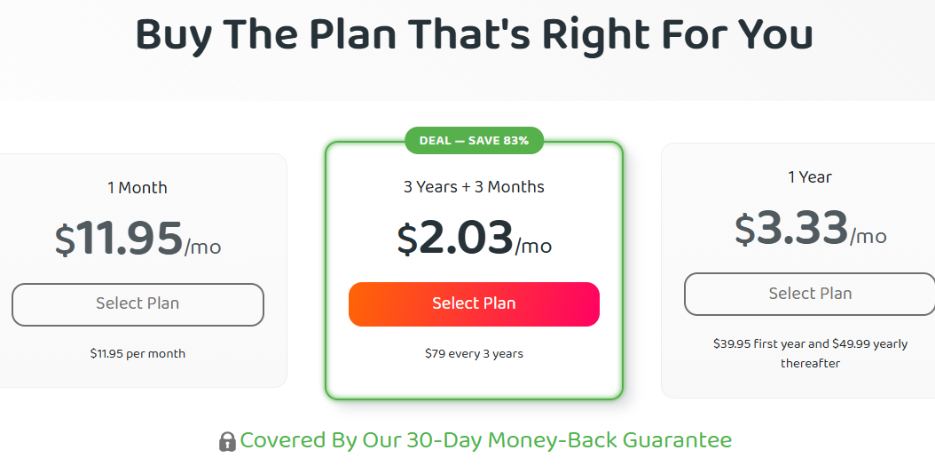
1. Choose a plan and sign up: Pick a PIA VPN subscription plan, and create your account.
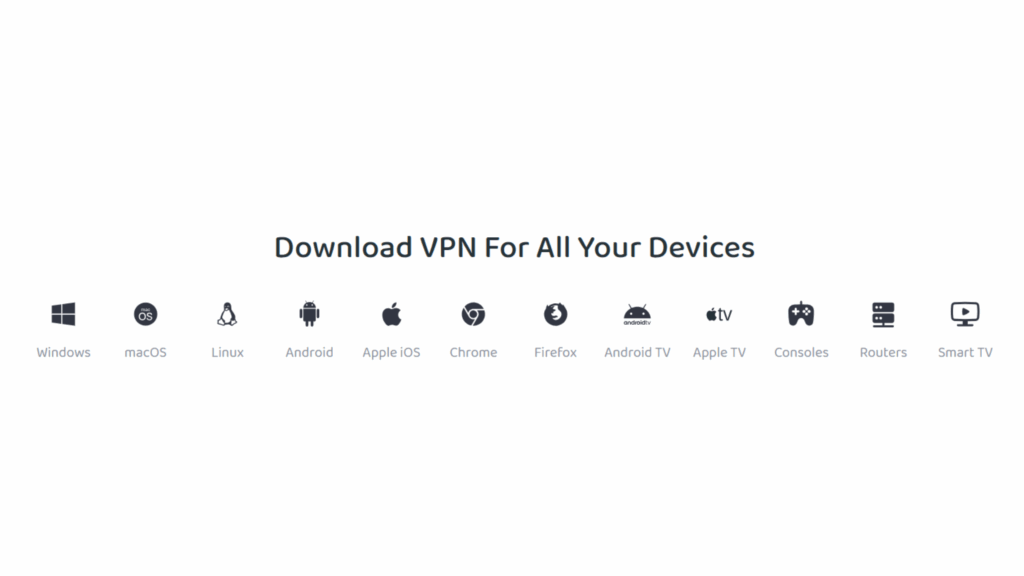
2. Download the app for your device: PIA works on Windows, macOS, Linux, iOS, Android, and more. You can even install it on a compatible router to protect every device on your network.
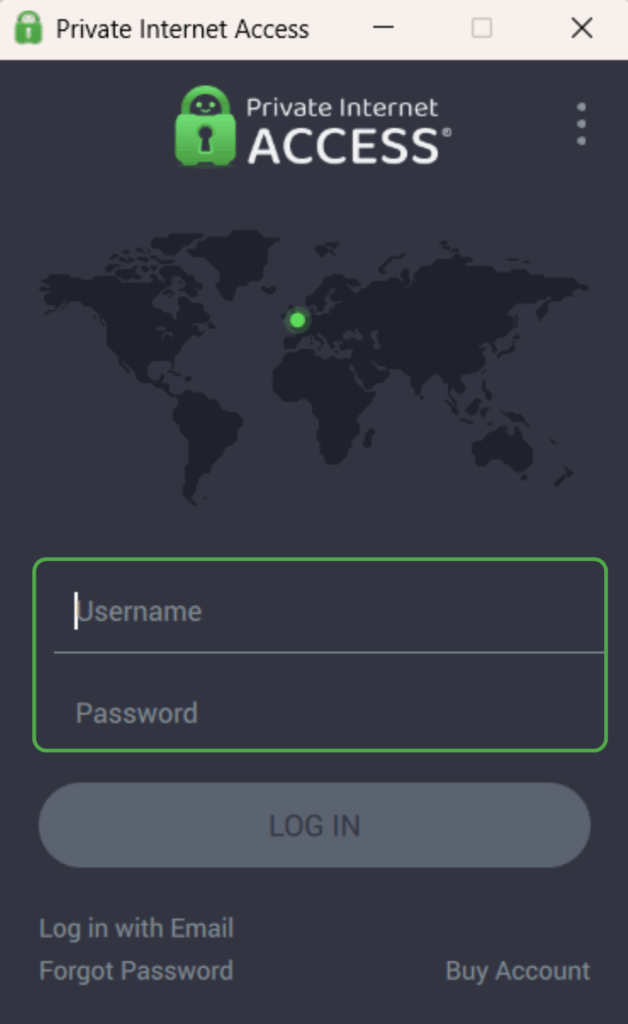
3. Open the app and log in: Use the credentials you created during sign-up.
4. Select a VPN server location: Choose from thousands of servers in different countries. PIA will recommend the best one for speed, but you can pick any you prefer.
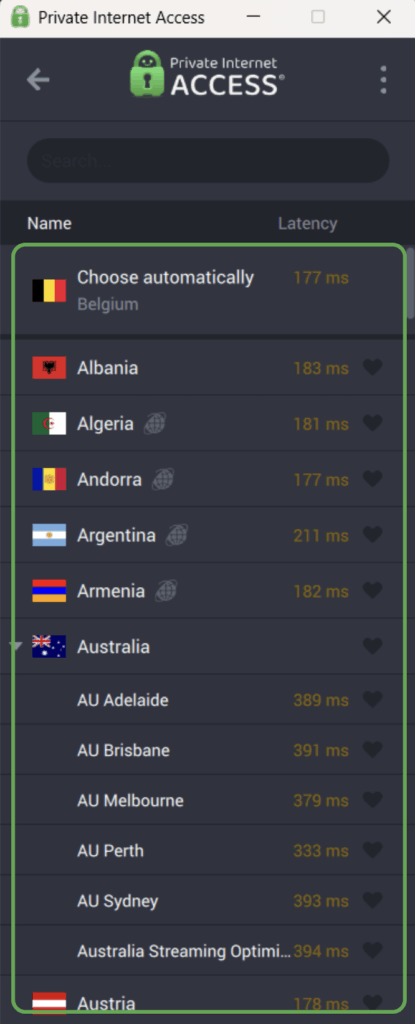
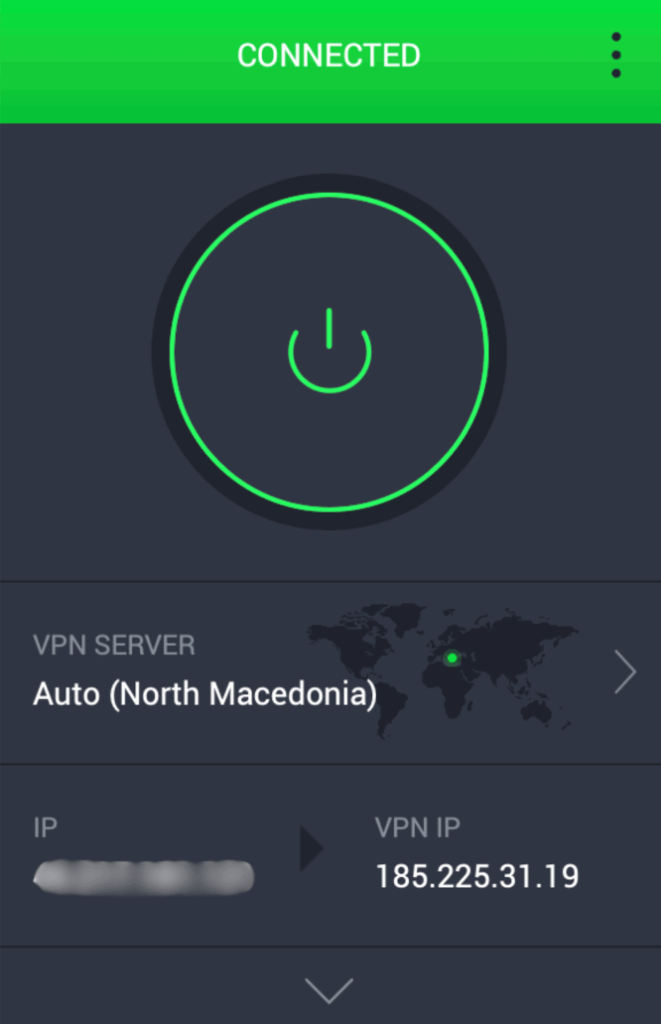
5. Click connect: If you’re choosing a new server, just click on the location you want. If you’re connected back to the same one you previously used or using the auto or recommended servers, just press the connect button. You’ll see that the VPN is active and your IP address has changed.
Tips for First-Time VPN Users
✅ Start with the “Auto” server option: If you don’t need a specific server location, use the recommended or auto server option. It will pick the server with the lowest latency and fastest ping time for you.
✅ Save your favorite locations: Mark your favorite server with a star so it’s easy to find for next time.
✅ Keep it on when using public Wi-Fi: If you’re at a café, airport, or hotel, make connecting to a VPN part of your routine before you browse.
✅ Update the app regularly: Updates include the latest security patches and performance improvements, so it’s best to turn on automatic updates if possible.
✅ Pair with antivirus software: A VPN protects your connection, but antivirus software keeps your device safe from malware and other threats. Using both gives you full coverage.
Are Free VPNs Any Good?
Free VPNs can absolutely have their place. If you just want a quick way to secure your connection on public Wi-Fi or occasionally mask your location, there are some decent free options out there that let you try out how a VPN works without committing to a subscription.
That said, free services usually come with trade-offs. You might only get access to a handful of servers, run into monthly data caps, or notice slower speeds. Some free VPNs also show ads or collect limited usage data to cover costs, which isn’t always ideal if privacy is your main concern.
Is Using a VPN Legal?
VPNs are safe to use and legal in most countries, including the US, Canada, and most of Europe. They’re a legitimate privacy and security tool used by millions of people and businesses every day.
However, there are some countries that either ban VPNs entirely or limit VPN use to specific state-owned providers. If you’re traveling, it’s important to know the local laws before connecting.
A VPN should always be used for lawful purposes and in line with the terms of service for any site or platform you visit. While it adds strong privacy protection, it’s not a free pass to break the law, download pirated content, or engage in prohibited activities.
FAQ
What is a VPN and how does it work in simple terms?
A VPN, or Virtual Private Network, protects your internet connection by sending it through a secure, encrypted tunnel to a VPN server. This process hides your real IP address and replaces it with the server’s IP, making it harder for websites, advertisers, or other third parties to track you.
Do I need technical skills to use a VPN?
Not at all; needing technical skills to use a VPN is just one of the several VPN myths that you may come across. Good quality VPNs like PIA are beginner-friendly and designed so anyone can use them without technical knowledge. You can connect with a single click or tap, and the software handles all the encryption and routing behind the scenes. If you ever need help, PIA’s 24/7 customer support can walk you through any step.
Can a VPN make my internet completely anonymous?
No, a VPN can’t do that, and any provider claiming total anonymity is overselling it. A VPN hides your IP address and encrypts your traffic, but things like website logins, cookies, and browser fingerprinting can still identify you. Think of a VPN as a strong privacy layer that greatly reduces tracking but doesn’t erase your digital footprint entirely.
Will a VPN slow down my internet speed?
Some slowdown is possible because your traffic takes an extra step through the VPN server, but with a quality service like PIA VPN, it’s usually not noticeable. PIA’s global network of fast, optimized VPN servers keeps streaming, video calls, and downloads running smoothly. In some cases, you may even see more consistent speeds if your ISP has been throttling certain activities.
How do I choose the right VPN for beginners?
There are a couple of things to look for in a VPN if you want to find one that balances ease of use with strong security features. PIA VPN offers a clean, simple interface, thousands of servers in multiple locations, a strict no-logs policy, and industry-leading encryption. Speed and device compatibility are also important. PIA works on phones, computers, tablets, and even routers. A reliable support team is the final piece, ensuring you’re never stuck if something doesn’t work as expected.
