What Is a Hotspot and How Does It Work?
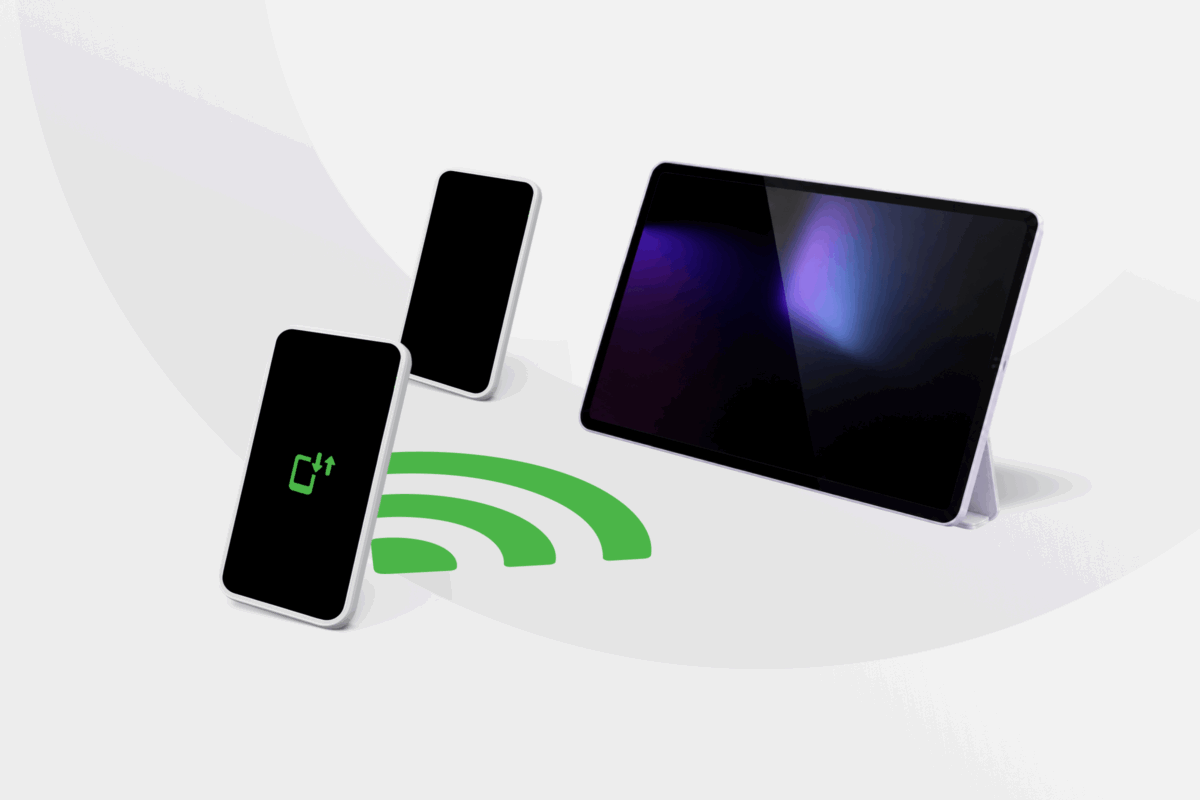
Nothing is more frustrating than wanting to get online, whether it’s to stream, browse, or check messages, only to find there’s no Wi-Fi. In situations like these, a hotspot is the solution you’re looking for.
But what is a hotspot, is it different from Wi-Fi, and how does it work? This guide explains everything you need to know, including the different types of hotspots, when to use them, and what to know before you connect.
- What Is a Hotspot?
- How Does a Hotspot Work?
- What Are the Different Types of Hotspots?
- Wi-Fi, Hotspots, and Tethering: What’s the Difference?
- How Fast Is a Mobile Hotspot?
- How Much Data Does a Hotspot Use?
- Does a Hotspot Cost Money?
- How to Turn On a Personal Hotspot
- Is a Mobile Hotspot Safe?
- How Does a VPN Work on a Hotspot?
- FAQ
What Is a Hotspot?
A hotspot is a location, phone feature, or device that provides wireless internet access to nearby devices. Although devices often connect to a hotspot using Wi-Fi, the underlying internet connection may come from wired broadband or a cellular network.
Traditionally, “hotspot” referred to a physical location offering Wi-Fi, such as a hotel, library, or coffee shop. The term is now also widely used for smartphones and portable routers that share cellular data with laptops, tablets, and other devices.
How Does a Hotspot Work?
A hotspot acts as a bridge between an internet connection and the devices using it. First, it connects to the internet through broadband or a cellular network. It then creates a local Wi-Fi network that nearby devices can join.
The basic process looks like this:
- The hotspot connects to an internet source.
- The hotspot becomes an access point and broadcasts a Wi-Fi network with a name, known as an SSID.
- A nearby phone, laptop, or tablet selects that network.
- The user enters the hotspot password, if requested.
- The hotspot transfers data between the connected device and the internet.
A mobile hotspot gets its internet connection from a 4G or 5G cellular network. The laptop or tablet connected to it acts like it’s using regular Wi-Fi, but it draws data from the hotspot’s mobile plan.
A hotspot can’t create an internet connection where none exists. You might be able to join a mobile hotspot’s Wi-Fi network when cellular coverage is unavailable, but the connected device won’t have internet access.
What Is a Hotspot Used For?
A hotspot provides temporary or portable internet access when a regular connection is unavailable or unsuitable. You might use one for:
- Connecting a laptop while traveling
- Giving a Wi-Fi-only tablet internet access
- Working somewhere without reliable broadband
- Getting online during a home internet outage
- Providing temporary internet at an event or job site
- Connecting several devices through one cellular connection
- Using a network you control instead of unfamiliar public Wi-Fi
For occasional use, a phone hotspot will usually be the simplest option. Someone who frequently works remotely or connects several devices may find a dedicated hotspot more practical.
Mobile hotspots still depend on cellular coverage. They may not work well in remote locations, congested areas, or during an outage that also affects the local mobile network.
What Are the Different Types of Hotspots?
Hotspots fall into three main categories. The most important differences are where they get their internet connection and who controls the network.
Phone or Personal Hotspots
Most phones can turn their existing cellular connection into a Wi-Fi network on their own, with no extra hardware needed.
Apple calls the iPhone feature Personal Hotspot. Android manufacturers commonly use names such as Mobile Hotspot, Wi-Fi Hotspot, or Hotspot and Tethering. Despite having different names, they perform the same basic function.
A phone hotspot is convenient for occasional use because you already have the device and data connection. However, sharing that connection can drain the phone’s battery, generate heat, and consume the plan’s data allowance.
Dedicated Mobile Hotspot Devices
A hotspot device is a small portable router that connects to a cellular network and broadcasts a Wi-Fi signal. It often has its own SIM or eSIM, battery, network settings, and compatible data plan.
Depending on the model, dedicated hotspot devices may offer stronger antennas, longer battery life, support for more simultaneous connections, and more network controls than a phone hotspot.
They can be useful for frequent travel, remote work, or connecting several users. The trade-off is having another device to buy, charge, and carry, along with the possible cost of a separate data plan.
Public Wi-Fi Hotspots
Public Wi-Fi hotspots are commonly available in cafés, hotels, libraries, airports, shopping centers, trains, and other shared spaces.
The business or organization operating the hotspot usually connects a wireless access point to a broadband connection. Visitors can then connect their devices over Wi-Fi.
Some public hotspots are open, while others ask for payment, a password, customer account, or acceptance of terms through a sign-in page. Because the network belongs to someone else, you have limited control over its configuration and access.
Phone Hotspot vs. Dedicated Hotspot vs. Public Wi-Fi
The right connection depends on how often you need it, how many devices you want to connect, and whether your data plan supports hotspot use.
| Feature | Phone Hotspot | Dedicated Hotspot | Public Wi-Fi |
| Extra hardware | ❌ | ✅ | ❌ |
| Internet source | Phone’s cellular plan | Separate cellular connection | Venue’s internet |
| Best suited to | Occasional use | Frequent or multi-device use | Quick access at a fixed location |
| Battery | Uses the phone’s battery | Has its own power source | No extra battery drain on user device |
| Cost | Often included with limits | May require a device and plan | Often free |
| Network control | Controlled by the phone owner | Controlled by the device owner | Controlled by the operator |
| Main limitation | Battery and data consumption | Additional cost and equipment | Limited control over the network |
A phone hotspot is usually enough if you occasionally connect one or two devices. A dedicated device may be more practical if you work remotely, travel frequently, or need to connect several users.
Public Wi-Fi is convenient when available, but you depend on the network operator’s performance, configuration, and access rules.
Wi-Fi, Hotspots, and Tethering: What’s the Difference?
These terms are related, but they don’t mean the same thing:
- Wi-Fi: The wireless technology devices use to communicate over a local network.
- Hotspot: A location, feature, or device that provides internet access.
- Tethering: Sharing one device’s internet connection with another.
A phone-based Wi-Fi hotspot is one form of tethering. Phones may also support USB tethering, which shares the connection through a cable, or Bluetooth tethering, which is generally slower but may use less power.
How Fast Is a Mobile Hotspot?
Hotspot speeds vary, even when two devices use the same type of connection. Performance can depend on:
- Whether the connection uses 4G or 5G
- Cellular signal strength
- Distance from the cell tower
- Network congestion
- The phone or hotspot hardware
- Distance between the hotspot and connected devices
- The number of connected devices
- Carrier speed limits
- Walls and other physical obstacles
Connecting more devices divides the available bandwidth between them. One laptop browsing the web may work well, while several devices simultaneously streaming video, downloading files, and joining video calls could experience slowdowns.
A mobile hotspot may support browsing, work calls, or streaming when conditions are good. However, cellular performance can fluctuate more than a wired broadband connection, which makes it less reliable for things like video calls or online gaming, where any lag or dropped connection stands out.
How Much Data Does a Hotspot Use?
A mobile hotspot uses your phone or hotspot device’s cellular data plan. Turning on the feature doesn’t necessarily consume much data on its own. It’s what you do on connected devices that determines how quickly the data allowance runs out.
| Activity | Typical Data Demand |
| Email and messaging | Low |
| General web browsing | Low to moderate |
| Music and podcast streaming | Moderate |
| Video calls | Moderate to high |
| HD video streaming | High |
| Cloud backups | Very high |
| Software and game downloads | Very high |
Computers may use more background data than expected. Operating system updates, cloud synchronization, photo backups, and automatic app downloads can continue even when you aren’t using the device.
If your plan has a limited hotspot allowance, mark the connection as metered where supported and pause large updates or backups. Reducing streaming quality can also help conserve data.
Does a Hotspot Cost Money?
Whether using a hotspot costs extra depends on your mobile carrier and plan.
Most modern phones include the hotspot feature without requiring a separate app. However, carriers may handle the data in several ways:
- Count it against your regular mobile data allowance
- Provide a separate hotspot allowance
- Reduce hotspot speeds after a set amount of data
- Require a plan that supports tethering
- Charge for hotspot data
- Apply roaming rates when used abroad
A plan advertised as offering unlimited phone data may still limit how much high-speed hotspot data you can use. Check the plan terms rather than assuming all cellular data can be shared without restrictions.
Dedicated mobile hotspot devices also have an upfront hardware cost and normally need their own data plan. Some carriers offer prepaid plans, which may suit occasional use without an ongoing contract.
How to Turn On a Personal Hotspot
You can usually activate a hotspot from your phone’s settings. The names and menu paths may vary depending on the device, operating system, and carrier.
How to Turn On a Hotspot on iPhone
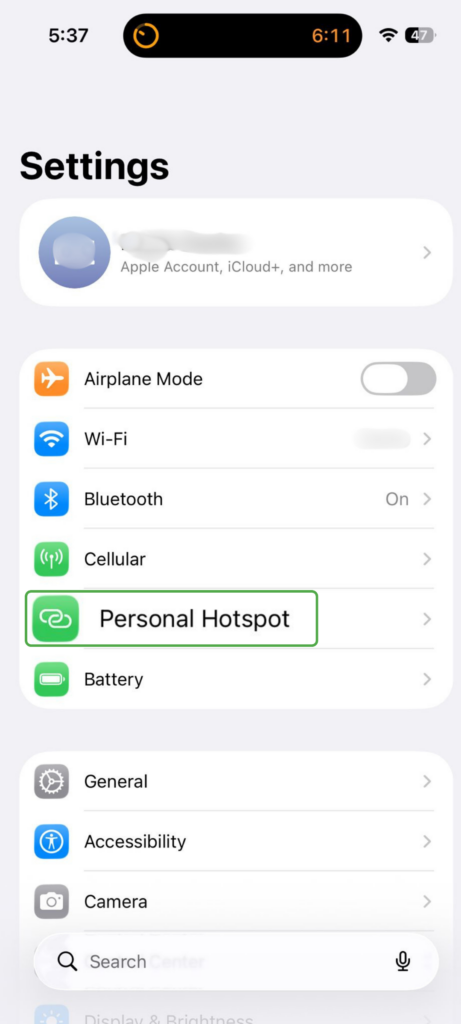
- Open Settings and tap Personal Hotspot.
- Turn on Allow Others to Join and set a password (required).
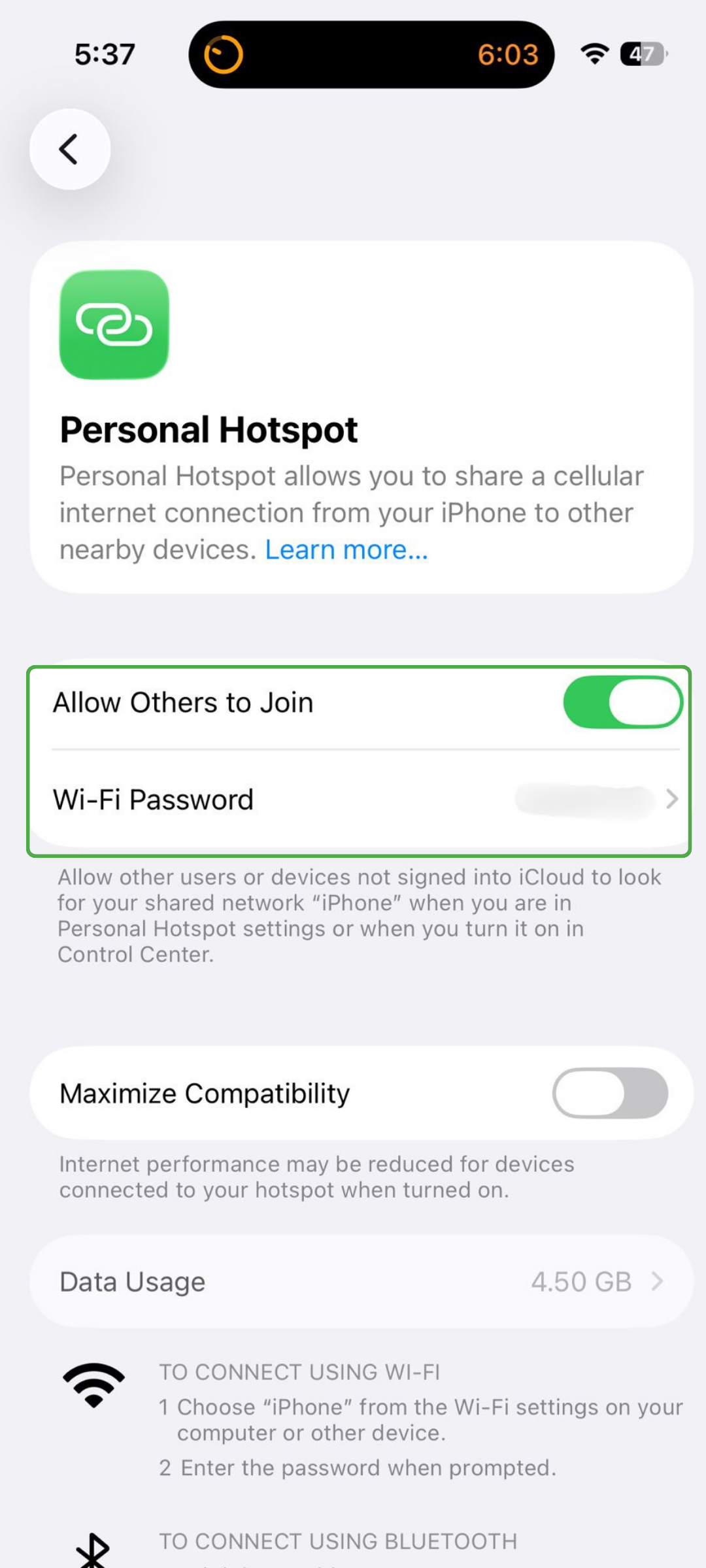
The hotspot’s network name is usually based on the iPhone’s device name.
How to Turn On a Hotspot on Android
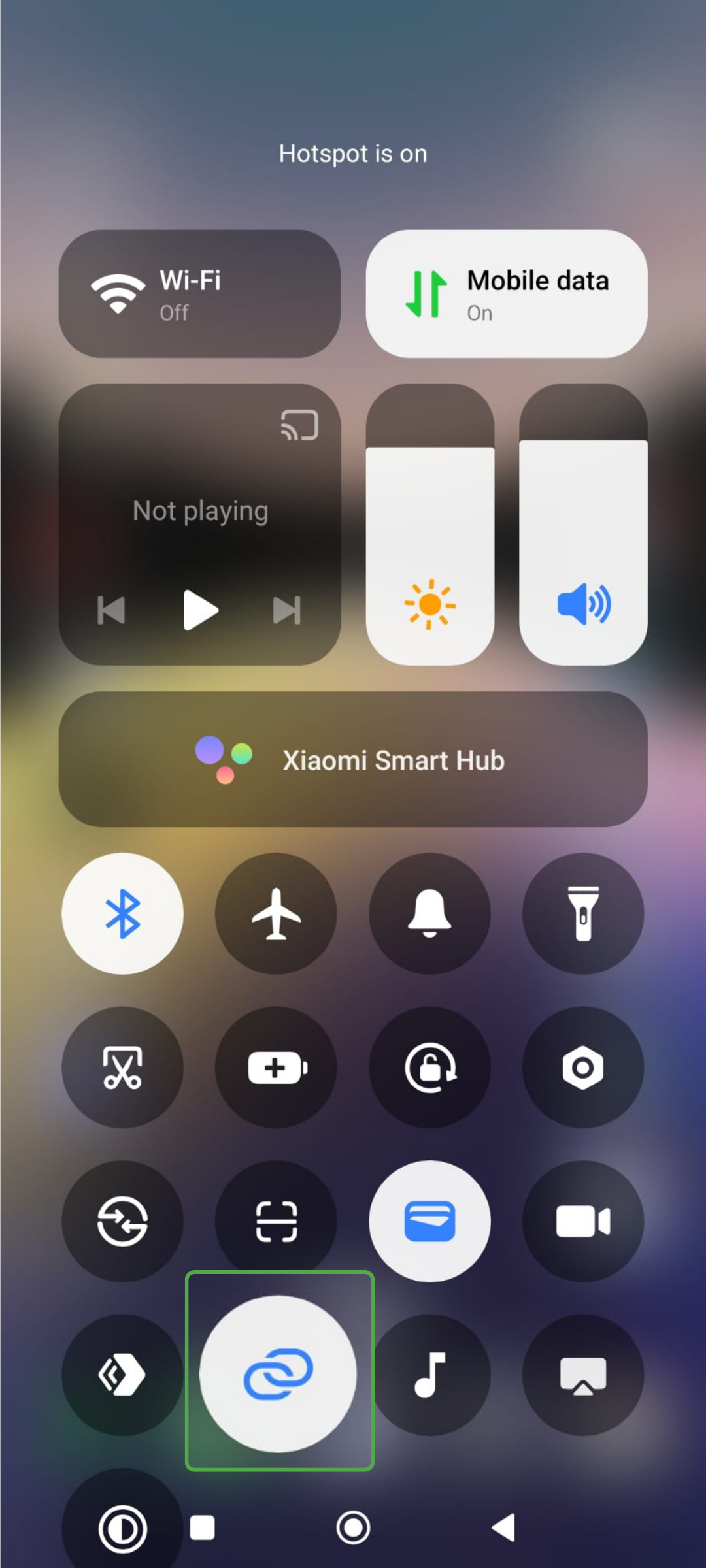
- Swipe down from the top of the screen to open Quick Settings.
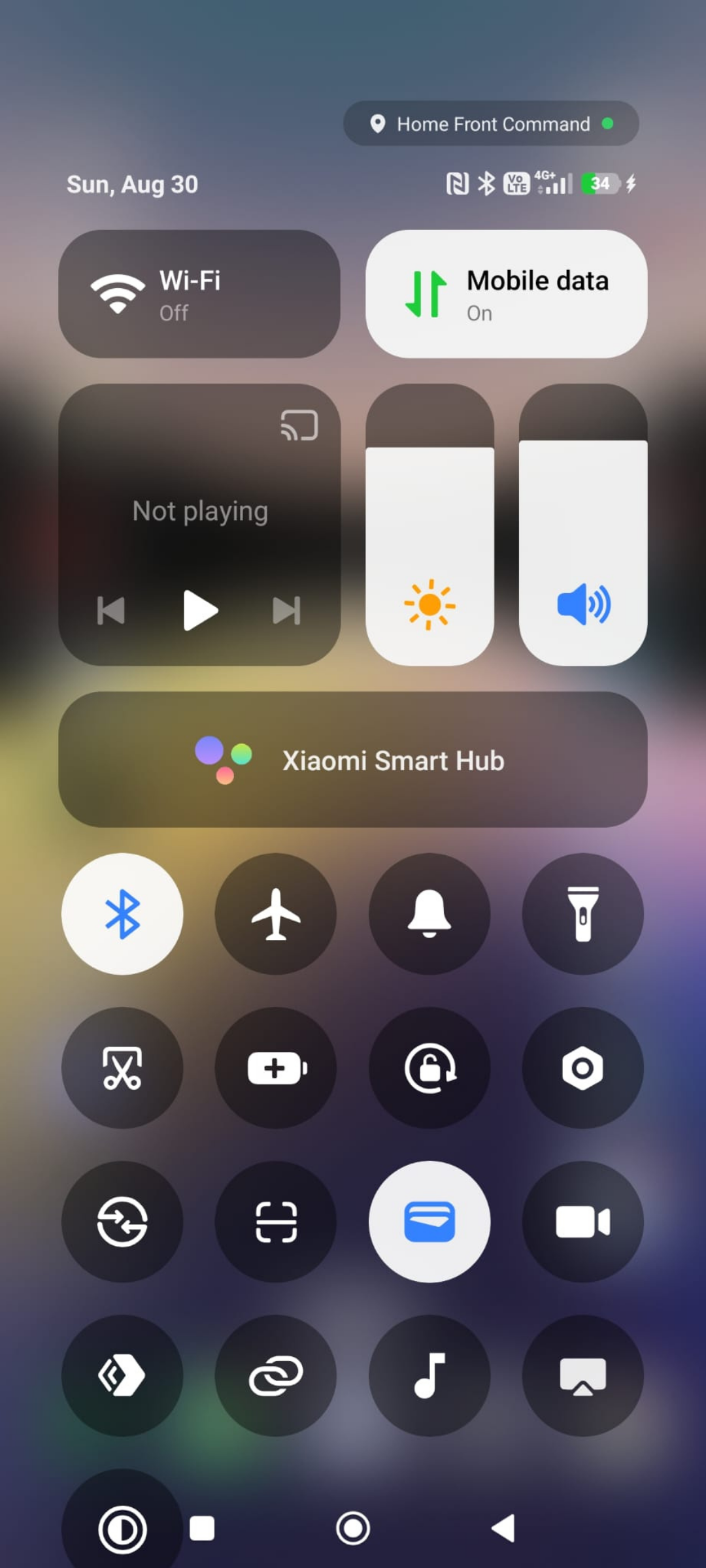
- Find the Hotspot icon (it typically looks like interlocking links), then press and hold it for a few seconds to access the Portable hotspot settings.
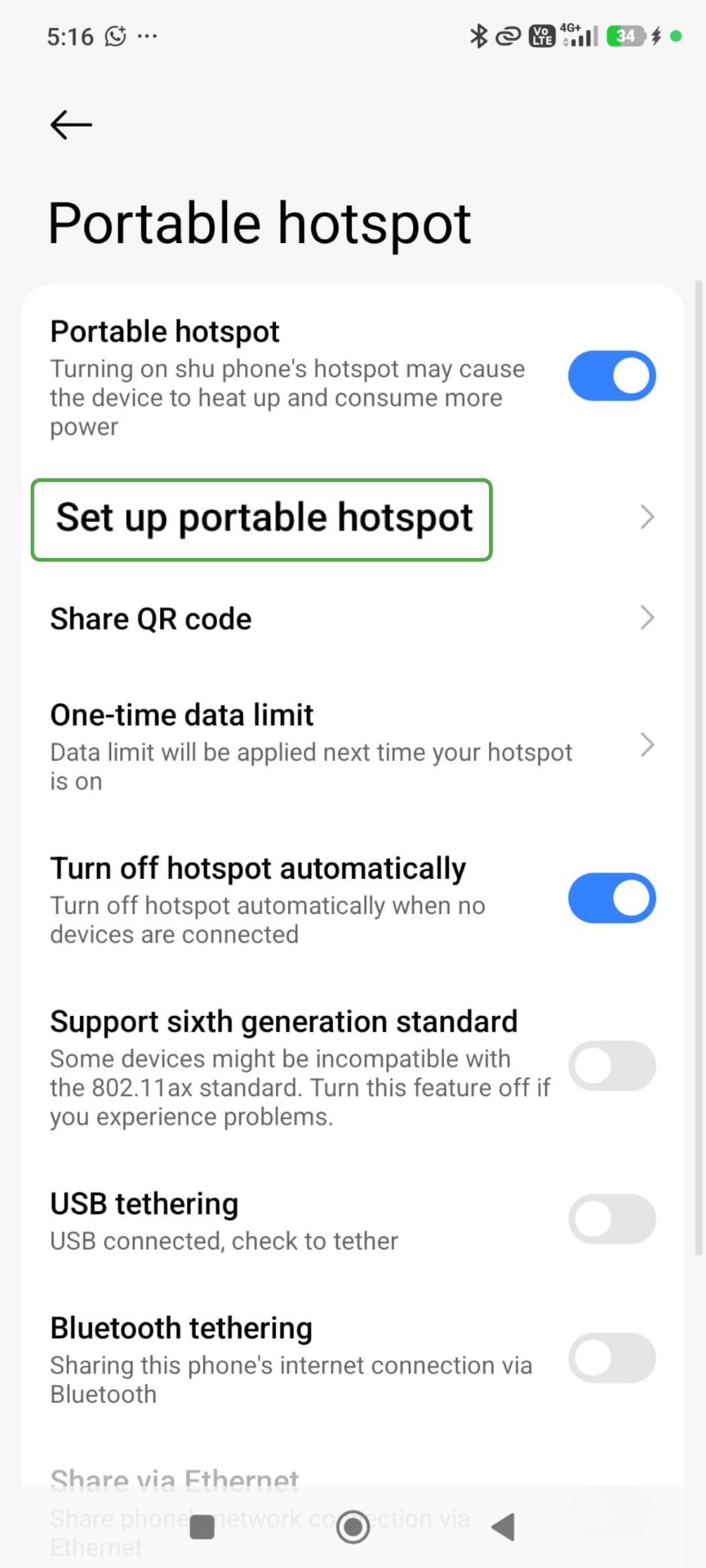
- Click Set up personal hotspot.
- Check the network name, password, and security settings.
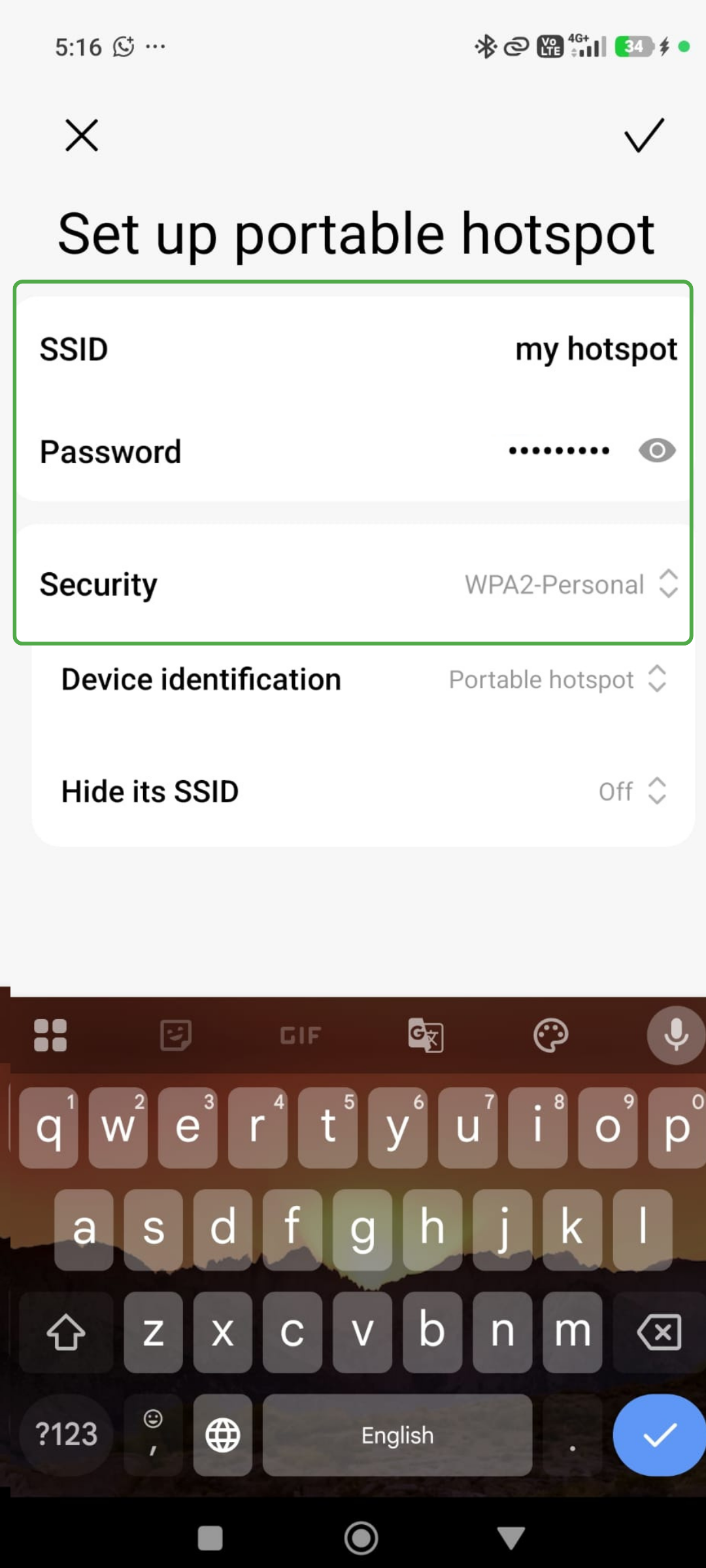
Android menus differ by manufacturer. If you can’t find the feature, search your Settings for “hotspot” or “tethering.”
How to Connect Another Device
After activating the hotspot:
- Open the other device’s Wi-Fi settings.
- Select the hotspot’s network name.
- Enter the hotspot password.
- Wait for the device to confirm that it’s connected.
Some phones also support USB or Bluetooth tethering, where the receiving device connects via a USB cable or Bluetooth. USB works well for connecting a single computer and can help reduce the phone’s battery drain. Wi-Fi is generally more convenient when connecting multiple devices.
Is a Mobile Hotspot Safe?
A personal hotspot can provide a more private connection than an unfamiliar public network because you control who can join it. How safe it is depends on how you configure and use it.
Follow these precautions:
- Protect the hotspot with a strong, unique password.
- Use WPA2 or WPA3 encryption when available.
- Avoid using a network name that reveals personal information.
- Don’t share the password with people you don’t trust.
- Check for unfamiliar connected devices.
- Keep the phone or hotspot’s software updated.
- Turn off the hotspot when you finish using it.
An open hotspot allows nearby devices to connect without a password. Avoid disabling hotspot security because it makes connecting easier.
Public Wi-Fi warrants different judgment because you don’t manage the network. Most reputable websites and apps encrypt transmitted data, which has made public Wi-Fi safer than it once was. However, you should still confirm that you’re joining the correct network and avoid bypassing browser security warnings.
How Does a VPN Work on a Hotspot?
A VPN works in exactly the same way on a hotspot as it does on other types of connections. It encrypts the internet traffic between your connected device and the VPN server. This helps protect the traffic from exposure on the local network and replaces your public IP address with the VPN server’s address.
When using a phone hotspot, the clearest approach is to install and connect your VPN on the laptop, tablet, or other device accessing the internet. That way, the VPN encrypts everything leaving that specific device.
Connecting a VPN on the phone providing the hotspot doesn’t always mean traffic from tethered devices will pass through the VPN tunnel. The exact behavior depends on the phone, operating system, and VPN configuration.
A VPN doesn’t secure the hotspot itself. You still need a strong hotspot password and WPA2 or WPA3 encryption to control who can join your network.
FAQ
Do I really need a hotspot on my phone?
No, you don’t need to turn on your phone’s hotspot for the phone to access the internet. The feature is useful when another device, like a laptop or tablet, needs a connection and Wi-Fi isn’t available.
What’s the difference between a hotspot and Wi-Fi?
Wi-Fi is the wireless technology devices use to connect to a local network, while a hotspot is a location, feature, or device that provides internet access, usually over Wi-Fi.
Does it cost money to have a hotspot?
It depends. Most modern phones have this capability built in, but using it consumes cellular data. Your carrier may include hotspot data in your plan, limit its speed or allowance, or charge a fee on top of your regular plan. Check your plan’s terms before using large amounts of data.
Why would someone use a mobile hotspot?
It comes down to flexibility. A hotspot lets you use a laptop or tablet for something a phone browser can’t handle well, without the need to hunt for a Wi-Fi network first. It’s also useful as a backup if your internet goes down or if you’d rather not join a public network you don’t control.
Is there a downside to using your phone as a hotspot?
The main trade-offs of a mobile hotspot are battery drain, extra heat, and faster use of your data plan. Performance can also dip if several devices connect at once or the cellular signal is weak. If you hotspot often, a dedicated device with its own battery might make more sense.
Do I have a free hotspot on my phone?
Most current smartphones include a hotspot feature at no additional cost. Whether it includes hotspot data without an extra charge depends on your carrier and plan. “Unlimited” mobile plans may still impose separate limits on high-speed hotspot use.
