What Is WPA3? A Guide to the Latest Wi-Fi Security Standard
Your personal information, login credentials, and browsing habits all have market value, and that has turned data theft into a profitable pastime for anyone who has the time or inclination to hack into unsecured Wi-Fi networks.
Fortunately, there are ways to defend your data. Wi-Fi Protected Access 3 (WPA3) is one. It secures the connection between your devices and your router and closes several weaknesses that attackers had learned to exploit in older Wi-Fi security standards.
This guide will help you understand WPA3, including how it works, its key features and modes, and how it compares to earlier Wi-Fi security types. We’ll also walk you through how you can activate WPA3 on your router to work with compatible devices.
WPA3 Quick Guide
- WPA3 is the latest wireless security standard. It replaced WPA2 in 2018, closing long-standing encryption weaknesses.
- It uses SAE and AES to give every session its own unique encryption key.
- There are three modes of WPA3: Personal for home networks, Enterprise for organizations, and Enhanced Open for public hotspots.
- It offers resistance to brute force dictionary attacks, forward secrecy for captured traffic, encryption for public hotspots, and simpler onboarding for IoT devices.
- Main drawbacks are the Dragonblood vulnerabilities, downgrade risks in WPA2/WPA3 transition mode, and incompatibility with most hardware released before 2018.
What Is the WPA3 Security Standard?
WPA3 is the latest Wi-Fi security standard released by the Wi-Fi Alliance. It uses the Simultaneous Authentication of Equals (SAE) key exchange for secure authentication and key exchange, while relying on AES-based encryption suites (like CCMP) to protect wireless traffic.
It’s essentially the set of rules your router and devices follow to prove they belong on the network and to encode the data traveling between them so that outsiders can’t read it.
The standard provides strong protection against password-guessing attacks and encryption that keeps past traffic secure (even if your password is exposed later down the line). It also adds features such as perfect forward secrecy and simplified device provisioning, without a noticeable performance cost on modern hardware.
There are various levels of protection, provided by three different modes of WPA3. WPA3-Personal secures home networks, while Enterprise is built for businesses and other organizations. Enhanced Open encrypts traffic on public networks that don’t require a network security key.
The History of Network Security: Wi-Fi Security Types
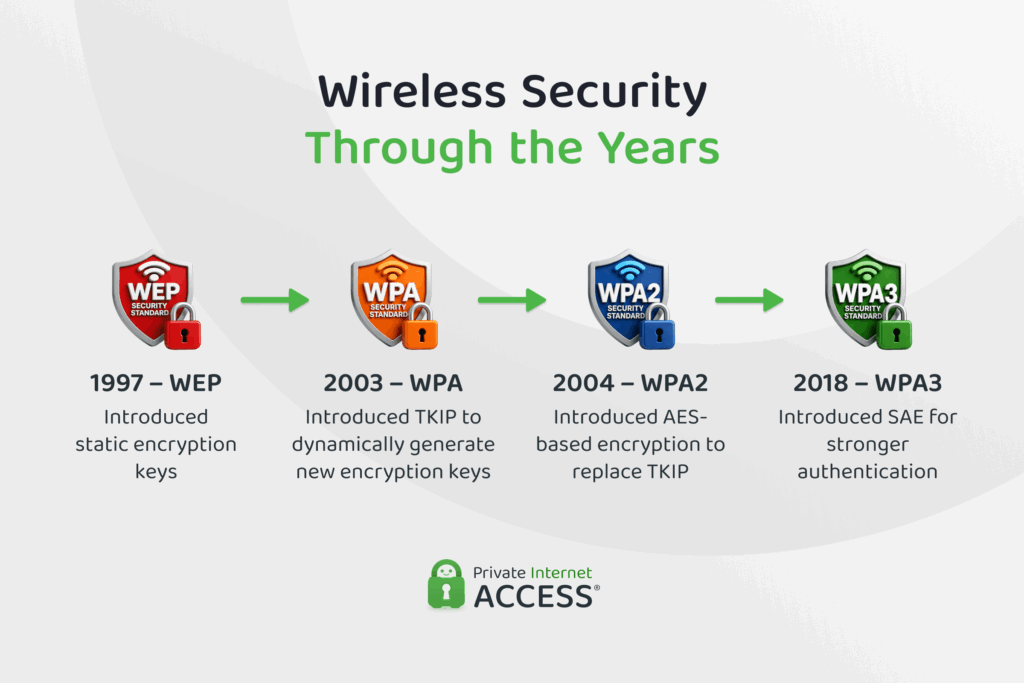
Wireless security has gone through four major generations since the late 1990s, and each one responded to the failures of the last.
Wired Equivalent Privacy (WEP) arrived in 1997 as part of the original IEEE 802.11 wireless standard. It used static encryption keys shared by every device on the network, a design that let attackers recover the key simply by capturing enough traffic.
The Wi-Fi Alliance responded in 2003 with Wi-Fi Protected Access (WPA), which introduced the Temporal Key Integrity Protocol (TKIP) to generate a new key for every data packet. It was always intended as a stopgap, though, because TKIP still ran on WEP’s underlying cipher.
In 2004, WPA2 implemented the full IEEE 802.11i standard and replaced TKIP with CCMP – an AES-based encryption protocol. It was the dominant standard for 14 years before the Wi-Fi Alliance introduced WPA3 in 2018.
WPA3 Features
A few features work together to manage how devices prove their identity, how data is encrypted, and how new hardware joins the network safely, and make WPA3 the most secure Wi-Fi standard to date.
WPA3 Encryption and Authentication
Authentication in WPA3 is built around SAE, a password-authenticated key exchange that’s also known as the Dragonfly handshake. The exchange has two phases that confirm the identity of each device involved without them ever having to exchange a password.
First, in the commit phase, your device and the router send one another values that have been mathematically derived from the network password and random numbers. Then, in the confirm phase, both sides prove they arrived at the same result.
As no data containing the password is ever transmitted, the only way to test whether a password is correct is to connect to the network and run a full commit-and-confirm exchange with the router.
Every password guess requires a live exchange with the router and routers can detect and throttle repeated failed attempts, so this makes automated password guessing slow, visible, and easy to shut down. This gives even short or common passwords gain meaningful protection against automated cracking.
The handshake also produces a fresh encryption key for every session – part of what gives WPA3 perfect forward secrecy. Once the keys are agreed, the data is encrypted with AES encryption to keep it safe in transit.
Perfect Forward Secrecy
Usually shortened to just PFS, perfect forward secrecy protects every session between your device and your router with its own temporary encryption key. This key is generated during the SAE exchange and discarded when the session ends.
By protecting historical data traffic, PFS helps to ensure that cybercriminals and other interested third parties can’t use a password they might obtain to decrypt traffic they may have captured previously. With WPA3, that recorded traffic stays unreadable because the keys that protected each session no longer exist.
Security Protocols
Wi-Fi security is usually described in bits: 128-bit, 192-bit, 256-bit, and so on, which measure the length of an encryption key. The bigger the number, the harder that secret is to guess.
Networks running WPA3 get one of two levels of overall protection. Personal mode provides 128-bit security, which is more than enough for homes and everyday browsing, while Enterprise mode can step up to 192-bit security.
In Enterprise mode, encryption keys run to 256 bits. Hash functions, the checks that confirm data hasn’t been altered in transit, produce 384-bit results. Each component has to be stronger than the 192-bit target, because the overall strength of a system is set by its weakest component.
Enterprise mode also uses the 802.1X authentication framework to check each user’s credentials against a dedicated authentication server before granting access. Then Server Certificate Validation (SCV) kicks in to confirm that the network is genuine before handing over any credentials.
Device Provisioning Protocol
Smart home and other IoT devices prompt a question that couldn’t have been anticipated when older standards were created: How do you enter a Wi-Fi password on a sensor, a plug, or a camera that has no screen or keyboard?
The Device Provisioning Protocol (DPP) is WPA3’s answer to this. It lets you add a device to your network by scanning a QR code that contains the device’s public encryption key, allowing credentials to be exchanged cryptographically rather than typed in or broadcast.
Wi-Fi Easy Connect – as DPP is called by the Wi-Fi Alliance – replaces Wi-Fi Protected Setup (WPS), the older and more vulnerable PIN system seen in previous versions of WPA.
Protected Management Frames
Management frames are the administrative messages Wi-Fi networks use to handle connections, telling devices when to join, roam, or disconnect.
Older standards sent these messages without protection by default and attackers took advantage: By forging a disconnection message, they could knock your device off the network and capture data as it reconnected.
Protected Management Frames (PMF) apply cryptographic protection to these messages, letting your device verify that each one genuinely came from your network. A forged frame fails that check and is ignored, so fake disconnection commands have no effect.
Types of WPA3 Connections
There are three modes of WPA3 connection – Personal, Enterprise, and Enhanced Open – and the differences between them come down to who the network serves and how users prove they belong.
What Is WPA3 Personal?
The technical name for WPA3 Personal is WPA3-SAE, which is a direct reference to the SAE exchange this mode uses to turn your network password into per-session encryption keys.
This mode is designed for homes and small offices where everyone shares one password. It uses AES-128 CCMP/GCMP encryption to scramble information into code that makes it very difficult for eavesdroppers and other third parties to see what you’re sending across a connection.
It also offers natural password selection, Easy Connect device onboarding, and unique key negotiation to help ensure that one compromised device doesn’t expose the traffic of others on the same network.
What Is WPA3 Enterprise?
Also known as WPA3-EAP, WPA Enterprise requires each user to have a unique set of login credentials to access the network.
It uses Server Certificate Validation (SCV) to help devices confirm that they’re talking to the legitimate network before sending any credentials across the connection. This works to close off fake access points that could be used by attackers to steal login information.
The 802.1X authentication framework is also in the mix here. It checks users’ login credentials against a dedicated authentication server (usually RADIUS) before letting them onto the network.
WPA3-Enterprise also includes an optional 192-bit mode, which is built for organizations that handle sensitive data (e.g., government agencies, defense contractors, and banks). Reaching it requires EAP-TLS, an authentication method built on digital certificates.
These certificates work to verify digital identities: The user’s device holds one, the server holds one, and each checks the other’s before any connection is made to minimize the chances of data leaks.
What Is WPA3 Enhanced Open?
WPA3 Enhanced Open is the Wi-Fi Alliance’s proprietary name for Opportunistic Wireless Encryption (OWE), a key exchange method that relies on the Diffie-Hellman exchange to encrypt data. Open network traffic is unencrypted in WPS2, so this is a significant addition to WPA3.
Built for public networks that don’t have passwords, WPA3 Enhanced Open lets two devices share and verify credentials without ever having to transmit the relevant data over the network.
Like WPA Personal, it uses 128-bit encryption as well as PMF to encrypt data and verify device identity.
| Feature | WPA3 Personal | WPA3 Enterprise | WPA3 Enhanced Open |
| Technical name | WPA3-SAE | WPA3-EAP | Opportunistic Wireless Encryption |
| Authentication | Shared password via SAE | Individual credentials via 802.1X | None |
| Encryption strength | 128-bit | 128-bit, optional 192-bit | 128-bit |
| Common users | Homes and small offices | Businesses, government, education | Public hotspots |
| Requirements | WPA3-compatible router and devices | Authentication server; certificates for 192-bit mode | WPA3-compatible devices |
Pros and Cons of WPA3
Upgrading to WPA3 brings real security gains for almost any network, from tougher password protection to safer public hotspots. But no security standard is infallible, so it’s helpful to understand the WPA3 weaknesses that moderate its strengths.
WPA3 Benefits
Each of the benefits below come together to protect the two things attackers most want from a Wi-Fi network: Your password and your traffic.
- Protection against brute force dictionary attacks: SAE forces every password guess through a live exchange with the router, making large-scale automated cracking slow and impractical.
- Defense against KRACK-style attacks: WPA3’s Dragonfly handshake is designed so this type of attack, which tricks devices into reinstalling encryption keys, is ineffective.
- Forward secrecy: Session keys are unique and temporary, so captured traffic stays unreadable even if your password leaks later.
- Enhanced Open encryption: Public networks without passwords finally encrypt traffic, protecting users from casual eavesdropping in cafes, airports, and hotels.
- Simplified IoT onboarding: Wi-Fi Easy Connect lets screenless smart devices join networks through a QR code scan.
WPA3 Disadvantages
Most WPA3 drawbacks stem from the same root cause: WPA3 has to work alongside two decades of older Wi-Fi hardware. Here’s what to keep in mind if you’re planning on upgrading to WPA3:
- Dragonblood vulnerabilities: Researchers found flaws in the Dragonfly handshake in 2019 that could leak password information. Patches exist, but routers running old firmware remain exposed.
- Transition Mode risk: On networks running WPA2 and WPA3 side by side, attackers can force devices onto the weaker WPA2 connection to exploit its weaknesses.
- Legacy device compatibility: Hardware released before 2018 generally can’t connect to WPA3-only networks, which keeps many households stuck on transition mode.
- Implementation complexity: Enterprise deployments involving certificates and 192-bit mode demand planning and technical expertise that smaller organizations may not have.
- Exposure to FragAttacks: Fragmentation flaws disclosed in 2021 affect all Wi-Fi standards, including WPA3, though there are firmware updates that address them.
What’s the Difference Between WPA2, WPA3, and Other Wi-Fi Security Standards?
As the WPA standard has evolved, it’s moved steadily away from static, shared keys toward unique, per-session encryption.
Where WPA2 relies on a shared password to derive its keys directly, WPA3 Personal adds the SAE exchange to authenticate the password and establish keys before the four-way handshake – without ever sending the password across the network. There’s also stronger default encryption, PMF as standard, and forward secrecy.
| Standard | Encryption | Key exchange | Current status |
| WEP | RC4 with static keys | Shared key | Retired |
| WPA | TKIP (RC4-based) | 4-way handshake | Deprecated |
| WPA2 | AES-CCMP | 4-way handshake | Still widespread – reasonably secure when patched |
| WPA3 | AES-CCMP-128 | SAE (Dragonfly) | Current standard |
How to Enable WPA3 On Your Router
Enabling WPA3 takes a few minutes if your router supports it. The steps below are general guidelines, so the exact menu names and layout may differ depending on your router’s make and model.
1. Log in to your router’s admin panel by typing your router’s IP address (often 192.168.0.1 or 192.168.1.1) into a browser and sign in with your admin credentials.
2. Access the wireless security settings. Look for a section labeled Wireless, Security, or Encryption.
3. Select WPA3 as the security mode. If older devices still need to connect, choose WPA2/WPA3 transition mode instead.
4. Save and reconnect. Your devices will briefly disconnect while the change applies.
Tech tip: If your router was made after 2018 and WPA3 doesn’t appear as an option, update your router’s firmware first. Many manufacturers added support through updates rather than new hardware.
How to Check If Your Device Allows a WPA3 Connection
Your router is only half the equation with setting up WPA3. Each device connected to your router also needs to support the standard. Here’s what to check on each platform:
- Windows: Open Command Prompt and run
netsh wlan show drivers. If WPA3-Personal appears under the supported authentication types, you’re covered. Support requires Windows 10 version 1903 or later. - macOS: WPA3 works on macOS 10.15 (Catalina) and later. Hold down the Option button and click the Wi-Fi icon to see the security type of your current connection.
- Linux: Recent versions support WPA3 and most distributions released since 2019 include one, but you can run
wpa_supplicant -vin a terminal to double-check. - iOS: iPhones and iPads with iOS 13 and beyond support WPA3.
- Android: Android 10 supports WPA3. You can confirm this in Settings under your Wi-Fi network’s details.
FAQ
How does WPA3 improve WiFi security?
WPA3 adds the Simultaneous Authentication of Equals (SAE) exchange before WPA2’s four-way handshake, closing off the offline password-cracking attacks that WPA2-PSK was vulnerable to. It also introduces perfect forward secrecy and Protected Management Frames to help secure the network.
What is the difference between WPA2 and WPA3?
The main difference between WPA2 and WPA3 is how keys are exchanged. Where WPA2 uses a four-way handshake that attackers can capture and crack offline, WPA3 uses SAE to force live interaction for every password guess and provides forward secrecy.
What is the difference between WPA3 Personal and WPA3 Enterprise?
Both encrypt traffic with AES, but they authenticate differently. Personal uses one shared password processed through SAE while Enterprise verifies each user individually through 802.1X and an authentication server. WPA3 can also add certificate-based sign-ins with 192-bit encryption.
Why does my Wi-Fi say “Weak Security” and how can I fix it?
The weak security warning usually means your network is using an outdated protocol such as WEP, WPA, or WPA2 (TKIP). To fix it, log in to your router’s settings and switch the security mode to WPA3 or WPA2/WPA3, then reconnect your devices.
Can a VPN provide additional protection on a WPA3-secured WiFi network?
Yes, because they protect different things. Where WPA3 encrypts traffic between your device and your router, a VPN encrypts the connection between your device and the VPN server with AES-256, helping to hide your activity from anyone who might be trying to intercept it.
