What Is PKI? How Certificates Establish Digital Trust
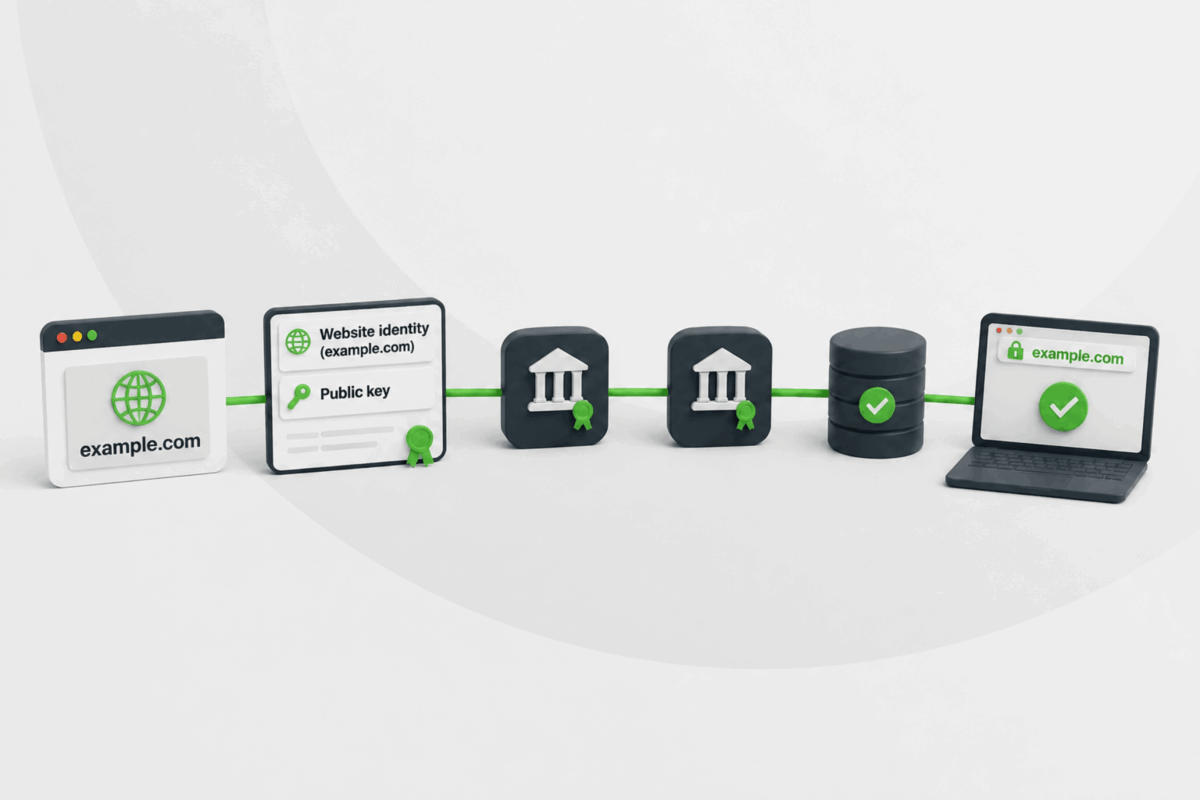
When you connect to your bank’s website, send an encrypted email, or install new software, how do you know you’re actually dealing with the real thing and not an impostor? The answer is public key infrastructure (PKI), the system that makes this kind of trust possible.
In this guide, we’ll define PKI in more detail, explain its role in issuing and validating certificates, where it’s used, and its associated security risks.
PKI Explained
PKI is a framework for issuing, managing, and maintaining digital certificates that link public keys to an identity. This key is a piece of cryptographic code used to secure data. It’s shared openly, unlike its matching private key, which stays secret.
The identity linked to a public key is often referred to as the certificate subject. Depending on the PKI, this may be a person, website, device, service, organization, or application.
A public key can perform useful cryptographic operations without PKI, but nothing ties it to a specific owner. PKI provides that missing link, giving other systems a basis to trust the key and the identity associated with it.
What Are Public and Private Keys?
PKI relies on asymmetric cryptography, which uses a pair of mathematically related keys. Users share the public key, while its matching private key must remain under the owner’s control.
The two keys perform complementary cryptographic operations. Their exact role depends on the algorithm and protocol in use:
- Private keys: Can create digital signatures and prove control of a cryptographic identity. Some cryptographic systems also use them for private operations involved in encryption or key establishment.
- Public keys: Can verify digital signatures. They can also take part in encryption or key-establishment processes without exposing the corresponding private key.
This is why saying “the public key encrypts and the private key decrypts” is too simplistic. Some public-key systems work that way for certain operations, while others use the key pair in other ways.
The mathematics can confirm whether someone controls a key pair’s private key, but the key itself doesn’t identify that person or system. PKI addresses that identity gap.
What Is a PKI Certificate?
A PKI certificate is a digitally signed credential that connects a public key to an identity. It’s also called a digital certificate or public key certificate.
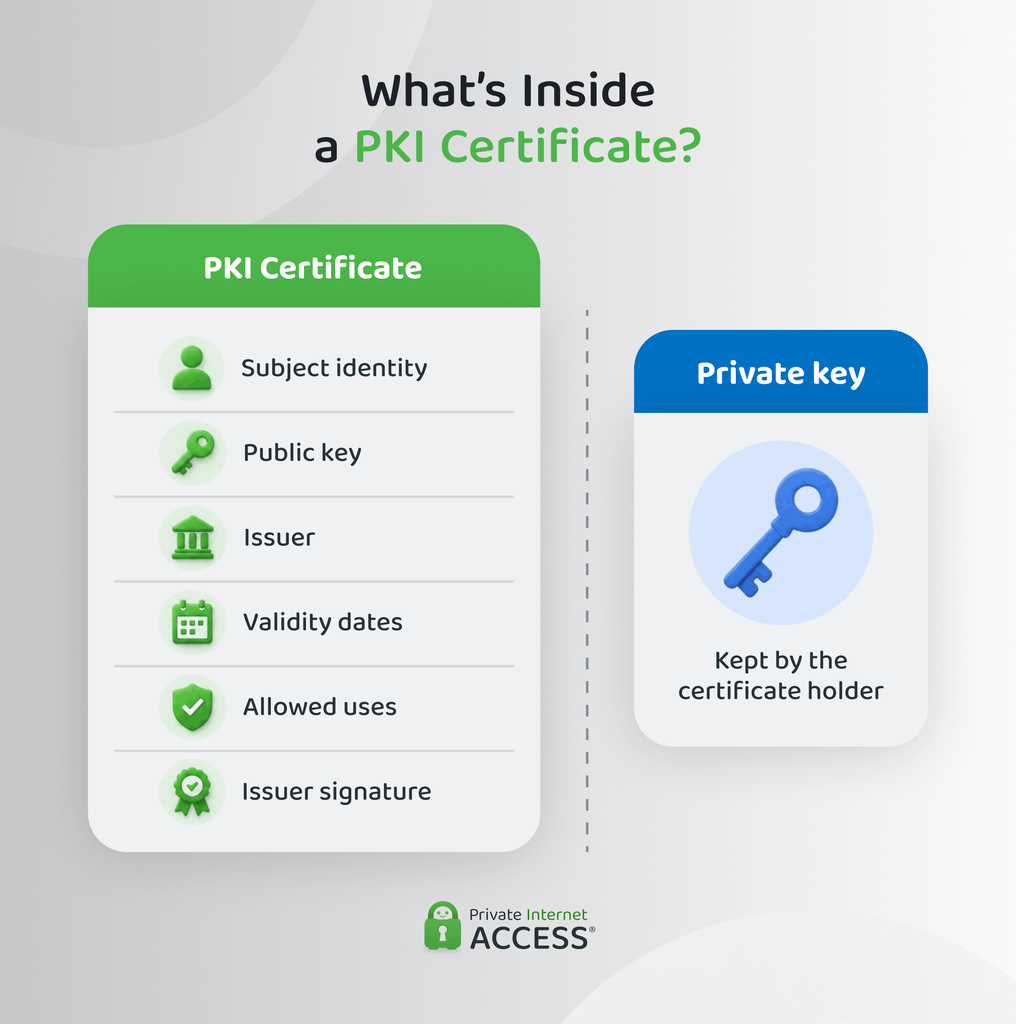
Many PKI systems use the X.509 standard, which is widely used for web services and enterprise systems.1 A certificate usually includes details such as:
- Subject: The identity the certificate represents.
- Public key: The subject’s public key.
- Issuer: The certificate authority that issued the certificate.
- Serial number: A unique identifier assigned by the issuer.
- Validity period: The dates between which the certificate is valid.
- Key usage: Rules that specify which cryptographic purposes the certificate can support.
- Subject names: Additional identities covered by the certificate, such as website domain names.
- Digital signature: A signature created by the issuer to protect the certificate’s contents and identify who issued it.
The subject’s private key isn’t stored in the certificate. It stays separate and should remain protected by the certificate holder. Anyone who receives the certificate can access the public key it contains without gaining access to the private key.
Presenting a certificate doesn’t, by itself, prove that the holder still controls the corresponding private key. That proof occurs when the holder uses the private key in a way that verifies it pairs with the certificate’s public key.
What Are the Main Components of PKI?
A PKI needs more than certificates and key pairs. Several roles and systems establish the trust relationships that make those certificates meaningful:
- Certificate authority (CA): Signs and issues digital certificates according to the PKI’s rules. Its digital signature links the certificate to its issuer and makes any later changes detectable.
- Root certificate authority: Sits at the top of the certificate hierarchy and acts as its trust anchor. Its private key needs strong protection, so organizations may keep root CA systems offline when they aren’t needed.
- Intermediate and issuing certificate authorities: An intermediate CA receives signing authority from a root or another intermediate CA. An issuing CA signs certificates for end entities, which limits how often the root CA needs to use its private key.
- Registration authority (RA): Checks identities or approves certificate requests on behalf of a CA. It’s an optional PKI role and normally doesn’t sign the final certificate itself.
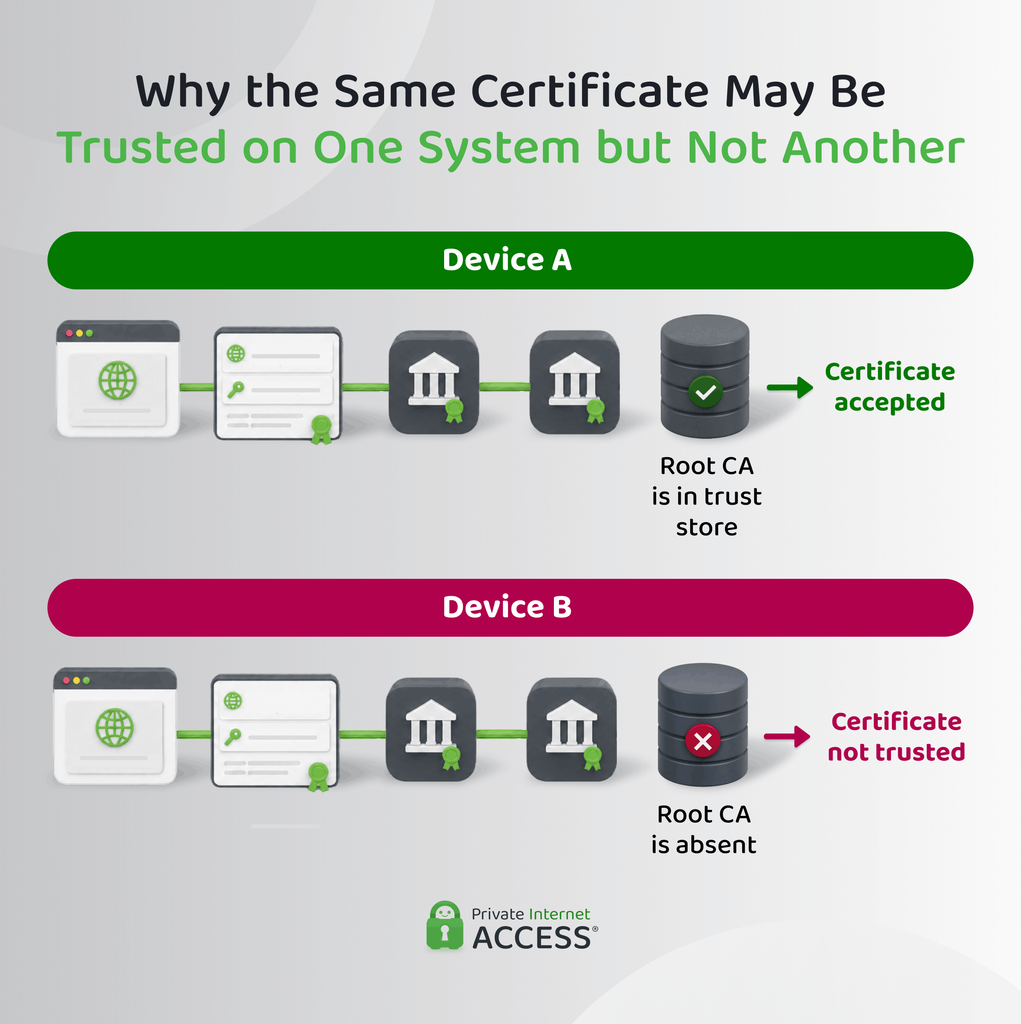
- Trust store: Contains the root certificates that a browser, operating system, application, or organization accepts as trusted. Trust stores can differ between systems, so the same root isn’t recognized everywhere.
- Certificate policies: Set the rules for how to check identities, which certificates to issue, how to protect keys, and what to use those certificates for.
How Does PKI Work?
PKI works in two main stages. Certificate issuance comes first, followed by certificate validation. A website certificate provides a familiar example of both.
How Is a Certificate Issued?
Certificate issuance starts with the system or organization that needs the certificate. The exact checks vary by certificate type, but the basic process follows this pattern:
- The requester generates a key pair: The requester creates a public key and its matching private key. The private key stays on the requester’s system or in protected hardware and isn’t sent to the CA.
- The requester creates a certificate signing request (CSR): The CSR packages the public key and required identity details (e.g., domain names for a website). It’s signed with the requester’s private key to prove ownership of the key pair.
- The CA validates the request: The required checks depend on the certificate type. For a website certificate, this can include confirming control of the requested domain, while certificates for people or managed devices can require different evidence.
- The CA signs the certificate: After approving the request, the CA creates the certificate and signs it with its own private key. This confirms the CA approved the certificate under its rules, rather than guaranteeing every possible claim about the subject.
- The requestor installs the certificate: The requester places the certificate on the server, application, device, or account it will use. The matching private key must remain available to that system so it can prove control of the identity represented by the certificate.
How Do Systems Validate a Certificate?
When a browser connects to a Hypertext Transfer Protocol Secure (HTTPS) website, the site sends its certificate as part of the connection setup. The browser then checks whether that certificate is valid for the website and whether it leads back to a CA the browser already trusts. The main checks include:
- Identity: The certificate has to apply to the requestor. For a website, the browser checks that the domain name appears in the certificate.
- Validity period: The current date has to fall within the certificate’s permitted start and expiration dates. The browser can reject a certificate that isn’t valid yet or has already expired.
- Permitted use: The browser must approve the certificate for the operation the system wants to perform. A certificate issued for one cryptographic purpose may not be valid for another.
- Issuer signature: The system verifies the digital signature made by the certificate’s issuer. A valid signature shows that no one’s altered the certificate since the issuer signed it.
- Chain of trust: The system follows the chain from the end-entity certificate through one or more intermediate CAs and ends up at a root certificate already accepted in its trust store. The system trusts the root because a trusted party added it to its trust store, not because it’s self-signed.
- Revocation status: Where certificate-status checking applies, the system may also check whether the CA revoked the certificate before its expiration date.
If the required checks succeed, the system can accept the certificate for that purpose. If validation fails, the application may refuse the connection or show a certificate warning such as “Your connection is not private.”
The Difference Between PKI and SSL/TLS
Transport Layer Security (TLS) keeps your connection private between you and the other party, but it doesn’t verify the other party’s identity. PKI handles that by confirming you’re actually talking to the right server. Secure Sockets Layer (SSL), TLS’s predecessor, is obsolete.
After the client authenticates the server, TLS derives shared session keys and uses symmetric encryption to protect application data. The certificate authenticates the server, but it doesn’t encrypt the browsing session itself.
Standard HTTPS authenticates the server to the client. TLS can also require a client certificate, but this is optional and more common in controlled environments where a service needs to authenticate connecting users or devices.
Why Is PKI Important in Cybersecurity?
PKI gives systems a reliable basis for recognizing digital identities. This means several security functions can work from a shared trust model instead of establishing trust independently.
- Trusted authentication: Certificates can authenticate users, servers, devices, applications, or workloads. Authentication establishes who or what is connecting, while authorization rules determine what it can access.
- Data integrity and digital signatures: You can check signed data for changes made after signing, while the certificate identifies the subject associated with the signing key.
- Certificate-based access decisions: Services can use an authenticated certificate identity when deciding whether to accept a connection. Access permissions are still controlled by the receiving system.
- Scalable machine identity: Large environments can give each non-human system its own certificate-based identity instead of reusing one shared credential across many systems.
What Is PKI Used For?
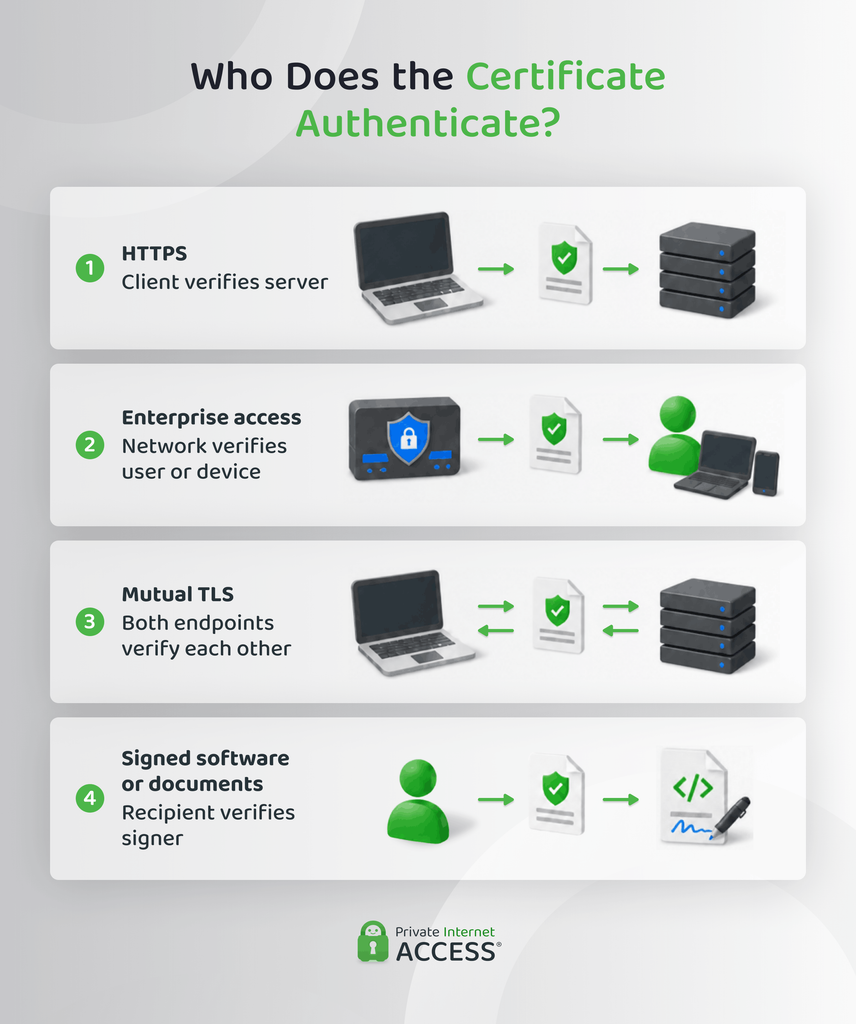
Beyond the web example above, PKI also appears in:
- Enterprise Wi-Fi: Wi-Fi Protected Access (WPA)-Enterprise networks can use certificates to authenticate approved users or verify that the access point isn’t a rogue network, rather than relying only on a shared Wi-Fi password.
- Secure email: Systems such as Secure/Multipurpose Internet Mail Extensions (S/MIME) use certificates to support message signing and encrypt messages for specific recipients.
- Code signing: Software publishers use certificates to associate a signing key with their identity, helping users verify who signed the software.
- Document signing: Certificates can associate a digital signature with an identified signer and help reveal changes made to the document after signing.
- Device authentication: Managed hardware and Internet of Things (IoT) devices can receive individual certificate-based identities instead of sharing one credential.
- Service-to-service communication: Applications and workloads can use certificates to identify themselves when connecting to other internal services.
- Smart cards and security tokens: These devices can store private keys and the certificates associated with them for certificate-based authentication.
How Do VPNs Use PKI?
VPN protocols such as Internet Key Exchange version 2/Internet Protocol Security (IKEv2/IPsec) can use X.509 certificates to authenticate VPN peers. In a site-to-site VPN, this can mean authenticating the gateways at each end of the connection. Remote-access deployments can also use certificates to authenticate managed devices or users.
OpenVPN can also use certificates through TLS to authenticate VPN endpoints. An organization might issue individual client certificates to employees or devices, while the VPN server presents its own certificate during connection setup.
Certificate-based PKI isn’t universal across VPN protocols. WireGuard, for example, identifies peers by their public keys rather than using X.509 certificates or a CA hierarchy.
How Does PKI Certificate Management Work?
PKI certificate management covers the ongoing work needed to keep certificates organized and usable after they’re issued. It often follows four stages:
- Discover and inventory certificates: Keep a record of each certificate’s location, owner, purpose, issuer, expiration date, and associated system so every credential has a known owner and role.
- Deploy, renew, and rotate certificates: Install certificates where they’re needed and replace them before they expire. Renewal replaces the certificate, while key rotation creates a new key pair. Automation can help when certificate volumes become difficult to track manually.
- Revoke certificates and publish their status: Revoke certificates after key compromise. A certificate revocation list (CRL) publishes revoked certificates, while the Online Certificate Status Protocol (OCSP) checks one certificate’s status. Revocation stops trust in the certificate, not use of the private key.
- Monitor and audit the PKI: Track upcoming expirations, unauthorized certificates, policy violations, revocation status, and CA activity. Audit logs record important actions such as issuance, revocation, configuration changes, and administrative access.
Types of PKI Solutions
PKI classifications include trust (public vs. private), operation (managed vs. self-managed), and hosting (cloud vs. on-premise). These dimensions are independent, so a private PKI can still be cloud-hosted or fully self-managed.
Public PKI vs. Private PKI
Public PKI uses CAs whose root certificates are already recognized by common browsers or operating systems. This makes it suitable for internet-facing services that need to work on users’ devices without requiring custom certificate installation.
CAs that participate in public trust programs must follow the requirements set by the relevant browser or operating system vendor. “Public” describes who can recognize the certificates by default. It doesn’t mean the CA infrastructure is accessible.
Private PKI creates a trust system for a controlled environment. The organization distributes its own root certificate to the devices or applications that should recognize certificates issued under that PKI.
Systems configured to recognize the organization’s root trust private PKI certificates. External browsers and unmanaged devices won’t trust them by default.
Managed, Cloud, and Self-Hosted PKI
How you deploy PKI depends on your resources, expertise, and how much control you need over the infrastructure. These are your main options:
| Model | Main Distinction | Main Advantage | Main Tradeoff |
| Self-managed PKI | Organization operates the PKI | Direct operational control | Requires internal PKI expertise |
| Managed PKI | Provider performs agreed PKI functions | Reduces routine administration | Creates provider dependence |
| Cloud PKI | Infrastructure is cloud-hosted | Easier infrastructure provisioning and scaling | Less direct control over hosting |
| On-premise PKI | Infrastructure runs in the organization’s environment | Greater infrastructure control | More maintenance responsibility |
| Hybrid PKI | Organizations divide hosting and operational duties | Flexible division of control | More integration complexity |
A few points worth noting:
- With managed PKI, the exact split of responsibilities varies by service, so the organization may still retain control over some policies or infrastructure.
- Cloud hosting doesn’t automatically mean the PKI is fully managed. The organization can operate a cloud-hosted PKI itself.
- In a hybrid setup, an organization might retain direct control of its root CA while using an external service for routine certificate issuance.
What Are the Main PKI Security Risks and Limitations?
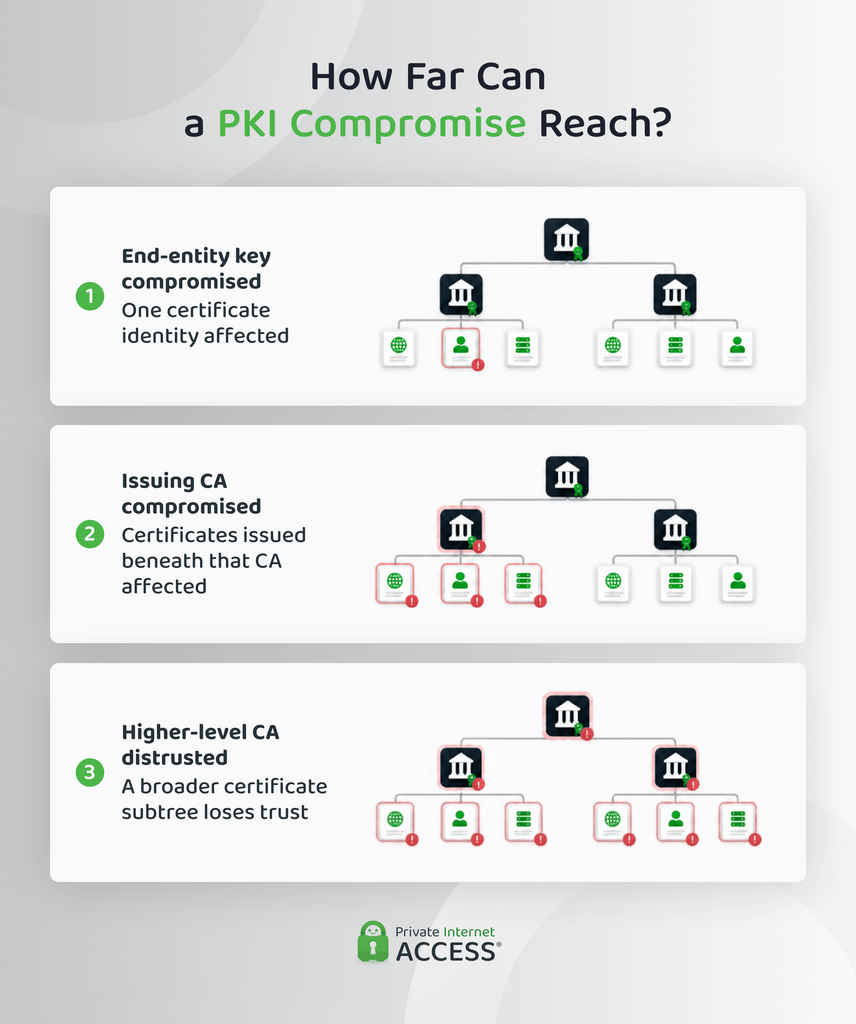
PKI can fail even when its cryptography remains secure. Here are some of its risks and limitations:
- Private key theft: A stolen private key can let an attacker impersonate its owner or create valid-looking signatures until the certificate expires or it’s no longer trusted. Hardware security modules can reduce key exposure, but not eliminate the risk.
- CA compromise or misissuance: A compromised certificate authority can issue certificates that other systems trust. Misissuance can also result from weak checks or errors, while distrusting that CA may affect every certificate below it.
- Expired or untracked certificates: Expired certificates can interrupt websites, VPN connections, applications, or internal services. Untracked certificates may also remain active after the system or owner they belonged to has changed.
- Validation and revocation gaps: Weak hostname checks, ignored warnings, or incomplete chain validation can undermine trust. Some systems may also skip, delay, or make revocation data unavailable.
FAQ
What is an example of a PKI?
A public web PKI is a common example. Websites use certificates that link back to CAs trusted by browsers or operating systems, allowing browsers to verify website identities without making users install a public key for every site.
Is PKI the same as SSL?
No. PKI manages certificates and public-key identities, while SSL is a network security protocol replaced by Transport Layer Security (TLS). TLS can use PKI certificates for authentication, but PKI serves a much broader role.
What is PKI and how does it work?
Public key infrastructure (PKI) is a framework for issuing, maintaining, and revoking public-key certificates. A certificate links an identity to a public key, while trusted certificate authorities and validation rules let other systems decide whether to accept that identity.
Why is PKI important for cybersecurity?
PKI provides a structured way to authenticate digital identities and verify digital signatures. This helps systems establish the identity of the person, device, website, app, or organization that’s connecting, check that no one’s altered the signed data, and apply verified identities to access decisions.
What’s the difference between managed/cloud PKI and running your own?
Running your own PKI means your organization operates the CAs and handles their security and administration. Managed PKI shifts agreed operational work to a provider, while cloud PKI only describes where you’re hosting the infrastructure, meaning you might still need to manage your own cloud PKI.
References:
