Is Google Listening to Me? Understanding Google’s Voice Features
Is Google spying on me? If you use Google Assistant or Gemini, your device may listen for a wake word, such as “Hey Google,” to respond to voice commands.
This guide explains how Google’s voice features work, what data they collect, how to manage your voice and privacy settings, and the steps you can take to better protect your personal data.
While managing your Google settings helps you control what data it collects, you can add a VPN to your arsenal for added protection. PIA encrypts your internet traffic and masks your IP address whenever you connect to our server. This makes it harder for your ISP or third parties to monitor your online activity, especially on public and shared networks.
Table of Contents
Why Does Your Phone Listen To You?The Risks of Being Overheard
Is Google Listening to Me All the Time?
Is It Legal for Google to Listen to You?
Where to Find Your Google Recordings
How to Stop Your Phone from Listening to You
How to Stop Your iPhone from Listening to You
Privacy Tips to Protect Your Data on Smartphones
FAQ
Why Does Your Phone Listen To You?
Many smartphones listen for voice commands so voice assistants can respond when you say a wake word or activate them manually.
This includes Google Assistant and Gemini on Android devices, Siri on iPhones, and other apps that you’ve given microphone permission to use.
Whether Google records or stores anything depends on which voice features you’ve enabled, your privacy settings, and the permissions you’ve granted to individual apps.
The Risks of Being Overheard
Voice recordings can contain sensitive personal information, so it’s important to think about how they’re stored and protected. If they’re exposed in a data breach or someone gains unauthorized access to your account, someone could misuse these for fraud, identity theft, or other forms of impersonation.
AI voice cloning has also introduced new risks. Criminals may be able to use these recordings to create convincing impersonations for scams or to bypass voice-based verification systems.
Governments and law enforcement agencies may also require companies to disclose user data, depending on local laws. In some countries, privacy advocates have raised concerns that broad access to stored personal data, including voice recordings, could affect personal privacy.
Related: What Is Data Harvesting? Definition, Risks, and Protection
Is Google Listening to Me All the Time?
Not exactly. Google Assistant and Gemini remain in a standby mode until they’re activated. Official Google documentation says the device processes short snippets of audio to detect activation and that these snippets aren’t sent to its servers – this only happens if the assistant is activated.¹
However, unintended activations can still happen. For example, background noise or speech that resembles a wake word may activate the assistant.
Whether Google saves audio from those interactions depends on the Google service and your settings. For example, Google Assistant’s Voice & Audio Activity setting controls whether Google saves recordings to your account. It’s off by default, so they’re not saved unless you choose to enable it.
Google may also use audio from some voice interactions to improve its speech recognition technology and voice services, depending on the service and settings.²
Does Google Use Your Conversations for Advertising?
Google denies using voice recordings for ad personalization, but many people remain skeptical, and concerns about its voice features have continued to prompt legal challenges and regulatory scrutiny.
According to Google, it can base ad personalization on other information associated with your Google account, such as your search activity.3 This depends on your settings, which you can review through Google Activity Controls and My Ad Center.
Is It Legal for Google to Listen to You?
Whether Google’s voice features are legal depends on how they’re used and the laws in your country or region. In many jurisdictions, companies can collect and process voice data if users give consent, such as accepting terms of service or enabling voice features.
Google has faced legal challenges over allegations that Google Assistant unintentionally recorded private conversations and disclosed some recordings to third-party reviewers. In 2026, Google and its parent company, Alphabet, agreed to pay $68 million to settle a lawsuit over those allegations.4 Google denied wrongdoing and settled the case without admitting liability.
The settlement doesn’t mean Google admits its voice features are illegal. Instead, the settlement resolved the claims without a court ruling on whether Google had violated the law.
Where to Find Your Google Recordings
Google lets you review, listen to, and delete voice recordings saved to your account. Where you find them depends on the Google service used and the activity settings enabled on your account.
Google can save Assistant recordings under Web & App Activity, while you might find Gemini recordings under Gemini Apps Activity. Google is also rolling out Search Services History for Search and Maps, so some accounts may now find voice search recordings there instead.5
Access Web & App Activity
The steps below explain how to find and manage recordings saved through Web & App Activity.
On a Browser
- Navigate to your Google Account and sign in (or visit
myactivity.google.com). Select Web & App Activity.
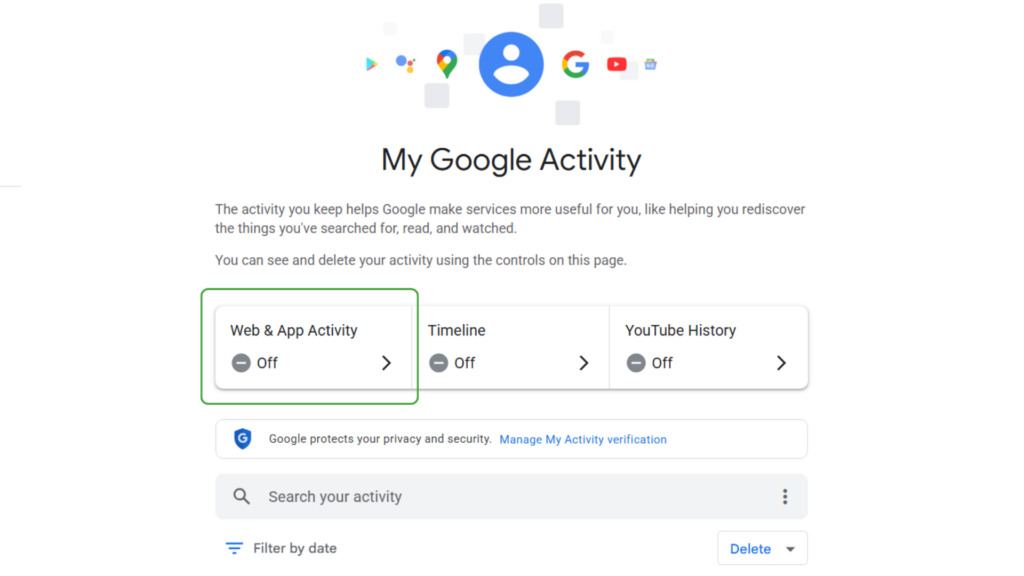
- Select Manage All Web & App Activity.
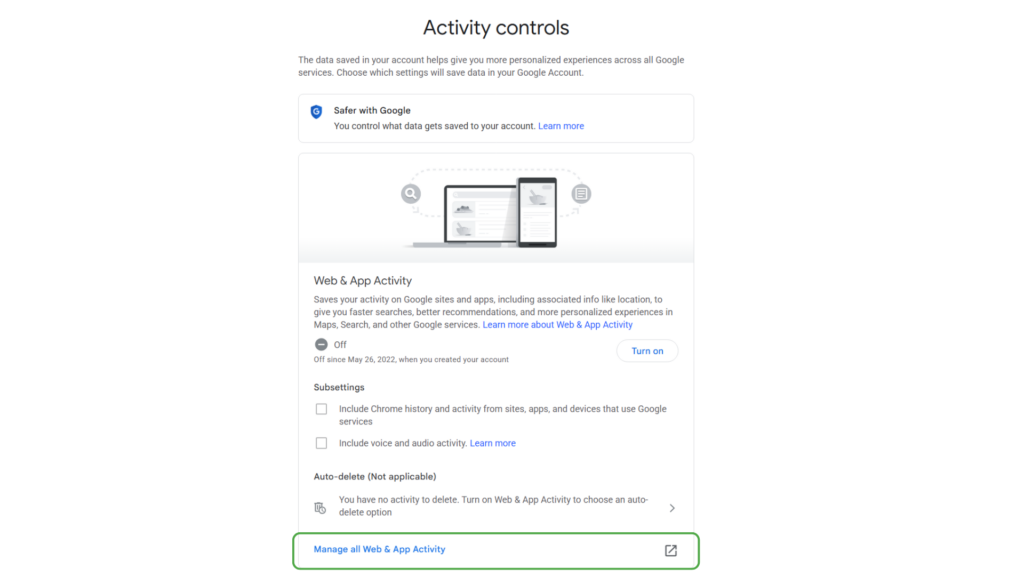
On Android
- Navigate to Settings > Google. Click on your profile picture and select Manage your Google Account.
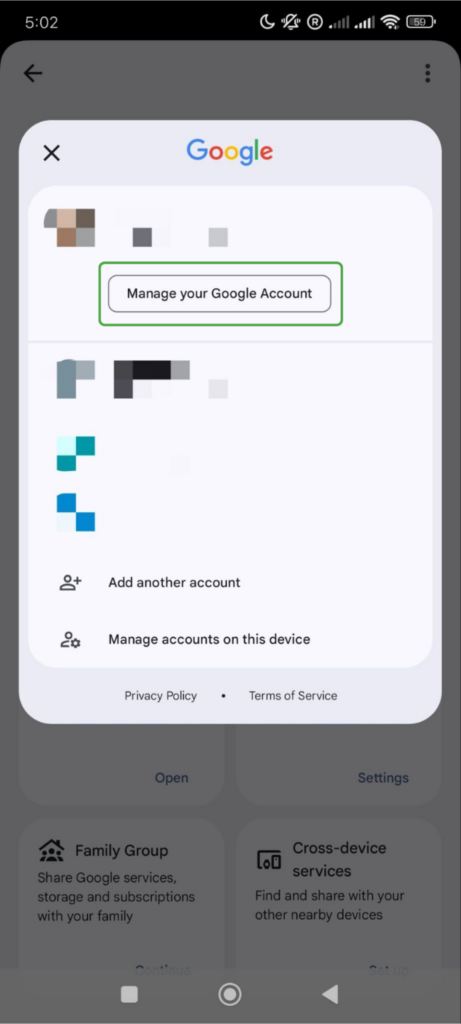
- Click Data & privacy.
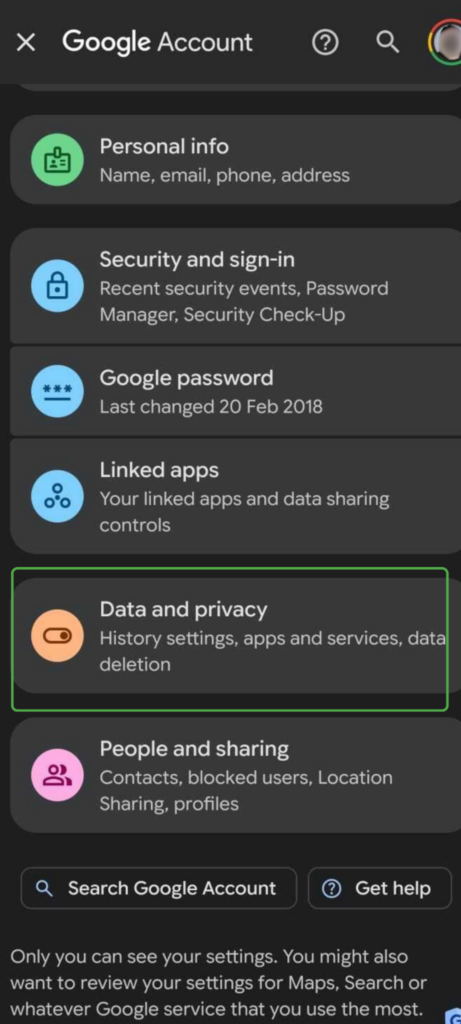
- Open Web & App Activity.
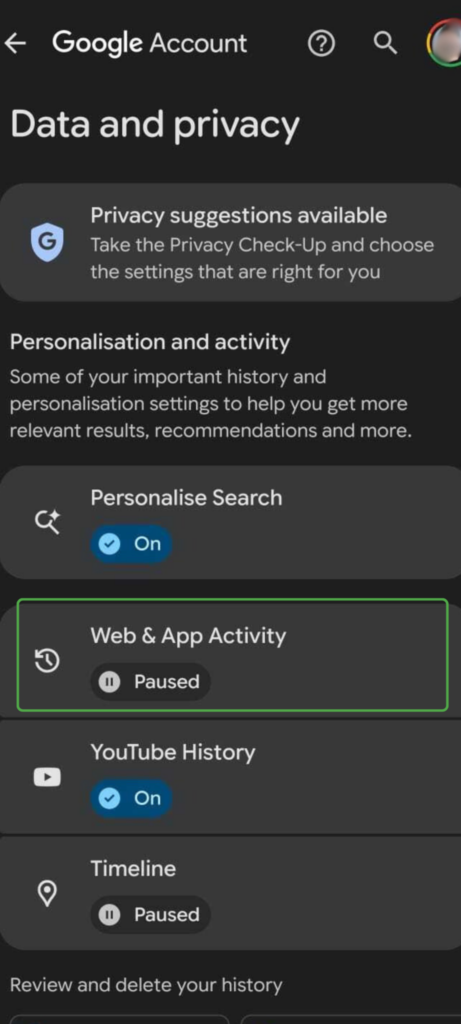
Note: Deleting activity from Web & App Activity only removes data stored in this section. It doesn’t delete recordings that Google may save elsewhere in your Google account.
Manage Recordings in Web & App Activity
Google doesn’t currently provide a separate view for saved audio recordings. In Web & App Activity, recordings appear alongside other activity.
You can delete individual recordings, but Google’s bulk deletion and auto-delete options also remove other web and app activity within the selected period. There’s also no dedicated filter for showing only recordings.
To find these, you’ll need to look through your entire Web & App Activity section. The process is the same on both desktop and mobile:
- Browse the activity list for recordings marked with an audio icon.
- Click Details to see when Google recorded an interaction or View recording to listen to it.
- To remove a recording, select the delete icon next to the entry.
- Return to Web & App Activity and turn off Include voice and audio activity if you don’t want Google to save future recordings.
Related: How To Remove Your Voice Search History
Manage Gemini Activity
Here’s how to see your activity on Gemini via browser or app.
On a Browser
- Navigate to
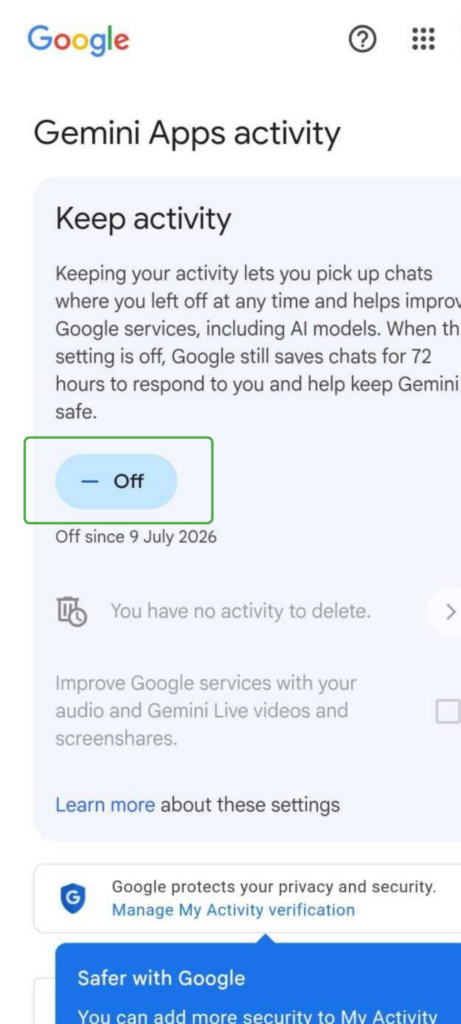
gemini.google.comin any browser. - Select Settings & help > Activity (or go to Gemini Apps Activity). Here you can review or delete your Gemini activity or turn off Keep Activity.
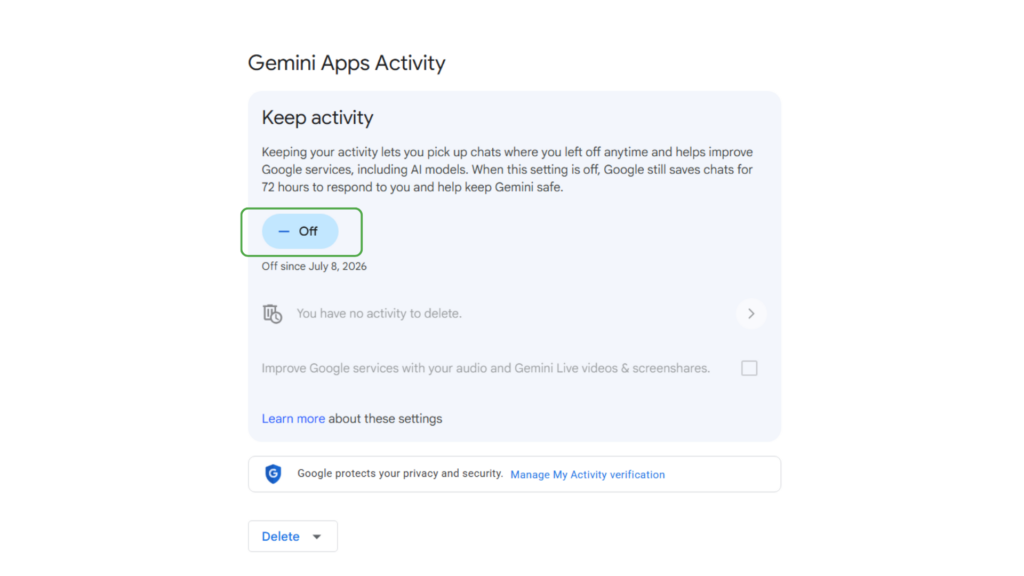
In the Gemini App
- Open the Gemini app, tap your profile picture, and select Gemini Apps Activity.
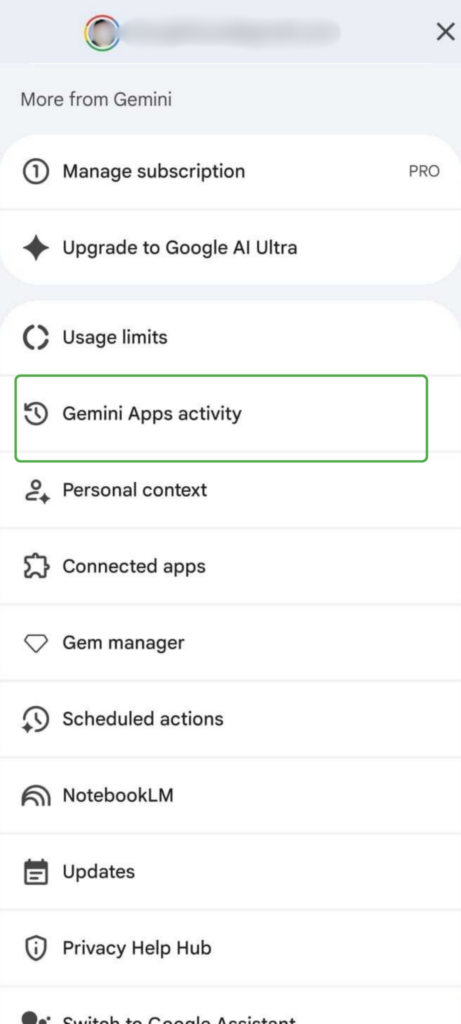
- Review or delete your Gemini activity. You can also turn off Keep Activity.
How to Stop Your Phone from Listening to You
You can reduce how often your phone listens for voice commands and control which apps have access to your microphone. Here’s how:
Turn Off Google Assistant on Gemini on Android
You can either turn off the assistant completely or keep it enabled while disabling wake word activation. Note that the exact options may vary between devices.
Turn Your Default Assistant off Completely
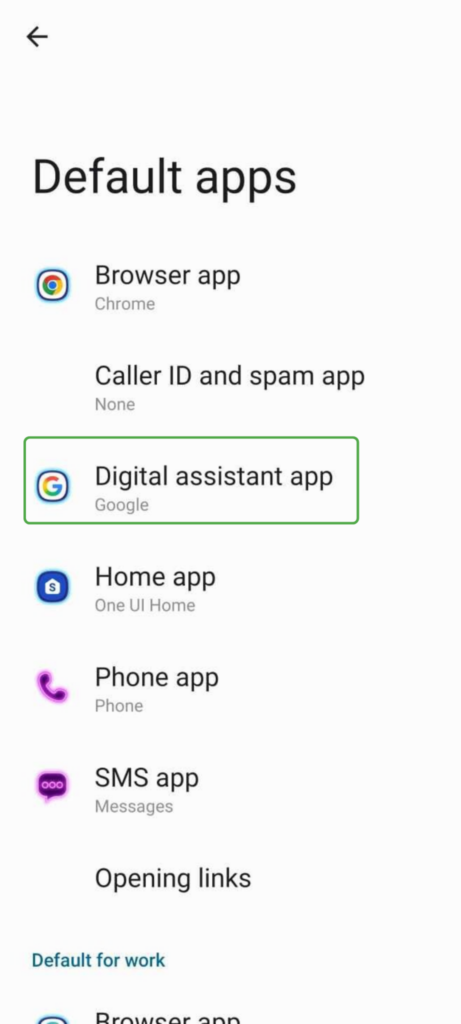
- Open Settings and go to Apps > Default apps.
- Select Digital assistant app, Default assistant, or Assistant app.
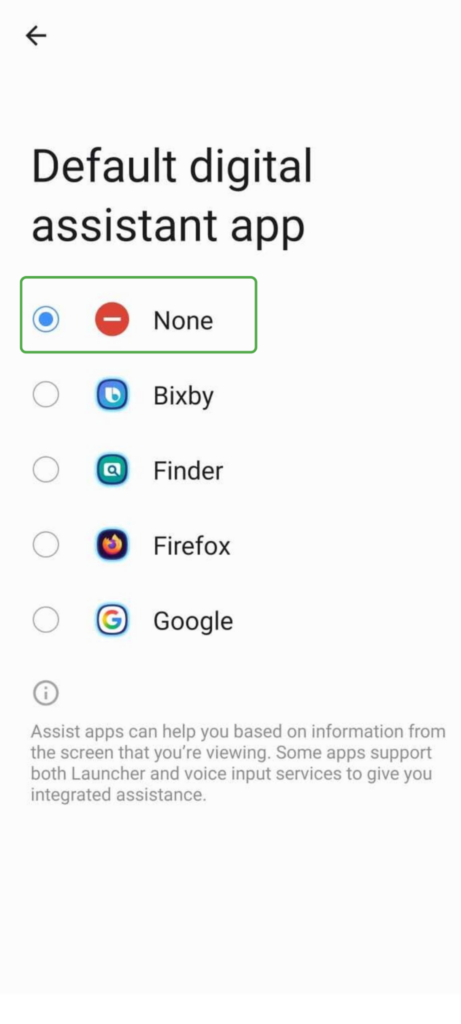
- From the options, choose None.
To keep using Gemini without voice activation:
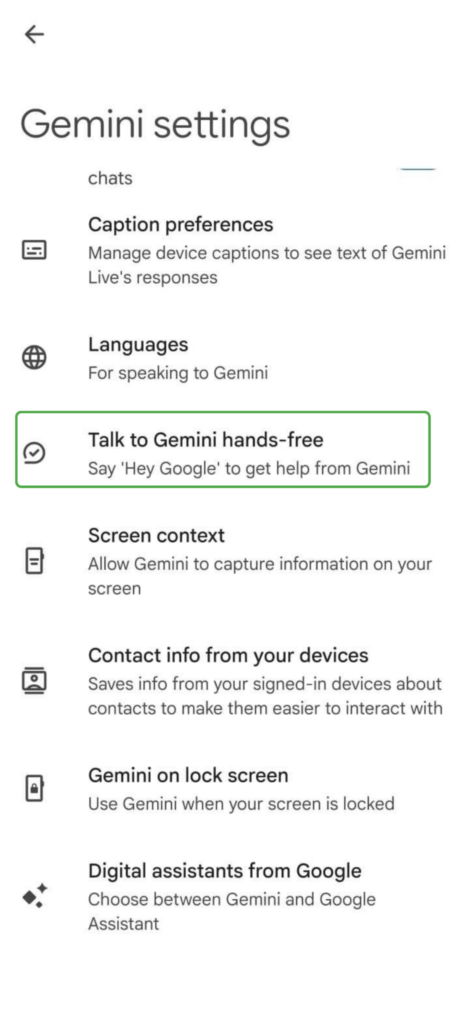
- Open the Gemini app. Tap your profile picture, then Settings.
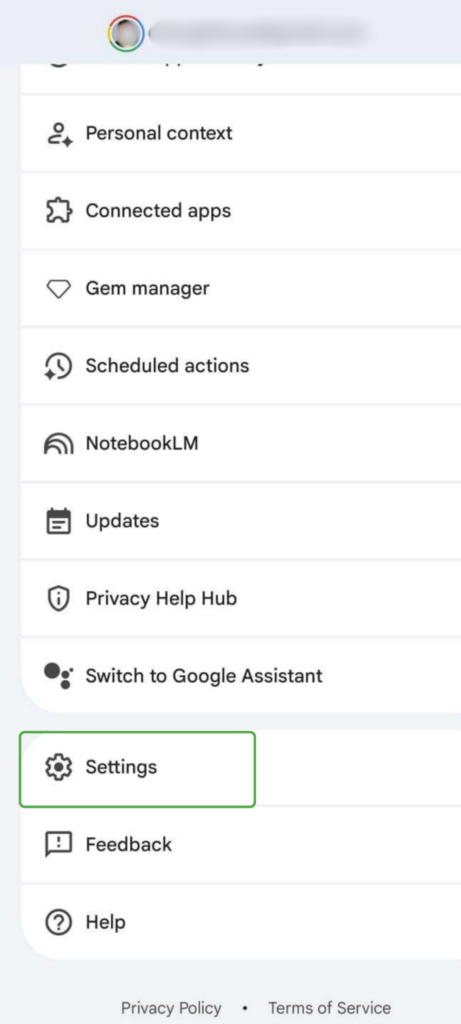
- Open Talk to Gemini hands-free.
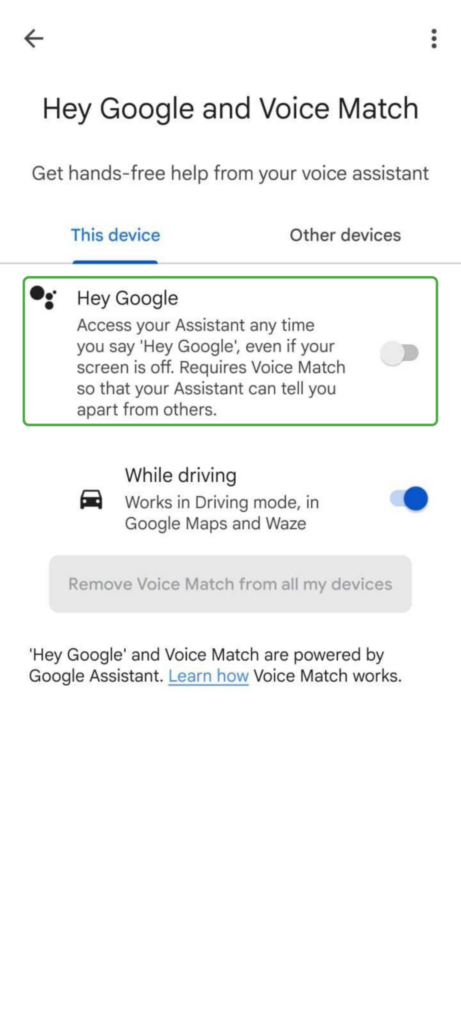
- Turn off Hey Google.
Note: On many Android devices, you can also stop the Assistant from launching when you press and hold the power button. Go to Settings and search for Gestures > Launch digital assistant. Toggle off Press & hold power button. Exact options vary by device but instructions are similar.
Remove Microphone Permissions
If an app doesn’t need microphone access to work, you can remove or limit the permissions. Follow these steps and repeat them for any other apps that don’t require microphone access:
- Go to Settings > Apps.
- Select the app you want to review and choose Permissions or App Permissions.
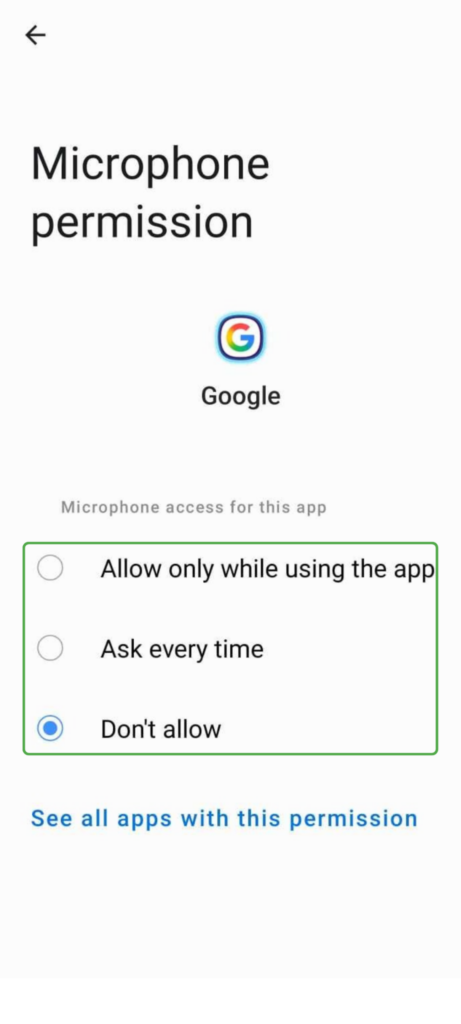
- Tap the microphone option.

4. Depending on how much access you want to give the app, choose Allow only while using the app, Ask every time, or Don’t Allow.
How to Stop Your iPhone from Listening to You
Google may not have the same kind of access to your data on iOS devices. However, iOS devices use Siri, a personal assistant that wakes via voice command. Here’s how to limit what Siri and Google can track on your iPhone.
Disable Siri
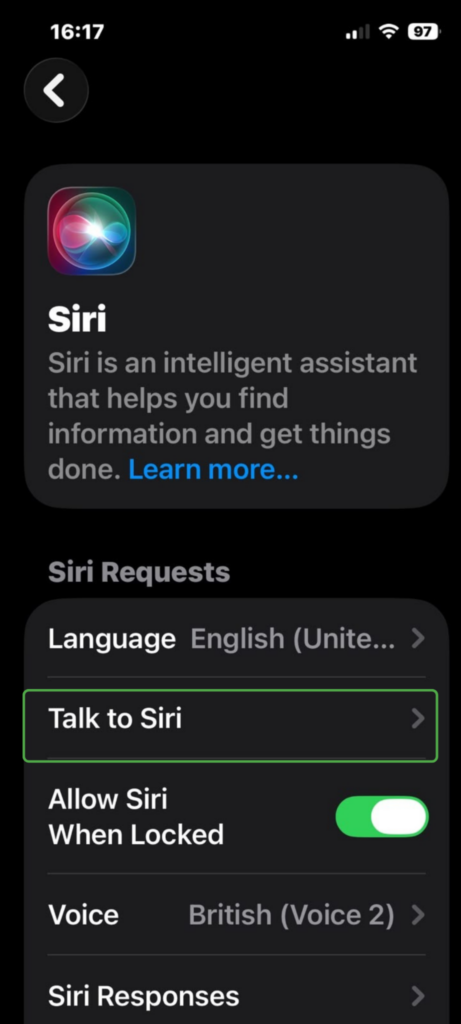
- Open Settings and tap Apple Intelligence & Siri (or Siri on other iOS versions).
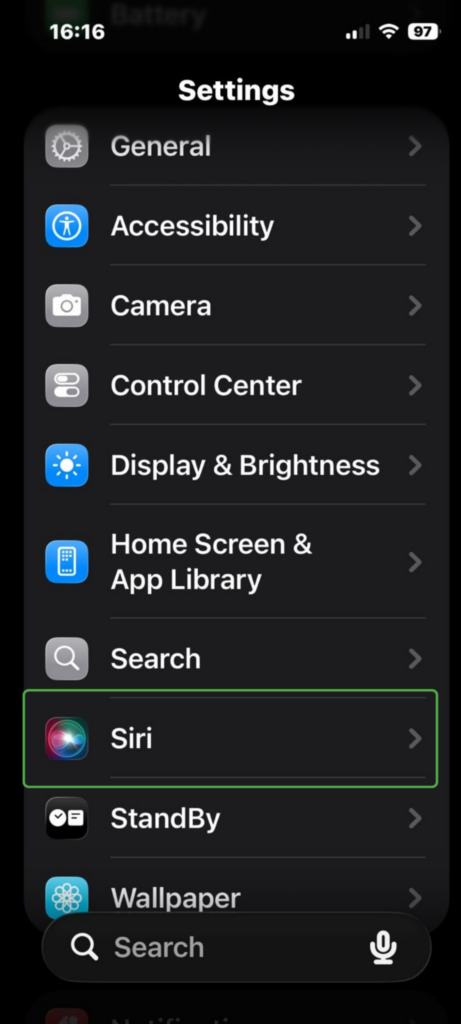
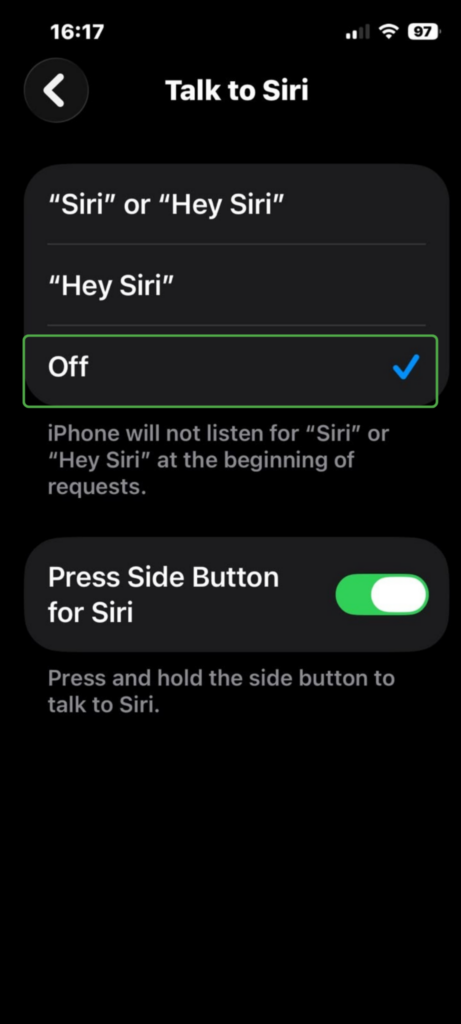
- Tap Talk to Siri (or Talk & Type to Siri, depending on your iOS).
- Select Off.
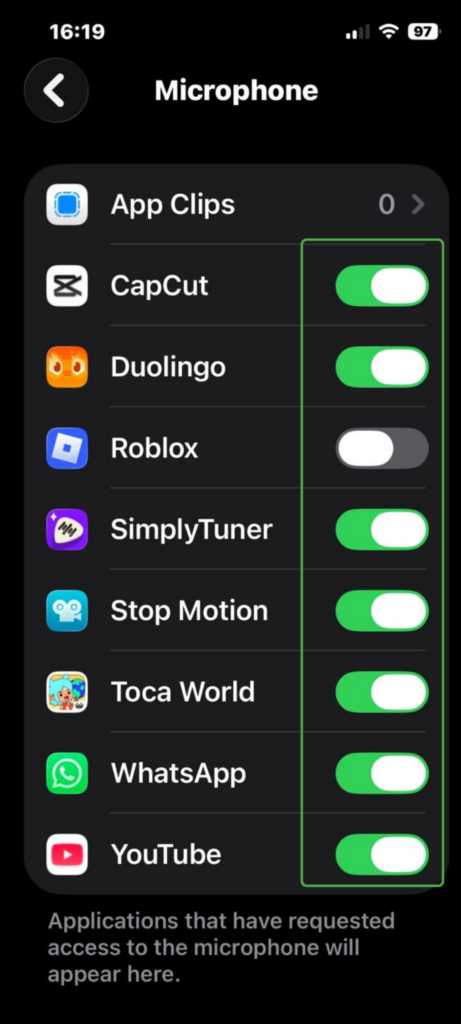
Review Microphone Permissions
As with Android, Apple requires apps to request your permission before they can use the microphone, and you can change that access at any time. Here’s how:
- Got to Settings > Privacy & Security.
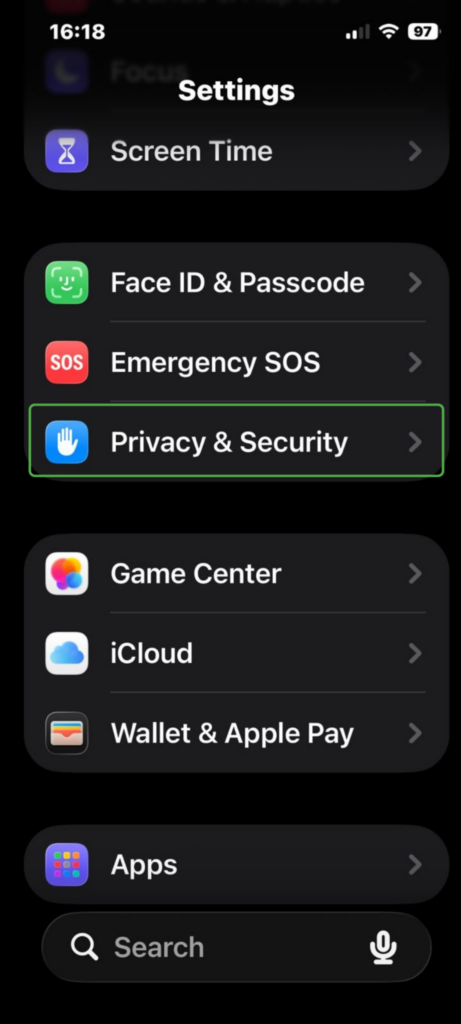
- Select Microphone.
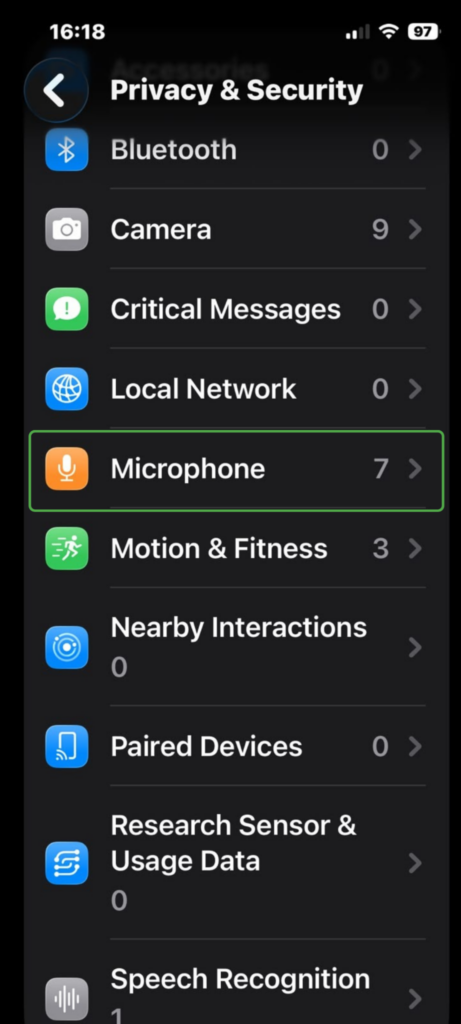
- Review the list of apps that have access and disable any that don’t need it.
Privacy Tips to Protect Your Data on Smartphones
Managing your voice settings and app permissions are only one part of protecting your privacy. These additional practices can help reduce the amount of data you share and improve your overall security:
- Download apps from trusted sources: Use official app stores, such as the Google Play Store or Apple App Store, to reduce the risk of downloading malicious or fake apps.
- Keep your phone up to date: Install software updates to receive the latest security patches and address new discovered vulnerabilities.
- Delete apps you don’t use: Remove unused apps to reduce unnecessary data collection and potential security risks.
- Review your Google privacy settings: Manage your Google Activity Controls and My Ad Center settings to control how your Google stores your activity for personalization.
- Use a VPN: Add another layer of privacy when you’re online with a reputable VPN with strong privacy controls. PIA VPN includes MACE, a built-in tool that blocks known ads, trackers, and malicious domains at the DNS level.
FAQ
How do I delete my Google voice recordings?
You can delete Google’s voice recordings through your Google Account. For Assistant recordings, access these through Web & App Activity or Gemini Apps Activity for Gemini. Google is also rolling out Search Services History for Search and Maps, so you might find some recordings there instead.
Is Google listening when my phone is locked?
If you’ve enabled Google Assistant or Gemini, your phone can listen for a wake word while it’s locked so it can respond to voice commands.
How does Google use my voice data?
Google says it uses voice data to respond to voice commands and doesn’t use this data for ad personalization. If you’ve chosen to save voice recordings, Google may also use your voice data to improve speech recognition and Google’s voice features.
Can Google listening be a security risk?
Saved voice recordings can present a security risk if they’re exposed through unauthorized account access or a data breach. Criminals may use stolen recordings in impersonation scams or AI voice-cloning attacks.
Is Google violating my privacy by listening?
Whether Google is violating privacy depends on the circumstances and the laws that apply. Google has faced lawsuits over its voice features but denies wrongdoing. The cases have raised broader questions about transparency, consent, and how Google handles voice data.
Does Google listen for targeted advertising?
According to Google, no. While lawsuits have alleged otherwise, Google has denied those claims and there hasn’t been a court ruling that found it used ambient conversations for targeted advertising.
Can I disable “Hey Google” or “OK Google” detection?
Yes. You can turn off “Hey Google” or “OK Google” detection without disabling your digital assistant completely. Follow these instructions to update your voice activation settings.
How accurate is Google’s speech recognition?
Google’s speech recognition is generally accurate, but its performance depends on factors such as audio quality, background noise, the language spoken, and how clearly someone speaks. Like other speech recognition systems, it can also make mistakes with some accents, dialects, or uncommon words.
References:
- How Google Assistant is designed for your privacy – Google
- Manage audio recordings in your Web & App Activity – Google
- Manage Personalized Recommendations in Search services – Google
- Google settles Google Assistant privacy lawsuit for $68 million – Reuters
- Manage your saved media in Search Services History – Google

Comments are closed.
Nice proof. I see that you installed wireshark, watched the activity, and analyzed it to back up your claims of google spying on you.
Oh … wait. You didn’t. Ooops.
Bad Google! No browser cookie for YOU!
Best comment EVER! You win everything! Cheers!
P.S. Made me sign up for Disqus just to regale your comment!
No need – servers track requests
I uninstalled Google just now. Please keep me advised of any class-action lawsuits against them for this. Otherwise, they belong in prison.
How do you turn it off… Faking Google.
“Don’t be evil” – Google
Sheesh everywhere, and I mean EVERYWHERE, we look, every direction we turn, corruption…deep to the core corruption.
Only thing I’ve found is power off and pull that battery when you discuss anything you don’t want repeated or video taped also hangout is another one to get rid of jlyk RATCHET hope that helps
What I want to know… and I think I already do know the answer… If people who are surprised about this hidden black box get together as a larger group and ask Google to explain what they are finding out… I believe it will lead to an interesting dialogue. The people at Google are pretty knowledgeable about things but perhaps we need to balance the privilege they have given themselves by being so “smart” with an honest to goodness red flag curiosity. of our own. I do trust google- strangely enough -but you are right to point out this self entitling behaviour and, in fact, if what they are looking for is truly a worthy thing that enables them to bring us all closer to the things we dearly want to learn and know about then we really do have an obligation to say something and not leave our faith in humanity to become a prisoner to our inability to trust others. Google has accomplished some remarkable things that can be given a positive interpration as well. If you want me to put Googles’ accomplishments into simple words, I would have to say that Google… out of its “do no evil” pledge has had an incredible… actually unimaginably significant effect on all our lives.
It seems that being such an amazing facilitator might even justify their evolving more relaxed views on the taboos of most average people that evolved in a completely different environ. Perhaps, becoming a googlophyte or what ever you call the programmers and engineers at Google you actually become part of a group of individuals who want to change the world for the better. Maybe they will listen to us if we complain about not being included in this interesting examination of boundaries and boldness. If I was doing something kind for someone, I think I would choose to boldly believe that what I was doing is worth my going against the grain.
In short, I would like to say that drawing attention to a black box might underline the covert tendencies of the author more than the violating nature of Google’s curiosity and that an inquiry of greater significance might be to examine the more subtle variances of mission creep evident in Google’s path of inquiry if indeed there are any.
Throughout history, the greatest damage has generally been done by seemingly well-intentioned people who saw themselves as better, smarter, more moral, whatever, than the “common” people, and who believed that their superior status entitled them to evade the rules that govern everyone else. And if you can’t see the Orwellian irony in Google’s “do no evil,” then you really shouldn’t be commenting on things like this.
If you think this is an excusable and responsible statement, raise your hand now.
The Patriot 24/7 365.
Talk about full of shit!! That long rambling utterance of nonsense that you just spouted. Makes about as much sense as farming for rocks. So in your mind because they have a “do no evil” statement. That they’ll never use any of that information that they pick up for something that could hurt you or people around you. The amount of information that could be covertly gathered about individuals and the people they associate with. family members and the like. Could be very easily used to Blackmail anybody. The individuals that would have access to that kind of information could very easily use it to destroy someone’s life. on a individual basis someone in a particular position and another company of any type you could take information gathered from that particular person’s private conversations and use that to your own advantage. It doesn’t have to be Google themselves but those individuals who have access to that type of private information. This is very dangerous and I believe there should be a class action lawsuit against Google so that they have to remove any type of software like this. this should cost them millions for doing this. If I were a lawyer I would start looking to pull people in and start a class action lawsuit against Google for an invasion of privacy against Millions of people. Google has just gotten too big for their own good and I believe needs to be brought down a peg or three. Anyone finding out about this should be outraged. Google has gotten too big and too powerful. Any company who has access to that much information about individuals needs to be scrutinized very very carefully. I believe a audit of their informational databases should be done. any personal information they’ve gathered without permission from that individual. Google should be fined for every individual breach of trust. A company like Google can be very dangerous to every individual. There truly is no limit to what they can do with that kind of information.
I wish I had the “good faith” or “naivety” to trust in something as large as google, that engages in as much censorship as google has been, because life would have a lot less stress.
If you really believe being spied on is in our or your best interests, you’re insane. I don’t care about their accomplishments – because that doesn’t tell you a think about their intention for you or what their end goal may be. Information is a powerful thing, and information on people who are already in less power than yourself is a weapon. It means essentially, you can do whatever you want, and you have the means to stymie anyone who might disagree.
Things like suppression of free speech and freedoms in general, and invasion of privacy, are NOT “changing the world for the better” . Not a fucking chance. And that goes for EVERYONE who is not the founder of Google or one of his immediate employees or associates.
What corruption? What exactly have you been listening to for the past several decades. Not only our government, but governments around the world are thoroughly corrupt and actively involved in taking power away from regular people, consolidating it, and using it to suppress rights that are inconvenient for those in positions of power – little things like freedom of speech… in fact, why don’t we just say freedom, period.
I hope that question isn’t serious, because corruption has been a hot topic for decades, even centuries.
Shut up, pig, and get back to work, while you have work to get back to.
The world revolves around money and Capitalism demands that the maximum amount of money be extracted from you.
Anything less is pure communism.
I don’t give a shit what capitalism demands, I work for ME, not you, or anyone else leeching off this country’s welfare system. There isn’t just choice A and choice B – the corruption is plain to see and surprise surprise, it exists in ANY form of government you could possibly use as an example.
Maybe you should TRY working, and you’d have some perspective on all this. I’m willing to bet you don’t. “Pig” …
Let me correct that instead of backspace. “Swine”
If you’re really questioning the corruption they talk about in all this you’re beyond a fucking retard. That’s why I had HOPED you were being sarcastic. Evidently not. Stupid is as stupid does. By your response it’s almost impossible to gauge if you even KNOW what you think you believe in – or if you’re just pretending to have beliefs period.
No, “corporation” just means a legal person (as opposed to a natural person). Lots of things are corporations. Most small businesses, for one (and most of those are definitely NOT sociopathic).
Oh, AND the big corporations you’re so keen on making out to be the bogeyman… they’re owned by your pension scheme (i.e. by YOU, albeit indirectly). And you can buy shares in them too, if you want to own a bit of them. Oh, and did I mention that shares generally come with voting rights? Yes, that’s right, folks, most corporations are democratic — you just have to be a member to vote.
Now, you can certainly criticise the behaviour of companies like Google and Facebook with respect to user privacy. But lazily handwaving about huge evil megacorps of the kind Hollywood insists on (equally lazily) writing into the scripts for its blockbusters is really dumb. If anything, it causes people to disengage when really they should be making clear to their pension companies, investment fund managers and so on that they want particular issues raised with businesses whose shares they hold.
How democratic is a system where you vote with your money?
The word CITIZEN is now being discouraged due to the fact that it is OFFENSIVE to residents who are not citizens. Dont believe me just google Seattle + citizen…….couldn’t make this crap up if you tried. I am awaiting the mass book burning.
Consumer? That implies we consume something. Sorry but “content” cannot be consumed. No, we are not consumers, the same as we are not “content creators” that should be getting paid for our hard work of putting words online by creating this original content (these posts). We are data, we are ad revenue, we are nothing, we are slaves to be bought and sold with no say.
I agree with what you say. Although i would like to linguistically and literally debate whether or not we “consume” content.
In any case, saying we are ad revenue is good enough.
Fake News = Mob Fuel
Why speak of democracy as if it were something laudable? The United States resembled, before the hideous Federal Reserve Act of 1913, a republic, one where the Constitution and Bill of Rights originated. Now, by way of a so called “democracy”, amendments are destroyed because it’s easier to usurp them under conditions of “democracy for all!” We need a republic.
A corporation large enough is obligated by contract to be a psychopath: to put profit first.
I wish we had a time machine and we could send you back to the early 1800s. It would be for the best.
Fuck off and die, moron.
Charming.
Corporations behave like people in groups – inherently sociopathic, which means they’re amoral – not always-evil. The challenge is to make sure they’re properly motivated to stay moral.
Does this include those corporations which call themselves governments, while too often also claiming a monopoly right upon use of violence?
A lot of people are hanging themselves and others on the “noose of convenience.” Most everyone is guilty of doing this but I’m not looking for people to blame. I reflect this because I want an easy way to question the effect of consumption on our choices in life. Eat apples from the tree in the very middle of the garden and
Ok, so how does it know to start listening just before I’m about to say ‘Ok, Google?