RDP vs. VPN: What You Need to Know for Safe Remote Access

If you’re trying to work remotely or access files from another location, you’ve probably come across terms like RDP and VPN. While they may sound similar on the surface, they do very different things: one gives you full control of a remote machine, the other connects you securely to a remote network.
In this guide, we’ll explain the difference between RDP and a VPN, how they work, when to use each, and why using both together can keep your remote connections secure.
- RDP vs. VPN: The Difference at a Glance
- What Is RDP and How Does It Work?
- What Is a VPN and How Does It Work?
- RDP vs. VPN: What’s the Difference?
- When You Need RDP vs. a VPN
- RDP over VPN: How It Works, When to Use Both, and Why
- How to Use RDP over VPN
- Should You Use RDP without a VPN?
- Can You Use PIA VPN with RDP?
- FAQ
RDP vs. VPN: The Difference at a Glance
The main difference between RDP and VPN is the level of access each gives you.
- A VPN gives you secure access to a network and its files, apps, and servers as if you were physically there.
- RDP gives you control of a specific computer’s desktop so you can use it remotely.
Here’s a quick side-by-side breakdown:
| RDP | VPN | |
| Main use | Control a specific computer | Secure access to a private network |
| What you access | One machine’s desktop, apps, and files | Network resources like servers, apps, and file shares |
| Device control | Full control of the remote computer | No control, just network access |
| Security (what’s protected) | The remote desktop session (screen, keyboard, mouse data) is encrypted. | The data traveling between the device and the VPN server is encrypted. |
| Weak security point | The RDP service itself: if the port is open to the internet, attackers can target it. | The device you’re using: if it’s infected, the VPN just delivers that bad traffic into the network. |
| Performance | Can feel laggy if bandwidth is low, but the remote machine does the heavy lifting. | Slower speeds are possible due to extra routing and encryption, but apps still run locally on your device. |
| Best for | IT tasks, remote computer use | General remote work, secure browsing |
What Is RDP and How Does It Work?

Remote Desktop Protocol (RDP) is a Microsoft-developed protocol that lets you remotely access and control another computer over a network. It’s built into Windows (via the Microsoft Remote Desktop app), but there are clients for macOS, Linux, iOS, and Android.
With RDP, it’s like you’re literally “on” the remote computer. The tool sends your keyboard and mouse inputs to the remote computer, and its screen output is sent back to you. That way, you can open files, run programs, or check email on the remote machine, just as if you were sitting in front of it.
RDP: Pros and Cons
| RDP Pros | RDP Cons |
| ✅ Provides complete remote control of a computer | ❌ Can be a security risk if exposed to the internet without safeguards |
| ✅ Enables access to all software, files, and settings on the remote machine | ❌ Requires a strong and stable internet connection for smooth performance |
| ✅ Can run demanding applications from a less capable device | ❌ Only works with the specific machine it’s set up on |
| ✅ Useful for performing administrative or technical support tasks | ❌ May take extra time and technical know-how to set up securely for internet access |
What Is a VPN and How Does It Work?
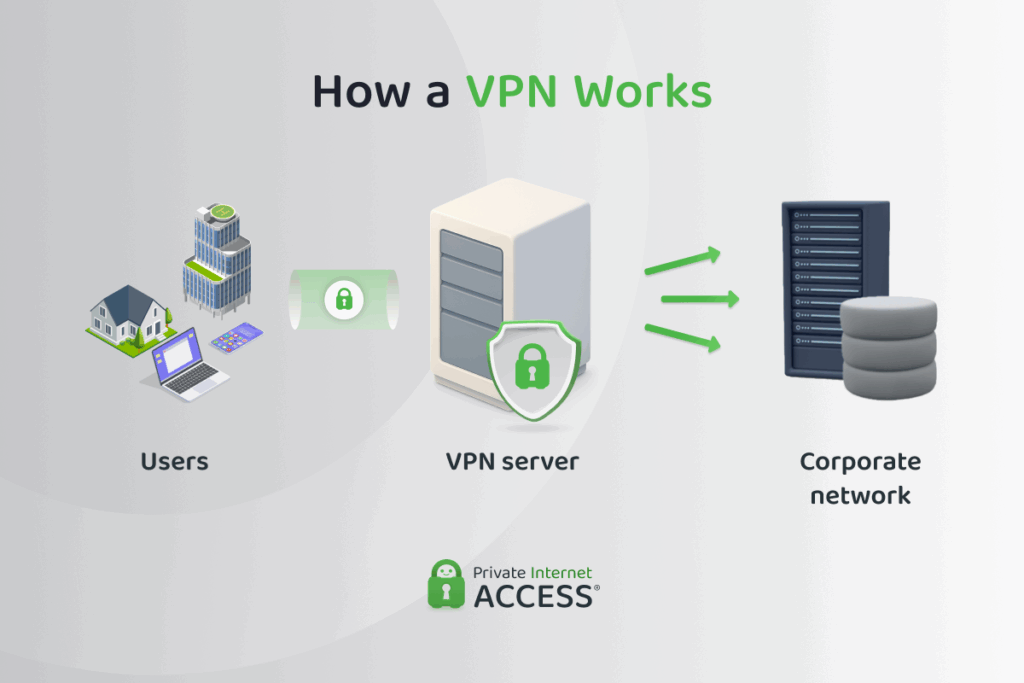
A VPN is a cybersecurity tool that lets you securely access a network over the internet.
It does this by creating a secure, private VPN tunnel between your device and the VPN server. Any data that travels inside that tunnel is encrypted; if anyone were to try and intercept it, all they’ll see is a bunch of illegible symbols.
When the VPN server receives your data, it decrypts it and forwards it to its destination, like a company file server or intranet page. The response comes back the same way: first to the VPN server, then through the encrypted tunnel, and finally to your device.
VPN software is available for most major operating systems. For example, Private Internet Access has VPN apps for Windows, macOS, Android, iOS, and Linux.
VPN: Pros and Cons
| VPN Pros | VPN Cons |
| ✅ Creates a secure, encrypted tunnel for your internet traffic, keeping data safe in transit | ❌ Doesn’t protect against malware or malicious activity inside the network you connect to |
| ✅ Protects sensitive information from interception on public or untrusted networks | ❌ Can reduce internet speed depending on server distance and load |
| ✅ Works on multiple device types and operating systems | ❌ Requires correct setup and maintenance to ensure full security benefits |
| ✅ Helps maintain privacy by masking your IP address and location | ❌ VPN access still requires account credentials; if those are stolen, the VPN can’t prevent unauthorized logins |
RDP vs. VPN: What’s the Difference?
Both tools enable remote access, but in different ways, and there are trade-offs in security, privacy, performance, and ease of use.
Security
RDP connections are often exposed directly to the internet because they use a specific channel called port 3389. This means attackers can find RDP connections easily and use brute-force attacks or known exploits to gain access. Without extra protection, it’s an easy entry point.
A VPN, on the other hand, wraps all traffic in an encrypted tunnel, which shrinks the number of ways attackers can reach internal systems.
Both RDP and a VPN can work with multi-factor authentication. That said, a VPN usually plugs straight into the company’s existing login system, while RDP often needs extra setup or third-party tools to make MFA work.
PIA VPN offers advanced online security. It uses strong encryption to protect all of your online traffic and includes a kill switch that prevents your data from leaking in case the VPN disconnects.
Privacy
A VPN hides your online activity from outsiders, like your ISP (internet service provider), your hotel Wi-Fi, or anyone trying to monitor traffic on your network. From their perspective, all they see is encrypted traffic and that you’re connected to a VPN server.
RDP doesn’t provide that same cover. It encrypts the remote desktop session itself, but once you’re connected, all your work happens on the remote machine, where system administrators can monitor activity, logs, and browsing.
Privacy is non-negotiable at PIA. We follow a strict no-logs policy, meaning we don’t see or log your online activities. We also use RAM-only servers that wipe all data with every reboot.
Performance
RDP streams a full desktop over the network, so every mouse move and screen change has to travel back and forth. On a solid connection, it feels smooth, but with weak Wi-Fi or high latency it can quickly turn choppy or unresponsive.
Good quality VPNs offer excellent speeds, but encrypting and rerouting your data does add some overhead. For most tasks, like file sharing, email, and web apps, the slowdown is barely noticeable. Noticeable slowdowns only usually occur when too many users connect through a single VPN gateway that gets overloaded.
PIA uses NextGen VPN servers and modern protocols like WireGuard so you get the best possible speeds regardless of whether you’re streaming, gaming, or sharing files.
Ease of Deployment and Management
RDP is straightforward to enable and connect to, which makes it great for quick setups. The challenge comes with securing and managing it at scale. IT teams need to maintain firewall rules, apply regular patches, and monitor access closely.
VPNs take more effort upfront. You need client software, certificates or keys, and a central system to manage them. But once configured, VPNs scale more cleanly and give IT tighter control over access and how connections are secured.
Cost and Licensing
RDP comes built into Windows, but using it in a business setting usually requires Windows Server and Client Access Licenses (CALs). Those costs can add up, especially when supporting many users.
VPN solutions often come bundled with existing firewalls, network appliances, or cloud services. The main costs are in setup, support, and possibly subscription fees, but licensing is usually simpler and more predictable than with RDP.
When You Need RDP vs. a VPN
When choosing between RDP and a VPN, it usually comes down to whether you need network access or remote control of a computer.
RDP is ideal if:
- You need to access a specific desktop environment remotely, with all its apps and settings
- You need to run software that’s only installed on that remote machine
- You want access to a powerful workstation or server from a less capable device
- You provide technical support or admin tasks on remote systems
A VPN is ideal if:
- You need secure network-level access to multiple company resources
- You want to access resources using your own computer
- You need to protect your data on public Wi-Fi
RDP over VPN: How It Works, When to Use Both, and Why

In this setup, the RDP service itself never touches the public internet. Instead, users connect to the VPN first, and only then are they allowed to start an RDP session.
This approach makes sense when:
- Remote admins need full desktop access to internal systems but don’t want to expose RDP directly.
- Compliance rules demand layered defenses, where RDP is available only behind a secure, encrypted channel.
- You’re managing sensitive servers and want to minimize the attack surface without giving up the flexibility of remote desktop tools.
The main advantage is that RDP remains hidden from attackers, who can’t even see it unless they’ve already gained access to the VPN or the network it connects to. This adds an extra layer of defense: the VPN enforces encryption and authentication first, often tied into MFA or SSO, before anyone can even attempt an RDP login. In other words, attackers face two locked doors instead of one.
The trade-offs are extra steps for users and more overhead for IT, since both systems require maintenance and monitoring. Performance can also take a slight hit due to double encryption, though in most cases it’s manageable.
Bottom line: RDP over VPN adds friction, but it’s far safer than exposing RDP to the internet, and it’s often the right call when compliance or sensitive data are at stake.
How to Use RDP over VPN
RDP works best and safest when tunneled through a VPN that places you on the same private network as the remote computer. There are two possible scenarios:
- A work VPN: This is the VPN your employer provides for secure connections to work resources. Your IT department gives you a VPN app and the necessary login details. Once you connect, you’re “inside” the office network and can RDP into your work machine from home or while traveling.
- A home VPN: If you’re a freelancer who needs secure remote access with RDP, you can manually configure a VPN on your router or device. Once you connect, you can RDP into your home PC or laptop on the go, without leaving RDP open to hackers.
Once you have that VPN figured out, the process is straightforward. Here are the steps:
1. Connect to the VPN: This gives your computer an internal IP on the private network.
2. Verify network access: Check that you can reach the remote PC by pinging its IP address.
3. Open the remote desktop app: Enter the remote machine’s internal IP or hostname, and hit connect.
4. Log into the remote machine: Enter the remote machine’s credentials. You now have full desktop control, tunneled securely through the VPN.
Should You Use RDP without a VPN?
Not really. RDP without a VPN means the connection is exposed to the internet, and that makes it an easy target for cyberattacks.
That said, if you must use RDP without a VPN, here are some security best practices to follow:
✅ Change the default RDP port: RDP normally uses port 3389, and hackers often scan for that number. Changing it to something less obvious (like 3399 or 49152) makes your computer harder to find and attack.
✅ Turn on two-factor authentication (2FA): This means you’ll need both a password and a code (usually sent to your phone) to log in.
✅ Allow only trusted IP addresses: This limits access to specific devices, like your home or office computer.
✅ Keep your system and antivirus up to date: Updates fix security holes and help block new threats.
✅ Use a firewall: A firewall acts like a security guard, only letting in approved connections.
Can You Use PIA VPN with RDP?
Yes. PIA VPN can protect your RDP sessions for personal use, like connecting to your home PC while you’re away. PIA encrypts your entire RDP session, meaning screen data, keyboard input, mouse clicks, and any files or clipboard content sent over RDP are all secured by the VPN tunnel.
PIA also offers dedicated IPs, which are IP addresses that are only assigned to you. This can make your RDP sessions even safer as you can configure the remote computer to accept RDP connections only from that one trusted address.
Important note: This setup only works when you’re connected to PIA on the device you use to access the remote machine. If, instead, the remote computer is connected to PIA, the RDP traffic itself doesn’t benefit from VPN encryption; only that computer’s own outbound internet traffic is. What’s more, to make the remote machine accessible in that scenario, you’d need to use port forwarding or adjust your router’s firewall rules.
FAQ
What is the difference between RDP and a VPN?
RDP lets you remotely control another computer from another location, like moving the mouse and opening files as if you were sitting in front of it. A VPN, on the other hand, lets you securely access an entire network and its internal tools.
Can I use RDP without a VPN securely?
It’s possible, but not as secure. Without a VPN, your RDP connection is exposed to the internet, which might make it an easy target for hackers. You’d need to set up strong security measures like two-factor authentication, complex passwords, and firewall rules. But even with those, the risk of attack remains higher.
Is RDP over VPN more secure?
Yes, combining the two gives you a much safer setup. When you run RDP through a VPN, your remote session is encrypted and hidden from outside threats. This means your data travels through a secure tunnel, making it harder for anyone to spy on or break into your connection.
When should I use VPN instead of RDP?
Use a VPN when you just need to safely connect to a work network, like when checking your emails, accessing shared folders, or using company apps. RDP is only necessary when you need to fully control another computer remotely, such as fixing software or managing files directly on that device.
Does a VPN replace the need for RDP?
No, they do different things. A VPN gives you secure access to a network, but it doesn’t let you operate another computer. If you need to interact with a remote desktop (moving files, installing software, or running programs) then RDP is the tool for that. In many cases, you may need both.
Can I combine RDP and VPN for better security?
Absolutely. Using RDP over VPN is the safest and most effective way to control a remote computer without exposing it to cyber threats. The VPN hides your remote desktop connection from public view and encrypts the data, so it’s much harder for hackers to find or intercept. It’s a layered security approach that greatly reduces risk.
