TKIP Explained: How It Works and Why It’s No Longer Secure
The Wi-Fi Alliance, working with the IEEE 802.11i task group, introduced the Temporal Key Integrity Protocol (TKIP) in 2002 to address weaknesses in the Wired Equivalent Privacy (WEP) security standard. Eventually, stronger Wi-Fi security protocols replaced it.
In this guide, we’ll explain what TKIP is, how it works, and why it’s no longer recommended. We’ll also see how it compares to newer Wi-Fi protocols. If your router uses TKIP, we’ll show you what to do and how a VPN can add another layer of protection to your internet traffic.
What Is TKIP?
TKIP is an older Wi-Fi security protocol designed to protect data transmitted between devices and Wi-Fi access points. It formed part of Wi-Fi Protected Access (WPA), a security standard for protecting wireless networks.
As a temporary solution, TKIP improved on the protection provided by WEP, an earlier Wi-Fi security protocol. Many existing devices could add TKIP support through software or firmware updates, avoiding the need for immediate equipment replacement.
How Does TKIP Encryption Work?
TKIP creates a different encryption key for each packet by combining three pieces of information: a shared temporal key (TK), sending device information, and individual packet identifiers. It then uses the resulting key with RC4, a stream cipher that scrambles data, to encrypt the packet before transmission.
Encryption alone doesn’t prevent an attacker from resending captured packets or modifying data in transit. Because of this, TKIP uses two additional mechanisms to help the receiving device detect these threats:
- Replay protection: Each packet has an increasing sequence number, and the receiving device keeps track of the packets it’s already accepted. It rejects those with old sequence numbers, preventing attackers from resending valid packets and tricking the receiver into accepting them as new transmissions.
- Message Integrity Check (MIC): TKIP calculates a MIC based on the data before transmission and sends it with the packet. The receiving device verifies the MIC against the data it receives. If the data’s changed, the check fails and the device rejects the packet.
TKIP vs. WEP: What Did TKIP Improve?
TKIP addressed several weaknesses in WEP without requiring a completely new encryption system. Both protocols used the RC4 stream cipher, but TKIP changed how it created encryption keys and added protections that WEP lacked.
The main improvements include:
- Key reuse: WEP used a 24-bit initialization vector (IV), which contributed to repeated key streams and made attacks easier. TKIP expanded the sequence counter to 48 bits and combined it with key mixing to reduce the risk of reuse.
- Replay protection: WEP couldn’t detect replayed packets. TKIP added a sequence counter that allowed receiving devices to reject packets they had already accepted.
- Stronger integrity checks: TKIP added a keyed MIC called Michael to address weaknesses in WEP’s CRC-32 integrity check. This made it harder for attackers to modify data without detection.
Despite these improvements, TKIP retained RC4 so it could run on existing WEP-era equipment. This compatibility requirement limited how extensively someone could update the underlying encryption system.
Related: What Is a Network Security Key? How and Where to Find It
Why Is TKIP No Longer Secure?
TKIP has several exploitable design weaknesses. It relies on RC4, while other components of the protocol also provide insufficient protection against known attacks.
For example, Michael, TKIP’s MIC mechanism, required little processing power so it could run on older hardware, limiting the protection it could provide. Researchers later demonstrated attacks that exploited weaknesses in TKIP, allowing them to decrypt some packets or inject forged packets under certain conditions.1
TKIP included countermeasures that addressed repeated MIC failures by temporarily suspending communication and generating new encryption keys. However, these measures couldn’t overcome the protocol’s underlying design weaknesses.
Due to these security limitations, the protocol was officially deprecated in the IEEE 802.11 standard2 in 2012 and is no longer recommended for securing Wi-Fi networks.
Related: What Are Cybersecurity and Network Security Compliance Standards?
TKIP and Modern Wi-Fi Security Standards
TKIP’s role in Wi-Fi security changed as WPA2 and WPA3 introduced stronger protections and stricter security requirements. Here’s how TKIP relates to these newer standards:
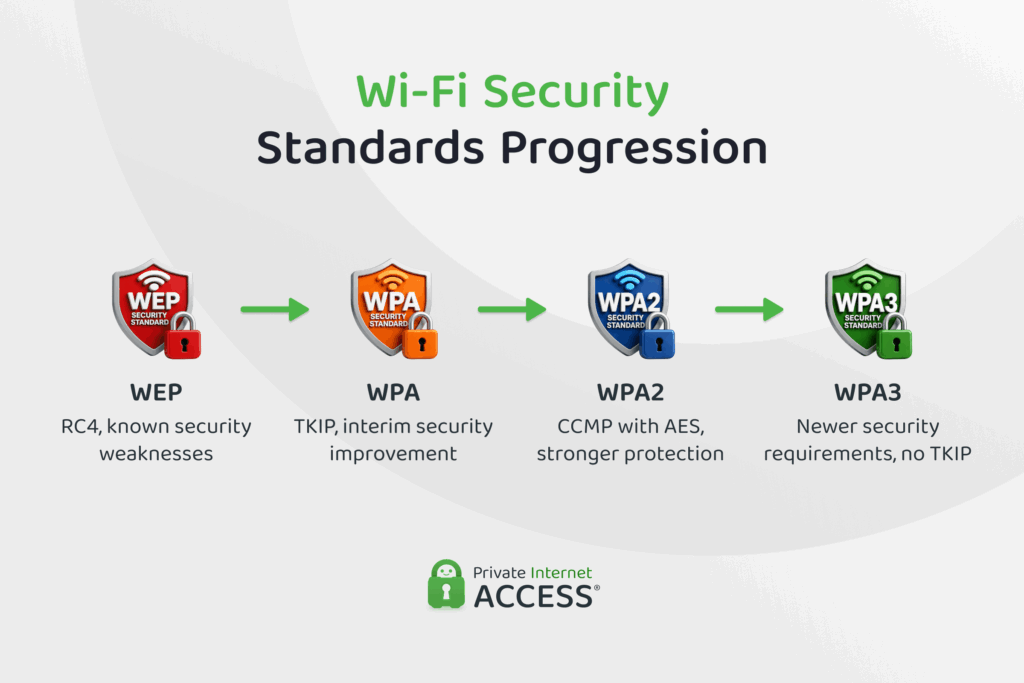
TKIP vs AES: What’s the Difference?
Counter Mode with Cipher Block Chaining Message Authentication Code Protocol (CCMP) succeeded TKIP, as it is the stronger security protocol that uses the Advanced Encryption Standard (AES) cipher. Although AES is often described as replacing TKIP, AES is the encryption algorithm used by CCMP rather than a direct replacement for TKIP.
Unlike TKIP, which uses separate mechanisms for encryption and integrity checking, CCMP uses AES to provide both data encryption and stronger protection against unauthorized changes.
CCMP was a core part of WPA2, which brought the stronger protections defined in IEEE 802.11i into widespread use. WPA2 certification required support for CCMP, helping Wi-Fi security move away from TKIP toward stronger AES-based protection.
What Does WPA2 TKIP Mean?
WPA2 TKIP refers to a WPA2 network that uses TKIP rather than AES-based CCMP to protect transmitted data.
WPA2 included TKIP support for backward compatibility with older devices, but using it doesn’t address the protocol’s known security weaknesses. It can also reduce Wi-Fi speeds because newer Wi-Fi standards require AES-CCMP to support faster connections.
Where Does WPA3 Fit In?
WPA3 introduced several additional protections. Two important changes affect device authentication and the protection of certain messages used to manage Wi-Fi connections:
- Stronger authentication: WPA3-Personal, the version used on networks secured with a shared password, requires Simultaneous Authentication of Equals (SAE). Unlike the authentication process used by WPA2-Personal, SAE makes it harder for attackers to guess passwords using information captured from a Wi-Fi connection.
- Protected Management Frames (PMF): PMF protects certain messages that devices use to manage Wi-Fi connections, helping prevent attackers from forging or altering them. It was optional in WPA2 but became mandatory with WPA3.
These stricter security measures mean TKIP isn’t permitted in WPA3.
Related: WPA-Enterprise vs. Personal – Benefits, Differences, and Setup
Related: What is Network Topology? Diagrams, Types, and Key Concepts
What You Should Do If Your Router Uses TKIP
If your router uses TKIP, consider changing to a stronger security option where possible. The exact settings and terminology vary between routers, but you can generally take the following steps:
- Open your router’s settings: Access the settings through the router’s app or administration page. If you’re connected to your router, you can usually open a new browser and type
192.168.1.1or192.168.0.1in the URL box to log in. You can also check the manufacturer’s instructions for your model. - Find the security settings: Look for Wireless Security or a similar label. Depending on your router, you may see WPA, WPA2, WPA3, TKIP, AES, CCMP, or combinations of these terms.
- Choose WPA3 when compatible: Look for a WPA3 option and use it if your router and connected devices support it. If you can’t use WPA3, look for an option labeled WPA2-AES, WPA2-CCMP, or similar.
- Check for updates: If you don’t see WPA3 or WPA2 with CCMP/AES, check whether the router manufacturer offers a firmware update, as it may add security features or improve compatibility.
Even if your router supports WPA3, some of your devices may only support WPA2. In this case, some routers offer a WPA2/WPA3 option, allowing both WPA2-only and WPA3-compatible devices to connect.
After changing the security mode, you may need to reconnect your devices. If stronger options remain unavailable after installing any updates, your router may not support current Wi-Fi security standards.
Does a VPN Improve Wi-Fi Security?
A VPN like PIA creates an encrypted tunnel between your device and a VPN server, helping shield your internet traffic from third parties monitoring the local network. This can add protection to your home and Wi-Fi networks you don’t control, like public or shared Wi-Fi.
VPN encryption can complement the security provided by modern Wi-Fi standards, but it doesn’t replace them or fix weaknesses in your router’s configuration. If your router uses TKIP, you should still change to WPA3 or WPA2 with CCMP/AES where possible.
Related: Pros and Cons of Using a VPN
FAQ
What is TKIP?
Temporal Key Integrity Protocol (TKIP) is an older Wi-Fi security protocol introduced with WPA as a temporary improvement over WEP. It’s now deprecated and no longer recommended for securing Wi-Fi networks.
What is TKIP encryption?
TKIP encryption protects Wi-Fi traffic by creating a different encryption key for each data packet and using RC4 to encrypt the data. It also includes mechanisms to detect altered or resent packets.
How does TKIP work with a VPN?
TKIP protects data over the Wi-Fi connection, while a VPN encrypts internet traffic between your device and the VPN server. A VPN adds protection for your traffic but doesn’t fix TKIP’s weaknesses or replace stronger Wi-Fi security.
Which protocol replaced TKIP for WPA2?
CCMP replaced TKIP as the more secure protocol associated with WPA2. It uses AES, a stronger encryption algorithm than RC4, to provide encryption and integrity protection.
Does WPA3 use TKIP?
No, WPA3 doesn’t allow TKIP. Instead, it requires newer security mechanisms designed to provide stronger protection for Wi-Fi networks.
How do I know if my Wi-Fi uses TKIP?
Check your router’s Wi-Fi security settings for TKIP, WPA-TKIP, WPA2-TKIP, or a similar label. If you find one of these settings, you can change your router from TKIP to a stronger security option where supported.
References:
