What Is a Data Breach?

A number you don’t recognize calls your phone. Then another. Your inbox fills with loan offers and insurance quotes you never asked for. You haven’t handed your details to anyone new, so where did they come from?
Often, the answer is a data breach. Personal details are the most common target for these attacks, though breaches also expose corporate secrets, source code, and internal communications.
You unfortunately can’t control how well a company guards your data. But you can control how much of your information gets exposed when security measures fail, and how quickly you react. In this blog, we’ll cover what a data breach is, why criminals want your information, and what you can do to limit your risk.
- Data Breach Definition
- How Does a Data Breach Happen?
- The 4-Step Process of Malicious Data Breaches
- The Effects of Data Breaches
- Why Do People Steal Data?
- Data Breach Prevention: How to Keep Your Data Secure
- How to Check if Your Data Has Been Exposed
- What to Do if Your Data Has Been Compromised in a Cybersecurity Breach
- Examples of Major Data Breaches
- FAQ
Data Breach Definition
A data breach happens when information is accessed, taken, or disclosed by a third party without authorization. It can be powered by files stolen by a cybercriminal, records emailed to the wrong recipient, information found on a lost or stolen laptop, and a variety of other sources.
Whether it’s called a cybersecurity breach, a security breach, a data compromise, or a data spill, a data breach always results in information ending up in the hands of people who were never authorized to see it.
It’s good to keep in mind that someone doesn’t necessarily have to steal data for a breach to occur. Unauthorized access on its own is enough – even if nothing gets copied – as is losing track of data you’re responsible for.
For example, a contractor who opens patient files they have no business reading causes a breach. So does an organization that can’t account for where a set of records went. Nobody profited in either case, but the data is still compromised.
Types of Data Breaches
Breaches can be described by the kind of data involved. The most common types are:
- Personally identifiable information (PII) breaches: Exposure of details that identify a specific person, such as names, addresses, dates of birth, and Social Security numbers.
- Financial data breaches: Exposure of payment card numbers, bank account details, and transaction histories, usually taken from retailers, banks, or payment processors.
- Health data breaches: Exposure of medical records, diagnoses, prescriptions, and insurance details held by providers, insurers, and claims processing contractors.
- Credential breaches: Exposure of usernames and passwords, which attackers then try on unrelated services in the hope that the same login was reused.
- Biometric data breaches: Exposure of fingerprints, facial scans, and voice patterns. Unlike a password, these identifiers can’t be reset once they’re out.
- Intellectual property breaches: Exposure of source code, product designs, research data, and internal strategy documents.
- Employee data breaches: Exposure of staff records, including payroll data, home addresses, performance reviews, and background check results.
How Does a Data Breach Happen?
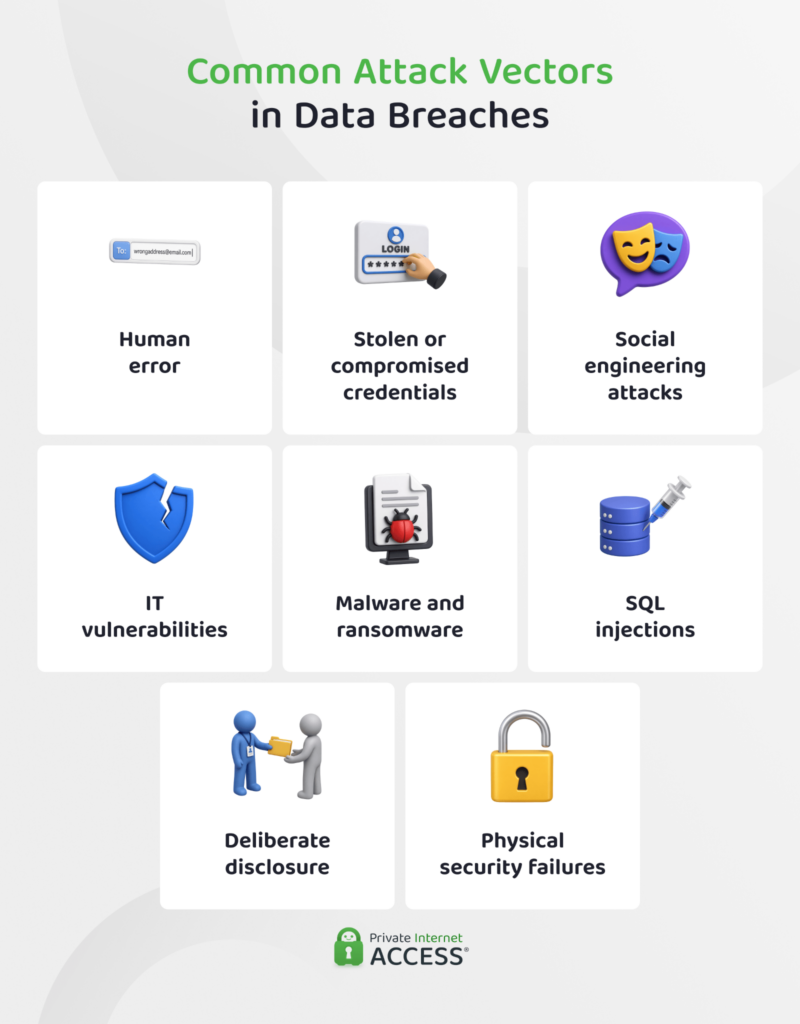
Breaches start either inside an organization or outside of it. Insiders usually have access to at least some data and can either misuse it or make a mistake with it. External attackers have to find a way in first, and they have plenty of tactics for doing that.
Insider Breaches
An insider breach involves someone who already has legitimate access to the data, whether that’s an employee, a contractor, or a vendor with valid credentials to access an organization’s systems. No perimeter gets crossed, which is part of what makes these breaches hard to identify.
There are two broad types of insider breaches:
- Accidental: Exposure caused by error rather than intent. Someone with legitimate access mishandles data, and it ends up somewhere it shouldn’t be. This might look like a spreadsheet being sent to the wrong recipient, a storage permission that should be private being set to public, or misplacing a work phone.
- Malicious: Deliberate theft or disclosure by someone trusted with access. The motive is usually money, sometimes grievance, and sometimes payment from an outside attacker. Examples include an employee copying a customer list before resigning, a contractor selling database access to a third party, or current staff knowingly handing over login credentials.
Malicious insiders are becoming a serious threat to data integrity. The Identity Theft Resource Center recorded a sevenfold increase in malicious insider incidents in the first half of 2026.1
External Threats
An external threat comes from someone who has to break in, trick their way in, or find a virtual door that’s been left open. These include:
- Social engineering: Attackers manipulate a person into handing over credentials or access. Phishing emails are the classic version, though voice calls and text messages are growing in popularity. For instance, Verizon found mobile-based lures had a 40% higher success rate in phishing simulations.2
- Malware, ransomware, and spyware: Malicious software that steals data, encrypts it for ransom, or monitors activity quietly. Information-stealing malware harvests saved passwords from infected machines, after which those credentials can be resold.
- Vulnerability exploits: Attackers target known flaws in software that haven’t been patched. Thanks to improving AI capabilities, vulnerability exploits are now the most common way to gain access to data, accounting for 31% of all breaches.2
- Exposed cloud storage and misconfigured services: Attackers scan the internet for storage buckets, databases, and admin panels left reachable without authentication.
- SQL injection: Attackers type database commands into a website’s input fields (e.g. a search box or login form). If the site passes that text straight to its database, the database answers.
- Device theft: A stolen laptop, phone, or drive gives an attacker almost instant access to whatever data is on it or that it provides access to.
- Third-party and supply chain compromise: Attackers breach a vendor, then use that trusted connection to reach its customers. Breaches involving a third party accounted for 48% of the total in Verizon’s 2026 Data Breach Investigations Report.2
The 4-Step Process of Malicious Data Breaches
Malicious breaches tend to follow the same four steps. Although cybercriminals take more-or-less the same approach every time, this doesn’t necessarily make attacks easy to identify. According to IBM’s Cost of a Data Breach Report 2026, the average breach lifecycle is 247 days, with 183 to detect the intrusion and 64 more to contain it.3
Here’s the process:
- Research: The attacker studies the target to find the most likely point for gaining entry. That might be a person, a system, or a vendor with a connection to the network.
- Attack: The attacker uses that weakness to get access. This can be done with phishing messages, zero-day attacks, or other methods.
- Extraction: With access established, the attacker locates the valuable data, copies it, and may even encrypt files in place so that the target organization can’t access it.
- Exploitation: The data gets monetized. It’s sold or traded (usually on the dark web), used directly for fraud, or used to extort the victim organization.
The Effects of Data Breaches
A breach unfortunately doesn’t end when the intrusion is contained. For individuals, exposed data circulates indefinitely. For the organization, the costs, the legal exposure, and the loss of customer confidence can run for years.
Exposure of Identifying Information and Other Data
Once your personally identifiable information is exposed, it’s exposed. There’s no recall mechanism. Your name, date of birth, address, Social Security number, and other important information can sit in a dataset that gets recompiled, resold, and merged with other breach data for years.
The practical effect of this is that attacks against you get more convincing. Someone who knows your recent order history, your insurer, and your partner’s name, for example, can write a message that survives your skepticism. Credential stuffing works on the same principle: Reused passwords from one breach can be used to unlock accounts elsewhere.
Financial and Operational Costs
The global average cost of a data breach reached $4.99 million in 2025, with breach detection as well as escalation and lost business making up a big portion of this expense.3
That said, the total is made up of the sum of a long list of separate costs. Investigation, legal fees, notification, loss of business, and regulatory fines are all bundled into the number, which means that it can be highly variable depending on the strength of a business’s security, breach detection, and remediation systems.
Operational costs add to the financial burden of a data breach. These attacks have the potential to cause systems to go offline and redirect staff time and attention to remedying the breach, rather than focusing on their actual jobs.
Reputational Damage
Customers choosing not to do business with an organization accounts for a large share of what a breach costs. And it’s the most difficult effect to reverse.
A breach might suggest that the company either didn’t invest in protecting the data it collected or didn’t notice when someone took it. Both of which are reasons why customers might choose to work with a competitor.
This damage can also affect a business’s ability to attract new customers. For example, corporate buyers run security reviews before signing contracts and those reviews ask directly whether a vendor has been breached. These incidents have to be disclosed, which could give the buyer the upper hand in a negotiation or a reason to work with a competitor instead.
Legal Liability
Companies that hold data have various obligations under data protection laws and regulations. They are required to secure the information, notify people when that fails, and be able to show the safeguards were reasonable. Falling short on any of those is a violation in itself, separate from the breach.
Which obligations an entity has to fulfill depends on the data being held and the place where the company operates or stores this information.
For example, the General Data Protection Regulation (GDPR) covers European Union residents and allows fines up to €20 million or 4% of global annual turnover for data incidents. In the same vein, California’s Consumer Privacy Rights Act (CPRA) gives state residents enforceable rights and sets out fines for failure to protect these rights.
These regulations give affected individuals a right to compensation, which can be crippling to an organization that suffers a large breach.
Why Do People Steal Data?
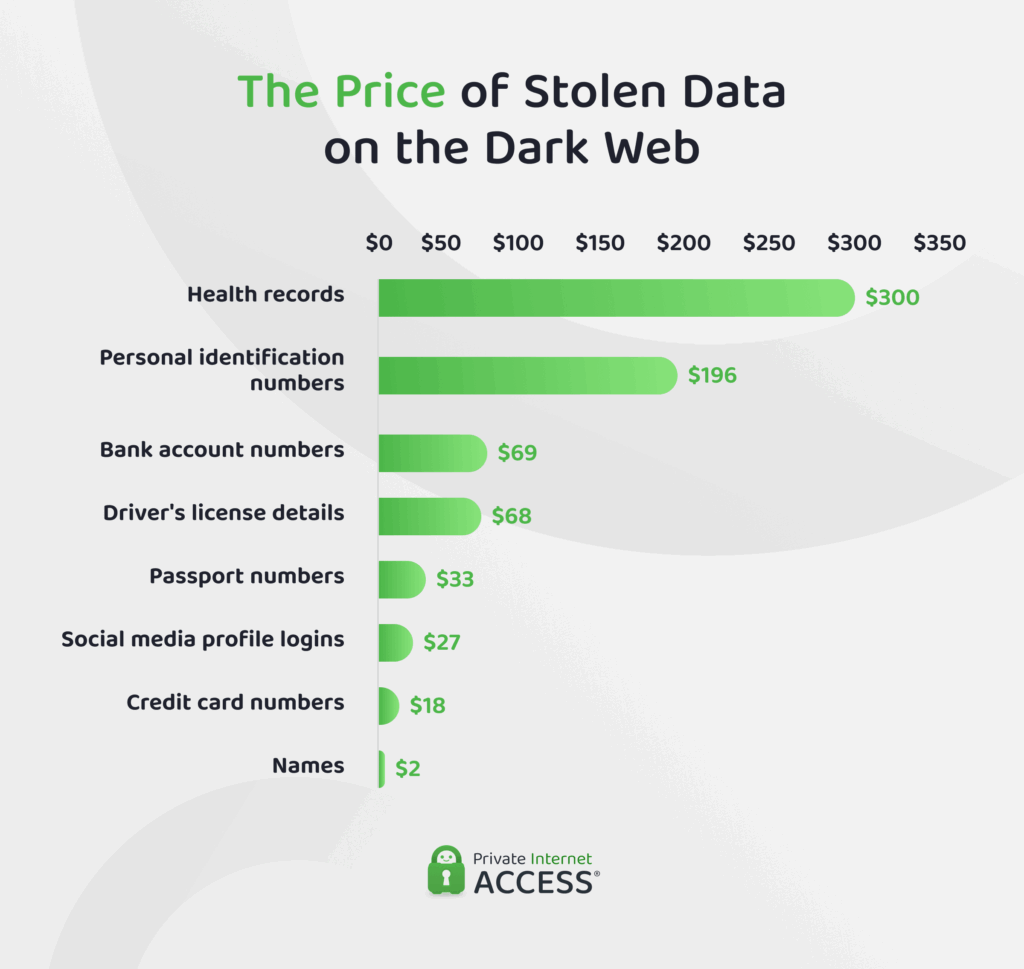
The answer to this question is generally straightforward: Money. There’s a huge market for stolen records and the prices tell you what attackers actually want.
Threat intelligence firm Flare analyzed 348 real breach listings from dark web marketplaces and found health records at the top, selling for roughly $300 each.4
Personal identification numbers followed in second place at $196, bank account numbers at $69, driver’s licenses at $68, and passport numbers at $33. Credit card numbers ranked ninth, at $18, while email addresses went for under a dollar.
There are two reasons for this ranking. First, data that can’t be changed is more valuable to cybercriminals as it can allow prolonged access to various other tranches of data. You can easily cancel a credit card, but you can’t get a new Social Security number.
Secondly, different types of data enable different crimes that have varying financial perks. Financial details fund direct theft. Personally identifiable information enables identity and credit fraud. Health records feed insurance fraud. And employee records, criminal histories, and biometric data serve blackmail and targeted social engineering.
Data Breach Prevention: How to Keep Your Data Secure
Best practices to prevent a data breach depend on which side of the data dynamic you’re on. As businesses generally hold the data, they carry most of the responsibility for protecting it. Individuals play a smaller role, but there are strategies you can use to make yourself a harder target and limit what information an attacker can get hold of.
Data Breach Protection for Organizations
Preventing a data breach usually means layering controls so no single failure leads to total exposure. Organizations use a combination of the following defences for data breach protection:
- Data classification: Cataloging data to get a full picture of what information the organization holds, how sensitive it is, and where it lives on the system.
- Firewalls: Filtering traffic at the network boundary and between internal segments, so access to one system doesn’t enable access to the rest.
- Encryption: Encrypting data at rest and in transit ensures that it’s unreadable – and therefore useless – to any unauthorized persons who might access it without decryption keys.
- Physical security: Controlling who can physically reach servers, workstations, and printed records, through locked server rooms, badge access, and clean-desk policies.
- Cloud security services: Monitoring cloud configuration for the errors that cause most cloud exposure (e.g. public storage buckets and over-permissive access roles).
- Employee training: Teaching staff to recognize phishing, voice phishing, and pretexting attempts, and giving them a reliable way to report a suspected issue.
- Identity and access management: Granting each role the minimum access it needs, enforcing multi-factor authentication, and revoking credentials when someone leaves.
How Individuals Can Prevent a Data Breach
You can’t prevent a data breach at a company that holds your data, but you can limit how much information gained from one breach can be used elsewhere. There are three simple steps to take here:
- Use strong, unique passwords: One password per account, generated and stored by a password manager.
- Enable multi-factor authentication: Adding a second authentication factor (like biometrics or app authentication) can block an attacker who already has your password.
- Be skeptical about calls and emails: Treat unexpected requests for credentials, payment details, or verification codes as suspicious, no matter who the sender appears to be. Contact the organization using a number or address you already have, not one supplied in the message.
How to Check if Your Data Has Been Exposed
There’s a golden rule of digital data privacy: Assume that some of your data is already out there, but take precautions to secure it as though it isn’t.
Websites like Have I Been Pwned let you enter an email address and see which known breaches include it. Running the check takes seconds and tells you which accounts need attention first.
Breach notification letters are the other signal. A notice will likely name the data categories involved, the dates of the intrusion, and the steps the organization is taking to remedy the issue. All of which can help you to understand what you need to do to further secure your data.
Then there are more subtle signs, like receiving an unusual amount of spam calls or emails, or unusual movements on your bank accounts or credit score. All of these can point to the fact that your data has been exposed in a breach and cybercriminals are using it to their benefit.
What to Do if Your Data Has Been Compromised in a Cybersecurity Breach
You should be notified when an organization loses your data, though the letter or email may arrive long after the fact. It’s best to take immediate action if you think your data may have been exposed.
Manage Your Passwords
Change the password on the breached account first, then anywhere you reused it. Using a password manager makes this a little easier. It generates unique passwords, stores them, and flags which of your logins are duplicates so you can resolve them.
Where the service you’re using supports passkeys, switch. A passkey keeps a private key on your device that never gets sent anywhere, so there’s nothing to be accessed or phished by an attacker.
Monitor Your Finances
Check your bank and credit card statements line by line for small unfamiliar charges. Attackers often make low-value purchases before they really dig in to test whether a card is live and whether you’ll notice the charge.
It’s also a good idea to check your credit report regularly, looking for any new accounts that you don’t remember opening. You should continue to do this for at least 12 months after a breach, and perform random spot checks every couple of months thereafter.
Initiate a Fraud Alert
Contact one or all of the credit bureaus that operate in the country where you are to create a fraud alert. This is a free notification that requires lenders to verify your identity before opening credit in your name.
A credit freeze is another option, though it blocks access to your file entirely so you’ll need to lift it when next you want to apply for credit.
Examples of Major Data Breaches
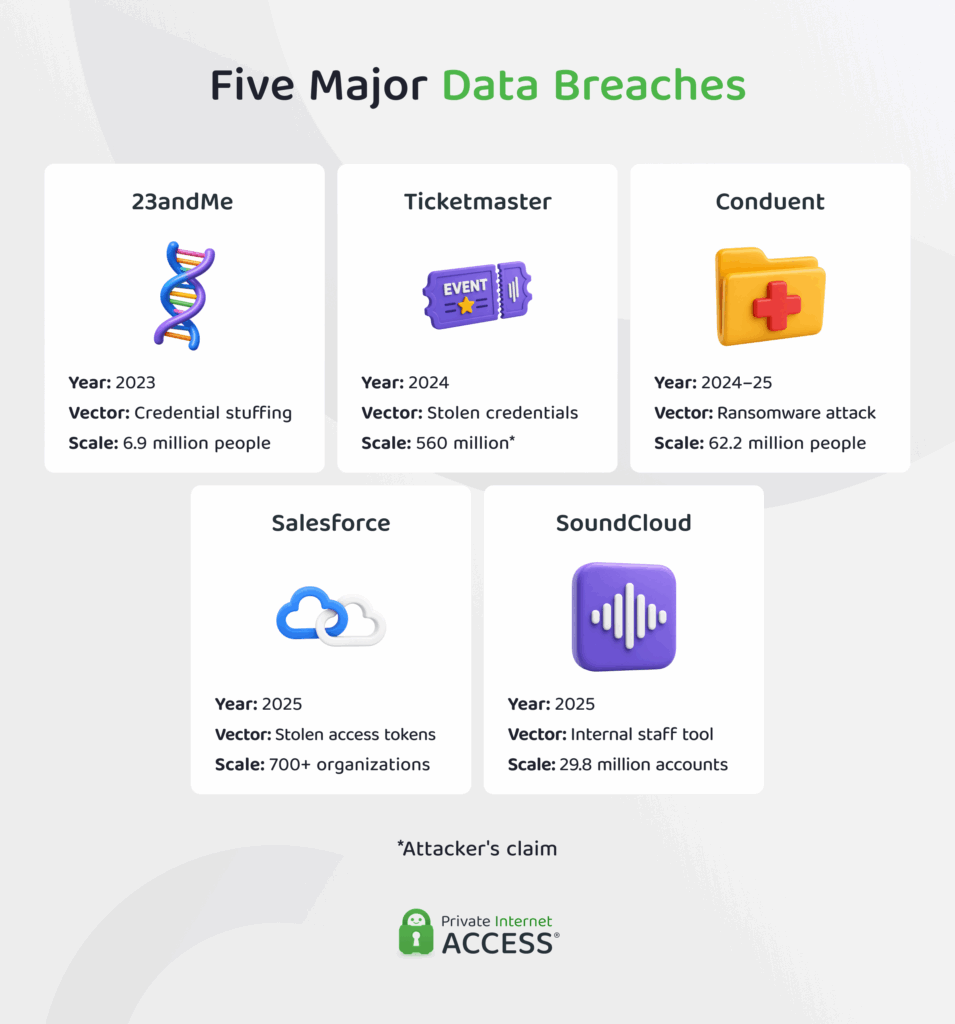
Any organization can fall victim to a data breach – giants like Meta, X (Twitter), Yahoo, eBay, Adobe, Target, Uber, and AT&T have all been at the center of major breaches in the past. Below are five recent data breach incidents that illustrate how these events happen and the effects they have.
Conduent
- Date of breach: October 21, 2024 to January 13, 2025 (disclosed in April 2025).
- Number of records affected: 62,224,658
- Attack vector: Ransomware intrusion claimed by the SafePay group
- Data exposed: Names, Social Security numbers, dates of birth, addresses, health insurance information, and in some cases medical treatment and claims data
Conduent is a business services provider most people have probably never heard of. It handles payments and administration for state Medicaid programs, child support systems, food assistance, and large health insurers across more than 30 US states.
Attackers spent nearly three months inside the network before anyone noticed and took around 8 terabytes of data, taking the number of victims from about 10.5 million in the initial assessment to 25.5 million in February 2026, and a final 62,224,658 in June 2026.5
The worst part of this attack is that almost none of the people who were affected chose to give Conduent their information.
23andMe
- Date of breach: April to September 2023 (disclosed in October 2023)
- Number of records affected: 6.9 million
- Attack vector: Credential stuffing
- Data exposed: Names, birth years, self-reported locations, profile photos, family trees, ethnicity estimates, and health predisposition reports
Attackers in this data breach tested passwords stolen from other websites to gain access to roughly 14,000 accounts where those keys were reused. They then used 23andMe’s family-matching features to reach highly sensitive data belonging to 6.9 million people.6
The company dismissed early public reports as a hoax and only confirmed the breach after an employee found the data for sale on Reddit.
Regulators found that 23andMe had not required multi-factor authentication and had not checked customer passwords against lists of credentials already known to be compromised – two simple measures that could have blocked the attack. The UK’s Information Commissioner’s Office fined the company £2.31 million as a result, contributing to the business’s 2025 bankruptcy.
Salesforce
- Date of breach: August 8 to 18, 2025
- Organizations affected: 700+
- Attack vector: Stolen OAuth tokens belonging to a third-party integration
- Data exposed: Salesforce support case text, contact and account records, and credentials customers had stored inside those records
Over ten days in August 2025, attackers later identified by Google as UNC6395 queried and exported data from more than 700 organizations, including Cloudflare, Google, Palo Alto Networks, Proofpoint, Tanium, and Zscaler.7
They were hunting credentials that customers had pasted into support tickets: Amazon Web Services access keys, Snowflake tokens, and plaintext passwords.
Salesforce wasn’t attacked directly – the data thieves exploited an OAuth vulnerability that allowed third-party app Salesloft to query Salesforce on a customer’s behalf. Using this route allowed attackers to bypass passwords and multi-factor authentication entirely.8
Ticketmaster (Snowflake)
- Date of breach: April to May 2024 (disclosed in May 2024)
- Number of records affected: 560 million claimed by attackers; unconfirmed by Ticketmaster
- Attack vector: Stolen credentials for a third-party cloud data warehouse account with no multi-factor authentication
- Data exposed: Names, addresses, email addresses, phone numbers, order details, and partial payment card data
In this breach, attackers obtained credentials for Ticketmaster’s account with Snowflake (a cloud data warehousing provider) using logins harvested by information-stealing malware from infected machines.9
The account had no multi-factor authentication enabled, so the stolen password was all attackers needed to gain access. Although Snowflake’s own systems weren’t breached, around 165 Snowflake customer organizations were affected as a result.
The total number of records affected has never been confirmed by Ticketmaster, though attackers claim to have accessed 560 million. It’s difficult to tell how much data was stolen, but attackers did offer 1.3 terabytes of data for sale at $500,000 by the end of May 2024.10
Soundcloud
- Date of breach: Detected December 2025 (disclosed January 2026)
- Number of records affected: 29.8 million user accounts
- Attack vector: Unauthorized access to an internal staff dashboard
- Data exposed: Email addresses, names, usernames, display names, profile images, follower counts, and country (in some cases)
The attackers behind this breach never had to touch SoundCloud’s main user database to gain access to the 29.8 million user accounts they targeted. Rather, they accessed an internal dashboard used by staff and used it to link private email addresses to public profile data, building a dataset that connected identities to contact details at scale.11
Although no passwords were stolen in this breach, the fact that email addresses were tied to verified usernames, follower counts, and location data still gave attackers enough material for convincing targeted phishing.
FAQ
What are the most common causes of data breaches?
Unpatched software vulnerabilities are now the leading data breach threats, making 31% of breaches according to Verizon. Stolen credentials, phishing, cloud misconfigurations, and insider mistakes make up most of the rest. Third parties were involved in nearly half of all breaches.
How can you prevent a data breach for a company and individual?
There are plenty of strategies to prevent data breaches. Businesses should invest in data classification, encryption at rest and in transit, least-privilege access, multi-factor authentication, and staff training. Individuals should use unique passwords from a password manager, turn on multi-factor authentication, and freeze their credit files.
What should you do immediately after a data breach?
If you find out that your data has been exposed, immediately change the password on the affected account and anywhere you reused it, then enable multi-factor authentication. Place a one-year fraud alert with any one of the three credit bureaus, or freeze your credit for more protection.
What is the difference between a data breach and a cybersecurity breach?
In everyday use, none. Both describe unauthorized access to systems or information. That said, cybersecurity breach tends to emphasize the security failure and can cover incidents where no data moved, while data breach specifies that information was exposed.
Can a VPN help reduce the risk of data breaches?
Not directly. A VPN can’t protect data sitting on a company’s servers, which is where nearly every major breach happens. It does hide your IP address and encrypt your traffic as it flows between your device and the VPN server, which can help prevent your data being intercepted and stolen by others on your network.
References:
- ITRC: Malicious Insiders Surge as H1 2026 Data Compromises Set Pace for Record Year – Identity Theft Resource Centre
- Vulnerability exploitation top breach entry point, 2026 industry-wide DBIR finds – Verizon
- Cost of a Data Breach Report 2026 – IBM
- What is the Cost of Your Data on the Dark Web? – Flare
- Conduent Business Services Data Breach Affected More Than 62.2 Million Individuals – The HIPAA Journal
- 23andMe Data Breach: What Was Exposed, Who Was Affected, and What Happens to Your DNA Now – Security.org
- Reviewing the Salesforce–Salesloft Drift OAuth Supply Chain Breach – Anomali
- Salesloft breached to steal OAuth tokens for Salesforce data-theft attacks – TechRadar
- Snowflake Data Breach – Huntress
- Data allegedly stolen from 560 million Ticketmaster users – BBC
- Have I Been Pwned: SoundCloud data breach impacts 29.8 million accounts – BleepingComputer
