What Is Passwordless Authentication? A Complete Guide
Weak, reused, and stolen passwords keep showing up at the start of the data breach chain, year after year. According to Verizon’s 2026 Data Breach Investigations Report, compromised credentials play a part in 39% of all data breaches – more than any other technique attackers rely on.1
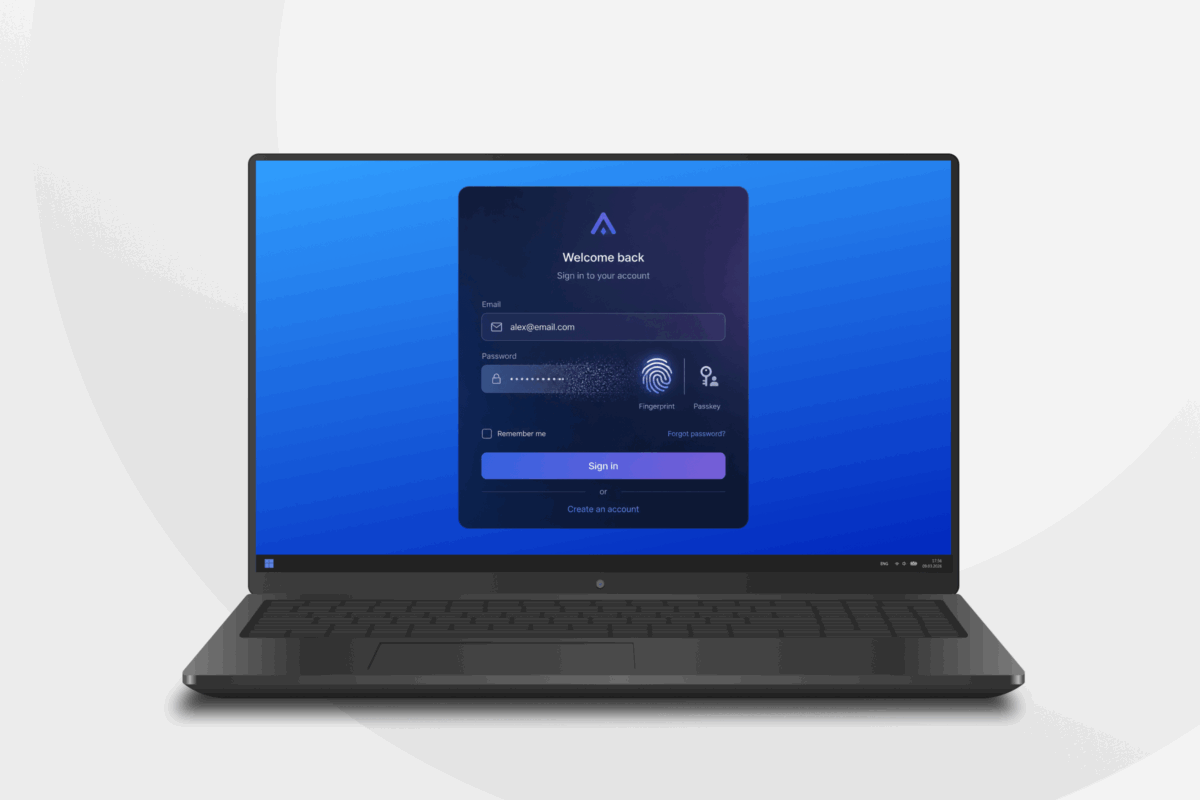
Passwordless authentication solutions remove this weak point almost entirely by replacing the password itself with something far harder to steal or guess, like a biometric login or one-time PINs generated by an authenticator app on a secondary device.
By the end of this guide, you’ll understand what passwordless authentication is, how it works, how it relates to MFA and SSO, and how to start implementing it in your organization.
Passwordless Authentication Explained
Passwordless authentication is a way to verify a user’s identity without asking them to type in a traditional password.
Instead of testing something a user knows, like a memorized string of characters in a password, it tests something the user has. This can be a registered device, a biometric trait, a hardware key, or a cryptographic credential.
Many people already use some form of passwordless authentication or another. You’ve probably already come across this when you unlock your iPhone with Face ID, approve a login through Microsoft Authenticator, or tap a security key at a login prompt.
Passwordless authentication is typically deployed as part of a wider identity strategy that includes single sign-on (SSO) and multi-factor authentication (MFA). It works alongside these systems to make logins more secure.
Passwordless, Multi-Factor Authentication, and Single Sign-On
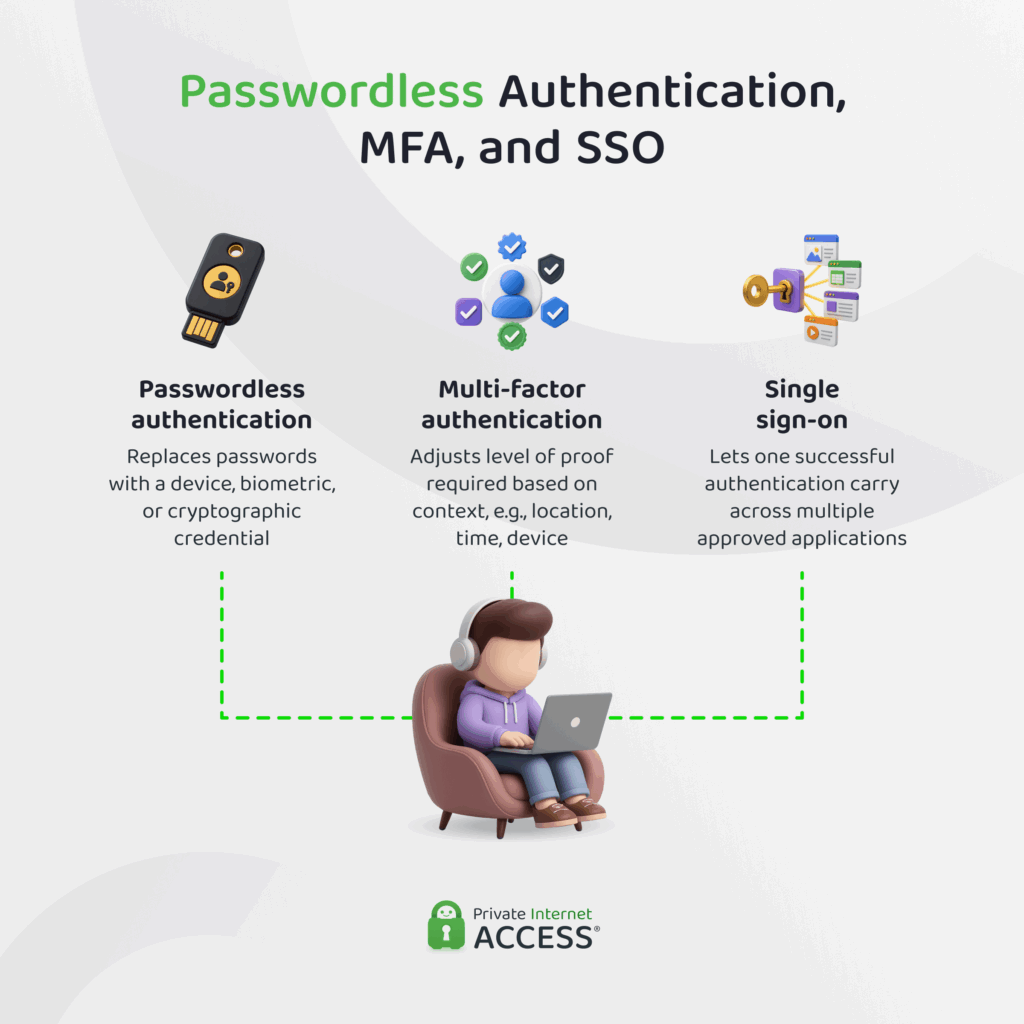
Passwordless authentication, MFA, and SSO solve related but distinct problems, working together to enhance users’ digital security.
Where passwordless authentication asks what proves the credential belongs to you, SSO determines how many times you should have to prove that credential is yours, and MFA determines how much proof you need to provide based on what you’re trying to do.
Passwordless authentication replaces the password with a device, biometric, or key, while SSO lets a single successful login carry across multiple approved applications, rather than repeating the process for each one. Multi-factor authentication adjusts the bar for entry dynamically based on context signals like location, time of day, IP address, and the type of device.
For example, an employee logging into a company laptop while they’re in the office might authenticate with a single passkey through SSO. That same employee accessing payroll data from an unfamiliar network might trigger multi-factor authentication, adding a step-up biometric check before granting access.
Passwordless authentication removes the weak link in each of these interactions (the password) without changing what MFA or SSO are actually responsible for.
The Password Problem
The average user uses countless personal and professional passwords. Faced with so many logins to remember, it’s somewhat unsurprising that individuals reuse passwords across accounts, choose weaker combinations to make them easier to recall, or fall back on insecure habits like storing them in unencrypted notes.
One analysis of passwords captured through malware found that more than 6 billion were stolen over the 12-month period between January and December 2025, with a large proportion of these being weak enough to crack in a matter of seconds (think “password” or “12345678”) even without hacking software.2
The fallout from this can be extremely damaging for both individuals and businesses. For account holders, a breached password can expose further information that can lead to identity theft, account takeovers, and associated data disasters.
Businesses have to deal with the financial burden of poor password management, too. According to IBM’s 2026 Cost of a Data Breach Report, the average cost of a breach sits at $4.99 million, with phishing and social engineering attacks that target credentials being top routes for unauthorized access to systems.3
Common Password-Based Attack Techniques
Cybercriminals rely on a fairly small set of well-worn techniques to steal or guess passwords:
- Brute force: Attackers systematically try large volumes of password combinations, often with automated tools, until one works. This method is most useful for breaking short and simple passwords.
- Credential stuffing: Attackers take usernames and passwords leaked in one data breach and test them against other services, banking on the fact that many people reuse the same login across platforms.
- Phishing: Fraudulent emails, texts, or websites used to impersonate trusted organizations and trick users into typing their password directly into a page controlled by the attacker.
- Keylogging: Malware downloaded onto a user’s device secretly records every keystroke a victim types, capturing passwords the moment when they’re entered into login fields.
- Man-in-the-middle (MITM) attacks: Attackers intercept communication between a user and a legitimate service, capturing login credentials as they pass through an unsecured or compromised connection.
- Data breaches: Large-scale hacks expose stored passwords and other credentials in bulk, which attackers then sell via dark web marketplaces or use to break into other accounts.
How Does Passwordless Authentication Work?
Just because passwordless authentication lets a user access an application or platform without ever entering a password, that doesn’t mean there’s no verification step.
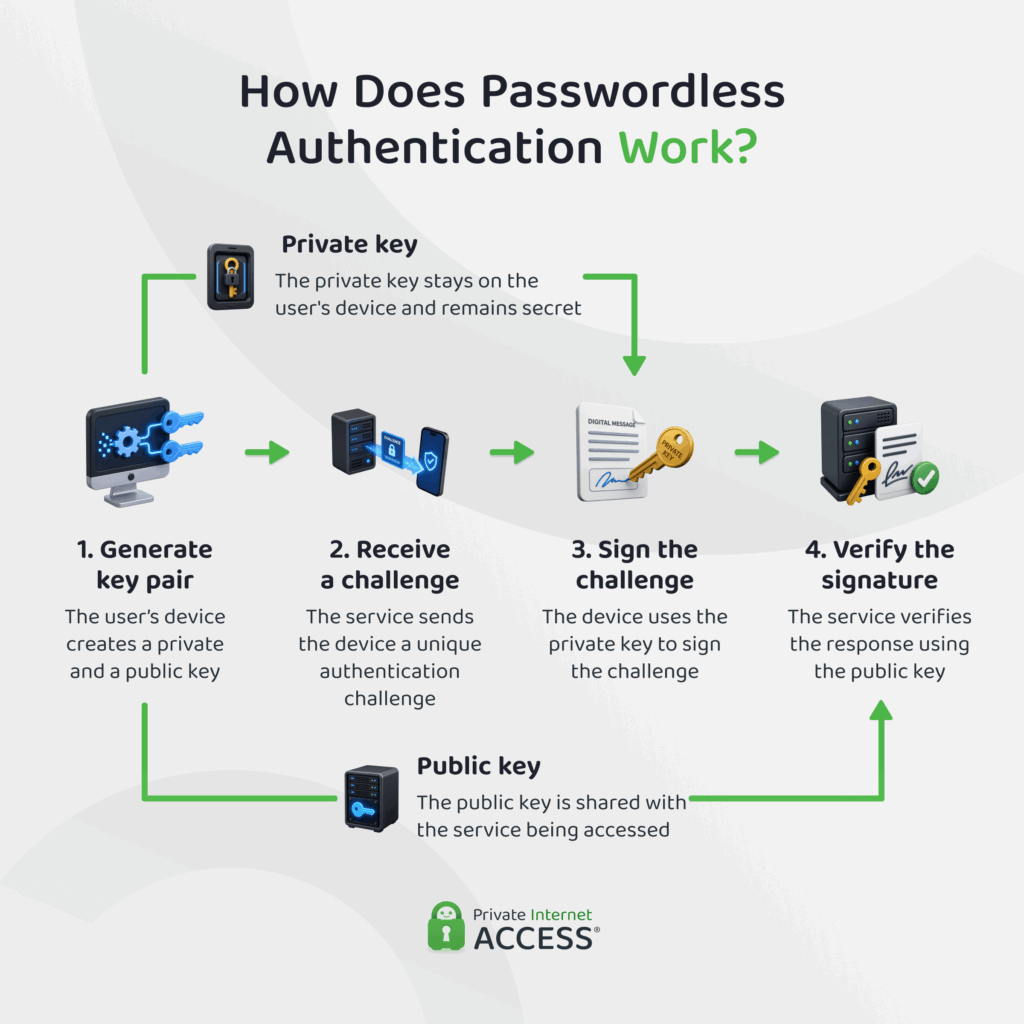
Biometric verification, hardware security, authenticator apps, and other passwordless systems are built on public-key cryptography. When a user enrolls with a passwordless method, their device generates a matched pair of cryptographic keys: a private key that’s kept secret and a public key that’s shared with the service they’re logging into.
During login, the service issues a challenge and the device uses the private key to sign it. This proves the user’s identity without ever transmitting data that could be intercepted, phished, or reused elsewhere. The exchange is the same mechanism that underpins passkeys and FIDO2 standards.
Passwordless Authentication Methods
There are a variety of passwordless authentication options out there. Here are some of the most popular:
| Method | Underlying Tech | Examples | Top Strength | Top Weakness |
| Hardware security keys | FIDO2/WebAuthn USB or NFC token | YubiKey, Google Titan Key | Near-immune to phishing and remote attacks | Lost or forgotten device can lock users out |
| Biometrics | Fingerprint/facial recognition sensors | Touch ID, Windows Hello | Fast and hard to replicate at scale | Biometric data can’t be changed if compromised |
| Passkeys / FIDO2 | Public-key cryptography, synced or device-bound | Apple Passkeys, Google Password Manager | Phishing-resistant, works across major platforms | Cross-platform syncing and recovery sometimes inconsistent |
| Certificates | PKI-issued digital certificate on a device | Smart cards, enterprise client certificates | Strong identity binding for managed devices | Complex to issue, renew, and revoke |
| Mobile apps | App-to-server push approval | Microsoft Authenticator, Okta Verify | Simple one-tap approval on a familiar device | Vulnerable to “MFA fatigue” if users approve blindly |
| Magic links | One-time login link sent by email | Slack, Medium | No app or hardware needed to sign in | Only as secure as the recipient’s email account |
| OTPs | Time-based codes via SMS or authenticator app | Google Authenticator, bank SMS codes | Widely supported, low setup effort | SMS-delivered codes exposed to SIM-swapping attacks |
| QR codes | Device pairing via camera scan | WhatsApp Web login, some banking apps | Fast cross-device login without typing anything | Vulnerable to quishing scams using fake codes |
| Behavioural biometrics | Passive analysis of typing rhythm, gait, or device handling | Bank fraud-detection tools, continuous-auth platforms | Runs continuously in the background, no user action | A background signal, not a standalone login method |
Benefits of Passwordless Authentication
Passwordless authentication strengthens system security while easing the day-to-day burden it places on employees and IT teams, among other benefits.
- Strengthens security: Removes the credential most attacks target to defend against phishing, credential stuffing, and brute-force attempts, while also reducing the risk that a departing or malicious insider can misuse a shared or weak password.
- Simplifies IT operations: Cuts the volume of password-reset tickets and account lockouts, freeing help desk teams to focus on higher-value work instead of routine credential support.
- Improves user experience: Logging in becomes faster and less frustrating for users since there’s nothing to remember, mistype, reset, or forget at the login screen.
- Increases scalability: New users, devices, and applications can be onboarded quickly without expanding the pool of passwords that need to be created, stored, rotated, and secured across the organization.
- Customizable policy controls: Administrators can set granular rules around which methods, devices, and contexts are permitted, better supporting governance and compliance requirements.
How to Implement Passwordless Authentication
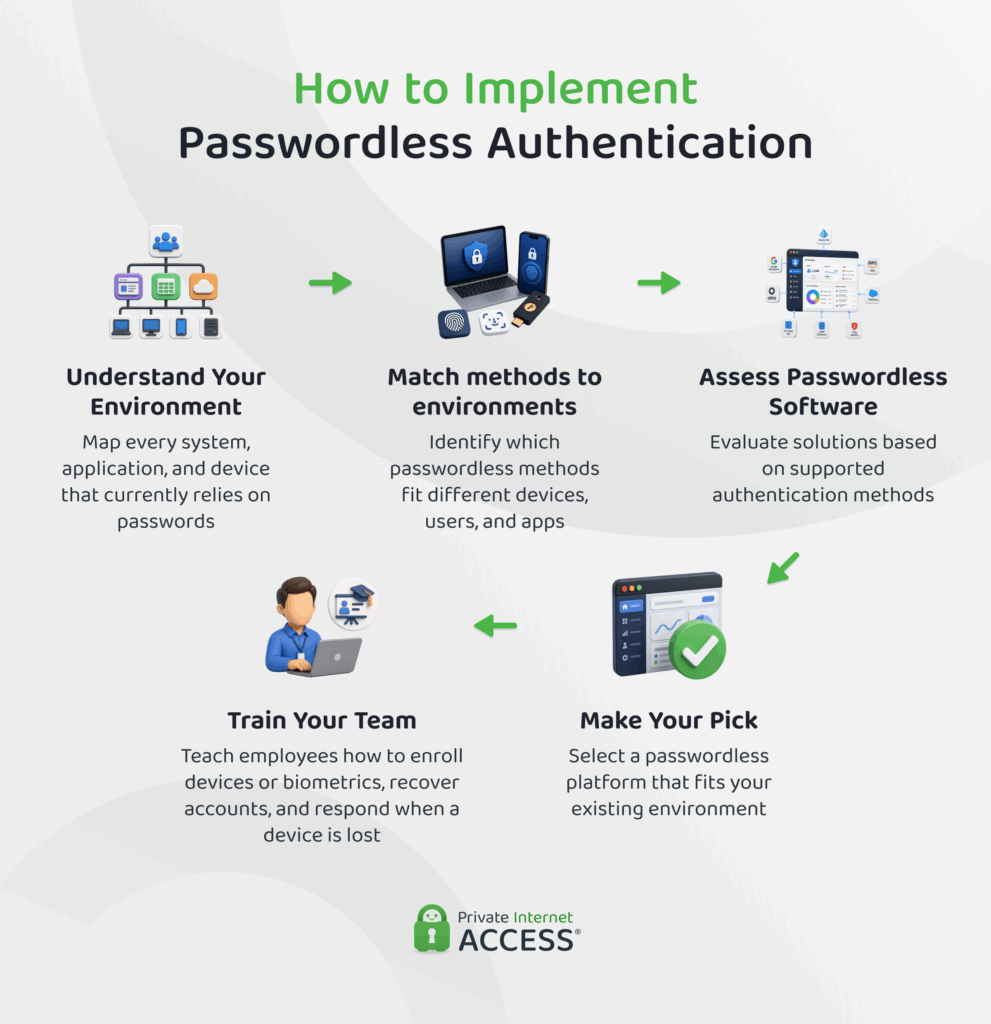
Rolling out passwordless authentication across an organization requires a phased process that touches infrastructure, software selection, and user training.
1. Understand Your Environment
Before choosing any specific tool to manage passwordless authentication for your organization, you’ll need to map every system, application, and device across the organization that currently relies on users providing passwords for access.
Systems like email, messaging apps, file storage services, and core business applications are a good place to start, but it’s also important to consider other internal tools, shared workstations, and third-party vendor platforms that might be used by only a few teams.
From there, identify which passwordless methods are realistically suited to – and therefore most likely to be used in – each environment.
A workforce using company-issued laptops with built-in biometric sensors is a strong candidate for biometric or platform-based passkeys. A team relying on personal devices or shared kiosks may need hardware security keys or push-based mobile approval instead.
Organizations that operate in regulated spaces, like healthcare or finance, may also need to weigh specific methods against compliance requirements before settling on an approach.
2. Assess Passwordless Authentication Software Options
With the environment mapped, the next step is evaluating passwordless authentication solutions that can actually support the methods you identified in Step 1.
Not every platform will give you access to every passwordless authentication method. Some specialize in consumer-facing passkey logins where the priority is a frictionless signup flow, while others are built for enterprise workforce identity and integrate directly with existing identity and access management (IAM) or directory services.
The right choice depends heavily on what’s already in place. For example, a cloud-native platform built around FIDO2 and passkeys might be an easy fit for a company that already runs on modern SaaS tools, but the same platform can struggle the moment it meets an organization still leaning on legacy, on-premises systems.
It’s worth considering how well the software plays with your existing single sign-on setup, whether it holds up in offline or low-connectivity conditions, and what happens when someone loses a device and needs their account back.
3. Make Your Pick and Train Your Team
Once you’ve selected a platform, the next task is enforcing passwordless methods across the environments you identified in Step 1. It’s likely that users might be unenthusiastic about changing their established login habits, so it may be wise to update your digital security policies and roll the changes out in phases.
Employees will also need clear guidance on enrolling their devices or biometrics, what to do if a device is lost, and how account recovery works without a password to fall back on. These are usually the biggest sources of support requests during a rollout, so it’s worth creating a clear roadmap before launch.
It also helps to keep an eye on the numbers once the system is live. Monitor how many people have or haven’t enrolled, how often logins are failing (a sudden spike here often points to one specific device or app that isn’t playing nicely with the new method), and which legacy systems are still running on passwords in the background, so they don’t get forgotten in the overhaul.
Passwordless Authentication Implementation Challenges and Solutions
There are some real security and efficiency gains to be had from passwordless authentication, but that doesn’t mean it will necessarily be easy to roll out. Here are a few of the most common challenges organizations run into, along with practical ways to work through them:
- Legacy systems: Older applications and infrastructure weren’t built to support modern authentication protocols like FIDO2. Rather than forcing an all-or-nothing switch, run passwordless and password-based authentication in parallel for legacy systems while prioritizing a migration or replacement plan for the platforms that pose the greatest security risk.
- User resistance: New login methods can feel unfamiliar or even suspicious to employees and customers used to typing a password. Clear communication about why the change is happening, paired with a simple, well-supported enrollment process, goes a long way toward encouraging adoption.
- Backup and recovery issues: Losing a device or a biometric mismatch can lock a user out entirely and, unlike a password, a fingerprint or face scan can’t simply be reset if it’s compromised. Organizations need a clearly defined recovery path, such as backup codes or a secondary enrolled device before the rollout starts.
- Diverse device types: A workforce or customer base spread across different operating systems, device ages, and hardware capabilities won’t all support the same passwordless method equally well. Offering more than one supported method, rather than a single mandatory option, helps cover this gap without excluding users on older or less capable hardware.
- Dispersed workforce: Remote and hybrid teams complicate device enrollment and in-person verification steps that are simple to manage in a single office. Building remote-friendly enrollment flows, with identity verification steps that don’t rely on them being physically present, keeps the rollout consistent regardless of where employees are working from.
The Future of Passwordless Authentication
Passwordless authentication isn’t going anywhere. In fact, it’s becoming the default for access control. According to the FIDO Alliance’s 2026 State of Passkeys report, more than 5 billion passkeys are in use globally and 75% of consumers have enabled one on at least one account4.
Regulation is having a major impact here, with frameworks like the EU’s NIS2 and DORA, along with PCI DSS 4.0, increasingly calling for phishing-resistant multi-factor authentication to be the standard rather than a nice-to-have.
FAQ
What is passwordless authentication and how does it work?
Passwordless authentication is a method of verifying a user’s identity using something they have or are, like a fingerprint or a registered device. Most methods rely on public-key cryptography: The user’s device holds a private key and proves its identity by responding to a login challenge, without ever transmitting the data that allows the login.
Is passwordless authentication better than using a password?
For most users, yes, passwordless authentication is better than using a password. The benefit that passwordless methods provide is the removal of the credential attackers target most and they typically make logging in faster.
What are the downsides of passwordless authentication?
The main downsides are recovery-related: lose the device or fail a biometric scan, and you can be locked out entirely, and unlike a password, a compromised fingerprint or face scan can’t be reset. Legacy system support and initial setup effort are the other common friction points.
Is passwordless authentication safe?
Yes. And it’s generally safer than passwords. Most passwordless authentication methods rely on public-key cryptography, which means there’s no data sitting on a server for attackers to steal in a breach. The level of security does depend on implementation, and weak recovery flows or unmanaged legacy systems can undermine it.
What are some examples of passwordless authentication in action?
Common examples of passwordless authentication include unlocking a phone with Face ID or a fingerprint, approving a login through an authenticator app’s push notification, tapping a hardware security key, or signing in with a synced passkey on Apple, Google, or Microsoft platforms.
References:
