What Is WWW2? A Guide to Website Subdomains
On occasion, when you visit a website you might notice something slightly strange in the address. Rather than seeing the standard “www” in the URL, the domain prefix could read as “www2.”Nothing else about the site looks different, so what’s happening?
In most cases, this is simply a redirect that a website’s administrator has set up to manage traffic or maintain performance behind the scenes. It usually doesn’t mean anything broke on the site or it’s unsafe, so there’s no alarm if you spot it.
This guide unpacks what a www2 website is, how it works, whether it’s safe to visit, and how to protect yourself while browsing these and other sites.
WWW2 Explained
A www2 prefix is a different subdomain address often set up for testing or load balancing. The content, branding, and functionality of a www2 site will typically mirror the main website. Instead of the www, you’ll see www2 in the URL, which points to the same or a closely related version of the site.
Anatomy of a WWW2 Web Address
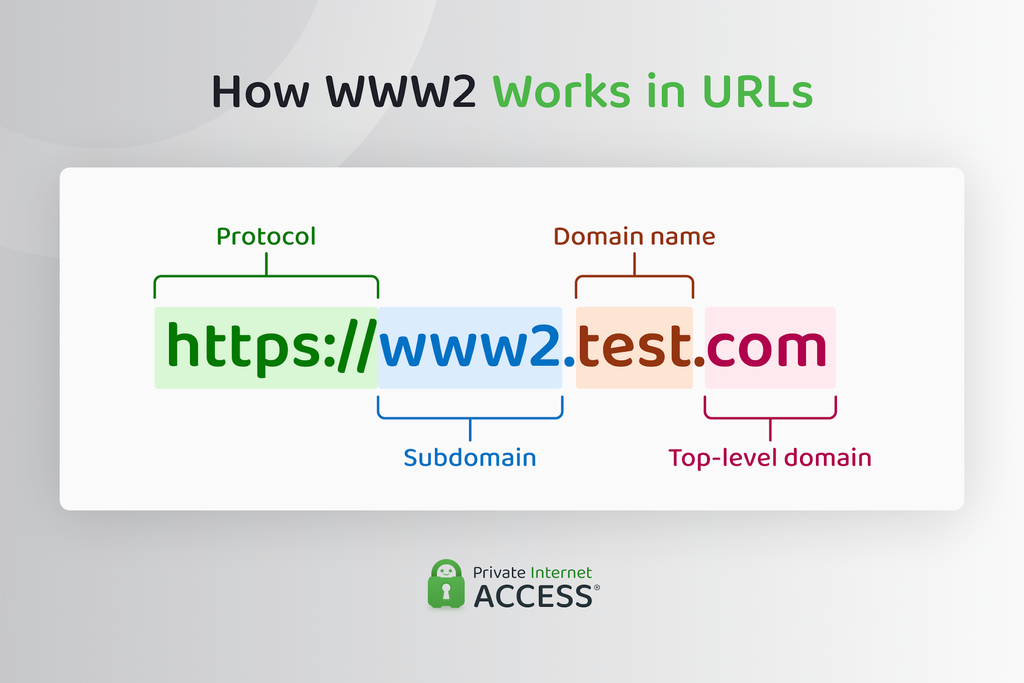
To understand www2, it helps to get acquainted with the various components of a typical web address. Take https://www.test.com, for instance. The “https” in the address indicates a secure connection, while “www” is the subdomain, “test” is the domain name itself, and “.com” is the top-level domain (TLD).
When you buy a domain, you get ownership of a name (like “test” in our example) under a specific TLD, such as .com, .org, or .gov. The “www” you see in front of most addresses is actually the first subdomain a site owner sets up, not a required part of the domain itself. Most sites keep it because visitors expect to see it, even though the site can work without it.
You probably won’t come across www2 subdomains often because not every website needs one. Larger organizations are most likely to use one to manage heavy traffic or maintain complex sites, which is why you’re more likely to encounter it on big brand sites than small personal blogs.
WWW2 vs. WWW
There’s no meaningful difference between a www2 site and its www counterpart. In nearly every case, www2 serves the same content as its corresponding www site, hosted on a separate subdomain to help distribute traffic or provide a backup if the primary server goes down.
That said, a www2 address can be set up by someone other than the legitimate site owner for less trustworthy purposes. It’s a good idea to stay alert and follow digital security best practices when visiting these sites.
WWW2 vs. WWW3 and Beyond
Higher-numbered subdomains like www3 and www4 work in the same way as www2. They’re often additional copies of a site that manages traffic, provide backup capacity, or perform some other useful function.
A higher number in a domain prefix might indicate that a site’s administrator has added more servers over time, but this isn’t a technical standard and it usually boils down to a naming convention that administrators apply to subdomains. The number alone doesn’t tell you anything meaningful about a site’s setup.
Other Domain Name Prefixes
Plenty of other subdomains exist beyond www. Each one can be used to organize a different part of a site:
- blog: Hosts a company’s blog posts and other articles
- shop: Powers an online store or checkout process
- admin: Gives staff access to a backend dashboard
- support: Houses help center or customer service resources
- mail: Connects to a company’s webmail client
- app: Runs a separate web application
Like www2, these prefixes don’t change what a domain is. They simply route visitors to the right part of a site’s infrastructure.
How WWW2 Works
Loading a website usually takes a few seconds, but a lot happens in the short window between typing an address and seeing a page appear.
Behind the scenes, your device sends a request to the Domain Name System (DNS), asking it to translate the human-readable address you typed into the numerical IP address of the server hosting that site.
This translation, which lets your browser know where to send the request, relies on DNS records to get the job done. An A record points a domain or subdomain to an IP address, while a CNAME record points it to another domain name, which the DNS resolves in turn.
A www2 subdomain can have its own record, either pointing to a separate server or looping back to the same infrastructure as www, depending on the site administrator’s configuration.
Once your device has the correct IP address, your browser opens a connection to that server, which then responds with the website’s content, which your browser assembles into the page you see.
There are two main reasons why you might land on a www2 page: the main server issued a redirect or the site’s DNS setup or load balancer routed your request to the second server from the start. Either way, this all happens within the same fraction of a second it takes the rest of the page to load.
Why WWW2 Is Useful
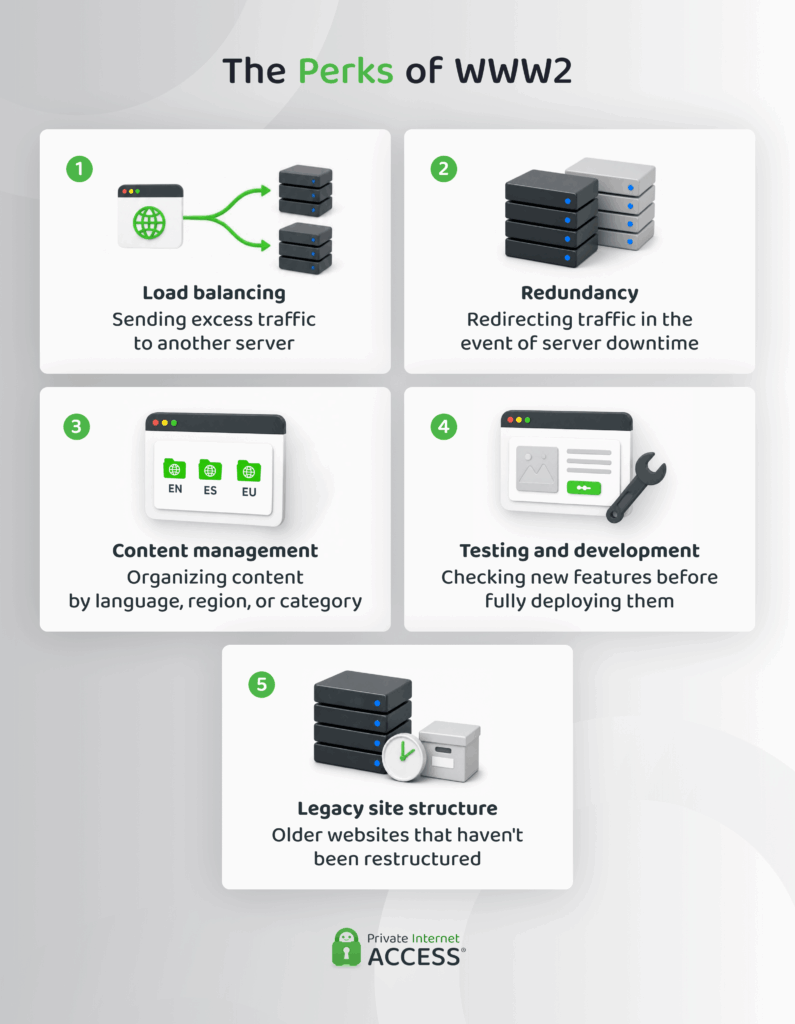
Website administrators rely on www2 subdomains in a variety of practical situations, from handling spikes in traffic to organizing content and testing new features before they go live.
Load Balancing
One of the reasons your browser redirects to a www2 address may be because a site’s load-balancing setup directs your traffic to a separate server or infrastructure. Busy websites often do this to help prevent server overloads that can cause slow loading or crashes.
Load balancing resolves this issue by distributing incoming requests across multiple servers, so no one machine has to deal with a massive traffic load. This process happens automatically and within a fraction of a second, so you usually won’t notice it but for the “www2” in your browser’s address bar.
Redundancy
A website’s administrator can also set up a secondary server to improve website uptime. If the site’s primary server experiences a hardware failure, crashes, or goes down for any other reason, the backup server can take over so the site stays online.
This is another common reason why you might see “www2” in a website’s URL. Rather than displaying an error page, the website’s infrastructure can redirect you to the secondary server to keep the site accessible.
For businesses that rely on their website for revenue or critical services, this kind of failover can mean the difference between a brief redirect and a costly outage.
Content Management
Domain prefixes like www2 can also help website owners organize content for different audiences or purposes. Rather than cramming everything onto a single set of pages, a subdomain can act as a distinct section of a site with its own structure.
This is useful for sites that have regional or language-specific content. A site might automatically redirect a visitor browsing from a particular country to a subdomain built for that audience, serving content in their language or tailored to local requirements.
Used well, this kind of structure makes a site easier to navigate for visitors and easier to maintain for the people running it.
Testing and Development
Most website developers and administrators want to test website changes before rolling out major updates. A www2 subdomain can serve as that testing ground (sometimes called a staging environment) to minimize the risk of something going wrong on the live site.
In this setup, the www2 address hosts a private copy of the site where developers can try out new features, design changes, or fix bugs. Once things work as expected, the development team can push the changes to the live site.
This kind of testing environment reduces the risk of visitors encountering broken pages, failed transactions, or other issues that come with pushing changes to a live website.
Legacy Site Structure
Some www2 subdomains, especially those associated with older websites, exist simply because that’s how the site administrators built the site.
In the early days of the internet, when connections were slower and infrastructure was far less sophisticated than it is today, administrators began setting up secondary servers to handle growing traffic and reduce strain on a single machine. Numbered subdomains like www2 became a common way to label these secondary servers.
Modern infrastructure like content delivery networks (CDNs) and cloud-based load balancers have replaced many of these older structures. Some websites, however, particularly larger or older ones, still carry a www2 address as a holdover from those earlier days.
Is WWW2 Safe to Visit?
In most cases, yes. If the domain name itself is correct and the only unusual detail is the “2” in the address, you’re likely looking at a legitimate redirect rather than a cloned or fraudulent site.
That said, www2 addresses are subject to the same threats as other domains. For example, bad actors can hijack subdomains when a website stops using a particular DNS record but never removes it. If that abandoned record still points to a service the organization no longer controls, an attacker can claim it and use it to host something else while it still appears to be part of the trusted domain.
Other risks depend less on the subdomain itself and more on general web security. The strength of a website’s security practices, vulnerabilities like DNS spoofing, and outright scams like phishing or malware sites can all affect your potential exposure to cyberthreats on www2 sites.
How to Protect Yourself From WWW2 Threats
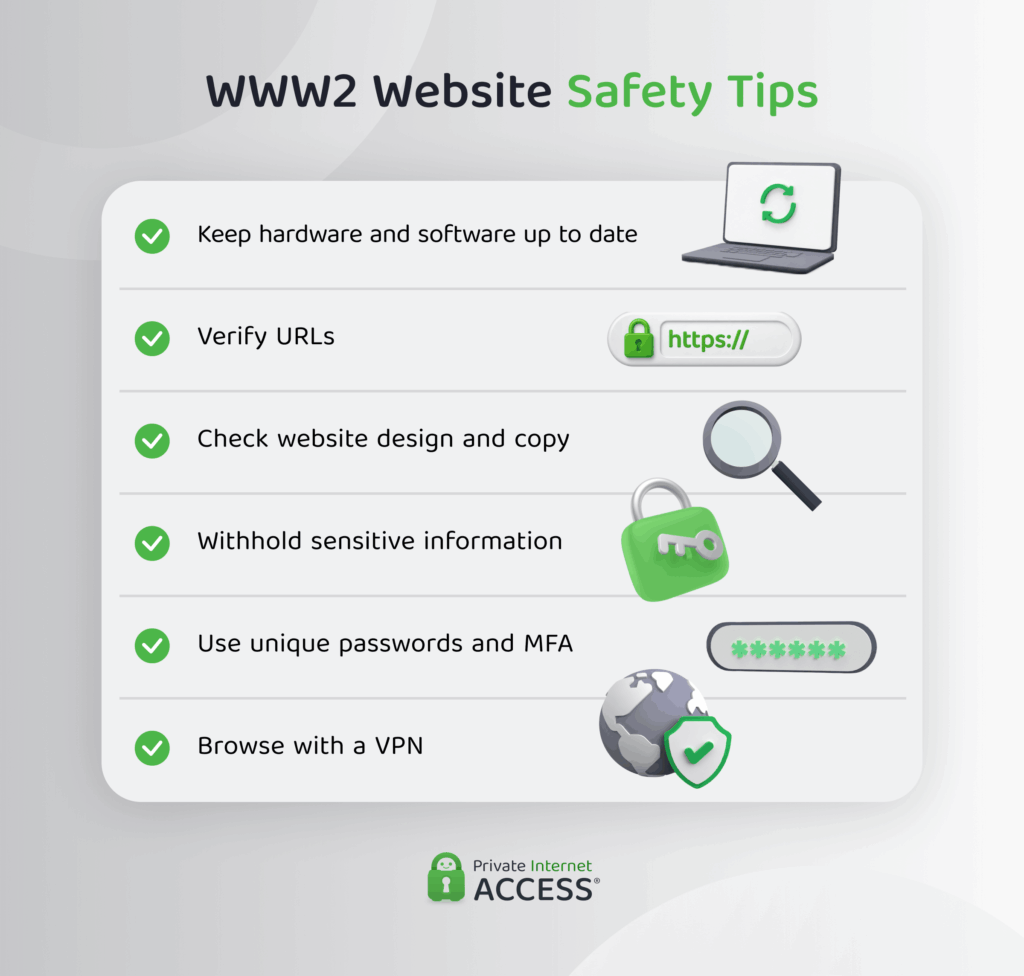
Your best bet for staying safe on www2 sites is to treat them with the same scrutiny you’d apply to any other website. There are a few best practices to follow when browsing the web:
- Keep your software updated: Outdated browsers and devices are more vulnerable to exploitation, so it’s best to run regular updates.
- Verify a site’s authenticity: Check the domain name in the URL character by character. A single altered letter can indicate that you’ve landed on a fraudulent site.
- Scrutinize the site design: Look for spelling mistakes in website copy, low-resolution images, or colors that are slightly off from what you’d expect.
- Avoid sharing sensitive information: Don’t enter passwords, payment details, or other sensitive information anywhere on a site unless you’re confident it’s legitimate.
- Use strong authentication: Use strong, unique passwords with multi-factor authentication for your accounts.
- Add a VPN to your browsing setup: Add VPN encryption to your connection for an extra layer of protection from potential cyberattacks.
FAQ
Is the WWW2 domain safe?
Generally, yes. A www2 address is usually safe and means the site’s redirected you to a secondary server for traffic management or maintenance, not that anything is wrong. However, it’s a good idea to watch out for other warning signs, like an inconsistent domain name or a site asking for sensitive details unexpectedly.
What does “WWW2” mean in a website URL?
A www2 URL usually indicates you’re viewing a secondary version of a website, as opposed to the primary “www” version in that site’s subdomain structure. Administrators often use it for load balancing, backup capacity, organizing content, or testing, and it doesn’t usually change what you’re actually viewing.
What’s the difference between WWW and WWW2?
There’s usually no difference in what you’ll see on a www website versus a www2 site and often, the latter will mirror the content of the former. A www2 address usually points to a separate server used for traffic management, backups, or testing, rather than a different website.
What are the different types of subdomains?
Beyond www and www2, other common subdomains include blog, shop, admin, support, and mail, each of which can be used to organize a different function or section of a site. Some organizations might also use subdomains for region or language-specific content, redirecting visitors based on their location.
Why do I have WWW2 in my URL instead of WWW?
You’ll usually end up on a www2 URL because a website has redirected you. This is a useful setup that helps site administrators manage high volumes of traffic, provide a backup if the main server was unavailable, or serve a specific version of the site.
