Snapchat Scams: Types, Warning Signs, and How to Stay Safe
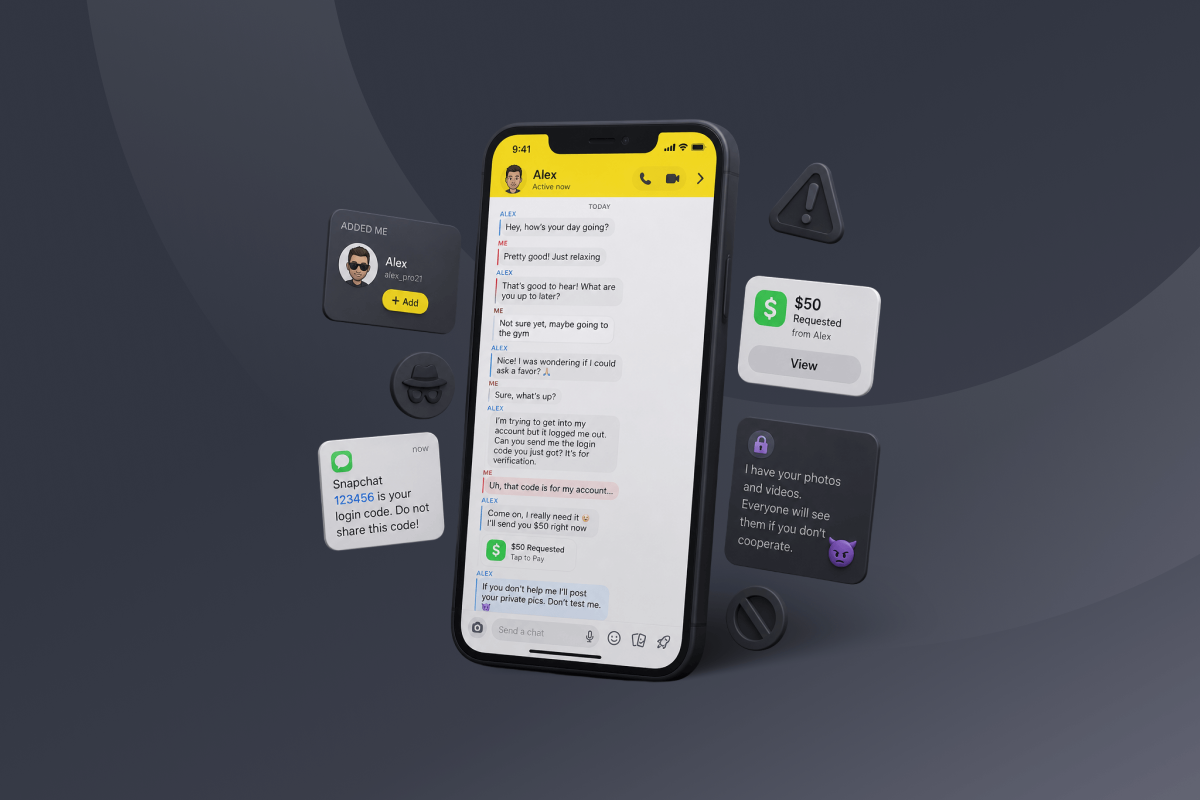
A Snapchat scam can look like a normal chat right up until someone asks you for money, a login code, or private information. The conversation can feel genuine, which is what makes these scams hard to catch early.
Though it’s impossible for this guide to cover every conceivable scenario, we’ll break down how Snapchat scams work and the most common scams today. You’ll also learn how to spot signs of a hacked account and what to do if something goes wrong.
- Snapchat Scams at a Glance
- What Are Snapchat Scams and How Do They Work?
- 10 Common Snapchat Scams
- How to Tell If Your Snapchat Account Has Been Hacked
- What to Do If You’ve Been Scammed on Snapchat
- What to Do If Someone Is Blackmailing You on Snapchat
- How to Report a Scam on Snapchat
- How to Protect Yourself From Snapchat Scams
- Can a VPN Protect You from Snapchat Scams?
- FAQ
Snapchat Scams at a Glance
Almost every Snapchat scam eventually asks you to do one of these things:
- Send a verification code you received
- Send money, gift cards, or crypto – especially to someone you haven’t met in person
- Log in through a link they sent you
- Share your password or My Eyes Only passcode (Snapchat staff will never ask for these)
- Send intimate photos or videos, or pay to stop someone from sharing them
Don’t act on any of these without stopping to verify who’s asking. If you’ve done any of the above, find out what to do if you’re the victim of a scam or what to do if someone is blackmailing you.
What Are Snapchat Scams and How Do They Work?
Snapchat scams are fraud schemes that use Snapchat as part of the interaction. They don’t always start in the app. A scammer may contact you somewhere else first, then move the conversation to Snapchat.
That deception can take many forms, so we’ve grouped Snapchat scams by the main trick each one relies on.
Most scams on Snapchat follow the same basic pattern. Here’s the general flow:
- The scammer makes contact and starts the interaction.
- They provide a reason for the interaction that makes it seem legitimate.
- They ask you for something valuable or to do something that moves the scheme forward.
- They use the result to complete the fraud or set up further abuse.
If a scammer approaches you, it doesn’t necessarily mean they’ve accessed your Snapchat account. A scam attempt happens through the interaction itself, while account compromise means someone has gained unauthorized access to your account.
Sextortion involves using intimate images you’ve shared to blackmail you into sending money or more material. While still a scam, this category requires a different understanding and approach.
10 Common Snapchat Scams
Most Snapchat scams involve some form of social engineering built around a core deception designed to manipulate the victim into taking a specific action or disclosing information.
We group the scams below by the main deception or tactic they use. Some can lead to account compromise, financial loss, blackmail, or other forms of abuse.
1. Phishing and Fake Snapchat Support Scams
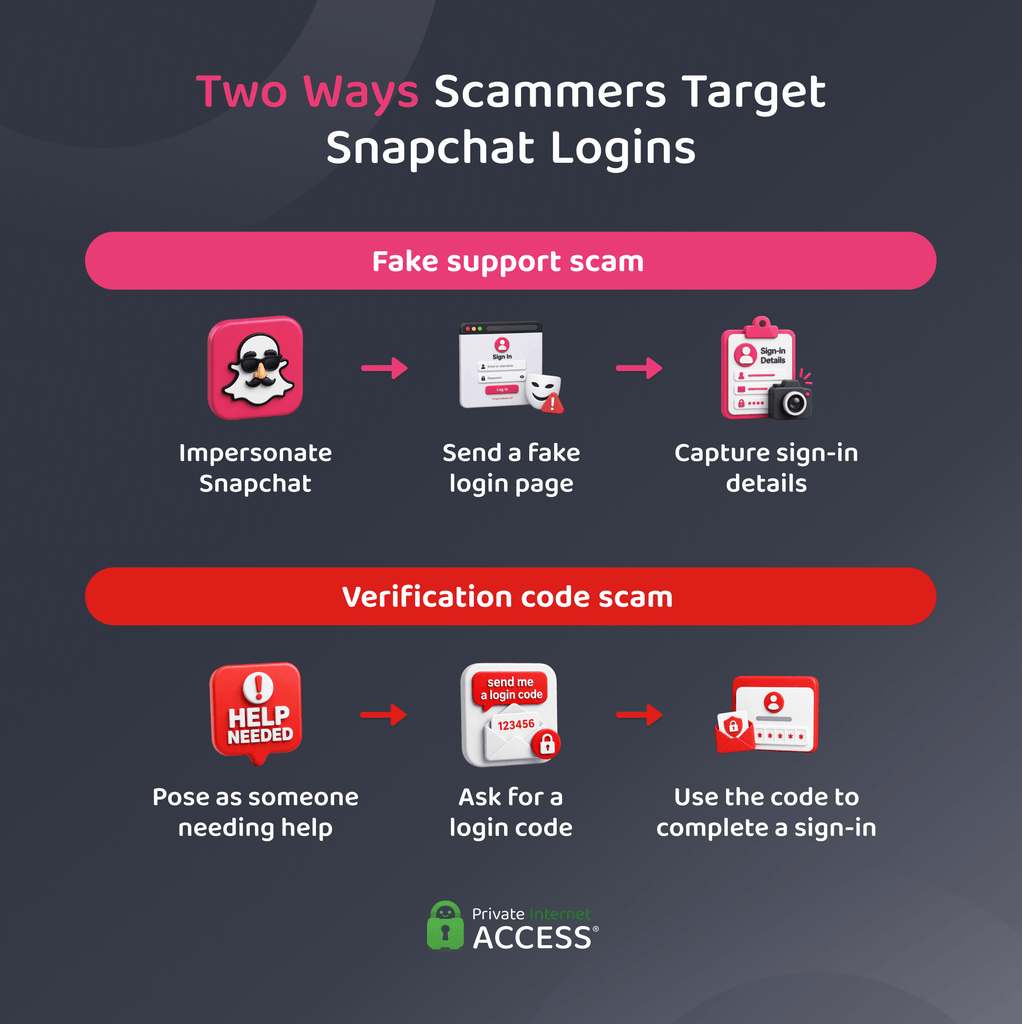
In this scheme, scammers pretend to be from the Snapchat support team. You might get a fake security alert, password-reset notice, or message claiming there’s a problem with your account.
The message may send you to a fake login page that copies Snapchat’s sign-in screen. If you enter your details, they go to the scammer. Snapchat-themed phishing can also arrive by email or SMS, so it doesn’t have to appear inside the app.
Fake support agents may also claim they need sensitive account details to fix an issue. Snapchat representatives will never ask for your password or My Eyes Only passcode.1
2. Account Recovery and Verification Code Scams
This scam usually starts with someone saying they need help getting back into their Snapchat account. They may claim that the app sent you a login or verification code by mistake and ask you to forward it.
That code could be part of a sign-in attempt for your account. Sending it back can give the scammer what they need to complete the login.2 The trick works because the scammer lies about what the code is for.
3. Impersonation and Hacked-Friend Scams
Impersonation scams rely on someone else’s identity to gain trust. A scammer may copy a real profile or take control of a genuine Snapchat account.
They can pose as a friend, creator, or business and then make a fake personal request. A hacked account can be harder to question because the message comes from a profile you already know.
4. Romance, Catfishing, and Fake Meetup Scams
Romance or online dating scams build a relationship that isn’t what it seems, cultivating the victim’s trust in order to make a series of requests.
Often called catfishing, the scammer may use a false identity or someone else’s photos to keep the story going. As the relationship develops, the scammer may use plans to meet in person as an excuse to ask for money.
5. Snapchat Blackmail Scams and Sextortion
Snapchat blackmail scams use threats to pressure you into complying. Sextortion is a form of blackmail that involves sexual or intimate content.
The scammer may get that material during the conversation or through deception, then threaten to share it unless you meet their demands. Those demands can involve money, more intimate content, or another form of compliance.
Snapchat’s disappearing-content features don’t guarantee that the material is gone. A recipient may be able to save content in Chat or take a screenshot. That’s why it’s important to keep intimate content secure.
6. Sugar Daddy and Sugar Mommy Scams
These scams promise financial support from someone posing as a wealthy benefactor. The person may offer an allowance or gifts, then introduce a reason why you need to send money first.
One version asks for a fee before the promised payment can be released. Another uses a fraudulent payment, then asks you to send part of the money back.
Fake checks can work the same way. The deposit may appear in your account at first, but the bank can reverse it once they discover the fraud. Any real money you sent in the meantime is still gone.3
7. Fake Job, Investment, and Money-Making Scams
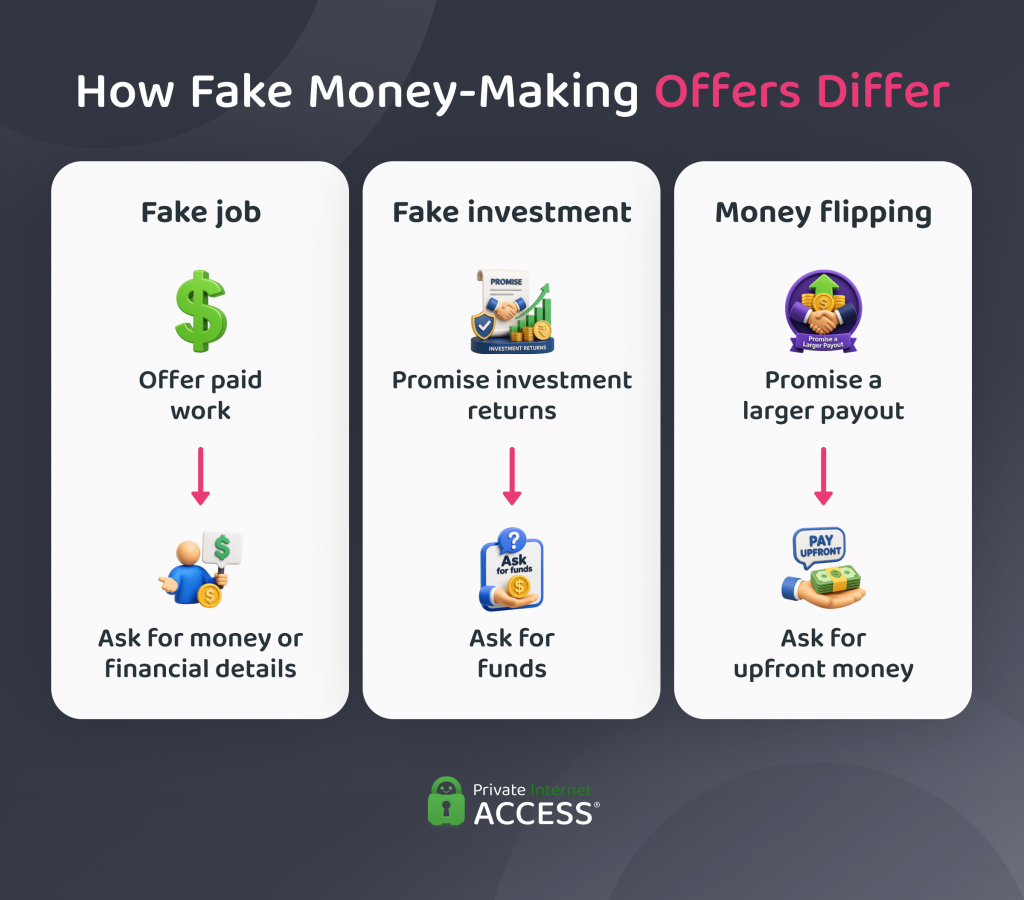
These scams involve a false chance to earn or grow money. A fake job promises paid work that doesn’t exist. An investment pitch may claim that cryptocurrency or another asset will produce large returns. Money-flipping schemes promise to turn a small payment into a much larger one with little effort.
The offer is the bait. The scammer uses it to get the victim to put money into the scheme, move funds, or hand over financial information.
8. Fake Giveaways, Contests, Surveys, and Charity Scams
Fake giveaway and contest scams claim you’ve won something, then invent a fee before the prize can be released.
Fake surveys use the promise of a reward to collect information. Charity scams take a different route by inventing a cause or misusing the name of a real one to ask for donations.
In each case, the scammer creates a false reason for the request. The reward or cause exists to make that request seem legitimate.
9. Premium Snapchat and Adult Content Scams
Premium Snapchat is an informal term people use for paid private content shared through Snapchat. It isn’t the name of Snapchat’s official paid subscription, Snapchat+.
Scammers can use the idea to sell access to content that doesn’t exist. They may send the buyer to a fake subscription or payment page, accept payment and disappear, or use a stolen creator identity to make the offer look real.
10. Fake Product and Shopping Scams
Fake shopping scams use Snapchat to sell products that aren’t what they seem. A seller may take payment and never send the item. They may also ship a counterfeit product or something different from what they advertised.
The scam can also lead to a fake online store that looks like a real shopping site. Extremely low prices or claims of limited stock can help make the offer seem tempting.
How to Tell If Your Snapchat Account Has Been Hacked
Some Snapchat scams rely on getting information that gives a scammer access to your account. If you’ve shared a password or verification code, clicked a suspicious login link, or noticed unexpected changes to your account,4 the next step is to check whether the scam has resulted in an account compromise. Here are some common telltale signs:
- Login alerts from an unfamiliar device, IP address, or location
- Unknown devices or browsers in your active sessions
- An email address or phone number you didn’t add
- A display name you didn’t change
- Two-factor authorization (2FA) settings you didn’t change
- Contacts you didn’t add
- Messages or content you didn’t post
- Account data exports you didn’t request
- Repeated unexplained logouts, especially alongside other unfamiliar account activity
What to Do If You’ve Been Scammed on Snapchat
What you should do next depends on what happened. A scam may result in financial loss or exposed personal information without giving the scammer access to your Snapchat account. In other cases, a scammer may use information you provide to take over the account.
| What Happened | What To Do |
| You shared your password | – Change your Snapchat password – Confirm the email and phone number on file are still yours – Update the password anywhere else you reused it |
| You shared a login code | – Check active sessions and sign out unrecognized devices – Review account details for changes you didn’t make |
| You sent money or shared banking details | – Contact your bank, card issuer, or payment service – Ask what fraud response or account protection options apply – Note that you may not be able to recover it |
| You shared personal information | – Identify exactly what information the scammer received – Watch your accounts and inbox for follow-up fraud or impersonation attempts |
| You downloaded something suspicious | – Remove the file or app – Scan your device with up-to-date security software – Note that clearing Snapchat’s cache won’t remove malware |
| Someone took over your account | – Use Snapchat’s official compromised account recovery process – Contact Snapchat support if a password change doesn’t restore access |
| Someone is impersonating you | – Confirm your real Snapchat account is still secure – Warn contacts through a trusted channel where they can verify it’s really you |
What to Do If Someone Is Blackmailing You on Snapchat
If someone is threatening to share private or intimate content, treat the situation differently from a typical scam. Paying or complying does not always end the threats. The steps below focus on preserving safe evidence, reporting the abuse, and reducing further harm.
- Don’t send more content: Avoid sending anything else in response to a threat. It only gives them more leverage over you.
- Save safe evidence: Keep the account username, profile details, threatening messages, and any payment demands. This information may help when you seek support or report what happened.
- Handle minors’ images carefully: If the intimate content shows someone under the age of 18, don’t download, forward, or share it to keep evidence. Keep any material already stored on your device intact and, if it requires specialist examination, leave its collection and analysis to the appropriate authorities.
- Use Take It Down: NCMEC’s free Take It Down service can help remove or prevent further sharing of explicit images taken when the person was under 18, even if they’re now an adult. It creates a digital fingerprint of the image from the one on your device. This allows participating public or unencrypted platforms to use that fingerprint to identify and block matching copies without you having to share the image with Take It Down.
- Use StopNCII if eligible: Adults who were 18 or older in the intimate image can use StopNCII.org if they have the image on their device. It creates a digital fingerprint that participating platforms can use to find matching content and action under their policies.
- Know the limits: Neither service can remove every copy from the internet. They work with participating platforms, and StopNCII doesn’t cover encrypted messaging services.
- Get help if you’re under 18: Tell a trusted adult and contact an appropriate child-safety organization for support. If the threat includes an immediate risk of physical harm, contact the relevant local emergency service or law-enforcement agency.
How to Report a Scam on Snapchat
Snapchat includes options for reporting both accounts and specific content. The steps differ depending on what you want its safety team to review.
How to Report an Account on Snapchat
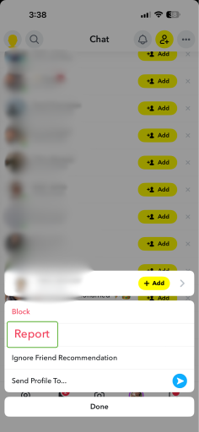
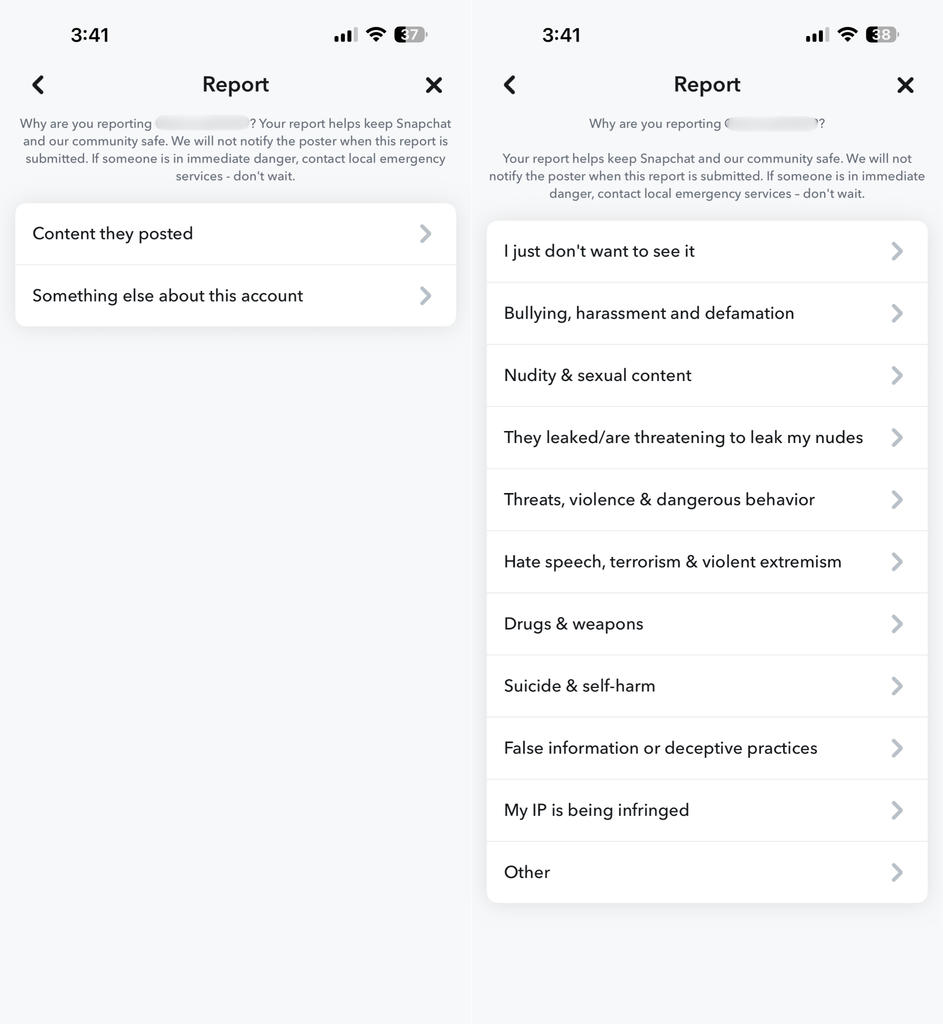
- Open the Chat screen, then press and hold the person’s name.
- Tap Report.
- Choose an option that explains why you’re reporting the account and tap Submit.
How to Report Content on Snapchat
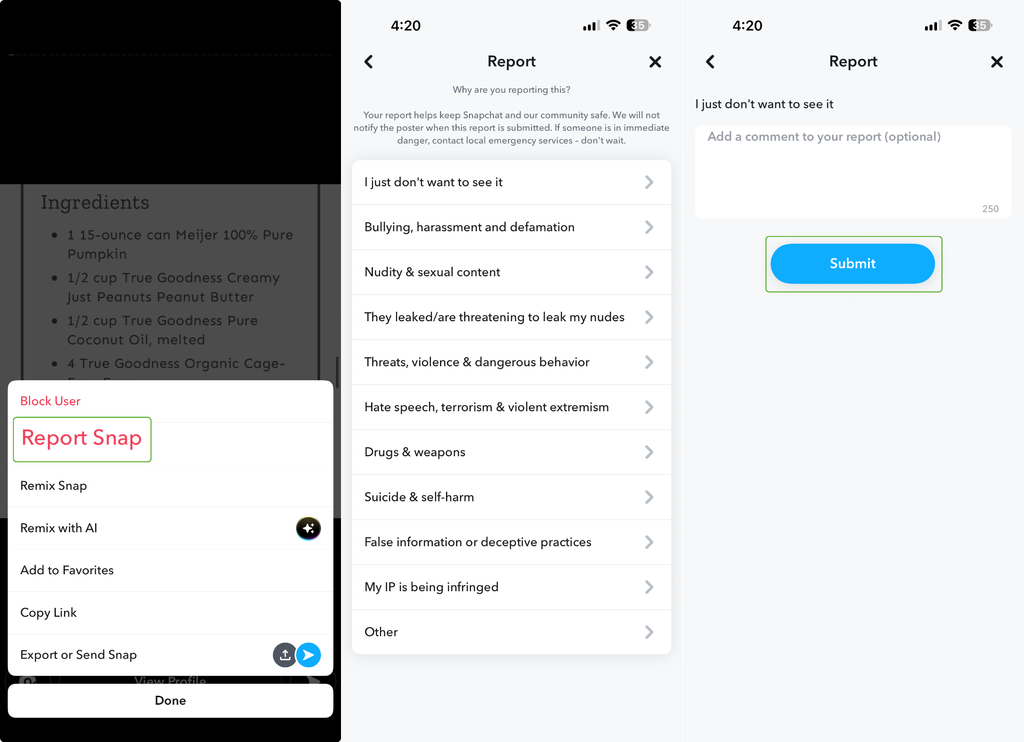
To report a snap, story, or a chat message, press and hold the object, then tap the Report button. Choose the appropriate reason for reporting, then tap Submit.
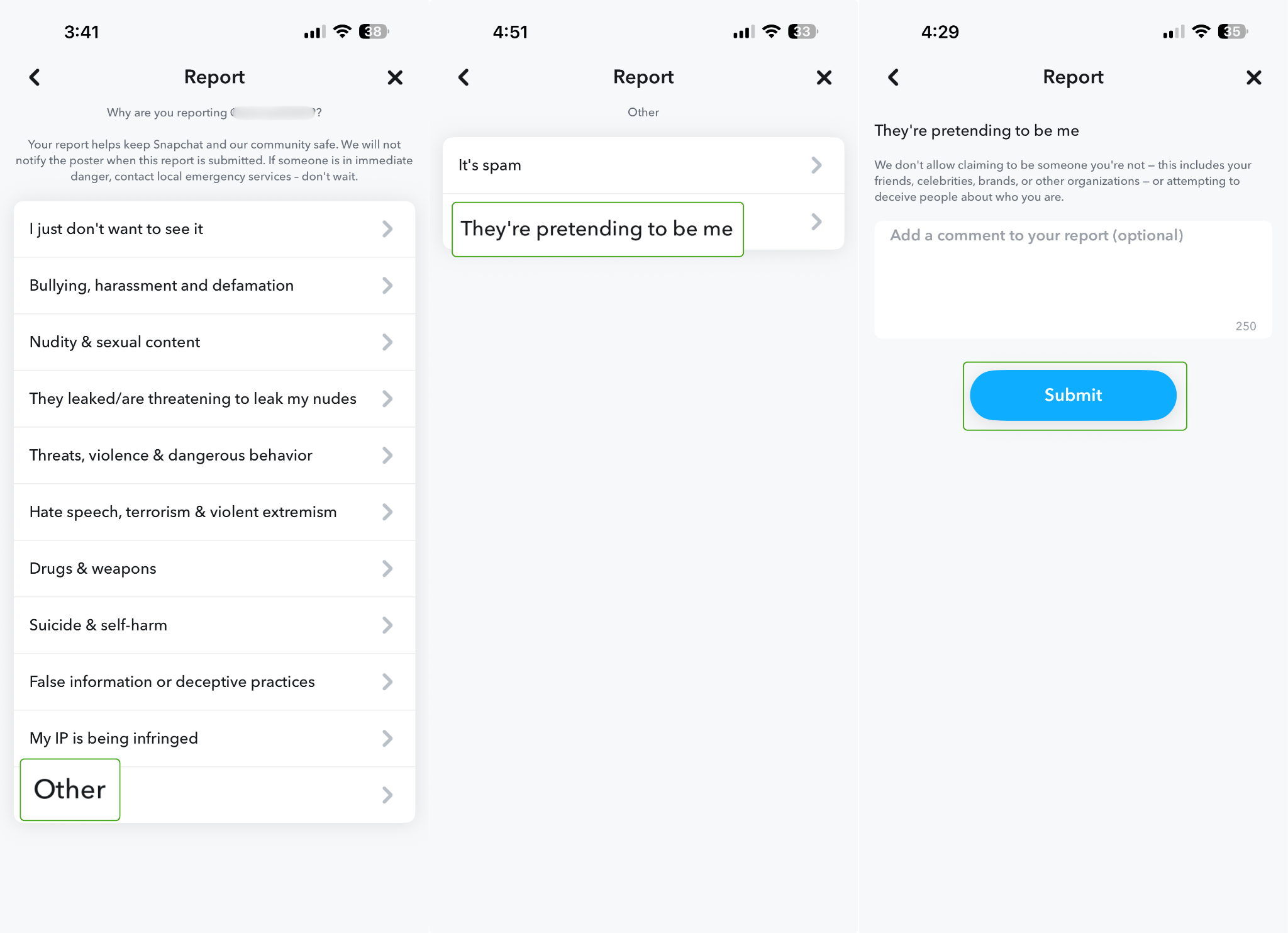
If someone is using a copied identity or pretending to be you, report the account through the same flow. Under the list of reasons, select Other, then They’re pretending to be me. Include all the details in the text box and tap Submit.
How to Protect Yourself From Snapchat Scams
Good account security can make it harder for someone to take over your Snapchat. Here are some measures to protect yourself from Snapchat scams:
- Use a unique password: Choose a strong password that you don’t use anywhere else. That way, if another service suffers a data breach, attackers can’t reuse the same password to access Snapchat in credential stuffing attacks.
- Enable 2FA: Two- or multi-factor authentication adds an additional check – usually a code sent via SMS or a key from an authentication app – when you sign in. That way, your password alone isn’t enough to get in.
- Consider using a passkey: Snapchat supports passkeys on eligible devices, although the feature may not be available on every account yet. Passkeys can provide stronger sign-in protection without relying on a password alone.
- Avoid unofficial Snapchat apps: Third-party apps or services that ask for your Snapchat login details can put your account at risk. Snapchat also warns that unauthorized plugins and apps can lead to account access problems.
- Review who can reach you: Update your contact and discoverability settings based on how open you want your account to be. Be selective when accepting requests from people you don’t know.
- Limit your location sharing: Review your Snap Map settings and decide who, if anyone, can see your location. Ghost Mode lets you hide your location from other users whenever you like.
- Share less public information: Avoid posting details that could help someone build a convincing story about you or pretend to know you. Keep sensitive personal information out of public-facing profile content.
- Verify requests somewhere else: If someone you know makes an unusual request, confirm it through a separate channel you already trust. Replying to the same Snapchat account only confirms that someone still controls that account.
Can a VPN Protect You from Snapchat Scams?
A VPN can’t tell whether the person messaging you on Snapchat is genuine. It also can’t stop you from sending money, sharing an authentication code, giving away sensitive information, or sending private content.
What a VPN does protect is your network traffic. It encrypts the connection between your device and the VPN server, which helps shield your traffic from anyone monitoring your local network.
That can matter on an untrusted network, such as public Wi-Fi, but it doesn’t make a Snapchat conversation itself safer.
FAQ
What are some common Snapchat scams?
Common Snapchat scams include fake support messages, account-recovery tricks, impersonation, money-making schemes, and blackmail. Some scams also use fake relationships or shopping offers. A single scam can mix more than one of these methods.
How can you tell a fake Snapchat account?
You usually can’t tell from one profile detail alone. Check whether the person’s identity matches what you already know, then verify them through another trusted channel. A low Snapscore or sparse profile can look suspicious, but neither proves the account is fake.
How to tell if you’re talking to a scammer on Snapchat?
Be cautious if someone suddenly asks for money, login details, or private content. Pressure to act fast or refusal to verify their identity elsewhere can also be a warning sign. What they ask you to do matters more than how polished their profile looks.
Are snapchat ads scams?
No. Snapchat runs a real advertising platform, but that doesn’t mean every ad or seller is trustworthy. Fraudulent ads can still appear, so judge the offer itself and the site it leads to rather than assuming it’s safe because you saw it on Snapchat.
Resources:
