VPS vs. VPN: What’s the Difference and Which Should You Use?

VPS (Virtual Private Server) and VPN (Virtual Private Network) may seem interchangeable, but they’re actually used for very different purposes
Whether you need one or the other, or both depends on what problems you need to solve and how they can fit into your setup. In this article, we’ll look at them individually, explain how they work, and how you can use them together.
What Is a VPS?
A Virtual Private Server (VPS) is a virtual machine that runs on a larger physical server but functions like its own independent computer. It has its own operating system, storage, and resources. It’s like having a private server, even though you’re sharing the physical hardware with others.

You create a VPS by using virtualization software, called a hypervisor, to divide a physical server into multiple virtual servers. The hypervisor assigns each VPS its own share of the CPU, RAM, and storage, so each VPS works independently.
Since a VPS acts like its own separate computer, you can install programs, store files, run websites, or do just about anything you could do on a regular computer. Most VPS providers guarantee a high level of uptime, so you can usually access your server anytime from anywhere, and run your services 24/7 with minimal interruption.
When Do You Need a VPS?
A VPS is a great choice when your project requires more control, reliability, or performance than a basic setup can offer. You might need a VPS when:
- You’re launching a site or app that needs to stay online 24/7.
- You want to install your own software or configure the system your way.
- You’re running a service that can’t afford lag or downtime.
- You need private storage for data or databases.
- You’re hosting tools or platforms that multiple users will access.
- You’ve outgrown limited environments and need guaranteed resources.
VPS Pros
| VPS Pros | Why it matters |
| Full system control | You get root or admin access to configure everything from the OS to the firewall. |
| Customizable environment | You can install any software stack you need, including apps, databases, or dev tools. |
| Dedicated resources | CPU, RAM, and storage are allocated specifically to your VPS for reliable uptime. |
| Scalable performance | It’s easy to upgrade your VPS plan to handle more traffic or heavier workloads. |
| Always-on availability | A VPS stays online even when your local device is turned off or disconnected. |
VPS Cons
| VPS Cons | Why it Matters |
| Requires technical skills | Setting up and maintaining a VPS often requires familiarity with server administration. |
| No built-in privacy tools | Unlike a VPN, a VPS doesn’t encrypt your internet traffic unless you install and configure it separately. |
| Can be overkill | For simple tasks like casual browsing or streaming, a VPS is overly complex and unnecessary. |
| Varies by provider | Performance and reliability depend on the host, so choosing the right VPS service is critical. |
What Is a VPN?
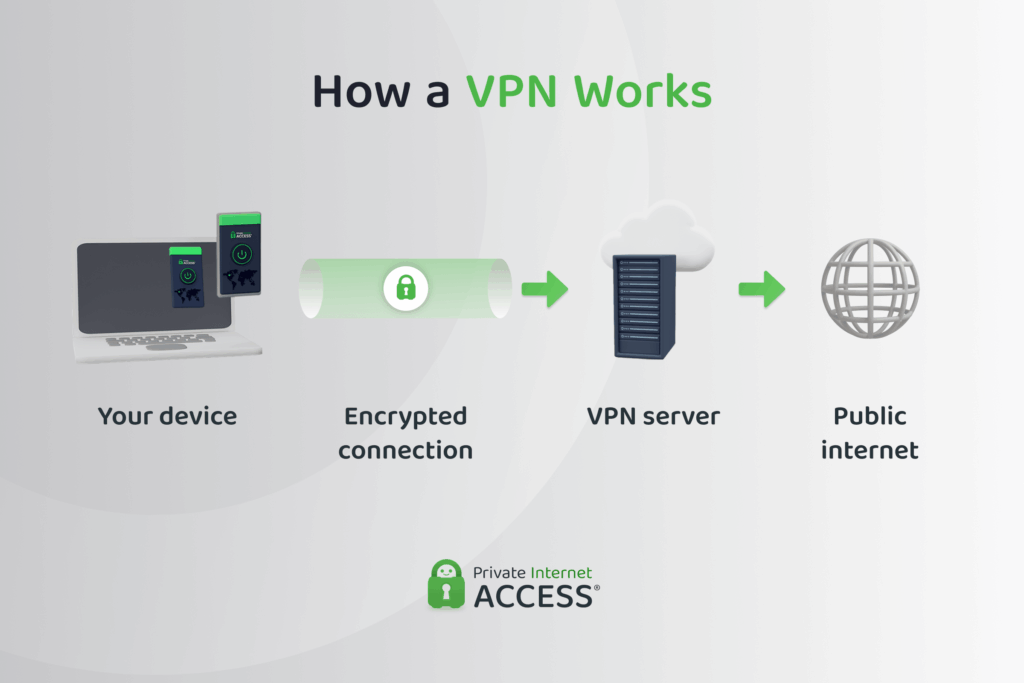
A Virtual Private Network (VPN) is a tool that creates a secure, encrypted tunnel between your device and the internet. The encryption encodes everything you send or receive, so third parties like hackers, your internet provider, or public Wi-Fi snoops, can’t read it.
Once connected, all your internet traffic travels through this secure tunnel to the VPN server, which then forwards it to the website or service you’re using. Because of this, the site you’re visiting sees the VPN server’s IP address, not yours. This hides your real location and makes it harder for websites to track you online.
VPNs aren’t just for individuals. Some organizations use site-to-site VPNs, which connect two separate networks, like a company’s HQ and a branch office, into one secure virtual network. It’s a powerful solution for businesses that need to share internal resources across multiple locations without exposing sensitive data to the public internet.
When Do You Need a VPN?
A VPN is a smart choice when you need more privacy, security, or freedom online. You might need a VPN when:
- You’re using public Wi-Fi and want to protect your personal information.
- You want to hide your IP address and keep your browsing private.
- You work remotely and need a secure connection to your company’s network.
- You want to reduce tracking from websites, advertisers, or your ISP.
- You’re traveling and want to connect to banks and other services in your home country without additional security steps.
VPN Pros and Cons
| Pros | Cons |
| ✅ Encrypts your connection: VPNs secure all data between your device and the internet, protecting against snoops and hackers. | ❌ Doesn’t host content: A VPN is only for privacy and security; it doesn’t let you run websites or apps. |
| ✅ Hides your IP address: Your real IP stays private, which helps shield your identity and location. | ❌ Limited speed based on server: Connection speeds can vary depending on server load and physical distance. |
| ✅ Easy to use: VPN apps are beginner-friendly – just install, tap connect, and you’re protected. | ❌ No root access or hosting: Unlike a VPS, you can’t install custom software or manage an operating system. |
| ✅ Great for public Wi-Fi: VPN encryption makes unsecured public Wi-Fi networks safer to use – perfect for travelers or remote workers. | ❌ Can be blocked by some services: Some network hardware and online services actively block VPN traffic. |
| ✅ Protects remote work: Secures sensitive business information when accessed from external locations. |
VPS vs. VPN: Key Differences
While both VPS and VPN use remote servers, they’re built for entirely different purposes. Here’s a quick breakdown of how they compare:
| VPS | VPN | |
| Primary use | Hosting websites, apps, databases | Securing internet traffic and remote connections |
| User privacy | Depends on your setup | Strong encryption and IP masking |
| Control level | Full root access and system control over a virtual machine | Network-level rerouting and protection (no server access) |
| Tech Skill Needed | Moderate to advanced | Beginner-friendly setup |
| Used For | Custom software, file storage, private hosting | Privacy for remote work, public Wi-Fi connections, site-to-site links, streaming |
Is a VPN Better than a VPS?
Comparing a VPN to a VPS is a bit like comparing a security guard to a server room. Sure, they both deal with access and protection, but they serve very different roles. A VPN is designed to keep your internet connection private. A VPS, on the other hand, is a flexible environment for running apps, websites, or even your own private VPN.
That said, there’s one overlap: location control. If you want to boost your privacy by masking your real IP with one from another country, both tools can help. You can rent a VPS in another country and route your traffic through it, or, just open your VPN app and connect to a VPN server in that region with a single click.
So, there’s no real answer as to whether one is better than the other. It depends on what you need: privacy and ease of use? Go with a VPN. Full control and hosting power? Get a VPS.
If privacy matters to you, it’s a good idea to look for an independently audited VPN with a proven no-logs policy, like PIA. We offer quarterly transparency reports, RAM-only servers that wipe your connection data on each reboot, and court records proving the validity of our claims.
Pricing Comparison: Do VPS and VPN Services Cost the Same?
While both VPS and VPN services can be affordable, their pricing models and what you’re paying for are completely different.
A VPN service is typically a turnkey product. You pay a monthly or annual subscription fee for access to a network of encrypted servers, built-in privacy features, support across devices, and automatic updates. Everything is managed for you, and there’s no need for setup or maintenance. Expect to pay anywhere from $3 to $12 per month, depending on provider, features, and billing cycle.
A VPS, on the other hand, is more of a blank slate. You’re renting a portion of a remote server and configuring it yourself. Prices vary based on resources like CPU, RAM, bandwidth, and storage. Entry-level VPS plans can cost as little as $5 per month, while higher-performance options range from $10 to $30+, especially if you need more memory or region-specific servers.
If you’re setting up a self-hosted VPN on a VPS, you’ll likely save money in the long term. But you’ll also be responsible for setup, security, and maintenance—things a VPN provider typically handles for you.
You can try PIA VPN risk free with a 30-day money-back guarantee for new subscribers. With full access to all our servers and features, it’s a great way to see if a VPN is right for you.
How a VPS and VPN Can Work Together
If the situation demands it, using them together gives you the privacy of a VPN and the control of a remote VPS server.
Use a VPN to Secure Access to Your VPS
When you connect to your VPS over the internet, especially from public Wi-Fi or shared networks, you risk exposing your credentials and activity. A VPN adds a critical layer of encryption, shielding your connection from snoopers or man-in-the-middle attacks.
How to do it:
- Install a VPN app on the computer you use to manage your VPS: This is usually your laptop or desktop, where you use SSH or log in through a control panel.
- Connect to a VPN server: Launch the VPN app and connect to a secure server before opening any VPS-related tools.
- Check that the VPN is active: Confirm the connection and make sure your IP address is masked.
- Log into your VPS: Use your SSH client or hosting control panel as usual. Now your session is encrypted and protected from local network threats.
Best for: Remote teams, freelancers, and admins who regularly manage cloud infrastructure from different locations.
Host Your Own VPN on a VPS
If you’re privacy-focused and want complete control over your VPN, you can set one up on your own VPS. This gives you all the benefits of a VPN without relying on a third-party provider.
How to do it:
- Rent a VPS: Choose the right VPS provider for the VPN, with a server location that matches your needs.
- Log into your VPS: Use SSH from your computer to access the VPS terminal.
- Install VPN software: Choose an open-source VPN like WireGuard or OpenVPN, and install it on your VPS using the official documentation or setup scripts.
- Configure the VPN: Set up your encryption, authentication, and any user access settings. This step defines how your devices will securely connect.
- Download or create VPN profiles: Generate configuration files for each device you want to connect, like your laptop, phone, and tablet.
- Install the VPN app on your devices: Use a compatible VPN client (like WireGuard app or OpenVPN Connect) and import the profile.
- Connect to your VPN: Launch the app on your device and connect to your VPS-hosted VPN.
Best for: Privacy-first individuals, developers, or organizations that want to avoid shared infrastructure.
Hosting your own VPN may give you more control, but it also means you’re responsible for installing security patches and troubleshooting if something goes wrong. A managed service like PIA offers all the same VPN benefits (and many more), without the burden of ongoing maintenance.
VPS for VPN: How to Choose the Right VPS For Your VPN

If you’re thinking about running your own VPN on a VPS, the first step is choosing the right server environment. Searching “best VPS for VPN” will return dozens of options, but not all are suitable for privacy-focused setups or beginner-friendly configurations.
Here are the important factors to consider:
Server Location
Choose a VPS in a region that matches your VPN goals. For example, if you want to appear online with a US IP address, rent a VPS hosted in the US. Likewise, if you’re setting up a site-to-site VPN to access company systems, the VPS should be close to your main office network for optimal speeds and minimal latency. Server location directly impacts both performance and access to content or apps.
Bandwidth and Performance
Look for plans that offer high or unmetered bandwidth. VPN traffic can add up quickly, especially if you stream, video chat, or share files. Make sure the VPS has enough CPU and RAM to handle your usage without throttling.
Privacy Policy
Read the provider’s privacy policy carefully. Some VPS hosts log metadata or usage patterns, which may defeat the purpose of using them to set up your own VPN.
Ease of Setup
Some VPS dashboards let you install VPN tools like OpenVPN or WireGuard with one click. Others require manual setup via a command line. If you’re new to VPS management, look for providers with documentation or pre-built templates for VPN servers.
FAQ
What is the main difference between a VPS and a VPN?
When it comes to VPSs and VPNs, there are more differences than similarities. A VPS is a virtual server you can use to host websites, apps, or custom services. A VPN is a privacy tool that encrypts your internet connection and hides your IP address. One gives you control over a remote machine; the other protects your data as it travels online.
Can I use a VPS as a VPN server?
Yes, you can create your own private VPN on your VPS. This lets you bypass commercial VPN providers entirely while maintaining full control over your encryption and traffic.
Is a VPN safer than a VPS for protecting online privacy?
VPNs are built for one main purpose, which is to protect your online privacy. Most VPN features work toward that goal. A VPS has some privacy benefits when you configure it properly, but it’s more of a side effect than the main focus.
Who should choose a VPS instead of a VPN?
There are several situations when you need a VPS, like if you need to run custom software, host websites, or set up a private server environment. It’s better suited for people who want flexibility and aren’t afraid of a little setup. If your main goal is encrypted browsing and a quick connection, a VPN is a better fit.
Do VPS and VPN services cost the same?
When comparing the pricing for VPNs and VPS, it’s important to look at both short-term and long-term costs. VPNs are typically subscription-based and user-ready, while VPS pricing depends on the server specs and provider. A VPS can be cheaper over time, but it requires more effort to set up and maintain.
