Web Filtering: How It Works and the Main Types Explained
When you visit a website, access may be allowed or blocked based on rules applied somewhere between your device and the internet. But how does that process work, and where does the filtering take place?
In this guide, we cover what web filtering is, how it works, the main types, and how it compares with other cybersecurity tools.
What Is Web Filtering?
Web filtering is a set of techniques used to control which websites or specific types of online content users can access based on predefined rules and access policies.
It’s commonly used in a range of environments, including:
- Schools and libraries: Supporting age-appropriate access to online resources.
- Businesses: Enforcing acceptable-use policies and supporting security and productivity.
- Public networks: Managing online access at hotels, airports, and other public venues.
- Home networks: Giving parents more control over children’s internet access.
How Does Web Filtering Work?
A web filter evaluates each request against rules that determine whether the requested destination or content is permitted. The information used to make that decision depends on how the filter is configured.
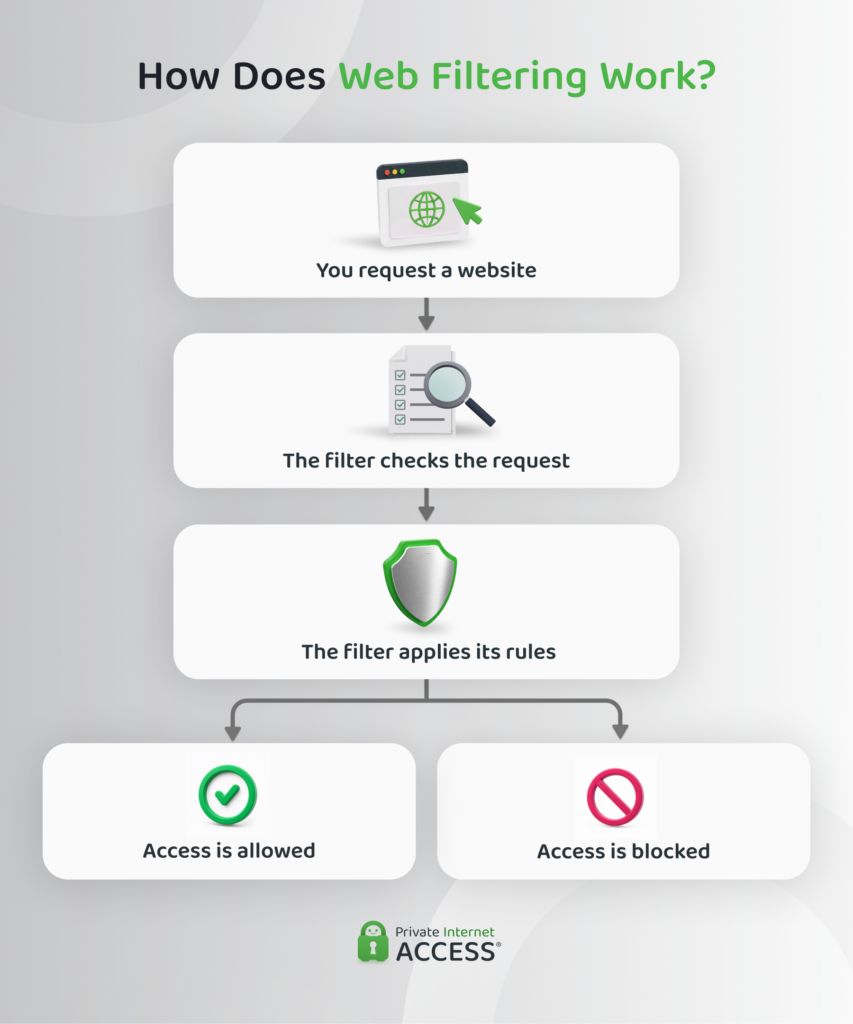
The process generally follows four steps:
- A request is made: A user enters a web address or follows a link, prompting their device to request the website.
- The request is checked: The filter examines information about the requested destination or content.
- The rules are applied: The information is compared with the filtering rules.
- A decision is made: The request is either allowed to continue or blocked.
These rules can include allowlists and blocklists, which identify specific websites or web addresses that should be permitted or restricted. Some systems can also log or flag requests rather than blocking them outright.
Types of Web Filtering
Web filtering methods differ in what they examine and how they identify content that should be restricted. Here’s a quick comparison of the most common types:
| Type | What It Checks | What It Can Target |
| URL filtering | Specific web addresses | Individual webpages or files |
| DNS filtering | Website domains | Entire websites |
| Category filtering | Groups of websites | Websites with similar content |
| Content filtering | Content on webpages or in files | Specific types of material, such as keywords or images |
URL Filtering
A URL identifies a specific location on a website, such as an individual webpage or file. This makes URL filtering useful for controlling access to specific pages or resources, while broader URL rules can also restrict access to an entire website.
DNS Filtering
DNS (the Domain Name System) translates website names, such as privateinternetaccess.com, into an IP address that your device uses to connect to the website.
When your device looks up a domain, it sends a DNS request to find the corresponding IP address. DNS filtering checks the domain in this request against its filtering rules. If the domain is restricted, the filter can prevent the website from loading.
Category Filtering
Websites can be grouped by their content or purpose, such as gambling, social media, or adult content. Filtering services can also use security categories to identify websites associated with threats such as malware or phishing.
Category filtering lets administrators apply the same filtering settings across multiple websites in a group, rather than specifying them individually for each website.
The classifications are typically maintained by the filtering service and may be created using automated systems, machine learning, human review, or a combination of these approaches.
Content Filtering
A website can contain different types of material, so its address or category alone may not tell a filter everything it needs to know. This approach examines the material itself, such as text, images, keywords, files, or other elements of a webpage, to identify specific types of content.
Where Web Filtering Happens
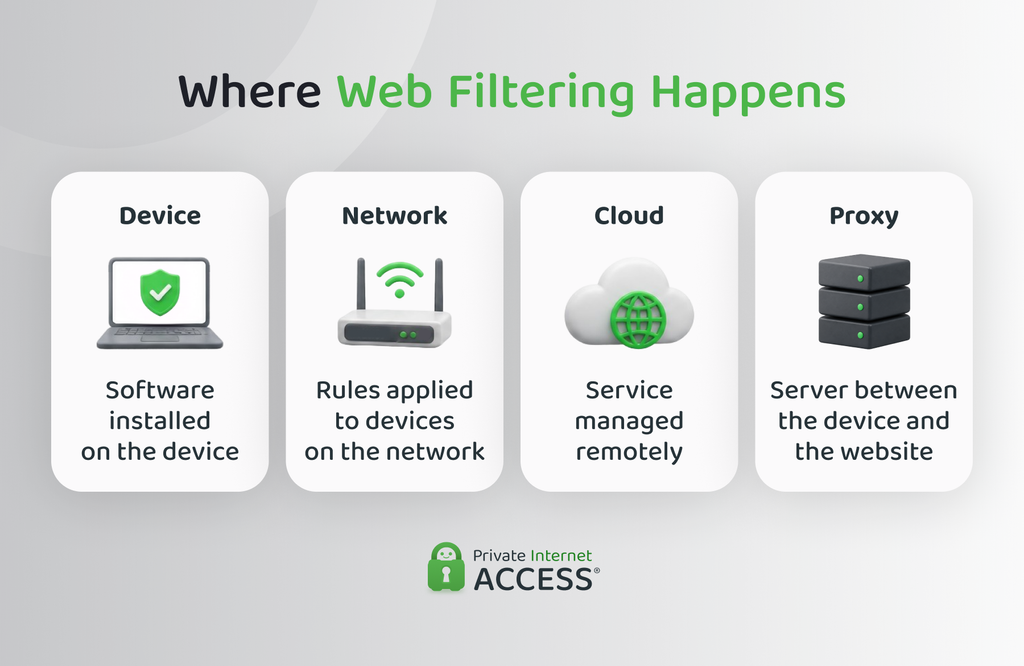
Web filtering can be implemented in different ways depending on where the filtering software or service operates. It may run directly on a device, be applied across a network, or be handled by a remote service.
The same filtering method can be deployed in more than one way. For example, DNS filtering can run on an individual device, be configured across a network, or be provided through a remote service.
Device-Level Filtering
Filtering software installed directly on a device (also called client-side filtering) can monitor and restrict web access on that device.
Because the filtering runs on the device itself, the same rules can apply wherever the device connects to the internet. This makes it a common choice for managed laptops, tablets, and company-issued phones.
Network-Level Filtering
Network-level filtering applies rules to internet traffic passing through a network. For example, filtering can be configured on a router or other network equipment so that devices connected to a home, school, or office network follow the same rules.
This can make it easier to apply consistent rules across multiple devices without installing filtering software on each one.
Cloud-Based Filtering
Cloud-based filtering is provided through a remote service rather than software or hardware located on the user’s device or local network. Because the service is managed remotely, the same policies can be used across multiple locations.
Proxy-Based Filtering
A proxy is a server that sits between a user’s device and the websites they visit. Instead of connecting directly to a website, the device sends its web request to the proxy, which then handles the connection to the destination.
This allows the proxy to examine web requests against the defined rules before passing them on to the requested website.
How Does Encryption Affect Web Filtering?
Encryption can affect what a web filter can see and therefore what information it can use to make filtering decisions. The impact depends on the type of traffic being filtered and where the filtering takes place.
How Does HTTPS Affect Web Filtering?
HTTPS encrypts the connection between your browser and a website. While HTTPS doesn’t make the website invisible to every filter, it can limit visibility into certain details of the connection and impact its ability to apply specific rules.
For example, a filter may be able to identify the website you’re visiting but not the specific page you’re accessing, such as privateinternetaccess.com/vpn-features. Without access to the encrypted connection, it may also be unable to inspect the webpage’s content.
Some filtering systems use TLS (Transport Layer Security) inspection to examine encrypted HTTPS traffic. TLS inspection decrypts the traffic so the filtering system can inspect it, then re-encrypts the traffic before sending it to the destination. This gives the filter greater visibility into the encrypted traffic and can allow it to apply more specific filtering rules.
How Does DNS Encryption Affect Web Filtering?
DNS information can also be encrypted, which can affect how DNS-based filtering works. DNS-over-HTTPS (DoH) and DNS-over-TLS (DoT) are two protocols that encrypt the information sent when your device looks up a website’s domain.
This can limit DNS filtering performed on the network because the filter may no longer be able to see the domain being requested. However, encrypted DNS doesn’t necessarily prevent DNS filtering. Some DNS filtering services support encrypted DNS, allowing them to continue applying their filtering rules.
Related: Encrypted DNS Traffic: What It Is and How It Works
Benefits and Limitations of Web Filtering
Web filtering can offer several benefits, but it also has limitations that are important to consider.
Benefits of Web Filtering
Some of the main ways web filters can help include:
✅ Reducing exposure to online threats: Blocking websites associated with malware, phishing, and scams can help prevent users from reaching potentially harmful sites.
✅ Enforcing access policies: Applying rules to specific websites, categories, or types of content can help organizations manage internet use more consistently.
✅ Managing distractions and bandwidth: Controlling access to certain websites and activities can help reduce distractions and limit unnecessary use of network capacity.
✅ Supporting compliance: Following required internet-filtering measures can help organizations meet specific legal requirements, such as those under CIPA for eligible US schools.¹
Limitations of Web Filtering
Some of the main drawbacks can include:
❌ Blocking legitimate content: Incorrect classifications or filtering can prevent access to useful websites or resources.
❌ Failing to identify new threats: Newly created websites or emerging threats may not yet be included in filtering databases, potentially allowing some harmful content to go undetected.
❌ Needing regular maintenance: Filtering databases and rules need to be updated as new websites appear and existing websites change.
❌ Creating possible privacy concerns: Filtering systems may record information about users’ web activity, depending on how the system is configured and what data it collects.
Web Filtering and Other Security Tools
Although web filtering, firewalls, and VPNs can all play a role in security, they address different needs. Here’s how they compare.
Web Filtering vs. Firewalls
Although both can control what traffic is allowed through, firewalls and web filters differ in what they’re designed to control, examine, and block.
Firewalls generally operate at a broader level than web filters, controlling network traffic based on security rules. They can block unwanted or potentially harmful traffic before it reaches devices or networks.
The two can also overlap. Some firewalls include web-filtering capabilities, so a firewall may perform some of the functions normally associated with a web filter.
Related: How Does a Firewall Work? A Complete Guide
Web Filtering and VPNs
While web filters are an access-control tool, VPNs are a privacy and security tool. A VPN encrypts your internet connection and routes your traffic through a VPN server. This can help safeguard your data and activity, providing added privacy while you’re online.
Some VPNs also let you set rules for specific traffic. For example, PIA’s split tunneling lets you choose which apps, websites, or IP addresses use the VPN and which connect directly to the internet. This differs from web filtering because it controls whether traffic uses the VPN, rather than whether a website is permitted.
Overall, VPNs and web filters can be used together, but the way they interact depends on where the filtering is implemented.
Can a VPN Affect Web Filtering?
A VPN can change how some web filters work because it can alter how traffic and DNS requests are routed. The effect depends on where the filtering is applied:
- Network-level filtering: The filter relies on the network to see and evaluate the traffic. A VPN can limit what the network filter can see because traffic is sent through the VPN connection. If the VPN also handles DNS requests, a DNS filter on the local network may not receive those requests.
- Device-level filtering: The filtering software is installed on the device, so it can apply its rules before the traffic is sent through the network or VPN. This means the filtering can remain in place even when the device connects through a different network.
FAQ
What is the difference between web filtering and URL filtering?
Web filtering is a broad term for controlling access to websites and online content. URL filtering is a type of web filtering that checks web addresses and can restrict access to specific webpages or files, as well as an entire website.
What is content-based filtering?
Content filtering examines material within a webpage or file, such as text or images, rather than relying only on the website’s address or category. This lets it identify specific types of content within a page, even when the rest of the website is allowed.
How does DNS-based web filtering work?
DNS filtering checks website domains during the DNS lookup process, before a connection to the site is established. If a requested domain matches a filtering rule, the DNS filter can prevent the device from connecting to it.
What is the difference between cloud-based and on-premise web filtering?
On-premise web filtering runs on equipment managed by the organization, while cloud-based filtering is provided remotely through a service provider. Cloud-based filtering can make it easier to apply policies across multiple locations and users, while on-premise filtering gives an organization more direct control over its infrastructure.
Does a firewall already include web filtering?
Some firewalls include web filtering features, so a separate web filter isn’t always necessary. However, firewalls and web filters serve different primary functions: firewalls generally control network traffic, while web filters focus on websites and online content.
Can a VPN get around web filtering?
A VPN may affect network-level or DNS filtering because it can change where traffic and DNS requests are sent. Device-level filtering can work differently because the rules are applied directly on the device rather than by the network. The effect depends on how the VPN and filtering system are configured.
References:
