What Is WPA-PSK? A Guide to Wireless Security
Wi-Fi Protected Access Pre-Shared Key, or WPA-PSK, is one of the most common ways to secure a Wi-Fi network. The shared-password model with easy setup made WPA-PSK a popular network security choice for a long time, but it also comes with some real limitations.
This guide explains what WPA-PSK is and how it works and how it compares to WPA2, WPA3, and WPA-Enterprise. We’ll also reveal whether it’s still a safe choice for your network today.
WPA-PSK Explained
WPA-PSK is a method for securing a wireless network with a single, shared password. The “PSK” part stands for pre-shared key, the password you and others on the same network would use to connect.
When a client or device provides the correct network key, the router authenticates it and opens an encrypted connection between that device and the wireless access point (WAP). The connection encrypts the data that’s traveling between the client and the router, making it unreadable to outside parties.
The Origins of WPA-PSK
WPA-PSK serves as a fix for Wired Equivalent Privacy (WEP), the original Wi-Fi security standard. Although WEP encrypts data with a cipher called RC4, it uses one static key for every device and every packet. That makes it easy to crack and gain access to a network.
WPA-PSK replaced that approach with TKIP (Temporal Key Integrity Protocol). Instead of one fixed key, TKIP changes the key for every packet, adds a message integrity check to catch tampering, and rotating keys during a session.
These improvements came with a compromise. To run on existing WEP-era hardware, TKIP kept RC4 as its underlying cipher. Over time, researchers found ways to break it1 and eventually, the industry moved from TKIP to stronger encryption methods.
While WPA-PSK in its original form still authenticates devices and encrypts traffic, the encryption doing that work would be unlikely to hold up against a determined attacker.
WPA-PSK vs. WPA2-PSK vs. WPA3-Personal
All three Wi-Fi Protected Access protocols are the “personal” modes of their generation: they secure a network with one shared password rather than individual logins. What differentiates them are the underlying encryption and authentication mechanisms.
The original WPA-PSK pairs the pre-shared key with TKIP. The pre-shared key and four-way handshake are both used for WPA2-PSK, but it swaps TKIP for the stronger AES-CCMP cipher. While the encryption upgrade is solid, the four-way handshake means that bad actors can still guess the password offline.
The WPA3-Personal corrected this. It still uses a password but replaces the 4-way handshake with Simultaneous Authentication of Equals (SAE).
A captured handshake exchange contained everything an attacker needed to test password guesses on their own machine. With SAE, neither side ever reveals information to verify password guesses, so an attacker has to test each password against the router.
This turns a fast offline attack into a slow online one the router can detect and throttle. On top of that, SAE gives each session its own encryption key, generated independently of the password. So even if someone cracks the password, they can’t use it to decrypt traffic from other sessions. Similarly, Opportunistic Wireless Encryption (OWE) establishes unique session keys between a client and access point without requiring a password.
Each version builds on the one before it, keeping the shared-password setup while strengthening what runs beneath it. As a result, a newer protocol is always the safer choice when your hardware supports it.
WPA-PSK vs. WPA-Enterprise
WPA-PSK uses one shared password to secure a network. Everyone uses the same key, which keeps setup basic and makes it the standard choice for homes and small offices.
WPA-Enterprise works differently. Each user or device signs in with its own credentials – either a username and password or a digital certificate – rather than a shared key. A separate authentication server behind the network, called a RADIUS server, checks those credentials against a central directory and grants or denies access. Every approved session also gets its own encryption key.
This method removes the shared-password weakness. There’s no single key to leak, you can revoke one person’s access without resetting everyone else’s access, and there’s a record of who connected and when.
The tradeoff is complexity, since running a RADIUS server uses infrastructure most homes don’t need. That’s why WPA-Enterprise is mainly a business tool.
How Does WPA-PSK Work?
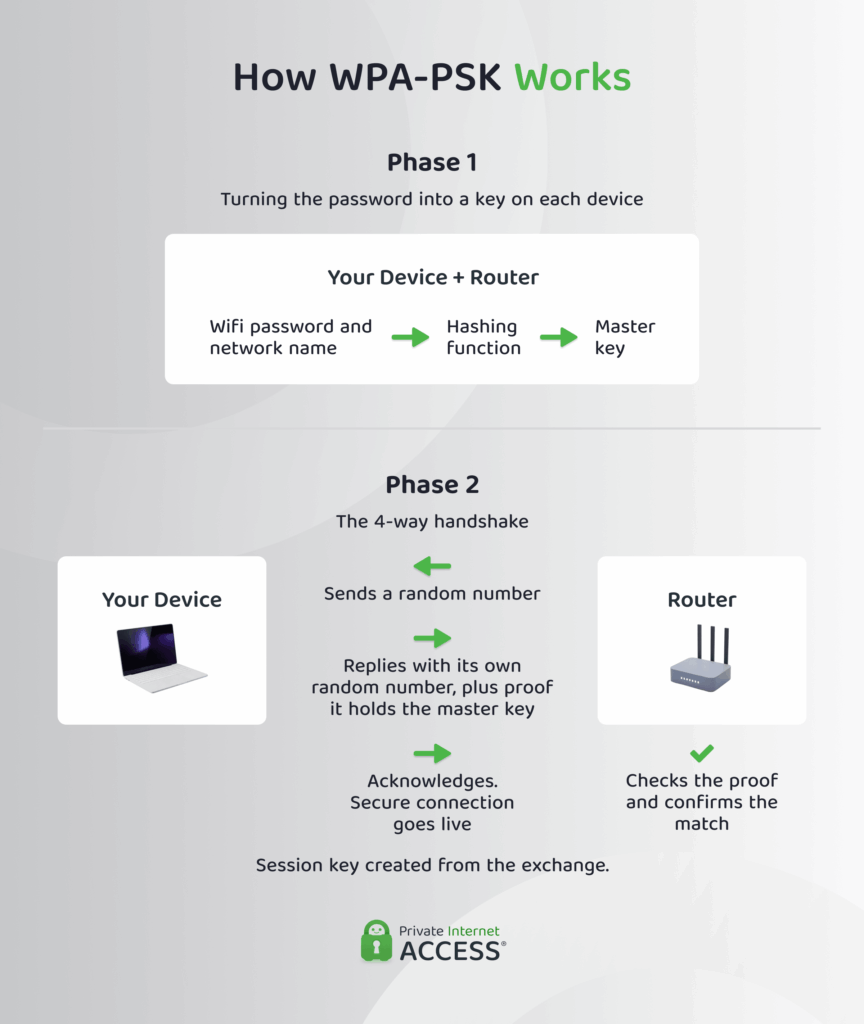
When you set up a network password, your device and the access point each take the passphrase and run it through a hashing function, mixing in the network name (SSID) along the way. This produces a longer, fixed-length value called the Pairwise Master Key (PMK).
This process allows both sides to hold the same PMK without ever having to send it over the air, so anyone listening nearby can’t simply grab it. But because the PMK is never transmitted, neither side can confirm the other has the right one.
So, before any data flows, your device and the access point prove they both hold the correct key through a process called the 4-way handshake:
- The access point sends your device a random number.
- Your device replies with its own random number, plus a short cryptographic proof that it holds the correct PMK.
- The access point runs the same calculation, checks the proof, and confirms the match.
- Your device acknowledges and the encrypted connection goes live.
During this exchange, both sides independently derive a Pairwise Transient Key (PTK) from the PMK and the two random numbers. The PTK is the session key that actually encrypts the traffic moving between your device and the access point, using the network’s cipher.
One problem here is that every key in that chain traces back to your password and the strength of your password determines the security of your entire network.
An attacker within range can capture the handshake as it happens, then go offline to guess passwords at high speed, testing one candidate after another until a guess reproduces the same proof.
Benefits and Drawbacks of WPA-PSK
Whether WPA-PSK provides enough security for your network comes down to context. Its simplicity is a genuine advantage for home networks, but anything with multiple users or sensitive data can make it difficult to control access.
| Benefits | Drawbacks |
| ✅ Straightforward to set up, with no server or extra infrastructure required | ❌ A single shared password protects the whole network, so one leak exposes everyone |
| ✅ Works on most Wi-Fi devices, old or new | ❌ No way to revoke access without changing the password for everybody |
| ✅ No per-user accounts to manage, which suits homes and small networks | ❌ No record of who connected or when, so there’s little accountability |
| ✅ Low overhead, so it runs on cheap and low-power hardware | ❌ Attackers can use a captured handshake to guess passwords offline |
Can WPA-PSK Still Secure Your Wi-Fi Network?
In its original form, WPA-PSK unfortunately no longer holds up. Industry standards organizations have deprecated TKIP encryption and current security guidance recommends avoiding its use when possible.2, 3
The shared-password model itself didn’t disappear, though. It carried into WPA2-PSK and WPA3-Personal, which is why you’ll still see PSK in modern router menus.
For most homes, WPA2-PSK with AES encryption and a strong password is still reasonable today. The setups worth retiring are original WPA and TKIP, which no longer offer meaningful protection.
Older setups may linger for a practical reason. Plenty of devices, especially smart home gadgets like printers, thermostats, and cameras, only support older standards and may never receive a firmware update. If one aging device is the only reason you’re stuck on an older standard, it’s safer to isolate it on a separate guest network than to weaken security to accommodate it.
Can a VPN Improve WPA-PSK Wi-Fi Security?
A VPN won’t fix the security holes in a WPA-PSK setup, but it adds a separate layer of protection.
These two solutions work at different levels. WPA encryption secures the link between your device and the access point and controls who can join the network. It does nothing once your traffic leaves the router for the wider internet.
A VPN works the other way around. It wraps your traffic in a layer of encryption from your device to a VPN server. So even if someone cracks a weak pre-shared key and joins your network, your VPN-protected traffic stays unreadable to them.
Where WPA controls access to the network, a VPN protects the data you send across it. A VPN can’t repair a weak Wi-Fi password, but it can keep your traffic private even when the network around it isn’t.
How to Secure Your Router With the Strongest PSK Setting Available
You can switch to a stronger setting once you’ve accessed your router’s settings page.
- Open a browser and enter your router’s IP address (usually
192.168.1.1or192.168.0.1), then log in with the admin credentials. - Find the wireless or Wi-Fi security section and set the security type to WPA3 if it’s offered, or WPA2-PSK (AES) if it isn’t. If your router lists WPA2 with TKIP or a mixed “TKIP/AES” mode, choose AES on its own.
- Choose a strong passphrase, save your changes, and reboot the router if prompted.
How to Choose a Strong Password
Your passphrase is the main thing standing between your network and an attacker, so it’s worth getting right. There are a few factors that determine how strong a password is:
- Length: Your password should be 8 to 63 characters, but it’s best to aim for at least 16. The longer the better because each extra character multiplies the time an attack takes.
- Unpredictability: Avoid dictionary words, names, dates, and keyboard patterns like “qwerty” or “asdf.” These are the first things cracking tools try.
- A mix of character types: Combine uppercase, lowercase, numbers, and symbols to widen the range an attacker has to search.
- Uniqueness: Don’t reuse a password from another account. If that one leaks, it could make it much easier to access your network.
Tech tip: A long passphrase made of a few random, unrelated words is both hard to crack and easier to remember than a short string of random characters.
WPA-PSK: Frequently Asked Questions
What does WPA PSK mean?
WPA-PSK stands for Wi-Fi Protected Access Pre-Shared Key. It’s a method of securing a Wi-Fi network with a single shared password. Every device uses the same key to connect, which authenticates the device and sets up an encrypted connection between the device and the router.
Is WPA-PSK the same as a Wi-Fi password?
Not quite. The pre-shared key is your Wi-Fi password and WPA-PSK is a broader network security measure. The password is one part of that system, which also handles authenticating your device and encrypting the traffic between it and the router.
How does WPA PSK work in Wi-Fi security?
Your device and router turn the shared password into a master key, then run a four-way handshake to confirm both sides hold the key without sending it over the air. From that exchange, they create a session key that encrypts the traffic passing between them.
How do I find my WPA-PSK security key?
Your WPA-PSK or network security key is your Wi-Fi password. Check the label on your router, where the default key is often printed, or open your router’s admin page and check under wireless settings. On a device that’s already connected, you can usually view the saved network password too.
