Everything You Need to Know About IPv4 vs. IPv6 Right Now
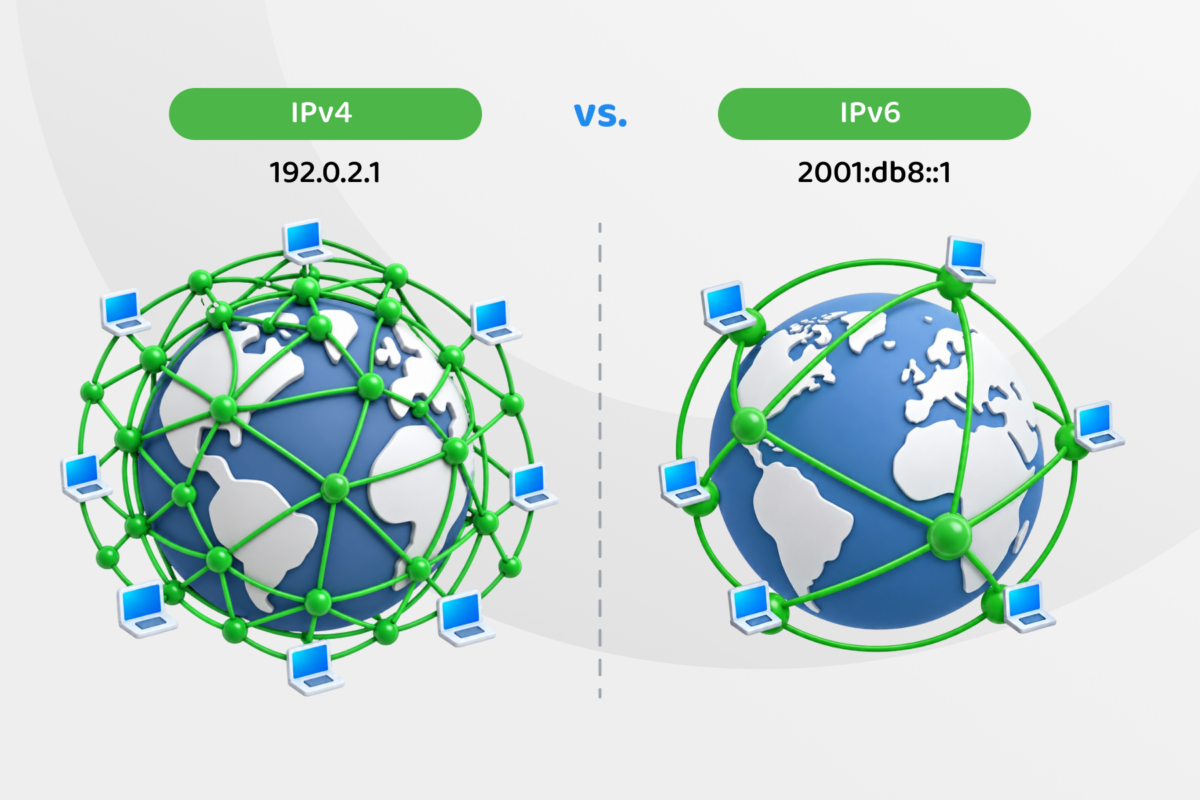
Internet Protocol version 4 (IPv4) and Internet Protocol version 6 (IPv6) are both network protocols that tell internet traffic where it’s going and where it came from. Initially, the developers who created IPv4 thought there would be plenty of addresses to cover every internet-connected device and website. Unfortunately, that wasn’t the case.
RIPE NCC, the entity responsible for distributing IP addresses in Europe, central Asia, and the Middle East, had run through its pool of 32-bit numeric IPv4 addresses by 2019, so it started using the 128-bit alphanumeric IPv6 addresses to create more potential internet locations. Similar organizations also found themselves in the same predicament.
There are a variety of technical differences between IPv4 and IPv6 that affect your digital security, network efficiency, and how reliably your devices reach the right destination. But that doesn’t necessarily mean that one protocol is better – or worse – than the other.
IPv4 vs. IPv6 At a Glance
| Feature | IPv4 | IPv6 |
| Address space | About 4.3 billion addresses | More than 340 undecillion addresses |
| Speed | Neither is faster than the other – speed depends on network conditions and ISP routing | |
| Efficiency | Relies on technologies such as NAT to extend the usable address space, adding complexity | Handles large volumes of traffic more efficiently with simplified headers and native auto-configuration |
| Security | Allows encryption via IPsec, but it’s not built in | Includes native encryption support via IPsec but doesn’t automatically use it |
| VPN compatibility | Widely supported by VPNs and commonly prioritized over IPv6 | Support varies by provider. VPNs may restrict IPv6 to prevent traffic leaking outside the encrypted tunnel |
How IP Addresses Help Internet Communications Work
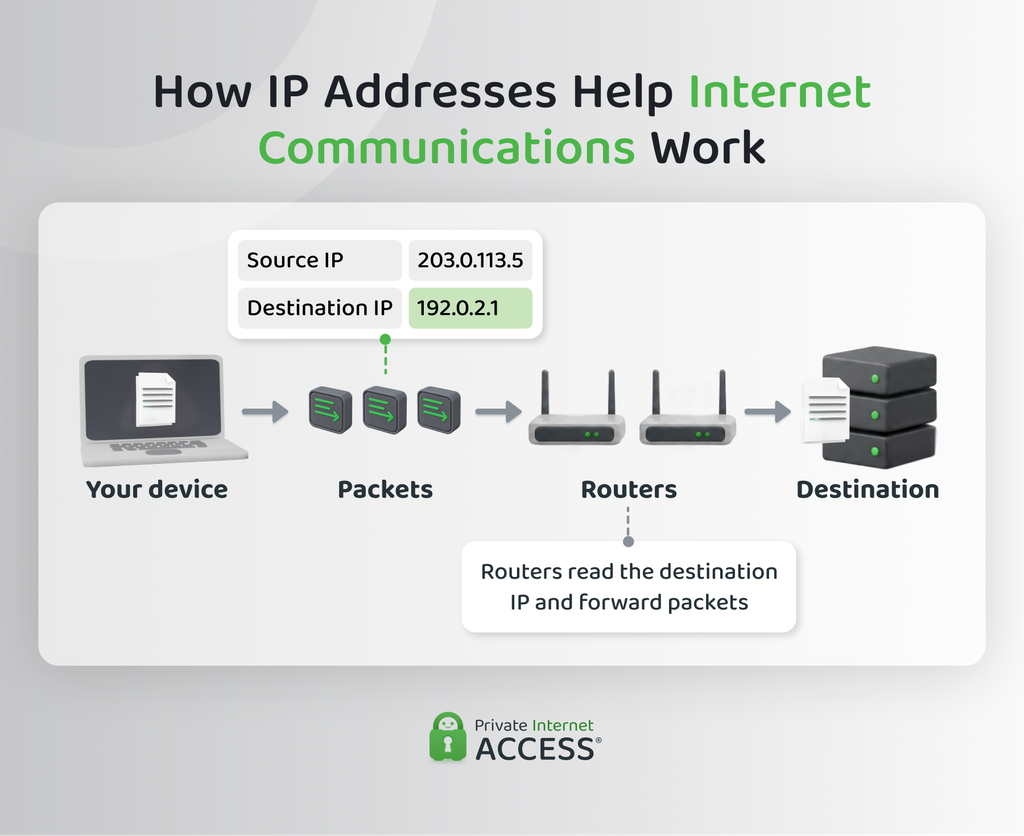
Ever wondered how, when you send a message or type a question into a search engine, the message reaches the right destination and the answer finds its way back to your specific device despite hundreds of millions of other connections happening at the same time? That’s all thanks to IP addresses.
Although we might think of the internet as one giant interconnected network of devices and websites, it isn’t. It’s actually a network of billions of smaller networks that link together and pass traffic between one another.
To make this setup work, networks assign devices and websites unique IP addresses and break down data into smaller chunks called “packets.” Every packet carries a source and destination IP address, so the data knows where to go and the receiving device or website knows where to send its response.
The internet’s configuration means that there isn’t a single route that these packets need to follow to get from A to Z (or from Z back to A), and an individual router can’t control or predict the packet’s exact path. As information bounces between them, each router reads the destination address and forwards the packet to the next best stop until it arrives.
This usually works behind the scenes, but if any part of this addressing goes wrong or there’s an address in the chain that the network can’t reach, messages go undelivered and 404 pages start popping up.
IPv4 vs. IPv6 Address Evolution
IPv4 was the first version of the Internet Protocol built for public, everyday use. Its 32-bit structure put the address pool at roughly 4.3 billion unique addresses, which felt more than generous when engineers settled on it in the early 1980s.
However, when personal computers and the broader internet skyrocketed to mainstream popularity in the 1990s and millions of new devices went online each year, it became clear that IPv4 wouldn’t be as long-lasting as anticipated.
Engineers needed to accommodate a much larger number of devices and websites, which is exactly what Internet Protocol version 6 (IPv6) provides.
IPv6’s 128-bit alphanumeric structure supports over 340 undecillion addresses (that’s 340 trillion trillion trillion, or 340 followed by 34 zeros), roughly 1028 times as many as IPv4 offers.
What Happened to IPv5?
There’s lots of guidance about IPv6 vs. IPv4 online. But IPv5, which should sit between these two, barely gets a mention.
The reason is that IPv5 is not available for public use. Designed to carry real-time voice and video traffic rather than general internet data, engineers assigned the number 5 to an experimental protocol called the Internet Stream Protocol (ST).
The ST never made it past a limited, experimental deployment. When the successor to IPv4 was ready, developers skipped straight to IPv6 to avoid any confusion with the ST version.
IPv4 vs. IPv6: Which Is Better?
Neither protocol is outright better than the other. Both are responsible for conveying information across the internet but each does that in a different way, creating different benefits and drawbacks.
IPv4 and IPv6: Head-to-Head Comparison
IPv4 and IPv6 are part of the Transmission Control Protocol (TCP), and both break data into smaller packets to move it across the internet. But that’s where the similarities end.
The two protocols diverge in how they’re structured, how much translation and configuration they need, and how well they scale for a world where almost every household item can have its own internet connection.
| Characteristic | IPv4 | IPv6 |
| Address size | 32-bit, about 4.3 billion addresses | 128-bit, over 340 undecillion addresses |
| Naming standard | Dotted-decimal notation (e.g. 192.168.1.1) | Hexadecimal, colon-separated (e.g. 2001:db8::1) |
| Address translation | Relies on NAT to share limited public addresses | Rarely needed; large address pool supports direct addressing |
| Packet addressing | Unicast, broadcast, multicast | Unicast, anycast, multicast (no broadcast) |
| Address configuration | Manual or DHCP-assigned | Stateless autoconfiguration (SLAAC) or DHCPv6 |
| Fragmentation | Can happen at the source or at routers along the path | Only the source device can fragment while routers drop oversized packets instead |
| DNS resolution | Uses A records | Uses AAAA records |
| Privacy | Devices often share one visible address via NAT | Each device usually gets its own address; privacy extensions rotate it periodically |
| Efficiency | Needs NAT and other workarounds to stretch limited addresses | Simplified header and native features reduce processing overhead |
| Mobile support | Works, but NAT and address changes can complicate handoffs | Built-in support and abundant addresses ease handoffs between networks |
None of IPv6’s features make it inherently faster or more secure than IPv4. Speed still depends on your routing path, your ISP network quality, and how many hops your traffic takes to reach its destination, regardless of which protocol carries it.
Security works the same way: Firewalls, network segmentation, monitoring, and careful configuration matter more than the protocol version you’re using. A poorly configured IPv6 network can be as exposed as an outdated IPv4 one, and a well-managed IPv4 network can hold up fine against most everyday threats.
How IPv4 Works
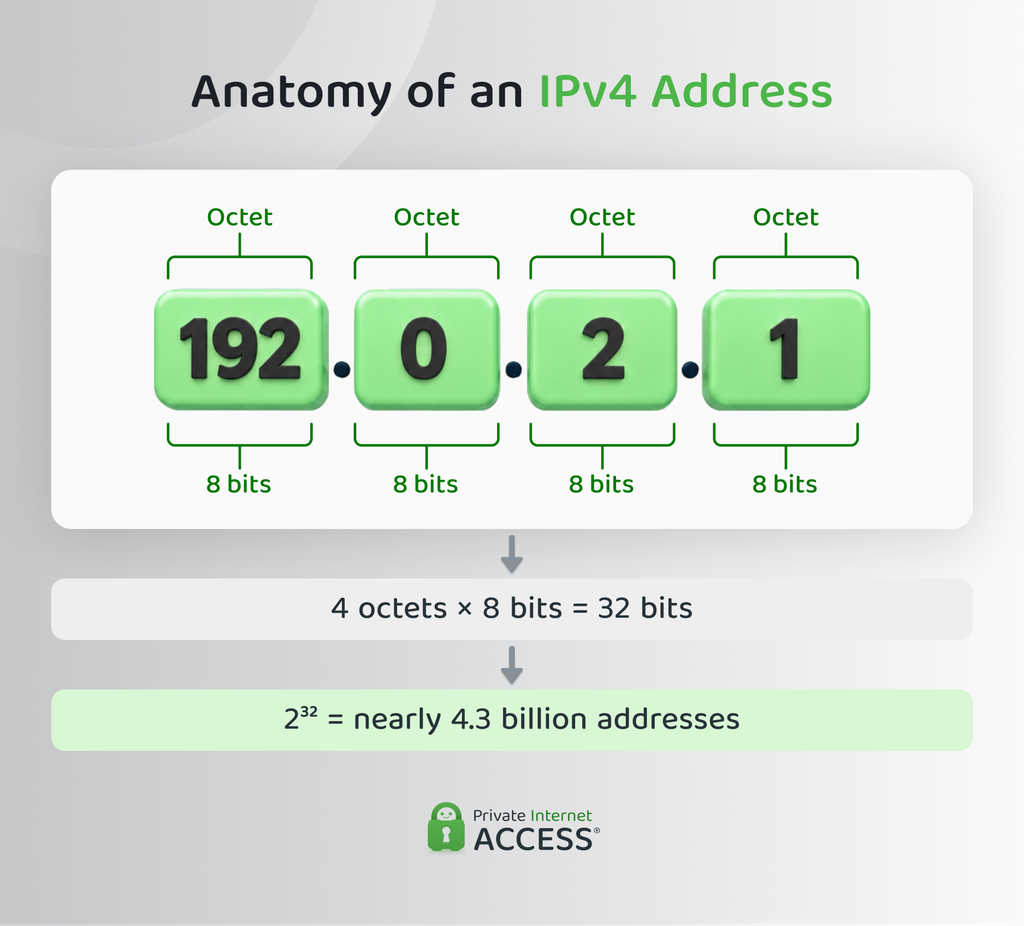
An IPv4 address uses four numbers between 0 and 255, separated by periods (e.g. 192.0.2.1). Each of those numbers represents 8 bits, adding up to the full 32-bit address.
When you type a website address into your browser, an A record in the Domain Name System (DNS) translates that human-readable address into its IPv4 address so your device knows where to send the request.
There are three ways this traffic can be addressed with IPv4 and the method depends on how many devices receive the communication:
- Unicast addressing: Transmits data between individual devices and works well for most everyday browsing and downloading activities.
- Broadcast addressing: Sends packets to every device on a local network at once, enabling processes like Address Resolution Protocol (ARP) requests and Dynamic Host Configuration Protocol (DHCP) discovery for address resolution and configuration.
- Multicast addressing: Delivers packets to network devices that are part of a particular group. It’s useful for things like video streaming or routing updates.
IPv4 also allows fragmentation, so routers along a data path can split a packet into smaller pieces if it’s too large for the next network segment to handle. The destination device can then reassemble the packets once it’s received them.
Benefits and Limitations
The address configuration and longevity of IPv4 mean that it has a few valuable benefits:
- Broad compatibility: Nearly every router, server, and device built in the last 40 years supports IPv4 without extra configuration.
- Simple addressing: The dotted-decimal format is easy to read and troubleshoot compared with longer address formats.
- Mature tooling: Network administrators have decades of established software and documentation built around IPv4.
The biggest trade-off is address scarcity. With only about 4.3 billion possible addresses, IPv4 alone can’t cover every device online today. However, there are solutions like Network Address Translation (NAT), Classless Inter-Domain Routing (CIDR), and subnetting, which allow multiple devices to share a single public address and save space for others.
How IPv6 Works
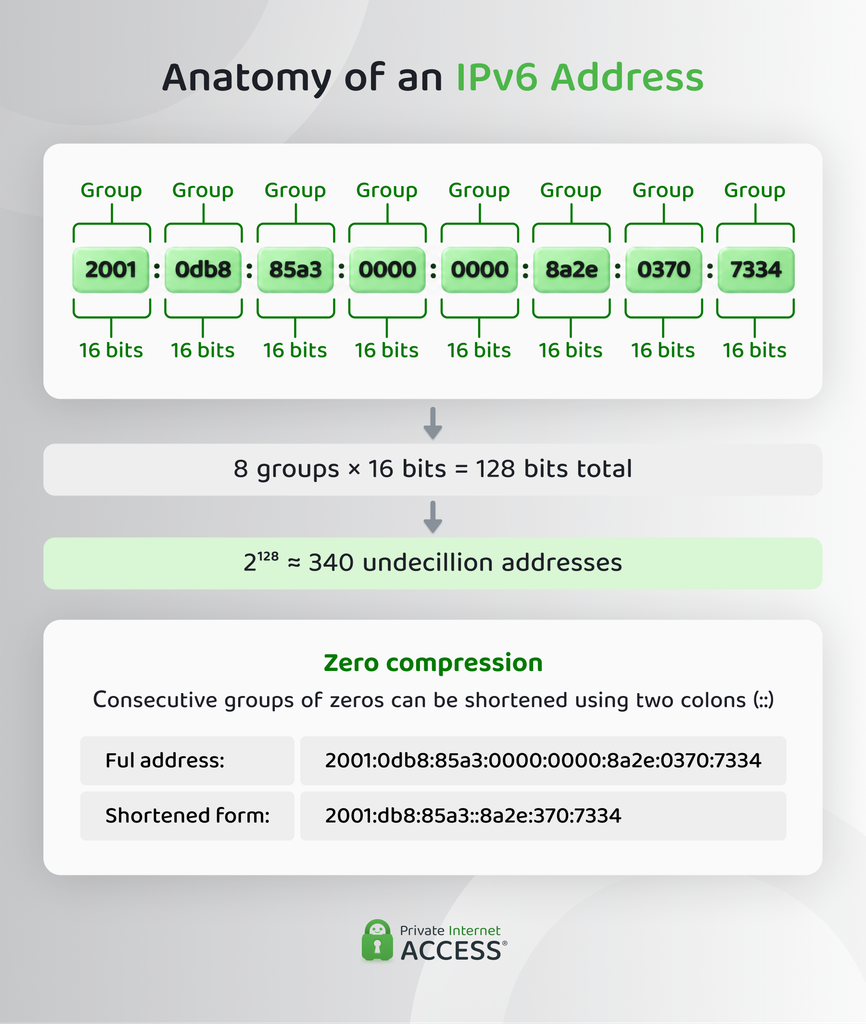
An IPv6 address uses eight groups of four hexadecimal characters, separated by colons. The result is an IP address forming a string of numbers, letters, and colons that looks something like this: 2001:0db8:85a3:0000:0000:8a2e:0370:7334.
To keep addresses from becoming unreadable, consecutive groups of zeros can be shortened to a double colon (::), taking the above example down to something that looks like this: 2001:db8:85a3::8a2e:370:7334.
Website names resolve to IPv6 addresses through an AAAA record, which allows the DNS to translate the human-readable URL into these much longer IP addresses.
The protocol also cuts the packet header down to a fixed 40 bytes (compared to IPv4’s 20- to 60-byte range). On top of that, it drops the header checksum, adding extra information only when it’s essential for delivery. This creates a leaner, more predictable structure that lets routers handle IPv6 traffic with less work per packet despite the longer addresses.
Benefits and Limitations
While the main benefit of IPv6 is its ability to accommodate more devices, it also offers these features:
- Native security: The protocol includes IP Security (IPSec), supporting end-to-end encryption without the extra configuration needed with IPv4.
- Efficient group delivery: Multicast addressing lets a single packet reach an entire subscribed group at once, while anycast addressing routes it to the nearest available server.
- Self-configuration: Neighbor Discovery Protocol (NDP) resolves addresses on the local network and supplies the prefix data devices use to configure their own IPv6 addresses.
Even with these advantages, IPv6 adoption has been slow. Many older devices, routers, and internet service providers still don’t support the protocol, plus it requires a new level of expertise that most network administrators are still building up.
Switching from IPv4 to IPv6
Speed is the reason most people start thinking about switching from IPv4 to IPv6 devices. The hope is that upgrading will make their connection noticeably faster.
It’s tempting to do because it seems so simple – buy a few IPv6-compatible devices and you’re ready to rely on the new protocol. That’s unfortunately not the full picture, and there may be knock-on effects if you make the jump too soon.
On a local network, the two protocols resolve physical device IP addresses in contrasting ways. Where IPv4 devices typically use ARP, IPv6 devices use NDP. When both protocols are available and a destination supports both, devices usually prefer IPv6, but they don’t always support it.
If you switch to IPv6 before your ISP is ready or you have a compatible router, your connection may end up feeling slower. That’s because your device would need to first attempt to resolve the address via IPv6 before falling back to the IPv4 path.
Then there’s the matter of privacy. Switching before checking whether your existing network security and VPN are compatible with IPv6 could result in losing the protection that these services provide.
At the end of the day, there’s no real need to switch to IPv6 yourself or all at once. ISPs, network operators, and device manufacturers are incrementally rolling out the protocol on new devices, and you’re most likely using it alongside IPv4 without even noticing it.
Plenty of networks run IPv4 and IPv6 in a dual-stack setup that lets supported devices use whichever protocol gets the job done. Often, all the related tunneling methods and translation techniques run in the background without needing your intervention.
FAQ
Should I be using IPv4 or IPv6?
You probably already use both. Modern devices and networks often run IPv4 and IPv6, relying on whichever protocol the destination device supports. Your ISP and router usually make this decision for you in the background, so there’s rarely a need to choose.
Does IPv6 give faster internet?
Although IPv6 can be faster, it doesn’t guarantee speed. IPv6’s simpler header can reduce processing overhead, but real-world speed depends far more on your ISP, routing, and network congestion than the IP version you’re using. A slow connection won’t necessarily improve by switching to IPv6.
Why do people prefer IPv4 over IPv6?
Preferences around IPv4 and IPv6 usually come down to familiarity and compatibility. IPv4 has been the internet’s backbone since the 1980s, so most routers, devices, and pieces of network software already support it without extra configuration. IPv6 still requires updated hardware and know-how that not every network has caught up on yet.
Should I use IPv6 at home?
If your ISP and router already support it, there’s little downside to enabling IPv6 at home. One thing worth knowing, though: many VPNs don’t support IPv6, so depending on your provider, your traffic may not be routed through the encrypted tunnel.
Which wins between IPv4 vs. IPv6 for gaming?
Neither IPv4 nor IPv6 wins outright when it comes to gaming. Most consoles and matchmaking servers still lean on IPv4, so you might find it a little less laggy than playing on an IPv6 device, but what really matters is a stable connection and fast base connection speed.
References:
